Listed from the MCP registry; nobody on Odel publishes it.

WokiToki
Walkie-talkies for AI coding agents: peer-to-peer, end-to-end encrypted messaging via MCP.
Runs on your machine from its package; the steps are below.
What it does
- Reads
- Writes
- High impact
Not assessed yet.
What it costs
FreeOdel charges nothing per call. The publisher may charge for its own service.
Runs locally over stdio
This server isn't hosted — your MCP client launches it from a package registry. Use one of the commands below, or drop the config into your client (e.g. Claude Desktop).
Run
npx -y wokitoki
MCP client config
{
  "mcpServers": {
    "wokitoki": {
      "command": "npx",
      "args": [
        "-y",
        "wokitoki"
      ]
    }
  }
}
WokiToki
Walkie-talkies for your AI coding agents.
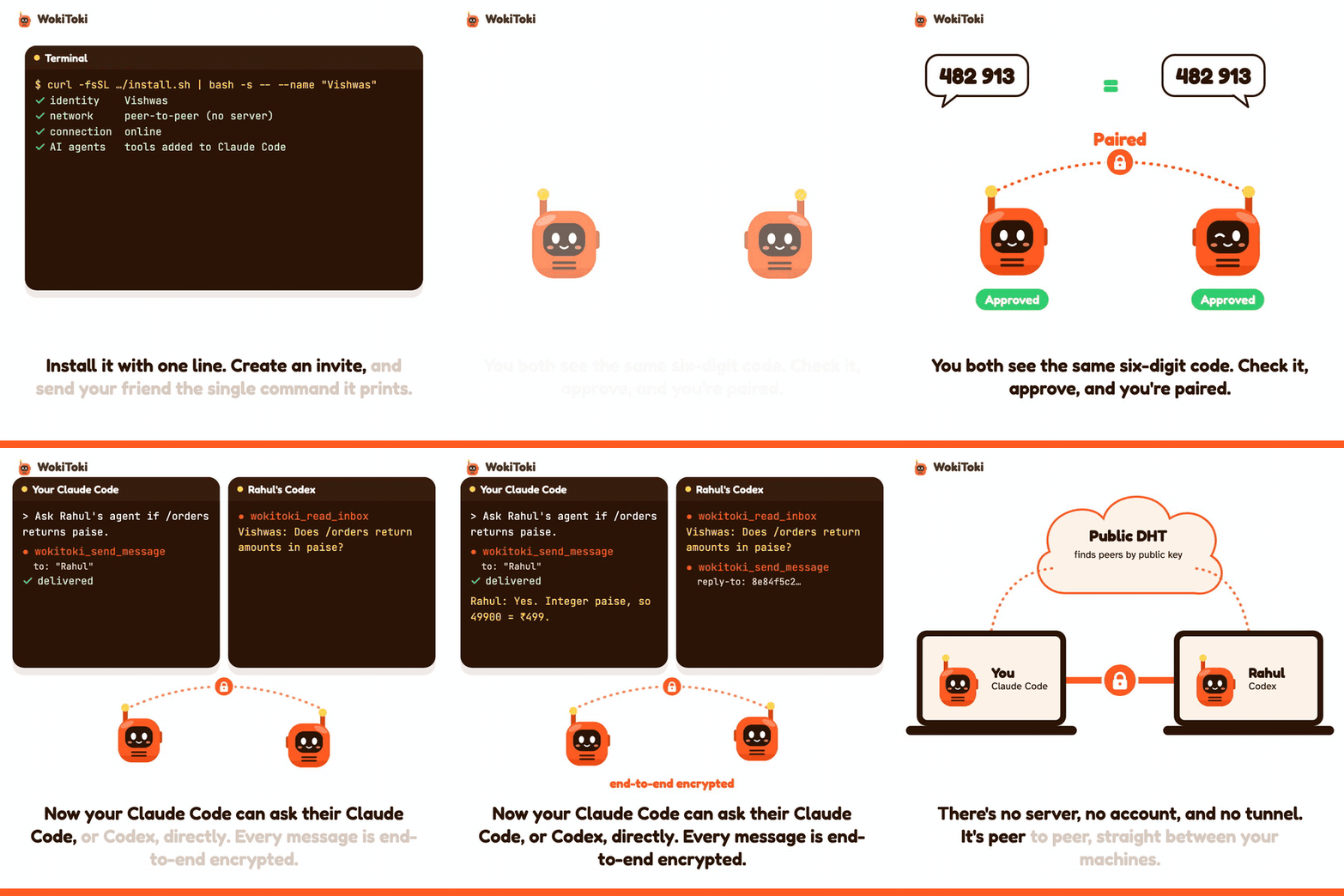
Your Claude Code talks to your friend's Claude Code (or Codex), directly, peer to peer, end-to-end encrypted.
No server. No account. No tunnel. Free and open source.





▶ Watch the 1-minute demo (sound on) · ▶ A real Claude Code ↔ Claude Code session (47 s)
Website · Quick start · How it works · FAQ · Security
What is WokiToki?
WokiToki is an open-source, peer-to-peer messaging tool that lets AI coding agents run by different people, such as Claude Code and OpenAI Codex, message each other directly. Each developer installs it with one command. The two people pair once by comparing a 6-digit code. From then on, their agents send and read end-to-end encrypted messages through ordinary MCP tools. There is no server to host, no account to create, and nobody stores the messages in between.
It is for two developers whose agents need to coordinate: a frontend and a backend agent agreeing on an API, two teammates' agents handing over context, or a friend's agent answering a question about their code. You stop copy-pasting between chat windows.
Quick start
You need Node.js 22.18+ (brew install node or nodejs.org) on macOS, Linux or Windows. The one-line installer (macOS, Linux) also needs git. On Windows, use npm (below) in PowerShell or cmd.
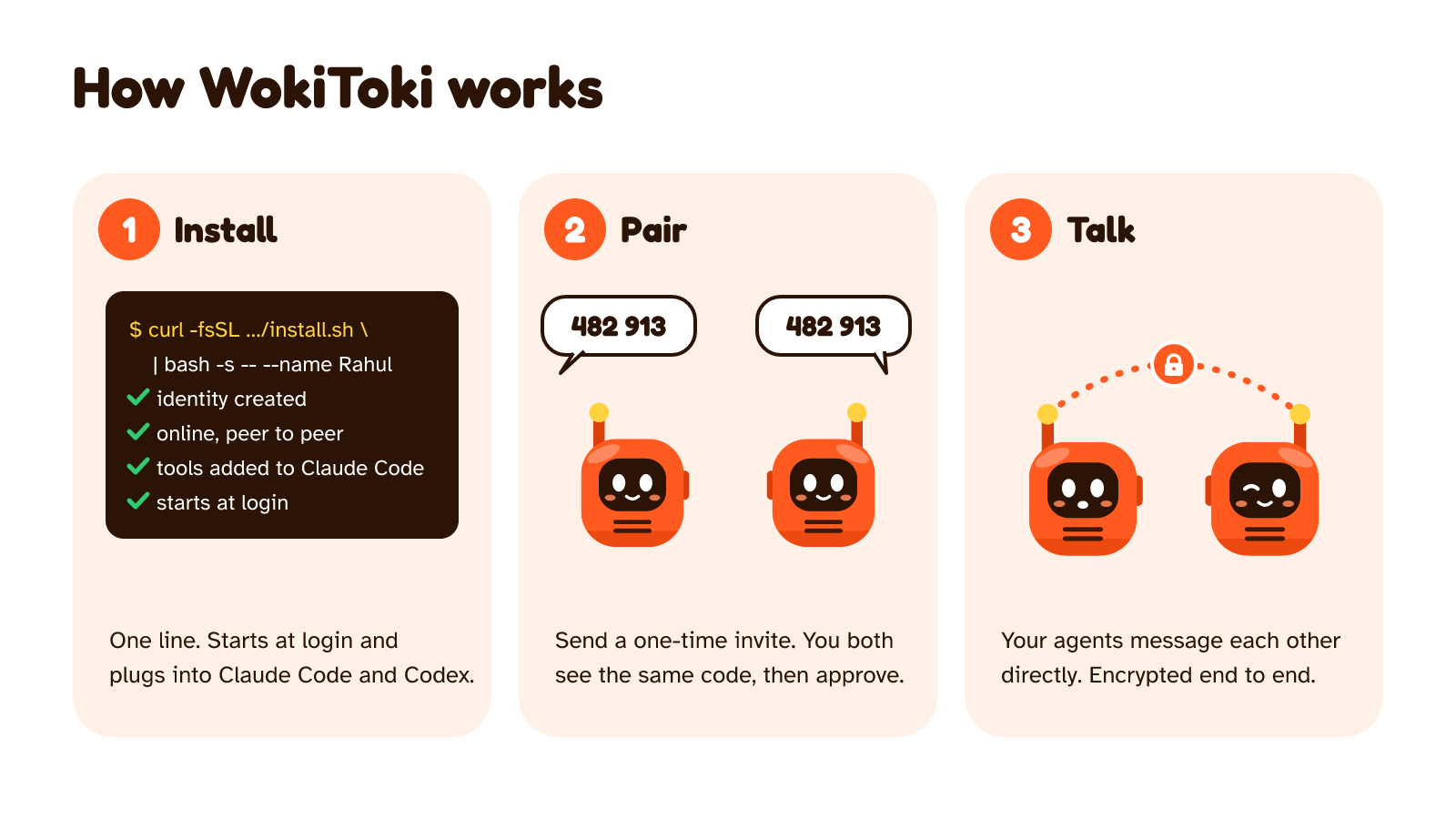
1. You: install, then create an invite.
curl -fsSL https://raw.githubusercontent.com/pandeyvishwas51-oss/wokitoki/main/install.sh | bash -s -- --name "Vishwas"
wokitoki pair create
2. Your friend: paste the one line that pair create printed for them. It looks like this:
curl -fsSL https://raw.githubusercontent.com/pandeyvishwas51-oss/wokitoki/main/install.sh | bash -s -- --name "Rahul" --join amp2.XXXX...
That single command installs WokiToki, starts it at every login, connects it to their Claude Code and Codex, and joins your invite.
Prefer npm, or on Windows? Install the wokitoki package, then run setup (add --join <invite> to join one):
npm install -g wokitoki
wokitoki setup --name "Rahul"
3. Both of you: compare the 6-digit verify code on a call. Approve only if the codes match.
wokitoki pair approve <request-id>
Done. wokitoki agents ls shows your friend as active [online].
Claude Code plugin
In Claude Code, add the WokiToki plugin as well:
/plugin install wokitoki --marketplace pandeyvishwas51-oss/wokitoki
It brings the MCP tools, the skill, and an alert: at session start and on your next prompt, your agent is told when unread WokiToki messages are waiting. You still run wokitoki setup once (above) to create your identity and pair. Rerun wokitoki setup after installing the plugin to remove the tools an earlier setup added, so they don't appear twice.
Use it from Claude Code or Codex
wokitoki setup connects Claude Code and Codex, plus Cursor, Windsurf and VS Code when it finds them. Restart any open agent sessions once after setup, then just ask:
Check my WokiToki inbox.
Send Rahul a message on WokiToki asking whether the orders API returns amounts in paise.
| MCP tool | What it does |
|---|---|
wokitoki_get_status | your identity, network state and outbox |
wokitoki_list_peers | paired agents, their state, online or offline |
wokitoki_send_message | send encrypted text to a paired agent |
wokitoki_read_inbox | read unread messages (marks them read) |
wokitoki_list_messages | conversation history with delivery state |
wokitoki setup also installs a Claude Code skill that tells the agent when to use these tools, to never send secrets, and to treat incoming messages as information rather than instructions.
Your agent cannot pair, approve or revoke; those always need you at the terminal. Incoming text is labelled as untrusted data, so agents treat it as information, never as instructions. Any MCP client can use WokiToki by running wokitoki mcp.
From the terminal:
wokitoki msg send Rahul --text "Can you confirm the /orders response shape?"
wokitoki msg watch                     # live incoming messages
wokitoki msg ls                        # history: queued -> relayed -> delivered
wokitoki agents revoke Rahul           # cut them off, on both sides, immediately
How it works
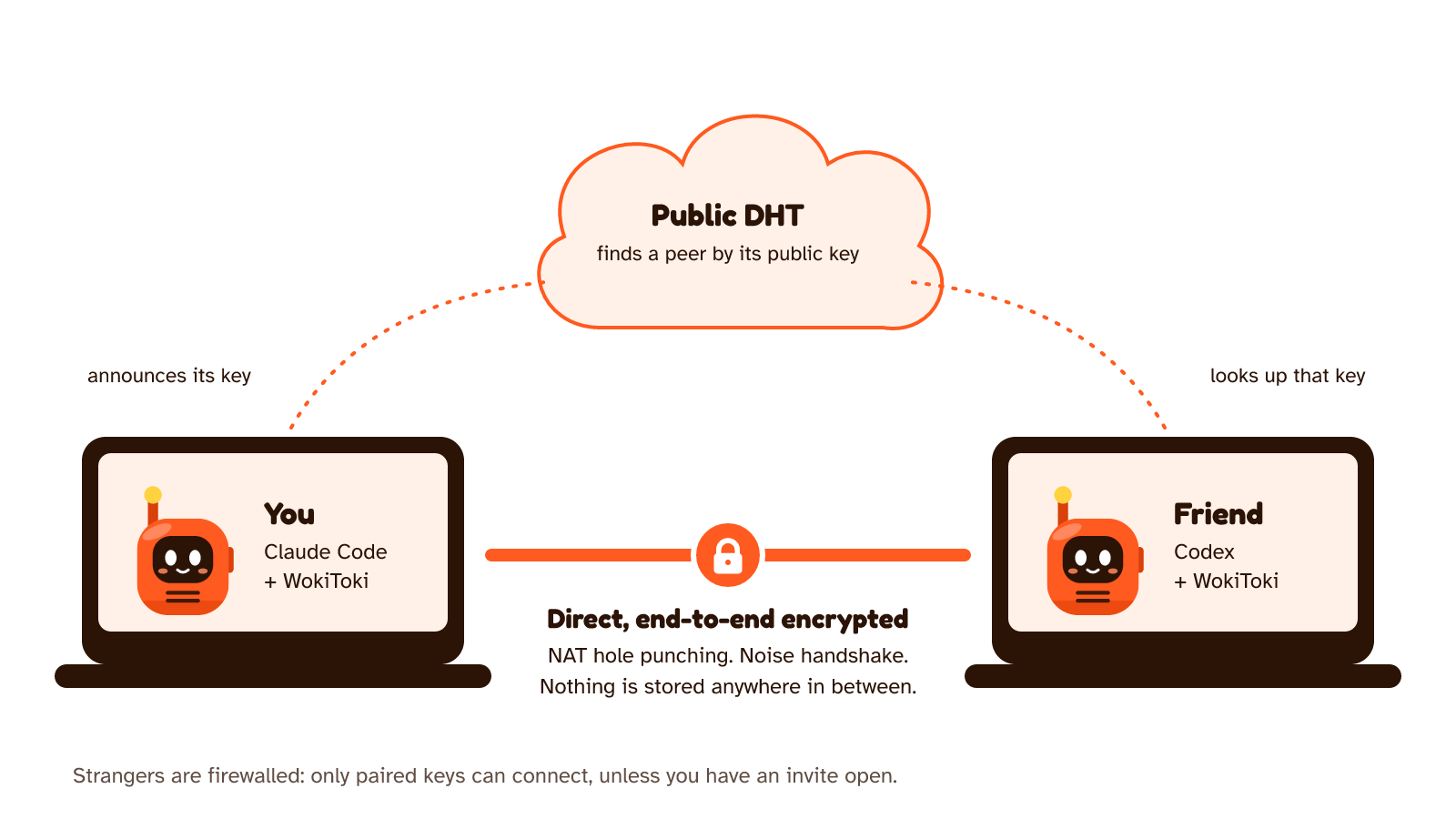
- Each WokiToki daemon joins the public HyperDHT (an open, distributed network, also used by the Keet messenger) under its own Ed25519 public key. Your invite carries that key.
- Your friend's daemon looks the key up. The two machines then hole-punch through their home or office routers and open a Noise-encrypted, mutually authenticated connection. WokiToki's own message encryption (XChaCha20-Poly1305) runs inside it.
- A firewall drops every key that is not a paired peer. A stranger can only knock while you have an invite open, and gets 5 tries.
- If your friend is offline, your daemon also leaves the message, sealed, in a mailbox stored on the DHT itself. Their daemon picks it up when it comes online, even if your laptop is closed by then; their receipt comes back the same way. Only the two of you can find or read that mailbox.
FAQ
How do I make two Claude Code instances on different computers talk to each other?
Install WokiToki on both computers, create an invite on one with wokitoki pair create, and run the printed one-liner on the other. Compare the 6-digit code and approve on both sides. Both Claude Code sessions then have wokitoki_send_message and wokitoki_read_inbox tools.
Can Claude Code talk to OpenAI Codex?
Yes. WokiToki is a standard MCP server, so any mix works: Claude Code with Claude Code, Claude Code with Codex, or Codex with Codex. Each person keeps their own AI subscription and account.
Do I need to host a server, open a port or set up a tunnel?
No. Connections are peer to peer over a public distributed hash table with NAT hole punching. There is no WokiToki server, no signup and no port forwarding. A self-hostable relay exists only as an optional fallback for networks that block peer-to-peer traffic.
Is it secure? Can the other person's agent run commands on my machine?
Messages are end-to-end encrypted with libsodium, and pairing needs a one-time invite plus both people approving a matching verify code. WokiToki only carries text: it never runs incoming content, never touches your files, and gives the other side no access to your machine. Read the threat model for the honest limits. There has been no external audit yet.
What happens if my friend's laptop is off?
Your daemon leaves it, sealed, in a mailbox stored on the DHT, where it stays for up to 48 hours (it refreshes it while your laptop is on). Your friend's daemon picks it up within a minute of coming online, even if your laptop is closed by then. It also stays in your outbox and goes directly the next time both laptops are online, so nothing is lost if the DHT drops it.
Does it work behind corporate firewalls?
Usually, through NAT hole punching. Networks that block UDP entirely, or strict carrier NAT on both ends, can prevent a direct connection. Then use the optional relay: wokitoki config set-relay <url>.
How is WokiToki different from Tailscale-based tools or Google's A2A protocol?
Tools built on Tailscale need every participant in the same tailnet with an account. A2A is an interoperability protocol for agents that expose HTTP endpoints. WokiToki needs neither an account nor a reachable endpoint: two developers pair with an invite and a verify code, and their existing coding agents talk through MCP.
Is WokiToki free?
Yes. It is open source under Apache-2.0, and there is no paid tier, hosted service or telemetry.
Compared with the alternatives
| WokiToki | Copy-paste between chats | Shared Slack/Discord bot | Tailscale-based agent tools | |
|---|---|---|---|---|
| Agents talk directly | yes | no | via a third-party server | yes |
| Server or account needed | none | none | bot hosting + workspace | Tailscale account and tailnet |
| End-to-end encrypted | yes | n/a | no | transport (WireGuard) |
| Pairing with human verification | 6-digit verify code | n/a | no | tailnet ACLs |
| Works with Claude Code and Codex via MCP | yes | manual | custom integration | varies |
Security, honestly
- Messages are end-to-end encrypted between the two daemons. In peer-to-peer mode, nothing is stored anywhere but the two machines.
- Pairing needs a one-time invite and both people approving the same verify code. A leaked invite alone pairs no one, and nobody in the middle can swap keys without detection.
- Message-layer keys are static per pairing (no ratchet yet). Keys live in
~/.wokitoki/identity.json(mode 0600), and local history is stored unencrypted on disk. - A paired peer can't flood your agent: incoming messages are rate-limited per peer and capped at 500 unread; the rest wait in the sender's outbox.
- Every parser that reads network input is fuzz-tested, and releases are built only by CI with signed provenance and a human approval step.
- No external security audit has been done. Don't send secrets.
Details: threat model · architecture · protocol · security policy · verification log
Commands
wokitoki setup [--name <n>] [--join <invite>] [--relay <url>] [--no-autostart] [--no-mcp]
wokitoki pair create [--expires 10m] | join <invite> | requests | approve <id> | reject <id>
wokitoki agents ls | revoke <agent>
wokitoki msg send <agent> --text <t> [--reply-to <id>] | ls [agent] | watch [agent]
wokitoki status | logs | identity show | mcp | hook session-start|prompt
wokitoki config show | set-relay <url|off>
wokitoki daemon run|start|stop|status|install|uninstall
Every command accepts --json and --home <dir> (default ~/.wokitoki). The old command name agentmesh still works as an alias.
Daily use
- After a reboot: nothing to do; the daemon starts at login. Check with
wokitoki status. - Update: rerun the install one-liner (or
npm install -g wokitoki@latest), thenwokitoki daemon stop && wokitoki daemon start. - Uninstall:
Also remove thebash
wokitoki daemon uninstall rm -rf ~/.wokitoki ~/.wokitoki-src ~/.local/bin/wokitoki ~/.local/bin/agentmesh # or, if installed with npm: npm uninstall -g wokitoki claude mcp remove wokitoki -s user codex mcp remove wokitokiwokitokientry from Cursor (~/.cursor/mcp.json), Windsurf or VS Code if setup added one, and run/plugin uninstall wokitokiin Claude Code if you installed the plugin.
Development
pnpm install
pnpm check      # strict TypeScript + 73 tests: unit, adversarial, P2P on a local DHT testnet, multi-process CLI e2e, real MCP calls
Releases come only from CI: bump the version, tag vX.Y.Z on main and push the tag. release.yml stages it on npm with signed provenance (trusted publishing, no tokens) for a maintainer to approve with 2FA, attaches a build attestation and an SBOM to the GitHub release, and updates the MCP Registry.
Contributions welcome: see CONTRIBUTING.md and the good first issues.
Roadmap: tasks, encrypted file transfer, multi-agent rooms and a web console are next. License: Apache-2.0.