Listed from the MCP registry; nobody on Odel publishes it.
Is this yours? Claim it
PaperOffice AI
Document AI and headless DMS: OCR, IDP, search, workflows, signatures. EU-hosted, OAuth 2.1.
One address for any MCP client. You sign in at mcp.paperoffice.ai once, after adding it.

What it does
- Reads
- Writes
- High impact
At most: creates or changes data: records, files, settings.
What it costs
FreeOdel charges nothing per call. The publisher may charge for its own service.
What it asks for at sign-in
| Access to | Read | Change |
|---|---|---|
| Mcp | Not stated: mcp:tools | |
From the sign-in at mcp.paperoffice.ai, as the endpoint publishes it. You approve it there.
Tools
None listed · checked 18 Nov 2026Odel could not list its tools without signing in.
PaperOffice MCP Server
PaperOffice AI is an AI document management system (DMS) with intelligent document processing (IDP), AI-OCR, redaction, e-invoice checks (XRechnung, ZUGFeRD) and a hosted MCP server for Claude, ChatGPT, Cursor and Grok. Website: paperoffice.ai
Give your AI assistant access to your documents — in plain language, in under 60 seconds.
Search, read, OCR, classify, extract, sign and analyse documents straight from
Claude, Claude Cowork, Cursor, ChatGPT, Grok or Windsurf. No SDK, no boilerplate, no local install — or, for stdio-only clients, one npx command.




Why this matters
Your documents live in a DMS. Your AI assistant lives in your IDE or chat window. PaperOffice connects the two through the Model Context Protocol — so you can just ask, and the model does the work across every authorized workspace.
"List all unpaid invoices across my workspaces, with totals and overdue flags."
"OCR this scanned contract and extract the signing date and parties."
"Classify these 50 documents and file them by type."
No prompt engineering, no API code — the model picks the right PaperOffice tool and runs it.
See it in action

Claude Fable 5 + PaperOffice MCP DMS — agentic document work. Watch the full guide →
Four real workflows with Claude — under 30 seconds each. Click a card for the deep-dive with prompts and tool lists:
| Use case | Watch & read | |
|---|---|---|
| 📊 | Month-end invoices — open items across every workspace, with totals and overdue flags | 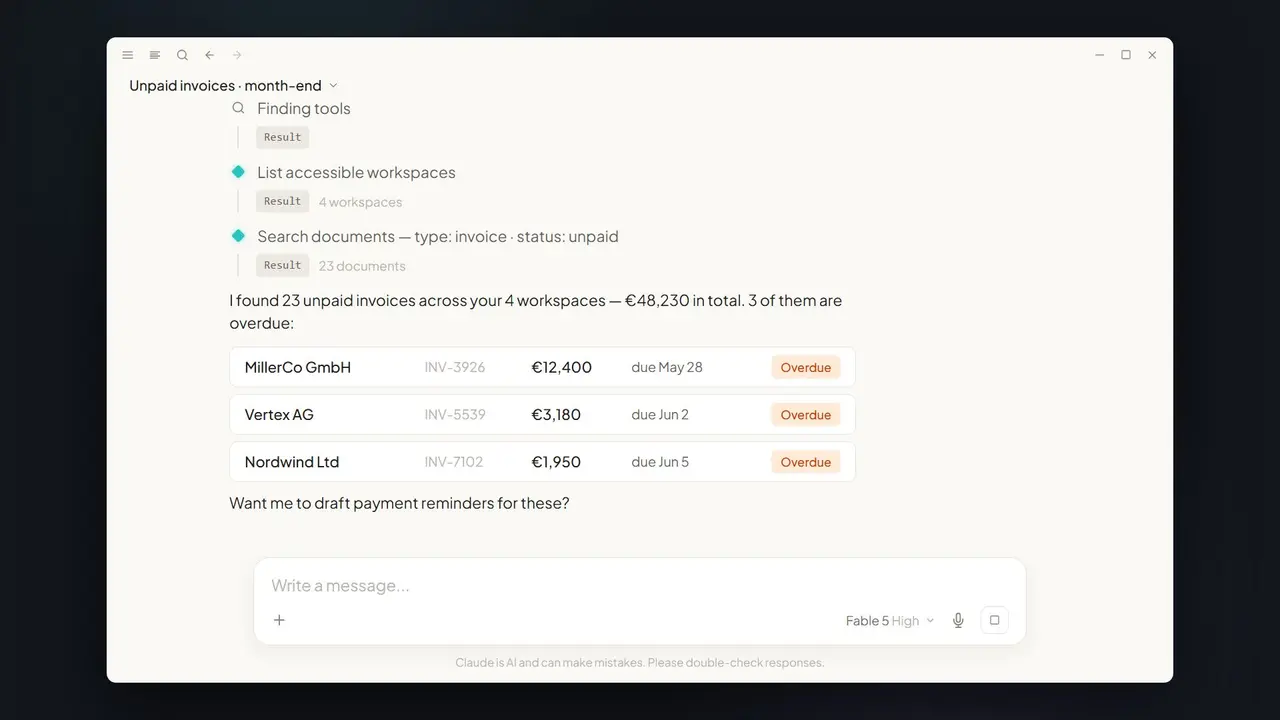 |
| 📥 | Overnight inbox — capture, classify, flag duplicates and expiring contracts before you wake up | 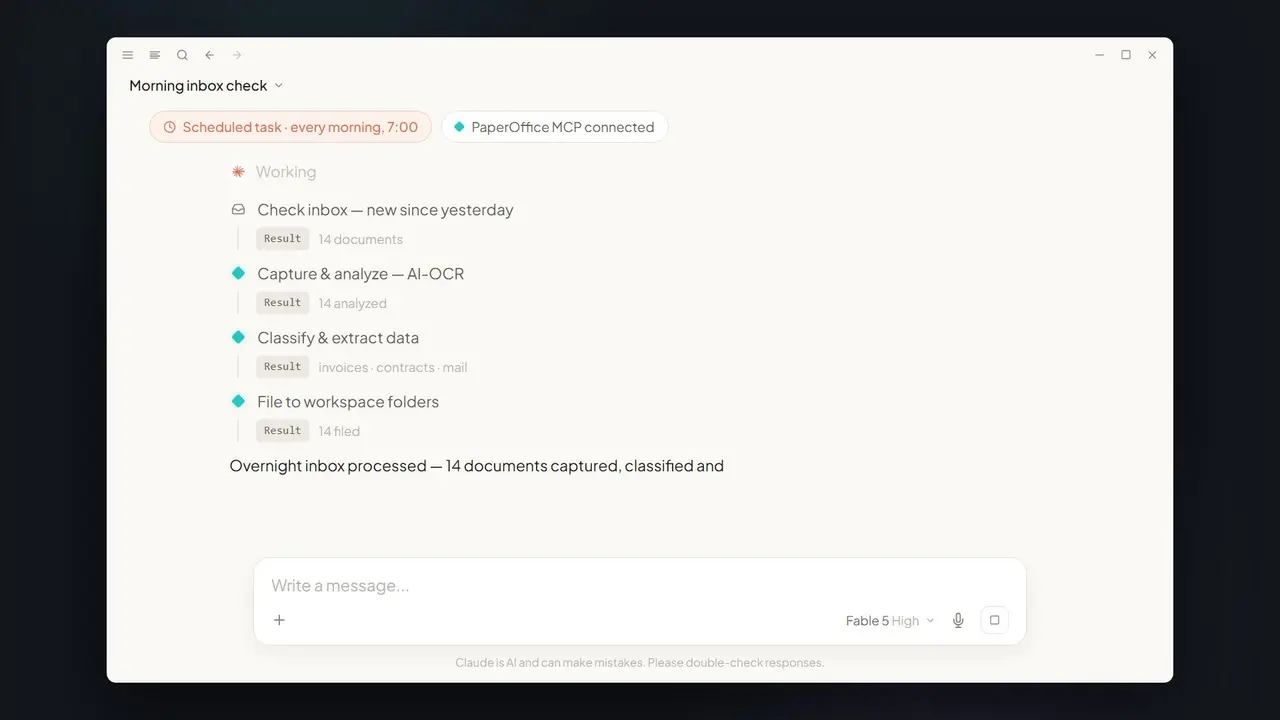 |
| 📱 | Mobile contract lookup — signed date, terms, page reference from your phone in seconds | 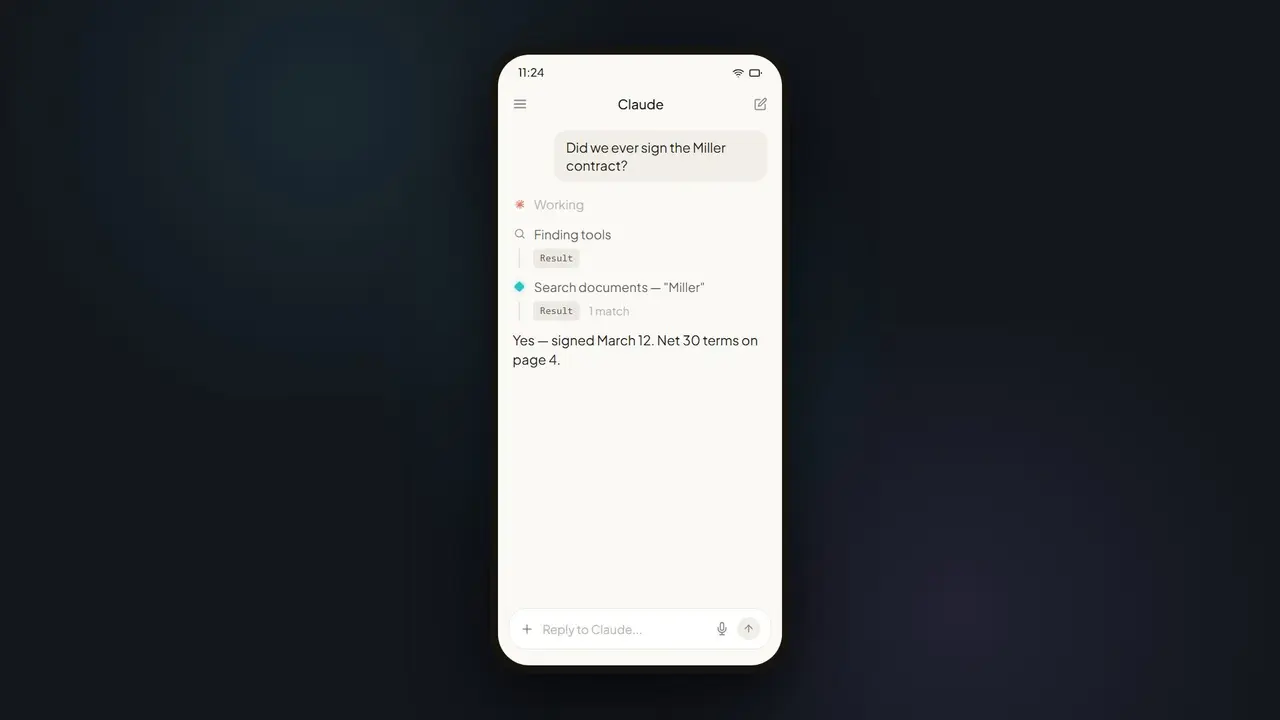 |
| 📈 | Spend dashboard — from 300 invoices to a board-ready dashboard in one prompt | 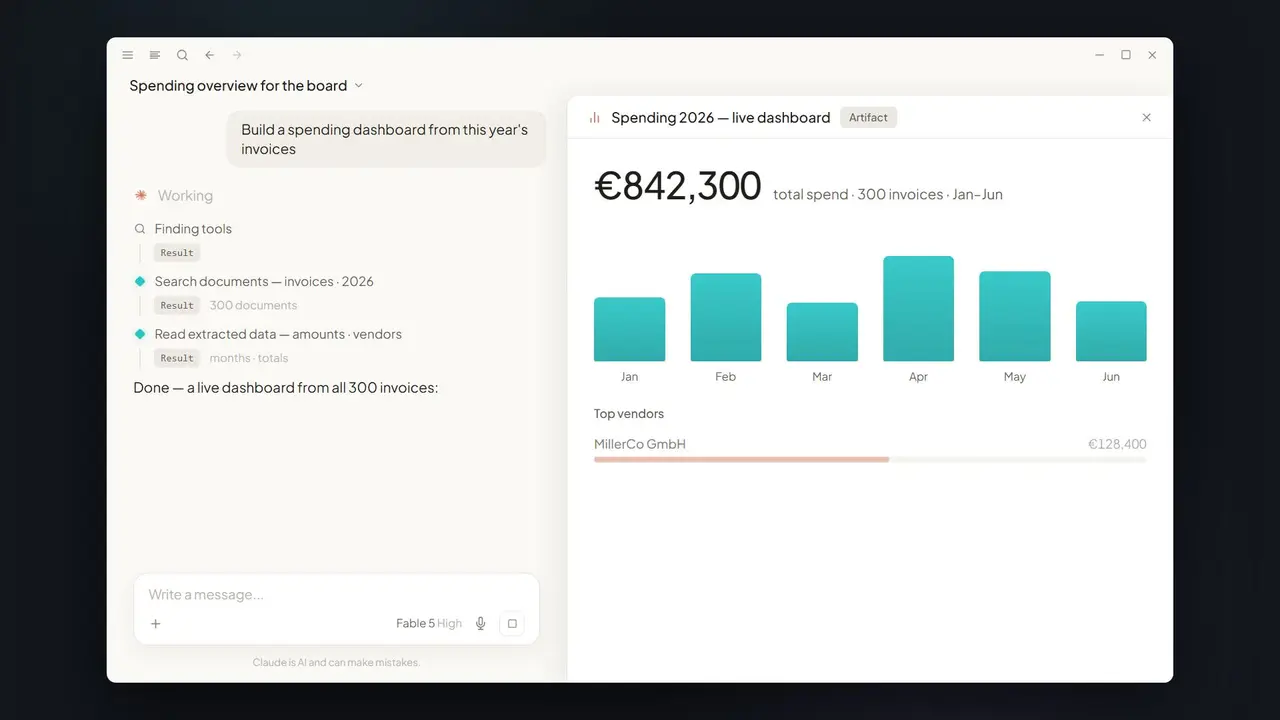 |
60-second setup
1 · Auth
You need a PaperOffice account — the free plan is enough to try everything here. No account yet? Create one at app.paperoffice.ai/en/register/ (no credit card).
Claude, ChatGPT and Grok start with OAuth 2.1: the client opens the PaperOffice sign-in, you approve, no token in any file. For Cursor, DMS, or as an alternative: sign in at app.paperoffice.ai, open Account → API and create a User token (po_ut_) or a Group token (po_gt_, limited to the workspaces of one group). po_sk_ and po_pk_ are blocked for MCP.
Questions or something not working: Help & FAQ · Support · Issues.
2 · Paste one URL into your client
Claude Desktop / Anthropic Directory (OAuth 2.1, no key in file) — configs/claude_desktop_config.json
{
  "mcpServers": {
    "paperoffice": {
      "url": "https://mcp.paperoffice.ai/claude"
    }
  }
}
/dms and /cursor share the Documents Operations catalog (including TTS). /claude is Directory without TTS. /chatgpt (alias /openai) lists a curated tool set for ChatGPT, every tool individually; /grok and /muse list the same tools except the ChatGPT-only attachment upload.
Full headless DMS (po_ut_ / po_gt_) — configs/dms_mcp.json → /dms. Same catalog as /cursor.
ChatGPT / Grok / Meta Muse (OAuth 2.1, no key in file) — /chatgpt (alias /openai), /grok (configs/openai_mcp.json, configs/grok_mcp.json) or /muse. These three list a curated tool set, every tool individually. po_ut_ / po_gt_ remains an alternative for /chatgpt.
Everything (300+ MCP tools across every module) — configs/mcp_full.json → /mcp-full.
3 · Ask away
That's it — your AI now works with your documents.
Choose your scope — you decide, not your client
Any client can use any URL. The paths below are convenience profiles, not limits: go full from day one, or pick Directory / ChatGPT policy surfaces when a catalog requires it.
| I want… | URL | Surface | Good for |
|---|---|---|---|
| Everything | https://mcp.paperoffice.ai/mcp-full | 300+ | Power users, agents, migration |
| Documents Operations | https://mcp.paperoffice.ai/dms | 300+ | Canonical DMS URL |
| Cursor / Windsurf | https://mcp.paperoffice.ai/cursor | same as /dms | IDE — full Documents Operations including TTS |
| Grok | https://mcp.paperoffice.ai/grok | curated tool set: the /chatgpt tools without the attachment upload | Grok connector |
| Meta Muse | https://mcp.paperoffice.ai/muse | same curated tools as /grok | Meta Muse connector |
| Claude Directory URL | https://mcp.paperoffice.ai/claude | Directory without TTS | Claude Desktop / Anthropic Directory |
| ChatGPT | https://mcp.paperoffice.ai/chatgpt | curated tool set, every tool listed individually | ChatGPT Apps SDK |
| ChatGPT alias | https://mcp.paperoffice.ai/openai | same as /chatgpt | Legacy ChatGPT URL |
| Slim IDE subset | https://mcp.paperoffice.ai/mcp | subset of 300+ | Read-safe default for tool-limited IDEs |
Client shortcuts:
https://mcp.paperoffice.ai/cursor = same Documents Operations catalog as /dms ·
https://mcp.paperoffice.ai/grok = curated /chatgpt tools without the ChatGPT-only attachment upload ·
https://mcp.paperoffice.ai/muse = Meta Muse connector, same tools as /grok ·
https://mcp.paperoffice.ai/claude = Directory without TTS ·
https://mcp.paperoffice.ai/chatgpt = ChatGPT connector (alias https://mcp.paperoffice.ai/openai) ·
https://mcp.paperoffice.ai/mcp = slim IDE subset.
Why scopes at all? Fewer tools = faster, more accurate tool-selection by the model, and some clients enforce a tool-count cap.
/mcpis the slim IDE subset. None of this limits what PaperOffice can do — switch to/mcp-fullanytime for media, CRM and telephony.
Ready-made config files for every profile are in configs/.
Per-client quick reference
| Client | Suggested start | Want more? |
|---|---|---|
| Claude Desktop | /claude (OAuth, Directory without TTS) | /mcp-full for media/CRM |
| Claude Cowork / Claude Code | /dms (Documents Operations, po_ut_ / po_gt_) | /mcp-full for all modules |
| Cursor / Windsurf | /cursor (same catalog as /dms) | /mcp-full for media/CRM |
| ChatGPT | /chatgpt (OAuth, alias /openai) | /mcp-full for all 300+ |
| Grok | /grok (OAuth, curated tool set) | /mcp-full for all 300+ |
These are starting points — change the URL whenever your task needs a different scope.
Marketplace plugins
Prefer a one-click install? The same server is packaged as a plugin for two marketplaces:
| Marketplace | Repository | Endpoint |
|---|---|---|
| Cursor Marketplace | paperoffice-ai/paperoffice-cursor-plugin | /cursor — token set as a plugin variable, never in the repo |
| xAI Plugin Marketplace (Grok Build) | paperoffice-ai/paperoffice-grok-plugin | /grok — OAuth 2.1 on first connection |
ChatGPT and Claude do not need a repository: connect the /chatgpt or /claude URL directly, or install PaperOffice from their app directories once listed.
npm package for stdio clients
Clients that only start local (stdio) MCP servers — or teams that prefer one command over a URL — use the npm package @paperoffice-ai/mcp. It is a dependency-free bridge to the same lanes; source in npm/.
{
  "mcpServers": {
    "paperoffice": {
      "command": "npx",
      "args": ["-y", "@paperoffice-ai/mcp"],
      "env": { "PAPEROFFICE_API_KEY": "po_ut_…" }
    }
  }
}
# Claude Code
claude mcp add paperoffice -e PAPEROFFICE_API_KEY=po_ut_… -- npx -y @paperoffice-ai/mcp

# Test a token and list the tools
PAPEROFFICE_API_KEY=po_ut_… npx -y @paperoffice-ai/mcp --check
Pick another catalog with --lane mcp-full (or claude, chatgpt, grok, muse, mcp, cursor). Configs for VS Code, Windsurf, Cline, Gemini CLI and Codex CLI: npm/README.md.
Official MCP Registry
PaperOffice is published in the official MCP Registry as io.github.paperoffice-ai/paperoffice-mcp — the manifest is server.json in this repository. Clients and directories that read the registry (VS Code, Glama, PulseMCP and others) find the seven lanes and the npm package there without any manual entry.
# Claude Code
claude mcp add --transport http paperoffice https://mcp.paperoffice.ai/dms
Agent Skills
The MCP server supplies the tools; paperoffice-ai/paperoffice-skills supplies the procedures — five SKILL.md files (API integration, invoice extraction, OCR, documents, tool discovery) that load as a Claude Code plugin, a claude.ai skill upload, or inside the Cursor plugin.
What you can do
| Area | Examples |
|---|---|
| Document AI / IDP | Zero-shot extraction, classification, document chat, PII redaction |
| OCR | 120+ languages, layout-aware, searchable PDF & Markdown output |
| Headless DMS | Search, read, upload, move, version, tag, sign |
| Workflow AI | Tasks, human-in-the-loop approvals, process automation |
| Intelligence | Knowledge graph, entities, analytics, BI dashboards |
Why PaperOffice
- EU-sovereign — own data center in the EU (Navarra, Spain). GDPR-aligned, no mandatory US cloud.
- Zero-shot IDP — extraction without template training, powered by specialized LLMs.
- Pay-per-use — transparent credits, no per-seat lock-in.
- API-first — 300+ API/MCP-Tools via REST or MCP. MCP uses OAuth 2.1 or a User token (po_ut_ / po_gt_) — see Postman.
- 24+ years — document management since 2002.
Prefer plain REST?
Paste this into any AI assistant for the full API — it reads the docs and writes the code:
https://api.paperoffice.ai/latest/docs/postman
Machine-readable context: paperoffice.ai/llms.txt · api.paperoffice.ai/latest/docs/llms.txt
Technical notes
- Transport: Streamable HTTP (remote MCP). Optional stdio bridge for local-only clients:
npx -y @paperoffice-ai/mcp - Base host:
mcp.paperoffice.ai - Auth: OAuth 2.1 first for Claude / ChatGPT / Grok (no token in the file). Bearer (
po_ut_/po_gt_) for Cursor, DMS, and as an alternative.po_sk_andpo_pk_are blocked for MCP. - Public claim: 300+ API/MCP-Tools (unified REST + MCP). Do not cite 250/260/350/357/500 or drifting profile integers.
- Claude.ai network allowlist:
mcp.paperoffice.aiandapi.paperoffice.ai(two fs — neverpaperofice)
Resources
License
Config files and the npm bridge in this repository are MIT. The PaperOffice AI platform and API are proprietary — see paperoffice.ai for terms.






