Listed from the MCP registry; nobody on Odel publishes it.

AdMob
MCP server for the Google AdMob API — apps, ad units, mediation, and revenue reports
Runs on your machine from its package; the steps are below.
What it does
- Reads
- Writes
- High impact
At most: only reads or looks up information.
What it costs
FreeOdel charges nothing per call. The publisher may charge for its own service.
Runs locally over stdio
This server isn't hosted — your MCP client launches it from a package registry. Use one of the commands below, or drop the config into your client (e.g. Claude Desktop).
Run
npx -y admob-mcp-server
MCP client config
{
  "mcpServers": {
    "admob": {
      "command": "npx",
      "args": [
        "-y",
        "admob-mcp-server"
      ]
    }
  }
}AdMob MCP Server


English | 한국어
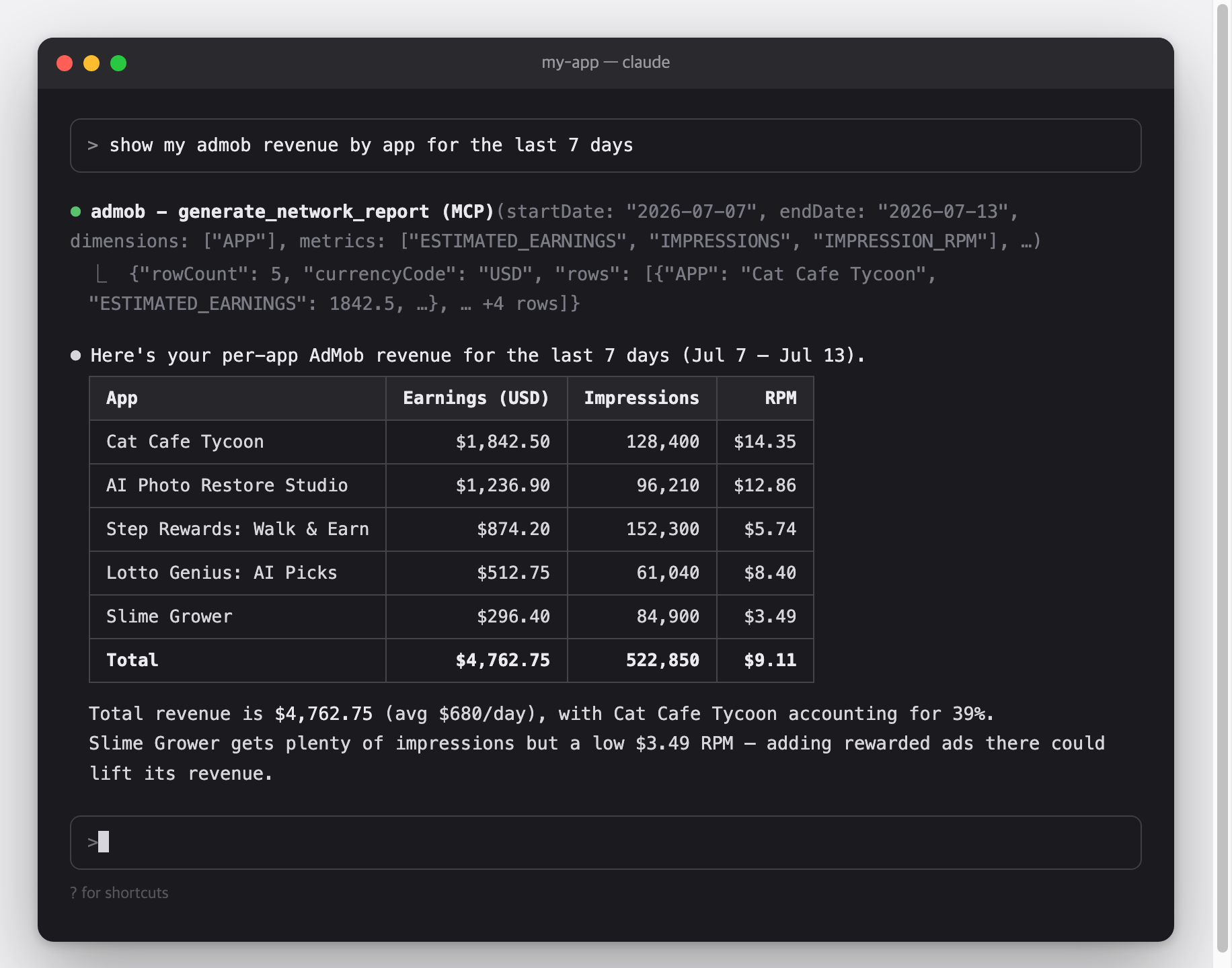
Ask your AI assistant about your AdMob apps and earnings — in plain language:
- "How much did my apps earn in the last 7 days, broken down by country?"
- "Which mediation ad source had the best eCPM this month?"
- "Compare the RPM of my banner vs. rewarded ad units."
- "List my apps and their ad units."
This is a Model Context Protocol (MCP) server for the Google AdMob API.
It works with Claude Code, Claude Desktop, Cursor, Gemini CLI, and any other MCP-capable AI client.
Architecture
flowchart LR
    C["MCP client<br/>Claude Code · Claude Desktop · Cursor · Gemini CLI"]

    subgraph S["admob-mcp-server — runs on your machine"]
        direction TB
        T["9 read-only tools in 5 toolsets<br/>accounts · apps · adunits · reports · mediation<br/>(filtered by --toolsets)"]
        A["Credential resolver<br/>env vars → token.json → gcloud ADC"]
        R["Report flattener<br/>chunk stream → rows · micros → currency"]
    end

    G["Google AdMob API<br/>v1beta"]

    C <-->|"MCP over stdio"| T
    T --> A
    A <-->|"OAuth 2.0 / HTTPS"| G
    G -.->|"report chunks"| R
    R -.-> T
Credentials and revenue data travel only between your machine and Google — there is no third-party server in between.
Features
- Everything the AdMob API opens to normal accounts — 9 tools across accounts, apps, ad units, reports, and mediation (why there are no write tools)
- Reports made readable — streaming report responses are flattened into simple row tables, and monetary values (micros) are converted to real currency units
- Read-only by design — the sign-in requests read scopes only, so the server cannot change anything in your AdMob account
- Toolsets — enable only the tool groups you need, e.g.
--toolsets reports,accounts - Three authentication options — one-command browser sign-in (
npx admob-mcp-server auth), environment-variable refresh token, or gcloud Application Default Credentials - Built-in analysis prompts and report-spec reference resources
Setup at a glance
One-time setup, roughly 10 minutes:
| Step | What you do | Where |
|---|---|---|
| 1. Google Cloud setup | Register a personal "app" so Google lets you access your own data | browser |
| 2. Sign in | Run one command and log in with Google | terminal |
| 3. Connect your AI client | Add one config entry and restart the client | terminal |
Requirements
- Node.js 18 or newer — check with
node --version; if missing, install from nodejs.org - An AdMob account and the Google account that owns it
Setup
Part 1 — Google Cloud setup
Why is this needed?
The AdMob API has no simple API keys — Google requires every program that accesses your data to be registered as an "OAuth app".
Here you register a personal one that only you will use.
It's free and needs no billing setup.
- Create (or select) a Google Cloud project: console.cloud.google.com/projectcreate — any name works; reusing an existing project is fine too.
- Enable the AdMob API: console.cloud.google.com/apis/library/admob.googleapis.com → check that your project is selected in the top bar → Enable.
- Configure the OAuth consent screen: console.cloud.google.com/auth/overview — the first visit opens a short wizard:
- App name: anything (e.g.
admob-mcp), and your email as the support/contact email - Audience: External
- Finish the wizard — you do not need to submit the app for Google's verification
- Then go to Audience → Test users → Add users and add the Google account that owns your AdMob account
- App name: anything (e.g.
- Create an OAuth client: console.cloud.google.com/apis/credentials → Create credentials → OAuth client ID
- Application type: Desktop app
- After creating it, click Download JSON — you'll use this file in Part 2
Warning
While the consent screen is in Testing mode, Google expires sign-ins after 7 days, so you'll need to re-run the sign-in weekly.
To stop that, publish the app (Audience → Publish app).
Publishing for your own use doesn't require Google's verification — you'll just see an "unverified app" warning during sign-in, which is expected.
Part 2 — Sign in
Move the JSON file you downloaded to where the server looks for it, then run the sign-in command:
mkdir -p ~/.admob-mcp
mv ~/Downloads/client_secret_*.json ~/.admob-mcp/oauth_client.json

npx admob-mcp-server auth
(On Windows, move the file to C:\Users\<you>\.admob-mcp\oauth_client.json in Explorer, then run the npx command.)
Your browser opens.
Pick the Google account that owns your AdMob account and allow access.
If you see a "Google hasn't verified this app" warning, that's your own app from Part 1 — click "Continue".
When the terminal prints Setup complete, your sign-in is saved to ~/.admob-mcp/token.json and reused from then on.
The sign-in requests the admob.readonly and admob.report scopes — read access only.
What the auth command does:
sequenceDiagram
    autonumber
    participant T as Terminal
    participant S as admob-mcp-server
    participant B as Browser
    participant G as Google

    T->>S: npx admob-mcp-server auth
    S->>S: read ~/.admob-mcp/oauth_client.json
    S->>B: open consent URL (loopback redirect, random port)
    B->>G: sign in & allow scopes
    G-->>S: authorization code → refresh token
    S->>S: save ~/.admob-mcp/token.json (reused for every later call)
Advanced: environment variables (headless / CI)
If you already have a refresh token, no files are needed:
export GOOGLE_CLIENT_ID="....apps.googleusercontent.com"
export GOOGLE_CLIENT_SECRET="..."
export GOOGLE_REFRESH_TOKEN="..."
Advanced: gcloud Application Default Credentials
The same pattern Google's official Analytics/Ads MCP servers use:
gcloud auth application-default login \
  --scopes=https://www.googleapis.com/auth/admob.readonly,https://www.googleapis.com/auth/admob.report,https://www.googleapis.com/auth/cloud-platform \
  --client-id-file=path/to/oauth_client.json
Credential resolution order: environment variables → token.json (from auth) → ADC.
Part 3 — Connect your AI client
Pick your client below.
MCP servers are loaded when the client starts, so restart the client after adding the config.
Claude Code
claude mcp add admob -- npx -y admob-mcp-server
Verify with claude mcp list — you should see admob: ... - ✔ Connected.
Claude Desktop — open Settings → Developer → Edit Config, which opens claude_desktop_config.json (macOS: ~/Library/Application Support/Claude/, Windows: %APPDATA%\Claude\), and add:
{
  "mcpServers": {
    "admob": {
      "command": "npx",
      "args": ["-y", "admob-mcp-server"]
    }
  }
}
Restart the app; the admob tools appear in the tools menu of the chat input.
Cursor — add the same mcpServers block to ~/.cursor/mcp.json, then check Settings → MCP shows admob as enabled.
Gemini CLI — add the same mcpServers block to ~/.gemini/settings.json, then check with /mcp inside the CLI.
Tip
If you used the environment-variable sign-in, pass the variables through your client's env block (Claude Code: repeat --env KEY=value before --; JSON configs: add an "env": { ... } object next to "args").
Try it
You don't call tools yourself — just ask in plain language and the assistant picks the right tools.
Some starters:
- "What did my apps earn last week?"
- "Break down this month's revenue by country and app."
- "Which ad format had the highest RPM in the last 30 days?"
- "How is my mediation doing? Compare ad sources by observed eCPM."
- "List my apps and their ad units."
Most clients ask for your permission before each tool call, so nothing runs without your approval.
Configuration
All configuration is optional — the defaults work for a single AdMob account.
Environment variables
| Variable | Description | Default |
|---|---|---|
ADMOB_ACCOUNT | Publisher ID (pub-XXXXXXXXXXXXXXXX). Only needed when your login can access multiple accounts | auto-discovered |
ADMOB_TOOLSETS | Comma-separated toolsets to enable | all |
ADMOB_CREDENTIALS_DIR | Directory for oauth_client.json / token.json | ~/.admob-mcp |
ADMOB_OAUTH_CLIENT_FILE | Path to the OAuth client JSON used by auth | <credentials dir>/oauth_client.json |
GOOGLE_CLIENT_ID | OAuth client ID (env sign-in; also used by auth instead of the JSON file) | — |
GOOGLE_CLIENT_SECRET | OAuth client secret (env sign-in) | — |
GOOGLE_REFRESH_TOKEN | OAuth refresh token (env sign-in) | — |
CLI flags
| Flag | Description |
|---|---|
--toolsets <names> | Same as ADMOB_TOOLSETS, e.g. --toolsets reports,apps |
--account <pub-id> | Same as ADMOB_ACCOUNT |
--client-file <path> | Same as ADMOB_OAUTH_CLIENT_FILE (for auth) |
CLI flags take precedence over environment variables.
Flags go after the command in your client config, e.g. npx -y admob-mcp-server --toolsets reports.
Tools
A "tool" is a function the AI assistant can call on your behalf.
Tools are grouped into five toolsets; all are enabled by default:
| Toolset | Tools |
|---|---|
accounts | list_accounts, get_account |
apps | list_apps |
adunits | list_ad_units |
reports | generate_network_report, generate_mediation_report, generate_campaign_report |
mediation | list_ad_sources, list_adapters |
All tools are read-only and require the admob.readonly / admob.report scopes.
Why there are no write tools
The AdMob API does expose write methods (adUnits.create, apps.create, the whole mediationGroups resource), but Google marks each of them limited access:
This method has limited access. If you see a 403 permission denied error, please reach out to your account manager for access.
A normal publisher account gets PERMISSION_DENIED from all of them even with a valid admob.monetization token — and the same wall blocks mediationGroups.list and adUnitMappings.list, which are reads. Since these tools cannot work without an allowlisted account, they are not shipped: an assistant that sees them will try them and fail. Create ad units and mediation groups in the AdMob console instead.
accounts
| Tool | Description |
|---|---|
list_accounts | List accessible publisher accounts — use to find your pub-... ID |
get_account | Get account details: publisher ID, reporting currency, reporting time zone |
apps
| Tool | Description |
|---|---|
list_apps | List registered apps with app ID, platform, store link, and approval state |
adunits
| Tool | Description |
|---|---|
list_ad_units | List ad units with their IDs, formats, and owning apps |
reports
All report tools take startDate / endDate (YYYY-MM-DD), metrics, and optional dimensions, dimensionFilters, sortConditions, maxReportRows (default 1000), currencyCode.
Responses are flat tables; monetary metrics are converted from micros to currency units.
| Tool | Description |
|---|---|
generate_network_report | AdMob Network performance: earnings, impressions, clicks, match rate, RPM, ... |
generate_mediation_report | Mediation performance across ad sources: earnings, observed eCPM per AD_SOURCE / MEDIATION_GROUP |
generate_campaign_report | Cross-promotion campaign stats (last 30 days only): impressions, clicks, installs, cost |
Valid dimensions/metrics per report are exposed as MCP resources (reference documents the assistant can read): admob://reference/network-report-spec, mediation-report-spec, campaign-report-spec.
mediation
| Tool | Description |
|---|---|
list_ad_sources | List available mediation ad sources (ad networks) and their IDs |
list_adapters | List adapters of an ad source, incl. required configuration keys |
Mediation groups and ad unit mappings are not covered — see Why there are no write tools.
Prompts
Prompts are ready-made analysis requests.
Your client surfaces them as slash commands or a prompt picker (e.g. /top_performing_apps in Claude Code).
All take an optional days argument:
| Prompt | What it does |
|---|---|
top_performing_apps | Ranks your apps by revenue with RPM and match-rate context |
revenue_summary | Daily revenue trend with anomaly call-outs |
compare_ad_formats | Compares earnings and efficiency across ad formats |
Security & privacy
- The server runs entirely on your computer.
Your data flows only between your machine and Google's API — never through any third-party server. - Two files are stored locally, both readable only by your user account:
~/.admob-mcp/oauth_client.json(your OAuth app) and~/.admob-mcp/token.json(your sign-in). - To sign out: delete
~/.admob-mcp/token.json, and optionally revoke the app's access at myaccount.google.com/permissions. - Nothing can be modified: the sign-in requests read scopes only, and every tool is a read.
Troubleshooting
Install & connection
command not found: npx / spawn npx ENOENT
- Cause: Node.js is not installed, or your client can't find it.
- Fix: install Node 18+ from nodejs.org, then restart the client.
The server doesn't appear in the client
- Cause: MCP servers load at client startup, or the server fails to start.
- Fix: restart the client first.
Then check its MCP status (Claude Code:claude mcp list, Gemini CLI:/mcp), and make surenpx -y admob-mcp-serverruns in a terminal without errors.
Sign-in & auth
"No usable Google credentials found"
- Cause: sign-in hasn't been set up yet.
- Fix: follow Part 2 — Sign in.
invalid_grant / "token has been expired or revoked"
- Cause: your sign-in expired.
With a consent screen in Testing mode this happens every 7 days. - Fix: re-run
npx admob-mcp-server auth.
To stop it recurring, publish the app (Audience → Publish app).
access_denied during browser sign-in
- Cause: the Google account you picked is not a test user of the consent screen.
- Fix: add it under Audience → Test users, or publish the app.
"The publisher could not be authenticated"
- Cause: the Google account you signed in with has no active AdMob account.
- Fix: re-run
npx admob-mcp-server authand pick the account that owns your AdMob account in the account chooser.
API errors
403 PERMISSION_DENIED
- Cause: the AdMob API isn't enabled, the wrong Google account is signed in, or the token predates a scope change.
- Fix: check the following:
- The AdMob API is enabled in the same project as your OAuth client
- You signed in with the account that owns the AdMob account
- Your token covers
admob.readonlyandadmob.report— re-runnpx admob-mcp-server authto refresh it
429 RESOURCE_EXHAUSTED
- Cause: AdMob API quota hit (usage limits).
- Fix: retry later, or reduce the request — narrower date range, fewer dimensions.
"Multiple AdMob accounts found"
- Cause: your Google login can access several publisher accounts.
- Fix: set
ADMOB_ACCOUNT=pub-...(find IDs withlist_accounts).
Development
git clone https://github.com/ParkSangGwon/admob-mcp-server.git
cd admob-mcp-server
npm install
npm test
npm run build

# debug with the MCP Inspector
npm run inspect
To run a local build in a client, point it at the built entry instead of npx: node /path/to/admob-mcp-server/dist/index.js.
Releases: pushing a v* tag runs CI and publishes to npm with provenance (see .github/workflows/release.yml).
Contributing
Issues and pull requests are welcome.
For larger changes, please open an issue first to discuss the direction.
Make sure npm run lint, npm run format:check, and npm test pass.






