
sentinelx-cloud-core
Operate your Linux, macOS, and Windows servers from Claude.ai or ChatGPT — safely. SentinelX gives your LLM an allowlisted, auditable shell: it can only run commands you've explicitly permitted, filesystem access is gated by a per-path allowlist, and every action is recorded. No inbound ports — just a single outbound WebSocket.
The security model is the point. Handing an LLM unrestricted shell on a server you care about is the thing SentinelX is designed to avoid: the allowlist is the real trust boundary, so the agent can't run — or invent — anything you didn't allow. This is the agent you install on the host; structured file edits and service management come with it.
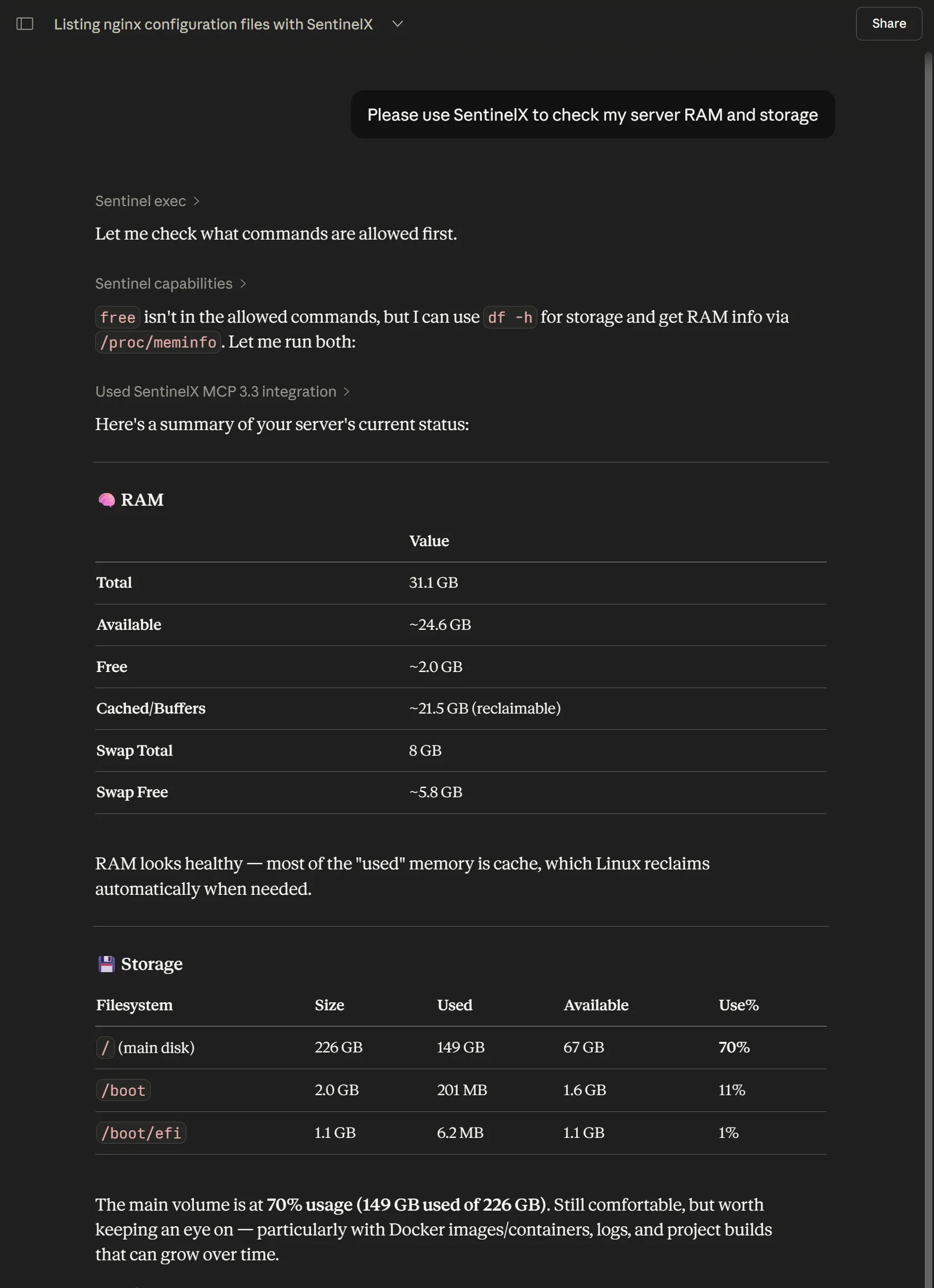
SentinelX in ChatGPT — it reads the allowlist, runs only what's permitted (df -h, /proc/meminfo), and reports back.
Install
Most people start with the one-liner — it auto-detects Linux or macOS:
curl -fsSL https://get.sentinelx.app | bash
Windows (PowerShell — needs Python 3.12+ and git on PATH):
Service install — runs as LocalSystem at boot; needs an elevated PowerShell:
iwr -useb https://get.sentinelx.app/install.ps1 -OutFile "$env:TEMP\sx.ps1"
powershell -ExecutionPolicy Bypass -File "$env:TEMP\sx.ps1"
Per-user install — no admin; runs as you at logon (locked-down machines):
iwr -useb https://get.sentinelx.app/install.ps1 -OutFile "$env:TEMP\sx.ps1"
powershell -ExecutionPolicy Bypass -File "$env:TEMP\sx.ps1" -User
The installer clones this repo into a virtualenv, registers the agent as a
service (systemd / launchd / Windows service), and walks you through enrollment.
On networks that block PyPI, add -Bundle <zip-or-url> for an offline install
from the wheel bundle on the latest release; the agent uses the OS trust store
(truststore) so a TLS-inspecting proxy's CA is accepted. Full options —
per-user vs service, offline bundle, all flags, uninstall — live in
sentinelx-cloud-installer.
SentinelX is also listed in the ChatGPT app directory — ChatGPT users can connect it in one click, no custom MCP URL required.
This repo is also the agent's source — read on if you want to audit or contribute.
Architecture
                                        Internet
                                            │
   ┌────────────────┐                       │                  ┌─────────────────┐
   │  Claude.ai or  │   MCP over HTTPS      │   WebSocket      │  Your host      │
   │   ChatGPT      │ ◄───────────────────► │ ◄──────────────► │                 │
   │                │   (OAuth via Google)  │                  │  ┌───────────┐  │
   └────────────────┘                       │                  │  │  agent    │  │
                                ┌───────────────────────┐      │  │ (this)    │  │
                                │   mcp.sentinelx.app   │      │  └─────┬─────┘  │
                                │  (SentinelX hub —     │      │        │        │
                                │   closed source)      │      │   shell, edit,  │
                                └───────────────────────┘      │   service mgmt  │
                                                               └─────────────────┘
The agent is the box on the right. It opens one outbound WebSocket to the hub at install time (after enrollment) and stays connected. No inbound ports, no port-forwarding, no reverse tunnel.
What runs where
| Component | Where | What it does |
|---|---|---|
sentinelx-cloud-core (this repo) | /opt/sentinelx-cloud-core on your host | Receives MCP tool calls from the hub, executes them locally, returns output |
| Hub | mcp.sentinelx.app (operated by Pensa) | Auth, multi-host routing, MCP transport |
| Config | /etc/sentinelx/config.yaml | Allowlist: which commands, services, and paths the agent will accept |
| Identity | /etc/sentinelx/identity.json | The agent's enrollment JWT, used to authenticate the WebSocket handshake |
Supported platforms: any modern Linux distribution with systemd
(tested on Ubuntu 22.04 / 24.04 and Debian 12), macOS with launchd
(Intel and Apple Silicon), and Windows — as a service (WinSW, admin) or
as a no-admin per-user Scheduled Task (-User); see Install on Windows
below. The one-line installer auto-detects Linux and macOS; Windows uses a
PowerShell installer. The agent also runs unmodified inside WSL2.
Tools exposed
The agent exposes its host's operations as MCP tools to your LLM via the hub:
| Tool | What it does |
|---|---|
sentinel_exec | Run an allowlisted shell command |
sentinel_script_run | Run a one-off bash or python3 script |
sentinel_edit | Structured file edit (replace, regex, replace-block, write, append, prepend) |
sentinel_edit_upload_* | Three-step upload for large file edits |
sentinel_move | Move/rename a file or directory |
sentinel_copy | Copy a file or directory |
sentinel_delete | Delete a file or directory |
sentinel_chmod | Change file permissions |
sentinel_chown | Change file owner/group |
sentinel_service | systemctl start/stop/restart/reload/status |
sentinel_restart | Shortcut for sentinel_service with action=restart |
sentinel_upload_file | Single-shot file upload to the host |
sentinel_upload_* | Three-step chunked upload for large files |
sentinel_read | Read a file's contents, with optional line-range slicing |
sentinel_list | Structured directory listing (name, type, size, mtime) |
sentinel_search | Recursive content search with regex and glob filters |
sentinel_capabilities | Host policy/capabilities; optional bounded summary projection |
sentinel_help | Rich orientation/help; optional topic/path/single-playbook projections |
sentinel_state | Internal agent state, for debugging |
sentinel_ping | Cheap connectivity check |
Progressive introspection (agent operation contract)
The agent-side help and capabilities operations also support optional
narrow-response selectors. A Hub/MCP profile may expose these fields through
whatever model-facing tool shape it uses; the selectors are backend-operation
semantics and do not depend on full vs compact tool names.
help({"topic":"index"})— small topic + paged playbook index.help({"topic":"security"})— one broad help section.help({"path":"security_model.permission_errors"})— one exact leaf from the existing help tree.help({"playbook":"update_sentinelx_code"})— one playbook only; optionalpath,offset, andlimitcan select/page a subfield such assteps.capabilities({"detail":"summary"})— host/operation/limit metadata and policy counts without command/service/location/playbook bodies.
Progressive help/playbook responses normalize explicit full-profile
sentinel_* references to op:<name> canonical operation hints so the same
guidance can be routed through compact or full presentation without teaching a
playbook two sets of MCP tool names.
For compatibility, empty help({}) and capabilities({}) requests retain the
legacy full responses. A Hub that wants compact-first behavior should map its
compact help/capabilities branches to the narrow selectors rather than changing
the agent's legacy empty-payload semantics.
sentinel_read, sentinel_list, and sentinel_search are read-only
filesystem primitives. sentinel_edit and the mutating primitives
(sentinel_move, sentinel_copy, sentinel_delete, sentinel_chmod,
sentinel_chown) write. All of them give the LLM structured access to
the filesystem without shelling out to cat/ls/mv/rm through exec,
and all of them are gated by the same path allowlist (file_ops in the
config, see below), not the command allowlist. Each path in that allowlist
declares an access level: r (read-only ops) or rw (read-only ops plus
the writing ops). Destructive operations that overwrite or remove an existing
target make a timestamped backup first.
The hub additionally exposes a handful of hub-side integrations (Cloudflare DNS, Resend email, Telegram) as MCP tools your LLM can use alongside the agent's tools — those live on the hub, not in this repo. See the integrations table on sentinelx.app.
Config (/etc/sentinelx/config.yaml)
A starter config is generated at install time. Editable. Reloaded when the service restarts. Schema:
# Commands the agent can execute via the `exec` op. Prefix-matched against
# this list; empty/missing = nothing allowed (deny by default).
allowed_commands:
  - uptime
  - df -h
  - free
  - systemctl
  - sudo systemctl
  - journalctl
  # See config.example.yaml for the full starter list (file inspection,
  # networking, containers, git, etc.) plus opt-in categories
  # (Cloudflare tunnels, WireGuard, Android tooling, firewalling, SSH).

# Service units the agent is allowed to control via `service` / `restart`.
# Each unit explicitly lists which actions are permitted.
services:
  nginx:
    actions: [status, start, stop, restart, reload]
  docker:
    actions: [status, restart]
  # The agent itself, so the LLM can reload policy after editing the
  # config. Restarting re-reads /etc/sentinelx/config.yaml. Conservative
  # actions only — no start/stop, since the agent can't remotely start
  # itself once stopped.
  sentinelx-cloud-core:
    actions: [status, restart, is-active, is-enabled]
  # postgresql:
  #   actions: [status, start, stop, restart, reload]

# Optional: named playbooks the LLM can read or execute. Two shapes are
# supported and can coexist in the same map:
#
# 1) Diagnostic playbook — a fixed sequence of allowlisted commands the
#    agent can run in order. Useful for "give me a quick health snapshot"
#    type prompts where you want one named entry-point.
#
# 2) Procedure playbook — a structured recipe for the LLM to follow,
#    expressed in `description` / `when` / `steps` / `requires` / `notes`
#    fields. Pure documentation: the agent does NOT execute the steps,
#    the LLM reads them via `capabilities` and then calls the regular
#    tools (sentinel_exec, sentinel_edit, sentinel_service) on its own.
#
# See `config.example.yaml` for the full reference.
playbooks:
  # Diagnostic playbook (shape 1)
  health:
    description: "Show system health summary"
    commands:
      - "uptime"
      - "df -h /"
      - "free -m"

  # Procedure playbook (shape 2) — guides the LLM through extending the
  # allowlist itself. Useful so users can ask "let me run htop here" and
  # the LLM knows the exact procedure (edit config, restart service,
  # verify with capabilities).
  add_allowed_command:
    description: "How to add a new command to this host's allowlist"
    when: "User asks to allow a new command on this host"
    steps:
      - "Read /etc/sentinelx/config.yaml with sentinel_exec"
      - "Insert under allowed_commands with sentinel_edit (sudo, validator_preset=yaml)"
      - "Restart the agent: sentinel_service restart sentinelx-cloud-core"
      - "Verify with sentinel_capabilities"

# Logging
log:
  path: /var/log/sentinelx/core.log
  level: INFO

# SSRF defense for upload_file's file_url. The hostname must be in this
# allowlist AND must resolve to a public-routable IP (no loopback,
# RFC1918, link-local, etc.). Default empty = file_url disabled.
# Only add hosts YOU control — third-party hosts (github.com, pypi,
# random CDNs) expose your agent to supply-chain compromise.
security:
  trusted_fetch_hosts:
    - drop.pensa.ar
    - get.sentinelx.app
  file_url_timeout_seconds: 15

# Filesystem primitives (sentinel_read/list/search + edit, move, copy,
# delete, chmod, chown). Gated by a PATH allowlist, separate from the
# command allowlist above. Empty/missing = all the filesystem primitives
# are effectively disabled (they return path_not_allowed for any input).
#
# Each entry declares an access level:
#   r  = read-only ops (read, list, search) may touch this subtree
#   rw = read-only ops AND writing ops (edit, move, copy, delete,
#        chmod, chown) may touch this subtree
#
# A path is permitted only if, after canonicalization (symlinks
# resolved, .. collapsed), it falls under one of these entries. That
# canonical-resolve-then-prefix-check is what defeats both path
# traversal and symlink escapes. Writing ops additionally require the
# matched entry to be `rw`.
#
# Back-compat: an older `allowed_read_paths:` list is still accepted and
# is interpreted as a set of `r` entries (with a deprecation warning).
file_ops:
  paths:
    - path: /etc/nginx
      access: r
    - path: /var/log
      access: r
    - path: /home/youruser/projects
      access: rw
  max_read_bytes: 65536       # per read; larger files come back truncated
  max_list_entries: 1000      # per list
  max_search_results: 200     # per search
The agent only runs commands that prefix-match allowed_commands. So
allowing git lets the LLM run git status, git log, etc.; allowing
ls is enough to cover ls -lah /var/log. Out of the box the config is
restrictive — see config.example.yaml for the full starter list with
sensible categories.
There are two independent allowlists, and they protect different ops:
allowed_commandsgatesexec(and the commands insidescript_run).file_ops.pathsgates every filesystem primitive — the read-only ones (sentinel_read,sentinel_list,sentinel_search) on anyrorrwentry, and the writing ones (sentinel_edit,sentinel_move,sentinel_copy,sentinel_delete,sentinel_chmod,sentinel_chown) only onrwentries.
So a directory listed as r lets the LLM inspect it but not modify it; a
directory listed as rw allows both. A directory in neither is invisible to
all the filesystem primitives (the LLM would have to fall back to exec,
which is governed by allowed_commands instead).
One deliberate exception: sentinel_edit with sudo=true is not gated
by file_ops.paths. The trust boundary for sudo'd edits is the operator's
sudoers policy, not the path allowlist — this is what lets the
add_allowed_command playbook edit the root-owned config. Path
canonicalization still runs (no traversal/symlink bypass); only the
rw-membership check is waived for the sudo path. This carve-out and its
residual risk are documented in THREAT_MODEL.md
(§4.2.1).
Security model
- No inbound ports. Only an outbound WebSocket to the hub.
- JWT-bound identity.
identity.jsonis signed by the hub at enrollment. Compromising one host doesn't grant access to others. - Allowlist-gated. Anything not in
config.yamlreturnscommand_not_allowed. The agent won't synthesize new commands. This is the actual security boundary — not the unix user, not sudo policy. When a command is rejected, the agent returns a classified error (multi-line input, bash keyword, shell pipeline, or simply not in the allowlist) that points the LLM at the right tool instead of guessing. - Path-allowlisted filesystem primitives. Every structured filesystem
op only touches paths under
file_ops.paths. Read-only ops (sentinel_read,sentinel_list,sentinel_search) work onrandrwentries; writing ops (sentinel_edit,sentinel_move,sentinel_copy,sentinel_delete,sentinel_chmod,sentinel_chown) require anrwentry. Paths are canonicalized — symlinks resolved,..collapsed — before the prefix check, so neither path traversal nor a symlink pointing outside the allowlist can escape it. Empty allowlist = the primitives are disabled. Writing ops that overwrite or delete an existing target back it up first (timestamped.bak).sentinel_editwithsudo=trueis a documented exception to therwcheck — seeTHREAT_MODEL.md§4.2.1. - Unprivileged user with passwordless sudo. The agent runs as
sentinelx, not as root. By default the installer grantssentinelxpasswordless sudo so it can manage services and edit system files — but it can still only invoke what's in your allowlist. To run with no sudo, setSENTINELX_SKIP_SUDO=1during install. - SSRF-defended
file_url. Whenupload_fileis called with a URL, the agent validates the hostname againstsecurity.trusted_fetch_hosts, resolves it to an IP, and rejects loopback / RFC1918 / link-local addresses (so an attacker can't pivot to cloud metadata services or LAN-internal hosts). Redirects are disabled, https only, default timeout 15s. The allowlist defaults to empty —file_urlis effectively disabled until the operator opts into specific hosts. - Path-traversal-defended uploads. All
target_patharguments are resolved underupload_baseviasafe_path_under();..and absolute paths that escape are rejected up front. - No telemetry. The agent reports nothing about your host or activity to anyone but the hub you're explicitly connected to.
For a deeper view, see THREAT_MODEL.md (assets,
adversaries, trust boundaries, per-threat mitigations) and
SECURITY.md (vulnerability reporting + disclosure
policy).
Local development
git clone https://github.com/pensados/sentinelx-cloud-core
cd sentinelx-cloud-core
python3 -m venv .venv
source .venv/bin/activate
pip install -e '.[dev]'
pytest                              # unit tests
To run the agent against a hub other than the production one:
SENTINELX_HUB_URL=wss://localhost:8000/agent/connect \
  python3 -m sentinelx_core --identity-file /tmp/dev-identity.json
Vendored: pensa-safe-edit
The actual file mutation for sentinel_edit is done by a small stdlib-only
module vendored at src/sentinelx_core/vendored/pensa_safe_edit.py. It is
called in-process via its Python API (not shelled out), so there is no
shell=True anywhere in the edit path. It does its work via temp files +
atomic rename, makes a timestamped backup before mutating, preserves file
metadata, and can run an optional pre-commit validator
(json/yaml/toml/python/sh/nginx/systemd presets) — if validation fails the
original file is left untouched. It is still also registered as a pip
console-script entry point for standalone/manual use.
Related
sentinelx-cloud-installer— the bash + python installersentinelx-cloud-protocol— wire format spec
License
Apache License 2.0 — see LICENSE.