
Kairn
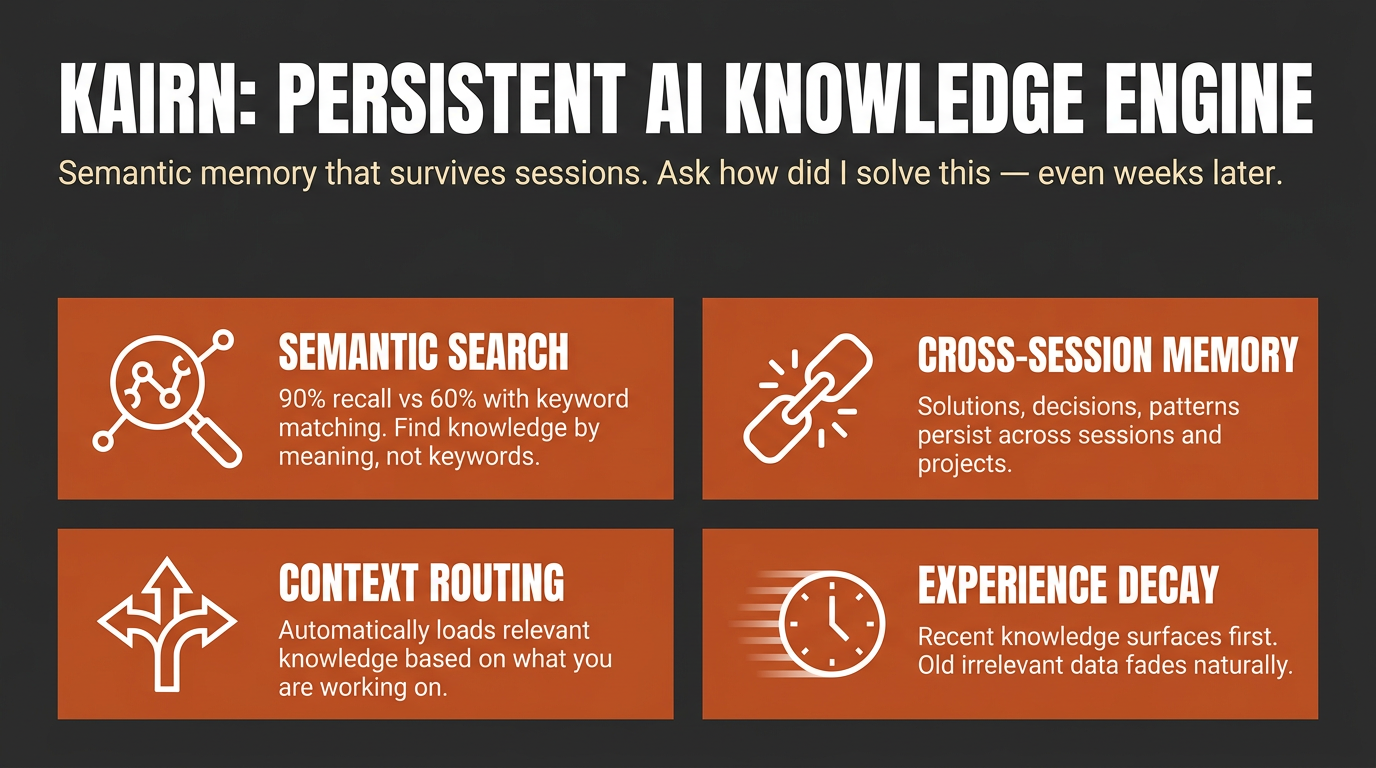
Context-aware knowledge engine for AI assistants.
Status: pre-1.0. In daily use since February 2026, with 722 tests (see Development) and a published LongMemEval-S benchmark. Interfaces may still change between releases until 1.0. Feedback and issues welcome.
Other tools give your AI a memory. Kairn gives it a knowledge graph with intelligent context routing. It knows what to load, when to load it, and how much - so your AI stays focused, not overwhelmed.
pip install kairn-ai
kairn init ~/brain
kairn serve ~/brain
Add it to Claude Code in one line:
claude mcp add kairn -- kairn serve ~/brain
Or install it as a one-click bundle, no Python setup required: download the
.mcpb file from the latest release
and open it with a bundle-aware app such as Claude Desktop.
For other clients, see Quick Start below. New to Kairn? Jump to First 5 Minutes.
Install routes
| Route | Who it is for | Command |
|---|---|---|
| PyPI | anyone with Python, and every MCP client | pip install kairn-ai |
MCP Bundle (.mcpb) | Claude Desktop and other bundle-aware apps; no Python install needed | download from Releases and open it |
| Claude Code | one line, uses the PyPI install | claude mcp add kairn -- kairn serve ~/brain |
The bundle carries no Kairn source of its own. It declares kairn-ai as a
dependency and the host resolves it with uv, so a bundle install and a
pip install run identical code. Where the database lives is configurable when
you install the bundle; it defaults to ~/.kairn and never leaves your machine.
Why Kairn?
Every AI conversation starts from scratch. Previous insights, decisions, and patterns - gone. Existing memory tools store flat key-value pairs that can't represent relationships or surface the right context at the right time.
Kairn is different:
- Context Router + Progressive Disclosure - Automatically loads relevant subgraphs based on keywords, starting with summaries and drilling into details only when needed. No other tool does this.
- Knowledge Graph with FTS5 - Not flat storage. Typed relationships (
depends-on,resolves,causes) between nodes with provenance tracking and full-text search across everything. - Experience Decay + Auto-Promotion - Experiences lose relevance over time (biological decay model). Frequently-accessed experiences auto-promote to permanent knowledge. Your AI naturally forgets what doesn't matter.
- 22 MCP Tools - Works with Claude Desktop, Cursor, VS Code, Windsurf, and any MCP client. Includes
kn_judgefor 5-verb relationship judgments andkn_doctorfor read-only health diagnostics. - Per-Workspace Isolation - Each workspace is its own isolated SQLite store. JWT auth and role-based access control (owner / maintainer / contributor / reader) ship for team deployments.
Quick Start
Claude Desktop
Add to ~/Library/Application Support/Claude/claude_desktop_config.json:
{
  "mcpServers": {
    "kairn": {
      "command": "kairn",
      "args": ["serve", "~/brain"]
    }
  }
}
Cursor
Add to .cursor/mcp.json:
{
  "mcpServers": {
    "kairn": {
      "command": "kairn",
      "args": ["serve", "~/brain"],
      "env": {
        "KAIRN_LOG_LEVEL": "WARNING"
      }
    }
  }
}
VS Code
Add to .vscode/mcp.json:
{
  "servers": {
    "kairn": {
      "type": "stdio",
      "command": "kairn",
      "args": ["serve", "~/brain"]
    }
  }
}
Windsurf
Add to ~/.codeium/windsurf/mcp_config.json:
{
  "mcpServers": {
    "kairn": {
      "command": "kairn",
      "args": ["serve", "~/brain"]
    }
  }
}
Restart your editor. Kairn's 22 tools appear in the MCP section.
First 5 Minutes
A guided first run, end to end:
pip install kairn-ai
kairn init ~/brain              # creates the workspace + database
Add the one-liner from above (or your client's Quick Start snippet), then restart the client. Once connected, ask your assistant to remember something:
"Remember that we chose Postgres over SQLite for the analytics service because we needed concurrent writers."
That calls kn_learn under the hood and returns a JSON envelope like this (captured from a real run, via kairn learn, the CLI mirror of the tool):
{"_v": "1.0", "stored_as": "node", "node_id": "002d9c22", "experience_id": "d0710c2f", "type": "decision", "confidence": "high", "namespace": "knowledge", "candidates": []}
Start a new session and ask it to recall the same thing - that calls kn_recall and surfaces what you just stored, no re-explaining required:
{"_v": "1.0", "count": 2, "results": [
  {"source": "node", "id": "002d9c22", "name": "Decision: we chose Postgres over SQLite for the analytics service beca", "type": "learned_decision", "description": "we chose Postgres over SQLite for the analytics service because we needed concurrent writers", "relevance": 1.0, "relevance_kind": "match"},
  {"source": "experience", "id": "d0710c2f", "type": "decision", "content": "we chose Postgres over SQLite for the analytics service because we needed concurrent writers", "confidence": "high", "relevance": 1.0, "relevance_kind": "recency"}
]}
kn_learn stored both a permanent graph node and a decaying experience (high confidence does both, see Confidence routing); kn_recall found both from a three-word topic.
Read relevance_kind before you read relevance. Both rows above show 1.0 and they do not mean the same thing. match is lexical match strength (bm25); the experience's recency is time-decay - it is 1.0 because the row was created seconds ago, not because it matched well. A third value, similarity, is embedding cosine on the semantic-recall path, and unscored marks a row the surface had no ranking for and filled in with a constant. The numbers are not comparable across kinds, so do not sort a mixed result set on relevance alone. Same caution for min_relevance on kn_recall: it gates nodes on match strength and experiences on recency, one number against two scales. On kn_memories and kn_prune, which see experiences only, it is recency - and on kn_prune it deletes.
Run kairn status ~/brain any time as a smoke test - if it prints a JSON stats block (nodes/edges/experiences counts), the workspace is healthy. Want a scripted tour of every core feature instead of doing it by hand? Run kairn demo ~/brain - it walks through node creation, querying, experience saving, learning, recall, and context in about 30 seconds.
Which tool when
22 tools is a lot to hold in your head on day one. Most sessions only need these:
| You want to... | Use | Why |
|---|---|---|
| Remember something new (a decision, gotcha, pattern, solution) | kn_learn | Default entry point - auto-routes to a permanent node (high confidence) or a decaying experience (medium/low), no need to decide yourself |
| Capture a stated user preference the moment it is expressed | kn_preference | Dedicated preference write path - you (the calling model) state the preference as one explicit sentence; stored with the longest half-life of any type |
| Add a permanent named concept you already know is durable | kn_add | Skips decay entirely - for structural knowledge, not day-to-day experience |
| Log a one-off experience with explicit confidence/decay control | kn_save | Lower-level primitive kn_learn wraps - reach for it when you want to set confidence/decay yourself |
| Search the permanent knowledge graph by text, type, tags, or namespace | kn_query | You're looking for nodes, not decaying experiences |
| Search saved experiences, ranked by relevance and decay | kn_memories | You're looking for experience content (solutions, gotchas, workarounds), not graph nodes |
| Surface everything relevant to a topic in one call | kn_recall (flat list) or kn_context (subgraph, progressive disclosure: summary first, full detail on demand) | You don't know yet whether the answer is a node or an experience - let Kairn search both |
Everything else (kn_crossref, kn_related, kn_connect, kn_judge, kn_project/kn_projects/kn_log, kn_idea/kn_ideas, kn_promote_pending, kn_prune, kn_remove, kn_status, kn_doctor) is advanced usage - see the full 22 Tools reference below once you're past the basics.
22 Tools (kn_ prefix)
All tools follow MCP protocol with JSON responses.
Graph (6)
| Tool | Description |
|---|---|
kn_add | Add node to knowledge graph |
kn_connect | Create typed edge between nodes (lax-mode vocabulary) |
kn_judge | Record 5-verb judgment edge (strict mode: conflicts_with / supersedes / compatible / scoped / related) |
kn_query | Search by text, type, tags, namespace |
kn_remove | Soft-delete node or edge (undo-safe) |
kn_status | Graph stats, health, system overview |
Project Memory (3)
| Tool | Description |
|---|---|
kn_project | Create or update project |
kn_projects | List projects, switch active |
kn_log | Log progress or failure entry |
Experience Memory (5)
| Tool | Description |
|---|---|
kn_save | Save experience with decay |
kn_preference | Capture a stated user preference at utterance time (longest half-life) |
kn_memories | Decay-aware experience search |
kn_prune | Remove expired experiences |
kn_promote_pending | Promote high-access experiences to permanent nodes |
Ideas (2)
| Tool | Description |
|---|---|
kn_idea | Create or update idea |
kn_ideas | List/filter ideas by status, category |
Intelligence (5)
| Tool | Description |
|---|---|
kn_learn | Store knowledge with confidence routing |
kn_recall | Surface relevant past knowledge |
kn_crossref | Find similar past solutions in the current workspace |
kn_context | Keywords → relevant subgraph with progressive disclosure |
kn_related | Graph traversal (BFS) to find connected nodes |
Diagnostic (1)
| Tool | Description |
|---|---|
kn_doctor | Read-only health checks (lock mode, FTS5 parity, promotion backlog, namespace sprawl, orphan edges) - returns structured envelope with per-check verdicts and roll-up summary |
Resources & Prompts
Resources (read-only context for MCP clients):
kn://status- Graph overview, active projectkn://projects- All projects with recent progresskn://memories- Recent high-relevance experiences
Prompts (session management):
kn_bootup- Load active project, recent progress, and top memories (session start)kn_review- Summarize session and suggest next steps (session end)
How It Works
Architecture
Any MCP Client (Claude, Cursor, VS Code)
        │
        ▼ MCP Protocol (stdio)
FastMCP Server (22 tools)
        │
   ┌────┼────┐
   ▼    ▼    ▼
Graph  Memory  Intelligence
Engine Engine  Layer
   │    │      │
   └────┼──────┘
        ▼
   SQLite + FTS5
   (per-workspace)
Decay Model
Experiences decrease in relevance exponentially:
relevance(t) = initial_score × e^(-decay_rate × days)
| Type | Half-life | Notes |
|---|---|---|
| solution | 120 days | Stable, durable |
| pattern | 90 days | Architectural knowledge |
| decision | 100 days | Context-dependent |
| workaround | 40 days | Temporary fixes fade fast |
| gotcha | 70 days | Tricky pitfalls stay relevant |
| preference | 180 days | Durable user preferences - initial estimate, not yet tail-calibrated |
Half-lives are calibrated against the real access tail of a production experience store, not guessed (one exception: preference is a new type with no access history yet, so its value is a documented initial estimate until real data accumulates).
Confidence routing via kn_learn:
high→ Permanent node + experience (no decay)medium→ Experience with 2× decaylow→ Experience with 4× decay- Auto-promotion: 5+ accesses → permanent node
- Node access tracking:
kn_recall,kn_context, andkn_crossreflog which nodes were accessed, feeding the decay and promotion pipeline
Benchmarks
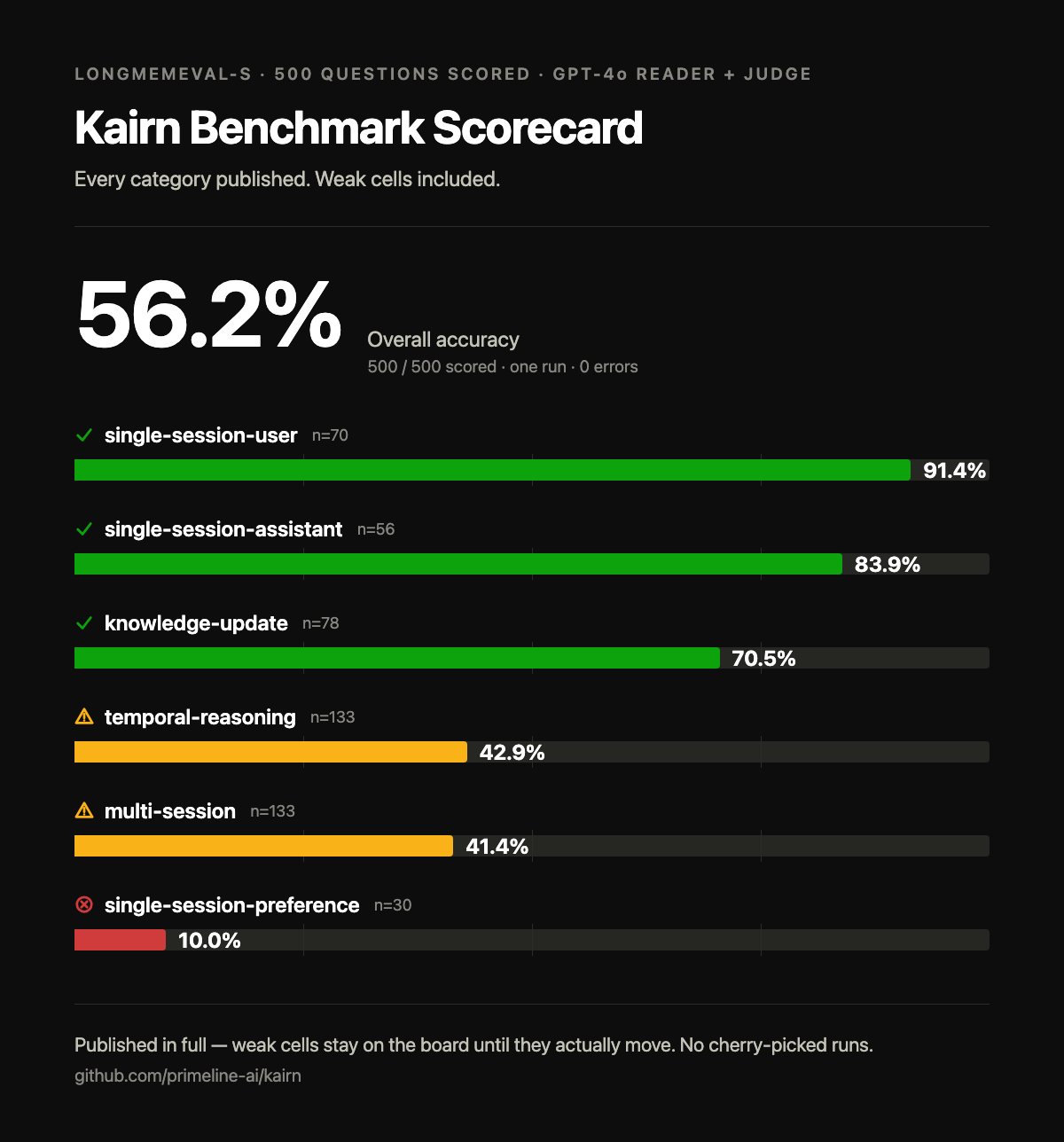
Kairn scores 56.2% overall on LongMemEval-S (500/500 questions scored, GPT-4o reader + judge, single run, 0 errors). These are the real per-category numbers, including the bad ones - each red cell links to its diagnosis:
| Category | n | Accuracy | Diagnosis |
|---|---|---|---|
| single-session-user | 70 | 91.4% | - |
| single-session-assistant | 56 | 83.9% | - |
| knowledge-update | 78 | 70.5% | - |
| temporal-reasoning | 133 | 42.9% | why |
| multi-session | 133 | 41.4% | why |
| single-session-preference | 30 | 10.0% | why |
The 500 questions include 30 abstention variants (the right answer is to decline); they are counted inside their categories above and scored separately: Kairn declines correctly on 96.7% of them.
Recall latency is ~1.4 ms per query (FTS5, in-process, no network). Protocol, honesty notes, and reproduction steps: BENCHMARKS.md.
This scorecard stays current: every release that touches recall re-publishes these numbers, and a weak cell stays on the board until the number actually moves. No cherry-picked runs, no hidden categories.
CLI
kairn init <path>              # Initialize workspace
kairn serve <path>             # Start MCP server (stdio)
kairn status <path>            # Graph stats
kairn demo <path>              # Interactive tutorial
kairn benchmark <path>         # Local performance benchmarks (latency, not LongMemEval)
kairn token-audit <path>       # Audit tool token usage
kairn import git <path> <repo>...  # Import git commit history (zero-LLM, offline)
kairn import claude-code <path>    # Import Claude Code session history (zero-LLM, offline)
Importing your history
kairn import git <workspace> <repo>... backfills a Kairn store from one or
more local git repositories at $0 - no LLM calls, no network calls. Conventional-commit
prefixes map to experience types (fix: -> solution, feat:/refactor:/perf: -> pattern,
everything else -> decision); merge commits are skipped. Imported experiences land in a
dedicated imported-git namespace, separate from your organic knowledge, so they're always
distinguishable and a bad import is fully reversible.
kairn import git ~/brain ~/code/my-project --dry-run   # Preview first
kairn import git ~/brain ~/code/my-project              # Then import for real
kairn import git ~/brain ~/code/proj-a ~/code/proj-b --since 2026-01-01
Idempotent - re-running only imports commits that weren't already imported, so it's safe to run again as a repo's history grows.
Claude Code transcripts
kairn import claude-code <workspace> backfills your Kairn store from your existing
Claude Code session history, also at $0 and fully offline. With no --root given it scans
~/.claude/projects (and ~/.claude-secondary/projects if you have a second account);
--root PATH is a repeatable override. Imported experiences land in their own
imported-claude-code namespace, so they stay distinct from your organic knowledge and a
bad import is reversible.
kairn import claude-code ~/brain --dry-run              # Review exactly what would be stored
kairn import claude-code ~/brain                        # Import (prompts once before writing)
kairn import claude-code ~/brain --root ~/other/projects --since 2026-01-01 --yes
What gets stored (coarse mode): one experience per session - the session's title plus
your first prompt of that session. This is deliberately a low-detail, high-precision summary
rather than a fine-grained per-decision extraction: a zero-LLM rule-based extractor cannot
reliably tell a captured decision from ordinary planning chatter, so import claude-code
imports a clean session-level pointer instead of noisy fragments. It is not a full transcript
archive, and it is not a one-time migration - it is idempotent and meant to be re-run as your
history grows.
Privacy. Every stored string is passed through a deterministic secret redactor first
(API keys, Authorization/Bearer headers, password=/token=/secret= assignments,
common vendor key shapes, private-key blocks, URL-embedded credentials). Tool outputs and
tool-call blocks are never read, only your own prompt text. The redactor is defense in depth,
not the only control: a real (non-dry-run) run is gated behind an explicit confirmation, and
--dry-run shows you the exact post-redaction text before anything is written. Redaction is
bounded by its rule set, so --dry-run review before a first real import is recommended;
nothing ever leaves your machine.
Configuration
KAIRN_LOG_LEVEL=INFO|DEBUG|WARNING    # Default: WARNING
KAIRN_DB_PATH=~/brain/.kairn         # Default: {workspace}/.kairn
KAIRN_CACHE_SIZE=100                  # LRU cache entries
KAIRN_JWT_SECRET=<your-secret>        # Required for team features
Development
git clone https://github.com/primeline-ai/kairn
cd kairn
pip install -e ".[dev,team]"
pytest tests/ -v --cov
ruff check src/ && ruff format src/
Project Structure
src/kairn/
├── server.py              # FastMCP server + 22 tools
├── cli.py                 # CLI commands
├── config.py              # Configuration
├── core/
│   ├── graph.py           # GraphEngine (6 tools)
│   ├── memory.py          # ProjectMemory (3 tools)
│   ├── experience.py      # ExperienceEngine (4 tools)
│   ├── ideas.py           # IdeaEngine (2 tools)
│   ├── intelligence.py    # IntelligenceLayer (5 tools)
│   └── router.py          # ContextRouter
├── storage/
│   ├── base.py            # Storage interface
│   └── sqlite_store.py    # SQLite + FTS5 implementation
├── models/                # Data models
├── events/                # Event bus
└── auth/                  # JWT + RBAC (team feature)
Performance
Measure it yourself rather than trusting this table:
kairn benchmark ~/brain --nodes 100
One run of that command, 100 nodes, on an Apple M4 Pro:
| Operation | Measured |
|---|---|
| Insert | 0.7ms per node (1,479 ops/sec) |
| FTS5 query | 0.2ms (5,552 ops/sec) |
| Graph traversal | 6.0ms (166 ops/sec) |
Single run on one machine, so treat it as a shape rather than a spec - which is
why the command is above the table. kn_connect and kn_crossref used to
appear here with figures the benchmark does not produce; they have been removed
rather than estimated.
Used By
| Project | What It Uses Kairn For |
|---|---|
| Quantum Lens | Persistent insight storage, cross-analysis pattern tracking, lens effectiveness metrics |
| Claude Code Starter System | Session memory, project state, learning persistence |
License
MIT
Part of the PrimeLine Ecosystem
| Tool | What It Does | Deep Dive |
|---|---|---|
| Evolving Lite | Self-improving Claude Code plugin - memory, delegation, self-correction | Blog |
| Kairn | Persistent knowledge graph with context routing for AI | Blog |
| tmux Orchestration | Parallel Claude Code sessions with heartbeat monitoring | Blog |
| UPF | 3-stage planning with adversarial hardening | Blog |
| Quantum Lens | 7 cognitive lenses for multi-perspective analysis | Blog |
| PrimeLine Skills | 5 production-grade workflow skills for Claude Code | Blog |
| Starter System | Lightweight session memory and handoffs | Blog |