
ProdPoke MCP Server
A QA tester inside your AI. Chat with ProdPoke from Claude, Cursor, or any MCP client. It launches real Playwright browsers, finds real bugs, and remembers what you talked about across turns.



Hosted, not installed. Just paste a config into your MCP client and go.
Landing page · Get an API key · Pricing · ProdPoke
What it does
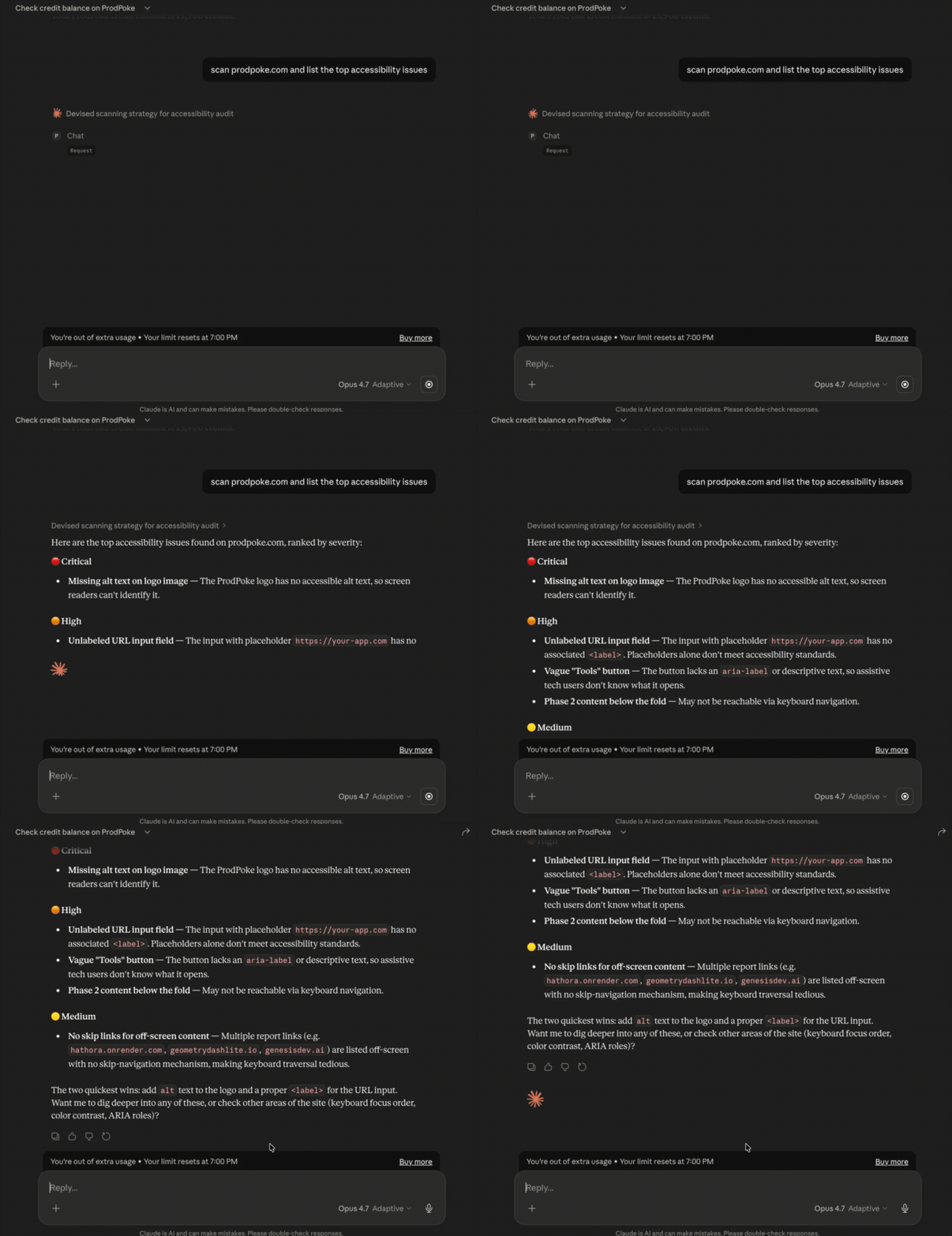
ProdPoke is a remote, stateful MCP server that runs real-browser QA for any website. You describe what you want in plain English; ProdPoke spins up a headless Playwright session, navigates the site, and streams back structured findings — accessibility, SEO, performance, user-flow bugs, visual regressions, broken CTAs, and more.
Unlike local tools, everything runs on ProdPoke infrastructure. No Chromium to install, no browser containers to manage, no cleanup.
Available tools
| Tool | Description | Parameters |
|---|---|---|
chat | Talk to ProdPoke like a QA tester — scan a URL, test a flow, investigate findings, set session preferences. Stateful via session_id. | message (required), session_id (optional) |
get_credit_balance | Check your remaining scan credits. | — |
Example chat response
{
  "session_id": "a1b2c3d4-...",
  "response": "Found 3 issues on https://example.com...",
  "findings": [
    {
      "severity": "high",
      "category": "accessibility",
      "title": "Missing alt text on 4 images",
      "description": "Images in the hero section lack alt attributes..."
    },
    {
      "severity": "medium",
      "category": "seo",
      "title": "Missing meta description",
      "description": "The page has no meta description tag..."
    }
  ],
  "session_context": {
    "url_being_tested": "https://example.com",
    "message_count": 2,
    "has_findings": true
  }
}
Setup
1. Get your API key
- Sign up for a ProdPoke account — the free tier includes 500 credits, enough for a first scan.
- Go to Settings → API Keys.
- Click Create new key and copy it immediately (it's shown once; you can't recover it later, but you can revoke and re-mint).
Keys look like pp_ followed by 64 hex characters.
2. Paste the config into your MCP client
Claude Desktop / Cursor / Claude Code (streamable HTTP — recommended)
{
  "mcpServers": {
    "prodpoke": {
      "type": "streamable-http",
      "url": "https://prodpoke.com/v1/mcp",
      "headers": {
        "Authorization": "Bearer pp_YOUR_KEY_HERE"
      }
    }
  }
}
Config file locations:
- Claude Desktop (macOS):
~/Library/Application Support/Claude/claude_desktop_config.json - Claude Desktop (Windows):
%APPDATA%\Claude\claude_desktop_config.json - Claude Code:
.mcp.jsonin your project root - Cursor: Settings → MCP Servers
Fully restart the client after editing.
Clients that only support stdio (via mcp-remote bridge)
{
  "mcpServers": {
    "prodpoke": {
      "command": "npx",
      "args": [
        "mcp-remote",
        "https://prodpoke.com/v1/mcp",
        "--header",
        "Authorization: Bearer ${PRODPOKE_API_KEY}"
      ],
      "env": {
        "PRODPOKE_API_KEY": "pp_YOUR_KEY_HERE"
      }
    }
  }
}
Uses mcp-remote to proxy stdio ↔ streamable HTTP.
3. Start chatting
Try any of these:
- "Scan https://mysite.com and tell me what's broken"
- "Run an accessibility audit on https://example.com"
- "Test the signup flow on https://app.example.com — fill the form and check the confirmation page"
- "What bugs have you found on mysite.com?"
- "Scan https://competitor.com and compare their SEO headers to ours"
- "Check my ProdPoke credit balance"
Multi-step sessions
The chat tool is stateful. Each response includes a session_id; pass it back to continue
the conversation with full context:
chat("Scan https://mysite.com")— starts a session, runs the scan, returnssession_id+ findings.chat("Dig deeper into the accessibility issues", session_id="...")— builds on the prior scan.chat("Now test the checkout flow", session_id="...")— runs a targeted test, knows about the earlier findings.chat("What should I fix first?", session_id="...")— answers from the accumulated session context.
Sessions persist across MCP client restarts for the lifetime of the key.
How it works
Your MCP client  ──Authorization: Bearer pp_...──▶  https://prodpoke.com/v1/mcp
                                                       │
                                                       ▼
                                           Orchestrator classifies intent
                                                       │
                                                       ▼
                                           Playwright worker on ProdPoke
                                            infrastructure runs the scan
                                                       │
                                                       ▼
                                          Findings streamed back as a
                                               structured `chat` response
Nothing is installed on your machine. Scans run on our servers. You pay per scan in credits (see below).
Pricing
| Plan | Credits | Price |
|---|---|---|
| Free tier | 500 credits | $0 |
| Watch | 10,000 / month | $15 / month |
| Watch Pro | 50,000 / month | $49 / month |
| Top-up packs | 1,000 – 50,000 | From $3 |
A standard scan costs roughly 10 credits. Deeper workflows — full user-flow tests, competitor comparisons — run 400–500 credits. See full pricing →
The error message when you're out of credits is explicit: "Insufficient credits. You need N but have M.", so your AI client can surface it clearly.
Troubleshooting
401 Missing Authorization header— your client didn't send theAuthorizationheader. Double-check the config (the key goes inheaders, notenv, for streamable HTTP).401 Invalid or revoked API key— the key was revoked or typed incorrectly. Re-mint at /app/settings/keys.- The tool responds but never runs a scan — ask it to scan a specific URL. ProdPoke needs a URL to launch a browser; it won't guess.
- Scan hangs for >2 minutes — the MCP call times out at 120 seconds per step. Long
flows should be split into multiple
chatturns usingsession_id.
Links
License
MIT — see LICENSE.