bilig
Run workbook rules from Node, with formula readback you can verify.
Bilig is for workbook logic that has to run from code. If your service or agent
should own the workbook model, start with @bilig/workpaper: edit cells,
recalculate formulas, read outputs, and persist JSON. If an existing .xlsx
file is still the contract, use the XLSX tools to find stale cached formula
values and refresh readback.
Start with the boundary you actually have. Do not drive Excel, LibreOffice, Google Sheets, or a screenshot UI just to learn whether a formula value is fresh.
Run the no-clone checks:
npm exec --yes --package @bilig/xlsx-formula-recalc@latest -- bilig-evaluate --door workbook-compatibility --json
npm exec --yes --package @bilig/workpaper@latest -- bilig-evaluate --door workpaper-service --json
npm exec --yes --package @bilig/workpaper@latest -- bilig-evaluate --door agent-mcp --json
npm exec --yes --package @bilig/xlsx-formula-recalc@latest -- bilig-evaluate --door xlsx-cache --json
Evaluate a real workbook before integrating it:
npm exec --yes --package @bilig/xlsx-formula-recalc@latest -- workbook-compatibility-report workbook.xlsx --json
The report lists unsupported functions, external links, VBA payloads, pivots, volatile formulas, stale cached formulas, and concrete risk reasons. It is not an Excel compatibility certification and does not print a compatibility score.
Expected WorkPaper service result:
{
"schemaVersion": "bilig-evaluator.v1",
"door": "workpaper-service",
"verified": true,
"evidence": {
"editedCell": "Inputs!B2",
"dependentCell": "Summary!B2",
"before": 24000,
"after": 38400,
"afterRestore": 38400,
"persistedDocumentBytes": 999
}
}
Need the full formula-cache report for a real workbook?
npm exec --package @bilig/xlsx-formula-recalc@latest -- xlsx-cache-doctor pricing.xlsx --json
npm exec --package @bilig/xlsx-formula-recalc@latest -- xlsx-recalc pricing.xlsx --read Summary!B2 --out pricing.recalculated.xlsx --json
For pull requests with XLSX fixtures, start with the GitHub Action in report mode and let it show stale cached formulas before it blocks anything:
- uses: actions/setup-node@v6
with:
node-version: '22'
package-manager-cache: false
- uses: proompteng/bilig@v1
with:
workbooks: '**/*.xlsx'
changed-files-only: 'true'
package-version: '0.164.1'
fail-on-stale: 'false'
For TypeScript services that should own the workbook model:
npm create @bilig/workpaper@latest pricing-agent -- --agent
cd pricing-agent
npm install
npm run agent:verify
For lower-level runtime imports:
npm install @bilig/headless
Direct diagnostic commands remain available:
npm exec --yes --package @bilig/workpaper@latest -- bilig-agent-challenge --json
npm exec --yes --package @bilig/workpaper@latest -- bilig-mcp-challenge --json
Evaluator examples live in
examples/bilig-evaluator-proof.
Agent and framework evaluators are ranked in the
Agent WorkPaper proof matrix.
The agent proof transcripts show the
successful prompt, tool call, workbook state change, formula readback, JSON
export, and restart verification shape.
The XLSX Cache Doctor proof transcript
shows the stale cached formula value, recalculated value, exact cell address,
and suggested read target before a service or CI job trusts a saved workbook.
The Workbook Compatibility Report
shows the local risk report for an actual .xlsx before a Node service or
coding agent trusts Bilig with it.
Use the coding agent rule chooser when you need
the exact instruction, rule, prompt, or MCP config file for Codex, Claude Code,
GitHub Copilot, VS Code, Cursor, Kiro, Roo Code, Trae, Qodo IDE, Zed, Junie, OpenHands, OpenCode, Aider,
Goose, Windsurf/Cascade, Cline, Continue, or Gemini CLI.
Project site: https://proompteng.github.io/bilig/
Start Here
Pick the path that matches the job:
| You have... | Start with | You should see |
|---|---|---|
| You are not sure whether XLSX, SheetJS, ExcelJS, xlsx-populate, CI, WorkPaper, or an agent owns the fix | Stale formula readback chooser | the smallest proof command for the boundary, plus when not to use it. |
| You need to know whether a specific workbook has Bilig integration risks | Workbook Compatibility Report | unsupported functions, external links, macros, pivots, volatile formulas, cache risks, and no compatibility score. |
A coding agent already has a real .xlsx and needs MCP before edits | Agent XLSX risk preflight | analyze_workbook_risk, Inputs!B3, Summary!B3, 60000 -> 96000, export, and verified: true. |
A real .xlsx file has stale formula results after Node edits | XLSX Cache Doctor evaluator | stale cells, cached values, recalculated values, suggested reads, and JSON output. |
| You need to see the exact stale-cache output before adopting | XLSX Cache Doctor proof transcript | Summary!B2 and Sheet1!B61 cached-vs-recalculated proof, plus CI boundary. |
| Pull requests can commit XLSX fixtures with stale cached values | XLSX Cache Doctor GitHub Action | report-only workbook findings before the workflow blocks anything. |
| A Node service, route, queue, test, or tool needs workbook logic | Node service WorkPaper evaluator | input edit, recalculated output, serialized JSON, restore check, and verified: true. |
| A coding agent or MCP client needs workbook tools without UI automation | Agent MCP evaluator | tool discovery, cell edit, formula readback, export, restart check, and verified: true. |
| A coding agent needs the right repo rule or MCP config file | Coding agent rule chooser | the exact Bilig file for Codex, Claude Code, Copilot, VS Code, Cursor, Kiro, Roo Code, Trae, Qodo IDE, Zed, Junie, OpenHands, OpenCode, Aider, Goose, Windsurf, Cline, Continue, or Gemini. |
| You are comparing Excel MCP servers, hosted spreadsheet agents, or file-first XLSX tools | Spreadsheet MCP server comparison | the account/session/file/runtime boundary before an agent trusts formula readback. |
| You need to choose among agent, MCP, AI SDK, OpenAI, LangGraph, Semantic Kernel, or XLSX proof | Agent WorkPaper proof matrix | the smallest command or example for the host boundary, plus what it does and does not prove. |
| You need to see a successful agent session shape before adopting | Agent proof transcripts | prompt, tool call, result, workbook state change, formula readback, JSON export, and restart verification. |
| Existing XLSX outputs need refreshed cached results | XLSX recalculation evaluator | changed input, recalculated output, output workbook, and recalculationCompleted: true. |
If you are not sure which one fits, start with the thing that owns state. Use WorkPaper when your service or agent should own the workbook model. Use the XLSX path when a saved Excel file is still the source of truth.
The shortest no-project checks are:
npm exec --yes --package @bilig/workpaper@latest -- bilig-evaluate --door workpaper-service --json
npm exec --yes --package @bilig/workpaper@latest -- bilig-evaluate --door agent-mcp --json
npm exec --yes --package @bilig/xlsx-formula-recalc@latest -- bilig-evaluate --door workbook-compatibility --json
npm exec --yes --package @bilig/xlsx-formula-recalc@latest -- bilig-evaluate --door xlsx-cache --json
npm exec --package @bilig/xlsx-formula-recalc@latest -- xlsx-recalc --demo --json
Good fits: pricing, quote approval, payout checks, import validation, forecasts, CI fixtures, formula-backed workflow steps, and coding agents that need exact cell addresses plus readback. Bad fits: manual spreadsheet editing, Office macros, desktop Excel automation, or one-off arithmetic where a workbook would be ceremony.
The canonical XLSX guide is
Fix stale XLSX formula values in Node.js.
If you need to choose among XLSX, SheetJS, ExcelJS, xlsx-populate, CI,
WorkPaper, and agent proof paths, use the
stale formula readback chooser.
If you are answering a public SheetJS, ExcelJS, xlsx-populate, template, or CI
question, use the non-spam
XLSX formula support answers first.
For a direct before/after proof across SheetJS, xlsx-populate, and ExcelJS:
npm --prefix examples/recalc-bridge-workflows install
npm --prefix examples/recalc-bridge-workflows run smoke
For the GitHub Action listing and a live reviewer path:
- https://github.com/marketplace/actions/xlsx-cache-doctor
- https://github.com/proompteng/xlsx-cache-doctor-demo/pull/1
If You Only Try One Thing
Run the WorkPaper service proof first. It is the shortest proof that Bilig gives backend code a workbook object it can change, recalculate, read back, save, and restore without driving Excel, LibreOffice, Google Sheets, or a browser grid.
npm exec --yes --package @bilig/workpaper@latest -- bilig-evaluate --door workpaper-service --json
Expected shape:
{
"schemaVersion": "bilig-evaluator.v1",
"door": "workpaper-service",
"verified": true,
"evidence": {
"editedCell": "Inputs!B2",
"dependentCell": "Summary!B2",
"before": 24000,
"after": 38400,
"afterRestore": 38400,
"persistedDocumentBytes": 999
}
}
If an agent or MCP client owns the workflow, run the agent door:
npm exec --yes --package @bilig/workpaper@latest -- bilig-evaluate --door agent-mcp --json
If an existing XLSX file is still the contract, run the XLSX cache door:
npm exec --yes --package @bilig/xlsx-formula-recalc@latest -- bilig-evaluate --door xlsx-cache --json
Trust boundaries:
- Runs locally in Node or in your GitHub Actions runner; no hosted workbook upload is required.
- Does not claim Excel parity. Start with where Bilig is not Excel-compatible yet before using it for irreversible workflows.
- The XLSX cache doctor is diagnostic by default. It only blocks pull requests
when you opt into
fail-on-stale.
For linked workbooks, use the external workbook recalculation proof. For stale cached XLSX values, use Evaluate stale XLSX formula caches. For a copyable terminal transcript, use the XLSX Cache Doctor proof transcript. For a narrower recalculation evaluator, use Evaluate XLSX formula recalculation.
If you already have the real workbook but do not know which formulas to read yet, inspect it first without writing an output file:
npm exec --package @bilig/xlsx-formula-recalc@latest -- xlsx-cache-doctor pricing.xlsx --json
That checks every formula by default, reports any skipped formulas as
uninspectedFormulaCellCount, returns stale cached values, and suggests
--read targets so the next command can prove the cells your service actually
depends on.
If your service or test runner needs the same report without a subprocess, use the Node API:
import { readFile } from 'node:fs/promises'
import { inspectXlsxCache } from '@bilig/xlsx-formula-recalc'
const report = inspectXlsxCache(await readFile('pricing.xlsx'), {
fileName: 'pricing.xlsx',
})
if (report.staleCachedFormulaCount > 0) {
throw new Error(
report.formulas
.filter((formula) => formula.cacheStatus === 'stale')
.map((formula) => formula.target)
.join(', '),
)
}
To run that check in CI, install
XLSX Cache Doctor from GitHub Marketplace,
read the GitHub Action guide, or
copy the runnable example at
examples/xlsx-cache-doctor-ci.
The proof transcript shows the
same cached-vs-recalculated value shape in one page.
For a live reviewer path, inspect the
demo pull request:
it runs proompteng/bilig@v1, proves 60 formula cells were inspected, finds 1
stale cached formula value, and uploads the JSON report.
To generate the pull-request workflow instead of hand-writing YAML:
mkdir -p .github/workflows
npm exec --package @bilig/xlsx-formula-recalc@latest -- \
xlsx-cache-doctor --print-github-action "**/*.xlsx" \
> .github/workflows/xlsx-cache-doctor.yml
The generated workflow is read-only and report-only by default. Add
--fail-on-stale true when you want stale cached values to block pull requests,
or pass --inspect-limit, --json-output, or --markdown-output to match your
CI artifact policy. The Action uploads machine-readable JSON and a
human-readable Markdown report path, so reviewers can inspect the stale cells
without giving the detector write permissions.
If your pipeline is specifically SheetJS / xlsx, run the sibling proof with
the same shape:
npm exec --package @bilig/sheetjs-formula-recalc@latest -- sheetjs-recalc --demo --json
If the workbook is already in ExcelJS, keep that boundary and add
@bilig/exceljs-formula-recalc:
npm install exceljs @bilig/exceljs-formula-recalc
npm exec --package @bilig/exceljs-formula-recalc@latest -- exceljs-recalc --demo --json
For one checkout proof across SheetJS/xlsx, xlsx-populate, and ExcelJS:
npm --prefix examples/recalc-bridge-workflows install
npm --prefix examples/recalc-bridge-workflows run smoke
That bridge proof is the fastest way to check whether Bilig solves the stale formula-value problem without asking you to adopt WorkPaper state first.
Which Path Should I Install?
| Problem you have right now | Install or use | First proof |
|---|---|---|
| Pull requests can commit XLSX fixtures with stale formula caches | uses: proompteng/bilig@v1 | XLSX Cache Doctor GitHub Action |
| Generic XLSX bytes changed in Node; formula outputs must refresh before returning | npm install @bilig/xlsx-formula-recalc | XLSX formula recalculation in Node.js |
| Formula workbook state belongs inside a Node service, route, queue, test, or tool | npm install @bilig/workpaper | Node service WorkPaper evaluator |
Advanced adapters are still available when the boundary is already specific:
SheetJS,
ExcelJS,
external workbooks,
agent tools,
@bilig/workbook when a runtime needs
transport-neutral plan data and command receipts, and
runtime provenance.
Agent And WorkPaper Proof
For agent adoption, use the
Agent Adoption Kit: install the skill, run the
no-key agent MCP evaluator, paste one workbook task into the agent, and require
verified: true before trusting the result.
For marketplace reviewers and agent hosts that want one copyable install file,
use llms-install.md.
Coding agent? Do not start by driving Excel, LibreOffice, Google Sheets, or a
browser grid. Use the headless WorkPaper proof instead:
npm exec --yes --package @bilig/workpaper@latest -- bilig-evaluate --door agent-mcp --json.
Then follow the agent MCP evaluator.
The published package also carries AGENTS.md and SKILL.md so coding agents
inspecting node_modules/@bilig/workpaper can find the write/read/persist loop
locally. Cloned checkouts expose the same workflow through
.mcp.json,
.claude/skills/bilig-workpaper/SKILL.md,
.claude/commands/bilig-workpaper-proof.md,
.cursor/mcp.json,
.cursor/rules/bilig-workpaper.mdc, .devin/rules/bilig-workpaper.md,
.windsurf/rules/bilig-workpaper.md, .clinerules/bilig-workpaper.md,
.continue/rules/bilig-workpaper.md,
.zed/settings.json,
opencode.jsonc, .opencode/agents/bilig-workpaper.md,
.vscode/mcp.json, and mcp/bilig-workpaper.mcp.json.
The public docs expose the same agent path through
docs/.well-known/agent.json.
npx --yes skills@latest add https://bilig.proompteng.ai --list
npx --yes skills@latest add proompteng/bilig --skill bilig-workpaper --list
npm exec --yes --package @bilig/workpaper@latest -- bilig-evaluate --door agent-mcp --json
Integration Recipes After The Proof
Run one core proof above before wiring a platform-specific integration. These recipes are for teams that already know where the workbook tool needs to live.
| Host or workflow runner | Use Bilig when... | Guide |
|---|---|---|
| Open WebUI | A local or hosted tool server should expose workbook reads, writes, and formula readback. | Open WebUI WorkPaper tool setup |
| LobeHub | A LobeHub agent needs a Custom MCP server for workbook tools. | LobeHub WorkPaper MCP setup |
| AnythingLLM | Agent Skills should call hosted MCP or a private file-backed stdio server. | AnythingLLM WorkPaper MCP setup |
| Sim | An Agent block or MCP Tool block should read, write, recalculate, and export proof. | Sim WorkPaper MCP setup |
| FastMCP Python | A Python client should smoke-test hosted MCP or launch a private file-backed stdio WorkPaper. | FastMCP WorkPaper client |
| Agno | MCPTools should import workbook tools and return verified formula readback before an agent trusts the result. | Agno WorkPaper MCP tools |
| Pydantic AI | MCPToolset should validate typed workbook proof before an agent trusts spreadsheet-style calculations. | Pydantic AI WorkPaper MCP tools |
| Google ADK | McpToolset should import workbook MCP tools and return verified formula readback before an ADK agent trusts the result. | Google ADK WorkPaper MCP tools |
| OpenHands | openhands mcp add should launch the file-backed WorkPaper server while .agents/skills teaches readback-first workbook edits. | OpenHands WorkPaper MCP setup |
| Trae | .trae/mcp.json should register the Project MCP server while .trae/rules/bilig-workpaper.md keeps workbook proof work readback-first. | Trae WorkPaper MCP setup |
| Qodo IDE | Qodo Agentic Tools should launch the local bilig-workpaper MCP server from pasted mcpServers JSON and keep proof tied to root AGENTS.md. | Qodo WorkPaper MCP setup |
| OpenCode | opencode.jsonc should register the local WorkPaper MCP server while .opencode/agents keeps workbook proof work readback-first. | OpenCode WorkPaper MCP setup |
| Zed | .zed/settings.json should register the project-local context_servers.bilig-workpaper server while AGENTS.md and the project skill keep workbook edits readback-first. | MCP client setup |
| Microsoft Agent Framework | MCPStdioTool or MCPStreamableHTTPTool should import workbook MCP tools and verify dependent formula readback before an agent trusts the result. | Microsoft Agent Framework WorkPaper MCP tools |
| Goose | A Goose recipe should launch the file-backed WorkPaper MCP server and require formula readback, export, restore, and verified: true. | Goose WorkPaper MCP recipe |
| Microsoft Semantic Kernel | MCPStdioPlugin should import workbook tools and verify dependent formula readback before an agent trusts plugin calls. | Semantic Kernel WorkPaper MCP plugin |
| OpenAI Agents SDK | tool(), MCPServerStdio, or MCPServerStreamableHttp should return computed WorkPaper readback before an agent trusts workbook math. | OpenAI Agents SDK WorkPaper tools |
| ChatGPT Apps / Developer Mode | A ChatGPT conversation should add Bilig as a no-auth remote MCP app before trying spreadsheet UI automation. | ChatGPT Apps WorkPaper MCP |
| Proof chooser | An agent or reviewer needs the smallest proof for WorkPaper service, MCP, AI SDK, OpenAI, LangGraph, Semantic Kernel, Mastra, ExcelJS, or XLSX. | Agent WorkPaper proof matrix |
| Hugging Face smolagents | A Tool should return structured formula readback proof to a CodeAgent. | smolagents WorkPaper tool |
| Hugging Face Gradio MCP Space | A Space template should expose one no-key WorkPaper readback tool before a team wires private workbook state. | Hugging Face Gradio MCP Space |
| n8n, Dify, Flowise, Pipedream | Workflow builders need formula readback without spreadsheet UI automation; use @bilig/n8n-nodes-workpaper, the upstream merged Dify plugin, or the reviewed Pipedream action. | n8n, Dify, Flowise, Pipedream |
| Vercel AI SDK | generateText() or streamText() tools need before/after/restore proof. | Vercel AI SDK WorkPaper tools |
| LangGraph.js / LangChain MCP | ToolNode state should carry WorkPaper proof, or MCP adapters should discover workbook tools. | LangGraph, LangChain MCP example |
| Windmill, Trigger.dev Durable Formula Tasks, Inngest | Durable workflow code should calculate fields from reviewable formulas. | Windmill, Trigger.dev, Inngest |
| Airbyte, Meltano | Post-sync or post-ELT validation should return formula-backed record/state proof. | Airbyte, Meltano |
| Temporal, Airflow, Dagster Formula Assets, Kestra, Prefect | Orchestrators should own retries/history while a Node step owns workbook proof. | Temporal, Airflow, Dagster, Kestra, Prefect |
| Directus Persisted Calculated Fields | A custom operation should persist calculated fields with formula proof. | Directus WorkPaper Flow operation |
Choose An Evaluation Path
| If you are evaluating... | Start here | What should be true before you adopt |
|---|---|---|
| Existing XLSX files | XLSX recalculation evaluator | A command edits inputs, reads recalculated values, writes XLSX, and returns recalculationCompleted: true. |
| Node service formulas | Node service WorkPaper evaluator | A starter writes one input, recalculates, persists JSON, restores, and prints verified: true. |
| Agent MCP contract | Agent MCP workbook evaluator | MCP tool discovery, input edit, formula readback, persistence, and restart proof all pass. |
| Agent proof chooser | Agent WorkPaper proof matrix, agent proof transcripts, MCP spreadsheet formula server, and Vercel AI SDK formula readback | The agent path starts with the smallest verified proof and avoids write-only or UI-only claims. |
| Agent intent/runtime adapters | Workbook agent intent API and workbook-agent-model example | A model prepares transport-neutral plan data, strict runtime proof, command receipts, and check evidence. |
| Basic fit | Why use Bilig? | The problem is workbook-shaped business logic that needs API readback and persistence. |
| Published npm package | 90-second Node quickstart | @bilig/workpaper edits one input, recalculates, persists JSON, restores, and prints verified: true. |
| XLSX or ExcelJS recalculation | XLSX formula recalculation and ExcelJS formula recalculation | The package updates inputs, reads recalculated values, and exports or mutates the workbook boundary. |
| Backend service shape | Quote approval WorkPaper API | A realistic route-style workflow returns formula readback and restoredMatchesAfter: true. |
| Agent or MCP tools | Headless WorkPaper agent handbook, MCP spreadsheet tool server, Gemini CLI extension, and Claude Desktop MCPB bundle | The agent installs a tool path, uses the handoff prompt, then proves write/readback/persist. |
| Agent XLSX risk preflight | Agent XLSX risk preflight | The MCP path starts with analyze_workbook_risk, then proves formula readback and WorkPaper export. |
| Agent-owned XLSX files | Agent XLSX recalculation without LibreOffice | A tool can edit XLSX inputs, recalculate, export, reimport, and return verified: true. |
| Public WorkPaper review | Show HN WorkPaper maintainer note | One shareable page has the npm check, benchmark caveat, known limits, and feedback ask. |
| Trust and performance | npm provenance and benchmark evidence | npm shows SLSA provenance, and benchmark claims match the checked artifact. |
| Almost a fit | adoption blocker form | Name the formula, import/export, persistence, framework, MCP, package, or benchmark gap. |
| Formula or XLSX bug | formula bug clinic and XLSX Cache Doctor proof transcript | First prove stale cached values locally, then share one reduced public case that can become a fixture. |
| Real workbook blocked | submit a workbook fixture | Use the structured form when a reduced workbook is ready. |
Reduced workbook already in hand? Start with the stale-cache diagnostic when a Node process changed cells but formula output stayed old:
npm exec --package @bilig/xlsx-formula-recalc@latest -- xlsx-cache-doctor ./reduced.xlsx --json
If the blocker is an import, formula, or persistence gap, generate the fixture report:
npm exec --package @bilig/workpaper@latest -- bilig-formula-clinic ./reduced.xlsx --cells "Summary!B7,Inputs!B2"
Handing a spreadsheet task to another coding agent? Start with the agent handoff prompt before opening Excel, LibreOffice, Google Sheets, or a screenshot UI. To prove the package-owned agent loop without cloning the repo or downloading a TypeScript file:
npm exec --yes --package @bilig/workpaper@latest -- bilig-evaluate --door workpaper-service --json
npm exec --yes --package @bilig/workpaper@latest -- bilig-evaluate --door agent-mcp --json
npm exec --package @bilig/workpaper@latest -- bilig-mcp-challenge --json
Agent tools that support skill manifests can start from
skill.md or the well-known index at
docs/.well-known/agent-skills/index.json.
Claude Code reads the project skill from
.claude/skills/bilig-workpaper/SKILL.md
when the repo is cloned locally, and can invoke the explicit proof prompt from
.claude/commands/bilig-workpaper-proof.md.
Cursor and Windsurf/Cascade read the same proof loop from
.cursor/rules/bilig-workpaper.mdc and
the Cascade rule mirrors at
.devin/rules/bilig-workpaper.md and
.windsurf/rules/bilig-workpaper.md.
Kiro reads the project steering file from
.kiro/steering/bilig-workpaper.md and the
project MCP server from .kiro/settings/mcp.json.
Roo Code reads the project rule from
.roo/rules/bilig-workpaper.md and the
project MCP server from .roo/mcp.json.
Trae reads the project rule from
.trae/rules/bilig-workpaper.md and the
Project MCP server from .trae/mcp.json.
Zed reads the project context server from
.zed/settings.json, then uses root
AGENTS.md and
.agents/skills/bilig-workpaper/SKILL.md
for the same WorkPaper proof loop.
Cline reads the workspace rule from
.clinerules/bilig-workpaper.md. Continue
reads the workspace rule from
.continue/rules/bilig-workpaper.md and
can launch direct WorkPaper tools from
.continue/mcpServers/bilig-workpaper.yaml.
Aider loads
CONVENTIONS.md through
.aider.conf.yml for the same WorkPaper proof loop.
GitHub Copilot and VS Code agent mode read the repository instructions, prompt,
and MCP servers from
.github/copilot-instructions.md,
.github/prompts/bilig-workpaper-proof.prompt.md,
and .vscode/mcp.json.
Gemini CLI users can install Bilig as an extension:
gemini extensions install https://github.com/proompteng/bilig --ref main
Claude Desktop users can also install the released MCPB bundle directly:
https://github.com/proompteng/bilig/releases/latest/download/bilig-workpaper.mcpb.
For another tool host, use the
agent workbook challenge: one input edit,
one dependent formula readback, one serialized restore, and a verified: true
object.
Try It In 90 Seconds
This uses the published npm package. It builds a workbook, changes one input, reads the calculated value, saves JSON, restores the workbook, and prints the same value again.
npm create @bilig/workpaper@latest pricing-workpaper
cd pricing-workpaper
npm install
npm run smoke
Expected output includes these fields:
{
"before": {
"summary": {
"decision": "review"
},
"inputCells": {
"units": "Inputs!B2",
"listPrice": "Inputs!B3"
}
},
"edit": {
"before": {
"decision": "review"
},
"after": {
"decision": "approved"
},
"restored": {
"decision": "approved"
},
"checks": {
"decisionChanged": true,
"formulasPersisted": true,
"restoredMatchesAfter": true,
"serializedBytes": 1242
}
},
"verified": true
}
The generated starter uses the same WorkPaper fields as the
public mirror at https://proompteng.github.io/bilig/npm-eval.ts and
examples/headless-workpaper/npm-eval.ts.
The exact byte count can change between package versions; verified: true,
decisionChanged, formulasPersisted, and restoredMatchesAfter are the
checks.
For a route-shaped quote approval API today, run the maintained example:
git clone --depth 1 https://github.com/proompteng/bilig.git
cd bilig
pnpm --dir examples/serverless-workpaper-api install --ignore-workspace
pnpm --dir examples/serverless-workpaper-api run smoke
For a generated project from a blank directory, run
npm create @bilig/workpaper@latest pricing-workpaper through the
@bilig/create-workpaper package. The package source lives in
packages/create-workpaper, and the publish gate
is documented in create a Bilig WorkPaper starter.
For an agent-ready project with AGENTS.md, CONVENTIONS.md,
.aider.conf.yml, CLAUDE.md, GEMINI.md,
Copilot / Cursor / Kiro / Roo Code / Trae / Zed / Junie / OpenHands / OpenCode / Aider / Cline / Continue / Windsurf rules, MCP client
configs, and an agent:verify script, run
npm create @bilig/workpaper@latest pricing-agent -- --agent.
For an existing repo, run
npm create @bilig/workpaper@latest . -- --add-agent; it adds Bilig agent and
MCP instructions without replacing your app template or editing package.json.
If an agent policy already exists, it writes BILIG_WORKPAPER_INSTALL.md with
the skipped paths and a short handoff block.
If that proof almost matches a service or agent workflow you maintain, the useful next step is concrete feedback: open or answer one adoption blocker in Discussions: formula coverage, stale XLSX cached values, persistence shape, MCP/agent writeback, or benchmark coverage.
TypeScript API Shape
Most integrations are just this: build a workbook, write an input, read the
calculated value, and save the workbook state. When a workflow writes more than
one input, use editManyAndReadback() so the edits are applied atomically and
the proof compares typed readback values, persisted restore output, and formula
diagnostics.
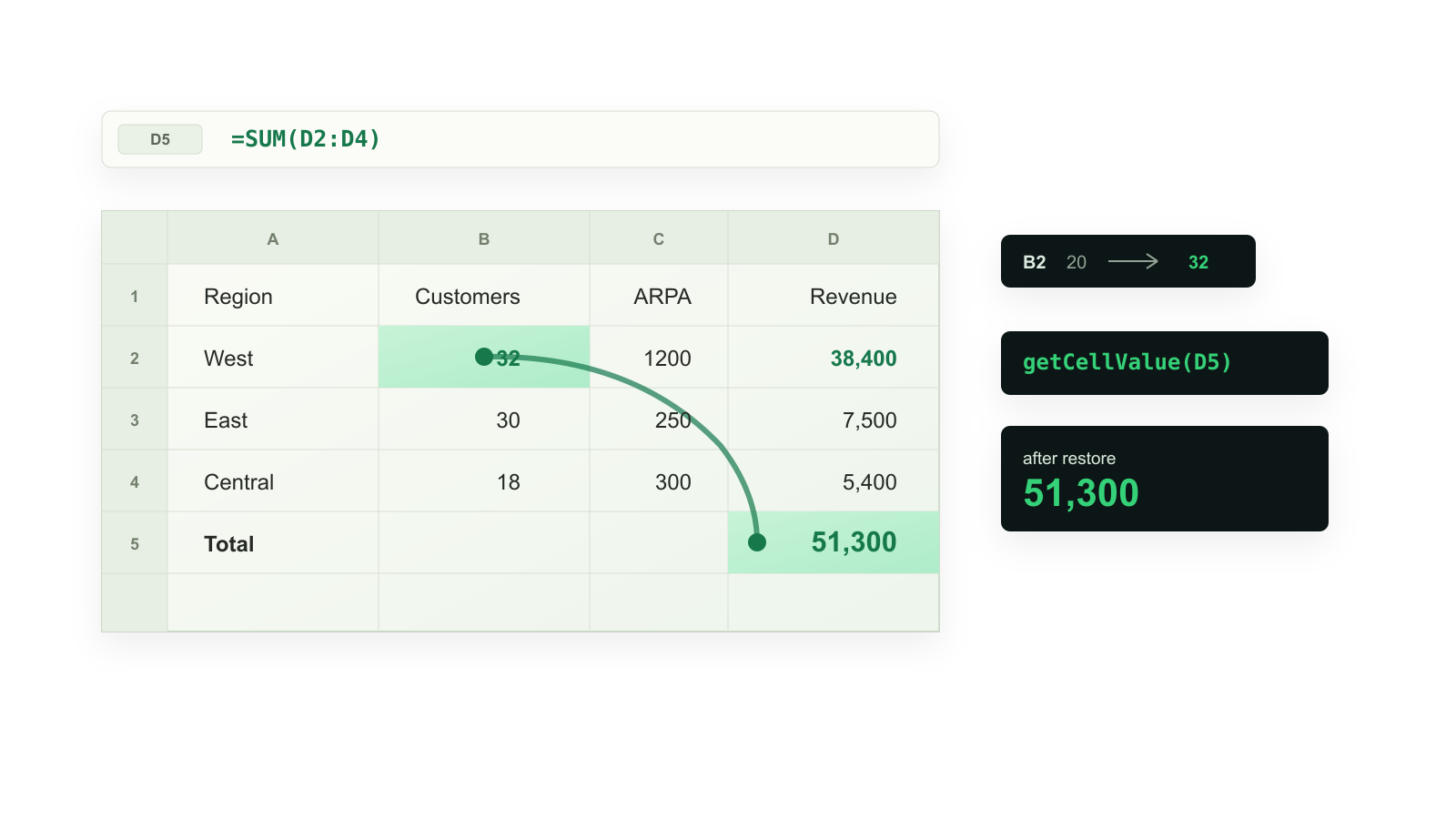
import { buildA1WorkPaper } from '@bilig/workpaper'
const book = buildA1WorkPaper({
Inputs: [
['Metric', 'Value'],
['Customers', 20],
['Average revenue', 1200],
],
Summary: [
['Metric', 'Value'],
['Revenue', '=Inputs!B2*Inputs!B3'],
],
})
const proof = book.editAndReadback('Inputs!B2', 32, {
readbackRange: 'Summary!B2',
})
console.log({
editedCell: proof.editedCell,
revenue: proof.afterReadback.displayValues[0]?.[0],
persistedDocumentBytes: proof.persistedDocumentBytes,
verified: proof.verified,
})
book.dispose()
The lower-level WorkPaper runtime is still exported for engine integrations,
but the A1 facade is the default service and agent path. Use
book.set(), book.setMany(), book.readMany(), book.display(), and
book.saveJson() when a full readback proof is not needed. Use
book.editManyAndReadback() when several inputs should be committed and proven
as one atomic workbook edit.
When To Reach For It
Use @bilig/workpaper when:
- a Node service owns a workbook-shaped calculation;
- an agent needs tools such as
readRangeandsetInputCell, with computed before/after values instead of screenshots; - tests need deterministic spreadsheet state and formula readback;
- a workflow needs to save the edited workbook as JSON and restore it later.
Use something else when you need a visual spreadsheet grid, Office macros, desktop Excel automation, or a one-off arithmetic helper. Do not treat embedded XLSX cached formula values as truth; use the Excel oracle workflow when accuracy matters.
Package Boundary
Current checked npm footprint for @bilig/headless@0.164.1:
- Pack dry run:
860 kBtarball,5.24 MBunpacked,835package entries. - Boundary: the main import is the WorkPaper formula/JSON runtime; XLSX
import/export stays behind the
@bilig/headless/xlsxsubpath; MCP is thebilig-workpaper-mcpbinary wrapper; reduced workbook reports use thebilig-formula-clinicbinary. - Cold-start gate: Node imports the main entrypoint, builds a two-sheet
WorkPaper, and reads
24000under1000 mswithout importing the XLSX subpath. - Runtime: Node
>=22.0.0; Node 22 compatibility is covered by the runtime package workflow.
Published Package Trust
@bilig/headless is published with npm registry signatures and SLSA provenance
attestations. Verify the package version you are about to adopt:
npm view @bilig/headless version dist.attestations dist.signatures --json
After installing, npm can verify the current dependency tree:
npm audit signatures
The current package trust path is documented in
npm provenance and package trust.
Repository security posture is tracked by
OpenSSF Scorecard
and uploaded to GitHub code scanning on every main update.
Deeper Evaluation Paths
After the first proof in Start Here, use the deeper guide that matches the next job.
- Run the 90-second npm eval in a blank project.
- Run the flagship
serverless WorkPaper API example:
npm run quote-approval-api. - If the workflow starts with an XLSX file, run the
XLSX formula recalculation in Node:
npm start. - If an agent needs workbook tools, start with the headless WorkPaper agent handbook, then use the MCP server guide when the caller is an MCP client.
- If a real workbook almost works, start with the
formula bug clinic. For stale XLSX caches, run
xlsx-cache-doctor ./reduced.xlsx --jsonand include the exact cell, cached value, and recalculated value. If the fixture is already reduced and public, submit the structured fixture form so the blocker can become a test, example, or corpus case instead of private feedback. https://github.com/proompteng/bilig/issues/new?template=workbook_fixture.yml. If you are still reducing the case, discuss the shape first: https://github.com/proompteng/bilig/discussions/414.
The rest of the docs are an index, not a prerequisite.
For comparison and integration details, use the plain-language fit guide, screenshot automation boundary, Google Sheets API boundary, Google Sheets QUERY/SORTN in Node, workbook automation examples, the formula workbooks proof page, the Node spreadsheet formula engine guide, server-side spreadsheet automation, framework adapters, formula bug clinic, workbook fixture submissions, OpenAI Agents SDK tools, Browser Use formula tool, Google ADK MCP tools, OpenHands MCP setup, OpenCode MCP setup, Microsoft Agent Framework MCP tools, Goose MCP recipe, Agent WorkPaper proof matrix, MCP spreadsheet formula server for coding agents, Vercel AI SDK formula readback, AI SDK and LangChain tools, CrewAI adapter, the headless WorkPaper agent handbook, the MCP server guide, spreadsheet MCP server comparison, MCP directory status, MCP client setup, Gemini CLI extension, FastMCP Python client, Claude Desktop MCPB bundle, npm provenance and package trust, JavaScript library comparison, headless spreadsheet engine for Node services and agents, XLSX formula recalculation in Node.js, agent XLSX formula recalculation without LibreOffice, Excel file as a Node calculation engine, stale XLSX formula cache in Node.js, stale formula readback chooser, XLSX formula support answers, SheetJS formula result not updating in Node.js, ExcelJS formula result not updating after Node edits, Microsoft Graph Excel recalculation in Node.js, xlsx-calc alternative for Node workbook recalculation, ExcelJS formula recalculation in Node.js, ExcelJS shared formulas in Node.js, SheetJS/ExcelJS boundary, and [headless engine comparison](docs/head