Listed from the MCP registry; nobody on Odel publishes it.
ModemBox
Control USB cellular modems, SMS, calls and audio over MCP.
Runs on your machine from its package; the steps are below.
What it does
- Reads
- Writes
- High impact
Not assessed yet.
What it costs
FreeOdel charges nothing per call. The publisher may charge for its own service.
Runs locally over stdio
This server isn't hosted — your MCP client launches it from a package registry. Use one of the commands below, or drop the config into your client (e.g. Claude Desktop).
Run
docker run -i --rm docker.io/psyb0t/modembox:v0.2.3
MCP client config
{
  "mcpServers": {
    "modembox": {
      "command": "docker",
      "args": [
        "run",
        "-i",
        "--rm",
        "docker.io/psyb0t/modembox:v0.2.3"
      ]
    }
  }
}



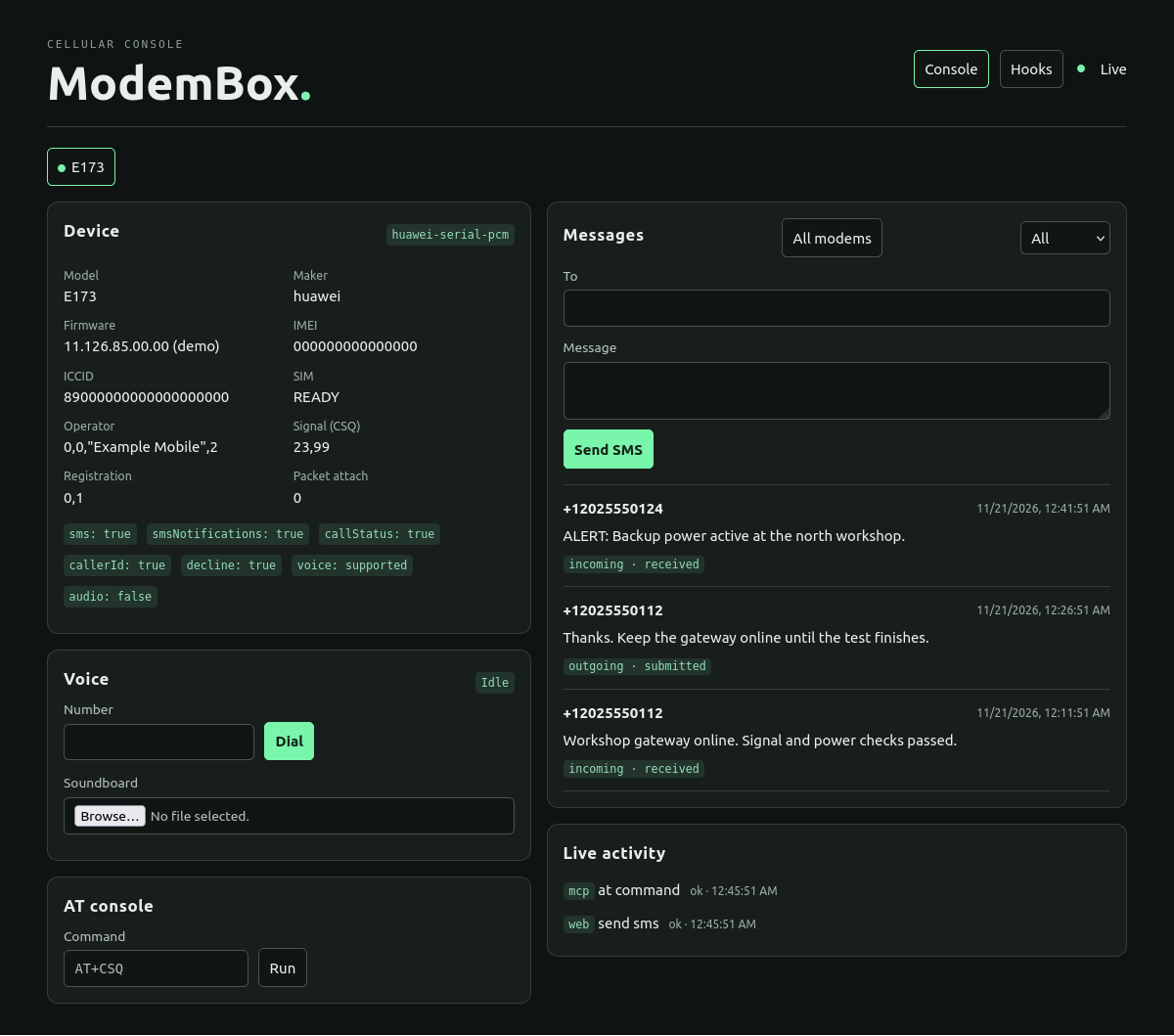
Plug a USB modem into a Linux box and run ModemBox. Send and read SMS, check the SIM and radio, and run AT commands from the browser, over HTTP, or through MCP. With supported hardware you can place and answer calls, listen, talk through the browser microphone, and play a WAV clip into the call.
Use SMS and call hooks to forward messages, call webhooks, or decline calls that match a rule.
Open a second browser and watch the same inbox, calls, and activity update live. A bearer token controls access by default. SQLite keeps the inbox and encrypted SIM PINs.
Contents
Quick start
Plug in your USB modem on a Linux host with Docker Compose, curl, and OpenSSL.
curl -fsSL https://raw.githubusercontent.com/psyb0t/docker-modembox/main/install.sh | bash
modembox start
If your shell cannot find modembox, run ~/.local/bin/modembox start.
The installer generates MODEMBOX_TOKEN on first install and saves it in ~/.config/modembox/.env. Open http://localhost:8000 and paste the value into the Access token field.
Fresh installs use psyb0t/modembox:latest and store the database and PIN key under ~/.config/modembox/data/.
Use modembox upgrade to pull the current image tag, modembox upgrade --version vX.Y.Z to pin a release, or modembox uninstall to remove the stack and keep your data.
For tailnet HTTPS, set MODEMBOX_TAILSCALE_ENABLED=true in that same .env and run modembox start. The installation guide covers Tailscale login, system installs, and direct Docker.
Hardware
The Huawei E173 was tested with SMS, voice calls, and serial call audio. ModemBox detects known Huawei USB layouts. For other devices, map the control port and check the capabilities shown in the console. See the hardware compatibility table for test coverage and links to the E173 manual and FCC filings.
Keep host modem software off the ports ModemBox uses. See the device guide for port mapping, SIM PINs, and voice support.
Agent integrations
Point your Streamable HTTP MCP client at http://localhost:8000/mcp. When authentication is on, use the same bearer token as the web console. Call list_modems first to see what the device supports.
Once released, install the skill and optional stdio bridge through the shared catalogs:
claude plugin marketplace add psyb0t/agents
claude plugin install modembox@psyb0t

codex plugin marketplace add psyb0t/agents
codex plugin add modembox@psyb0t

openclaw skills install @psyb0t/docker-modembox
openclaw plugins install clawhub:@psyb0t/modembox
For the stdio bridge, set MODEMBOX_URL to the base URL and MODEMBOX_TOKEN to the bearer token when auth is enabled. The bridge appends /mcp. See MCP and agent integrations.
Documentation
The full docs are at psyb0t.github.io/docker-modembox.
| Guide | What you'll find |
|---|---|
| Installation | Compose, direct Docker, upgrades, and data storage |
| Browser console | Unlock a SIM, use the inbox and outbox, and work with calls and audio |
| Devices and configuration | Modem profiles, SIM PINs, and runtime settings |
| REST and WebSockets | Endpoints, live events, and call audio frames |
| MCP and agent integrations | Client setup and the list of tools |
| SMS and call hooks | Set up rules, try a dry run, and inspect deliveries |
Development
make lint
make test
make build
Tests run in Docker. Unit tests cover codecs and discovery. Integration tests use a simulated modem on a Linux pseudo-terminal with the real API and SQLite database. The browser test drives SMS and call controls in Stealthy Auto Browse.
make test-real MODEMBOX_TEST_DEVICE=/dev/ttyUSB2 reads identity, SIM status, registration, and voice capability from a selected physical modem. It does not send SMS, place calls, or submit a PIN. Run it with the selected control port free.
For a physical SMS reply check, set MODEMBOX_TEST_NUMBER to the test phone's international number in a private .env.test file. Set MODEMBOX_TEST_PIN if the modem's SIM needs unlocking. Run make test-real-sms-receive MODEMBOX_TEST_DEVICE=/dev/ttyUSB2 with the control port free. The modem texts the test phone and asks for a TEST1 reply. Set MODEMBOX_TEST_SMS_TEXT to use another reply. The test passes when a new SMS from the test phone matches the expected text exactly. It fails if the modem rejects the invitation or if no match arrives within five minutes of submission.
Released images target Linux amd64 and arm64.
A push to main runs checks and publishes :latest and :sha-<commit>. A version tag waits for the successful main run for its commit, promotes that image to the version tag, and publishes the GitHub release, ClawHub packages, and MCP registry metadata.
Sponsor