Listed from the MCP registry; nobody on Odel publishes it.

Claudexor
Route coding work across Claude Code, Codex, Cursor, and OpenCode with shared context.
Runs on your machine from its package; the steps are below.
What it does
- Reads
- Writes
- High impact
At most: moves money, runs code or commands, deletes data, or sends messages for you.
What it costs
FreeOdel charges nothing per call. The publisher may charge for its own service.
Runs locally over stdio
This server isn't hosted — your MCP client launches it from a package registry. Use one of the commands below, or drop the config into your client (e.g. Claude Desktop).
Run
npx -y claudexor
MCP client config
{
  "mcpServers": {
    "claudexor": {
      "command": "npx",
      "args": [
        "-y",
        "claudexor"
      ]
    }
  }
}






Website · CLI and account setup · Install in Hermes · Install in Pi · Install in OpenClaw
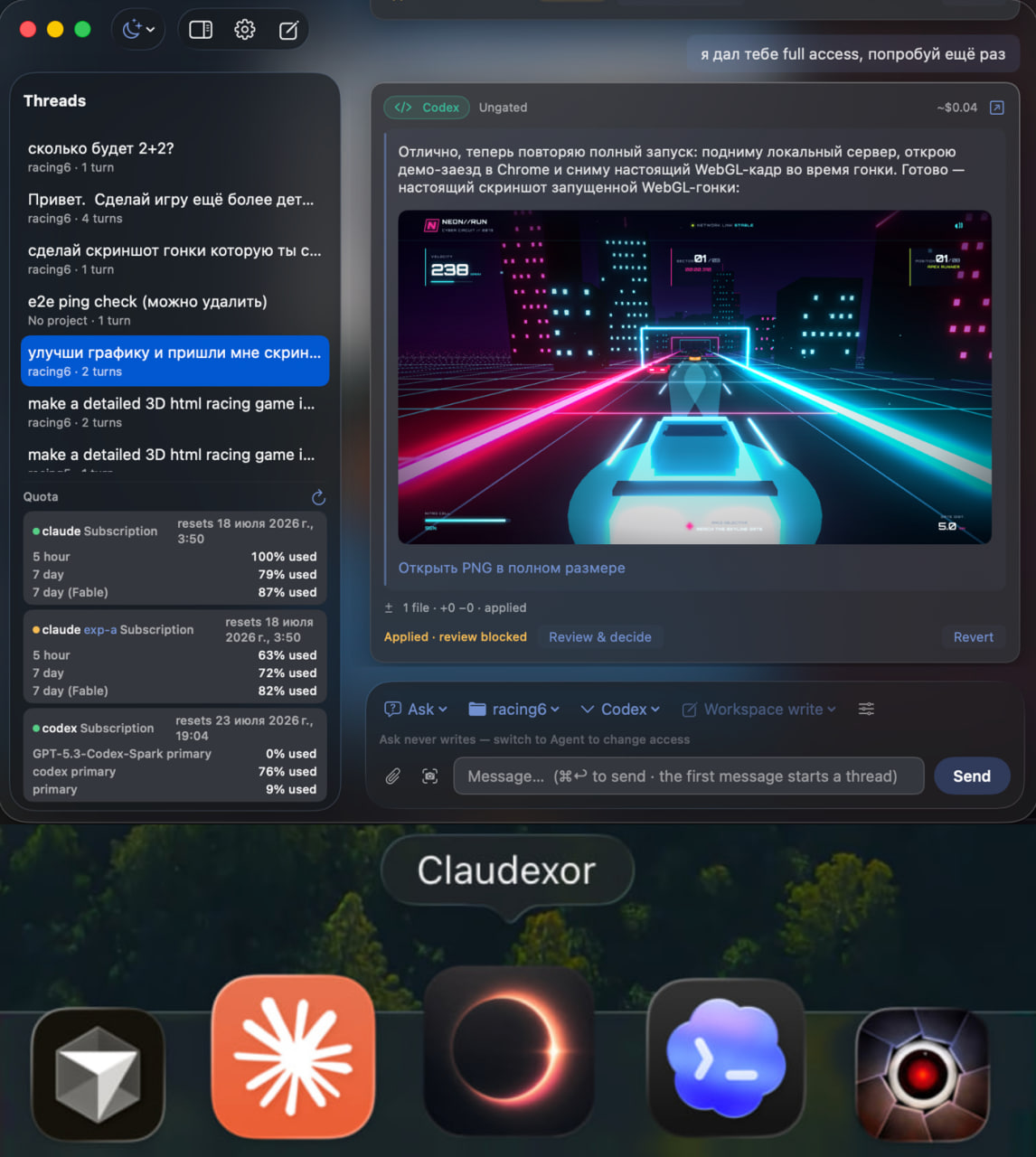
Claudexor is a local-first control plane for the AI coding agents you already pay for. It runs Codex CLI, Claude Code, Cursor CLI, OpenCode, Antigravity CLI, Grok Build, and raw API adapters behind one typed interface: a chat of turns where read-only questions resume the vendor's own native session, write turns land as inspectable patches or complete file manifests, races pit harnesses against each other with cross-family review, and every claim — cost, quota, web evidence, auth route — is a typed fact you can audit, never a vibe.
Compared to driving a bare Codex or Claude Code session, Claudexor adds the
layer the vendors do not ship: best-of-N races with independent reviewers and
arbitration; honest budget/quota accounting (unknown cost is never $0);
deterministic gates and protected paths; and — since 2.1 — credential
profiles: named Antigravity/Claude/Codex/Cursor/Grok Build subscription
bindings side by side, each with Claudexor-scoped state and platform-declared credential
custody. Live subscription-quota tracking and default rotation of unpinned runs
off spent accounts cover the harnesses with a vendor quota source (Antigravity,
Claude, and Codex). In Agent and Ask, saved work can also pass a verification or
organization subscription refusal from an in-run hop target that has done no
work of its own. Cursor's internal dashboard supplies dated monetary resources,
not an execution-quota verdict.
Everything runs on your machine, files are the source of truth, and there is no telemetry.
Current status: v6.3.0. This is the source version. See the changelog for its changes and GitHub Releases for published builds. "Stability at 2.0" below distinguishes stable contracts from experimental ones; retired verbs and mode ids hard-error with the new spelling instead of silently aliasing.
Claudexor also runs as the exact-pinned delegated execution layer inside Ouroboros, a persistent self-developing agent. Ouroboros owns its tasks, memory, review, and final integration. Claudexor runs the connected coding harnesses and returns durable execution evidence. See Ouroboros in action.
Embedding callers can also make a single model request through a managed Codex subscription, using the same account as Agents. The caller supplies its own system prompt and tools and executes those tools itself. This is a typed engine operation, not a public OpenAI-compatible server or a second agent loop. Model catalogs and context limits are account-specific; subscription access does not guarantee zero incremental charges or enable provider-paid credits. See model operations for the transport, retention and unsupported-parameter contract.
Thanks to Praxis Relay and CLIProxyAPI for prior work exploring subscription-backed model transports. They informed this design; neither runs as an embedded relay or owns credentials in this integration.
If you use Claudexor — or you are an agent whose human does — a star is the one-click way to say it works.
- Prerequisites
- Install
- Remote SSH
- Quickstart
- Modes
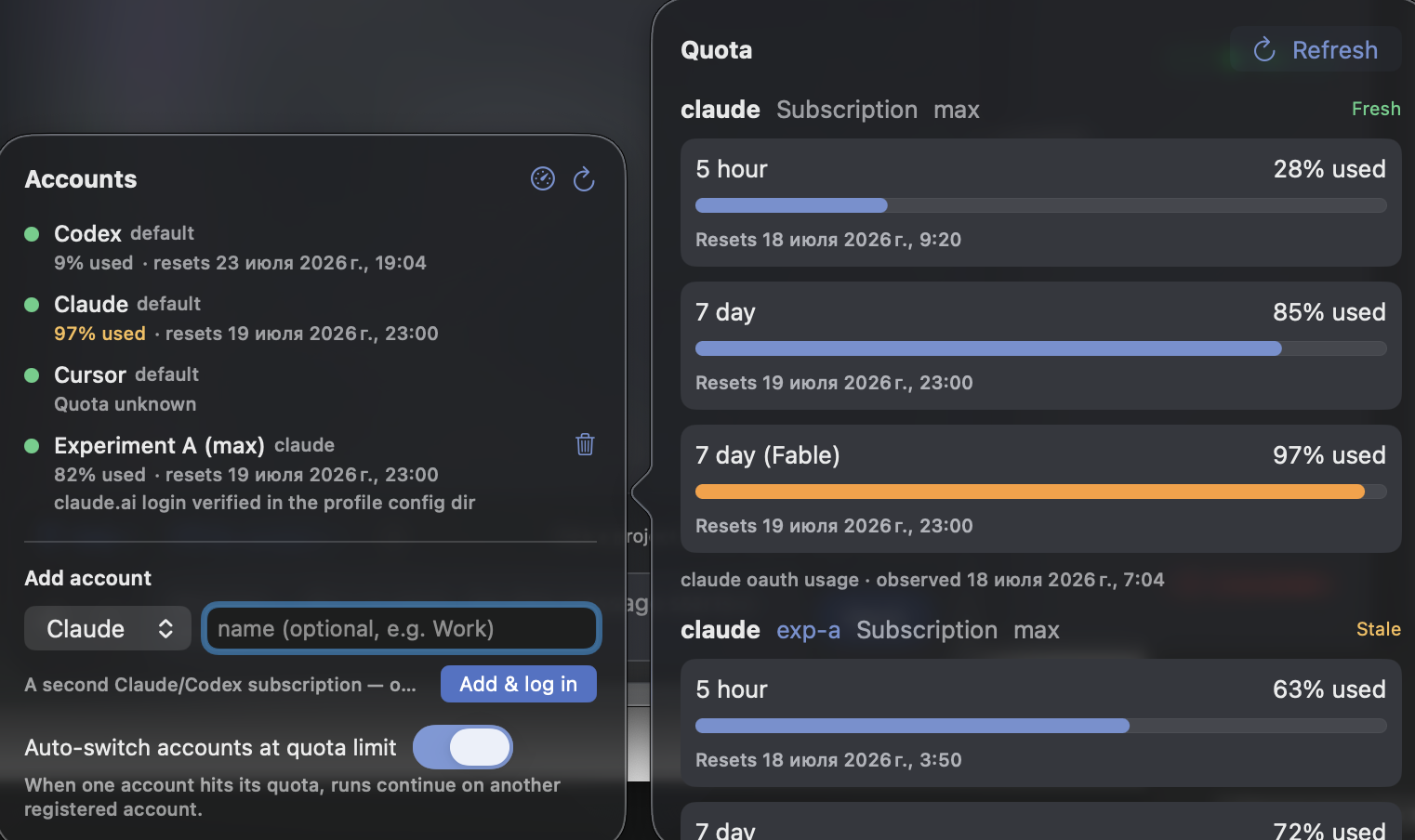
- Accounts And Quota
- Web, Budgets, And Gates
- Routing, Auth, And Secrets
- Daemon And Control API
- Artifact Layout
- Integrations
- Architecture
- Development
- Stability at 2.0
- For External Agents
- Privacy
- Uninstall / where your data lives
Prerequisites
- macOS app: macOS 26 or newer. The app includes its own Node runtime; you do not need to install Node or pnpm.
- CLI and daemon from npm: Node.js 24.15 or newer and npm, on macOS or Linux; use the latest Node 24 release for its security fixes. Windows support is partial: daemon and vendor-program installation checks run there, but login and runs on Windows are not qualified yet (see docs/FEATURES.md).
- Building from source: the same Node.js and pnpm (
corepack enable pnpm); on macOS also the Xcode Command Line Tools, which compile a native helper. See From a source checkout. - Git for Git-backed worktrees, candidate envelopes, and source-control delivery. Explicit directory execution supports direct work and selected-input copies without Git; Doctor reports Git availability, and the app's Workspace Git check explains whether a Git-backed shape is admitted.
- At least one logged-in vendor CLI —
codex,claude,cursor-agent(or Cursor’sagent),opencode,agy(Antigravity, for a Gemini subscription), orgrok(Grok Build, for a grok.com subscription) — OR a provider API key (adapters acceptOPENAI_API_KEY,ANTHROPIC_API_KEY, ... as fallbacks; the raw-API route needs only a key). Log in through Claudexor, not the bare vendor CLI — see Install And Login
Install
macOS app
The signed and notarized app requires macOS 26 or newer.
- Download
Claudexor-<version>.dmgfrom the latest release. - Drag
Claudexor.appintoApplications. - Open it. The app starts its bundled Claudexor engine, then onboarding checks the external Git and harness route needed by the work you select.
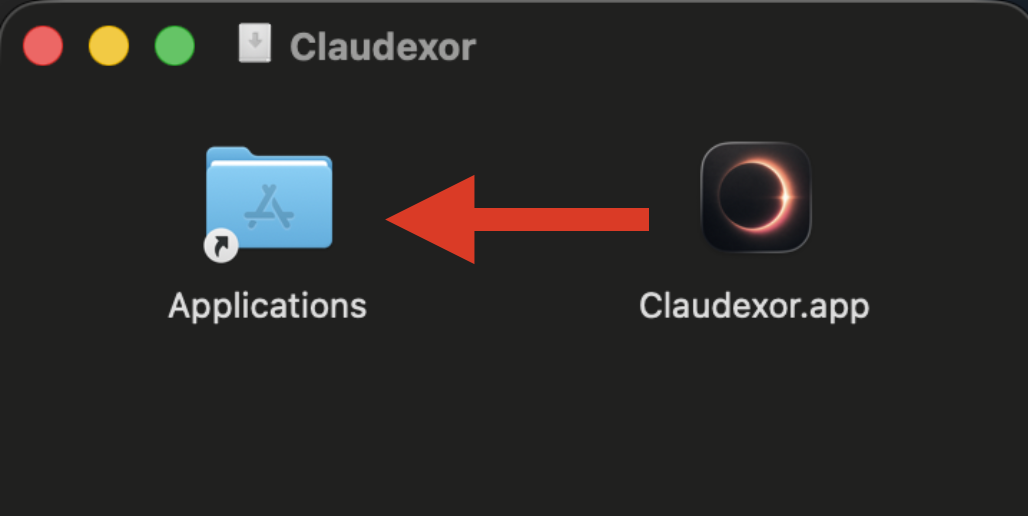
The app bundles its own daemon runtime and starts it on launch; installing the Claudexor CLI is only needed for terminal use. Git and vendor harnesses remain separate capabilities checked before a run starts. (The v1.0.0 DMG was unsigned — if you kept it, either upgrade or approve it via System Settings → Privacy & Security → Open Anyway.)
CLI from npm
With Node.js 24.15 or newer (use the latest Node 24 release), install the
CLI and daemon from npm. On a cold cache, claudexor doctor can contact other configured providers and
incur charges even when you select a subscription for Ask.
npm install -g claudexor
claudexor doctor
This installs the claudexor and claudexord commands; you need neither a
source checkout nor pnpm. Continue with the quickstart to
connect an account and ask a first question.
pr delivery requires the pinned publication scanner, which the npm packages do
not bundle. Prepare it once with claudexor scanner prepare, or offline from the
official archive with claudexor scanner prepare --from-archive <file>; a running
daemon picks it up at its next pr. See
Publication scanner.
Harness setup
Install a missing vendor program with
claudexor harness install <harness> --yes --json; a host may bind that explicit
authorization to the user's Connect action. Update the selected program with
claudexor harness update <harness> --yes --json. Both use the adapter's vendor
command under the installation HOME, and accept --vendor-version <exact> only
where supported. claudexor harness inspect --latest --json shows the selected
path/version, published version, action commands and available release notes.
The engine decides whether an update exists; an unknown comparison is shown as
unknown. Version reads happen when requested, including opening a version view,
with no engine update timer.
Receipts record actual commands, script URL/size/hash, before/after identity and vendor diagnostics. A successful install requires the program to answer its own version probe. Windows has vendor routes for Claude, Codex, Antigravity, Grok and Copilot; Cursor Windows (#667) and OpenCode's unattended Windows installation and second line (#668) remain unsupported. OpenCode stays on 1.x. A package-manager copy's updater may only advise; that sentence is the result. Vendor programs live in vendor directories and are pruned by the vendor.
Remote SSH
The macOS app can run a thread on a Linux or macOS SSH host while keeping the
UI local. In Settings → Connections, pick a concrete alias from
~/.ssh/config or create one in-app — the form appends a plain Host block
to ~/.ssh/config (after a timestamped backup), never a key or password.
Connect it, then choose a saved folder or Browse on <host>… from the
project picker. The thread is permanently bound to that
host and folder; changing either creates a new draft.
Claudexor uses the system /usr/bin/ssh, so existing keys, ssh-agent,
known_hosts, MFA and ProxyJump remain OpenSSH's responsibility. On first
connection the app verifies and installs a signed, no-sudo runtime under
~/.claudexor/remote/, then reaches its loopback-only control API through an
SSH local forward. Vendor CLIs and their credentials remain on the server and
with the vendors. Claudexor can install a harness CLI on the host for you
through claudexor harness install, or Settings → Harnesses for a connected
host. The menu reads the host engine's inventory; confirmation shows its vendor
command, installation HOME and script evidence. Preview and execution use the
same immutable remote runtime. A current install uses the vendor's current copy;
the terminal receipt records the actual version and script bytes. The app
refreshes Harness Doctor afterwards.
(Installing them on the host yourself works too.) Then sign in from the app,
which runs each vendor's own login in an embedded SSH terminal (Codex uses
device auth). Remote threads include an embedded SSH terminal and an
explicit-port preview tunnel.
Updates
v3.8.0, v3.9.0 and v3.9.7 release exceptions. These owner-authorized releases omit the three custom Ed25519 documents rather than publishing unsigned substitutes. Existing app installs therefore cannot take the in-place engine update to those versions, and the app cannot perform a first-time remote bootstrap from those releases. A fresh signed/notarized DMG, npm packages, and reviewed exact-pin embedders remain usable; normal releases keep the signed-manifest path below fail-closed (the client verifiers themselves stay fail-closed for the waived versions too).
- macOS app — each release publishes a
claudexor-runtime-<version>.tar.gzclosure (the bundled daemon and CLI, setup-login runner, Browser MCP, and native process-identity helper; Node, UI, and icons stay outside it) plus a signedruntime-manifest.jsondescribing it. On foreground and from the bottom-left update chip / Check for Updates, the app reads that manifest and, if a newer runtime is offered, surfaces "Update available → vX.Y.Z". One click installs it in place, no new DMG: the app downloads the closure, verifies its SHA-256 against the signed manifest, unpacks it under~/.claudexor/runtime/versions/<version>/, probe-starts it, requires that the engine is confirmed idle (otherwise it refuses and you can try Install again), stops the daemon, swaps the active pointer atomically, relaunches, and confirms the exact new engine accepts normal work — rolling back to the last-known-good runtime when the new engine is wrong or never answers. An engine answering only in recovery mode is reported as such, never as updated or rolled back by the new app; already-installed older apps check identity only and can still report either outcome over a recovery-only engine. The manifest is signed by a dedicated offline key the app pins; an unsigned, unknown-key, tampered, or downgraded manifest is refused. Node stays app-owned, so a Node bump still ships a new signed DMG. There is no background update timer; the check runs only when you open the app or click Check for Updates. The manifest'sminAppVersionfloor means an app that is too old is told to update the app itself rather than offered an incompatible engine. - embedded hosts — the same signed manifest and the same Node-free closure
may be exact-pinned by a host that owns its Claudexor daemon lifecycle. The
archive contains only ordinary directories/files (internal package links are
materialized), so its format needs no POSIX symlink support. The host supplies
the exact Node runtime proven by its reviewed pin, launches
claudexord.bundle.cjs, invokes operational commands through the adjacentclaudexor.bundle.cjs, verifies--probeagainst the pinned{version,buildSha}, and uses--stop <observed-version> <observed-buildSha>before replacing a live closure. This is an extraction/daemon-bootstrap contract, not a claim that every harness or interactive login path has feature parity on Windows. The signed manifest is the upstream publication authority used to form that pin; a host may verify it live or rely on its reviewed exact URL/buildSha/SHA-256/size pin.minAppVersionremains the macOS app's compatibility field; embedders keep protocol, one tested Node toolchain, and separate daemon/CLI entrypoint bounds in their pin instead of creating a second Claudexor manifest or trust root. Start and stop must use the sameCLAUDEXOR_CONFIG_DIRand, when overridden,CLAUDEXOR_DAEMON_SOCK, or the lifecycle command may address another daemon. A Windows consumer still owns a native extract/--probe/handshake/--stopsmoke before claiming Windows support. Vendor maintenance uses the same adapter-declared commands and installation HOME as the CLI; the host needs no npm for that operation. Available actions and platform limits come from the engine inventory. - npm — CLI/daemon installs update the ordinary way:
npm install -g claudexor@latest.claudexor release checkreports whether a newer engine runtime is published, verifying the same signed manifest fail-closed (npm users update via npm).
Quickstart
Start with one coding agent and one account. In the macOS app, follow onboarding to connect that account, choose a small project and select Ask. Try: "Explain how this project is organized and where its tests live." The answer and its execution evidence stay in the conversation.
With the CLI, sign in through Claudexor, never with the bare vendor CLI. A
subscription login is the default route; an API key is a paid fallback (see
Routing, Auth, And Secrets for other harnesses,
keys and when a key is used). If claudexor doctor cannot find the agent's
program, install it first (Harness setup). Complete a Codex
sign-in in a private browser window or one signed into no other OpenAI account.
Then ask from your project directory:
claudexor auth login codex    # or: claude, cursor
cd /path/to/your/project
claudexor ask "Explain how this project is organized and where its tests live."
This Ask uses Auto. To use a named account, add --harness <harness-id> --profile <profile-id>
with the two IDs from its row in claudexor accounts --json.
Subscription usage counts against the account that serves the run. The provider
bills API-key usage. When the run ends, the CLI prints its run ID:
claudexor inspect <run_id> shows that run's answer and evidence again, and
claudexor follow <run_id> replays it and, while it is still running, lets you
answer its questions. Do not repeat the task just to read its result. You can
add accounts, request changes or compare approaches later.
From a source checkout
These build steps are for contributors and source installations:
pnpm install --frozen-lockfile
pnpm build

# Run the CLI from the repo (or add an alias/PATH entry for it):
node packages/cli/dist/cli.js doctor
alias claudexor="node $(pwd)/packages/cli/dist/cli.js"

claudexor ask "2+2?"
claudexor ask "google the latest release notes" --web auto
claudexor ask --deep-scan "map this repo's auth and run storage"

# Read bounded saved turns and answer previews from an existing daemon
claudexor thread history <thread-id> --limit 20 --json
claudexor thread prompt <thread-id> <turn-id> --offset 0 --max-bytes 32768 --json
claudexor agent "fix the failing auth refresh test" --harness codex
claudexor best-of "fix add() and keep the patch minimal" --harness codex,claude --n 2
claudexor inspect <run_id>
claudexor follow <run_id>     # live event tail of a daemon run; answers questions in the TTY
claudexor apply <run_id> --dry-run
claudexor doctor
claudexor secrets list
claudexor daemon start
apply --dry-run checks the retained result without mutating the target: Git
patches use git apply --check; directory results verify the manifest, complete
content and selected target preimages. Unknown flags and invalid
--access/--web/--effort values fail loudly with exit code 2 — a typo never
silently runs with defaults.
When deterministic gates protect existing test/package surfaces and the task is
explicitly test-authoring work, use --allow-protected-path <glob[,glob...]> to
record typed per-run approval for those protected gate/test path changes. This
does not bypass built-in critical/security human gates.
Processing and ordinary folders
--processing standard|fast|ultrafast|economy requests service for the selected
model; it does not change the reasoning effort or routing goal. Native capabilities
and observed service remain visible, and Fast or Ultrafast stays within existing
money limits.
See the Processing rule.
--prompt-cache-ttl 5m|1h sets the native prompt-cache lifetime of Claude Code's
main conversation and helpers; omitting it keeps native defaults. See
Prompt-cache lifetime.
Inside an ordinary folder, select directory execution explicitly:
# Copy the complete selected folder, work there, then inspect/apply the result:
claudexor agent "Update the report and its figures" --workspace-kind directory --scope-path . --processing economy

# Work directly in the original folder, recording the selected file footprint:
claudexor agent "Update report.md" --workspace-kind directory --in-place --scope-path report.md
Repeat --scope-path for a narrower copied footprint; omission selects no
existing input files. Selected files are copied and published exactly,
including .env-style or key-shaped project files; leave out anything you do
not want the run to read. Directory
execution never initializes Git. Copied results
retain complete file bytes for later application; direct changes are already in
place and carry no promise of full rollback. Preview limits do not truncate
delivery files. See directory execution
and the feature ledger for current acceptance caveats.
Reviewers and approvals
Ordinary Agent runs skip internal model review by default, whether the executor is pinned or selected automatically. Completed changes remain normally applicable and show Not reviewed; required checks and result-integrity checks still apply. Ask and Plan reject these Agent-only controls; Council is Plan's critique path:
-
Review —
--reviewenables automatic panel selection. Best-of and--until-cleaninclude review. Explicit--attempts Nkeeps its review-based repair default;--no-review --attempts Nrepairs against configured checks and work completion without model reviewers. -
Reviewers — pick exactly who reviews a change. Pass
--reviewer-panela comma-separated list of unpinnedharness=model:effortentries (model and effort are optional); repeat a harness to review through several models. For a deterministic account per slot, use the round-trippable--reviewer-panel-json '<array>'form withcredentialProfileId. Example:--reviewer-panel-json '[{"harness":"claude","model":"claude-fable-5-1","credentialProfileId":"review-claude"}]'. An omitted profile uses the canonical account pool; a named profile is strict and never silently falls back. An explicit panel or reviewer model/effort override enables review without another flag. With--reviewand no panel, the engine chooses a cross-family panel and discloses families it skips. -
Approvals — mark paths that must clear a human before a change touching them can be applied. Set canonical repo-relative globs in the versioned
.claudexor/config.yaml(empty by default):yamlversion: 1 constraints: protected_paths: - migrations/** - "**/*.env"Creating, modifying, deleting, or renaming a matching path completes the run but pauses apply for a human decision.
--allow-protected-pathapplies only to engine-derived gate/test paths and cannot suppress these project rules. Before a mutating turn starts, a live project thread with configured project protected paths is promoted one-way to its persistent isolated worktree. The run and patch therefore complete without touching the project tree; only the existing typed thread Apply decision can deliver the accumulated change. Direct one-shot--in-placeagent runs refuse and name the isolation remedy.
Modes
Canonical mode ids (engine strategies are FLAGS, not modes):
ask- read-only answer/explanation route.--deep-scanwidens it into the bounded multi-scout research sweep with synthesis (per-scout findings, omissions, follow-up questions). Also the macOS composer's no-project fallback intent (Agent is the default on a project thread).plan- read-only planning; the plan lifecycle surfaces typed open questions and Implement freezes the plan as a content-hashed contract. Solo is the default;--council(optionally--n N) drafts plans across N harnesses in parallel, then the primary merges them into ONE unified plan whose open questions reach you as a single set (see below).agent- defaultclaudexor agentroute. Strategy flags:--n N(best-of-N race with isolated candidates, review, synthesis, arbitration),--attempts N(repair loop with a hard cap),--until-clean(repair loop until gates/review converge, budget/quota exhausts, cancellation happens, or the run stalls),--create(create-from-scratch intent),--delegate(the delegation belt — see below).
Delegation (agent --delegate)
--delegate (agent-only) injects a SCOPED Claudexor MCP belt into the harness
sandbox so the harness itself decides when to spawn bounded, isolated sub-runs
(the industry pattern: Claude Code's Task tool, Cursor subagents, Codex spawn).
The belt exposes only claudexor_ask / claudexor_plan / claudexor_run
(isolated sub-run) / claudexor_best_of / claudexor_run_status /
claudexor_run_result — there is NO apply/decision/thread/settings tool, so the
PARENT integrates results in its own workspace. Policy is enforced server-side
at the tool boundary: nesting depth is 1 (a sub-run cannot itself delegate),
sub-runs are capped per parent (default 8), and each sub-run draws from the
same live daemon-owned paid-budget authority as its parent. Reservations and
settlements are enforced across the whole family; each child reports its own
spend while the parent reports the aggregate. Only harnesses whose adapter declares
capability_profile.mcp_injection (claude, codex, cursor) can host the belt. The flag is
permission, not a requirement to create a child. Readiness and the final
requested/effective/used outcome are engine-projected: a known pre-start
incompatibility may continue as an ordinary Agent run only with a durable
warning and typed remediation, while failure after belt injection is terminal
on adapters with a startup receipt (claude, codex) — cursor hosting is
pre-spawn injection with typed pre-spawn refusals, its live E2E and
startup-status mapping gated as recorded in docs/FEATURES.md. Claudexor children
carry a typed parent link; native vendor subagents never count as belt use. This
replaces the former orchestrate mode (retired in v3): "suggest"-style planning
is ordinary claudexor plan.
Council planning (plan --council)
--council (plan-only) runs the Council plan strategy: N harnesses each draft a
plan in parallel (round 1, harness-native read-only planner transport, each in
its own lane on a thread turn; Cursor uses native Ask so its final WorkReport
remains available), the drafts land as file-backed run artifacts
(council/draft-<harness>.md), and then an admitted member runs one merge iteration that
points at the draft and attempt evidence files by absolute path (never embedding their full text) and
synthesizes ONE unified plan. The tagged ## Open Questions parser runs on the
MERGE output only, so you always answer a single question set — the downstream
readiness/freeze/Implement flow is byte-for-byte identical to a solo plan.
--n N sets the member count (default: distinct available harnesses, up to 3,
primary first); --n on a plan is legal ONLY with --council. Degradation is
honest: a failed member is disclosed (event + council/membership.yaml) and the
merge proceeds with the usable inputs (one input still merges). A useful draft
with a contradictory completed plus required_inputs report is retained as
explicitly unverified input, while its original attempt remains failed (where
the report footer is only requested, as on Cursor, the attempt does not fail and
the draft is accepted with an unverified work state). The
merger prefers an accepted draft's lane, then an eligible unverified lane; no
eligible input is a typed failure. The final plan must still pass its own checks. Run
detail carries a council projection (membership + per-member status + who
merged). Council is the plan critique path — the standalone "plan review" entity
was retired in v3.
Unknown modes fail loudly. The retired mode ids (audit, best_of_n,
max_attempts, until_clean, explore, create, readonly_audit, daily,
until_convergence, readonly_swarm) are NOT aliases, and the retired
audit/map/explore verbs hard-error pointing at claudexor ask --deep-scan. The retired orchestrate verb hard-errors pointing at claudexor agent --delegate. claudexor create remains a CLI convenience VERB mapping
onto agent --create; old WIRE mode ids hard-error at every API/DTO boundary.
Chat is the normal loop: claudexor with no arguments opens a REPL over a
thread. Read-only ask/plan turns RESUME the routed harness's own native CLI
session (codex exec resume, claude --resume) — plan first, then keep
asking, in ONE conversation. Each such turn runs in a DURABLE per-lane scoped
home (a lane is a thread + harness + credential profile), so the native
session it records survives the run and the next lane turn actually reaches
it; a one-shot ask/plan with no thread keeps a disposable throwaway home.
Write (agent) turns run
IN-PLACE: a single-candidate turn mutates the thread's live execution tree
directly (the project for an in_place thread, the thread's persistent git
worktree for an isolated thread, or the caller-owned workspace an external
orchestrator bound to a delegated thread) and resumes the native vendor
session, so the next turn sees the work. A race (--n N > 1) runs its candidates in
isolated throwaway envelopes and AUTO-ADOPTS the winner's patch into the live
tree.
When a turn runs on a lane that has NOT seen the whole conversation — a lane
switch (a different harness or account) or a gap (A→B→A) — the engine hydrates
it with a bounded continuation packet: the delta turns since that lane's
checkpoint, verbatim (past a byte budget the oldest turns are condensed — into a
cached LLM summary when one is available, else mechanical one-liners), plus the
active plan pointer and a workspace anchor. The packet is written as a file
(context/THREAD.md in the run's artifact tree) and the prompt only points at
its absolute path — the packet body never rides the prompt. Every hydrated
turn DISCLOSES it (INV-137): a typed session.continuity event carries the
stats, the turn record stamps a continuity field (native_resume | packet
| fresh), and the CLI prints one line (e.g. continued with thread context · 3 turns). Returning to a previously used lane resumes its native session and
injects ONLY the missed delta — never the whole conversation again.
The condensed prefix's summary is produced lazily at packet-build time: when a collapse is forced and no fresh cached summary covers it, the engine runs ONE bounded read-only pass (ask-mode, the lane's own harness + credential route, a single turn, a hard timeout — no job queue) and caches the result keyed by (thread, collapse-boundary turn) under the thread's lane dir. Later packets reuse the cache until a new head turn advances the boundary; a timeout or an unavailable harness falls back to the mechanical one-liners, so the packet always carries the delta.
Inside the REPL, /harness <id> and /profile <id|default> set the thread's
sticky lane preference (its primary harness / credential profile) through the
same PATCH /v2/threads/:id route the app composer uses — a bare /harness or
/profile default clears it back to engine routing. Outside the REPL,
--thread <id> targets an existing thread so a one-shot ask/plan/agent
lands as its next turn (--resume picks the most recently updated thread); such
turns enqueue through POST /v2/threads/:id/turns, the one path that owns scope,
lineage, and the continuation packet.
Examples:
claudexor                       # REPL: a thread of turns (read-only turns resume natively)
claudexor ask "2+2?"
claudexor ask "google the latest release notes" --web auto
claudexor ask --deep-scan "map this repo's auth and run storage"

# Read bounded saved turns and answer previews from an existing daemon
claudexor thread history <thread-id> --limit 20 --json
claudexor thread prompt <thread-id> <turn-id> --offset 0 --max-bytes 32768 --json
claudexor agent "fix the failing auth refresh test" --harness codex
claudexor best-of "fix add() in src/math.js and keep the patch minimal" --harness codex,claude --n 2
claudexor agent "repair the parser test" --attempts 3
claudexor agent "fix the bug and keep repairing until clean" --until-clean
claudexor plan "design a config-to-gates implementation"
claudexor ask --deep-scan "map artifact writers and secret risk"
claudexor agent --delegate "ship the v2 parser refactor across this repo"
Accounts And Quota
Every account is a named registry row — one unified kind (INV-135), no
separate "default" or "CLI login" account type. Register named Antigravity,
Claude, Codex, Cursor, or Grok Build subscription bindings side by side, each with its own
Claudexor-owned scoped state and subject to the effective platform cardinality
policy. Windows Antigravity permits one enabled OS-user binding. An existing
legacy default-store login auto-registers at the first start of this engine as
the ordinary claude-default / codex-default row (its credential bytes never
move), and claudexor auth login <harness> is simply sugar for signing into that bootstrap row. Removing
a row does not mutate vendor credentials outside the binding; on platforms
where a credential is owned by the OS user, it may be left unchanged. Cursor
accounts live only in isolated file-store rows. Rows may alternatively use
namespaced secret-store keys (anthropic:work, openai:acc2). Rows are
durable non-secret entries in the global config's credential_profiles;
credential material stays in Claudexor-owned scoped state, a managed secret
store, or a vendor/OS-user store declared by platform policy, never in the
registry row.
claudexor profiles                         # every account per harness + the informational next-up verdict
claudexor accounts --json                  # read-only snapshot doorway for agents, with freshness/quota state
claudexor auth login claude                # bootstrap sugar: sign into the claude-default row
claudexor profiles add claude work         # register another account
claudexor profiles login claude work       # direct vendor login in this terminal, scoped to the row's dir
claudexor profiles add cursor work        # a separate Cursor account row
claudexor profiles login cursor work       # daemon-managed login in this terminal; setup cancel/reconcile can recover it
claudexor profiles disable claude work     # Enabled toggle: a disabled account is never routable
claudexor profiles enable claude work
claudexor profiles remove claude work      # remove the binding + any Claudexor-owned state/managed secret
claudexor secrets set claude_oauth:work --from-env TOKEN_VAR
claudexor agent "fix the parser" --profile work   # explicit per-run pin always wins
Accounts are symmetric: every row has the same Enabled toggle (the
only routing control — there is NO user-settable "active" account) and the
same Remove (removal deletes the binding and any Claudexor-owned state or
managed secret, provably: a partial cleanup is a typed retryable error, never a
silent half-delete; a vendor credential for the OS user may be left unchanged).
An UNPINNED run routes through the quota-aware pool of enabled,
signed-in accounts. In ordinary pool order the freshest-headroom account wins,
unknown-quota accounts rank after known headroom but before exhausted ones, and
ties break deterministically. An unpinned chat thread is sticky: it stays on the
account it started with while that account is ready, and switches to a pool
sibling only with a disclosed lane switch. An explicit pin (per-run
--profile, or the composer's per-thread account chip) is STRICT — exactly
that account or a typed refusal (subscription_window_exhausted with the
reset time when its quota window is spent, or when it reached a saved
headroom_threshold below 100%; quotaRefusal.basis tells the two apart),
never a silent rotation.
claudexor profiles shows the informational next-up verdict — the first
candidate in ordinary pool order for the configured default model — computed
server-side by the same routing owner (accountPools; also
GET /v2/account-pools), plus each account's recent refusals, temporary capability marks and last
service per requested model. A run's own pin or sticky thread, model, mode, paid
budget or auth preference can still pick another account or route; a zero-paid
Ask, for example, puts a vendor-verified account first
(routing order).
Among accounts with unknown quota, the one that last
served the requested model is tried first, also after a daemon restart. When the pool is empty
or exhausted, the typed API-key fallback may serve the run as an explicit,
disclosed route — never a synthetic account row; key management stays in
Auth. The macOS Accounts surface renders these rows directly from ONE server
projection — no client re-derives Enabled or next-up. When the harness exposes
it, each row's secondary line shows the account's non-secret email · plan,
projected daemon-side under that binding's effective credential route; agy
currently exposes no machine-readable account identity.
A native session has one holder account at a time: when an Agent or Ask run
that already did work moves to another account, its session moves too (or the
work continues from an evidence packet) rather than restarting. Subscription quota is tracked
per account through each harness's declared vendor source: vendor usage
endpoints where available and Antigravity's own /quota command (proactive
window/per-model percentages in the app's quota footer, one chip per account).
Source-specific credential access stays inside the adapter/vendor route;
Windows agy uses the current OS user's Credential Manager identity while the
binding HOME scopes vendor state. Each harness may declare a typed
profile_policy (limit_action: auto|fail|ask|rotate; the default auto
rotates subscription accounts and fails metered ones): reactive rotation moves
pool-selected accounts on typed vendor limits and on a session that died before
any work. After progress, Agent and Ask can also move saved work past a
verification or organization subscription refusal from the current attempt's
own hop target, only if that try did no work of its own. These refusals still
stop a same-account resume or the first try of a new continue_from successor.
Ordinary network errors do not rotate, and an explicit pin never moves; the run
record keeps full provenance. Before installing an older engine that cannot read
migrated account rows, claudexor profiles rollback-migration reverses the
account-registration migration. It does not undo the SQL engine-store
migration or lower its serving floor, and an engine below that floor is refused
at startup; returning to one needs a complete pre-upgrade backup
(Upgrade backup and restore).
See docs/ARCHITECTURE.md §5 for the complete contract.
Web, Budgets, And Gates
External web context is a typed run policy (--web off|auto|cached|live),
separate from shell/network sandboxing. off asks each route to switch off its
own web tools and refuses a route that cannot; it is not a network switch, since
the vendor API connection stays open, and receipts name each route's switch while
saying that network traffic is not measured. auto, cached, and
live are optional preferences, so unused, denied, unavailable, or failed web
never blocks an otherwise useful result and remains visible as evidence or a
warning. A harness such as Cursor that cannot guarantee off is refused before
it starts, with a prompt to enable web or choose an enforceable harness. Run
terminal state remains separate from output readiness (outputReadyState).
Paid budgets are explicit (--max-usd N; zero is a real zero-cash cap) and
unknown cost is never reported as $0 — a finite run can end
cost_unverifiable or budget_overshoot. Deterministic gates use exact
argv (--test '["pnpm","test"]'), and externally-granted test commands are
invalidated when the config, argv, executable, script bytes, project, or
access profile changes. The full semantics live in
docs/ARCHITECTURE.md.
Routing, Auth, And Secrets
Routing is Pool + Primary + Routing Goal: selected harnesses are the
eligible pool, --primary-harness <id> biases single-route modes, and
--routing-goal auto|quality|economy picks the pacing. In chat this is sticky
per thread. An explicit one-harness pool infers that harness as primary unless
--primary-harness is supplied; an explicit primary must belong to the pool.
The thread remembers its primary, pool, and (since 2.1) its
credential profile; the engine owns routing, surfaces only send the choice.
Model review is opt-in for ordinary Agent. An explicit panel (--reviewer-panel "claude=claude-fable-5-1:max,codex=gpt-6-astra:ultra" or the structured
--reviewer-panel-json form) enables it. Requested review needs at least two
distinct observed provider families to count as clean and verified. Deliberately
unreviewed work remains applicable subject to its independent checks.
Native harness auth is preferred where readiness-proven; API keys are fallback
secret refs in the v2-owned 0600 file store. auto is native-first, an
explicit route never falls back, and every effective route is a typed
disclosure — doctor reports credential availability and live verification
as separate facts, and a zero vendor exit is only provisional until a fresh
targeted probe plus an isolated capability smoke prove the exact selected
transport. Native login stays vendor-owned (official CLI, structured argv,
scrubbed env; Claudexor never sees or copies vendor tokens). The deep
semantics live in docs/ARCHITECTURE.md §5.
Grok Build is available through --harness grok or mixed pools such as
--harness codex,grok, using a grok.com subscription without an API key.
See the Grok adapter contract for access policies
and the limits of its credential-source check.
Codex login defaults to device-auth, driven in-app: the macOS AuthSheet shows
the one-time code and opens a private sign-in window (no Terminal); the CLI
prints the same code inline. Complete it in a window signed into no other
OpenAI account — an in-browser account switch can revoke sibling OpenAI
sessions server-side.
claudexor auth login codex --browser-redirect opts back into the older
localhost-callback flow. See
Install And Login.
claudexor auth status
claudexor auth login codex    # codex login (device-auth by default)
claudexor auth login claude   # claude auth login (claude.ai subscription route)
claudexor auth login cursor   # cursor-agent login (or Cursor's own `agent`)
claudexor profiles add agy work    # register a named Antigravity binding
claudexor profiles login agy work  # login with its scoped HOME and platform credential policy
claudexor profiles add grok work   # Grok Build: grok.com subscription, no API key
claudexor profiles login grok work # isolated Grok HOME and device login
claudexor secrets set openai --from-env OPENAI_API_KEY
claudexor secrets list
claudexor settings show
claudexor settings set routing_goal auto
claudexor settings set paid_fallback when_unavailable
claudexor quota --refresh --json
Account resources are available through each row's Resources disclosure,
claudexor quota --resources --json, and the matching MCP tools. The view keeps
included windows, prepaid balances, spending limits and reset inventory separate,
with their own observation times. Refresh one named account with
claudexor quota --resources --refresh --profile codex/work --json.
Use an offered reset with
claudexor account-reset codex/work --offer codex_granted --idempotency-key <unique-key> --json.
Keep that key to recover the same request after a lost reply; a new key means a
separate reset. The GUI asks once before consumption. Claude supports reported
granted resets and its distinct five-hour refill through the native protocol;
weekly limits still apply to the refill. Availability depends on the account.
Reset outcome and the subsequent refresh are reported separately. These controls
do not enable paid usage, buy credits or change account-routing policy.
Daemon And Control API
The managed daemon is the mandatory runtime authority and normally auto-starts
when a product command needs it: synchronously committed command queueing
over a Unix socket (power-loss durability follows a flusher barrier), idempotency-key retry binding, and a loopback HTTP/SSE
control API as a thin viewport (/v2 only; POST /v2/handshake negotiation;
snapshot-then-subscribe run events). Harness setup/login is server-owned
through observable setup jobs with typed phases, deadlines, and post-exit
capability verification. The canonical endpoint inventory lives in
docs/ARCHITECTURE.md §7 and is generated from
source; this README does not duplicate it.
claudexor daemon start
claudexor daemon status --json
claudexor daemon logs
claudexor daemon stop
If start refuses with another claudexor daemon owns <path> while nothing answers,
read Legacy PID-only writer records
before touching that path. Its manual steps apply only to a record without
identity; one that carries identity stays held until the next start can
replace it.
Artifact Layout
Every project run creates files under the external per-project namespace
~/.claudexor/v3/projects/<project-sha256>/runs/<run_id>/; the repository's
.claudexor/ directory remains user-owned versioned config. An Ask without a
project (from the app with no project selected, or MCP claudexor_ask with
noProject: true) uses an empty synthetic cwd at
~/.cache/claudexor/no-project and writes artifacts to
~/.claudexor/v3/runs/<run_id>/:
events.jsonl
context/task.yaml
context/context_pack.yaml?
context/processing_intent.yaml?   (routed lanes' frozen speed intent)
attempts/a01/attempt.yaml
attempts/a01/answer.md?
attempts/a01/retained-envelope.json?  (capture-refused inspection source)
attempts/a01/patch.diff?
reviews/a01.yaml
arbitration/decision.yaml
final/run_facts.yaml
final/telemetry.yaml
final/patch.diff?
final/files/manifest.json?
final/files/content/<digest>?
final/work_product.yaml
final/summary.md
final/failure.yaml?
final/answer.md?
final/explore.md?
final/explore-findings.yaml?
final/omissions.md?
final/report.md?
final/plan.md?
context/context_error.md?
Files are the source of truth. Terminal output and UI rows are projections. The macOS thread workspace surfaces Changes, Artifacts, and Evidence (with each run's Outcome facts on top when a receipt is selected, and a remote-only Terminal tab on remote threads) directly from these artifacts/events, so successful answers and failed runs are inspectable instead of disappearing into logs.
Standalone Agent runs use isolated envelopes by default, and Best-of candidates
always use isolated envelopes. They live under the same external project
namespace at ~/.claudexor/v3/projects/<project-sha256>/workspaces/.../tree;
an isolated run's harness cwd is its Git worktree or selected-input directory
copy. Git-backed chat thread turns follow the workspace mode described above:
in_place uses the live project, isolated uses its persistent thread
worktree, and delegated uses the caller-owned workspace bound at creation
(see INTEGRATIONS).
Proven work product means a Git diff or a complete directory file manifest
captured from the run's physical execution root, a declared run artifact, or
the text answer. A project or folder that itself lives under /tmp is captured
like any other. A write outside the root, such as an absolute /tmp/... host
path, does not enter the project patch or directory capture automatically and
is not by itself proof of delivered project work; capture neither refuses nor
redirects it, and the access profile decides whether the harness may write
there.
Integrations
Claudexor can be driven by other tools through CLI JSON on supported commands, the
local daemon/control API, MCP, and ACP. These surfaces are capability-gated;
integrations should not assume every subcommand has JSON output or every
harness supports live steering: read a harness's liveInput channel from
GET /v2/agent-capabilities and send a live message through
POST /v2/runs/:id/messages, which answers a typed outcome instead of guessing
(see "Stability at 2.0").
The CLI accepts repeatable/comma-separated --attach <path> or --image <path>
and immediately streams each regular, non-symlink file through /v2/uploads.
Finalize returns an immutable resource ID; run and turn requests accept only those
IDs, never local paths or base64. Every selected harness must declare a finite
MIME, byte/count limit, and native transport for every mandatory attachment or
preflight refuses the whole pool. Adapters verify the finalized digest immediately
before building the vendor payload. Recoverable keyed imports (upload-import),
reusable --attach-resource refs and the MCP upload tools are specified in
docs/INTEGRATIONS.md.
Keep ONE AGENTS.md at your project root as the source of truth for
project-specific instructions. Claudexor keeps vendor-native instruction
semantics explicit and may create a thin generated CLAUDE.md only inside a
disposable Git envelope of a writing run, such as each candidate of a race,
including a race in a thread turn; it never mutates the durable project root just
to bridge a route. Direct runs in the project or a thread's worktree (in place,
or a single-candidate thread turn), directory workspaces and read-only runs get
no bridge. For a writing run there, keep your own CLAUDE.md importing
@AGENTS.md or state required instructions in the prompt; for a read-only run,
put required instructions in the prompt. File creation is not proof that a model
read the instructions. Full behavior is in docs/INTEGRATIONS.md "Project
Instruction Files".
Host integrations are managed by claudexor plugin install|status|doctor|repair|uninstall <cursor|claude|codex|opencode|all>.
They install user-global host-native artifacts plus MCP wiring while keeping
Claudexor as the orchestration owner. Codex is registered in the personal plugin
marketplace and still requires enablement from Codex Plugins. MCP run tools
enqueue work and return a durable run handle; follow it with the status/result
tools before claiming terminal output. They do not provide live Claudexor thread
parity.
You can ask an agent host with shell access to install the integration for itself. Paste something like this into Cursor, Claude Code, Codex, or OpenCode:
Install Claudexor's host integration for this app. First find the local
Claudexor CLI: prefer an existing `claudexor` command; otherwise, if this repo
is checked out at <REPO_ROOT> (the directory containing this README), use
`node <REPO_ROOT>/packages/cli/dist/cli.js`.

Run the matching command for this host:
- Claude Code: `claudexor plugin install claude`
- Codex: `claudexor plugin install codex`
- Cursor: `claudexor plugin install cursor`
- OpenCode: `claudexor plugin install opencode`

Then run `claudexor plugin status <host>` and
`claudexor plugin doctor <host>`. Do not overwrite unowned files. If the
installer reports a conflict, show me the exact message and stop.

After install: Claude Code/OpenCode may need a new session; Cursor may need a
reload or manual local-plugin enablement; Codex is only registered in the
personal marketplace, so tell me to open Codex Plugins and enable Claudexor
manually.

Then follow the Install And Login sequence in docs/AGENT_ONBOARDING.md
(verify version/doctor, check plugin status before touching anything, and log
in only via `claudexor auth login <harness>` — never a bare vendor login).
GitHub Copilot uses the portable plugin in this repository rather than the managed host installer:
npm install -g claudexor
copilot plugin install razzant/claudexor:plugins/copilot
The portable plugin supports macOS and Linux and requires the claudexor
command on PATH; Windows is not currently supported. It bundles one Agent
Skill plus MCP wiring and never collects credentials or bypasses Claudexor's
typed apply and human-decision gates. See
docs/INTEGRATIONS.md
for lifecycle and precedence details.
The same portable package is also available to Claude Code straight from this
repository (claude plugin marketplace add razzant/claudexor, then
claude plugin install claudexor@claudexor) and to Cursor as the local plugin
in plugins/cursor. Enable only one Claudexor integration per host; the
claudexor command must already be installed.
The explicit Claude install also enables the official subscription-quota
status-line source. If ~/.claude/settings.json already has a statusLine
command, Claudexor composes with it and restores it on uninstall; later user
drift is refused rather than overwritten. Only the documented five-hour and
seven-day usage/reset fields are retained in Claudexor's v2 data root.
Once enabled, ask the host to use Claudexor for work where orchestration, review, or evidence is useful. Examples:
Use Claudexor to make a read-only plan for this refactor, then show me the
plan and the open questions before changing files.
Use Claudexor best-of with 3 candidates for this bug fix. Compare the attempts.
If the review is clean, show me the full winning patch, including additions
and deletions, and wait for my approval before applying it.
Check Claudexor's status before choosing a route. If I chose a named account,
show me its row in Claudexor Accounts and when its readiness was last checked.
Use Claudexor ask --deep-scan on this repository and return the final report with concrete
file references. Keep it read-only.
See the integration reference for the full host matrix.
Agent host packages
From your usual chat, ask a second model a question or have it draft a change for review. Your agent calls the local Claudexor CLI over MCP and brings the result back to the conversation. Integration by Ouroboros.
Set up the CLI and account
Install the CLI on the machine running your agent (macOS or Linux, Node.js 24.15+):
npm install -g claudexor
claudexor --version
Use the account you already connected to Claudexor. For a first connection,
make sure the vendor CLI is installed, then sign in through
Claudexor with claudexor auth login codex or claudexor auth login claude.
For Codex, open the sign-in link in a private window or a browser profile
signed in to no other OpenAI account. Switching accounts during sign-in can
revoke other sessions.
On a cold cache, claudexor doctor can contact other configured providers and
incur charges even when you select a subscription for Ask.
Run claudexor doctor to check the harness. The host will launch the CLI
directly. command -v node and command -v claudexor show the executable
locations its PATH needs.
If you already use a custom CLAUDEXOR_CONFIG_DIR, give the host's Claudexor
MCP server that same absolute path. The default installation needs no override.
Configure the selected store.
Choose Hermes, Pi, or OpenClaw.
Install in Hermes
After CLI and account setup, check that
hermes --version in the profile you will use reports 0.23.1 or later, and that
the Hermes process can find node and claudexor on its PATH. Both routes below
need that version. The Git route needs no catalog listing: use the full
40-character SHA of a reviewed source commit whose
Hermes manifest declares the claudexor server
trust: untrusted. Older commits and release tags may not. On GitHub, press y
on that revision's manifest page to get its commit permalink. Use the commit SHA,
not a branch or tag. In a terminal for your intended Hermes profile, paste it here:
printf 'Reviewed source commit SHA: ' && IFS= read -r claudexor_sha &&
  hermes plugins install razzant/claudexor/plugins/hermes --ref "${claudexor_sha:?Full SHA required}" --enable
Only after Nous has accepted Claudexor into the Hermes catalog can you instead
install by name. First run hermes plugins info claudexor in the intended
profile and note the full Pinned SHA, Repo and Subdir. Continue only if they
match the source you reviewed, then verify the exact install as described below;
use hermes plugins list to check that the plugin is enabled. --enable is
your explicit choice; without it Hermes asks and the default answer is No:
hermes plugins install claudexor --enable
If an older Claudexor is already installed, use the Git command above with the
newly reviewed SHA and add --force to reinstall Claudexor.
Both routes download the plugin over the network. Hermes separately fetches its
own runtime on a first install. In that same profile, not only the default one,
read the claudexor record in plugins/.install-metadata.json inside your
selected Hermes profile home (default ~/.hermes). Its source and revision
must match the repository, the plugins/hermes subdirectory and the full
40-character SHA you chose. For a catalog install, compare them with the full pin
recorded from the catalog entry before you installed. Use hermes plugins list to check
that claudexor is enabled. Run hermes plugins validate on
plugins/claudexor in the same home; its server trust: claudexor entry should
say untrusted, which confirms the portable package only. A same-named
claudexor server entry in that profile's config.yaml replaces the package's,
so it needs trust: untrusted too (see the
custom store example).
If you restrict tools, allow the
Claudexor MCP tools for that platform in hermes tools. Start a new session in
that profile and ask Hermes to load claudexor:claudexor.
Get your first answer.
Prompts come from the Hermes version you run, not from Claudexor. With
trust: untrusted, Hermes' documentation says calls that can write ask first,
tools annotated read-only do not, and a call that needs approval where nobody can
answer is refused. A remembered answer applies to a tool, not to one set of
arguments, so prefer a one-time approval for sensitive actions and give Claudexor
its own Hermes profile. Approval is not a budget: Ask and Plan can send your
prompt and selected files to your provider and spend money or quota. The MCP
prompt does not cover delivering an isolated change, which is a separate manual
CLI step: inspect the complete diff and consent explicitly first. See
Hermes tool approval and access.
Install in Pi
Use a configured CLI and account and a Pi version
with built-in MCP and registerMcpServer (for example, 1.5.2).
Pi integration by Ouroboros.
Check the published package with npm view claudexor@latest pi.extensions --json.
If the result lists ./pi/index.js, install from npm.
pi install npm:claudexor
If the entry is missing, as it is in claudexor@6.2.0 on npm,
get a Git checkout containing the extension.
Keep the checkout in place so Pi can load it on each start.
pi install "$HOME/claudexor-hosts/packages/claudexor"
Start Pi with node and claudexor on its PATH, or use /reload in a running
session with that PATH. If built-in MCP or the extension is disabled, enable it
in pi config and reload. In /mcp, check that claudexor is connected.
The extension is the source by default. A manual claudexor entry in
~/.pi/agent/mcp.json or the project's .pi/mcp.json takes precedence even
when disabled. Keep an intentional custom-store entry. To use the packaged
server instead, remove or rename the conflicting entry and /reload. If you
filter MCP tools, allow the tools listed for your first request under
mcp__claudexor__. Get your first answer.
Install in OpenClaw
After CLI and account setup, get a package checkout
on the Gateway machine. Put claudexor and node on the Gateway service's
PATH. OpenClaw 2026.11.5 needs Node 24.16.0–24.x or 26.1.0+.
openclaw plugins install "$HOME/claudexor-hosts/plugins/claude"
openclaw plugins inspect claudexor
If disabled, run openclaw plugins enable claudexor. If you use a plugin
allowlist, include claudexor. OpenClaw plugin policy.
The intended embedded agent's tool policy and any sandbox
allowlist must permit the tools listed for your first request with the claudexor__
prefix (for example, claudexor__claudexor_status). Restart the Gateway with openclaw gateway restart
if you changed its PATH or the installer requests it. Open a fresh embedded
agent session. Get your first answer.
First delegation from any host
Before the first request, the shipped skill asks the host to compare the host's
claudexor_status with the harness reported by claudexor doctor, and it may
also read claudexor_accounts and claudexor_capabilities. Even without a fresh
or refresh option, a cold or missing cached observation can make these reads and
claudexor doctor contact other configured harness providers, not only the one
chosen for Ask. That can use subscription quota or cost money, and skipping the
manual claudexor doctor check does not guarantee that no probes run. Ask and
Plan are the intended model requests. Reading an existing run's status or result
is separate and does not start another. If you chose a named account, find its profile in
claudexor_accounts. On the first Ask, pass that profile's
harness_id as harness and its profile_id as credentialProfileId.
If the profile is missing, resolve that before asking. For Auto, omit the
profile pin and pass a harness only if you chose one. For a custom store, also use
claudexor_store_identity to match the store IDs.
If your host filters tools, allow these additional reads for the checks you need,
using the same host prefix as for claudexor_status.
The example below asks for a status check, and the skill may add its own readiness comparison. If the cache is already warm, that may need no provider contact; on a cold cache it may contact providers and use quota or incur charges as described above before the Ask itself.
Try this self-contained question with no repository selected and a CLI whose
claudexor_ask tool offers noProject.
Check Claudexor's status. Use its read-only Ask without a project. If I chose
a named account, pass its harness and credentialProfileId from Claudexor
Accounts on this Ask. Leave Auto unpinned. The shop opens at 09:00 and closes
at 17:00. When does it close? Show me Claudexor's answer and the run ID.
After the status check, the host calls claudexor_ask with noProject: true
and the account fields if you selected a profile. It follows the handle with
claudexor_run_status and reads the answer from
claudexor_run_result. If only a queued jobId is returned, use it as runId
for those reads. You should see 17:00 in the chat.
When a repository is selected or the question depends on its files, pass its
absolute repoPath. This route also works with an older CLI and a harness
that can read the repository.
For example, give the agent the repository's absolute path and ask “Use
Claudexor's read-only Ask to summarize README.md in one sentence. Pass my
path as repoPath. If I chose a named account, pass its harness and
credentialProfileId from Claudexor Accounts on this Ask. Leave Auto unpinned.”
For a file edit you want to review first, ask for a one-shot run in an
isolated copy. Ask to see the complete change, including every hunk and the
full contents of added and deleted files. The CLI requests all eligible
changes in one call. If you approve only some changes, leave the result
unapplied. Once you explicitly approve the full result and applyEligibility.eligible
is true, run claudexor apply <runId> --dry-run --json yourself or through an
agent whose host permits the command. If the check succeeds, use
claudexor apply <runId> --json. For a directory result,
appliedPaths lists what this call changed. Check detail for files skipped
because their original contents were unknown.
For multi-turn edits, a project thread defaults to
in_place and normally writes to the working copy. Project protected_paths
move the thread into an isolated worktree before a write






