
fenestra




A UI stack built for the agent loop. Describe a UI as JSON, render it natively, and check it in CI. There's no compile step in that loop, and no flaky screenshots.
fenestra is a pure-Rust GUI framework. Its headless renderer is
deterministic, which means people and AI coding agents can both look at
what they built and prove it is right. It also speaks
A2UI, the open Agent-to-UI standard — this is its first
native Rust renderer (fenestra-a2ui). The widget kit and
design system below are what that loop can produce.
▶ Try the live demo — the dashboard and widget galleries, running in your browser over WebGPU. No DOM and no CSS: every pixel is vello on wgpu, from the same code as the native window. There's also the book if you want the guided tour.
| Light | Dark |
|---|---|
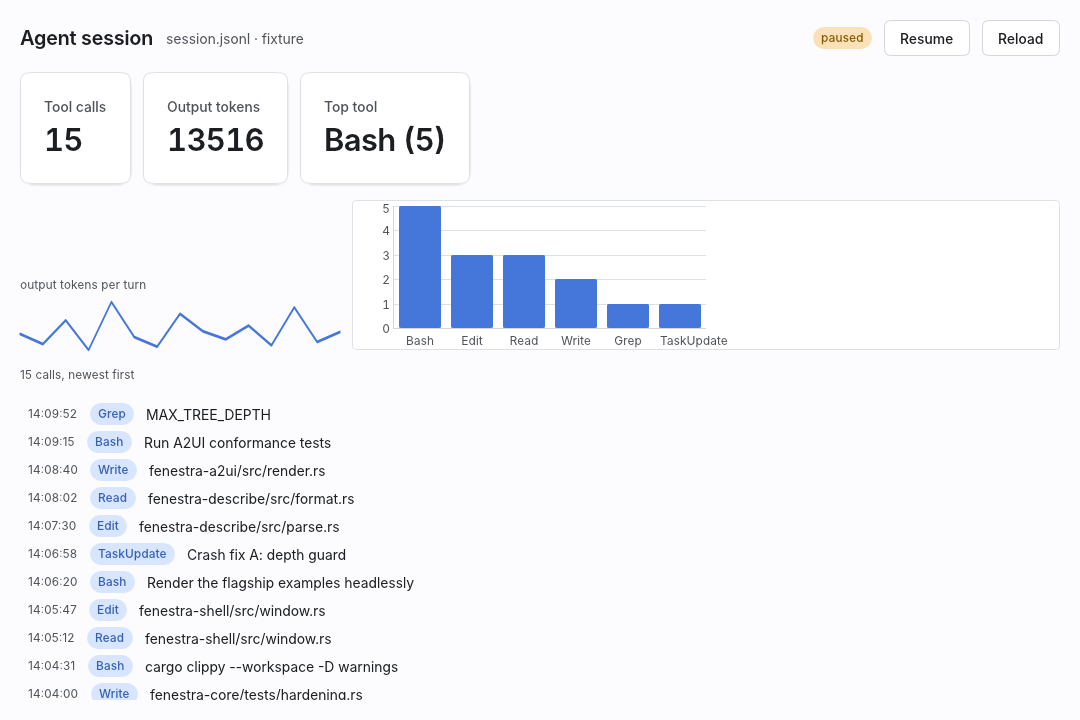 | 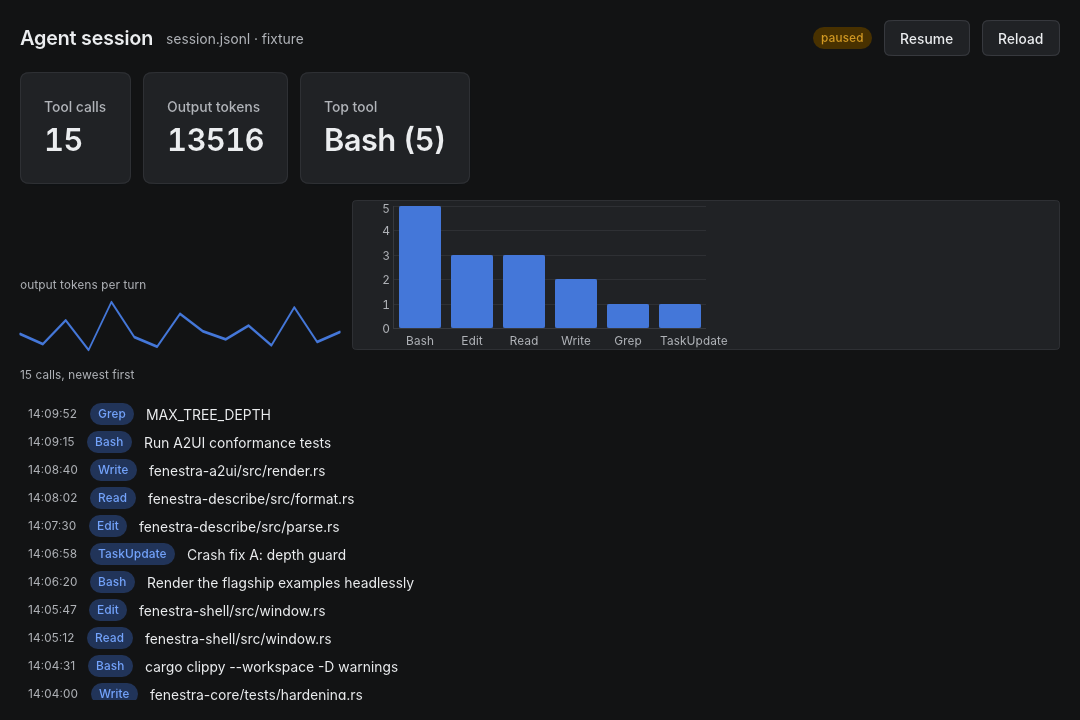 |
That hero shot is a real tool, not a mockup: examples/agent_dashboard.rs
is a live dashboard over an AI coding session, with a virtualized feed,
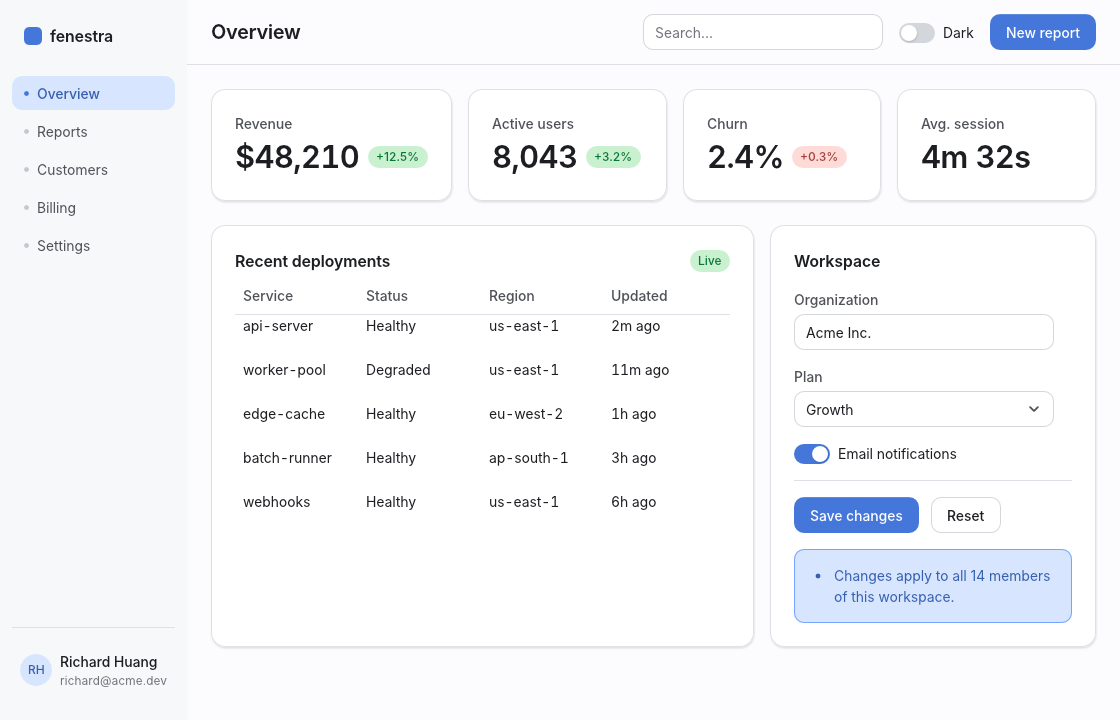
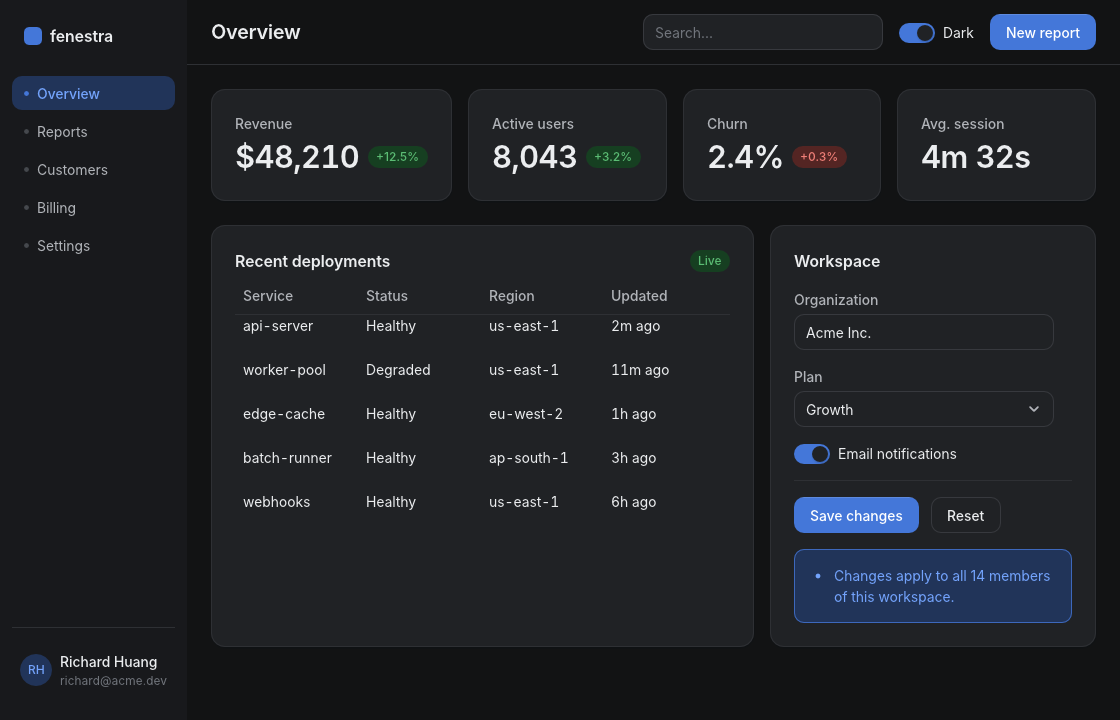
charts, and a live tail through the effect layer. The SaaS-style widget
showcase lives on as examples/dashboard.rs:
| Light | Dark |
|---|---|
 |  |
There's no browser here, no webview, and no HTML or CSS parser. fenestra draws everything itself with vello on wgpu. It lays out with taffy (flexbox and grid) and shapes text with parley.
On top of that sits a themed widget kit that looks like a polished modern web app: soft layered shadows, OKLCH color ramps, a real typographic hierarchy, transitions on hover and focus, and light and dark themes that both get first-class treatment.
Quickstart
use fenestra::prelude::*;

struct Counter { n: i64 }

#[derive(Clone)]
enum Msg { Inc, Dec }

impl App for Counter {
    type Msg = Msg;

    fn update(&mut self, msg: Msg) {
        match msg { Msg::Inc => self.n += 1, Msg::Dec => self.n -= 1 }
    }

    fn view(&self) -> Element<Msg> {
        col().p(SP6).gap(SP4).items_center().children([
            text(self.n.to_string()).size(TextSize::Xl2).weight(Weight::Semibold),
            row().gap(SP3).children([
                button("Decrement").variant(ButtonVariant::Secondary).on_click(Msg::Dec),
                button("Increment").on_click(Msg::Inc),
            ]),
        ])
    }
}

fn main() { fenestra::run(Counter { n: 0 }, WindowOptions::titled("Counter")) }
Run cargo add fenestra, paste that in, then cargo run. If you'd rather
start from a template, cargo generate richer-richard/fenestra-template
gives you one with a headless UI test and CI already set up.
The whole view is rebuilt, laid out and repainted on every redraw. There's no diffing and there are no macros, so everything autocompletes.
Agents can see what they build
Rendering (element tree, theme, size) to pixels is a pure function, and it
runs without a window or display server:
use fenestra::shell::{SyntheticEvent, render_app, render_element};

// A picture of any element tree:
let image = render_element(my_view(), &Theme::dark(), (800, 600));
image.save("preview.png")?;

// Or drive a full app with scripted input and look at the result:
let image = render_app(
    &mut app,
    &[
        SyntheticEvent::MouseMove { x: 50.0, y: 34.0 },
        SyntheticEvent::MouseDown,
        SyntheticEvent::MouseUp,
        SyntheticEvent::Text("hello".into()),
    ],
    (800, 600),
    &Theme::light(),
);
assert_eq!(app.value, "hello");
Headless rendering is deterministic (embedded fonts, fixed scale, reduced motion), which makes pixel-exact golden tests practical — fenestra's own widget kit is tested this way, on CI, with no GPU display attached.
The same pipeline backs a JSON authoring format called fenestra/1, for
agents and tools that would rather not compile Rust. You describe a UI in
JSON and fenestra-describe parses it into the same
Element tree the builders produce. The format covers the whole kit: data
tables, trees, popovers, command palettes, the OKLCH color picker, images,
charts, and markdown.
From there you have a few ways in. fenestra render writes a PNG.
fenestra preview <file> opens a window that re-renders every time you
save. And the fenestra-mcp server hands an agent the whole
loop — render, query, interact, verify — as fourteen MCP tools, including
render_a2ui. You can watch motion too, not just single frames:
Harness::film (also fenestra film, also the MCP film_ui tool) captures
a sequence with real motion turned on and composes it into one captioned
filmstrip.
What a headless render does and doesn't cover. It renders a deliberate subset of what a live window shows. That subset is exactly what makes it deterministic, so it's worth knowing where the edges are.
Text uses the embedded fonts, so Latin comes out exact. The real monospace,
CJK, emoji and RTL faces come from the OS, and those only show up in a real
window. Motion is always forced to reduced. Pixels are referenced against
macOS/Metal, with Linux/lavapipe allowed a wider tolerance. Scale isn't
pinned — render_element_scaled runs the same two-pass pipeline at any
device scale, so you can catch retina-only regressions like hairlines and
blur radii headlessly as well.
Two things look different outside that path. The full Liquid-Glass optics (backdrop blur, edge lensing, adaptive vibrancy) only render in the headless golden path; a live single-pass window gives you the translucent tint plus the specular rim and sheen. On the web, copying out reaches the system clipboard but pasting in from other apps stays inside the app, glass matches the native live window, and AccessKit is still waiting on an upstream web adapter.
So headless is the right thing to trust for layout, semantics, color, and the large majority of pixels. Check non-Latin text, monospace, and full glass in a real window. ARCHITECTURE.md keeps the precise ledger.
Working with an AI agent? AGENTS.md is the manual for the build → render → look → verify loop (and llms.txt for context loaders).
Philosophy: web aesthetics without the web platform
The way the web looks — soft elevation, tinted neutrals, OKLCH ramps, spacing on a 4px grid, focus rings, easing in the 120–300ms range — is the best-tested visual language we have in software. The web platform is a heavy way to get hold of it.
So fenestra encodes that language as typed Rust values instead. A Theme
is generated from a single accent hue. Spacing, radius, shadow and motion
come from tokens. The builder vocabulary (row(), .p(SP4),
.rounded(R_MD), .shadow(ShadowToken::Sm)) is small enough to memorize
and regular enough that rust-analyzer — or a language model — can
autocomplete it. Every widget routes every color through the theme, so
flipping one Mode turns the whole app dark.
The kit
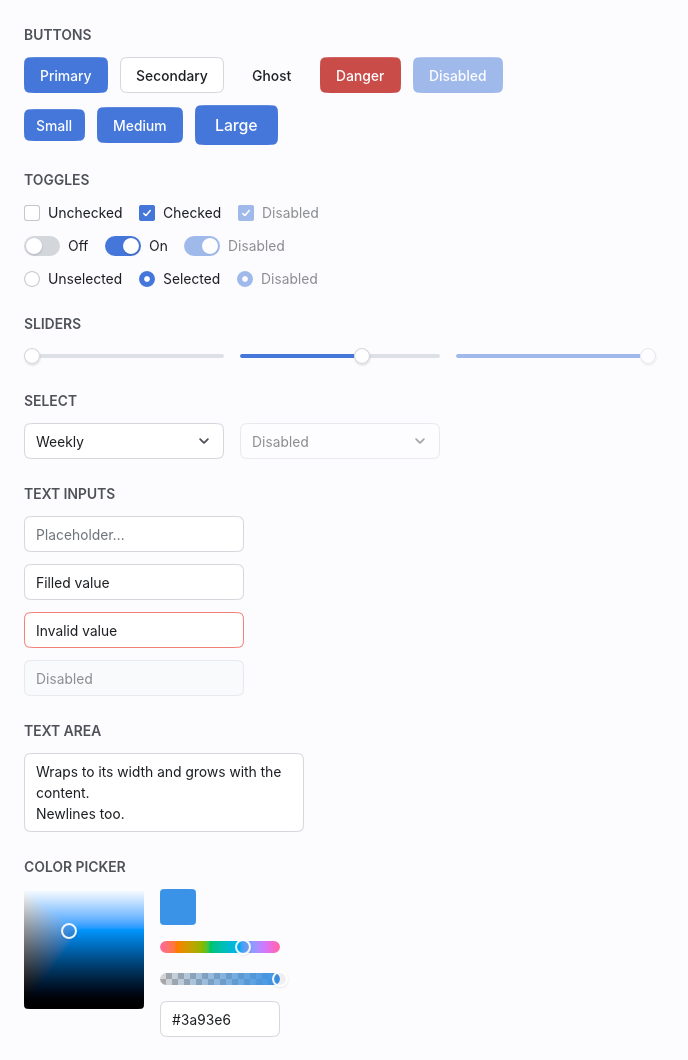
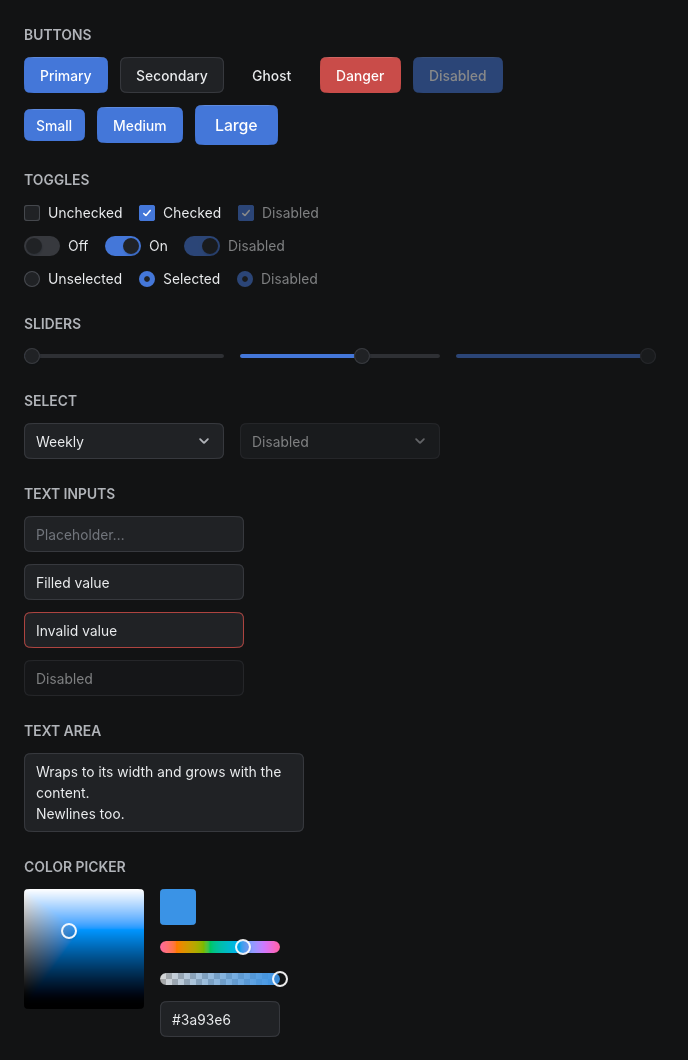
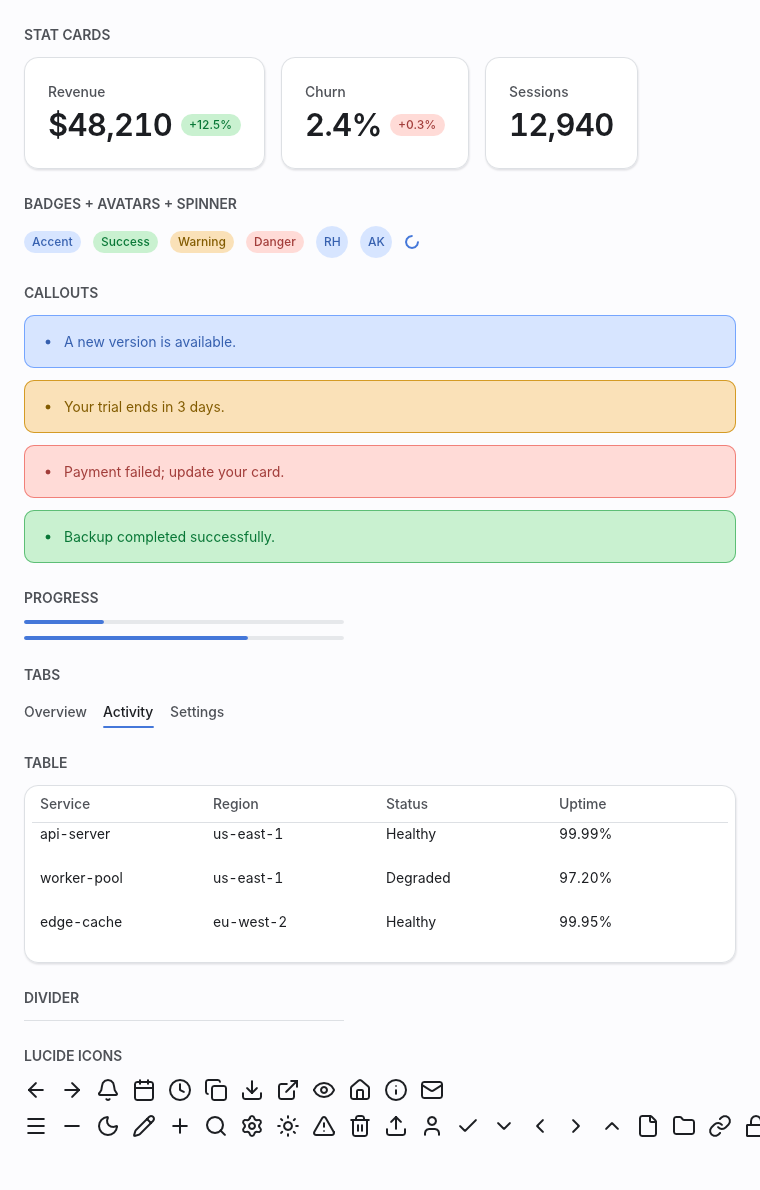
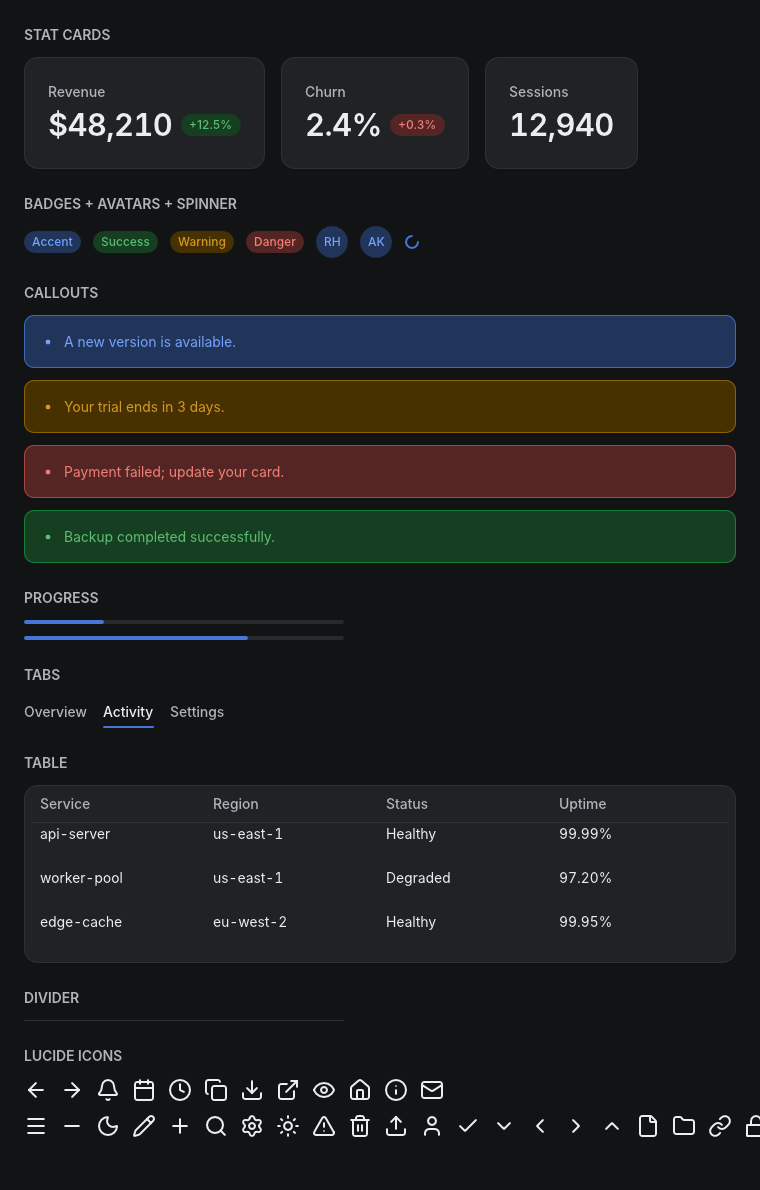
Every widget below ships in every state, in both themes.
Controls. Button, IconButton, Checkbox, Switch, Radio, Slider, SegmentedControl, Select, and a Color Picker with an OKLCH lightness×chroma pad, hue and alpha strips, and forgiving hex entry.
Text entry. TextInput (parley editing, clipboard, IME) and TextArea (multiline, auto-growing).
Surfaces and feedback. Tooltip, Modal (focus trap and backdrop), Toasts, Tabs, Card, StatCard, Badge, Avatar, StatusIndicator with a live pulse, Kbd key-caps, Skeleton loaders, Divider, Spinner, Table, Callout, and Progress — including a Material-3 Expressive wavy bar. Plus a vendored subset of Lucide icons.
 |  |
 |  |
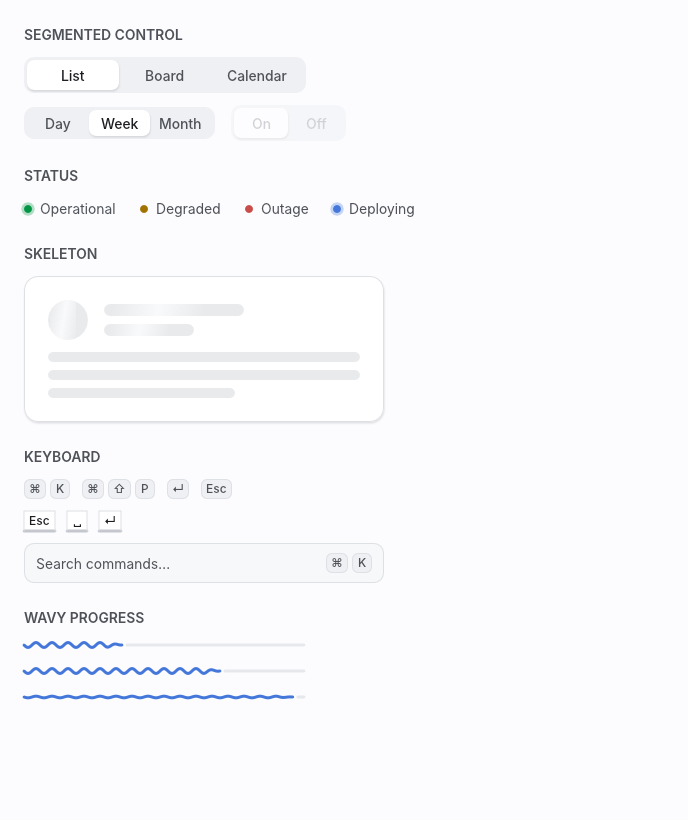 | 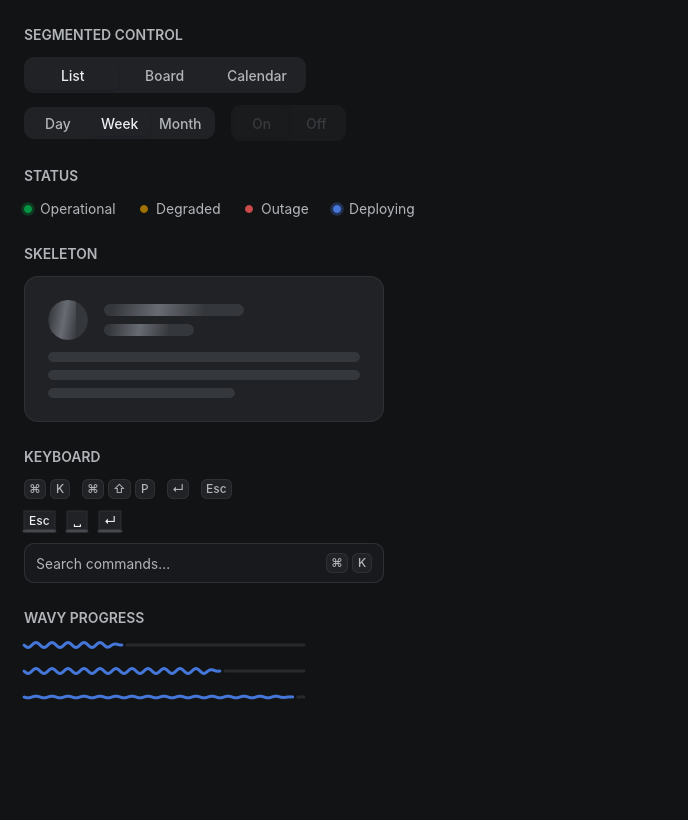 |
Regenerate this corpus any time with cargo run --example gallery — it
renders headlessly.
Motion
fenestra-motion renders frame-pure compositions headlessly, with no live
window and no screen recorder involved. The same pipeline is what fenestra film and the MCP film_ui tool use to let an agent watch a transition
play.
Below is a fenestra-charts bar chart, rebuilt every frame from
rank-sorted, track-interpolated data:
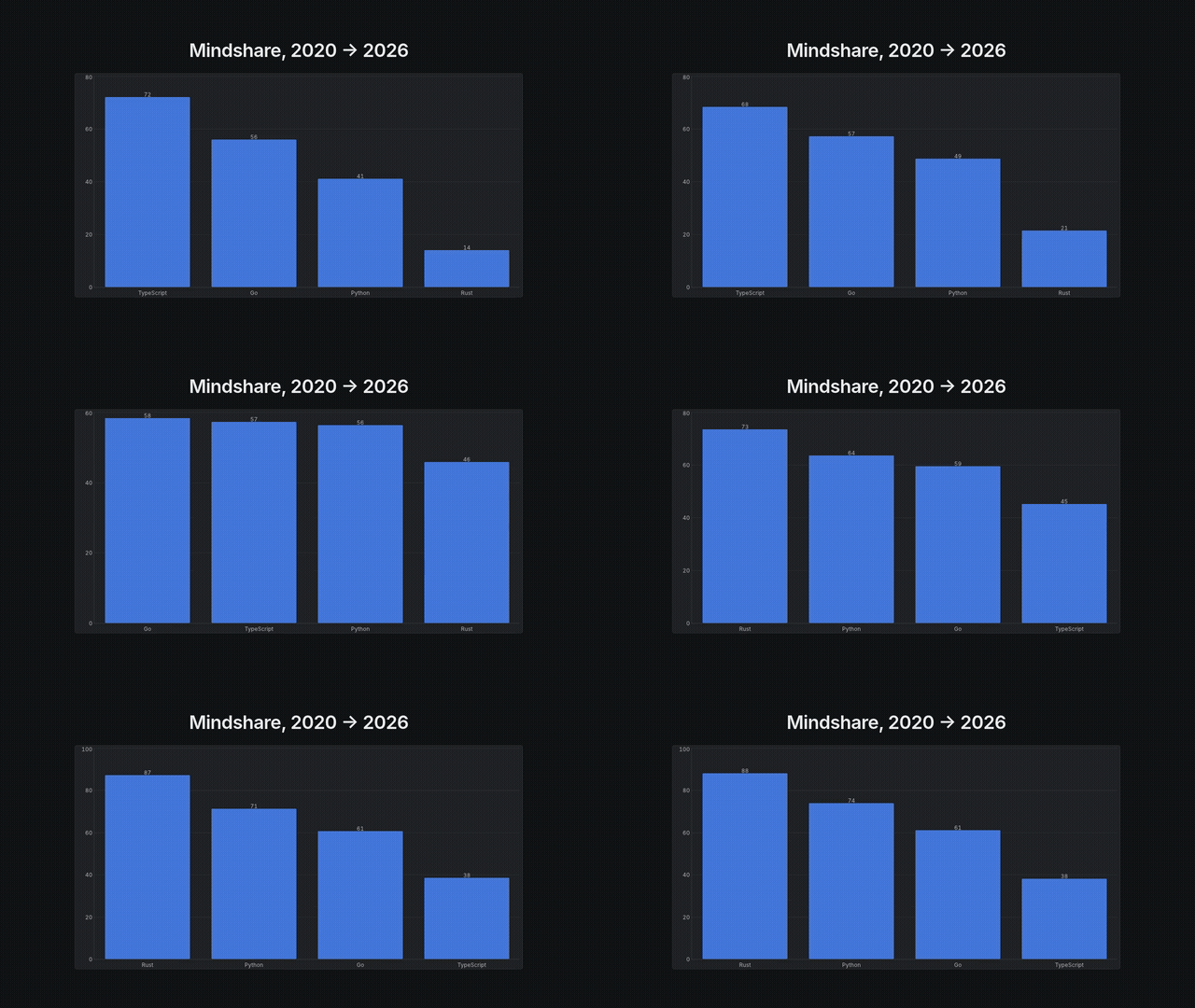
cargo run -p fenestra-motion --example chart_race -- --mp4 renders this
exact sequence — the lead changes hands partway through, verified
structurally in the example itself, not just eyeballed. Two more shipped
demos render the same way: a broadcast lower-third
(examples/lower_third.rs) and a per-word title stagger
(examples/title_stagger.rs).
Workspace
| Crate | Role |
|---|---|
fenestra | Facade: prelude, run(), examples |
fenestra-core | Element IR, theme/tokens, layout, text, paint, input, transitions |
fenestra-shell | winit + wgpu window runner and the headless renderer |
fenestra-kit | The themed widget kit, built only on core's public API |
fenestra-charts | Sparklines, line and bar charts — the reference third-party widget crate |
fenestra-markdown | CommonMark rendered as native fenestra elements |
fenestra-looks | Six ready-made design languages (product, editorial, terminal, console, warm-editorial, playful), applied in one call |
fenestra-describe | Parses fenestra/1 JSON into the same Element tree the builders produce |
fenestra-a2ui | A native Rust renderer for A2UI v0.9 — the open Agent-to-UI standard |
fenestra-render | The fenestra CLI: render, preview, film, query, verify, lint — from the command line |
fenestra-mcp | MCP server exposing render, query, interact, and verify as fourteen tools to AI agents |
fenestra-motion | Frame-pure motion graphics: timelines, headless frame/video rendering, temporal lints, the motion CLI |
fenestra-anim | Keyframe animation math — easing, springs, an exact rational timebase |
fenestra-anim is versioned on its own (0.1.x). It's a standalone leaf
crate that depends on no fenestra crate at all, and not on wgpu, vello,
parley, taffy or winit either. It was pulled out of fenestra-core and
fenestra-motion so that anything sampling by frame or tick — in this
workspace or well outside it — can depend on just the animation math.
fenestra-mcp is versioned separately too, so the MCP server can ship on
its own schedule.
See ARCHITECTURE.md for how the pipeline, widget identity, transitions, and overlays work — recorded decision-by-decision as the framework was built — and BENCHMARKS.md for honest frame-cost numbers (a full screen rebuilds, lays out, and paints in ~0.3 ms; 100k-row lists virtualize to ~0.09 ms).
Design range
Same framework, same tokens, a different design language.
The fenestra-looks crate bundles six ready-made voices — product,
editorial, terminal, console, warm-editorial and playful — and you can
enumerate them with all(). Past that, single knobs re-skin the whole kit.
Theme::with_radius(RadiusScale::sharp()) gives you un-rounded tech chrome.
Theme::with_elevation(Elevation::Flat) draws surfaces with borders instead
of shadows. Theme::duotone swaps neutral grays for atmospheric fields. If
you want your own display faces, register them under font roles with
Fonts::register.
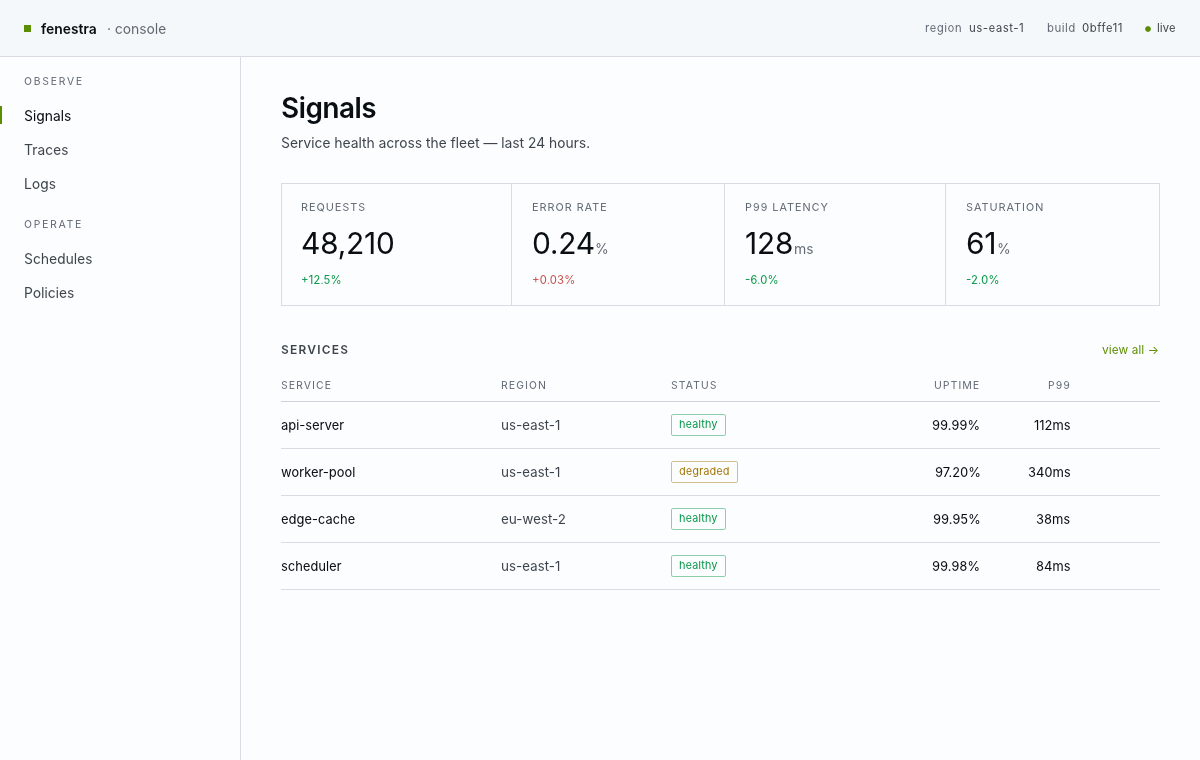
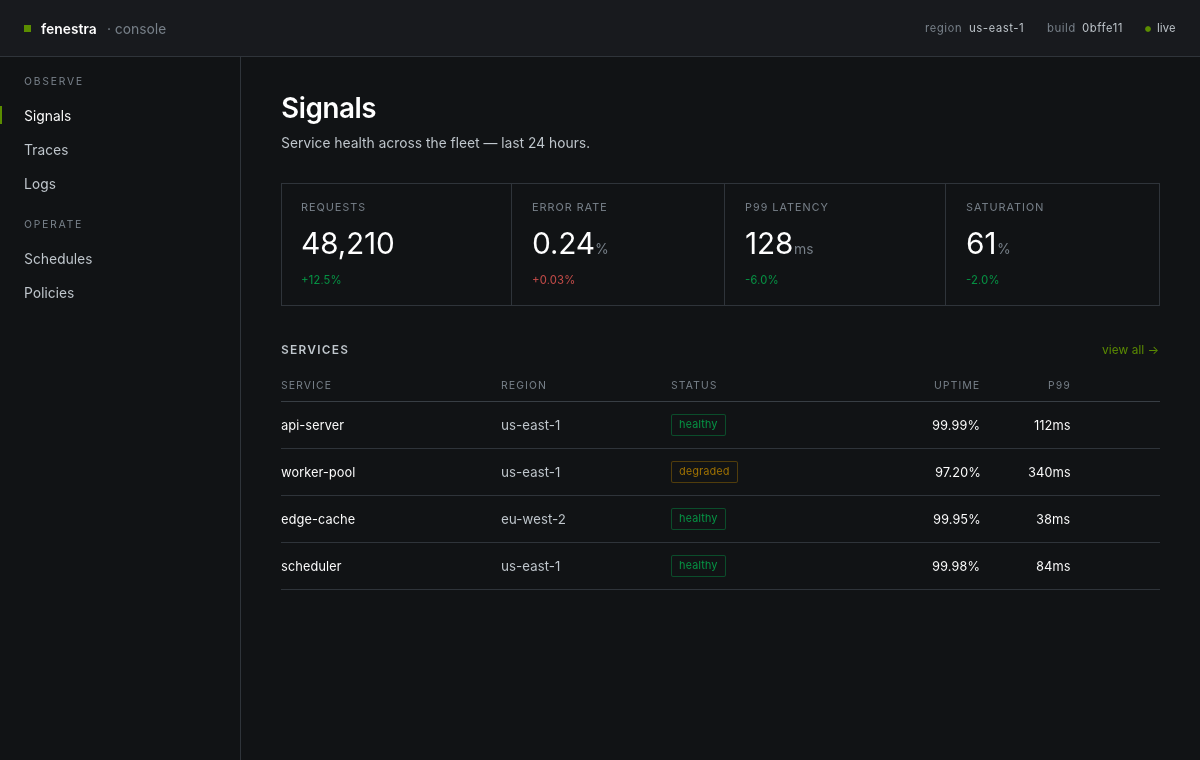
Below is the opposite end of the range from the soft default dashboard above: a sharp, hairline-ruled console in slate, with one lime accent and mono numerals. Rendered headlessly and golden-tested, like everything else here.
| Light | Dark |
|---|---|
 |  |
Composition, commands, accessibility
Components written around their own message type compose with
Element::map.
Background work comes in through App::init, which hands the app a
cloneable Proxy<Msg>. Spawn a thread, send messages back, and the window
repaints — examples/clock.rs and examples/toasts.rs both do this.
Every widget exposes its role, state and name in two directions: headlessly
through Frame::access_tree(), so you can assert in CI that your UI is
labeled, and to real assistive technology through AccessKit in the windowed
runner.
Ambient motion comes from looping Keyframes timelines, and images from
image_rgba8 (use .rounded_full() for round avatars).
Status
fenestra is at 0.41.0. ARCHITECTURE.md records how it got there, decision by decision.
Here's what has shipped:
- The interactive widget kit, in light and dark themes.
- Six ready-made design languages (
fenestra-looks) and a frosted-glass material system. - Charts and markdown, as reference third-party widget crates.
- The
fenestra/1JSON format, which can author the entire kit. It's parsed byfenestra-describe, then rendered and verified by thefenestraCLI and the fourteenfenestra-mcptools. - An A2UI v0.9 renderer (
fenestra-a2ui). - An effect layer (
Cmd/Sub) with a deterministic test harness. - Declarative native menus on macOS, hi-DPI headless rendering at any
scale, and a live-reload
fenestra previewwindow. fenestra-motion, for frame-pure motion graphics with temporal lints and filmstrip capture.
Every change clears the same gate before it merges: cargo fmt --check,
clippy -D warnings, the full test suite, and a headless golden-PNG
comparison on macOS/Metal and Linux/lavapipe. cargo audit and cargo deny
run on every push and once a week on top of that.
Open work is kept as a ranked list in ARCHITECTURE.md's "Deferred" notes.
The gaps worth knowing about up front: A2UI's DateTimeInput is an ISO text
field rather than a calendar, obscured text fields render unmasked (the
renderer reports this as a note rather than hiding it), and AccessKit on the
web is waiting on an upstream adapter.
License
MIT or Apache-2.0, at your option. The embedded Inter font, the Playfair
Display faces (poster and editorial looks), the Fraunces variable text serif
(the opsz/optical-sizing serif in the warm-editorial look), and JetBrains
Mono (terminal look) are licensed under the SIL Open Font License 1.1; the
vendored Lucide icon path data is ISC (see fenestra-kit/LICENSE-LUCIDE.txt).