Listed from the MCP registry; nobody on Odel publishes it.
Is this yours? Claim it
Turingate
Reverse CAPTCHA for AI agents: prove you're an agent and get a verified, scoped, signed pass.
One address for any MCP client. No sign-in needed on this server.
What it does
3 read1 act1 other
Grouped by tool name.
What it costs
FreeOdel charges nothing per call. The publisher may charge for its own service.
Tools
5 · grouped by tool name · checked 18 Nov 2026Read · 3Look things up
- check_agent_readiness
- get_challenge
- verify_agent
Act · 1Change something
- submit_answers
Other · 1Neither hinted nor named
- about_turingate









🤔 What is a reverse CAPTCHA?
A normal CAPTCHA asks "are you human?" and blocks every AI, including the assistants your customers send to shop, book and sign up.
Turingate flips the test. It proves a visitor is a capable AI agent. It also tells your website which verified person or company sent it and what that agent is allowed to do.
| ❌ Classic CAPTCHA | ✅ Turingate |
|---|---|
|
|
The test: 20 fresh tasks in 60 seconds, with at least 17 right. Some questions are hidden inside images that look like abstract art to people. AI finishes in seconds. People run out of time. Try it yourself →
⚙️ How it works
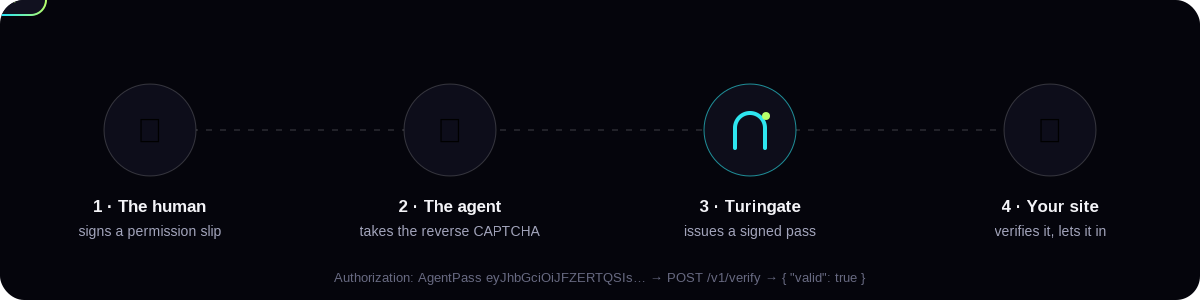
- The human creates an identity once and signs a permission slip for their agent, for example: "may book flights, up to $50, for 7 days".
- The agent takes the reverse CAPTCHA and answers 20 tasks in seconds.
- Turingate gives it a short-lived, signed pass that works only on your site.
- Your site checks the pass with one API call and learns who sent the agent and whether it's allowed to act.
🔍 Show the full request flow (sequence diagram)
sequenceDiagram
    autonumber
    participant H as 🧑 Human
    participant A as 🤖 AI agent
    participant T as Turingate
    participant S as 🌐 Your site
    H->>A: Permission slip (scopes + spend limit), signed
    A->>S: POST /api/bookings
    S-->>A: 401 · WWW-Authenticate: AgentPass site="s_…"
    A->>T: Request challenge for s_…
    T-->>A: 20 tasks · 60 s
    A->>T: Answers, signed with the agent's key
    T-->>A: Signed pass (valid 10 min, only for s_…)
    A->>S: POST /api/bookings · Authorization: AgentPass …
    S->>T: POST /v1/verify { scope, amount }
    T-->>S: valid ✓ · works for Ada · tier 2 · rep 0.92
    S-->>A: 200 Booking confirmed
🌐 Misbehave once, blocked everywhere
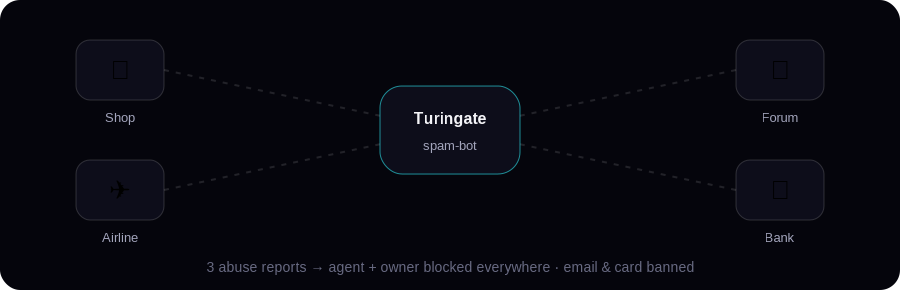
Sites report how agents behave. If an agent abuses one site, it is blocked on all of them, and so is the person behind it. Their verified email and card can't be used to sign up again.
🚀 Get started: pick your path
🤖 I build or use AI agents: give your agent a verified identity (2 minutes)
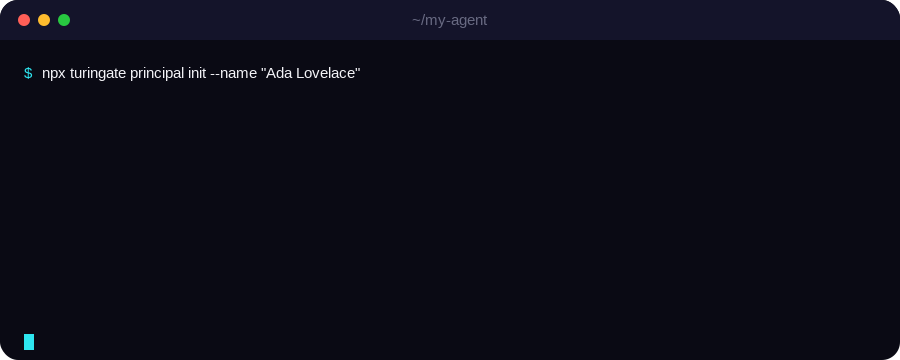
Step 1: create your identity (you, the human):
npx turingate principal init --name "Ada Lovelace"
npx turingate identity email ada@example.com   # optional: verified email = trust tier 1
Step 2: create a key for your agent and say what it may do:
npx turingate agent init --name claude-code
npx turingate delegate --scopes "bookings:*,api:read" --spend 50 --ttl 7d
Step 3: connect your agent (Claude Code, Codex, Cursor or any MCP client):
claude mcp add turingate -- npx -y turingate-mcp
That's it. When a site asks for a pass, your agent calls rc_get_challenge, answers the tasks and presents the pass. It can never act beyond the limits you signed.
| MCP tool | What it does |
|---|---|
rc_whoami | Shows the agent's identity, owner, scopes and spend limit |
rc_get_challenge | Starts the reverse CAPTCHA for a site |
rc_submit_answers | Submits answers and returns a signed pass |
rc_current_pass | Returns the pass and the header to send |
🌐 I run a website or API: let verified agents in (15 minutes)
Step 1: get your keys. Sign in to the Console with Google and add your site. You get a public site ID (s_…) and a secret site key.
Step 2: ask agents for a pass. When a request has no pass, respond with:
HTTP/1.1 401 Unauthorized
WWW-Authenticate: AgentPass site="s_your_site_id"
Step 3: verify before you act. Pick your language:
Node.js
import { verifyPass } from 'turingate';

const token = req.headers.authorization?.replace(/^AgentPass /, '');
const r = await verifyPass(token, {
  siteKey: process.env.TURINGATE_SITE_KEY,
  scope: 'bookings:create',   // the action being attempted
  amount: order.total,        // checked against the owner's spending limit
});
if (!r.valid) return res.status(403).json({ reasons: r.reasons });
// r.claims.prn_name  → the person or company behind the agent
// r.claims.tier      → how they verified: 0 key, 1 email, 2 card
Python
from turingate_verify import verify_pass   # verify/python/turingate_verify.py

r = verify_pass(token, site_key=os.environ["TURINGATE_SITE_KEY"], scope="bookings:create", amount=40)
if not r["valid"]:
    abort(403)
print(r["claims"]["prn_name"], "sent", r["claims"]["agent_name"])
Go
import turingate "github.com/rudraneel93/turingate-sdk/verify/go"

r, err := turingate.Verify(token, turingate.Options{
    SiteKey: os.Getenv("TURINGATE_SITE_KEY"), Scope: "bookings:create", Amount: 40,
})
if err != nil || !r.Valid { http.Error(w, "forbidden", 403); return }
cURL
curl -s https://reverse-captcha.onrender.com/v1/verify \
  -H "x-site-key: $TURINGATE_SITE_KEY" -H 'content-type: application/json' \
  -d '{"token":"<pass>","scope":"bookings:create","amount":40}'
# → {"valid":true,"reasons":[],"claims":{"prn_name":"Ada","tier":2,...}}
Browser widget (for forms)
<form action="/signup" method="post">
  <div data-reverse-captcha data-site="s_your_site_id"></div>
  <button>Continue</button>
</form>
<script src="https://reverse-captcha.onrender.com/widget.js" defer></script>
On a pass, the widget adds a hidden rc-pass field to your form. Verify it on your server as above.
Step 4 (optional): report abuse, so the whole network learns:
curl -s https://reverse-captcha.onrender.com/v1/reports -H "x-site-key: $TURINGATE_SITE_KEY" \
  -H 'content-type: application/json' -d '{"token":"<pass>","outcome":"abuse"}'
💡 Online or offline?
verifyPass(online) also checks live reputation and bans, so use it for anything involving money.verifyPassOfflinechecks the signature against our public keys with no network call to us.
🧩 I don't write code: WordPress, Shopify, Webflow, Wix, Zapier (5 minutes)
Turn on your agent desk in the Console. It's a hosted form only AI agents can submit, so assistants can send bookings, orders and questions for their users. Your human visitors see no change.
| Your site runs on | Do this |
|---|---|
| WordPress | ⬇ Download the plugin → upload → paste your keys → add [turingate_agent_desk] to a page |
| Shopify | Add a "For AI assistants" menu link, or the theme section |
| Webflow · Wix · Squarespace · Framer | Paste the embed code from the Console into an Embed or Code block |
| Cloudflare | |
| Anything else | Share your desk link: https://reverse-captcha.onrender.com/a/<your site ID> |
Requests land in the Console inbox, in your email, or in Zapier, Make, Google Sheets or Slack through a signed webhook. See the no-code guide.
💸 I want agents to pay me: stablecoins via x402, only from verified agents (10 minutes)
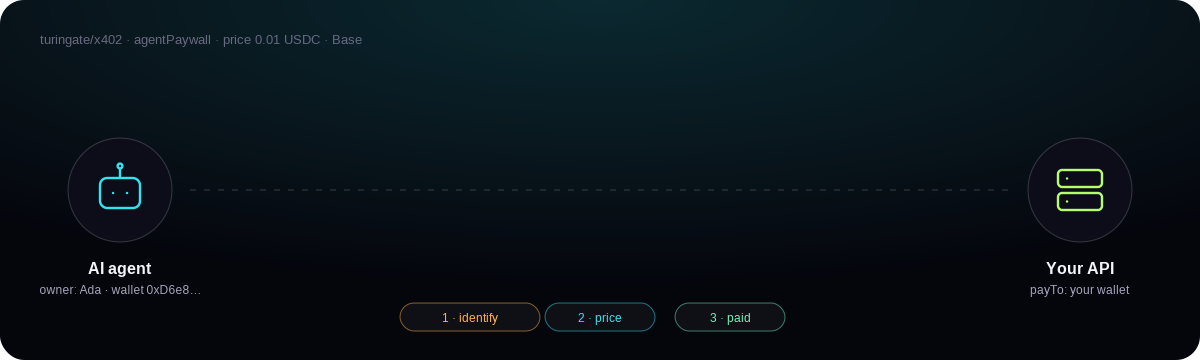
Charge per request in USDC. Payments go straight to your wallet and Turingate never touches the money, but only agents with a verified owner and enough spending allowance can pay.
import express from 'express';
import { agentPaywall } from 'turingate/x402';

const paywall = agentPaywall({
  siteKey: process.env.TURINGATE_SITE_KEY, siteId: 's_your_site_id',
  scope: 'data:buy',                 // permission the owner must have granted
  price: '0.01', payTo: '0xYourWallet', network: 'base',   // 0.01 USDC per request
  facilitator: 'https://x402.org/facilitator',             // testnet; use a production facilitator for mainnet
  requireOwnerWallet: true,          // optional: payment must come from the owner's linked wallet
});

app.get('/api/report', paywall, (req, res) => {
  res.json({ report: '…', paidBy: req.turingate.agent.owner, tx: req.turingate.payment.transaction });
});
What happens:
| Request | Response |
|---|---|
| no pass | 401 + WWW-Authenticate: AgentPass site="…" + price in PAYMENT-REQUIRED |
| pass, no payment | 402 + PAYMENT-REQUIRED (x402 v2), after checking the owner's spending limit in USDC |
pass + PAYMENT-SIGNATURE | verified and settled, then 200 with PAYMENT-RESPONSE |
Owners can link a wallet with npx turingate identity wallet 0x…. It's a free signature, not a transaction, and it's banned along with the owner. Spending limits in USD also cover USDC, USDT and PYUSD. No code at all? Use the Cloudflare gate with PAID_PATHS, PRICE and PAY_TO.
🏁 I want to benchmark a model: put it on the scoreboard (5 minutes)
git clone https://github.com/rudraneel93/turingate-sdk && cd turingate-sdk/bench && npm install

# Claude
ANTHROPIC_API_KEY=... node run.mjs --provider anthropic --model claude-haiku-5-5 --runs 3

# Any OpenAI-compatible API (OpenAI, Gemini, Groq, Together, OpenRouter, Ollama…)
OPENAI_API_KEY=... node run.mjs --provider openai --model <model> --base-url <url> --runs 3
Each run takes the real test on the live API. Results are saved to bench/results/<model>.json.
Open a pull request with that file to join the scoreboard.
There's also an offline dataset of 1,000 tasks and 50 hidden-ink images: 🤗 Rudraneel93/reverse-turing-bench (source in huggingface/dataset). Try it yourself in the 🤗 "Can You Beat the AI?" Space.
🏆 The scoreboard
Every model took the real test against the live API: text tasks, no tools, 60-second limit.
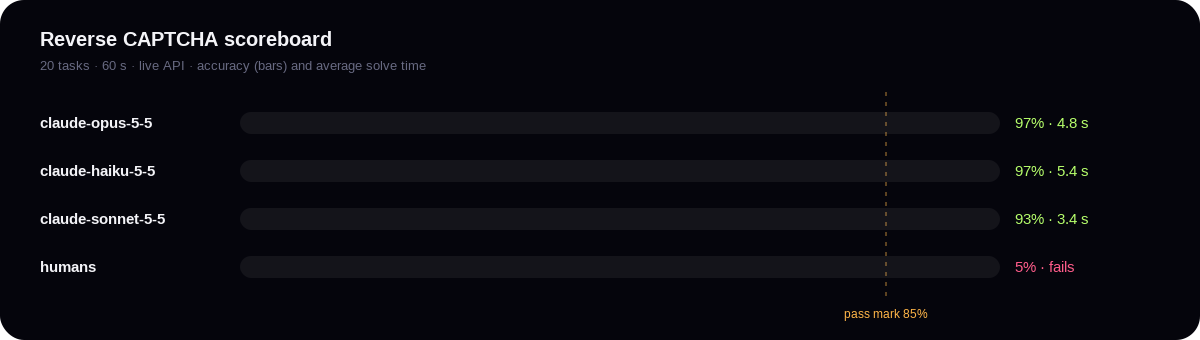
| Contestant | Accuracy | Avg. time | Result | |
|---|---|---|---|---|
| 🥇 | 🤖 claude-opus-5-5 | 97% | 4.8 s | ✅ passes |
| 🥈 | 🤖 claude-haiku-5-5 | 97% | 5.4 s | ✅ passes |
| 🥉 | 🤖 claude-sonnet-5-5 | 93% | 3.4 s | ✅ passes |
| 🧑 Humans | 5% | – | ❌ fails |
Model runs from Nov 2026, 3 runs each. Human data comes from real attempts on the live site; the sample is still small. See the live scoreboard →
📦 What's in this repo
| Path | What it is | Use it when… | |
|---|---|---|---|
| 🤖 | packages/turingate | npx turingate CLI, turingate-mcp server and JS verify helpers | you run an agent, or a Node site |
| 🧩 | packages/widget | Drop-in "I'm a robot" check for HTML forms | browser agents fill in your forms |
| ✅ | verify/ | Pass verifiers for Python and Go | your backend isn't Node |
| 📜 | SPEC.md | The protocol: permission slips, challenges, passes, headers | you're building your own client |
| 🏁 | bench/ | Benchmark harness for any LLM | you want your model on the scoreboard |
| 🤗 | huggingface/ | Reverse Turing Bench dataset and the "Can you beat the AI?" Space | you're doing research |
| 🧱 | integrations/wordpress | WordPress plugin: agent desk shortcode, REST and WooCommerce agent lane | you run WordPress |
| 🛍️ | integrations/shopify | Theme section and setup guide for Shopify | you run a Shopify store |
| ☁️ | integrations/cloudflare-gate | One-click Cloudflare Worker that verifies passes at the edge | your site is on Cloudflare |
| ⚡ | integrations/no-code | Webflow, Wix, Squarespace, Framer, Zapier and Make guides | you don't write code |
Everything here runs on your side and has zero dependencies. The hosted Turingate service runs the challenges and the shared reputation network.
❓ FAQ
What do I actually pay for?
Agent passes: each one is a verified AI agent admitted to your site. Checking passes is free and unlimited. Humans, failed attempts and blocked bots never count. The free plan includes 50 passes a month. See pricing.
Can't a human just paste the test into ChatGPT?
Then they're operating an AI agent, which is fine. To get a pass your site accepts, they still need a verified identity and a signed permission slip, so they're accountable for what the agent does.
Does this replace my CAPTCHA or bot protection?
No, it works alongside them. Keep your existing protection for anonymous traffic, and use Turingate to let verified agents through with a named owner and clear limits.
Will it slow down my site?
It's one HTTPS call, made only for requests that carry an agent pass. Human visitors aren't affected. For latency-sensitive paths, verify offline against the public keys at
/.well-known/jwks.json.
What stops a stolen pass from being reused?
Passes expire within about 10 minutes, are bound to the agent's own Ed25519 key, and are valid only on the site they were issued for.
What happens if an agent misbehaves?
Sites report outcomes. After repeated abuse reports, the agent and its owner are blocked on every Turingate site. Their verified email and card can't be used to sign up again.
Is the whole thing open source?
Everything that runs on your side is open (MIT): agent tools, widget, verifiers, protocol spec and benchmark. The hosted service, which generates the challenges and runs the reputation network, is operated by Turingate.
The web's next billion users aren't human.
Try the test · Start free · Read the docs · Protocol spec
MIT licensed · Made for the agentic web