Listed from the MCP registry; nobody on Odel publishes it.
Is this yours? Claim it
SandBase
Connect MCP clients to 2,000+ AI models without managing provider API keys.
One address for any MCP client. No sign-in needed on this server.
What it does
2 read3 act2 other
Grouped by tool name. At most: only reads or looks up information.
What it costs
FreeOdel charges nothing per call. The publisher may charge for its own service.
Tools
7 · grouped by tool name · checked 11 Nov 2026Read · 2Look things up
- sandbase_discover
- sandbase_inspect
Act · 3Change something
- sandbase_run_cancel
- sandbase_run
- sandbase_run_get
Other · 2Neither hinted nor named
- sandbase_runs
- sandbase_account
@sandbaseai/cli
Give your AI agent superpowers. One line. 2,000+ AI models and APIs. 100 free data API calls a day, then pay per call from one balance.
English | 中文 | 日本語 | 한국어 | Español | Français | Deutsch | Português






Start here
Requires Node.js 20 or newer. Use CLI / MCP to connect your AI tools, or discover and call APIs directly from your terminal.
- Website, API or agent setup: Quick Start.
- Python, TypeScript, Go and HTTP examples: SandBase SDK and catalog repository.
- Reusable workflows and browser utilities: Skills · Tools.
Connect your AI assistant to SandBase models and data APIs through the Model Context Protocol. Search, work with social data, and generate media using one SandBase connection, without separate provider accounts.
Building directly over HTTP instead of MCP? Start with the SandBase API quickstart or compare the unified LLM, image, and video API with specialized model gateways.
Setup
Paste this into your agent and let it do the rest:
set up https://www.sandbase.ai/SKILL.md
It reads the SandBase Skill, runs connect itself, and asks you to approve one browser sign-in. Prefer to drive it yourself:
npx -y @sandbaseai/cli@latest connect
Or install the official Homebrew formula on macOS or Linux:
brew install sandbaseai/tap/sandbaseai-cli
sandbase connect
See the Homebrew launch announcement and macOS/Linux CI evidence.
Approve the browser authorization once; each supported client can then discover,
inspect, and run available SandBase models and APIs through the local MCP bridge.
Start a new session afterwards so the sandbase_* tools load.
Every GitHub release publishes its own SHA-256 next to the tarball, so you can pin
and verify an exact build instead of tracking latest:
V=$(npm view @sandbaseai/cli version)
curl -fL -O "https://github.com/sandbaseai/cli/releases/download/v$V/sandbaseai-cli-$V.tgz"
shasum -a 256 "sandbaseai-cli-$V.tgz"   # compare against the checksum on the release page
npx -y "./sandbaseai-cli-$V.tgz" connect
Want to inspect compatibility before signing in or changing configuration? The client catalog is a read-only command — it writes nothing and needs no account:
npx -y @sandbaseai/cli@latest catalog --json
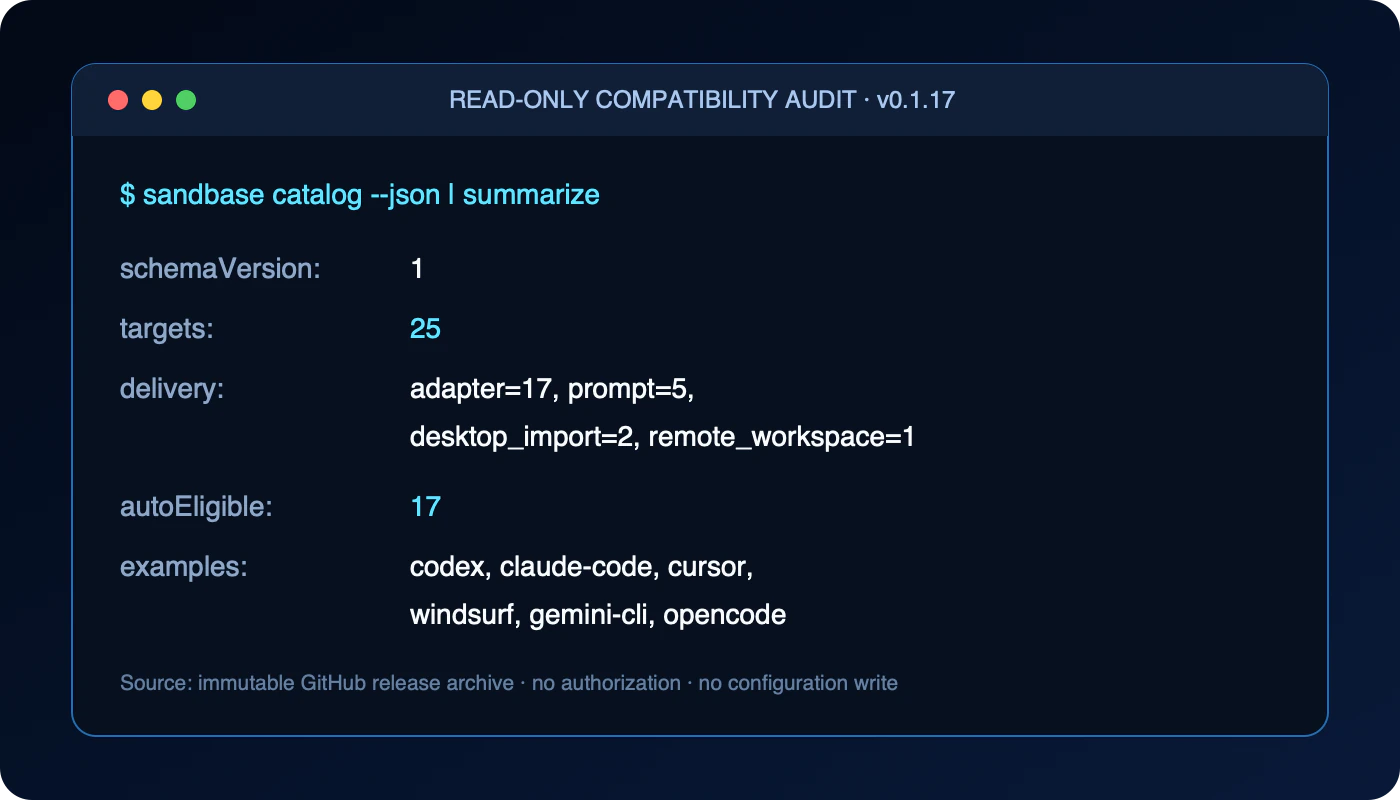
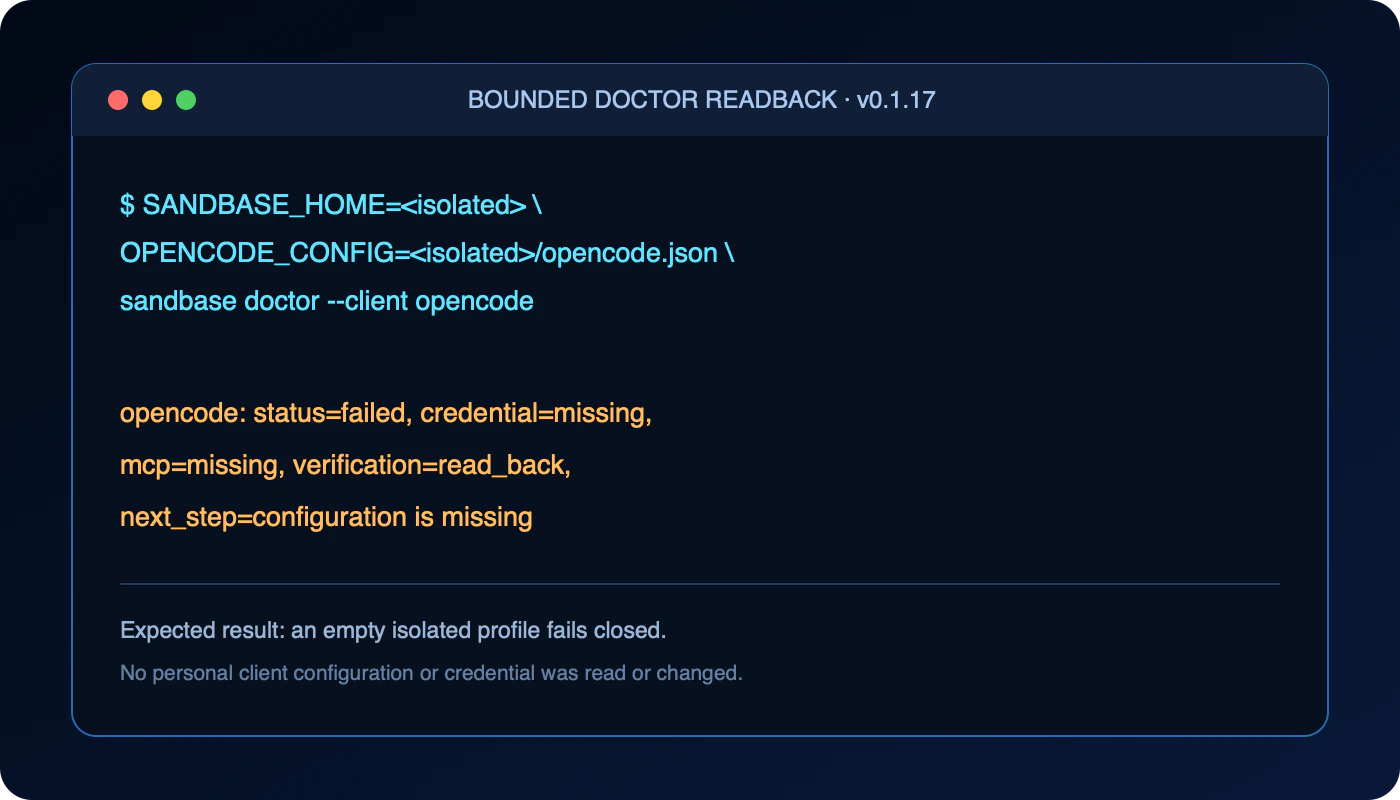
A no-write catalog audit and a bounded doctor check against an empty isolated profile.
Homebrew users can run the same read-only check with sandbase catalog --json.
What It Costs
| Price | |
|---|---|
| Data APIs — search, social, scraping, e-commerce, finance | 100 free calls/day per organization, then paid per call (price shown by sandbase inspect) |
| Discovery, inspection, run status, balance, file upload | Free |
| Models — LLM, image, video, audio | Paid per call or per million tokens |
sandbase inspect <tool> always shows the current price before you run anything;
data APIs covered by the daily allowance also show pricing.free_quota. The 100
free calls are shared across eligible data APIs and reset at 00:00 UTC; after
that, calls are billed per call. sandbase balance --json shows today's remaining free
calls as free_api_quota. Prices can change, so trust the live response over
any example in this file.
Visit the official SandBase CLI project page for a compact overview.
For a security-focused walkthrough of client detection, MCP tools, and rollback,
read the 25-client SandBase CLI setup guide.
AI agents and automated installers can use the concise
llms-install.md instructions.
SandBase Open-Source Stack
- SandBase Harness — self-hosted agent runtime with persistent sessions, sandbox isolation, approvals, audit, and replay.
- SandBase Agent Skills — installable Skills for research, social intelligence, marketing, and business workflows.
- SandBase for Codex — official Codex plugin packaging the SandBase MCP bridge and guided Agent Skill; its required HOL security scan passes on
main.
Discover the authenticated remote bridge in the official MCP Registry,
read its Registry community showcase, or find it through
Chinese Independent Developer,
Awesome MCP,
Glama,
TensorBlock MCP Index,
MCPRepository,
VaultPlane,
AIMCP,
MCP Server Hub,
MCP Server Spot, or the
Awesome AI API Proxy.
External maintainers have merged SandBase into
Awesome Codex CLI,
Awesome Agent Skills, and
Awesome MCP Server.
The Hermes integration is independently listed in the
Hermes Atlas ecosystem catalog and as beta in
Awesome Hermes Agent.
Install its
verified sandbase Agent Skill from skills.sh,
the sandbaseai/cli/sandbase listing on SkillsCat,
the sandbaseai/cli/sandbase listing on skills.re,
the 93/100 verified SandBase listing on vSkill,
the security-audited SandBase listing on Skillstore,
or the versioned sandbaseai/sandbase snapshot on Agent Skill Hub.
A Verifiable Agent Workflow
After connecting, ask your agent to follow the same inspectable sequence for search, data APIs, language models, image generation, video generation, and other catalog capabilities:
- Use
sandbase_discoverto find candidates by task or capability. - Use
sandbase_inspectto read the current input schema, pricing, and execution requirements. - Confirm the selected endpoint and parameters before calling
sandbase_run. Data APIs include 100 free calls per organization per UTC day, then are billed per call like models; confirm the cost shown bysandbase_inspectbefore paid runs. - For asynchronous work, use
sandbase_run_getwith the returnedrun_idinstead of creating a duplicate run. - Use
sandbase_runsto review recent run status and recorded cost. - Use
sandbase_accountto check the current account balance.
For example, start with a non-billable discovery request:
Find image models suitable for a square product illustration. Compare the required inputs and current pricing for the best two candidates. Do not run either model yet.
Discovery and inspection never cost anything, so an agent can always survey the catalog before it spends.
After reviewing the live response, explicitly approve the endpoint and inputs you want to run. Catalog entries, schemas, pricing, latency, and availability can change, so use the tool response from the current session rather than a static example.
See the complete Claude Code and Codex walkthrough or the Chinese workflow guide. For a live catalog example, read the GitHub connector discover-and-inspect dogfooding note.
What's Inside
| Category | Tools | What You Can Do |
|---|---|---|
| Web Search | Google, Exa, Tavily, Scholar | Research anything in real-time |
| Social Media | Twitter/X, YouTube, Reddit, Instagram, TikTok, Xiaohongshu, Weibo, Bilibili | Monitor trends, pull posts, analyze content |
| Scraping | Firecrawl, Exa Content | Extract data from any public webpage |
| AI Models | GPT, Claude, Gemini, DeepSeek, Qwen, Llama | Run any model without managing keys |
| Image Gen | GPT Image, FLUX, Seedream, Ideogram | Create logos, illustrations, mockups |
| Video Gen | Kling, MiniMax, Runway, Luma | Generate short clips and animations |
| Audio | ElevenLabs, Whisper | Text-to-speech, transcription |
| E-commerce | Taobao, Amazon | Product research, price comparison |
| Finance | Stock data, company info | Market research and analysis |
Supported Clients (25 Targets)
Works with every major AI coding tool:
| Auto-configured | Manual setup |
|---|---|
| Cursor, Cursor CLI | ChatGPT |
| Claude Code | Claude Desktop |
| Codex | |
| Kiro IDE, Kiro CLI | |
| Windsurf | |
| Gemini CLI | |
| Amp | |
| Warp | |
| OpenCode, Qwen Code, Kimi CLI | |
| Hermes, OpenClaw |
Preview the complete compatibility catalog without signing in or changing any files:
npx -y @sandbaseai/cli@latest catalog --json
# Connect all detected clients at once
npx -y @sandbaseai/cli@latest connect

# Or target one specific client
npx -y @sandbaseai/cli@latest connect --client cursor
OpenClaw quickstart
Target OpenClaw directly, then ask the CLI to read back the managed MCP server and SandBase Skill before you rely on them:
npx -y @sandbaseai/cli@latest connect --client openclaw
npx -y @sandbaseai/cli@latest doctor --client openclaw
After doctor reports the credential, MCP bridge, and Skill as configured,
restart OpenClaw and make a natural-language request that needs SandBase. If
OpenClaw already has a non-SandBase MCP server named sandbase, the installer
leaves it untouched instead of overwriting it. To remove the managed MCP entry
and local credential later:
npx -y @sandbaseai/cli@latest unregister --client openclaw
OpenClaw currently exposes no supported Skill removal command, so unregister
reports that limitation and leaves the verified SandBase Skill installed.
Hermes quickstart
SandBase can install both its managed Hermes Skill and local MCP entry in one authorization transaction:
npx -y @sandbaseai/cli@latest connect --client hermes
npx -y @sandbaseai/cli@latest doctor --client hermes
doctor verifies the owned local credential, MCP entry, and Skill. Restart
Hermes to confirm native discovery in a fresh client session, then use the
SandBase Skill or MCP tools. A pre-existing, non-SandBase MCP entry named
sandbase is left untouched. To remove only the managed Hermes configuration,
Skill, and local credential while retaining the shared bridge for other clients:
npx -y @sandbaseai/cli@latest unregister --client hermes
The integration is independently listed by Hermes Atlas and Awesome Hermes Agent.
How It Works
┌─────────────────┐         ┌───────────────┐         ┌────────────────────┐
│   Your Agent    │  MCP    │  Local Bridge │  HTTPS  │    SandBase API     │
│  (Cursor, etc.) │────────▶│  (on-demand)  │────────▶│ 2,000+ models/APIs │
│                 │◀────────│               │◀────────│                    │
└─────────────────┘         └───────────────┘         └────────────────────┘
- Run
connect→ CLI opens browser auth → you approve - API key saved locally (file permissions
0600) - MCP bridge configured for your client
- Agent calls tools on-demand. No daemon. No background process.
Install, upgrade and troubleshoot
A one-off npx ... connect does not permanently install the sandbase command. Prefix subsequent commands with npx -y @sandbaseai/cli@latest, or install it globally:
npm install -g @sandbaseai/cli@latest
sandbase connect
sandbase discover -q "Twitter posts" -t api
sandbase inspect sandbase_twitter_web_search_timeline
Discovery and inspection do not start billable work. Review the inputs and current price before using sandbase run. Upgrade through the same method you installed with: npm users can repeat the install command above; Homebrew users run brew update, then brew upgrade sandbaseai/tap/sandbaseai-cli. Avoid mixing both installation methods.
After upgrading, run sandbase setup and sandbase doctor --client <client-id>, then restart your AI client or open a new session. Complete any requested sign-in in your browser. Without a local AI client, obtain an API key, supply it as SANDBASE_API_KEY, and use terminal commands directly. Keep the run ID for async work and resume with sandbase runs get -r <run_id> -w instead of submitting it again.
Commands
CLI Commands
sandbase connect [--client <name>]    # Authorize + configure
sandbase setup                        # After upgrading: refresh the local bridge + Skill, test connectivity
sandbase doctor [--client <name>]     # Local checks plus one real round trip to SandBase
sandbase unregister [--client <name>] # Remove configuration
sandbase catalog --json               # List all supported clients
Agent Commands (shell transport, same capabilities as the MCP tools)
Agents without MCP, or with a broken MCP session, use the same catalog from a shell. Credentials come from connect automatically (or SANDBASE_API_KEY / sandbase keys add -k <key>).
sandbase discover -q "twitter posts"                       # search; -t api|llm|multimodal|embedding|service
sandbase inspect sandbase_twitter_web_search_timeline       # fields, price, ready-to-run command
sandbase run sandbase_twitter_web_search_timeline -i '{"keyword":"AI agents"}'
sandbase run <video_tool> -i '{"prompt":"..."}' -w -o result.json   # wait with backoff, save output to disk
sandbase runs get -r <run_id> -w -o result.json            # resume a long run instead of re-running it
sandbase upload ./photo.png                                # local image/audio/video -> public URL for tools that take a URL
sandbase runs list
sandbase balance
-j prints JSON; errors are {"error":{"code","message","hint"}} with the next step in hint. Exit codes: 0 success or still running, 1 failure (including a failed run), 2 usage.
Sync tools (LLMs, most data APIs) return their result directly; async tools (image, video, audio jobs) return a run id — wait with -w, or fetch later with sandbase runs get -r <run_id>. If api.sandbase.ai is unreachable, the bridge keeps the SandBase tools visible with an actionable error instead of dropping the server.
MCP Tools (available to your agent after connecting)
| Tool | Purpose |
|---|---|
sandbase_discover | Search all 2,000+ available AI models and APIs — free |
sandbase_inspect | Get input schema, current price, and a ready-to-run template — free |
sandbase_run | Execute a model or API endpoint — eligible data APIs: 100 free calls/day per organization, then paid per call; models: paid per call |
sandbase_run_get | Poll status/result of an async run (video gen, etc.) — free |
sandbase_runs | List your recent runs with their cost — free |
sandbase_account | Check account balance and today's free data API calls (free_api_quota) — free |
sandbase_run_cancel | Cancel an Agent Service run — free |
Recommended workflow:
discover → inspect → run
1. sandbase_discover(q: "twitter search")          → find current candidates
2. sandbase_inspect(name: discovered_name)          → get schema and pricing
3. sandbase_run(name: discovered_name, input: {...}) → run after confirmation
Security
- Browser authorization without pasting keys — The
connectflow uses PKCE; manualkeys add -kplaces the key in shell history, so preferconnector a securely supplied environment variable - Restricted file permissions — Credentials stored with
0600 - Ownership-aware updates — Existing JSONC comments and user-managed MCP entries are preserved
- Exact rollback — On failure or
unregister, only configuration owned by SandBase is removed - Revoke anytime — One click in the SandBase Dashboard
Get Started
npx -y @sandbaseai/cli@latest connect
Then ask your agent to do something it couldn't before.
Create an account → — every organization gets 100 free data API calls a day.
If SandBase saves you setup time, star the repository — it helps more agent users discover the project.
Links
- SandBase Platform
- Documentation
- CLI setup guide
- CLI deep dive: English · 中文
- Six-tool practical workflow: English · 中文
- npm Package
- Official Codex Plugin
- Dashboard
Community
- Ask a question or share what you built
- Report a reproducible bug
- Propose an integration or improvement
- Contribute to SandBase CLI
Community-curated listings:
- Official Registry community showcase
- VaultPlane MCP directory
- AIMCP directory
- Awesome MCP
- Awesome AI API Proxy
- Awesome Gemini CLI
- Hermes Atlas
- Awesome Hermes Agent
- Awesome AI Tools
- Awesome MCP Server
- Awesome Agent Cortex
- Awesome AI Agent Tools
- Awesome Codex CLI
License
Apache-2.0