
gimp-agent-mcp
An MCP server that hands AI agents the whole of GIMP 3, with the eyes and hands to do detailed work.
Claude, Codex, Cursor and any other Model Context Protocol client can open images, inspect layers, call every one of GIMP's ~1000 Procedure Database functions, apply every GEGL filter destructively or as a non-destructive layer effect, measure pixels instead of guessing, see before/after/diff renders, cut subjects out with an AI segmentation model, draw text and paths, and run tested multi-step recipes over whole folders. Windows-first; macOS and Linux paths are implemented.
Why this exists
GIMP 3 has a complete Python API through GObject Introspection. Earlier GIMP MCP servers wrapped a few dozen calls by hand, used Unix sockets that do not exist on Windows Python, and gave the agent no way to see or measure what it had just done. This server takes the opposite approach:
- Generic, introspected access.
gimp_pdb_search->gimp_pdb_describe->gimp_pdb_callreaches any procedure with typed argument descriptions, enum choices and defaults pulled from GIMP at runtime. No hand-written wrapper goes stale when GIMP updates. - Every GEGL filter. 200+ operations behind GIMP's Filters menu, with
mode="append"for GIMP 3's non-destructive layer effects andgimp_layer_effectto edit them afterwards. - Sight and measurement.
gimp_renderreturns a PNG of the current state.gimp_measurereads the colour at a pixel, the bounding box of visible pixels, histograms and dominant colours.gimp_snapshot+gimp_render_compareshow before, after and a pixel diff side by side. - Detailed work. Selection in one tool (rect, ellipse, by colour, by alpha, from path, grow/shrink/feather), layer masks including raw mask pixels, text layers with fonts, vector paths that can be stroked, filled or turned into selections, and layer management.
- AI cut-outs.
gimp_remove_backgroundruns a segmentation model (rembg, optional extra) and writes the result as an editable layer mask or bakes it into alpha. - Recipes. Repeatable jobs written once as Python that runs inside GIMP, with declared parameters, defaults and validation. Seven ship;
gimp_batch_reciperuns one over a glob. - Windows-first transport. TCP on
127.0.0.1with a per-install token, because CPython on Windows has noAF_UNIX. - Escape hatch.
gimp_run_pythonexecutes Python inside GIMP with a persistent namespace. One environment variable disables it.
Requirements
- GIMP 3.0 or newer (tested on 3.2.4). GIMP 2.10 will not work: it has no Python 3 API.
- Python 3.11+ and uv on the machine that runs the MCP client.
Quick start
git clone https://github.com/SarutobiSasuke8/gimp-agent-mcp.git
cd gimp-agent-mcp
uv sync                                # add --extra segmentation for AI cut-outs
uv run gimp-agent-mcp install-plugin   # copies the bridge plug-in into GIMP's plug-ins folder
uv run gimp-agent-mcp install-skills   # copies the bundled skills into Claude Code and Codex
uv run gimp-agent-mcp doctor           # shows what was found
uv run gimp-agent-mcp smoke            # launches headless GIMP and exercises every tool (24 checks with --segmentation)
Then add the server to your MCP client. For Claude Code, the plugin installs the server and the skills together:
/plugin marketplace add SarutobiSasuke8/gimp-agent-mcp
/plugin install gimp-agent-mcp
Or add the server on its own, from the repo directory:
claude mcp add gimp -- uv run --no-sync --directory "$(pwd)" gimp-agent-mcp serve
Or in .mcp.json / claude_desktop_config.json (see .mcp.json.example):
{
  "mcpServers": {
    "gimp": {
      "command": "uv",
      "args": ["run", "--no-sync", "--directory", "/absolute/path/to/gimp-agent-mcp", "gimp-agent-mcp", "serve"]
    }
  }
}
--no-sync matters. Without it uv re-syncs the virtualenv on every launch, which fails on Windows with os error 32 whenever an earlier server process still holds .venv\Scripts\gimp-agent-mcp.exe, and the client reports only CONNECTION_CLOSED.
Working in your own GIMP window
The agent works inside the GIMP you are using. Three ways to connect it:
- Menu: in an open GIMP, click Filters > Development > Start Agent Bridge. Every agent edit lands in your layer stack as an undoable step; keep editing by hand alongside it.
- Shortcut:
uv run gimp-agent-mcp shortcutcreates a "GIMP 3 (agent bridge)" launcher on your Desktop (a script in~/.local/binon macOS/Linux). Start GIMP from it and the bridge is already on; no menu click. - Agent-driven:
gimp_launch(mode="gui")opens a window with the bridge running;mode="headless"runsgimp-consolewith no UI for batch work.
If two bridges are alive (a headless batch job and your window, say), the newer one takes the next free port and agents follow it. GIMP registers plug-ins at startup, so restart it once after install-plugin.
Tools (33)
| Area | Tools |
|---|---|
| Help | gimp_help (topics: start, filters, colours, text, masks, paths, layers, measure, recipes, compose, errors) |
| Session | gimp_status, gimp_launch, gimp_shutdown |
| Images | gimp_list_images, gimp_image_info, gimp_new_image, gimp_open, gimp_export (with format options), gimp_close_image |
| Seeing | gimp_render (whole image, one layer, or a region), gimp_snapshot, gimp_render_compare (before / after / diff) |
| Measuring | gimp_measure (color at a point, bbox of visible pixels, histogram, dominant colours) |
| PDB | gimp_pdb_search, gimp_pdb_describe, gimp_pdb_call |
| Filters | gimp_filter_search, gimp_filter_describe, gimp_apply_filter (merge or append), gimp_layer_effects, gimp_layer_effect (edit or delete) |
| Detail work | gimp_select, gimp_layer_mask, gimp_layer, gimp_text, gimp_list_fonts, gimp_path |
| AI | gimp_remove_background (mask or apply; models u2net, isnet-general-use, u2net_human_seg, isnet-anime, silueta) |
| Code | gimp_run_python (disable with GIMP_AGENT_ALLOW_PYTHON=0) |
| Recipes | gimp_list_recipes, gimp_run_recipe, gimp_batch_recipe |
Argument conventions: images and items are integer ids; colours are "#rrggbb", "white", "rgb(255,0,0)" or [r,g,b,a]; enums are nicks like "clip-to-image" and unknown values return the valid list; dashes and underscores in names are interchangeable. run-mode defaults to non-interactive.
Recipes
| Recipe | Purpose |
|---|---|
telegram_sticker | Fit artwork into a 512x512 transparent canvas, add a white outline and a soft shadow, export PNG. |
web_optimise | Scale to a maximum edge and export WebP/JPEG/PNG, lowering quality until the file fits a KB budget. |
icon_set | Export a square source at every size in a list (favicon, app icons, PWA icons). |
watermark | Overlay a text or image watermark in a corner or centre with opacity. |
contact_sheet | Thumbnails of every image in a folder on a labelled grid. |
sprite_sheet_slice | Cut a sprite sheet into fixed-size tiles, skipping empty ones. |
fit_and_export | Scale to a maximum edge length and export by extension. |
compose | Build a card or banner from a layout manifest: background, images, text, rounded rectangles, ellipses, per-item effects. Returns every item's bounding box. |
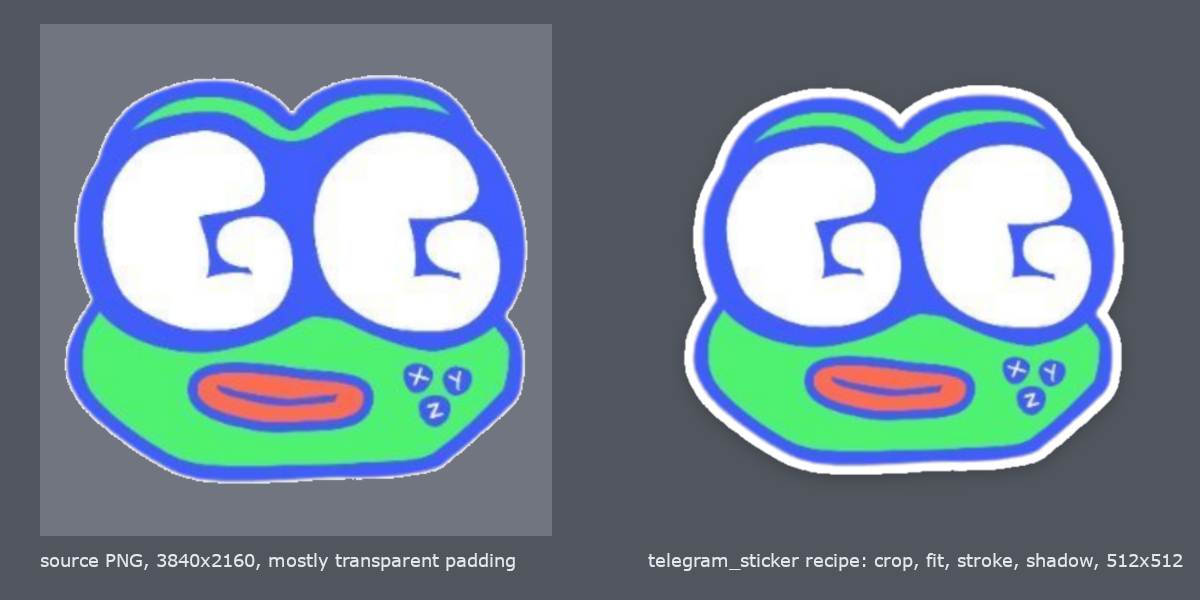
compose is the template engine: keep a brand manifest (logo path, fonts, colours, positions) and let the agent fill the text slots. gimp_help("compose") has a full example.
Recipes live in src/gimp_agent_mcp/recipes/. Each is a module with DESCRIPTION, PARAMS and SOURCE; see docs/RECIPES.md to add one.
Skills
Tools tell an agent what it can do. Skills tell it how a particular job is done well, and what it may not claim without evidence. Three ship in skills/, as client-agnostic SKILL.md directories that Claude Code and Codex both read:
| Skill | The job it owns |
|---|---|
gimp-sprite-sheets | Pack, slice and verify sprite sheets and atlases. Every crop rectangle measured with gimp_measure, and the exported sheet re-measured cell by cell before it is called correct |
gimp-layered-assets | Component-first layered composition: an XCF master, editable text and effects, delivery formats exported separately |
gimp-batch-jobs | Recipes across a folder, including reading the per-file result list and spot-checking by measurement rather than by thumbnail |
gimp-agent-mcp install-skills                          # every client directory found
gimp-agent-mcp install-skills --client codex           # ~/.codex/skills
gimp-agent-mcp install-skills --dir ./.claude/skills   # project scope
Existing skill directories are skipped rather than overwritten. Full details, including the Codex agents/openai.yaml descriptors and guidance for writing your own, in docs/SKILLS.md.
A detailed-work session, end to end
gimp_open("photo.jpg")                                  -> image 1, layer 2
gimp_snapshot(1)                                        -> snapshot 3
gimp_remove_background(layer_id=2, mode="mask")         -> editable mask, subject bbox
gimp_select(1, mode="alpha", layer_id=2); gimp_select(1, mode="shrink", amount=2)
gimp_layer(action="new", image_id=1, fill="#f4f1ea", position=1)
gimp_apply_filter(2, "gegl:dropshadow", {"x": 0, "y": 6, "radius": 12, "opacity": 0.35}, mode="append")
gimp_text(image_id=1, text="SUMMER SALE", size=96, font="Montserrat Bold", color="#111111", x=40, y=40)
gimp_measure("bbox", layer_id=2); gimp_measure("dominant", image_id=1)
gimp_render_compare(1, 3)                               -> before | after | diff
gimp_export(1, "out/hero.webp", {"quality": 82})
How it works
MCP client  --stdio-->  gimp-agent-mcp (server.py)  --TCP 127.0.0.1:9877 + token-->  bridge plug-in inside GIMP 3
                                |                                                        |
                        rembg (optional)                              GLib main loop runs each request on the plug-in
                                                                      main thread against libgimp / GEGL / the PDB
The plug-in writes agent-bridge.json (port, token, pid) into GIMP's per-user config directory. The server reads it to connect. Details in docs/ARCHITECTURE.md.
Testing
uv run pytest: unit tests, no GIMP needed.uv run gimp-agent-mcp smoke: 23 live checks against a headless GIMP. Add--segmentationto include the AI cut-out (downloads a small model on first use).- CI runs lint and unit tests on Ubuntu and Windows, and a second workflow installs real GIMP 3 on a Windows runner and runs the live smoke test on every push.
Security
The bridge listens on loopback only and requires the token on every request. gimp_run_python and gimp_pdb_call are, by design, arbitrary code execution inside GIMP with the permissions of the user running it: give this server only to clients you trust with your files. Segmentation runs server-side and never sends pixels anywhere; the only network access in the project is rembg fetching its model once. See SECURITY.md.
Provenance
Clean-room implementation under Apache-2.0. The author read the existing GPL and MIT GIMP MCP projects for lessons about the GIMP 3.2 API and copied no code from them.
Status
0.2.4, beta. Listed in the official MCP Registry as io.github.SarutobiSasuke8/gimp-agent-mcp. Verified end to end on Windows 11 with GIMP 3.2.4. macOS and Linux paths are implemented but not yet exercised on real machines; reports welcome. See ROADMAP.md.