Listed from the MCP registry; nobody on Odel publishes it.

whosaid
Local speaker-attributed transcription and meeting search for Apple Silicon. Audio stays on the Mac.
Runs on your machine from its package; the steps are below.

What it does
- Reads
- Writes
- High impact
Not assessed yet.
What it costs
FreeOdel charges nothing per call. The publisher may charge for its own service.
Runs locally over stdio
This server isn't hosted — your MCP client launches it from a package registry. Use one of the commands below, or drop the config into your client (e.g. Claude Desktop).
Run
uvx whosaid
MCP client config
{
  "mcpServers": {
    "whosaid": {
      "command": "uvx",
      "args": [
        "whosaid"
      ]
    }
  }
}Local, speaker-attributed transcription for Apple Silicon — who said what, on your Mac, nothing leaves the machine.


whosaid pairs Whisper speech-to-text with speaker diarization to turn a meeting,
interview, call, or podcast recording into a transcript that says who spoke when — running fully
offline and on-device on an Apple Silicon Mac, with no cloud service, no API keys, and no Hugging
Face token. Think of it as whisper + speaker labels + voice-based speaker recognition, in one
command.
Example output (meeting.speakers.txt):
[00:00:04] Alice: Thanks for jumping on, I know it's late for you.
[00:00:11] SPEAKER_01: No problem at all, happy to make it work.
[00:00:19] Alice: Let's start with the roadmap for next quarter.
[00:00:27] SPEAKER_01: Sounds good, I've got a few updates on that.
Why whosaid
- Meetings, interviews, calls, podcasts — get a transcript where every turn is attributed to a person, not just a wall of text.
- Privacy by construction — audio, text, and voice embeddings never leave your Mac. The only
cloud step is one you opt into:
[summarizer] engine = "claude"sends each transcript's text to Anthropic to draft action items. Leave it unset and nothing is sent. - Your name on your own lines — a one-time ~45s voice enrollment teaches whosaid your voice, so
your turns read as your name instead of
SPEAKER_00. - Tells you how many people spoke — the number of distinct speakers is auto-detected and reported up front, with per-speaker turn counts and talk time.
- Speaker cards to identify who's who — for every speaker, whosaid writes a card of that voice's most representative snippets, so you can read a few lines and know who was talking.
- Remembers people you name — identify a speaker once with
whosaid relabel, and their voiceprint is saved to a private local registry so they're auto-named in every future transcript. - Fast on long recordings — recordings over ~15 min are diarized in parallel windows and stitched back into consistent speakers by voiceprint, so an 80-minute meeting is minutes, not tens of minutes, recovering the same speakers as a single-pass run.
- No accounts, no API keys, no Hugging Face token — every model comes from an open, ungated source.
- Search everything you have recorded.
whosaid indexbuilds a local full-text (and, with Ollama, meaning) index over every transcript in a meeting workspace;whosaid searchfinds the turn,whosaid contextshows the minute around it, andwhosaid graphanswers who committed to what, when. See Search your meetings. - Hands-free from Voice Memos.
whosaid watch installputs a launchd agent on the Voice Memos folder (or any folder): stop recording, and a few minutes later the meeting is transcribed, summarized, and searchable. See Hands-free ingest. - Usable from an AI agent, too.
whosaid mcpexposes transcribe, relabel, doctor, the workspace search tools, drafts and Teams tools as MCP tools for Claude Code, Claude Desktop, Kiro, and other MCP clients, with the same local-only guarantee as the CLI. By default it lists only 7 of them (about 8 KB) and reaches the rest throughwhosaid_call_tool; see Tool listing.
How it compares
Looking for a MacWhisper, whisperX, or aTrain alternative? If you want speaker-attributed
transcription that runs fully offline on Apple Silicon and can put real names on voices — not just
SPEAKER_00 labels — that's the gap whosaid fills. Here's how it stacks up:
| whosaid | whisperX | plain mlx-whisper | cloud transcription APIs | |
|---|---|---|---|---|
| Speaker labels | Yes | Yes | No | Varies by provider |
| Names speakers by voice | Yes (enrollment) | No | No | No |
| Remembers speakers across meetings | Yes — persistent local voiceprint registry | No | No | No |
| Runs fully offline | Yes | Partial — needs a gated model download | Yes | No |
| Parallel diarization on long audio | Yes | No | — (no diarization) | Varies by provider |
| Needs an account / token | No | Yes — Hugging Face token for gated pyannote models | No | Yes — API key |
| Install weight | ffmpeg + uv, ephemeral environments | torch + pyannote + the full HF stack | mlx-whisper only | None (network client only) |
Quickstart
git clone https://github.com/sblattj/whosaid && cd whosaid   # get the code
./bootstrap.sh                                                # check deps, download models, install ~/.local/bin/whosaid
whosaid enroll                                                # ~45s reading a printed passage — teaches whosaid your voice
whosaid path/to/meeting.m4a                                   # transcribe + diarize + label -> meeting.speakers.txt (and friends)
If ~/.local/bin is not on your shell's PATH, add it or invoke the installed command by its
absolute path. WHOSAID_INSTALL_DIR=/another/bin ./whosaid install selects another install
directory. The installed command is a symlink to the checkout, so updating the checkout updates the
command without copying or duplicating the implementation.
whosaid's helper scripts need Python 3.11 or newer, because whosaid.toml is read with tomllib.
The launcher picks one interpreter: $WHOSAID_PYTHON if it is set, otherwise the first of python3,
python3.13, python3.12 and python3.11 on your PATH that is 3.11+, otherwise
uv python find '>=3.11'. It skips the stock macOS python3 (3.9) automatically. If no interpreter
qualifies, commands that run Python stop with an error; uv python install 3.13 fixes that.
whosaid doctor shows which interpreter was picked.
Homebrew is optional when uv, ffmpeg, and ffprobe are already installed. The launcher
and watcher search ~/.local/bin, ~/bin, and ~/homebrew/bin as well as the usual system
prefixes. Setup can install a pinned, checksum-verified Apple Silicon uv archive into
~/.local/bin. Homebrew FFmpeg installation requires a bottle; a nonstandard prefix will not
silently trigger a source build.
For a Mac without Homebrew, or one where no bottle is available, use:
./bootstrap.sh --build-ffmpeg
This builds pinned FFmpeg source into user-local ffmpeg and ffprobe executables. It needs
Apple's Command Line Tools (xcode-select --install if missing), compilation time, and free
disk space, but no administrator-owned install prefix or GPG installation. The source archive
is checked with macOS shasum against a checksum verified from FFmpeg's signed release.
Existing usable tools are retained. Setup then warms the Python environments and downloads
the models as usual.
Commands
| Command | What it does |
|---|---|
./bootstrap.sh [--yes] [--build-ffmpeg] (also whosaid setup) | Capability check, dependency install, model pre-download, and command installation. --build-ffmpeg selects the verified user-local source build when FFmpeg tools are missing. Idempotent — safe to re-run. |
whosaid install [--force] | Install/update the command symlink in ~/.local/bin (or WHOSAID_INSTALL_DIR). Refuses to replace an unrelated command, and refuses (unless --force) to install from a checkout under /tmp, /private/tmp, /var/tmp, or $TMPDIR — that symlink would dangle once the OS cleans the temp directory up. |
whosaid enroll [Name] | Records ~45s from the mic reading a printed passage, saves voices/<Name>.wav. See Speaker identity: enrollment clips vs. the registry. |
whosaid enroll <Name> --from FILE [--ss T] [--t D|--to T] [--force] | Extracts a clip from an existing recording instead of the mic (extract → verify → save, no interaction). --ss/--t/--to accept seconds or M:SS/H:MM:SS; same ≥15s/non-silent bar as mic enrollment. |
whosaid record [--label L] | Foreground mic capture to recordings/<timestamp>[-label].m4a, then transcribes automatically. |
whosaid record --app A [--no-mic | --mic-always] [--label L] | Capture one app's audio (Zoom, a browser, ...) through ScreenCaptureKit, plus the mic, to a stereo recordings/<timestamp>[-label].m4a (left = mic, right = the app), then transcribe it. A is a bundle ID, an app name, or a unique part of either; whosaid record --list-apps lists them. Needs macOS 15+, Xcode Command Line Tools (a small Swift helper, lib/record_app.swift, is built on first use into ~/.cache/whosaid) and Screen & System Audio Recording permission for your terminal. No virtual audio device. --no-mic records the app alone. With Teams (com.microsoft.teams2) the left channel is silent while Teams' mic button shows you muted (read through Accessibility, see Meeting mute in app mode); --mic-always records it regardless. With --me NAME (or $WHOSAID_OWNER), the voice heard only on the mic is named NAME and app-side voices never are. If macOS kills the capture it restarts in place. |
whosaid record --browser [--cdp-port P] [--target T] [--leave-selector CSS] [--max-seconds N] [--leave] [--no-mic | --mic-always] [--into DIR] [--label L] | Record one browser meeting tab (Teams web, Meet, Zoom web) through the Chrome DevTools port to a stereo .m4a (left = mic, silent while muted in the meeting unless --mic-always; right = the tab). Needs no Screen Recording permission and stops by itself when the call ends. Without --into it saves under recordings/ and transcribes; with --into DIR it only saves and prints the path. See Record a browser meeting tab. |
whosaid <audio>… [flags] | The default command: transcribe + diarize + label one or more audio files. --reuse-asr skips Whisper when <out>/<base>.json already exists and re-diarizes only (errors if the json is missing; not valid with --no-diarize). whosaid transcribe <audio>… is the same command written explicitly (matching the whosaid_transcribe MCP tool name). |
whosaid <audio>… --vocabulary TERM … --correct WRONG=RIGHT … | Workspace vocabulary (issue #216). Each --vocabulary TERM (repeatable) joins into Whisper's initial prompt; each --correct WRONG=RIGHT (repeatable, e.g. --correct "blobser=blob store") rewrites a known mishearing over the whole transcript before diarization, on --reuse-asr too. The raw text stays in <base>.json as each segment's raw_text. See Hands-free ingest. |
whosaid relabel <base> SPEAKER_02=Jane … | Put real names on clusters after reading the speaker cards. Rewrites the transcript + cards and saves each named voiceprint to the local registry for future transcripts — refusing (unless --force) to overwrite an existing registry entry the new cluster doesn't match (similarity below the match threshold, default 0.50). No re-transcription. |
whosaid relabel <base> SPEAKER_04=Alice --blend | Average the cluster into Alice's saved print instead of replacing it, to strengthen the print from a new recording. Same similarity guard as a normal relabel. See Speaker identity: enrollment clips vs. the registry. |
whosaid relabel <base> SPEAKER_04=Alice --no-save [--note TEXT] | Transcript-only label: renames the cluster in the transcript + cards and never writes to the registry. For a speaker the conversation makes obvious but whose cluster is a poor voiceprint — a long mixed cluster saved as that person would degrade their enrolled print. The label is kept in the sidecar (local_labels), survives relabel --auto and whosaid samples, and each card is marked Alice_Example (transcript-only label; registry untouched). See Speaker identity: enrollment clips vs. the registry. |
whosaid relabel <base> --auto [--forget NAME ...] [--fold-unknown] | Re-apply naming to an existing transcript with no assignments: re-runs registry matching + the absorb pass over the cached sidecar (and the voices/ enrollment clips, as transcribe does) and rewrites the transcript + cards. Picks up voices enrolled after the transcript was made, and drops auto-assigned names whose registry entry and clip are gone. --forget NAME (repeatable) clears NAME from this meeting first; it can come back if NAME is still enrolled and matches. Add --fold-unknown to repair anonymous phantom clusters in cached auto-diarization; it requires --auto and does not assign an identity. No re-transcription, no re-diarization. In a meeting workspace the base is transcript. See Speaker identity: enrollment clips vs. the registry. |
whosaid backfill <ws> [--dry-run] | Apply current registry names and roles to historical meetings, regenerate commitments, and refresh roll-up, worklists, search, graph, and wiki. Reports conflicts before changing meeting files. |
whosaid speakers export --out FILE | Export the private speaker registry to a new backup file, including voiceprints, roles, and metadata. |
whosaid speakers import FILE [--merge|--overwrite] | Restore a registry backup. An existing destination requires an explicit conflict policy; --overwrite replaces the entire registry. |
whosaid samples <base> [-o DIR] [--audio FILE] [--per-speaker N] [--seconds S] [--json] | Export one short representative WAV per speaker cluster — the longest diarized segment, clamped to --seconds (default 8) — so you can listen and confirm an identity before trusting an auto-label or enrolling. Cuts from the sidecar's own source.path, or an explicit --audio FILE for a sidecar written before that metadata existed. |
whosaid ingest <audio>… --into DIR [--action-items] [--engine E] [--index] | Transcribe a batch into dated meeting folders (idempotent by content hash). --engine picks the action-item summarizer, --index runs roll-up + index afterwards. See Meeting workspaces. |
whosaid roll-up <ws> [--action-items] [--refold MEETING[=OLD_MD]]... [--index] [--owner NAME|me] [--all-owners] | Rebuild the workspace index (_INDEX.md), audit, the deduplicated action-item and dev-commitments corpora, and the owner's ranked _WORKLIST-<Owner>.md; --index then rebuilds the search index too. --refold MEETING[=OLD_MD] (repeatable; implies --action-items, not valid with --rebuild) re-reads one already-folded meeting's regenerated action-items.md: ids, hand-set status and titles survive, owners follow the new speaker labels; OLD_MD is the meeting's previous file, so a hand-retitled item re-matches. |
whosaid reprocess <ws> [MEETING ...] [--dry-run] [--all] [--no-items] [--speakers N] [--min-speakers N] [--max-speakers N] [--expected-speakers A,B] [--match-threshold X] [--engine E] [--hook CMD] | Re-diarize meetings an older diarizer got wrong, reusing the existing ASR (transcribe --reuse-asr), keeping --no-save labels and hand edits, with backups in <ws>/_reprocess-backups/. --dry-run only reports. See Upgrading to 1.11. |
whosaid commitments <ws> [--owner NAME|me] [--all-owners] [--json] [-o FILE] | Print the ranked personal worklist (P1/P2/P3) on demand from the corpora, without a roll-up. See Dev-commitments. |
whosaid index <ws> [--no-embed] [--rebuild] | Build <ws>/_search.db (full text, optional embeddings, entity graph) and <ws>/_WIKI.md. See Search your meetings. |
whosaid search <ws> "<query>" [--mode exact|meaning|hybrid] [--speaker S] [--meeting M] [-k N] [--json] | Search every speaker-labeled transcript; each hit is a meeting, a timestamp, a speaker, and a snippet. |
whosaid context <ws> <meeting> <HH:MM:SS> [--before S] [--after S] [--json] | The verbatim turns around a moment, for reading a hit in place. |
whosaid decisions [ws] <meeting> [--json] [--engine auto|local|claude] | One row per decision in a call with every supporting turn across all visits of its topic, agreed / proposed / contested, and a "split across visits" flag when two visits decide different things. --live [--follow] for the call being recorded. See Decisions of a call. |
whosaid graph <ws> items|item AI-NNN|person [Name]|prs|meetings|speakers|commitments [--json] | Entity views: action items with filters, one item's history, a person's commitments and asks, PR mentions, meeting coverage, talk share. commitments lists the unified CM table (--owner, --source transcript|action-items, --status filters) — one model behind the worklist, whosaid commitments, and the wiki since #23: the roll-up folds self-owned action-items bullets into the same CM-NNN corpus as the spoken clauses (one item, occurrences from both sources, the bullet's timestamp included), and graph build loads that corpus instead of re-parsing the bullets. |
whosaid wiki <ws> [--stdout] [-o FILE] | Regenerate <ws>/_WIKI.md from the graph. |
whosaid watch run|install|uninstall|status --into <ws> | Hands-free ingest of new recordings via a launchd agent. See Hands-free ingest. |
whosaid backup <ws> --to TARGET [--tier text,index,audio,biometric] [--dry-run] | Incremental personal backup of a workspace, age-encrypted by default, to a path, s3://bucket/prefix or rclone:REMOTE:path; whosaid backup restore TARGET <ws> brings it back. See Back up and share a workspace. |
whosaid share <ws> --to TARGET [--meetings A,B] [--since DATE] [--exclude-chat] [--yes] | Read-only text export for teammates, never voiceprints; whosaid share pull TARGET <dir> on their side. See Back up and share a workspace. |
whosaid memos list|pull|delete "<title>"|shortcut-recipe | Voice Memos helpers that never touch the app's files or database. See Voice Memos helpers. |
whosaid doctor | Read-only environment report, including Ollama reachability and the index status of $WHOSAID_WORKSPACE, and the default workspace whosaid mcp resolves to with its source. |
whosaid version | whosaid --version | whosaid -V | Print the installed version (plus a git describe suffix when run from a git checkout). |
Record a browser meeting tab (no permissions)
whosaid record --app needs Screen & System Audio Recording permission for your terminal. A browser meeting can skip that. Start a Chromium-family browser (Chrome, Vivaldi, Edge) with a debugging port, join the meeting in it, then record that one tab:
# once, when you launch the browser
open -a "Google Chrome" --args --remote-debugging-port=9222

whosaid record --browser                      # port 9222, or $WHOSAID_CDP_PORT
whosaid record --browser --cdp-port 9222 --target teams.microsoft.com
- Only that tab is recorded. Left channel is your mic, right channel is the meeting audio. No system sounds, no notifications.
--targetis a targetId or a piece of the tab's URL. You need it when more than one tab could match. The error lists the candidates.- It stops on its own when the call ends. It arms once the hang-up button has been seen, then stops after 2 missed polls. If the button is never seen, use Ctrl-C or
--max-seconds(default 10800).--leave-selector CSSoverrides the built-in Teams, Meet and Zoom web selectors.--leaveclicks hang-up at--max-seconds. - Mute is respected. While the meeting's own mic button shows you muted (Teams web:
#microphone-button/data-tid="microphone-button"/data-tid="toggle-mute", read from itsaria-label"Unmute ..." ordata-state="mic-off", every 250 ms), the left channel is recorded as silence. Frames are zeroed, not dropped, so the two channels stay aligned. Each mute change is logged with its time and offset. If the button cannot be found or read, the mic is recorded.--mic-alwaysrecords the mic regardless of mute (also anautorecord run/installflag, kept in the installed agent).record --appreads Teams' native mic button instead; see Meeting mute in app mode. - If the tab is closed mid-call, whatever was already captured is kept.
--into DIRwritesDIR/<timestamp>[-label].m4aand skips transcription. The file appears only when it is complete, so point it at awhosaid watchsource folder and the watcher ingests it.- From an agent, use the
whosaid_record_browserMCP tool withactionset tostart,statusorstop. It runs in the background and needs no terminal.
Meeting mute in app mode (record --app)
There is no web page to read in the native Teams app, and Teams keeps the microphone open while you are muted, so record --app reads Teams' own mic button through macOS Accessibility instead:
- Every 250 ms, off the audio thread, it reads the
AXDescription/AXTitle/AXHelpof the controls in thecom.microsoft.teams2windows. A button labelled "Unmute" (optionally followed by a shortcut hint such as "(⌘+Shift+M)", or by "mic") means muted; "Mute ..." means live. "Mute all", "Unmute Jane Doe" (roster entries) and other controls are ignored. Read-only: nothing in Teams is pressed or changed. - While muted the mic leg is written as zeros of the same length at the same place, so the left and right channels stay aligned. Each change is logged in the same format as
--browser:mic muted: left channel silenced at <time> (+<offset>s). Under autorecord these lines land in<into>/.autorecord.log. - Fail-safe: no Accessibility grant, no button found, an unknown or localized label, buttons that disagree, or a reading older than 1 s all record the mic. Without the grant the helper logs
mute: unknown (no Accessibility grant; ...)once per capture and asks macOS to show its Accessibility prompt once per app (WHOSAID_AX_PROMPT=0turns the prompt off). Other apps (Zoom, a browser via--app) are not read:mute: unknown (only the Teams mic button is read; ...). - The grant belongs to the app that started the capture: your terminal for
whosaid record --app, "Whosaid Call Recorder" forautorecord. Turn it on under System Settings > Privacy & Security > Accessibility (use + to add~/Applications/Whosaid Call Recorder.appif it is not listed). - Check what the gate sees, read-only:
whosaid record --mute-state --app com.microsoft.teams2printstrusted=true|false,state=muted|unmuted|unknownand the labels it found. It runs under your terminal, so it shows the terminal's grant. - Teams local API (opt-in, experimental). Teams for desktop has a "Third-party app API" (Settings > Privacy > Manage API > Enable API) that pushes meeting state over
ws://127.0.0.1:8124.whosaid teams pair-apireads its token from stdin (paste it, input hidden), saves it to~/.config/whosaid/teams-api-token(0600) and listens for 15 s to show whether Teams answers. Once a token is stored,record --appalso listens there, and while the socket is open, Teams' pushedmeetingUpdate.meetingState.isMutedwins over the Accessibility read, with two fail-safe exceptions: "not in a meeting" falls back to Accessibility, and a pushed "muted" never silences the mic while a fresh Accessibility read says "unmuted" (logged once).pair-apiexits 0 once Teams pushed a mute state, 3 if the socket opened but nothing came (join a meeting, then--check), 4 if nothing answered. whosaid only listens and never sends a command, so it cannot change your call.whosaid teams pair-api --checklistens again, andwhosaid teams unpair-apiremoves the token. Unverified: Microsoft does not document this protocol. The port, the URL parameters and the message shapes follow the open-source teams-monitor client and were tested only against a fake server. That client completes pairing on its first command, which whosaid never sends. Microsoft also retired a "legacy, non-published" meeting-control integration on 2026-06-30 (MC1266901), so this may not work on your Teams build. Accessibility is the supported path. - A call muted from start to end leaves a silent mic leg. whosaid then says you were muted (the helper counts the silenced seconds), instead of the "unauthorized microphone" warning. Partly muted calls log how many seconds were silenced.
--mic-always(onrecord --appandautorecord run|install|setup --app) records the mic regardless.
Record every call, unattended: whosaid autorecord
whosaid autorecord waits for a call, records it, saves it, and waits for the next one. Pair it with whosaid watch and every call ends up transcribed in your workspace with no clicks.
# desktop meeting app (here native Microsoft Teams); needs Screen & System Audio Recording
whosaid autorecord install --app com.microsoft.teams2 --label teams

# or meetings in the browser; needs no permission and no admin rights
whosaid autorecord install --browser --label teams

# transcribe each saved call
whosaid watch install --into ~/meetings --source ~/Recordings --no-fda

whosaid autorecord status        # installed? running? recent log lines (--json for scripts)
whosaid autorecord pause --minutes 60   # skip calls for an hour; `resume` undoes it
whosaid autorecord stop-now      # end the call being recorded now and save it
whosaid autorecord uninstall     # a call in progress is saved first
A new Mac in one command. After git clone, whosaid autorecord setup runs whosaid setup --yes (dependencies, models), autorecord install, then watch install, stops at the first failed step, and lists what is left to do by hand (the permission toggle, whosaid enroll). --owner starts the workspace's whosaid.toml with your name; an existing one is left as is. Try it with --dry-run first.
git clone https://github.com/sblattj/whosaid ~/code/whosaid && cd ~/code/whosaid
./whosaid autorecord setup --app com.microsoft.teams2 --label teams \
  --workspace ~/meetings --owner Alice_Example   # or --browser instead of --app
- When it records.
--appwatches whether the app has the microphone open: it starts when the app opens the mic and stops 30 s (--idle-seconds) after it closes it.--browserwatches meeting tabs (Teams web, Meet, Zoom web) for their hang-up button. Neither reads the screen. - Login.
installstarts it at every login.--appbuilds a small launcher,~/Applications/Whosaid Call Recorder.app, and opens System Settings so you can turn it on under Screen & System Audio Recording. That permission belongs to the launcher, which is only rebuilt when whosaid changes it, so re-runninginstallwith other flags keeps it. - Mute. With
--app com.microsoft.teams2the left channel is silent while Teams shows you muted, once "Whosaid Call Recorder" also has the Accessibility toggle (System Settings > Privacy & Security > Accessibility;installlists it as step 3). Without it the mic is recorded and the log saysmute: unknown (no Accessibility grant; ...).--mic-alwaysturns the gate off and is kept in the installed agent. See Meeting mute in app mode. - No admin rights? If that toggle asks for an admin password, use
--browserwith the meeting on the web. Start the browser with--remote-debugging-port=9222(autorecord never launches or changes your browser). An organization policy can turn remote debugging off. - Robust by default. One copy per folder. An app that isn't running or a browser that isn't open yet is a waiting state; other failures back off to 5 minutes and keep trying. Log:
~/Recordings/.autorecord.log. - Live with every call (opt-in). Add
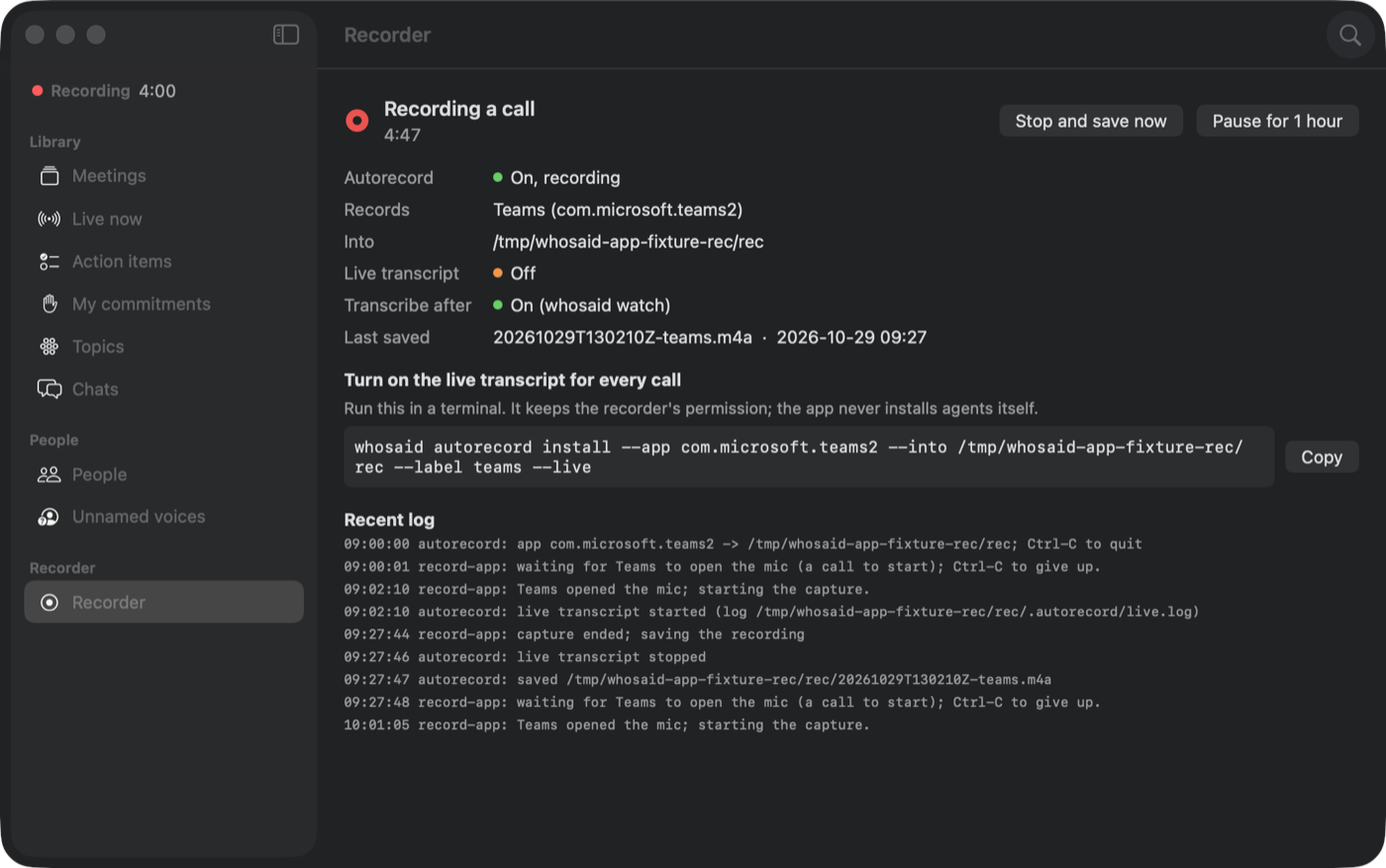
--livetoinstallorsetupand each capture also runswhosaid live, which starts when the capture starts and stops when it is saved, so the app's Live now and thewhosaid_livetool follow every call with no extra step. Its log:~/Recordings/.autorecord/live.log. If that transcriber dies mid-call, autorecord logslive transcript failed (exit N), restarts it up to 3 times with growing delays (5 s, 15 s, 45 s), andautorecord status(and--json:live_state,live_exit,live_restarts) and the menu bar show it, while the recording carries on. The app's Recorder page shows whether it is on and the command to turn it on. - Environment for the agent. launchd starts the job with a bare environment, so
installandsetupcopy the certificate variables from the shell you run them in (SSL_CERT_FILE,SSL_CERT_DIR,REQUESTS_CA_BUNDLE,CURL_CA_BUNDLE,UV_SYSTEM_CERTS,UV_NATIVE_TLS) plusWHOSAID_BINandWHOSAID_ACTION_ITEMS_HOOKinto the LaunchAgent, same aswatch install.--env KEY=VALUE(repeatable) adds more and wins over the copied ones; values you set earlier survive a reinstall.--offlineaddsHF_HUB_OFFLINE=1(plusTRANSFORMERS_OFFLINE, telemetry off) so nothing round-trips to huggingface.co. Check withwhosaid autorecord install --dry-run. whosaid autorecord runis the same loop in the foreground, for a terminal tab.
Follow the call as it happens: whosaid live
While record --app or autorecord is capturing a call, whosaid live transcribes it as it goes, on this Mac, and keeps a rough transcript you or an agent can read before the call ends.
whosaid live                 # follow each call being recorded; Ctrl-C to quit
whosaid live show --minutes 5   # the last five minutes of the newest live transcript
whosaid live follow --speaker 'Alice|Bob' --exclude-self --once   # each new line from them, once, until the call ends
whosaid live follow --agent --format jsonl --cursor-file ~/.cache/whosaid/agent.cursor   # events for an agent monitor
- Me vs them, no diarization. The recording keeps your mic and the meeting app apart, so each line is
me:orthem:with the wall-clock time. Your mic also hears the other side through your speakers; mic audio that isn't clearly louder than the app is ignored, so their words aren't repeated as yours. - Where it goes.
~/Recordings/.live/<start>.mdand.jsonl, updated every ~20 s (--chunk-seconds). Silent stretches are skipped. Model:whisper-large-v3-turbo(orWHOSAID_LIVE_MODEL). - Parakeet instead of Whisper (opt-in).
whosaid live --asr parakeet(orWHOSAID_LIVE_ASR=parakeet; a live run started byautorecord --liveinherits it from autorecord's environment) transcribes with NVIDIA Parakeet throughparakeet-mlx(modelmlx-community/parakeet-tdt-0.6b-v2, orWHOSAID_LIVE_PARAKEET_MODEL;--modelis the chosen backend's model). The launcher addsparakeet-mlxto its uv env only when Parakeet is picked; a pip install needspip install 'whosaid[parakeet]'. Whisper stays the default, and the post-call transcript is unchanged.- Why. On 30 s chunks of synthetic speech Parakeet decoded in about 220 ms vs about 400 ms for turbo, and its word times come for free, so a speaker change inside a line is split at a word without
--split-words. - Vocabulary boosting. The workspace's
[transcribe] vocabulary(--ws, else$WHOSAID_WORKSPACE) plus each--vocabulary TERMis boosted on every chunk, with beam search (beam 5, weight 1.0,--boost-weight). Whisper's prompt only reaches its first 30 s window, and live Whisper gets no vocabulary at all. On by default when there are terms: measured on the author's own recordings (numbers not published), weight 1.0 fixed most misspelled terms with very few false insertions, while higher weights inserted far more. Beam search costs speed, about 0.8 s per 30 s chunk instead of about 0.2 s, which is small against the chunk length. With no terms, or--no-boost(WHOSAID_LIVE_BOOST=0), it decodes greedily. - Bench it on your audio.
test/asr_bench/bench_asr.pyruns either engine on one recording, writes a whosaid-shaped transcript forwhosaid ab --compare, and times live-sized chunks (see its docstring).
- Why. On 30 s chunks of synthetic speech Parakeet decoded in about 220 ms vs about 400 ms for turbo, and its word times come for free, so a speaker change inside a line is split at a word without
- Follow it as it happens. The
.mdand.jsonlare rewritten whole on every update, so do nottail -Fthem (each update replays the call from its first line).whosaid live followprints each new line once instead, line-buffered for a pipe or an agent's background monitor, then anendedline when the call is over (--onceexits there; otherwise it waits for the next call).--speaker REGEX(repeatable) matches the live name or role; lines no known voice matched are kept and marked? (v9, nearest: Bob 0.71)unless--named-only, because one person can show up as a named and an unnamed voice, and a voice that keeps sounding like a known one is noted once (# v9 may be Bob (0.71)). A line where the speaker changes mid-segment is split at the change: each side is transcribed again on its own and gets its own voice, and when that can't be done the line is kept whole and marked(mixed, change at HH:MM:SS). Withwhosaid live run --split-words(orWHOSAID_LIVE_SPLIT_WORDS=1) Whisper also returns word times and the line is split at the words instead, at some extra decode time. A short reply at a turn boundary ("right", "exactly") is placed by its own voice; one too short to tell is voted again once the next line is known, and stays marked(mixed, short reply)if no voice wins.--format jsonlgives one object per line with a cursor. - Using follow as an agent monitor.
whosaid live follow --agent(alias--events) prints events instead of raw lines, for an AI agent that watches the call in the background as a copilot. Re-arm recipe: start the monitor withwhosaid live follow --agent --format jsonl --cursor-file ~/.cache/whosaid/agent.cursor --heartbeat 60, and when the monitor hits its lifetime cap, start the same command again. The cursor file is saved after every event, so the new follower picks up where the old one stopped, with no gap and no duplicate, even if the old one was killed and the.jsonlwas rewritten in between. (A kill in the instant between printing an event and saving the file prints that one event again.) A missing or empty file (mktemp) starts fresh. Thecursorfield on each event is informational here (<start>:n<N>, every line up to N emitted,+Kmore);whosaid_live(since=)takes the line-mode cursors, not this one. The events:call_started/call_ended: the session id and the voices so far ({voice, speaker, lines}). A call that never said it ended is read once more when a newer one starts, so its last lines come before itscall_ended(superseded: true). The follower then goes on into the next call (--onceexits instead).utterance:{t, end, clock, speaker, voice, confidence, mixed, text, n, topic, topicLabel, visit}, one voice's consecutive segments joined while the gap stays under 8 s. It is printed once finished: another voice follows, the call ends, or nothing is written for--flush-seconds(default 45).topicandvisitare the live insights topics at that moment.topic_revisit: a topic came back after 2+ minutes away.firstis the first turn of its first visit,previousthe first turn of the visit before, andgapthe seconds away. This event waits until the ~45 s chunk that brought the topic back is complete, so it is never a passing guess.for_me: a turn from someone else that names you, or that asks "you" a question or a favor ("can you take that") right after you spoke, withwhy(named/question/request) and the 2 utterancesbeforeit. Your name is--self NAME(repeatable), defaulting to the self-roled voice in the speaker registry.decision: a row of the decisions ledger (local engine, the samed-<seconds>ids as<start>.decisions.json) the first time it is agreed, citing theproposaland another voice'syes;decision_statusif it later turns contested.alive: with--heartbeat S, after S seconds with no event, so the agent can tell "nobody is talking" from "the follower died". Plainfollowtakes--cursor-fileand--heartbeattoo. A cursor file that is not one is an error (exit 2), never a silent replay.
- Ask about the meeting. The
whosaid_liveMCP tool returns the live transcript (or its last N minutes) and whether the call is still going, so an agent can answer "what did they just ask me?" mid-call. It also returns acursor: pass it back assinceto get only the lines after it, with the samespeaker,exclude_selfandnamed_onlyfilters aslive follow.whosaid_live_insightsadds the call's topics, rolling summaries and agreed or suggested next steps (the Live page's data), andwhosaid_live_askfinds the lines that match a question, with their times. whosaid itself sends nothing anywhere; the agent you ask sends the text it reads to its own model. - Topics and next steps.
whosaid live insights followturns the newest live transcript into topic buckets, wordgraph nodes, 5-minute summaries and agreed / suggested next steps in<start>.insights.json, locally (live insights build --jsonl Ffor one file).whosaid live ask --question "..."answers from the live transcript: a search by default, Claude only when the workspace opts in with[summarizer] engine = "claude". - AI labels and recap (opt-in, CLOUD). With
[live]ai = "claude"in<ws>/whosaid.toml,whosaid live insights follow --ws <ws>(the app passes it) also asks Claude (claude -p, Sonnet) for topic labels, a short recap and next steps once perai_everyseconds of talk (default 180), at mostai_max_calls(40) per call,ai_timeout90 s andai_max_tokens1500 per call. Each call sends the newest ~24k characters of the transcript plus the local topics to Anthropic, about 9k tokens. Answers land in<start>.ai.jsonand are laid over the local insights; every topic keeps itslocalLabel, and a failed call keeps the last good answer. Remove the line (or setai = "") to turn it off. - Decisions as they happen.
whosaid decisions --live --followkeeps a decisions ledger of the call in<start>.decisions.jsonand prints each new decision, status change and "split across visits" flag once. See Decisions of a call. - It only reads the recording in progress. The full transcript with names and action items still comes from
whosaid watchafter the call.
A live explainer page: whosaid live explain
A page that explains the call in plain words while it runs: one section per stretch of talk, newest first, each with a time range, a short explanation, a hand-drawn SVG sketch, S-T: lines for jargon, open questions, what was asked of you or what you owe, claims tied to who said them, a low-confidence footnote, a Suggested box ("my ideas, not said on the call") and a For you box whose reply is copied to the clipboard as rich text.
whosaid live explain serve                 # http://127.0.0.1:8765/ for the newest live call
whosaid live explain add --file s.json     # write a section (JSON on stdin without --file)
whosaid live explain correct 002 --before "on by default" --after "off by default" --quote "no, it is off" --who Ana
whosaid live explain recap --file r.json   # final recap, shown on top once the call ends
whosaid live explain status                # page path, section count, recap, engine
whosaid live export-items 20261116T100000 --format csv   # an ended call's items as rows (read-only)
whosaid live export-items --since 20261101T000000        # every ended call after that stem
whosaid live mark-item 20261116T100000 <row id> --status done --note "sent it"
- Where it goes.
~/Recordings/.live/<start>.explain/:NNN-<slug>.jsonand.htmlper section (stable ids likes-003),recap.html, and a staticindex.htmlthat works opened as a file (it refreshes every 30 s). Sketches are sanitized to an SVG allowlist; the page loads nothing remote. - Live push without reflow.
servestreams changes over SSE (S-T: server-sent events, one long HTTP response the server keeps writing to). Nothing on the page moves until you click the sticky "↑ N new updates, click to load" button; new sections then grow in over 1.8 s, older ones slide down, and the new one glows. - Corrections. A corrected section loads to the right of the old one with word-level highlights (red strikethrough for removed words, green for added ones, a dashed outline on changed paragraphs) under "corrected version: N changes highlighted"; "replace with the correction" slides the old one out over 2.6 s. The diff runs on the stored HTML, not on the page's own highlights.
- On the page. Dark mode by default with a toggle that is remembered, a topic timeline bar, a pinned For-you strip with checkboxes that stay checked, search and filter chips (open questions, my asks, suggestions, corrections), glossary popovers and a phone layout. Glossary terms come from each section's
S-T:lines,[live.explain_glossary]in<ws>/whosaid.toml, andglossary.jsonin the explain folder. - Phone or another machine (opt-in).
serve --lanlistens on every interface and prints a URL with a token. The first visit trades the token for an HttpOnly cookie; anything else from the network gets 403. The token is kept in.token(mode 600). Off by default:servebinds to 127.0.0.1 only. - Who writes it. By default nothing does on its own, and nothing is sent anywhere: an agent writes sections through
whosaid_live_explain_add,whosaid_live_explain_correctandwhosaid_live_explain_recap(or theadd/correct/recapcommands). Writing a section copies its For-you reply to the clipboard; pass--no-copy(or setWHOSAID_EXPLAIN_CLIPBOARD=0) to skip that. - AI sections (opt-in, CLOUD). With
[live]explain = "claude"in<ws>/whosaid.toml,whosaid live explain serve --ws <ws>sends the newest transcript lines to Claude (claude -p) once perexplain_everyseconds of talk (default 240) and writes what comes back as sections. Limits:explain_max_calls(30) per call,explain_timeout120 s andexplain_max_tokens3000 per call;explain_modelpicks the model. For-you replies are looked up in the local workspace search first. Three failures in a row stop it for that call. Remove the line to turn it off. - A recap even without a model. When a call ends and no recap was written, a deterministic local one is (questions and asks from the sections, agreed decisions from the local ledger;
"derived": true, no model call). A recap from an agent or the engine is never replaced. - Items as rows:
export-items. Reads the ended call's sections (top-level arrays only, neverrevisions[]),recap.jsonand<start>.ai.json, and prints one row per ask, question, suggestion, decision or next step: a stable id (<stem>-<kind>-<12 hex of sha1 of the normalized text>), the section and its time window, the asker, the owner when the text names one (mefor an ask aimed at you), the closest verbatim line of<start>.jsonlwith its clock and speaker, and every source it was merged from (near-duplicates within a call become one row). A call still live (ended: false) is refused alone and skipped under--since. It writes nothing; the MCP tool iswhosaid_live_export_items. - Status overlay.
mark-itemand the page's For-you checkboxes (when served) write<start>.explain/items.status.json({"version": 1, "items": {"<row id>": {status, updated, by, note}}}); export-items reports each row'sstatusfrom it (openby default).
One status feed for apps and scripts: whosaid app-state
whosaid app-state --json --workspace ~/meetings   # one snapshot
whosaid app-state --watch 2 --workspace ~/meetings  # a JSON line now and on every change
It joins autorecord status --json, the watcher's state for the workspace (the same rules as the SwiftBar plugin), live status --json, the newest meeting and the count of unnamed voices from the last two weeks into one object, plus a single menubar.state (warn, agent-not-loaded, recording-live, recording, paused, ingesting, waiting, done, idle). It is read-only. whosaid tracking set-status <ws> CM-012 done --note "..." is the matching write path for marking an item done (see docs/tracking.md).
A native macOS app: whosaid app
A menu bar app plus a library window: meetings, live now, action items, your commitments, topics, chats, people, unnamed voices and the recorder, in one vertical sidebar. It is SwiftUI, built with the Command Line Tools only (no Xcode needed), and it reads whosaid the way an agent does: whosaid mcp for the library and one whosaid app-state --watch for the menu bar.
whosaid app sign-setup  # once per Mac: a local signing certificate, so updates keep Full Disk Access
whosaid app install     # swift build -c release, then ~/Applications/whosaid.app
whosaid app open
whosaid app test        # swift test for WhosaidKit
whosaid app uninstall
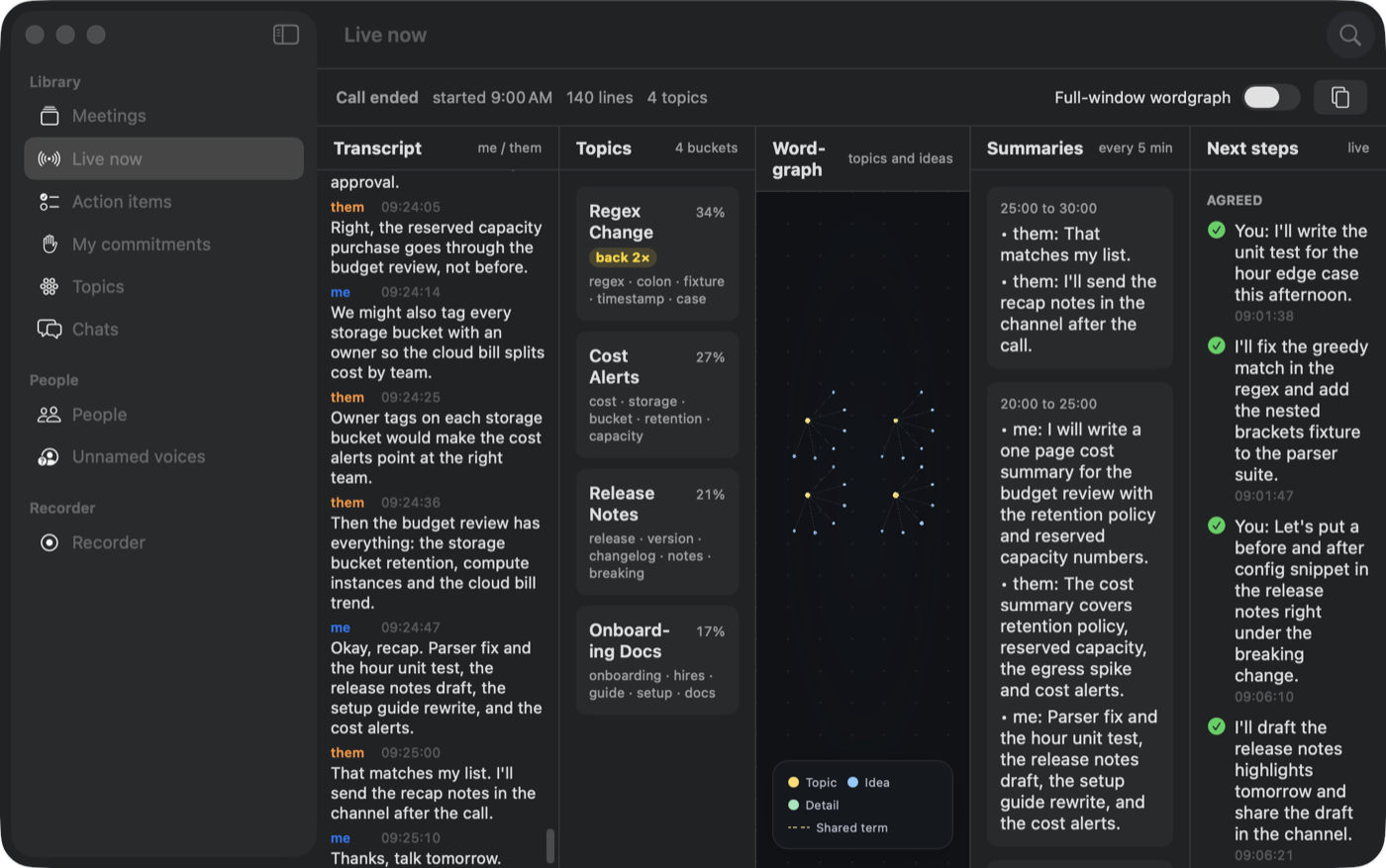
The app never records and never asks for Screen & System Audio Recording: Whosaid Call Recorder.app keeps that grant. Pick the workspace and the recordings folder in its Settings (or set WHOSAID_WORKSPACE / WHOSAID_RECORDINGS). With no workspace, or one that is not indexed yet, the window says what to do next. Settings also has "Open at login". Needs macOS 15 and Swift 6.
The menu bar item shows one glyph per state, from whosaid app-state: a waveform while idle, a red record dot with the elapsed time while a call is recorded (plus a pencil when whosaid live is transcribing it), gears while the last call is transcribed, a check just after, a pause sign while autorecord is paused and a warning triangle when something needs a look. Its panel has Stop and save now, Pause autorecord for 1 hour, the last three meetings, Name N unknown voices, search and Settings.
The library window lists meetings and Teams chats newest first (a call is named by what recorded it, a chat by its chat name). A meeting opens on its transcript, colored per speaker under a talk-time bar, with Summary, Action items and Speakers tabs. ⌘K searches every meeting (whosaid_search) and shows the minute around a hit (whosaid_context). People lists every named voice with what they own and asked for (whosaid_person); Unnamed voices lists the ones still called SPEAKER_NN. If the workspace sits in ~/Desktop or ~/Documents, macOS asks once whether whosaid may read that folder.
A meeting's Speakers tab has one card per voice: turns and talk time, a name field, role chips (self, boss, peer, report, external) and Save, which runs whosaid relabel and then whosaid index so the name shows up everywhere. An unnamed voice shows the closest enrolled voice that just missed the match ("Sounds like Carol (0.64)"), one click from the name field. Play clip cuts a few seconds of that voice with whosaid samples into ~/Library/Caches/whosaid/clips and plays it; the app plays nothing any other way.
My commitments is the ranked worklist for the workspace owner (whosaid_worklist): P1 to P3 chips, why each ranks where it does, and a link that opens the meeting at the moment it was said. Above it, "Looks done?" lists later statements that may show an item is finished (whosaid_tracking_suggestions), with the quote and why it matched. Nothing changes until you click Mark done, which records one status event with that quote as evidence (whosaid_set_status). Action items lists every item from every meeting, with the same Open / Done / All filter.
Live now follows the newest whosaid live session in five lanes: the me / them transcript, topic buckets, a wordgraph, 5-minute summaries and next steps (agreed vs suggested). Topics are buckets: when the talk comes back to a subject, its bucket is marked "back 2×" instead of starting a new one, and a fresh one is marked "new". The wordgraph is the balloon graph from jibbr (topic, idea, detail by color; dashed lines join words shared by two topics): drag and throw the balloons, click one to fold its branch, or switch it to full window. The lanes come from whosaid live insights follow, a small local engine the app starts only while a call is live; it writes <start>.insights.json next to the live transcript. ⌘L opens a narrow floating panel to keep next to the call, with the last lines, the topics and "Ask about this call" (whosaid live ask): it searches the live transcript, unless the workspace sets [summarizer] engine = "claude", which sends the transcript to Claude for the answer. With [live] ai = "claude" the topic labels, a "So far (AI)" recap and the next steps come from Claude instead (see Live above). The wordgraph page is bundled in the app and can load only its own files: no fetches, and any other navigation is cancelled.
Recorder shows what autorecord is doing (waiting, recording, paused), what it records and into which folder, whether the live transcript and the watcher are on, the last saved call or error and the recent log, with the same Stop and save now, Pause and Resume as the menu bar. It never installs anything itself: when the live transcript is off it shows the whosaid autorecord install ... --live command to copy.
Topics rolls up what each meeting was about, across meetings, from <workspace>/_topics.json. Topics are ranked by how many meetings they came up in, then by how recently. A topic shows its terms, its own wordgraph and the meetings it came up in, each opening its transcript where the topic starts. Rebuild runs whosaid topics build.
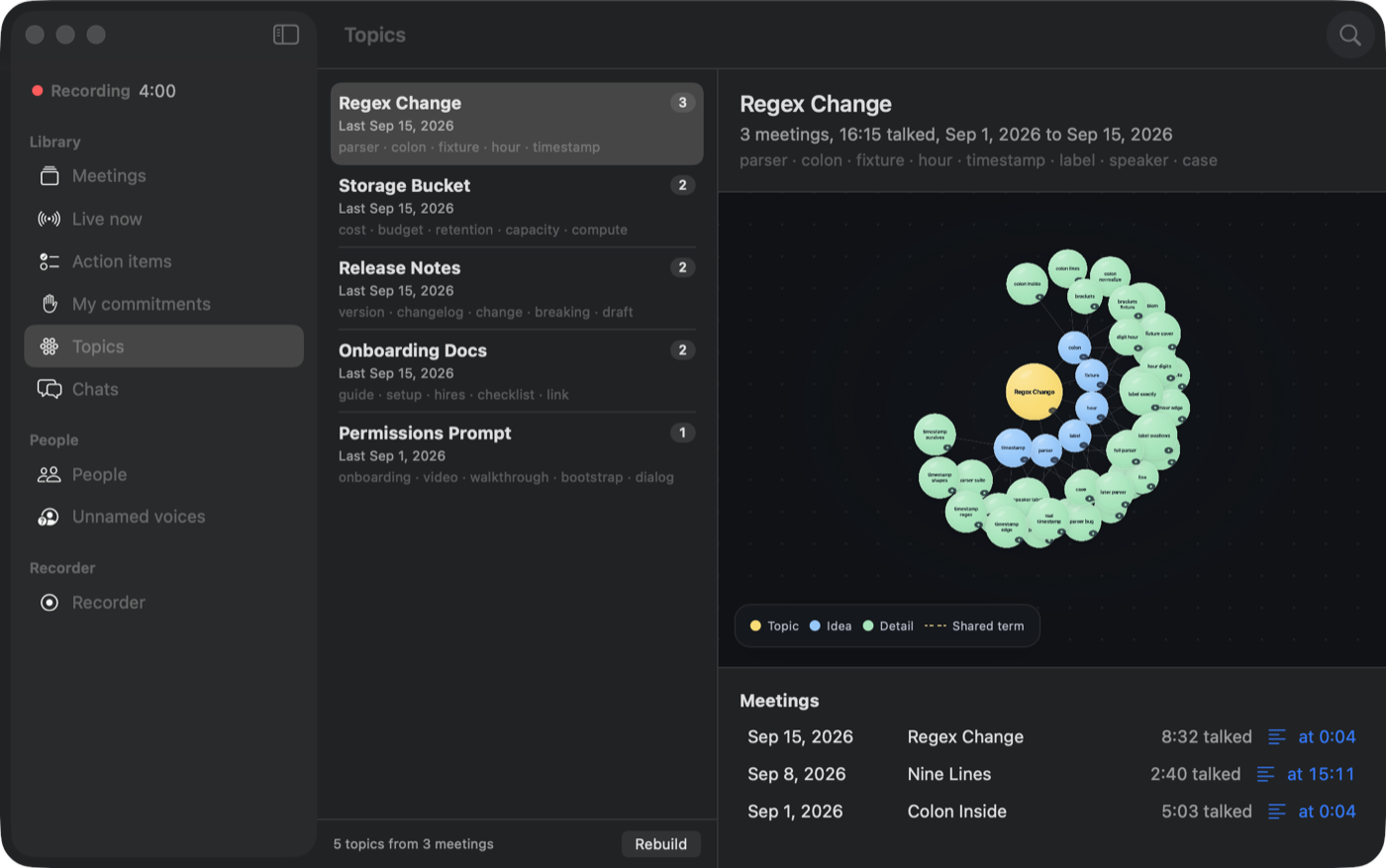
Topics across meetings: whosaid topics build
whosaid topics build ~/meetings          # writes ~/meetings/_topics.json
whosaid topics build ~/meetings --chats  # Teams chats and mail too
It runs the same local topic clustering as whosaid live insights over each meeting's speaker transcript, then merges topics across meetings: same label, or terms that match closely enough. A topic keeps its id as meetings are added, so links to it stay put. Each topic lists its meetings (date, the label it had there, talk time, where it starts), its top terms and a wordgraph. Speaker names are not written to the file. Stdlib only: no model, no network.
Decisions of a call: whosaid decisions
whosaid decisions ~/meetings 2026-03-02-1000     # one meeting (a unique part of the folder name works)
whosaid decisions path/to/call.speakers.txt      # any speaker transcript
whosaid decisions --live                         # the call being recorded right now
whosaid decisions --live --follow                # print each new decision, status change and flag
A call often settles one subject in two places far apart: at minute 11 the date parser stays in the service lib for now, at minute 39 the auth client moves to a separate platform lib. Read one line at a time, the two look like one decision and the first gets lost. The ledger keeps one row per decision, each with every turn that supports it ([meeting, time, speaker, verbatim text], tagged proposal, agree, contest, restate or discuss), across every visit of its topic:
Date Parser (3 visits): split across visits; a summary must keep each decision below
  D1 visit 1 [00:11:20] agreed: Let's keep the date parser in the service lib for now, ...
     [00:11:20] Carol_Example (proposal): Let's keep the date parser in the service lib for now, ...
     [00:11:40] Bob_Example (agree): Agreed, the service lib is fine for the date parser ...
  D3 visit 2 [00:39:20] agreed, split from D1: Then let's move the auth client to a separate platform lib, ...
- Topics and visits come from the live insights clustering (the same as
whosaid topics build); a topic back after 2+ minutes away is a new visit. - Status:
agreedwhen someone other than the proposer said yes,contestedwhen push-back was left standing, elseproposed. - Across visits: two decisions of one topic on different visits that share few terms are a
split(the topic is marked "split across visits"); one that repeats the earlier decision with more detail is arefinement("refined across visits"); one that undoes it ("actually", "instead", "let's not") is areversal("reversed across visits"). - Live:
--livereads the newest~/Recordings/.live/*.jsonl(--into DIR);--followkeeps<start>.decisions.jsonnext to it current and prints each change once (--json: one event per line;--onceexits after the call). Ids (d-<seconds>) stay put as the call grows. Code that wants the same events callsdecisions.ledger()anddecisions.changes()inlib/decisions.py. - Engines: local by default (no model, no network).
--engine claude, orengine = "claude"under[decisions]or[summarizer]in the workspace'swhosaid.toml(the action-items opt-in), sends the transcript to Anthropic in oneclaude -pcall; the script keeps only turn numbers that exist and quotes those turns itself, and any failure falls back to the local ledger (engine_errorsays why).--followand thewhosaid_decisionsMCP tool are always local.
A drafts outbox for agent-written chat messages: whosaid drafts
When several AI agents draft chat messages for you, they fight over the one browser tab, you
lose track of which session wrote which draft, and a draft goes stale as the work moves.
whosaid drafts keeps them offline until you stage them, one folder per draft under
~/.drafts/<id>/ (WHOSAID_DRAFTS_DIR overrides): draft.md, claims.json and draft.json.
whosaid drafts new --to "Test Person" --topic "dns records" --page ~/pages/dns-plan.html
whosaid drafts stakeholders ~/meetings --topic "dns records" --repo ~/code/infra --path dns/
whosaid drafts claims <id> --file claims.json --ws ~/meetings   # claims, stakeholders, docs; prints said turns
whosaid drafts text <id> --file draft.md
whosaid drafts verify <id> --ws ~/meetings      # --recap-days N: how far back a recap reply's points are searched
whosaid drafts lint --all                       # the voice lint alone, read-only
whosaid drafts list                             # state and the session that wrote each one
whosaid drafts merge <into> <from> [<from> ...] --text-file merged.md   # fold rival drafts into one
whosaid drafts stale-check ~/meetings           # stakeholders said something new since verify?
whosaid drafts stage <id>                       # paste it into the Teams chat; nothing is sent
whosaid drafts unstage <id> --reason R          # you cleared the compose box by hand: back to verified
whosaid drafts stage <id> --replace             # the compose box already holds text: overwrite it
whosaid drafts stage --all --queue              # every verified draft, oldest first, each in its chat
whosaid drafts mark-sent --check ~/meetings     # staged drafts you have since sent (and edits you saved)
whosaid drafts audit --staged-before 48h        # old staged drafts: sent edited, sent in another chat, or not sent?
whosaid drafts mark-sent <id> --message <mid>   # it went out as that message (edited, or in another chat)
whosaid drafts stage <id> --edit                # a sent draft's verified correction into Teams' Edit box
whosaid drafts html                             # review page of every open draft
-
Who wrote it.
newrecords the Claude Code session (CLAUDE_CODE_SESSION_ID, joined to the session registry for its name, cwd and pid) and a resume command.showprints it. -
Claims first. Each claim in
claims.jsonhas akind(code, tech, people, status, said), averdict(confirmed, refuted, unverified) andevidence.verifyrefuses a draft with an unchecked claim, a refuted claim not markeddropped, a confirmed claim without evidence, a confirmed tech claim without a doc URL, a confirmed claim whose evidence cites a search hit withattribution_uncertain: true(a turn whose speaker is in doubt, see Short replies at turn boundaries), no stakeholders, a stakeholder with no searched topics, or an em dash. It stamps a hash of the message, claims and pages; any later edit reads as stale. -
What someone said cites the turn. A
saidclaim (who said, agreed or decided what) carries turn refs, not a paraphrase:{meeting, t, quote}for a meeting turn or{message_id, quote}for a chat or mail message (the index id or the raw Teams id).verifyresolves each ref through the workspace index (--ws, elseWHOSAID_WORKSPACE), takes the turn at exactly that time, and fails when the ref does not resolve, when the quote (3 or more words, matched fuzzily so ASR noise survives) is not in that turn, when an optionalspeakeron the ref did not say it, when every turn it cites is flaggedattribution_uncertainin the index (a short "yeah, exactly" the diarizer split off at a turn boundary but could not place; the ref itself need not carry the flag, and one certain turn among the refs is enough), or when the claim cites only a summary (commitments.md, a live recap, items).drafts claims <id> --file F --ws WSprints the resolved turns, so you read the real words before the prose.json{"key": "p1", "kind": "said", "verdict": "confirmed", "text": "Sam asked for the old resolver to stay up", "evidence": [{"meeting": "2026-03-02-1000", "t": "00:02:05", "quote": "the old resolver stays up until march"}]} -
A reply to a recap answers each point. When the draft's chat is known by thread id and the recipient's newest messages hold a recap ("I heard: A, B, C, D. Does that match your understanding?", "to recap", a bullet list),
verifysplits it into points and searches each one over the meetings the recipient spoke in during the last--recap-days(14; the chat itself never counts). Every point then needs a claim with"point": Nand"stance":agreeordisagree(asaidclaim citing the turn) orskip(the draft leaves it alone; refused when the draft names the point, as in "point 1" or "points 3 and 4", or shares its words). Adisagreewithout a resolved turn fails, and so does citing the recap message itself. The failure lists the turns behind each point, so you see what supports the recipient before you tell them they are wrong; a passing verify returns them too (andwhosaid_draft_verifyreturns them asrecap.points[].turnseither way). -
Voice lint.
verifyalso checks the message shape withlib/voice_lint.py(plain rules, no model). Shape rules (more than one paragraph, a greeting opener likeHi Sam,, or an opener the message already implies (heads up,can you review,FYI,quick question,just wanted to), anattached pageorThanks!closer) fail verify when the workspace'swhosaid.tomlsays so; the rest (over 47 words, "want me to" asks, banned words and characters) only print warnings. The workspace is--ws, elseWHOSAID_WORKSPACE; with none, the defaultwarnapplies.toml[drafts] voice_lint = "enforce" # enforce | warn (default: every hit is a warning) | off [drafts.voice] # optional: voice_lint.py profile keys over the default banned_words = ["synergy"]A real exception gets a per-draft override with a reason, kept in
draft.jsonand its history:whosaid drafts verify <id> --voice warn --reason "..."(--voice cleardrops it).lint [<id>|--all]prints what verify would say without stamping anything (exit 1 if one would fail). -
Who has opinions.
stakeholdersranks speakers by search rank on the topics with a 90-day recency half-life (unnamedSPEAKER_NNvoices skipped), plus who changed--pathin--repoover the last six months. Read what the top people said before claiming what they want. -
Staging last.
stagetakes~/.drafts/.outbox.lock, refuses stale drafts and a second open draft to the same person, then runs the stager (the built-in one, orWHOSAID_DRAFTS_STAGER, see below) with--chat NAME --md FILE [--attach PAGE ...], plus--replace --only-these-attachmentson a restage, andTEAMS_OUTBOX_LOCKset. One draft per run with--all;--all --queuestages every verified draft, oldest first, each into its own chat's compose box, and stops at the first stager failure.mark-sentanddropclose a draft (a soft delete:list --allstill shows it). -
Staging from an agent or the app. The MCP tool
whosaid_draft_stage(id, orallwith an optionalqueue,dry_run,replace) runs the samestage, so an agent can stage a draft when you ask instead of handing you the command. The app's Drafts page (sidebar, Outbox) lists the open drafts with a count of ready ones, previews each message and its attached pages, and has Stage in Teams and Stage all ready. None of them sends: the stager never presses Enter or a send button, so you read the message in Teams and send it there. -
Correcting a message you already sent (#209). A draft marked sent keeps the id of the message it went out as. Write the corrected message (
drafts text, plusdrafts claimsfor anything new, such as a link),drafts verifyit like any draft, thendrafts stage <id> --edit(MCPwhosaid_draft_stage(edit=true), or Stage edit in Teams in the app). The stager finds your message in the chat by its id, opens Teams' Edit on it, replaces the text (rich text, links kept) and stops: it never presses Enter and never clicks a save, Done or send control, so you check the edit and save it in Teams. It refuses a correction that isn't verified or changes nothing (a link-only change counts), a message it can't find or that isn't yours, and a message someone else answered since (--allow-newerto edit anyway; your own later messages only warn). A sent draft takes a new text, claims, stakeholders and docs, never pages or mentions (Teams can't change those on a sent message). Each staged edit is kept in the draft'sedits[](old text, new text, revision,staged_at), andmark-sent --checksetsedited_atonce the chat shows the edit: Teams' edit time from the desktop cache, or the new text on that message id.whosaid teams syncre-ingests a message Teams edited since it was ingested.drafts edit-sent <id>is an alias with the same gates, plus--match-filefor a chat that isn't ingested. -
Sent check and same-name chats.
mark-sent --check(and the already-sent check instage) also reads a chat whose name is the recipient's plus a(chat 1a2b3c)suffix, the name the Teams cache gives a second chat with the same title (a group chat named like the 1:1). -
Merging rivals. Teams has one compose box per chat, so
stagerefuses a second open draft to the same person (listshows arivalscount per recipient).drafts merge INTO FROM [FROM ...]folds them into one: claims union bykey(a key with a different verdict or evidence refuses and lists the clashes), stakeholders byspeakerwith their searched topics merged, pages, mentions and docs union, and the FROM owners become contributors of INTO.--text-fileis the merged message; without it the texts are joined with a blank line and verify flags the extra paragraphs. Each FROM is closed asdroppedwithmerged_intoand amergedhistory event (list --allshows it); INTO getsmerged_from(showlists it) and is stale until verified again. A FROM owned by another live session needs--force, likedrop.--dry-runprints the result and clashes and writes nothing. MCP:whosaid_draft_merge(into, from, text?, force?, dry_run?). -
The built-in stager. When
WHOSAID_DRAFTS_STAGERis unset,stageuseslib/drafts_stager.py. It needs either the Teams desktop app or a Chromium browser started with--remote-debugging-portwith Teams web signed in (port order below). It opens the chat by exact name (left rail, loading up to 3 more pages through the rail's See more control when the chat isn't among the visible rows, else search).--new-chatto a group first looks for the chat those members already have (rail, paging See more, then search by each member, matching the member set in any order or the chat's thread id) and opens it when there is exactly one; two or more stop it as ambiguous, and only when there is none does it press New message and pick each person in the To picker. It pastes the draft as rich text, attaches the pages, and with--replaceclears the box (`--only-these-