

Corral
Automatically clone and organise repositories from GitHub, GitLab, Gitea, Forgejo, Codeberg and Bitbucket using Finder-friendly collections, ecosystems, and metadata.









Contents
Getting started
- Install — mise, Homebrew, Arch, Nix, Go, or from source
- Quick Start — clone and organise in one command
Features & Capabilities
- Features — structured layout, concurrency, and security
- Architecture — end-to-end flow from API fetch to per-repo dispatch
- Interactive TUI Mode — keybindings, commands, and autocomplete
- Layout Customization — Apple-style collections, ecosystems, and custom templates
- Smart Syncing — network-optimised incremental updates
- Exec Mode — concurrent batch execution of Git commands
- MCP Server — expose your local workspace to AI coding agents
- Cross-repository symbol lookup — find where anything is defined, across every clone
Reference & Operational
- Usage & Flags — complete CLI parameter reference
- Examples — index of runnable programmatic examples
- Troubleshooting — quick solutions to common errors
- Frequently Asked Questions — design decisions and Windows/WSL support
Project
- Documentation — manual, API reference, developer docs
- When not to use Corral — honest limits
- Requirements & toolchain policy — the Go floor and when it moves
- Stability guarantees — what a breaking change means here
- Security & hardening — reporting, posture, fuzzing
- License
Install
mise (macOS / Linux)
mise use -g github:sebastienrousseau/corral
This installs the latest released corralctl binary and keeps it managed with
the rest of your mise tools.
Homebrew (macOS)
brew install sebastienrousseau/tap/corralctl
Homebrew here is a cask, which is a macOS-only mechanism — brew install on
Linux will refuse it. On Linux use the .deb/.rpm packages or the tarballs
attached to each release,
or install with mise or the
Go toolchain.
Arch Linux (AUR)
yay -S corralctl-bin # or: paru -S corralctl-bin
Nix (any platform)
nix run github:sebastienrousseau/corral -- --help   # run without installing
nix profile install github:sebastienrousseau/corral # install
The flake ships the binary with its manpages and shell completions, and
nix develop gives a shell with every tool the project's CI gates need,
pinned by flake.lock.
Go toolchain
go install github.com/sebastienrousseau/corral/cmd/corralctl@latest
Installs into $(go env GOPATH)/bin (or $GOBIN when set). Note that a
binary built this way reports corralctl version dev: the real version is
stamped by the release pipeline through -ldflags, which go install does
not apply. Use a release artefact if you need --version to be meaningful.
Build from source
Requires Go 1.26+ and Git:
git clone https://github.com/sebastienrousseau/corral.git
cd corral
make install            # installs ~/.local/bin/corralctl
Platform Prerequisites
macOS
brew install go git gh
Ubuntu / Debian / WSL2
sudo apt install golang git
Install gh separately following the GitHub CLI installation guide.
Fedora / RHEL
sudo dnf install golang git gh
Quick Start
Run Corral with an owner name (GitHub username or organization) to clone and automatically sort all repositories into a clean local directory hierarchy:
# Log in to GitHub CLI first (or set GITHUB_TOKEN)
gh auth login

# Run Corral for your profile
./corralctl my-username
This converges your local directory structure into a structured mirror:
~/Code/
├── Public/
│   ├── Go/
│   │   └── corral/
│   ├── Rust/
│   │   └── my-crate/
│   └── Web/
│       └── project.github.io/
├── Private/
│   └── Python/
│       └── internal-tool/
├── Forks/
│   └── Rust/
│       └── upstream-project/
└── Work/
On macOS, Corral also writes native Finder Tags to repository folders while preserving tags you added yourself. This keeps the physical hierarchy shallow and makes Finder searches and Smart Folders useful across ecosystems.
Features
| Feature | Description |
|---|---|
| Apple-style Layout | Sorts source repositories into Public/, Private/, and Forks/, using Finder-friendly ecosystem names such as Go, Rust, Python, and Web. |
| Finder Tags | Applies native macOS lifecycle colors and searchable visibility, ecosystem, owner, fork, archive, template, and mirror metadata without replacing personal tags. |
| Smart Syncing | Compares remote pushed_at metadata to skip redundant network calls, speeding up syncs by 10x-50x. |
| Interactive Selection | A fully featured Terminal UI (TUI) selector dashboard to search, preview, and select repositories to clone. |
| Legacy Migration | Automatically moves existing flat directory layouts into the new structure and cleans up empty folders. |
| Concurrency | Processes clones and pulls concurrently with configurable worker limits (--concurrency). |
| Batch Commands | Batch execute Git commands concurrently across all cloned repositories using exec. |
| Zero Configuration | No configuration files required — simple, sensible defaults that work out of the box. |
Architecture
A single run resolves git, fetches every repository concurrently from GitHub, optionally lets you pick a subset interactively, then dispatches clone / smart-sync / skip decisions across a worker pool. Smart sync consults a per-repository .corral-state.json sidecar to skip a git pull when the upstream pushed_at is unchanged.
graph TD
    A[User Shell] --> B{corralctl}
    B --> C[Pre-flight: exec.LookPath git]
    C -- Missing --> Z1[Exit: git not found on PATH]
    C -- OK --> D[Resolve auto/token/gh auth]
    D --> E[GitHub API: list repos]
    E --> E1["First page<br/>+ resp.LastPage"]
    E1 --> E2{LastPage > 1?}
    E2 -- Yes --> E3["Concurrent fetch<br/>pages 2..N (max 5)"]
    E2 -- No --> F
    E3 --> F[Filtered repository set]
    F --> F1{TUI selector?}
    F1 -- "--select" --> F2[Interactive TUI<br/>/sort, /all, /none, search]
    F1 -- No --> G
    F2 --> G[Layout template render<br/>Collection/Bucket/Name]
    G --> H["Worker pool<br/>(--concurrency)"]
    H --> I{Already cloned?}
    I -- No --> J["git clone (+ blobless/<br/>depth/single-branch)"]
    I -- "Yes (--no-sync)" --> K[SKIP]
    I -- Yes --> L{Smart sync:<br/>pushed_at advanced?}
    L -- No --> M[SKIP up-to-date]
    L -- "Yes (or --force-sync)" --> N[git pull --rebase --autostash]
    N --> N1["+ optional submodule update<br/>(--ignore-submodule-failures)"]
    J & N1 --> O[Stamp .corral-state.json]
    O & K & M --> P{All workers done?}
    P -- No --> H
    P -- Yes --> Q[Cleanup empty legacy dirs]
    Q --> R{--orphans?}
    R -- Yes --> S[Walk baseDir<br/>parse .git/config]
    R -- No --> T[Print summary]
    S --> T
Interactive TUI Mode
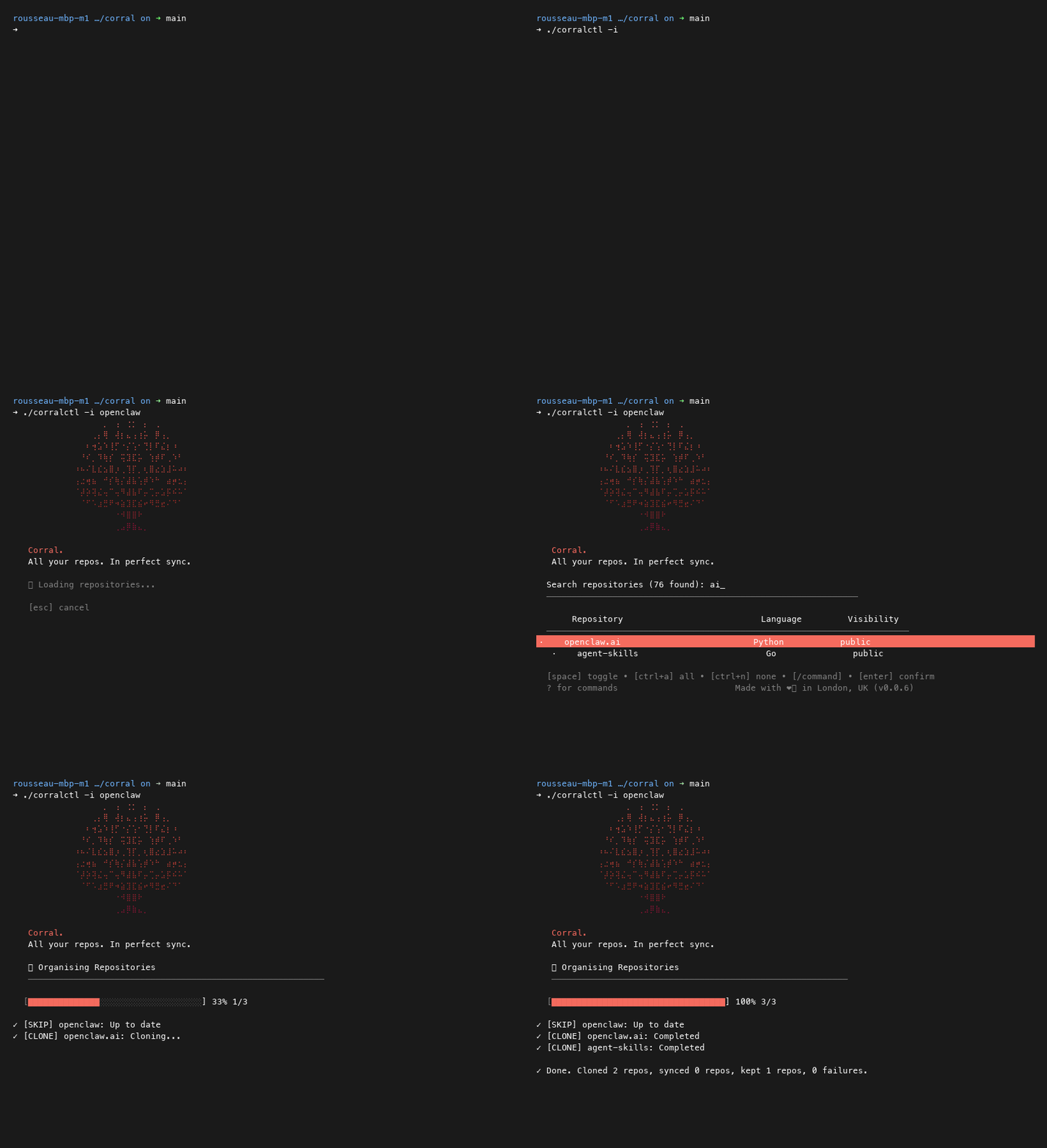
By passing the -i or --interactive flag, you can launch the selection dashboard:
./corralctl -i my-username
Keybindings
[space]— Toggle selection of the current repository.[ctrl+a]— Select all currently filtered repositories.[ctrl+n]— Deselect all currently filtered repositories.[/]— Enter command / filter mode.[enter]— Confirm selection and begin cloning/syncing.[esc]— Exit the application silently.
In-Session Commands
Press / inside the TUI to enter Command Mode. Commands support prefix-based autocompletion (press [tab] or [right-arrow] to autocomplete):
/sort <field>— Sort repositories. Fields:name— Alphabetical sort by repository name.language/lang— Alphabetical sort by language.visibility/vis— Alphabetical sort by visibility (Private/Public).public— Prioritize public repositories at the top.private— Prioritize private repositories at the top.
/all— Select all filtered repositories./none— Deselect all filtered repositories./exit//quit— Cancel and exit silently./help— Display the in-session help panel overlay.
Layout Customization
By default, Corral uses the Apple-style layout {{.Collection}}/{{.Bucket}}/{{.Name}}. Forks use the Forks collection, while .github.io repositories use the Web bucket regardless of their detected language. You can override this using the --layout flag:
./corralctl --layout "{{.Owner}}/{{.Name}}" my-org
Supported placeholders:
{{.Owner}}— GitHub owner name.{{.Name}}— Repository name.{{.Collection}}— Canonical root (Public,Private, orForks).{{.Bucket}}— Finder-facing ecosystem bucket (Go,Rust,Web, etc.).{{.Language}}— Primary language normalized to lowercase.{{.Visibility}}— Repository visibility normalized to lowercase.
Finder Tags on macOS
Finder tagging is enabled by default on macOS and can be disabled with
--finder-tags=false. Corral manages the following lifecycle taxonomy:
| Color | Tag | Automatic signal |
|---|---|---|
| Green | Active | Pushed within seven days or checked out on a non-default branch |
| Yellow | On Hold | Archived on GitHub |
| Red | Needs Fix | Corral encountered a sync failure for the matching clone |
| Purple | Experiment | Fork, template, or mirror repository |
Uncolored metadata tags include Visibility: Public, Collection: Forks,
Ecosystem: Rust, Owner: example, GitHub, Fork, Archived, Template, and Mirror.
Finder can combine these tags in searches or saved Smart Folders.
Smart Syncing
Corral stores synchronization metadata next to each repository's .git/ folder inside a .corral-state.json sidecar file:
- No Redundant Pulls: If the remote repository has not received new pushes since the last sync,
git pullis skipped completely. - Overrides: To bypass smart checks and force Corral to perform a full
git pull, pass the--force-syncflag. - Skip Syncing entirely: Pass
--no-syncto skip updates on all cloned repositories.
Exec Mode
Execute arbitrary shell commands concurrently across your organized repositories:
# Check git status for all Go/Rust private repositories
./corralctl exec "git status -s" --languages go,rust --visibility private
MCP Server (for AI agents)
Corral ships a Model Context Protocol server that exposes your local, Corral-organised workspace to AI coding agents — Claude Code, Cursor, Cline, Codex CLI, Aider, and anything else that speaks MCP. In its default read-only mode no network calls are made and the GitHub API is never contacted; the server is a window into the clones already on disk. (--enable-mutations adds corral_clone_repo and corral_sync_repo, which do reach the network — they shell out to git. The GitHub API is still never contacted.)
Where GitHub's own MCP server covers the remote API surface (issues, PRs, search), corral-mcp covers the dimension only it can — your local mirror, organised by visibility and language, queryable without a round-trip.
Tools
corral_list_repos— Filter local clones by visibility / language / name / sync statecorral_find_repo— Resolve a fuzzy name to one clone (returns candidates on ambiguity)corral_get_repo_metadata— Full metadata for one clone, including current branchcorral_status_summary— Workspace summary: counts by visibility and languagecorral_workspace_index— Full structured index in a single callcorral_find_symbol— Where a symbol is declared, across every clonecorral_search_code— Where text appears, across every clonecorral_repo_overview— One repository's shape in a single call
Write tools (v0.0.12, opt-in via --enable-mutations):
corral_sync_repo— Runsgit pull --rebase --autostashagainst one clonecorral_clone_repo— Clones a URL into a sandboxed target pathcorral_delete_repo— Removes a clone. Requires--enable-destructive-mutations. Refuses on uncommitted/unpushed changes, and asks a person to approve each deletion
Every mutation writes a JSONL audit record to
$XDG_STATE_HOME/corral/mutations.log (or ~/.local/state/corral/mutations.log),
capturing tool, target, args, result and timestamp. Two records per mutation: a
durable intent before anything happens, and a completion linked by operation
ID. A mutation whose intent cannot be recorded does not run.
Override the location with --audit-log <path>. The file rotates at 8 MiB and
keeps three previous generations (mutations.log.1 … .3), so a long-running
server cannot fill the disk.
Prompts (v0.0.12)
explain_workspace— Ask the agent to survey the workspace via read-only tools and summarise itidentify_stale_repos— Ask the agent to find clones whose.corral-state.jsonsays they haven't been synced recently (default: 30 days)
Resources
corral://workspace/indexcorral://repo/{owner}/{name}/statecorral://repo/{owner}/{name}/treecorral://repo/{owner}/{name}/file/{path}(bounded at 1 MiB; path-traversal protected)
Install
Claude Code:
claude mcp add corral -- corralctl mcp
Cursor / Cline (mcp.json):
{
  "mcpServers": {
    "corral": {
      "command": "corralctl",
      "args": ["mcp"]
    }
  }
}
Docker (no local install required) — the same binary the MCP Registry advertises, mounted against your workspace:
{
  "mcpServers": {
    "corral": {
      "command": "docker",
      "args": [
        "run", "--rm", "-i",
        "--user", "1000:1000",
        "-v", "${HOME}/Code:/workspace:ro",
        "ghcr.io/sebastienrousseau/corral:latest",
        "mcp", "--root", "/workspace"
      ]
    }
  }
}
Notes on the args:
--user 1000:1000— replace with your host UID:GID (id -u:id -g) so the containerised scanner reads the mounted workspace with the same permissions your host user has. Without this the image runs as a system UID inside the container and hitspermission deniedon any directory your workspace makes group- or user-private.-v … :ro— read-only mount. The v0 tools are read-only anyway; mounting:rodocuments that and defends against a hostile agent asking the server for a write it doesn't have.--root /workspace— sandbox root inside the container. Every tool and resource path check is scoped to this prefix; requests outside it are rejected regardless of what the agent asks for.
Sandbox a different root (defaults to --base-dir, then $HOME/Code):
corralctl mcp --root /custom/workspace
Serve over HTTP instead of stdio, for a client that connects to a running server rather than launching one:
corralctl mcp --http 127.0.0.1:7777
The address must be on loopback. --http :7777 binds every interface and is
refused, because this server has no authentication; pass --allow-remote if
you have put your own in front of it.
Safety
- Read-only by default.
--enable-mutationsunlocks clone and sync. Deletion additionally requires--enable-destructive-mutations; every mutation writes intent and completion records to the audit log. - Deletion fails closed. MCP and CLI pruning refuse repositories with
working-tree changes; commits on any local branch not reachable from a remote;
stashes; local-only or divergent tags; gitignored content (
.envfiles, local databases, caches — the least recoverable thing in a clone, and invisible to a plaingit status); submodules holding unpublished commits; a target that is not a git repository at all; or any state Git cannot verify. Each refusal names its specific reason and is written to the audit log. - Path-traversal protected. File-resource lookups canonicalise the selected repository root and candidate path, blocking
..and symlink escapes into sibling repositories or outside the workspace. - Per-call approval for deletion. With
--enable-destructive-mutations, each individual deletion is put to a person over MCP elicitation before it runs. The refusal cascade above stops mistakes; this is what stops a persuaded agent choosing the one clone that passes every check, which no amount of prompt text can. Pass--no-confirm-deletesonly for an unattended workspace you are willing to lose. - stdio by default; loopback when not. Without
--httpthe server has no endpoint and no listening port, and only ever speaks to the parent process that launched it.--httpserves the Streamable HTTP transport, and because the server has no authentication and exposes every repository under its root, a non-loopback address is refused unless you also pass--allow-remote— the accidental--http :7777, which binds every interface, does not start.
Forges
Cloning works against six hosting services:
corralctl <owner>                                    # GitHub (default)
corralctl <group> --forge gitlab                     # GitLab
corralctl <owner> --forge codeberg                   # Codeberg
corralctl <owner> --forge gitea --forge-url https://git.example.com
corralctl <owner> --forge forgejo --forge-url https://forgejo.example.com
corralctl <workspace> --forge bitbucket                # Bitbucket Cloud
Gitea and Forgejo have no single public instance, so they need
--forge-url. GitLab and Codeberg default to theirs. --forge-url alone
is enough when the host is recognisable — --forge-url https://codeberg.org implies Codeberg.
Credentials come from the environment, under the names each forge's own
tooling already uses: GITLAB_TOKEN (or CI_JOB_TOKEN), and
GITEA_TOKEN / FORGEJO_TOKEN / CODEBERG_TOKEN, and
BITBUCKET_TOKEN. A corral-specific
CORRAL_GITLAB_TOKEN or CORRAL_FORGE_TOKEN wins where both are set.
GitHub keeps its existing ladder — explicit token, then the environment,
then the gh CLI.
--forge applies to everything that talks to a hosting service:
corralctl <owner>, plan, profile and prune. Orphan detection and
prune compare against the forge you listed from, and scope by host — a
GitLab clone under the same owner name is never a GitHub orphan.
A profile can pin its own forge, so one config can cover owners on several services:
{
  "profiles": {
    "work":     { "owners": ["acme"],   "settings": { "forge": "gitlab" } },
    "personal": { "owners": ["me"] },
    "upstream": { "owners": ["forgejo"], "settings": { "forge": "codeberg" } }
  }
}
Reading was never host-specific. The index, the MCP server, symbol lookup and content search work on clones, so a repository you cloned by hand from anywhere has always been a first-class citizen.
Coming from another tool
Migration guides live in docs/migrating/:
from ghq, from
a hand-written clone script, from
a single-repository code index,
or from an unsorted ~/src.
Each says what carries over, what is genuinely different, and what
corral will not do — nothing there requires re-cloning, and corralctl plan shows you the outcome before anything changes.
Cross-repository symbol lookup
Every code-context server can tell an agent where a symbol is defined in the repository it has open. Corral is the only one that can answer across every clone on the machine, because it is the only one that knows they are all there.
// corral_find_symbol { "name": "CanonicalRemote" }
{
  "query": "CanonicalRemote",
  "repositories_search": 2,
  "total_matched": 1,
  "symbols": [
    {
      "repo": "Public/go/corral",
      "symbol": "CanonicalRemote",
      "kind": "func",
      "file": "internal/git/git.go",
      "line": 266,
      "exported": true,
      "language": "go"
    }
  ]
}
Filter by kind (func, method, type, interface, const, var), scope to one
repo, match by substring, or restrict to the exported_only surface.
Methods are found by their bare name or as Receiver.Name. Test
declarations are excluded by default — on a well-tested repository they
outnumber everything else — and include_tests brings them back.
corral_repo_overview summarises one repository in a single call: its
origin, file count, declaration counts by kind, and its most significant
exported types and functions. Reach for it before reading files.
corral_search_code is the counterpart to corral_find_symbol: find_symbol
answers where something is declared, search_code answers where it is
written — call sites, configuration keys, the error string from a ticket.
Literal by default, regex for RE2, and narrowable by repo, language or
path_glob.
It searches only the files the file resource would serve, so a credential
file can never match — otherwise search would be a way to read a refused
file one line at a time. Test files are excluded unless include_tests is
set, and the response says plainly when a bound was reached rather than
presenting a partial answer as complete.
Indexed languages: Go, Python, TypeScript, JavaScript, Rust.
Go is parsed with go/ast — the compiler's own parser, so the index agrees
with the language by construction. The rest are read by a line scanner, in
the tradition of ctags: it recognises declaration syntax rather than
building a syntax tree, because every mature parser for those languages is
either CGO (tree-sitter), a port that lags the language, or larger than
corral itself. ADR-0006 records why CGO is not available here.
The scanner runs over source that has had comment and string contents
blanked out, so a class inside a docstring or a function inside a
template literal is invisible to it.
Extracted symbols are cached under $XDG_CACHE_HOME/corral/symbols so the
first lookup of a session is not the slow one. A cache hit still walks the
repository — the walk is what produces the fingerprint the entry is keyed
on — so an edited clone is never served stale. --symbol-cache off
disables it; --symbol-cache <dir> moves it.
On a real 187-repository workspace a cross-repository lookup went from 6.9 s to 1.3 s: most of that from searching repositories concurrently rather than one after another, the rest from the cache. What it cannot do is resolve types, see through macros, or follow a declaration split across lines unusually — and it is wrong cheaply: a missed symbol falls back to reading files, and a spurious one is a wrong line in the right file. What it will not do is invent a symbol that does not exist.
Usage & Flags
Positional Arguments
corralctl <owner> [base_dir] [limit]
<owner>— GitHub username or organization (Required).[base_dir]— Root directory to save repositories (Default:$HOME/Code).[limit]— Maximum repositories to fetch (Default:1000).
Command Options
| Option | Short | Default | Description |
|---|---|---|---|
--base-dir | — | $HOME/Code | Root directory for cloned repos |
--limit | -l | 1000 | Maximum repositories to fetch |
--concurrency | -c | 1 | Number of concurrent worker threads |
--dry-run | -n | off | Preview actions without making changes |
--orphans | -o | off | Detect local repositories no longer on GitHub |
--protocol | -p | https | Protocol to clone: ssh or https |
--no-sync | — | off | Skip pulling latest changes for existing clones |
--force-sync | — | off | Force git pull regardless of cached state |
--layout | — | ... | Templated path layout for repositories |
--finder-tags | — | on (macOS) | Apply managed native Finder Tags to repository folders |
--interactive | -i | off | Launch the interactive selector TUI dashboard |
--recurse-submodules | — | off | Initialise submodules on clone and sync |
--output | — | text | Output format: text, json, or ndjson |
--auth | — | auto | Auth mode: auto, token, or gh |
--visibility | — | all | Filter by visibility: all, public, private |
--include-forks | — | on | Include forked repositories under Forks/ |
--include-archived | — | on | Include archived repositories and tag them On Hold |
--languages | — | — | Comma-separated language filter (e.g. go,rust) |
--exclude-languages | — | — | Comma-separated language exclude list |
--clone-depth | — | 0 | Shallow clone depth (0 disables shallow clone) |
--api-request-timeout | — | 30s | Deadline for a single GitHub API request |
--api-total-timeout | — | 10m | Deadline for the whole paginated fetch, including retries and backoff |
--api-timeout | — | — | Deprecated. Was applied to both of the above at once, capping a whole listing at 30s. Sets both when given; warns on stderr |
--log-level | — | info | Diagnostic verbosity on stderr: error, warn, info, debug |
Diagnostics
Results go to stdout in the format --output selects. Diagnostics — what was
skipped, what was worked around, why — go to stderr, so --output json stays
pipeable no matter how noisy the run is.
--log-level controls how much of that stderr you get. CORRAL_LOG_LEVEL
sets the same thing for a whole shell session.
# Why did that repository not migrate? Turn the detail up.
corralctl sebastienrousseau --log-level debug

# Machine-readable results, quiet stderr, both at once.
corralctl sebastienrousseau --output json --log-level error > repos.json

# For a bug report: full detail, everything captured.
CORRAL_LOG_LEVEL=debug corralctl sebastienrousseau > out.json 2> diagnostics.log
The default, info, is what corral has always printed.
Operational Commands
corralctl status --base-dir ~/Code
corralctl plan sebastienrousseau --base-dir ~/Code
corralctl prune sebastienrousseau --base-dir ~/Code --dry-run
corralctl prune sebastienrousseau --base-dir ~/Code --yes
status inventories local clones, plan emits a non-mutating reconciliation,
and prune removes only upstream-orphaned clones that pass the unpublished-work
checks. JSON output is available on each command.
Multi-owner profiles use a strict JSON config (default
~/.config/corral/config.json) and run with corralctl profile <name>:
{
  "profiles": {
    "work": {
      "owners": ["org-one", "org-two"],
      "base_dir": "/home/me/Code",
      "layout": "{{.Owner}}/{{.Visibility}}/{{.Language}}/{{.Name}}",
      "concurrency": 4
    }
  }
}
Examples
To inspect the package layout and programmatically run Corral modules, see the self-contained, copy-pasteable Go code examples in the examples directory:
- Interactive Selector — Programmatically configure and launch the selection checklist TUI in AltScreen mode.
- GitHub Repository Fetcher — Query the GitHub REST API using
github.FetchReposWithOptionswith stars sorting and language constraints. - Git Syncing — Call the
githelper package to perform clones, query branches, and resolve origin URLs. - Engine Orchestrator — Integrate the core engine
engine.Runto run repository syncing with custom filters, layout structures, and dry-run pre-flights.
Troubleshooting
| Error Message | Cause | Solution |
|---|---|---|
ERROR: git not found on PATH | Git is not installed or missing from the current PATH environment. | Install git via your package manager. |
ERROR: GITHUB_TOKEN environment variable not set | --auth token was specified but no environment variable is present. | Run export GITHUB_TOKEN=$(gh auth token) or switch to --auth auto. |
FAILED: owner/repo | Authentication error or network failure during clone/pull. | Check connectivity and confirm gh auth status displays a valid session. |
Frequently Asked Questions
- Does it work with GitLab or other hosts?
No. Corral is specifically built to integrate with the GitHub API and GitHub CLI (gh). - What happens to repositories deleted on GitHub?
Normal reconciliation never deletes them.--orphansreports them; the explicitprunecommand can remove verified-safe orphans after--yesconfirmation. - Can I run it inside Cron or systemd timers?
Yes. The command runs non-interactively by default. All Git command credential prompts are bypassed to ensure automated jobs never hang. - How are repositories with no primary language stored?
They default to theOther/ecosystem category (e.g.Public/Other/my-repo).
THE ARCHITECT ᛫ Sebastien Rousseau
THE ENGINE ᛞ EUXIS ᛫ Enterprise Unified Execution Intelligence System
Documentation
| Resource | Where |
|---|---|
| User manual | https://doc.corrallib.com |
| API reference | https://pkg.go.dev/github.com/sebastienrousseau/corral |
| Developer docs | DEVELOPMENT.md — toolchain and every CI gate reproduced locally |
| Architecture | docs/ARCHITECTURE.md |
| Decision records | docs/adr/ |
| Security model | docs/security-model.md |
| Packaging | docs/packaging.md — for distribution maintainers |
| Support | SUPPORT.md |
Once installed, man corralctl works offline, and every subcommand has its
own page (man corralctl-mcp).
When not to use Corral
Corral is opinionated, and the opinions do not suit everyone.
- You want a full mirror or backup. Corral clones working copies to be
read and edited. For archival mirroring use
git clone --mirroror a purpose-built tool; Corral will not preserve every ref or hold a guaranteed-complete copy. - You need a forge corral does not list from. GitHub, GitLab, Gitea,
Forgejo and Codeberg are supported; anything else is not. Reading is
forge-neutral — a clone from any host is a first-class citizen in the
index, the MCP server and symbol lookup — but
corralctl <owner>only knows those five. - Your repositories must stay where they are. Corral's value is a
consistent layout, and the default reorganises clones into
Collection/Bucket/Name. If a fixed path matters, use--layoutto match your existing tree — or a different tool. - You want code intelligence. The MCP server does index symbols and search file contents across every clone, but shallowly: a declaration is a name, a kind, a file and a line. It does not resolve types, find references, or rename — an LSP does those, one project at a time, and corral is the layer that tells an agent which project to open.
- You need Windows without WSL. Binaries are published for Windows, but macOS Finder tags are a no-op there and the experience is less tested than on macOS and Linux.
Requirements & toolchain policy
| Go | The go directive in go.mod — currently 1.26.6 |
| git | 2.30 or newer, on PATH |
| gh | Optional; only for --auth gh |
The Go floor is stated in exactly one place, go.mod, and CI sets
GOTOOLCHAIN=auto so it cannot disagree with a workflow input.
Policy for raising it. The floor may rise in any release when a
standard-library fix or language feature justifies it, and the reason is
recorded in that release's CHANGELOG entry. Corral makes no distro-LTS
compatibility promise — an aspirational claim without a table mapping
distro toolchains to the floor would be worse than none. Packagers should
check go.mod on every version bump rather than assume the floor held.
Stability guarantees
Corral is pre-1.0 and follows SemVer, with the patch digit moving for everything until 1.0.
The breaking axis is behaviour, not signatures. For a tool that moves and deletes directories, a change to what it does to a workspace is breaking even when no flag or function signature moves. Specifically, these are treated as breaking:
- A change to the default layout, or to how a repository maps onto a path
- A change to what
--output json/ndjsonemits, beyond added fields - A change to an exit code
- A refusal becoming permissive: any case where Corral used to decline to delete, prune or migrate and now proceeds
- A change to the MCP tool or resource surface that an existing client would notice
Added fields, new flags with inert defaults, and new refusals are not breaking.
Deprecation window. A deprecated flag or tool keeps working for at least one minor release after the release that announces it, and warns on stderr — never on stdout, which carries the selected output format.
Security & hardening
Reporting. Do not open a public issue. Follow the private process in SECURITY.md; the response SLA is stated there.
Posture. Corral runs with the user's own credentials against the user's own machine, so the threat model is about limiting blast radius, not crossing a privilege boundary. Full detail in docs/security-model.md.
- Credentials never reach
argvor.git/config. The GitHub token is handed to git as anhttp.extraheaderscoped tohttps://github.com/, so a submodule on another host cannot see it. Clone errors deliberately omit their arguments so a URL-embedded credential cannot reach a log. - Git runs non-interactively, always.
GIT_TERMINAL_PROMPT=0and friends, so an unattended run fails rather than hanging on a prompt. - Destructive operations refuse without evidence.
pruneandcorral_delete_repodecline when a clone holds uncommitted, unpushed, stashed, submodule or gitignored work — the last becausegit statushides exactly the files no remote has a copy of. - The MCP server is sandboxed and gated. Path resolution canonicalises
symlinks on both sides and compares path segments, not string prefixes.
Write tools require
--enable-mutations; deletion requires a second flag. Every mutation is written to an audit log before it is attempted. - Memory safety comes from Go; there is no CGO anywhere
(
CGO_ENABLED=0), so released binaries are static and free of libc coupling.
Fuzzing. Fuzz targets cover the parsing and path-resolution boundaries — layout evaluation, language normalisation, remote-URL parsing, and the sandbox check that must never let a path escape its root. They run on every push for a fixed duration. Corral is not enrolled in OSS-Fuzz.
Supply chain. Releases are signed with keyless cosign, carry SLSA build
provenance and a CycloneDX SBOM, and are built with -trimpath and a
commit-pinned timestamp so two builds of a commit are byte-identical. Every
GitHub Action is pinned by commit SHA and the container base by digest.
govulncheck runs on every push.
License
Licensed under the GNU General Public License v3.0.