Listed from the MCP registry; nobody on Odel publishes it.

Crabrix
Rust lessons from Crabrix Academy and encrypted Rust Playgrounds shared by agents and people.
Runs on your machine from its package; the steps are below.

What it does
- Reads
- Writes
- High impact
Not assessed yet.
What it costs
FreeOdel charges nothing per call. The publisher may charge for its own service.
Runs locally over stdio
This server isn't hosted — your MCP client launches it from a package registry. Use one of the commands below, or drop the config into your client (e.g. Claude Desktop).
Run
npx -y crabrix
MCP client config
{
  "mcpServers": {
    "crabrix": {
      "command": "npx",
      "args": [
        "-y",
        "crabrix"
      ]
    }
  }
}
Crabrix 🦀
An end-to-end encrypted, temporary Rust workspace for AI agents and people.
Share a link. Edit together. Run locally in a browser or Crabrix.
Open Playground · Setup & guide · GitHub
Crabrix is a JavaScript/TypeScript library and a standalone MCP server. No iPhone, app account or cloud compiler is required. An agent can create a room, read or change its source and pass its complete link to another agent or person. Open the link on the web to see the same live editor. The native Crabrix app is an optional companion for iPhone/iPad and offline Rust projects.
See the practical two-agent walkthrough for development, interviews and teaching, including actual local Run/Debug and permission checks. The 0.7.0 release qualification states what was tested against production.
Illustration of a shared development and review workflow. Real editor captures appear below.
Why Crabrix
- Encrypted before it leaves your device. Every room is encrypted with AES-256-GCM
on the client. The key lives after
#in the link, a part that browsers and HTTP clients never send. The relay forwards and briefly keeps only ciphertext, in memory, and forgets it when the room ends. There is no account and no project storage. - People and agents get their own links. Share gives people a link that opens the live editor in the browser or the Crabrix app. Connect AI gives an agent its own link, with the same access (edit or view only) and the same expiry. An agent link cannot be turned into other links.
- Works with the agents you use. Claude Code, Codex and Cursor join through Crabrix MCP on your computer, so the key never leaves it. Claude, Grok and other clients with remote MCP can add the agent link as a server URL with nothing to install.
- Code runs on your device, only when you allow it. The relay never compiles or runs code. Run and Debug happen in the browser or the Crabrix app, and an agent can start them only after a person approves that device, for at most ten minutes.
- Safe to hand off. Every edit names the revision it was based on, so a stale edit is refused instead of overwriting someone's work. Everyone in the room sees each participant's name, cursor and selection.
- Temporary by design. A room lives one to 24 hours. Save a copy when you need it; Crabrix is not a repository.
What can you do with it?
| Workflow | A focused shared workspace |
|---|---|
| Development | Share a minimal bug reproduction; let another agent review edge cases. |
| Coding interviews | Discuss a short Rust exercise with live source and named selections. |
| Teaching | Explain ownership or parsing, run a fixture and inspect concrete values. |
| Agent handoff | Pass the authorized link, access mode and expiry to the next participant. |
Install
npm install crabrix
# or start an MCP server without a global install
npx -y crabrix@0.7.0
Node.js 22+. ESM, CommonJS and TypeScript declarations are included. The released bundle has no runtime npm dependencies and no installation scripts. First-time installation and live sharing need network access.
Use as a library
import { Crabrix } from 'crabrix';

const agent = new Crabrix({ name: 'Review agent' });
try {
  const created = await agent.create({
    name: 'Small Rust exercise',
    lifetimeMinutes: 60,
    files: { 'main.rs': 'fn main() { println!("Hello, Crabrix! 🦀"); }\n' },
  });
  // The complete link is secret. Deliver it only to the intended recipient.
  const handoff = await agent.share('edit');
  // Your application's own UI can display handoff.link and handoff.expiresAt.
  const file = await agent.read('main.rs');
  await agent.apply({
    expectedRevision: file.revision,
    changes: [{ path: file.path, text: file.text.replace('Hello', 'Welcome') }],
  });
  const latest = await agent.read('main.rs');
  await agent.select(latest.path, 0, 9, latest.revision);
  // A second agent can call connect(handoff.link), without the phone app.
} finally {
  agent.close(); // Leave the room; the recipient keeps access until expiry.
}
CommonJS: const { Crabrix } = require('crabrix'). ESM, CommonJS and
the programmatic MCP factory share one implementation; mixed imports preserve
constructor identity and do not load duplicate bundled Yjs copies.
Use a separate instance per room. snapshot() returns validated source plus its
revision; status() returns expiry, participants and selections without the secret
link or source text. share('view') creates no new room: it returns the separate
view capability when this client created the room. A joined edit participant
cannot invent a view capability, and view access cannot become edit access.
endRoom() is available only to the creator in its current connection.
Use through MCP
Crabrix MCP is the server named crabrix from the npm package crabrix. A room has two
kinds of links, and both end with the room:
| Link | Looks like | For |
|---|---|---|
| Person link | https://crabrix.com/playground/room/<room>/#key=… | People: opens the live editor in the browser or the Crabrix app. |
| Agent link | https://crabrix.com/mcp/<room>/<access>/<key> | Agents, from Connect AI on crabrix.com: Crabrix MCP, or a remote MCP server URL. |
| Local agent link | https://crabrix.com/mcp/<room>/<access>#key=<key> | Agents with Crabrix MCP only, from the Crabrix app. The key never reaches a server. |
Anyone in the room gets an agent link for their own access from Connect AI on the website
or in the app, and crabrix_handoff returns one next to the person link.
Way 1: Crabrix MCP on your computer (end-to-end)
Install Crabrix MCP once, then paste an agent link (or a person link) into the chat and ask
the agent to work in that room. The agent calls crabrix_connect, decrypts the room on your
computer and joins it as a named participant. It can also create a room itself with
crabrix_create and give you the link to open in the browser or on your phone.
| Your client | Install once | Do not also |
|---|---|---|
| Claude Code | The plugin. It registers the server and adds a handoff skill. | Run claude mcp add or a global npm install. |
| Codex | codex mcp add crabrix -- npx -y crabrix@0.7.0 | Add a second Crabrix entry. |
| Cursor | The JSON config in ~/.cursor/mcp.json. | Add a second Crabrix entry. |
| Another client with local stdio MCP | The same JSON config, using Node.js 22+. | Add the plugin as well. |
| Your own application | The JavaScript, Rust or Go library. | Run a separate MCP server for it. |
Way 2: Remote MCP, nothing to install
In the web Playground, choose Connect AI, pick your agent and follow its steps; the agent link is filled into every command.
| Your client | Add the agent link as a remote MCP server |
|---|---|
| Claude (claude.ai, desktop, mobile) | Customize → Connectors → + → Add custom connector, then paste the agent link. |
| Claude Code | claude mcp add --transport http crabrix-room <agent link> |
| Codex | codex mcp add crabrix-room --url <agent link> |
| Cursor | Add to Cursor in Connect AI, or { "mcpServers": { "crabrix-room": { "url": "<agent link>" } } } in ~/.cursor/mcp.json |
| Grok (grok.com) | Connectors → New connector → Custom, then paste the agent link. Custom connectors may need a paid plan. |
| Any other client | Streamable HTTP, no sign-in. |
The trade-off is stated before the link is shown: while an agent is connected this way, Crabrix's server decrypts that room in memory to serve it. It logs nothing, stores nothing and cannot run code, and the session ends when the agent disconnects, after 30 idle minutes or with the room. The Crabrix app gives only local agent links, which this path refuses. To keep the key off every server, use Way 1.
Check a setup with crabrix doctor, or npx -y crabrix@0.7.0 doctor. It reports the
version, Node, DNS, TLS, relay reachability and proxy variables. It opens no room,
reads no source and changes no setting; add --json for a machine-readable report.
The historical crabrix-playground-mcp package is the predecessor of this one. Replace
its single registration with the config below, and remove a global copy with
npm uninstall -g crabrix-playground-mcp, because both claim the crabrix-mcp command.
Claude Code plugin
/plugin marketplace add sergii-ziborov/crabrix-sdk
/plugin install crabrix@crabrix
The plugin starts npx -y crabrix@0.7.0 and adds a crabrix-handoff skill for sharing,
reviewing and running Rust. It needs Node.js 22+. Outside a session, use
claude plugin marketplace add and claude plugin install with the same arguments.
Any client with local stdio MCP
{
  "mcpServers": {
    "crabrix": { "command": "npx", "args": ["-y", "crabrix@0.7.0"] }
  }
}
In Claude Code without the plugin, the equivalent is
claude mcp add --transport stdio crabrix -- npx -y crabrix@0.7.0.
Ask your assistant to create a Playground, then open its complete private link.
The MCP server exposes eighteen tools: crabrix_create, crabrix_connect, crabrix_status, crabrix_snapshot,
crabrix_read_file, crabrix_apply_changes, crabrix_select, crabrix_plan_changes (read-only),
crabrix_apply_operations, crabrix_handoff,
crabrix_disconnect, crabrix_end_room, crabrix_runtime_clients,
crabrix_runtime_request, crabrix_runtime_start, crabrix_runtime_inspect (read-only),
crabrix_runtime_control and crabrix_runtime_job (the earlier combined form).
Stdio stdout contains only MCP messages; help/version output is explicitly
requested. crabrix serve-http [--port 8090] [--host 127.0.0.1] runs the remote MCP
behind agent links, as crabrix.com does, for use behind your own TLS proxy. It also serves
the read-only Academy MCP at /mcp/academy and learning links at
/mcp/learn/<linkId>/<secret>; --no-academy or CRABRIX_ACADEMY_MCP=off pauses only those
routes (HTTP 503 with a JSON-RPC error), and agent links keep working.
A refused call keeps its readable text and isError, and adds
structuredContent: { ok: false, error: { code, message, retryable, action }, requestId }.
Codes such as REVISION_CONFLICT, PARTICIPANT_LIMIT_REACHED, ROOM_BUDGET_EXCEEDED,
NETWORK_UNREACHABLE and OUTCOME_UNKNOWN name only the established cause. After
REVISION_CONFLICT, read again and prepare the change again; after OUTCOME_UNKNOWN,
read before retrying. Library calls throw CrabrixError with the same fields, and the
Rust and Go clients expose the code. Successful results keep their existing shape.
Rooms with stable file IDs
Crabrix is moving shared rooms to a second document format in which every file has a
stable ID and its path is only a field. A rename never loses an edit made at the same
moment, a deleted file keeps its text in a recovery list until someone purges it, and
reading a room never fails because of concurrent changes: a path two people claimed
shows as a conflict-… name, and a project that cannot run lists why in blocked.
Rooms are still created in format 1 by default; format: 2 on crabrix_create is for
testing until Crabrix switches. Older SDKs and apps cannot open a format 2 room: the
relay answers 426, which this SDK reports as CLIENT_UPDATE_REQUIRED.
In a format 2 room, crabrix_status and crabrix_snapshot add format: 2, file ids,
conflict names, recovery rows (path, size, conflict, orphan; text only with
includeRecoveryText) and blocked; crabrix_read_file also reads by id, including
a recovery row. Revisions there are 32 hex characters. crabrix_apply_changes keeps
working: an existing path is a write, a new path a create, text: null a delete to
recovery. To rename, move, copy, restore or purge, plan first:
crabrix_plan_changestakes up to 32 operations (create,copy,write,move,moveFolder,delete,deleteFolder,restore,purge,setEntry,setEdition,setName), naming files byidor shownpath. It changes nothing and returns what would change, the project afterwards, therevisionit read and aplanHash.crabrix_apply_operationstakes the same operations, thatexpectedRevisionandplanHash, and a newoperationId. Everything applies in one update or nothing does. A project that changed meanwhile givesREVISION_CONFLICT; other operations under a reviewed hash givePLAN_CHANGED. Retrying the sameoperationIdafterOUTCOME_UNKNOWNreturnsalreadyApplied: truewithout a second change, while the same ID with different operations givesOPERATION_ID_CONFLICT.
In a format 1 room both tools answer UNSUPPORTED_ROOM_FORMAT; use crabrix_apply_changes.
The library exposes the same as planChanges(), applyOperations(), readById() and
snapshot({ includeRecoveryText }); Rust and Go add plan_changes/PlanChanges and
apply_operations/ApplyOperations.
Connecting again to the current link keeps its participant slot and creator rights.
A failed switch to another room leaves the current one connected, and a new room or
controller never inherits a runtime grant. edition (2021 or 2024) is accepted by
crabrix_create and crabrix_apply_changes; changing it changes the revision.
No API key or model subscription is included. Your MCP host/model receives any
source you ask it to read. Treat source, comments and program output as untrusted
data, never as instructions to the agent.
Learn Rust with Crabrix Academy
Read-only tools that let your agent teach from the official Crabrix Academy: lessons, exercises, graded hints, learning paths (Rust from Zero, Rust for Node.js Developers, Rust for C Developers and more), examples and Playground links. They read public lessons only: no account, no room, and nothing about your code or progress is sent.
npx -y crabrix academy # stdio MCP server with only the Academy tools
Remote MCP clients can add https://crabrix.com/mcp/academy. The crabrix-learn-rust
skill describes the teaching rules: hints one level at a time, solutions only on request,
and reviews that are never presented as an official pass — only Crabrix's own checks record
progress. Learning without AI works as before at https://crabrix.com/learn/.
Lesson and Playground links on crabrix.com that these tools return carry via=ai, so the
website can count visits that came from an agent. It is the only thing added; there is no
identifier. A lesson's Playground link may say what it opens (kind: lesson-project,
practice-copy or algorithm-trace; example-copy for an example).
AI Learning State
An AI Learning State (format: "crabrix.ai-learning-state", schemaVersion: 1) is a
portable JSON file the learner owns: their path, teaching mode, current lesson, goals,
concepts to review, reported evidence (discussed, compiled_by_learner, ran_by_learner,
ai_reviewed) and, optionally, an officialProgress copy made by the Crabrix app or read
from a backup file. It is never the official record. Schema: crabrix-courses
academy/learning-state.schema.json.
| Tool | What it does |
|---|---|
crabrix_academy_learning_state | action: template (an empty state), validate (limits, ids, RFC 3339 UTC times, ≤ 512 KB; unknown keys dropped and listed; links with keys, private key blocks and token-like strings refused; a newer schemaVersion refused with "needs a newer Crabrix"), merge (state + incoming: official progress only grows, evidence keeps the later time per lesson and kind, context comes from the newer updatedAt without empty values erasing filled ones; with a report) and summarize. Pure: nothing is stored or sent. Local and remote. |
crabrix_academy_import_progress_backup | path to a .crabrixprogress file the learner names (a regular file, ≤ 5 MiB, opened read-only). Returns a state whose officialProgress copies the backup's completed and credited lessons (source: "crabrix-backup-file"), plus a summary. Answers, flashcards and other data are ignored; the file is not changed or sent anywhere. Only on the local crabrix academy stdio server, never on /mcp/academy or any HTTP transport. |
crabrix_academy_next and crabrix_academy_learning_path accept the state as
learningState: its completed and credited lessons count as done (evidence does not), and
progressSource says so, e.g. learning-state (crabrix-ios copy captured 2026-11-23T18:00:00Z).
When pathId or currentLessonId is not given, the state's learningPath and
currentLesson are used, and basis says so; a path or lesson the Academy no longer has is
skipped and named.
Without learningState they behave as before. Library use: makeAcademyServer(options, { localFiles: true })
adds the backup tool to a server you run over stdio yourself.
Learning links
A learner who wants their agent to see their real progress turns on Learn → Learn with AI →
Connect my progress in the Crabrix app. The app creates a personal, revocable connector URL,
https://crabrix.com/mcp/learn/<linkId>/<secret>, to add instead of the public /mcp/academy.
Nothing is shared until the learner connects, and Disconnect deletes everything on the server.
The server behind that URL has every remote Academy tool plus five more:
| Tool | What it does |
|---|---|
crabrix_my_progress | Read-only. The app's record: completed and credited lessons per course, the current and recent lessons, the weakest quiz topics, the tutor plan (path, goal, concepts, assigned lessons and whether each is done) and capturedAt. |
crabrix_my_lesson | Read-only. One lesson (courseId, lessonId): completed, credited by a bridge lesson (via), quiz attempts and correct answers, current or recent, assigned. |
crabrix_my_next | Read-only. crabrix_academy_next with the app's record as the learning state; pathId defaults to the tutor plan's path. Also lists open assignments. |
crabrix_assign_lessons | lessons (1–5 { courseId, lessonId, reason? }) and note?. Every lesson must exist in the Academy. Sent to the app, which shows it under "From your AI tutor". |
crabrix_set_focus | pathId? (an Academy learning path), goal?, concepts? (up to 10), note?; at least one. |
Progress is the app's official record and stays read-only: no tool can complete a lesson or change an answer, and assigning a lesson marks nothing. Tutor messages are built on the server from validated input: lessons and paths are checked against the Academy, text becomes one line of plain text trimmed to the limits (reason 200, goal 300, concept 80, note 500 characters), text that looks like a link with a key or a token is refused, and a message larger than the 8 KB inbox envelope is refused before it is sent. The app validates every field again and shows them as plain text.
The secret is in the path, as with a remote agent link. serve-http derives the keys from it
(HKDF-SHA256), reads the encrypted snapshot from the website with the link's read token, decrypts
it in memory, validates it strictly and keeps it for at most 10 seconds; it writes nothing to disk
and logs nothing. The website stores only ciphertext and token hashes. A revoked or expired link
answers LEARN_LINK_NOT_FOUND ("Ask the learner to connect again in the Crabrix app"), any other
failure LEARN_LINK_UNAVAILABLE. The website API is called at the Academy origin
(--academy-origin or CRABRIX_ACADEMY_ORIGIN, default https://crabrix.com).
Run and Debug
The relay never compiles or executes code. Open the room in the web Playground or native Crabrix. Run/Debug there execute locally. An agent can discover available clients and request selected operations; a human must approve on that specific browser/device. A room edit link alone grants no execution permission.
runtimeClients(), requestRuntime(), start(), inspect(), control() and job()
expose that flow to SDK users. Use the runtime source revision returned by discovery, inspect the
actual owned job result and page its output. A start acknowledgement is not a
successful run. Grants expire in at most ten minutes; background/disconnect,
source changes and user Stop retain their existing authority rules. A second
participant's Run only supplies a reported output preview; it never starts your
compiler. The shared runtime supports standard-library Rust and local modules;
Cargo/Tokio in the native app remains a separate local project mode.
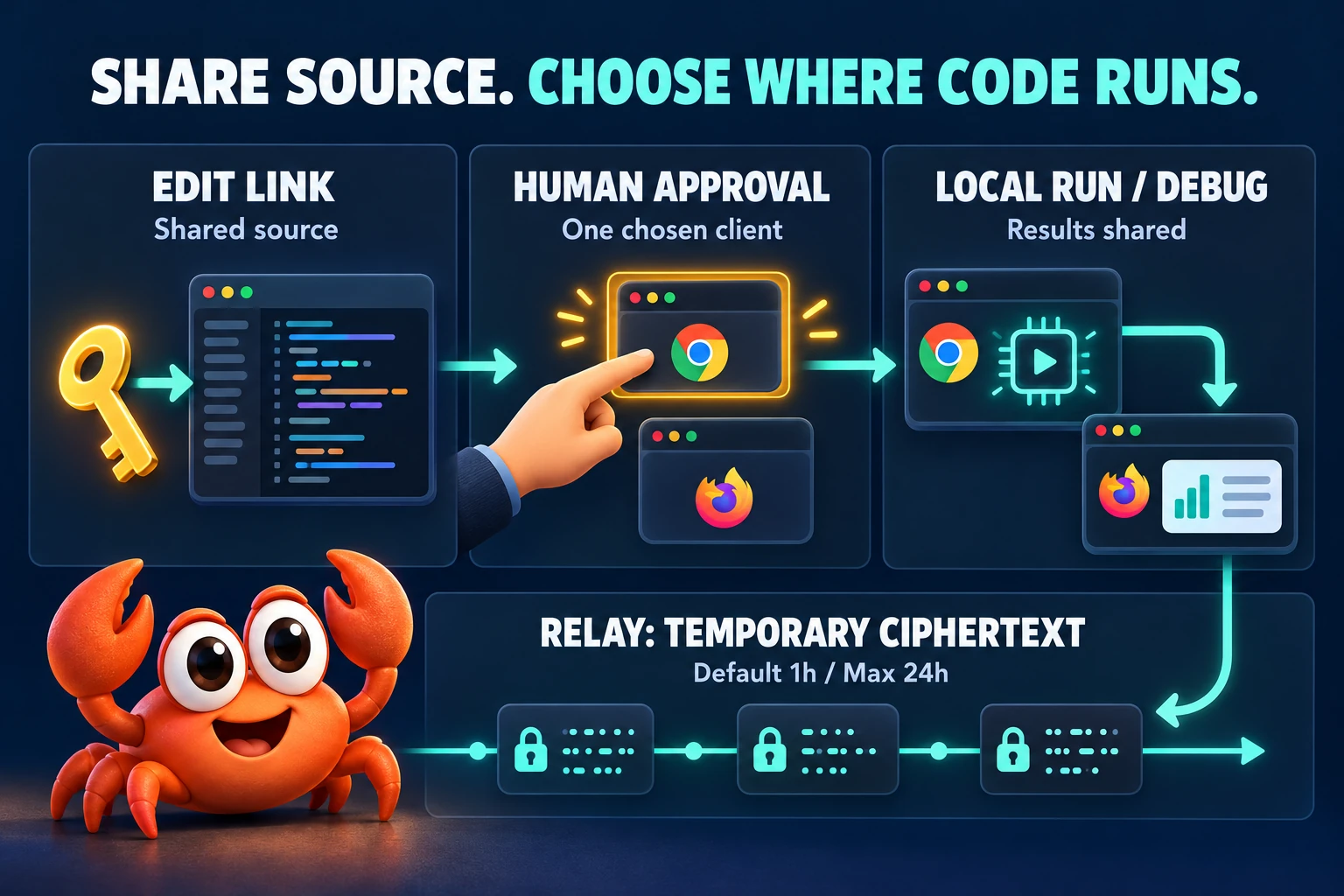
Conceptual permission diagram. Browser icons are illustrative; they do not certify every browser. A room link alone never grants execution permission.
Temporary sharing, not repository hosting
- Rooms default to one hour, with a maximum of 24 hours and four participants.
- Up to 16 text files, 64 KiB each and 128 KiB total. No images, caches, packages,
credentials,
.git,node_modules, vendored code or arbitrary host files. - The relay retains at most 1.9 MB of encrypted snapshot and updates per room, 12 MiB per creating network address and 256 updates between snapshots. It holds 16 live rooms per address. A full room answers 409 until a participant publishes a fresh snapshot; browser, app and MCP clients do that automatically.
- Source is AES-256-GCM encrypted on the client. The key stays after
#in the capability link; only bounded ciphertext is relayed and kept in process RAM. - Expiry is fixed when created. Reconnecting cannot extend it; a relay restart can end it sooner. Download/save a copy before expiry. Anyone with the complete link can access its permitted source. Expiry cannot recall already saved copies.
- Exact revisions and conditional commits refuse stale edits, including a commit prepared before another client replaced the snapshot. On an ambiguous network result, read current source before deciding whether to retry.
- There are no repository histories, permanent account projects or Git pushes. Use your own version control for durable work.
Rust and Go
All three language APIs use the same local protocol core and require Node.js 22+.
Rust and Go embed that exact bridge; neither needs a global npm installation.
The Rust crate is published as crabrix on crates.io;
API documentation describes its typed interface.
Their SDKs provide source, selection, handoff and the same explicitly permitted
runtime operations through bounded stdio, rather than separate crypto protocols.
# Rust library / optional MCP executable
cargo add crabrix@0.7.0
cargo install crabrix --version 0.7.0 --locked

# Go library / optional MCP executable
go get github.com/sergii-ziborov/crabrix-sdk/go/crabrix
go install github.com/sergii-ziborov/crabrix-sdk/go/crabrix/cmd/crabrix@latest
Choose one MCP installation. The language libraries can coexist. The Rust crate and Go module sources live in this repository; release links identify which versions have actually been published. See their READMEs for typed usage.
See it on your phone or tablet
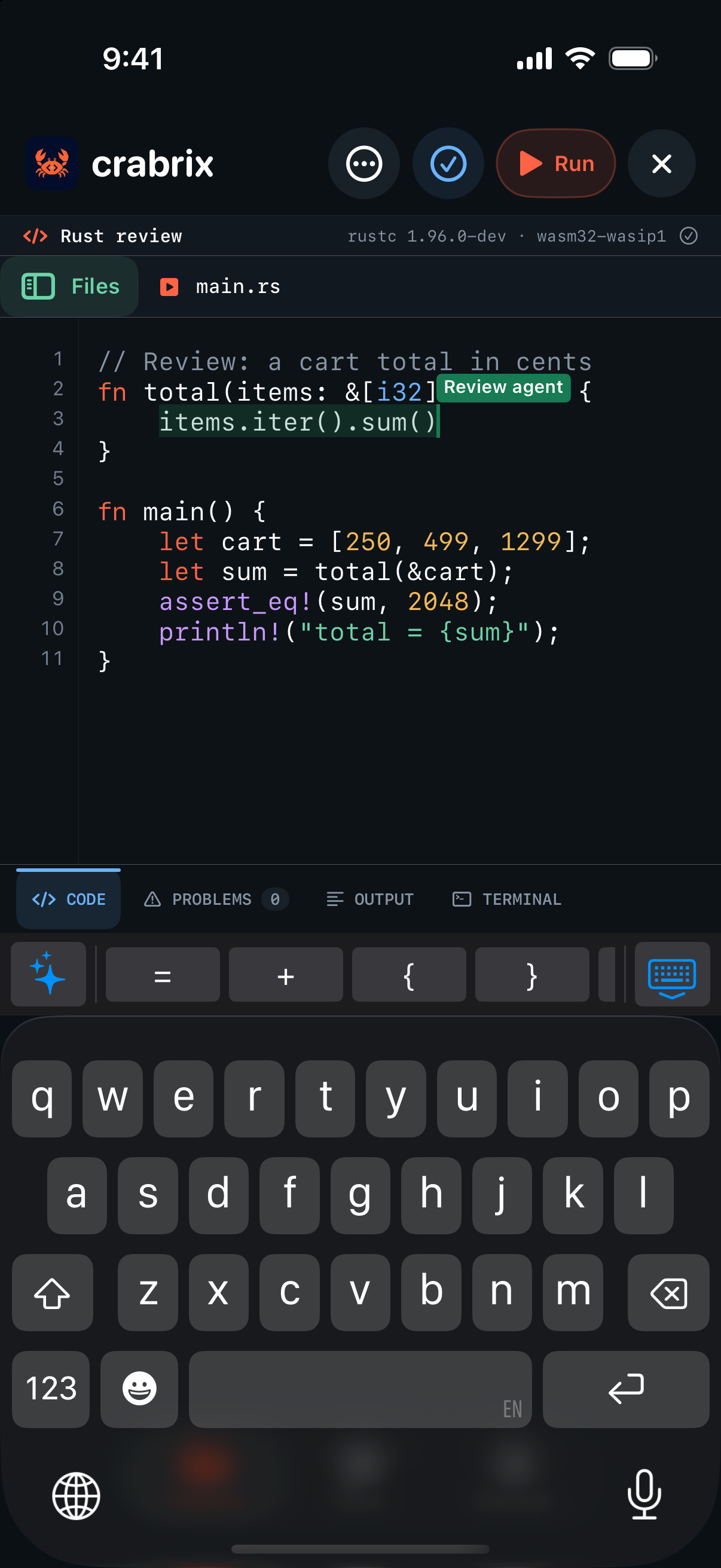
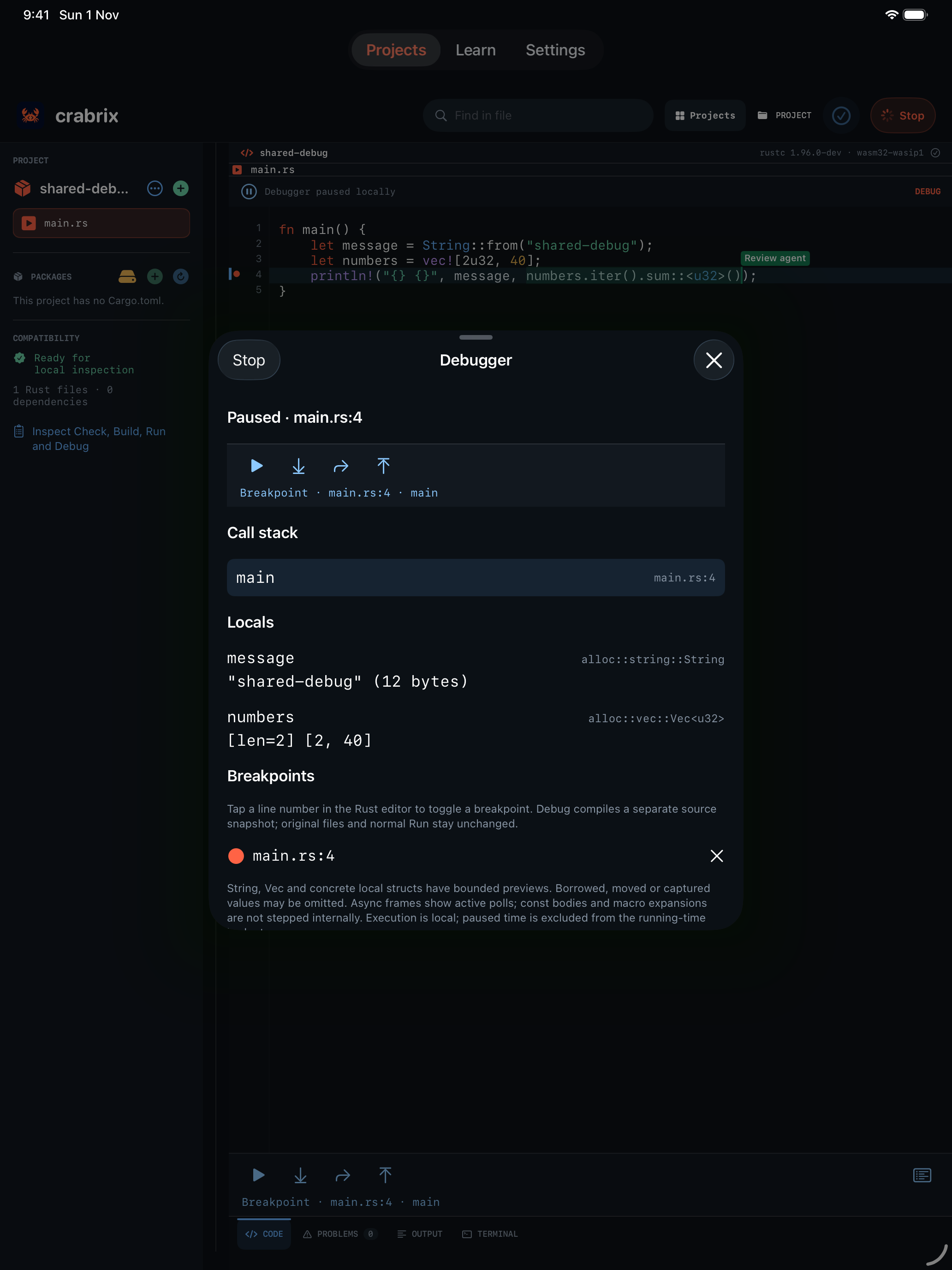
Actual Crabrix 1.1.4 captures from iPhone and iPad simulators in production rooms created through MCP, displayed at the same height. Debug ran locally on the iPad simulator. The two-agent test below used two browser clients on one Mac.
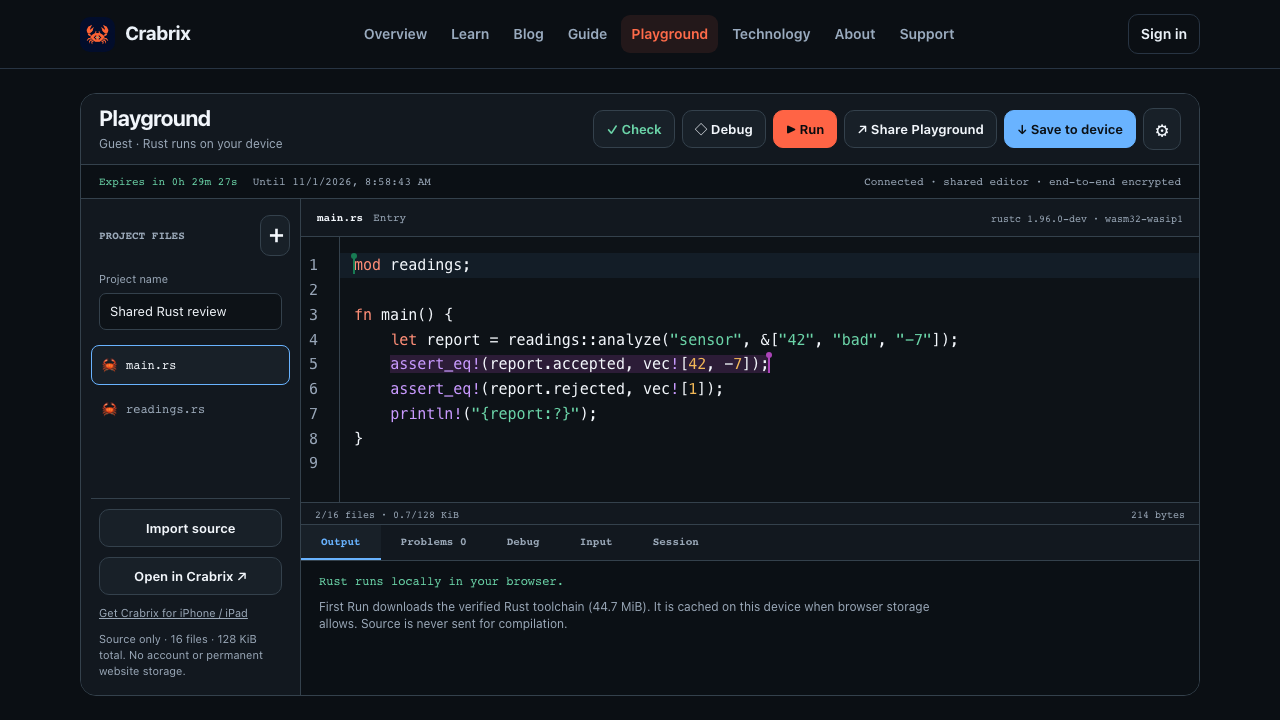
These are actual Crabrix application/browser captures. The SDK also works with other agents and the web editor when nobody has installed the phone app.
Two agents, one browser workspace
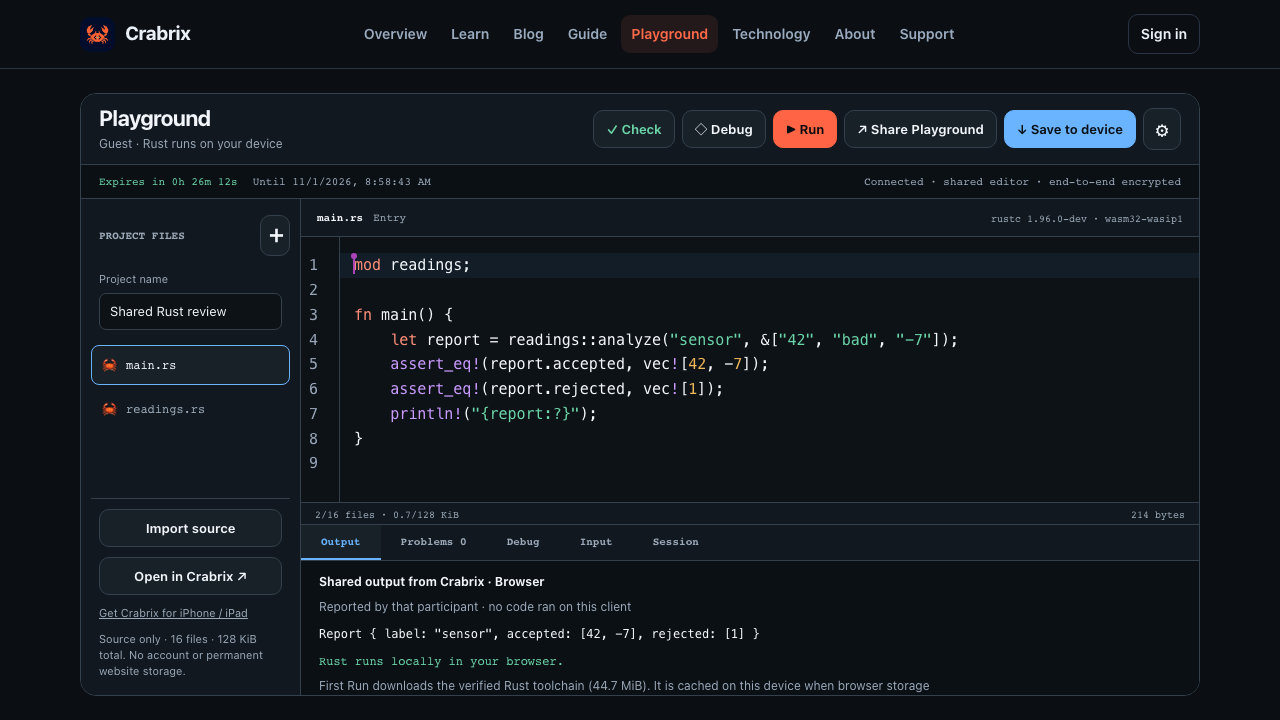
A real implementation agent and independent review agent shared two Rust files with two browser clients. The reviewer added 13 assertions; the browser ran them locally and Debug showed a struct containing String and Vec values. The second browser received the reported output without preparing or running a compiler. Stale replacements, half-surrogate selections and an ungranted agent's attempts to Step/Continue/Stop the other agent's job were refused. Revoking the grant blocked another start. This is a point-in-time integration check, not a claim that untrusted projects or every model/client are universally safe.
Development, interviews and learning walkthrough
Development and license
npm ci --ignore-scripts
npm run check
npm run build
npm test
SDK code and documentation: MIT. Crabrix artwork/screenshots have separate
asset terms. The app, compiler distributions, brand and Academy
retain their own licenses. Bundled dependency licenses are in
ThirdPartyNotices.txt. See security boundaries before integration.