Listed from the MCP registry; nobody on Odel publishes it.

SendMock
Test email, SMS, payments and webhooks locally: read messages, OTPs and webhook deliveries.
Runs on your machine from its package; the steps are below.
What it does
- Reads
- Writes
- High impact
Not assessed yet.
What it costs
FreeOdel charges nothing per call. The publisher may charge for its own service.
Runs locally over stdio
This server isn't hosted — your MCP client launches it from a package registry. Use one of the commands below, or drop the config into your client (e.g. Claude Desktop).
Run
npx -y sendmock
MCP client config
{
  "mcpServers": {
    "sendmock": {
      "command": "npx",
      "args": [
        "-y",
        "sendmock"
      ]
    }
  }
}Run
docker run -i --rm ghcr.io/shibbirweb/sendmock:1.6.0
MCP client config
{
  "mcpServers": {
    "sendmock": {
      "command": "docker",
      "args": [
        "run",
        "-i",
        "--rm",
        "ghcr.io/shibbirweb/sendmock:1.6.0"
      ]
    }
  }
}










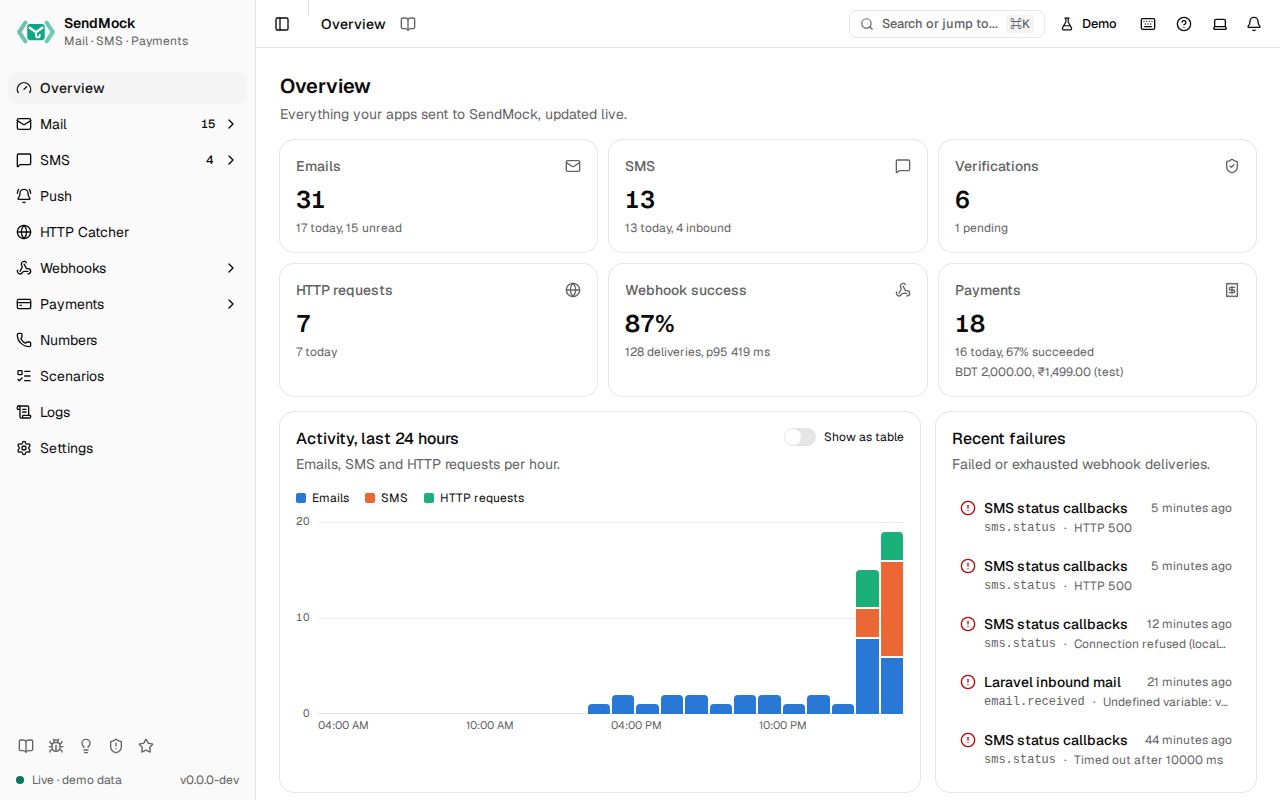
SendMock is a local stand-in for the email, SMS, push and payment services your app talks to, and for the webhooks they send back. It is one small program you run on your machine, in Docker or in CI.
Webhook simulation built in: fire a delivered, bounced, opened, inbound reply or payment succeeded webhook whenever you need one, signed the way the real provider signs it, straight to your app on localhost. You test your webhook handlers without a tunnel, a public URL or a provider sandbox.
The problem: while you build and test an app, it sends real things. A sign-up test emails a real address, an OTP test texts a real phone and costs money, a checkout test needs a payment sandbox, and the webhooks those services send back are hard to trigger on demand. Teams end up with shared test inboxes, borrowed phones, provider sandboxes and flaky tests.
What SendMock does: your app sends to SendMock instead, over SMTP or the same HTTP APIs it already uses for Twilio, SendGrid, Stripe, FCM and others (only the address changes). SendMock keeps every message, shows it in a web UI, pulls out codes and links for your tests, and sends realistic webhooks back to your app. Nothing reaches a real inbox, phone or payment provider, and it costs nothing.
Documentation: https://shibbirweb.github.io/sendmock/docs/
Live demo: https://shibbirweb.github.io/sendmock/demo/
Website: https://shibbirweb.github.io/sendmock/
How it works
Your app sends to SendMock instead of the real provider:
%%{init: {"flowchart": {"curve": "basis"}}}%%
flowchart LR
    App["Your app"] -->|"email, SMS, push, payments"| SendMock["SendMock"]
    SendMock -.->|"the provider's answer and webhooks"| App
    SendMock -->|"web UI and API"| You["You and your tests"]
No message reaches a real inbox, phone or provider unless you set up a real relay and allow the recipient.
Watch the video: SendMock: Test Email, SMS and Payment Webhooks on Localhost
What it catches
- Email over SMTP (and POP3 to read it back), with HTML, text and source previews, link and spam checks, one-time code extraction, and a Mailpit-compatible API.
- SMS and verification codes through the APIs of Twilio, Vonage and other providers, with conversation threads and replies.
- Push notifications sent through FCM, Expo and OneSignal.
- Payments through Stripe, PayPal, Razorpay, Paddle, bKash, SSLCommerz and your own gateways, with checkout pages and simulated outcomes.
- Webhooks sent back to your app, in Standard Webhooks or each provider's own format, with rules, templates and delivery logs.
- Any HTTP request sent to a catcher bin, with mock responses.
Everything works from the web UI, the REST API, the sendmock CLI and an MCP server for AI agents.
Install
| System | Command |
|---|---|
| macOS, Linux (Homebrew) | brew install shibbirweb/tap/sendmock |
| macOS, Linux (script) | curl -fsSL https://github.com/shibbirweb/sendmock/releases/latest/download/install.sh | sh |
| Windows (PowerShell) | irm https://github.com/shibbirweb/sendmock/releases/latest/download/install.ps1 | iex |
| Windows (Scoop) | scoop bucket add shibbirweb https://github.com/shibbirweb/scoop-bucket, then scoop install shibbirweb/sendmock |
| Any system with Node.js | npx sendmock (no install) |
| Any system with Bun | bunx sendmock (no install) |
| Docker | docker run --rm -p 1025:1025 -p 8025:8025 ghcr.io/shibbirweb/sendmock |
WinGet, Chocolatey, apt, dnf, Nix, Cargo, the beta of each channel, plain binaries, a Helm chart, a Docker Desktop extension and a menu bar app are on the install page.
Quick start
-
Start SendMock:
bashsendmock -
Open the web UI at http://127.0.0.1:8025.
-
Point your app's SMTP settings at host
127.0.0.1, port1025. Connect your app has the settings for PHP, Node.js, Python, Go, Java, Rust, Ruby and .NET.
SendMock listens on 127.0.0.1 only, so nothing outside your machine can reach it. sendmock --demo starts it with sample data to look around, sendmock --help lists the flags, and sendmock help --all every command.
Send your first message
Everything your app sends shows up in the web UI at once. The examples below are in JavaScript (Node.js); any language works the same way, since SendMock speaks plain SMTP and HTTP.
Email over SMTP
Use these settings in your app or mail library. No password or TLS is needed:
| Setting | Value |
|---|---|
| Host | 127.0.0.1 |
| Port | 1025 |
| Username and password | none (any are accepted) |
| Encryption | none |
For example, with Nodemailer:
import nodemailer from "nodemailer";

const transporter = nodemailer.createTransport({
  host: "127.0.0.1",
  port: 1025,
  secure: false,
});

await transporter.sendMail({
  from: "app@example.com",
  to: "user@example.com",
  subject: "Welcome",
  html: "<p>Your code is <b>482913</b></p>",
});
Connect your app has the same settings for PHP, Python, Go, Java, Rust, Ruby and .NET.
Email and SMS over the REST API
This example uses fetch in JavaScript or TypeScript. From any other language, send the same JSON in an HTTP POST request.
Send an email:
await fetch("http://127.0.0.1:8025/api/v1/send", {
  method: "POST",
  headers: { "Content-Type": "application/json" },
  body: JSON.stringify({
    from: "app@example.com",
    to: ["user@example.com"],
    subject: "Welcome",
    html: "<p>Your code is <b>482913</b></p>",
  }),
});
Send an SMS:
await fetch("http://127.0.0.1:8025/api/v1/sms", {
  method: "POST",
  headers: { "Content-Type": "application/json" },
  body: JSON.stringify({
    from: "+15550001111",
    to: "+15550002222",
    body: "Your code is 482913",
  }),
});
Through your provider's SDK
Keep your Twilio, Vonage, SendGrid, Mailgun, Postmark, Resend, SES, Stripe, FCM or Expo code and change its base URL to http://127.0.0.1:8025/providers/<provider>, for example http://127.0.0.1:8025/providers/twilio.
Learn more
- Email: attachments, outcomes such as bounces, replies, and the provider APIs.
- SMS: Twilio and Vonage SDKs, delivery status, test numbers and replies.
- Push notifications, payments and webhooks.
- Providers: every emulated provider API and its base URL.
- REST API reference: every endpoint, with a playground.
Use it from an AI agent
SendMock ships an MCP server and a skill, so an agent in Claude Code, Codex, Cursor, Gemini CLI or VS Code can read the codes your app sent, set up webhooks and check what happened:
sendmock ai install --target claude-code
Use SendMock from AI agents covers each agent.
Run it from source
-
Build the web UI:
bashcd webbashbun install --frozen-lockfilebashbun run build -
Start SendMock from the repository root:
bashcd ..bashcargo run -p sendmock -
Open http://127.0.0.1:8025.
Contributing
Read CONTRIBUTING.md to set up and make a change, and AGENTS.md for the rules every change follows. Report security problems privately as described in SECURITY.md.
License
SendMock is licensed under either of
- the Apache License, Version 2.0 (LICENSE-APACHE), or
- the MIT license (LICENSE-MIT),
at your option.