
Seminara
Digital Teammate (Aura) hosting live interactive presentations, demos, and audience Q&A 24/7.
One address for any MCP client. No sign-in needed on this server.
What it does
- Reads
- Writes
- High impact
At most: only reads or looks up information.
What it costs
FreeOdel charges nothing per call. The publisher may charge for its own service.
Tools
None listed · checked 26 Sep 2026Odel could not list its tools without signing in.
Seminara Agentic Suite
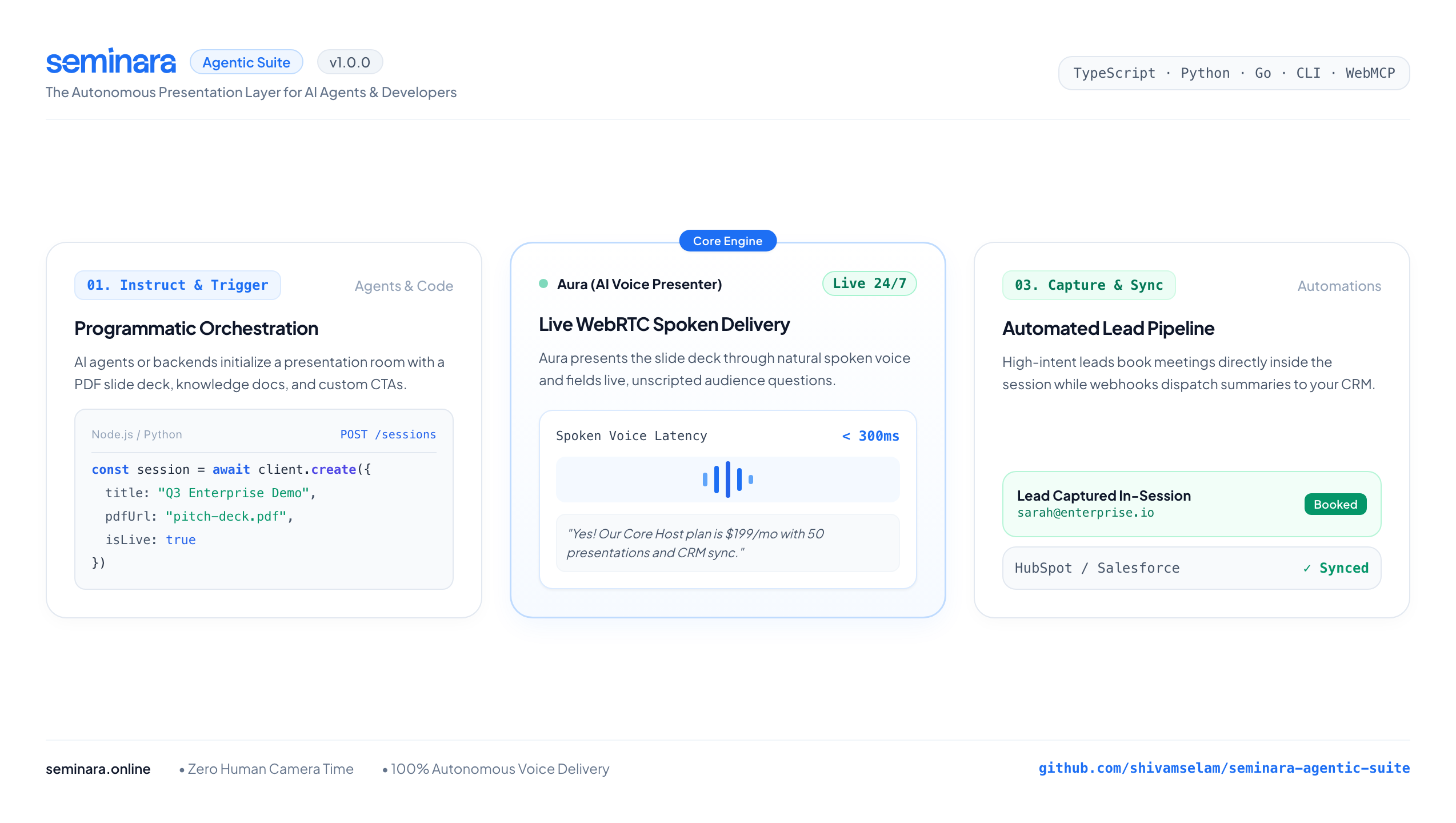
Now your AI agents can autonomously host live presentations for you.



View Live Interactive Demo » · Interactive Sandbox » · API Reference » · Seminara Platform »
The Presentation Layer for AI Agents
Seminara is an autonomous, 24/7 WebRTC presentation host (Aura) that delivers interactive slide decks and fields live audience Q&A.
With the Seminara Agentic Suite, this core engine is now fully programmable. You or your autonomous agents can orchestrate live, voice-led presentations entirely through code using our WebMCP integration, CLI, or multi-language SDKs.
📦 Available Packages & Tools
| Package / Tool | Language | Directory | Installation |
|---|---|---|---|
seminara-sdk | TypeScript / JavaScript | sdk/ | npm install seminara-sdk |
seminara | Python 3.9+ | python/ | pip install seminara |
seminara-cli | Command Line CLI | cli/ | npm install -g seminara-cli |
go | Go 1.21+ | go/ | go get github.com/shivamselam/seminara-agentic-suite/go |
🚀 Quickstarts: Time to Hello World < 5 Minutes
1. Node.js / TypeScript
npm install seminara-sdk
import { Seminara } from 'seminara-sdk';

const client = new Seminara({ apiKey: process.env.SEMINARA_API_KEY });

// Instantly generate a live, AI-hosted presentation room
const session = await client.sessions.create({
  title: "Q3 Enterprise Demo & Discovery",
  pdfUrl: "https://example.com/pitch-deck.pdf",
  knowledgeBase: [
    { title: "Pricing", content: "Core Host plan is $199/mo for 50 presentations." }
  ],
  ctaText: "Book Architecture Review",
  ctaUrl: "https://seminara.online/book-meeting"
});

console.log(`Live Session URL: ${session.liveLink}`);
2. Python
pip install seminara
import os
from seminara import SeminaraClient

client = SeminaraClient(api_key=os.environ.get("SEMINARA_API_KEY"))

session = client.create_session(
    title="Q3 Enterprise Demo & Discovery",
    is_live=True,
    pdf_url="https://example.com/pitch-deck.pdf",
    knowledge_base=[
        {"title": "Pricing", "content": "Core Host plan is $199/mo for 50 presentations."}
    ],
    cta_text="Book Architecture Review",
    cta_url="https://seminara.online/book-meeting"
)

print(f"Live Session Created: {session['liveLink']}")
3. Command Line (CLI)
npm install -g seminara-cli

# Set your API key
export SEMINARA_API_KEY="sk_live_..."

# Create a presentation room straight from your terminal
seminara create --title "Q3 Product Launch"

# List active rooms
seminara list
🤖 Model Context Protocol (MCP) & AI Connectors
Seminara natively exposes its presentation engine across the entire agent ecosystem:
- Standard Well-Known Discovery:
https://seminara.online/.well-known/mcp - Core Product MCP Server:
https://seminara.online/api/v1/mcp - Documentation MCP Server:
https://seminara.online/api/docs/mcp - OpenAPI 3.1 Spec (ChatGPT / Custom GPTs):
https://seminara.online/openapi.json - Discovery Catalog:
https://seminara.online/.well-known/api-catalog.json - Interactive Sandbox & Zero-Cost Rehearsals:
https://seminara.online/sandbox
1-Click Install via Smithery CLI
Installs automatically into Claude Desktop, Cursor, Windsurf, Cline, Zed, and more:
npx -y @smithery/cli install @seminara/autonomous-host
(Or specify client directly: --client claude, --client cursor, --client windsurf, --client cline)
Quick Connect Configurations
Claude Desktop (claude_desktop_config.json)
{
  "mcpServers": {
    "seminara": {
      "type": "sse",
      "url": "https://seminara.online/api/v1/mcp",
      "headers": {
        "Authorization": "Bearer sk_live_your_key_here"
      }
    }
  }
}
Cursor & Windsurf (.cursor/mcp.json or mcp_config.json)
{
  "mcpServers": {
    "seminara": {
      "type": "sse",
      "url": "https://seminara.online/api/v1/mcp"
    }
  }
}
ChatGPT / OpenAI Custom GPTs (Actions)
- In your GPT configuration, go to Actions → Create new action.
- Click Import from URL and paste:
https://seminara.online/openapi.json - Under Authentication, select Bearer and provide your API key.
WebMCP (In-Browser Agents)
If you navigate to https://seminara.online using a WebMCP-enabled browser, your agent will automatically discover the exposed presentation tools on page load.
📖 Documentation & Resources
- Developer Documentation: https://seminara.online/docs
- API Reference: https://seminara.online/docs/api-overview
- OpenAPI 3.1 Spec Guide: https://seminara.online/docs/openapi
- Interactive Sandbox: https://seminara.online/sandbox
- Developer Index (llms.txt): https://seminara.online/llms.txt
📄 License
MIT License. Copyright (c) 2026 Shivam Selam / Omni AI Club Private Limited.



