Clipswarm
Clip YouTube videos and livestreams into viral 9:16 shorts, in parallel, for AI agents
Runs on your machine from its package; the steps are below.
What it does
- Reads
- Writes
- High impact
At most: moves money, runs code or commands, deletes data, or sends messages for you.
What it costs
FreeOdel charges nothing per call. The publisher may charge for its own service.
Runs locally over stdio
This server isn't hosted — your MCP client launches it from a package registry. Use one of the commands below, or drop the config into your client (e.g. Claude Desktop).
Run
npx -y clipswarm
MCP client config
{
  "mcpServers": {
    "clipswarm": {
      "command": "npx",
      "args": [
        "-y",
        "clipswarm"
      ]
    }
  }
}


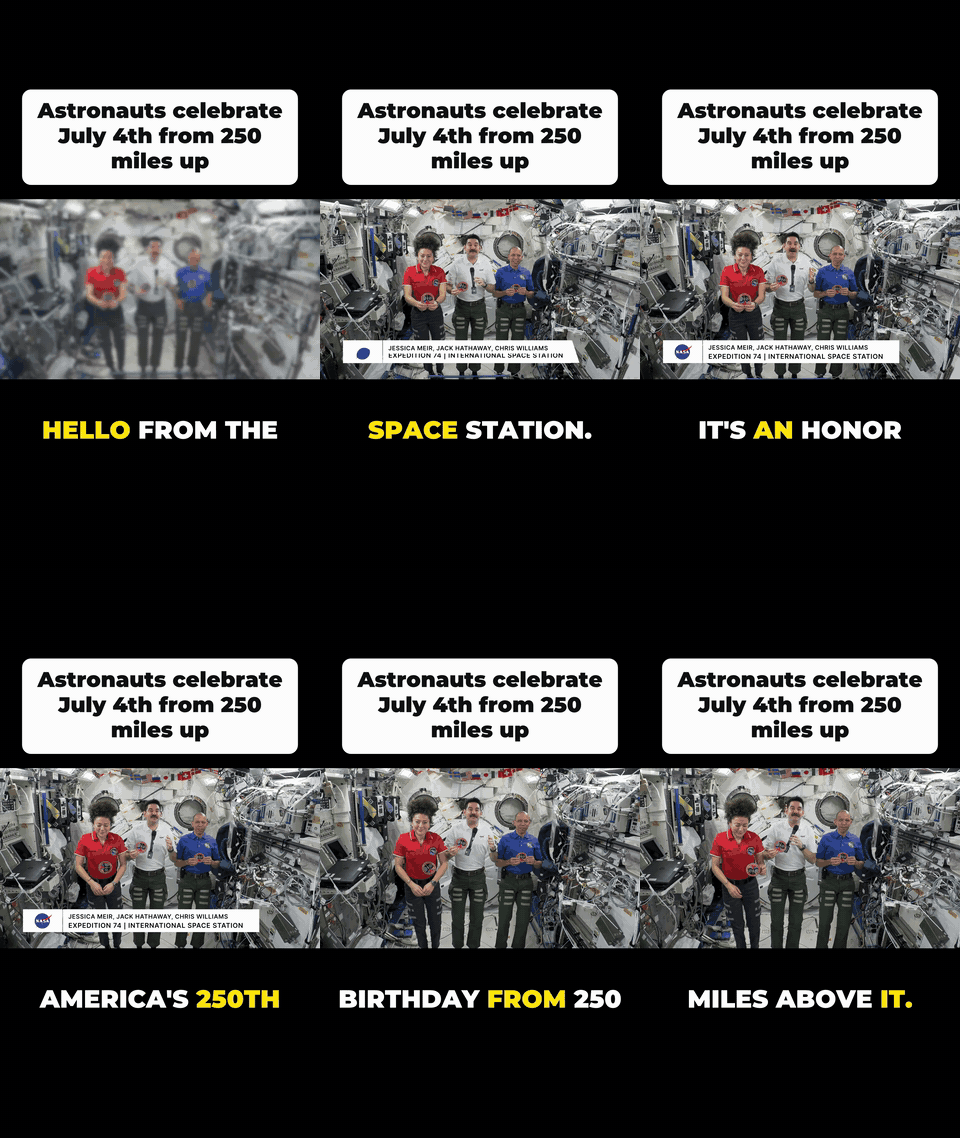
Open-source, agent-native video clipping. Point any number of AI agents at YouTube videos or live streams, and get ready-to-post viral shorts back: 9:16, a hook header, and word-by-word captions. Runs on your machine, with no API keys and no subscription.
Made with one command: clipswarm clip https://youtu.be/75-H-i9ctkE 6 14.4 --viral --title "Astronauts celebrate July 4th from 250 miles up"
Footage: NASA (public domain). No endorsement implied.
"Get me the 3 best moments from each of these 10 podcasts as shorts"
        │
        ├─ clipper agent 1 ─┐
        ├─ clipper agent 2 ─┼─► clipswarm MCP ─► yt-dlp ─► ffmpeg ─► clips/*_viral.mp4
        └─ clipper agent N ─┘     shared queue, cached transcripts, retries
Why clipswarm
OpusClip-style apps decide for you what's "viral". clipswarm gives your agent the tools to decide, then does the production work:
- Viral format built in: 1080×1920, a hook header card, the whole video frame (never cropped or zoomed), and animated captions that highlight each word as it's spoken. The layout adapts to the source's shape.
- YouTube videos and live streams: clip what just happened on a live stream (
start: -60, end: "now"), or what aired at 8:41pm. - Captions from real word timings: YouTube's auto-captions for regular videos, and local whisper.cpp for live streams. Free and offline.
- Runs on autopilot: give it a category and a schedule ("netflix stock, every 6h"), and it finds new videos, has AI pick the moments and write the hooks, and renders the clips in the background.
- Built for swarms: dozens of parallel jobs across many videos and many simultaneous agents, all through one shared queue. Transcripts are fetched once per video, and one bad job never sinks a batch.
- Fast and frugal: downloads only the seconds you clip (not the whole 3-hour stream), and uses hardware encoding on macOS.
- Works with any ffmpeg: text is rendered by clipswarm itself, so stock builds without
drawtext/libass(e.g. Homebrew's) work fine.
Install
1. Dependencies (Node 20+):
brew install yt-dlp ffmpeg whisper-cpp     # macOS
# Linux: pip install -U yt-dlp && sudo apt install ffmpeg   (+ whisper.cpp for live captions)
npx -y clipswarm setup                     # checks everything; downloads the caption model (~140MB)
whisper-cpp is optional. Without it, everything works, but live-stream clips render without captions.
Keep yt-dlp up to date (
yt-dlp -U/brew upgrade yt-dlp). YouTube regularly breaks older versions. This is the #1 cause of failures.
2. Add it to your AI app:
| App | How |
|---|---|
Claude Code (recommended, includes the clipper agent) | /plugin marketplace add Shoberman2/clipswarm then /plugin install clipswarm@clipswarm |
| Claude Code (MCP only) | claude mcp add clipswarm -- npx -y clipswarm mcp --out ./clips |
| Claude Desktop | Settings → Developer → Edit Config, add the JSON below |
| ChatGPT desktop app / Codex | codex mcp add clipswarm -- npx -y clipswarm mcp (shared by Codex CLI, the IDE extension and the ChatGPT desktop app) |
| Cursor | ~/.cursor/mcp.json, JSON below |
| VS Code | code --add-mcp '{"name":"clipswarm","command":"npx","args":["-y","clipswarm","mcp"]}' |
| Gemini CLI | gemini mcp add clipswarm npx -y clipswarm mcp |
{ "mcpServers": { "clipswarm": { "command": "npx", "args": ["-y", "clipswarm", "mcp", "--out", "/Users/you/clips"] } } }
Why not claude.ai or ChatGPT on the web? Those only connect to hosted servers. Hosting a YouTube downloader means datacenter IP blocks, Terms of Service exposure, and shipping 50MB videos through a chat window. clipswarm runs locally, where all three problems disappear.
Use it
In Claude Code with the plugin installed:
Spawn a clipper agent for each of these videos in parallel and get me the 3 strongest moments from each as viral shorts:
Clip the last 60 seconds of https://www.youtube.com/@aljazeeraenglish/live as a viral short.
Each clipper agent reads its video's transcript, picks self-contained moments, writes a hook for each, and calls create_clips. They all run at once.
The viral format
| Option | Default | |
|---|---|---|
style | "plain" | "viral" for the 9:16 format |
title | video title | The header hook. Agents should write a punchy one (≤10 words); "" for no header |
background | "#000000" | Colour behind the video (or "blur") |
captions | true | Word-by-word captions, 1–3 words at a time, current word highlighted |
accent | "#FFE600" | Highlight colour |
The full frame is always shown. clipswarm never crops or zooms, because what matters in a video (a spreadsheet, a chart, a second speaker) can be anywhere in the frame. The layout follows the source:
| Source | Layout |
|---|---|
| Widescreen (16:9, screen recordings, podcasts) | Full width, header above, captions below, centred on black |
| Vertical (9:16 Shorts, phone video) | Fills the frame; header and captions sit over the video |
| Square / 4:3 / anything else | Scaled as large as fits, nothing cut off |
Captions come from YouTube's auto-captions (exact per-word timing) for regular videos, and from local whisper.cpp for live streams or videos without captions. If neither is available, the clip still renders and the result includes a warnings entry explaining why.
Live streams
Paste a link to a stream that's live right now (a watch?v= or a channel's /live link). Times are relative to the live edge:
| You want | start | end |
|---|---|---|
| The last 30 seconds | -30 | "now" |
| 2 minutes ago, 20s long | "-2:00" | "-1:40" |
| What aired at a specific moment | "2026-10-08T00:51:00Z" | "2026-10-08T00:51:30Z" |
- About the last hour is available (YouTube's DVR window).
- Plain live clips are stream-copied for speed and start on the previous keyframe (≤5s early).
live.from/live.toin the result give the exact wall-clock range. Useprecise: truefor frame-accurate cuts. Viral clips are always frame-accurate. endcan't be in the future. Retry once it has aired.
Watches: clips that find themselves
Give clipswarm a category and a schedule. It searches YouTube for new videos, picks the best moments, and renders them as viral clips while you're away. A Mac notification appears when new clips land.
clipswarm watch add "netflix stock analysis" --every 6h          # what to look for, how often
clipswarm watch install                                          # background job (launchd on macOS)
clipswarm watch run --force                                      # or run it right now
clipswarm watch inbox                                            # what it found and clipped
Or just ask your agent: "Watch for new AI agent news videos every 12 hours and clip the best moments." (MCP tools: create_watch, list_watches, run_watch, get_inbox, update_inbox_item, delete_watch, watch_scheduler.)
How it picks moments, best first:
- AI. If the Claude Code CLI is installed, Claude reads the transcript, picks self-contained moments and writes a hook for each header (e.g. "Netflix at $67, but this model says $127"). This runs on your own Claude account.
- Most replayed. YouTube's replay peaks, on videos old enough to have them (usually several days).
- Transcript heuristic. Free and offline: it scores stretches for questions, numbers, strong claims and energy.
If YouTube's captions are missing or rate-limited, the watcher downloads just the audio and transcribes it with whisper.cpp. Anything it can't clip lands in the inbox as needs_agent for your agent to handle.
| Option | Default | |
|---|---|---|
--every | 6h | 30m, 6h, 1d… (min 5m) |
--max-age | 72h | Only videos uploaded within this window |
--min-views | none | Skip small videos |
--videos | 3 | New videos per run |
--clips / --seconds | 2 / 45 | Clips per video, target length |
--picker | auto | ai, heatmap or transcript to force one |
--live | off | Also list streams that are live right now in the inbox |
--no-auto | off | Only collect videos; don't clip |
--out | ~/clipswarm/<id> | Where clips go |
State lives in ~/.clipswarm/ (CLIPSWARM_HOME to move it). Each video is only processed once. On Linux, watch install prints a crontab line, and clipswarm watch daemon runs a foreground loop anywhere.
How it works
- Find the moment. The agent calls
get_video_info,search_transcriptandget_transcript. Transcripts come from YouTube's captions via yt-dlp and are cached. - Cut it.
- Regular videos: yt-dlp downloads only the requested section.
- Live streams: clipswarm reads YouTube's rolling HLS playlist (5-second segments with wall-clock stamps) and fetches just the segments covering your range.
- Make it viral. clipswarm gets word timings and draws the header and caption frames (font → vector paths → PNG). ffmpeg composites them with the full, uncropped video on a 9:16 canvas.
- Share the machine. Every job from every agent goes through one concurrency limiter, with retries for YouTube's intermittent 403s.
Contributors: see docs/ARCHITECTURE.md for a full walkthrough of the code.
MCP tools
| Tool | What it does |
|---|---|
get_video_info | Title, channel, duration, chapters, liveStatus |
get_transcript | Timestamped transcript as compact [m:ss] text lines, optionally windowed with from/to |
search_transcript | Where a phrase is said, as padded time windows ready to clip |
create_clips | Cuts many clips in parallel across any number of videos, live or not. Options: style, title, captions, accent, background, label, vertical, maxHeight, precise |
get_clips | Collects results from a batch still rendering. create_clips returns after ~40s with a jobId so MCP clients' ~60s timeouts never kill long batches |
create_watch, list_watches, delete_watch, run_watch | Manage scheduled YouTube topic searches and optional automatic clipping |
get_inbox, update_inbox_item, watch_scheduler | Review videos that need an agent and manage the opt-in background scheduler |
CLI
clipswarm clip <url> 13:53 14:28 --viral --title "His best advice in 30 seconds"
clipswarm clip <live-url> -60 now --viral --title "This just happened live"
clipswarm clip <url> 1:23 1:58 --label raw-cut                    # plain clip
clipswarm batch jobs.json --out clips                             # many jobs at once, writes clips/manifest.json
clipswarm search <url> stay hungry
clipswarm transcript <url>
clipswarm setup
Scheduled watches
Watches search YouTube for recently uploaded videos in a category and can clip their strongest moments. Video searches and clipping happen only when you run a watch or install the background scheduler; adding a watch only saves its settings.
clipswarm watch add "AI research" --every 6h
clipswarm watch list
clipswarm watch run ai-research
clipswarm watch inbox
clipswarm watch remove ai-research
Automatic clipping is on by default. The default --picker auto uses the local Claude Code CLI when available, then falls back to YouTube replay peaks or a transcript heuristic. That Claude CLI call uses its configured account and may consume its usage allowance; use --picker heatmap or --picker transcript to avoid it. Use --no-auto to put discovered videos in the inbox for an AI agent to review instead. Videos that cannot be picked automatically, plus live streams when --live is enabled, go to the inbox. clipswarm watch install opts into a macOS launchd job that checks for due watches every five minutes; clipswarm watch uninstall removes that job. Watch state is stored in ~/.clipswarm/state.json (set CLIPSWARM_HOME to use another location).
Configuration
| Env var | Default | |
|---|---|---|
CLIPSWARM_CONCURRENCY | min(6, cpus) | Max simultaneous download/encode jobs, shared across all callers; must be a positive integer |
CLIPSWARM_MAX_CLIP_SEC | 600 | Guards against accidentally downloading whole videos; must be greater than 0 |
CLIPSWARM_RETRIES | 3 | Retries for transient YouTube errors; must be a non-negative integer |
CLIPSWARM_WHISPER_MODEL | ~/.cache/clipswarm/ggml-base.en.bin | Any whisper.cpp model, e.g. a multilingual one |
CLIPSWARM_FONT | bundled Montserrat Black | Any TTF/OTF for headers and captions |
Platform support
| macOS | Linux | Windows | |
|---|---|---|---|
| Clips, viral format, live streams | ✓ (hardware encoding) | ✓ | ✓ |
| Watches | ✓ launchd | ✓ cron line printed by watch install | ✓ Task Scheduler |
| Notifications | ✓ | – | – |
CI runs the test suite (including a real ffmpeg render) on all three.
Known limitations
- YouTube changes break downloaders. When clips start failing, update yt-dlp first (
yt-dlp -U). clipswarm's error messages say so. - Heavy use can get rate-limited. YouTube sometimes returns HTTP 429 for captions after many requests. clipswarm retries, and falls back to transcribing audio locally with whisper.cpp.
- Live streams: only about the last hour is available, and there's no transcript while live.
- "Most replayed" data only appears on videos a few days old, so watches use AI picking first.
- Wide videos are small on a phone because clipswarm never crops. This is deliberate: nothing relevant gets cut off.
Responsible use
Only clip content you have the rights to use: your own videos, content you've licensed, or uses covered by fair use in your jurisdiction. Downloading may be restricted by YouTube's Terms of Service. You are responsible for how you use this tool.
Roadmap (help wanted)
Driven by what users ask for. Open an issue.
- More caption styles (karaoke boxes, emoji, per-word pop)
- Local files and other platforms (most yt-dlp sites already work)
- Optional hosted mode / HTTP transport for remote agents
License
MIT. The bundled Montserrat font is under the SIL Open Font License. See CONTRIBUTING.md to help out.