Listed from the MCP registry; nobody on Odel publishes it.

McpHub
One MCP endpoint for all your servers: a few meta-tools, Keychain secrets, sandbox, audit, OAuth.
Runs on your machine from its package; the steps are below.
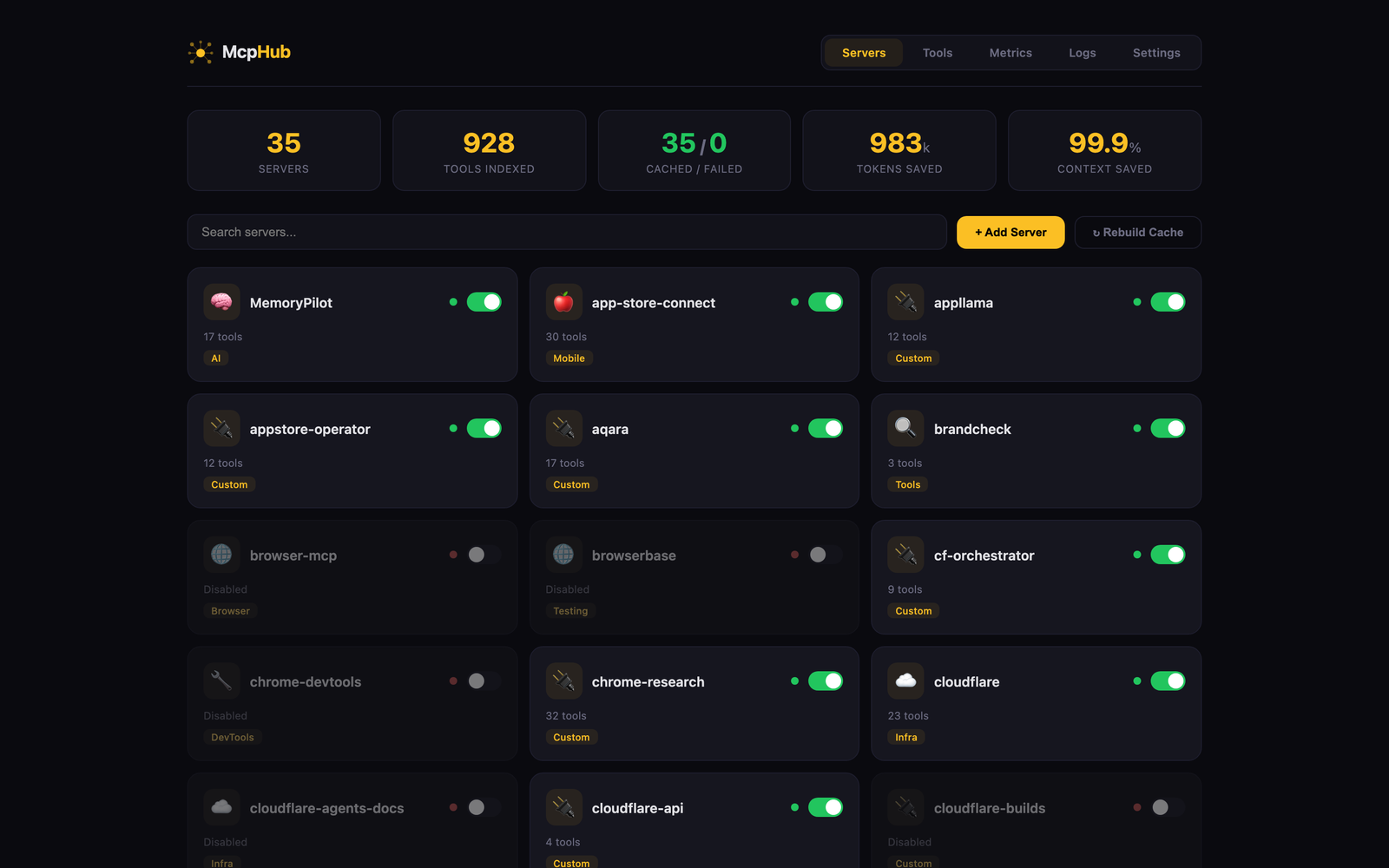
What it does
- Reads
- Writes
- High impact
At most: moves money, runs code or commands, deletes data, or sends messages for you.
What it costs
FreeOdel charges nothing per call. The publisher may charge for its own service.
Runs locally over stdio
This server isn't hosted — your MCP client launches it from a package registry. Use one of the commands below, or drop the config into your client (e.g. Claude Desktop).
Distributed as an MCP bundle (`https://github.com/Soflutionltd/McpHub/releases/download/v5.12.1/mcphub.mcpb`) — download it and import the bundle in your MCP client.
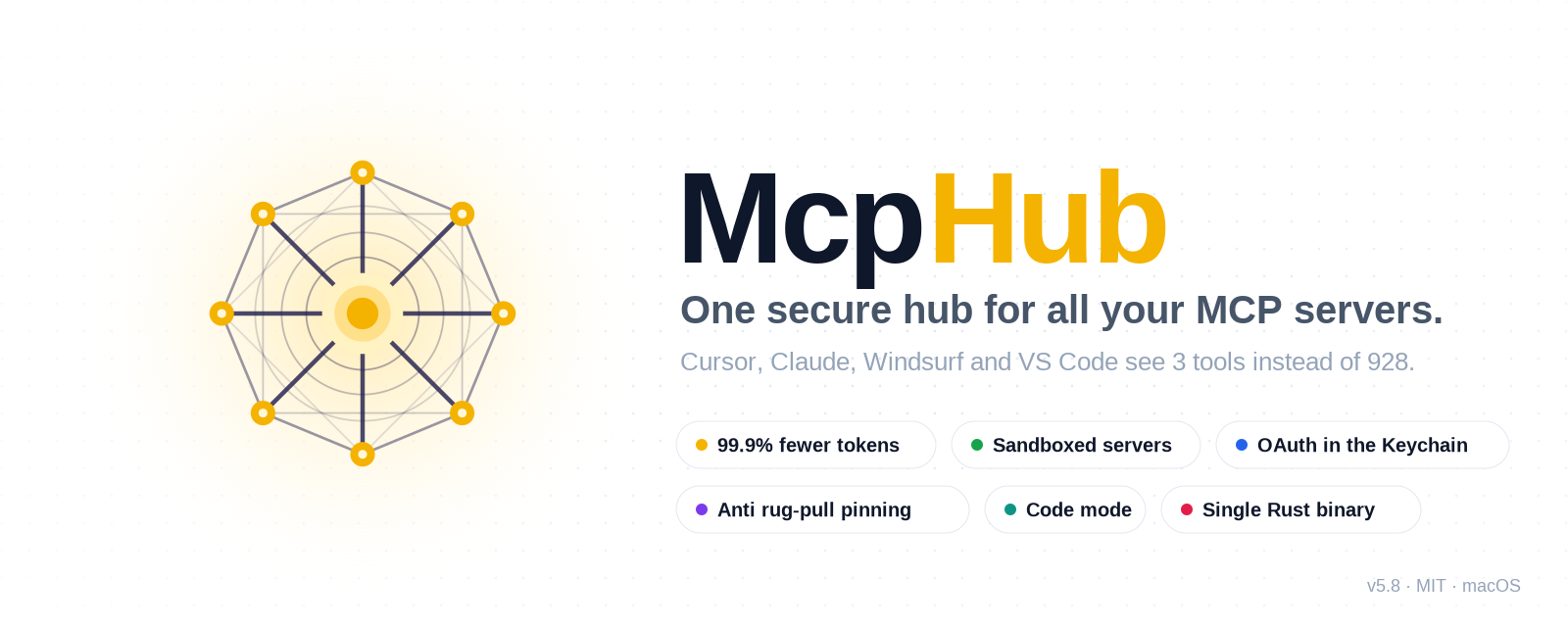







McpHub sits between your AI editors and all your MCP servers.
Your agents see 3 tools instead of hundreds, every call goes through the same security guards,
and your servers run once, sandboxed, shared by Cursor, Claude, Windsurf and VS Code.
Install · Connect your editor · How it works · Code mode · Security · Dashboard · Library · Linux and sync · Configuration · FAQ
✨ At a glance
| Each server wired into each editor | Through McpHub | |
|---|---|---|
| Tool definitions in every prompt | all of them (hundreds of thousands of tokens) | 3 tools, schemas loaded on demand |
| Server processes | one copy per editor | one shared copy |
| Secrets | plain text in every editor config | macOS Keychain, ${NAME} references |
| A server silently changes a tool | nobody notices | quarantined until you approve |
A malicious npm server reads ~/.ssh | it can | blocked by the macOS sandbox |
| Remote servers with OAuth | one mcp-remote process each, tokens in plain files | native HTTP, tokens in the Keychain, auto refresh |
| Who called what | unknown | audit log with redacted arguments |
| Finding a new server | search GitHub, copy a JSON snippet, paste a token | Library of the official MCP Registry: trust score, one-click add, secrets straight to the Keychain |
| Your agent needs a tool you lack | you install it by hand | the agent installs it itself from the registry, sandboxed, if it is trusted enough |
| A second machine, a Linux server | redo everything, copy tokens around | same binary, bubblewrap sandbox, encrypted sync of servers and secrets |
🚀 Install in one line
curl -fsSL https://raw.githubusercontent.com/Soflutionltd/McpHub/main/get.sh | bash
The script downloads the latest binary for your machine (signed universal binary on macOS, x64 or arm64 on Linux), verifies its SHA-256 checksum and installs it to ~/.local/bin/McpHub. Then:
McpHub dashboard  # Library tab: add servers from the official MCP Registry (or McpHub add)
McpHub generate   # index every tool once
McpHub install    # start the daemon at login (LaunchAgent on macOS, systemd --user on Linux)
Manual download
- Download
McpHub-macos-universal.tar.gzand its checksum. shasum -a 256 -c McpHub-macos-universal.tar.gz.sha256tar -xzf McpHub-macos-universal.tar.gz && install -m 755 McpHub ~/.local/bin/McpHub- Downloaded through a browser? Clear the quarantine flag:
xattr -d com.apple.quarantine ~/.local/bin/McpHub
Linux (amd64, arm64) and Windows (amd64) archives are attached to every release too. On Linux the sandbox uses bubblewrap and secrets live in ~/.McpHub/secrets.env (mode 600, hidden from sandboxed servers), see Linux servers and sync. Windows has no sandbox.
Build from source
git clone https://github.com/Soflutionltd/McpHub.git
cd McpHub
make install      # cargo build --release, install, sign
make install signs with your Developer ID certificate when one is present, so macOS keeps its permissions from one version to the next. Linux and Windows build from source (cargo build --release); the macOS sandbox and Keychain features are macOS only.
🔄 Updates
Once the daemon runs (McpHub install), McpHub keeps itself up to date. Editors connected by URL (Cursor, Claude Code, VS Code, Windsurf) need nothing: they talk to the updated daemon.
- Signed. Every release publishes
latest.json(version and SHA-256 of each file) signed with minisign; the public key is compiled into McpHub. On macOS the new binary must also carry Soflution's Developer ID signature. Anything else is refused. - Gradual. A new version reaches 10% of installations on day one, everyone after 24 hours. The daemon checks at start-up, then every 6 hours. The only request is the download from GitHub: no telemetry, the rollout bucket is drawn from a random local id that never leaves your machine.
- Never in the middle of a call. The new binary is installed next to the old one; each daemon switches over as soon as no request is in flight (editors reconnect by themselves). If the new version fails to start three times, the previous one is restored and that version is skipped.
- Your choice.
"settings": { "autoUpdate": false }turns it off;McpHub updateinstalls the latest release right away,McpHub update --checkonly reports it. Development builds and named instances never update themselves (the main instance updates the shared binary). - Claude Desktop extension.
mcphub.mcpbuses the installed McpHub when there is one, so it follows the same updates; otherwise it runs the binary it ships with. - Windows. The binary is replaced in place and used from the next session start.
🔌 Connect your editor
The daemon listens on http://127.0.0.1:24680. Your token is in ~/.McpHub/auth-token.
Cursor, ~/.cursor/mcp.json
{
  "mcpServers": {
    "McpHub": {
      "url": "http://127.0.0.1:24680/mcp",
      "headers": { "Authorization": "Bearer <your-token>" }
    }
  }
}
Claude Code
claude mcp add --transport http mcphub http://127.0.0.1:24680/mcp \
  --header "Authorization: Bearer $(cat ~/.McpHub/auth-token)"
Claude Desktop, claude_desktop_config.json
{
  "mcpServers": {
    "McpHub": { "command": "/Users/you/.local/bin/McpHub", "args": ["stdio"] }
  }
}
VS Code, .vscode/mcp.json
{
  "servers": {
    "mcphub": {
      "type": "http",
      "url": "http://127.0.0.1:24680/mcp",
      "headers": { "Authorization": "Bearer <your-token>" }
    }
  }
}
Windsurf and other SSE clients
Use http://127.0.0.1:24680/sse with the same Authorization header.
One profile per client. Give each editor its own view: http://127.0.0.1:24680/mcp/cursor only shows what the cursor profile allows (see Profiles).
Project-aware client (optional)
client/ is a small Node MCP server that sits between your editor and the daemon. It talks to the running daemon (SSE, token from ~/.McpHub/auth-token) and falls back to McpHub stdio. It exposes seven tools:
mcphub_bootstrap: call once per conversation. Resolves the project from the workspace, returns its aliases and allowed servers, and recalls compact MemoryPilot context, also for folders without a project entry.mcphub_search,mcphub_call: same as the daemon, plus suggestions on a misspelled tool or server, and the input schema on argument errors.mcphub_batch: up to 20 independent calls in one round-trip. A JSON result is embedded as JSON (not as an escaped string), with anotesarray when it was shaped.- Lighter results, on
mcphub_calland on each call ofmcphub_batch: a successful JSON result comes back compact, without itsnulland empty-string fields (empty arrays stay).fieldskeeps only the listed keys of each row,max_rowskeeps the first rows (rows are the root array, or an array of objects held by a root key),max_charscuts the text (default 60000, orMCPHUB_RESULT_MAX_CHARS), andformat: "toon"writes the JSON as TOON (each list of rows as one header line plus one line per row),format: "csv"writes a plain list of rows as one header line and one line per row (the most compact when rows are flat), andraw: truereturns the child result untouched. A text result loses its terminal noise: colour codes, progress bars redrawn in place, and a line of twenty characters or more repeated five times or more in a row is kept once with its count; anything else comes back as it was, short repeated lines and JSON that McpHub does not rewrite included. A cut result says how to go on without reading it all:mcphub_callwith servermcphub, toolsearch_result, arguments{ handle, query, context, max_matches }returns only the passages that hold the words, each with its position, and toolread_result, arguments{ handle, offset, length }reads on from a position; the client keeps the last 16 cut results in memory. A result holding a number of 16 digits or more, or an exponent, is never rewritten. Errors and confirmation requests are never touched. Agents are told aboutfieldsandmax_rowsthree ways: the server instructions sent at startup, themcphub_calldescription, and a one-line reminder appended to a list result of 8000 characters or more that used neither. mcphub_run: the daemon's code mode. A script chains several tool calls in the sandbox and only its final value comes back. The project rules (allowedServers, owned servers, the pinned Supabase, App Store and Cloudflare identifiers) are handed to the daemon, which applies them to everymcp.call; a daemon too old to do so is never given a script from a folder that has rules.mcphub_status,mcphub_savings: server health and an honest context-size comparison.mcphub_savingsalso counts code mode: scripts run, tool calls made inside them, round trips saved. It lists each server with its calls and the result bytes it sent to the agent, heaviest first.
Per-project policy lives in ~/.McpHub/projects.json (or the path in MCPHUB_PROJECTS), see client/projects.example.json. For a workspace listed there, only its allowedServers are reachable (["*"] opens every server and keeps the identifier checks), and a call aimed at another Supabase project, App Store app or Cloudflare project is refused. Without the file there is no policy; an unreadable file is an error, never silently ignored.
Each release ships the client as a single file, mcphub-client.mjs, which the daemon keeps up to date in ~/.McpHub/client/ (Node 20 or later, no npm install). Editors pick up a new version the next time they start the server:
{
  "mcpServers": {
    "McpHub": { "command": "node", "args": ["/Users/you/.McpHub/client/mcphub-client.mjs"] }
  }
}
From a clone instead: cd client && npm ci, then point args at /path/to/McpHub/client/index.js.
npm test runs smoke tests against the local daemon (MemoryPilot and supabase configured), with a throwaway project file.
Working on client accounts
Connecting to a client's Stripe (or Supabase, Cloudflare…) should not log you out of your own, and your own agent should never reach theirs by mistake. Three levels, from light to strict:
1. Client-owned servers (same McpHub). Add the client's server under its own name (stripe-acme, with its own OAuth token or restricted key, since tokens are stored per server name) and list it in the client project's ownedServers:
"acme": {
  "workspaces": ["/Users/you/Clients/Acme"],
  "aliases": { "product": "Acme" },
  "allowedServers": ["MemoryPilot", "context7"],
  "ownedServers": ["stripe-acme"]
}
An owned server only answers, appears in mcphub_search and in mcphub_status when working_dir is inside that client's workspace; the project argument alone is not enough. A server owned by two projects is a start-up error. This guard lives in the Node client: an editor connected straight to the daemon still sees every server, so give it a profile with "excludeServers": ["*-acme"].
2. Tenants (same McpHub, the client's own tokens, enforced by the daemon). Mark the client's project as a tenant and declare, server by server, which secrets of its vault replace yours:
McpHub tenant add acme --dir "/Users/you/Clients/Acme"      # writes projects.json (backup first)
McpHub vault set --tenant acme SUPABASE_ACCESS_TOKEN         # Keychain service McpHub-tenant-acme
McpHub vault set --tenant acme CLOUDFLARE_MCP_TOKEN
McpHub oauth login --tenant acme stripe                      # prints the URL, never opens your browser
McpHub tenant check acme                                     # can every instance start?
"acme": {
  "workspaces": ["/Users/you/Clients/Acme"],
  "aliases": { "product": "Acme" },
  "tenant": "acme",
  "credentials": {
    "supabase": { "SUPABASE_ACCESS_TOKEN": "vault:acme/SUPABASE_ACCESS_TOKEN" },
    "cloudflare-api": { "CLOUDFLARE_MCP_TOKEN": "vault:acme/CLOUDFLARE_MCP_TOKEN" },
    "stripe": {}
  },
  "keepEnv": { "supabase": ["NODE_OPTIONS"] },
  "sharedServers": ["context7", "svelte", "MemoryPilot"]
}
From a folder of that project, a call to supabase runs supabase@acme: a separate process started from the same config.json entry, with the client's token. The daemon decides, not the client: it reads projects.json itself and derives the tenant from the folders the client sends with every call (working_dir, else the folder the agent was started in). Rules:
- From a tenant folder, only the servers listed in
credentials(asserver@tenant) and insharedServersanswer. Every other server is refused, never silently served with your accounts. A client started in a tenant folder cannot aimworking_direlsewhere. - Without a known folder, or from any other folder, a tenant instance is unreachable, and no name (
supabase@acme) reaches it: notmcphub_call, not passthrough, not the dashboard. - A tenant instance gets an allow-listed environment only: the base system variables, its secrets,
PATHand the names inkeepEnv. A literal value of yours (a.p8key path) is dropped,inheritEnvand the SSH agent are never passed, and a${VAR}its vault does not provide stops it from starting.HOMEandXDG_*point to~/Library/Application Support/McpHub/tenants/<id>/home, so CLI logins saved on disk (gh, wrangler, supabase) are not yours.MCPHUB_TENANT=<id>tells the server which tenant it serves. - Tenant secrets live in their own Keychain service (
McpHub-tenant-<id>, index in~/.McpHub/tenants/<id>/), are read when the instance starts and never loaded into the daemon environment. OAuth tokens ofstripe@acmeare stored there too;oauth login --tenantprints the authorization URL so you open it in a browser profile signed in to the client's account. A tenant instance never starts an OAuth sign-in by itself. - A confirmation token is bound to the instance: approving
supabase/delete_xfor your account never approves it forsupabase@acme, and the request namessupabase@acme. McpHub's own tools (server: "mcphub": library, install) are refused from a tenant folder unlesssharedServerslistsmcphub. Folders are compared after resolving symbolic links, and case-insensitively on macOS. - Cached answers, metrics and the audit log are per instance:
McpHub audit --tenant acme, atenantfield inaudit.jsonland a Tenant column in the dashboard metrics. - The dashboard's Client accounts tab does the same as the CLI. Per client: its folders, then server by server the instance (running or stopped, calls, errors, last error), the expected secrets (present or missing, names only), the OAuth state and a Check button (
tenant check). It also lists, read only, the cf-orchestrator projects marked with the client and warns whencf-orchestratorlacksCLOUDFLARE_API_TOKENandCLOUDFLARE_ACCOUNT_IDfrom the client's vault. From the tab you can:- add a client (same checks and
projects.jsonbackup astenant add); every change is refused ifprojects.jsonchanged since the screen loaded; - choose its servers: Own tokens (an isolated instance; the screen suggests the
${VAR}names of the server's config, a literal path such as a.p8key as optional) or Shared; - set, replace or delete a secret through a write-only field: the value goes once to the client's Keychain service and is never sent back to the page nor logged; only secrets declared by the client's servers can be written, never an OAuth token; the audit log records the action and the secret's name;
- Connect an OAuth server: the screen shows the sign-in address with a Copy button, to open in the client's browser profile (never opened in yours), and turns to connected when the sign-in completes;
- Remove the client: only after you approve a native macOS dialog that neither the page nor an agent can answer; without that dialog (no GUI), use
McpHub tenant rm.
- add a client (same checks and
McpHub tenant rm acmeerases every secret and OAuth token of the tenant, its isolatedHOME, then removestenant,credentials,keepEnvandsharedServersfrom the project (asks you to retype the id, or--yes).- An invalid
projects.jsonrefuses every call that carries a folder. The client refuses calls from a tenant folder when the daemon is too old to isolate tenants.
This protects against agent and configuration mistakes, not against a malicious local process, which can claim any folder and read your Keychain with your session.
3. A separate instance (nothing shared). For clients who require it, run a second McpHub with its own folder, port, Keychain service, auth token and LaunchAgent:
export MCPHUB_INSTANCE=acme MCPHUB_PORT=24690
McpHub add                 # writes ~/.McpHub-acme/config.json
McpHub oauth login stripe  # token stored under Keychain service McpHub-acme
McpHub install             # LaunchAgent com.soflution.mcphub.acme
A named instance never imports the servers declared in your editors, refuses the main port (24680), and its token is rejected by the main daemon (and the other way round). Point the editor of that client's workspace at it with the same variables:
"McpHub": {
  "command": "node",
  "args": ["/path/to/McpHub/client/index.js"],
  "env": { "MCPHUB_INSTANCE": "acme", "MCPHUB_PORT": "24690" }
}
MCPHUB_HOME and MCPHUB_VAULT_SERVICE override the folder and the Keychain service. Sandboxed servers of every instance are denied all ~/.McpHub* folders. Automatic start of a named instance is supported on macOS and Linux.
🧭 How it works
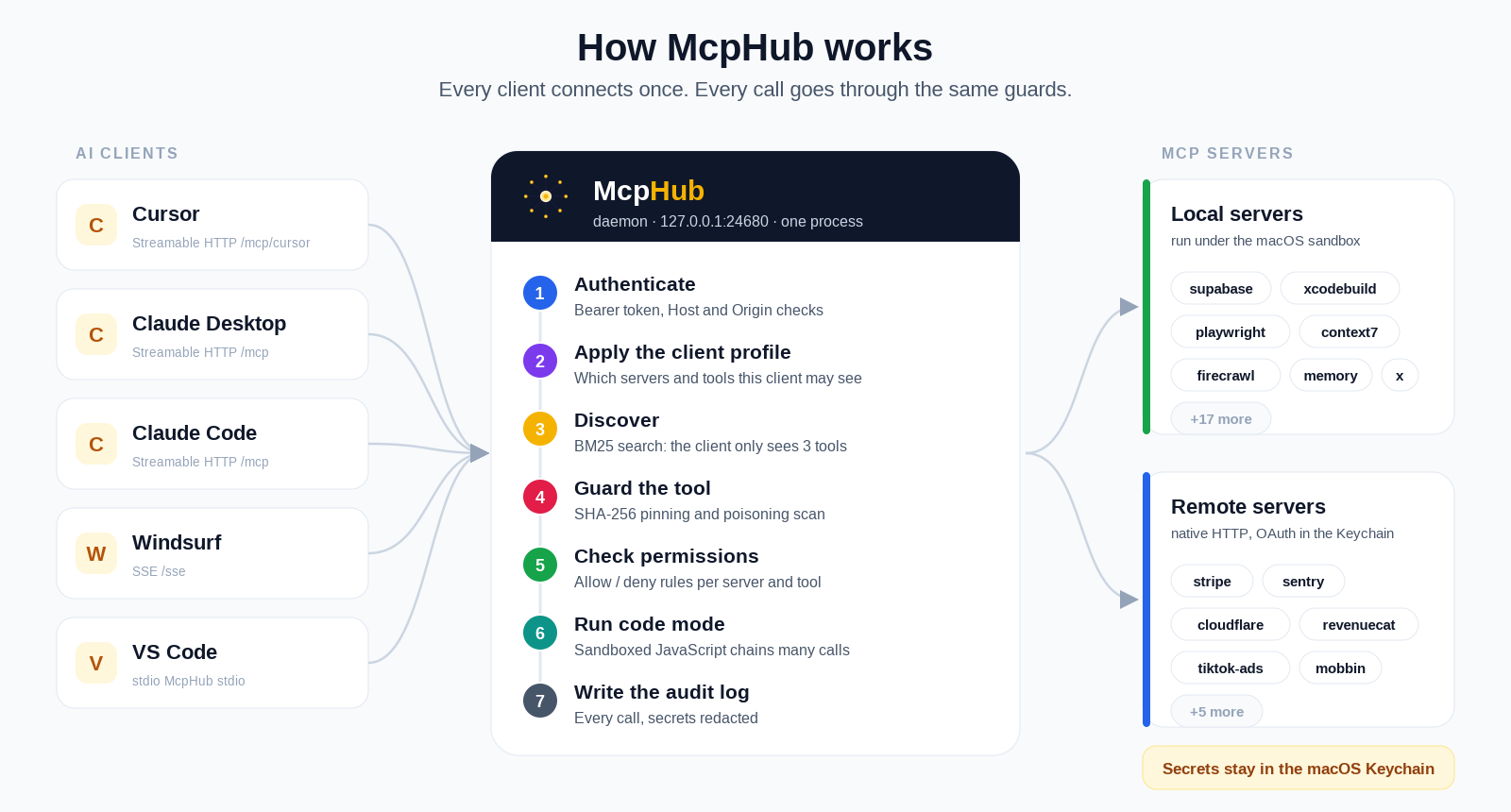
- Your editor connects once to the McpHub daemon (Streamable HTTP, SSE or stdio).
- The agent sees three tools:
mcphub_search(BM25 search over every tool),mcphub_call(run one tool) andmcphub_run(code mode). - Each call is authenticated, filtered by the client profile, checked against the tool pins and permissions, then routed to the right server, which is started on demand and stopped when idle.
- Local servers run under the macOS sandbox with a minimal environment; remote servers are reached directly over HTTP with OAuth tokens kept in the Keychain.
- Every call lands in the audit log.
Token savings
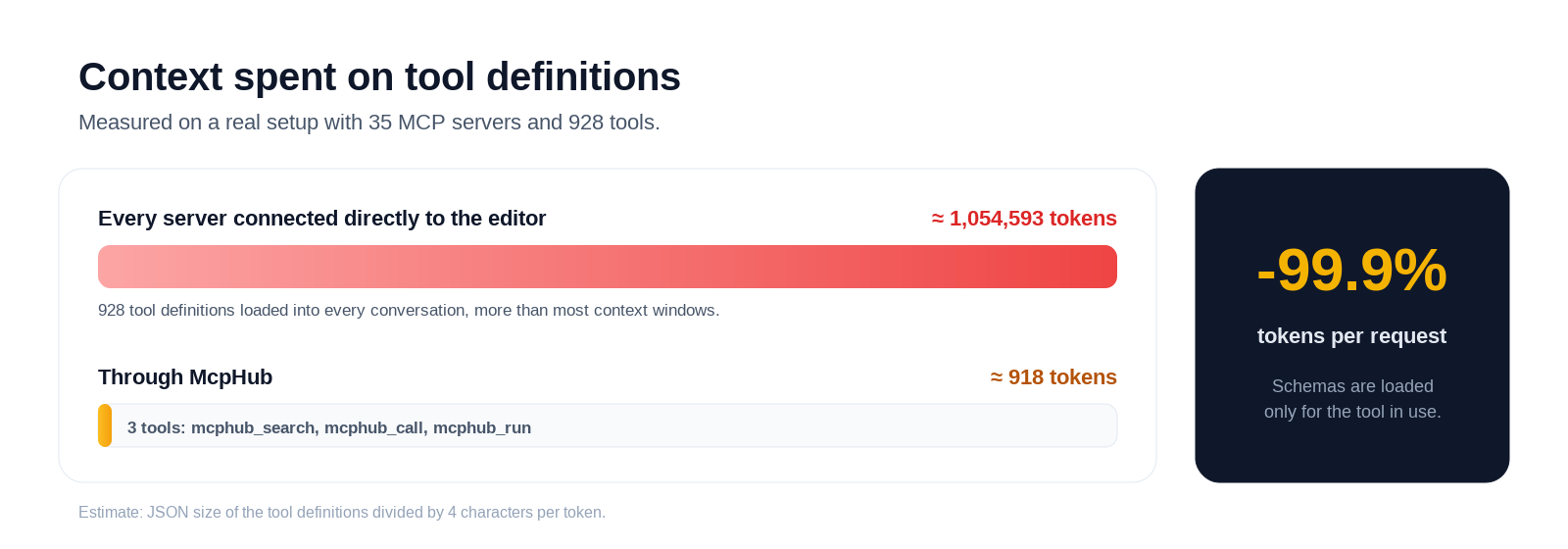
Wiring dozens of MCP servers straight into an editor loads every tool schema into every conversation. On the setup above (35 servers, 928 tools) that is over a million tokens, more than any context window. McpHub replaces it with three small tools and loads a schema only when the agent actually needs it.
🧠 Code mode
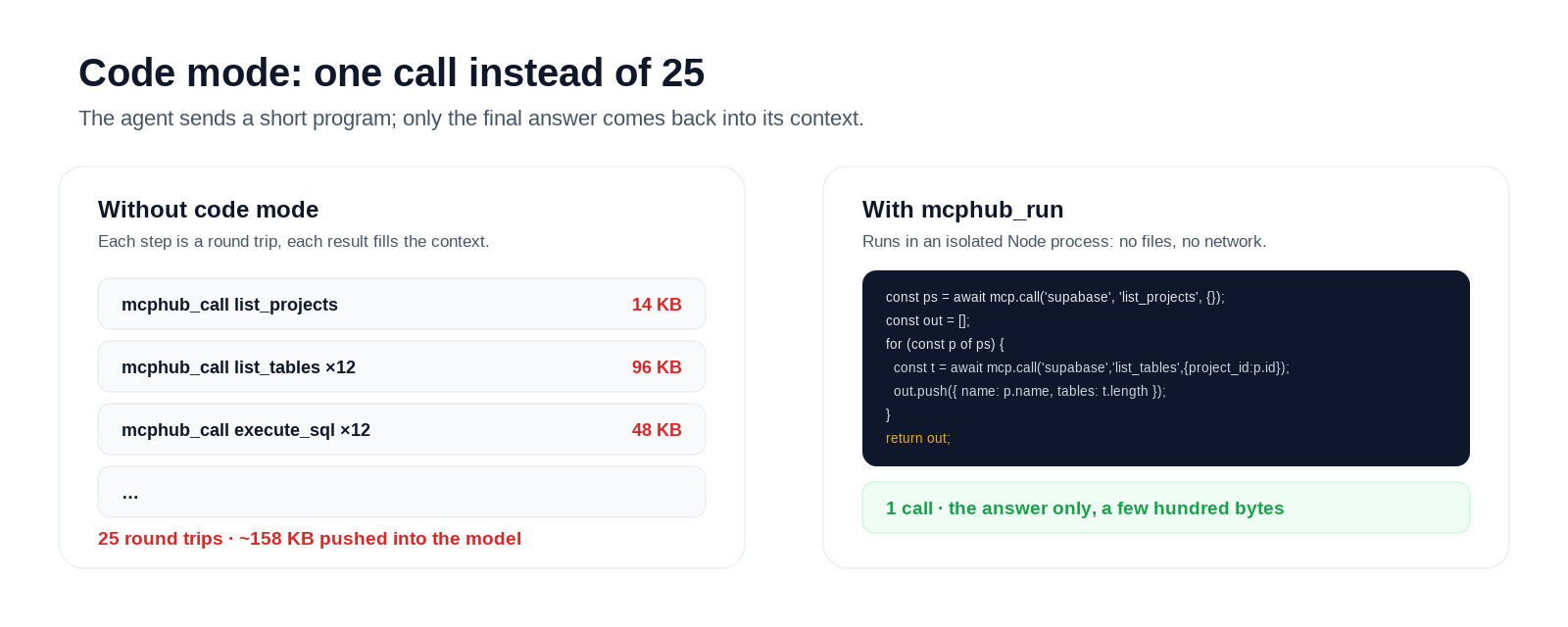
For multi-step or bulk work, the agent sends a short JavaScript program with mcphub_run:
const projects = await mcp.call("supabase", "list_projects", {});
const unhealthy = projects.filter(p => p.status !== "ACTIVE_HEALTHY");
return unhealthy.map(p => p.name);
mcp.call(server, tool, args)returns the tool result,mcp.search(query)finds tools,console.logis captured.- The program runs in a separate Node.js process (22.13 or newer) started with
--permission: no files, no network, no subprocesses, inside a macOS sandbox. - Its only way out is
mcp.call, which goes through every McpHub guard (permissions, quarantine, profiles, audit). - Limits:
settings.codeMode→{ "timeoutSecs": 60, "maxCalls": 100 }, output capped at 1 MB.
🛡️ Security
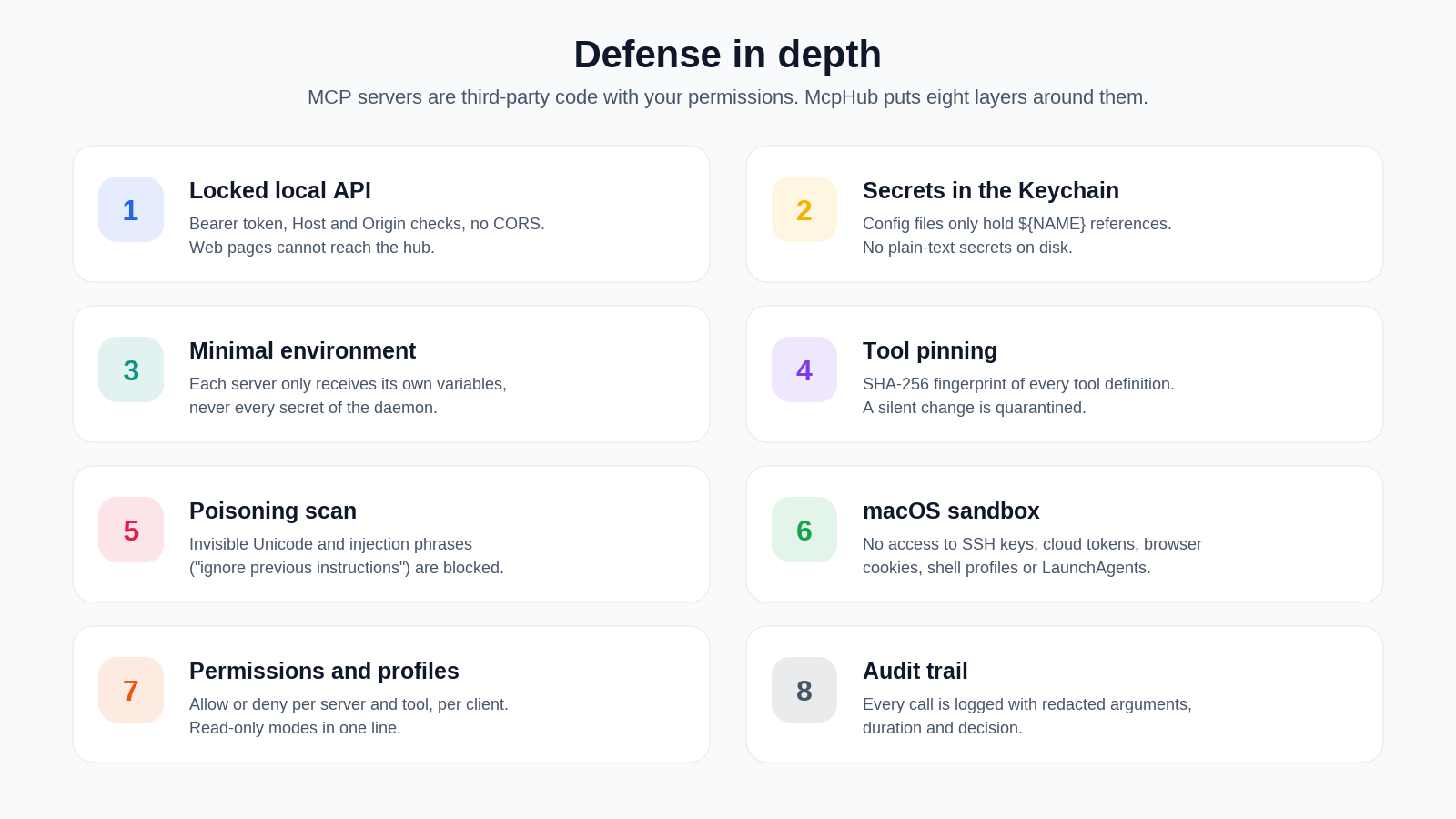
MCP servers are third-party programs, often fetched on the fly with npx -y package@latest, running with your permissions. McpHub treats them accordingly.
Locked local API
/mcp,/sse,/messageand every/api/*route requireAuthorization: Bearer <token>(a 256-bit random token in~/.McpHub/auth-token, mode 600).- Requests whose
Hostis not127.0.0.1,localhostor[::1]are refused (DNS rebinding), as are requests with a foreignOrigin. No CORS headers: a web page cannot call the hub. - The dashboard opens through a one-time link (
McpHub dashboard) and keeps a per-session secret, never the main token.
Secrets in the macOS Keychain
McpHub vault set GITHUB_TOKEN      # masked prompt, stored in the Keychain
McpHub vault migrate               # move an existing secrets.env into the Keychain
config.json only holds ${GITHUB_TOKEN} references. Each server process starts with a minimal environment (system variables, its own env, and the names listed in inheritEnv), so no server ever receives the secrets of the others.
Tool pinning and poisoning detection
The first time McpHub sees a server, it records a SHA-256 fingerprint of every tool (name, description, input and output schemas, annotations) in ~/.McpHub/tool-pins.json. If a server later changes a definition (a "rug pull"), the tool is quarantined: hidden from the catalog and refused on call, until you check it:
McpHub pins status                  # what is quarantined and why
McpHub pins approve SERVER [TOOL]   # accept the new definition
McpHub pins scan                    # scan every cached tool, read-only
Descriptions and schemas are scanned for invisible Unicode and classic injection phrases ("ignore previous instructions", "do not tell the user", ~/.ssh/id_rsa, mcp.json...). New tools appearing on an approved server are held back too.
"settings": { "toolSecurity": { "pinning": "block", "scan": "block", "newTools": "block" } }
With "pinning": "off" (or "warn"), changed definitions are accepted automatically but scanned again: a new description that trips the scan is still blocked when scan is block.
Automatic review of new tools ("newTools": "auto"). Instead of holding back every new tool, McpHub accepts a new tool on its own when it fits the server, and quarantines it when:
- its name breaks the server's naming convention (a
sync_datatool on a server whose tools all start withfl_); - it brings a sensitive capability the server did not have: a text parameter for a password, secret or API key, a code or command parameter on a tool that runs it, or a webhook / callback / upload URL. Capabilities are read from the tool's name and parameters, not from what its description mentions;
- its description shares almost no vocabulary with the rest of the server;
- with
"requireSignedCommits": true, the server runs from a local git checkout whose last commit is not signed by a trusted key (git log --format=%G?). A hijacked GitHub account can push code, but cannot sign it with a key that only lives on your machine.
"settings": { "toolSecurity": { "pinning": "off", "scan": "block", "newTools": "auto", "requireSignedCommits": true } }
There is no pop-up: blocked tools are listed under securityAlerts in mcphub_status and mcphub_bootstrap, so the agent tells you at the start of the next conversation, and a call to a blocked tool returns the reason. McpHub pins simulate replays the filter on every cached tool, as if each were new, to check it would not hold back legitimate tools.
Server isolation (macOS sandbox)
"settings": { "sandbox": "shield" }
shield runs every local server under sandbox-exec. Servers keep working normally but cannot read or write SSH and GPG keys, cloud and GitHub credentials, browser profiles and cookies, Claude/Cursor configs, shell profiles, LaunchAgents or McpHub's own files, and cannot run security, launchctl, osascript or open. A secret file that a server references in its own env or args (an App Store .p8 key, for example) stays readable.
Per server: "sandbox": false, "strict" (no writes outside temp folders and caches), or { "mode": "strict", "network": false, "allowWrite": ["~/data"], "allowExec": ["open"] }.
McpHub sandbox                 # effective isolation of every server
McpHub sandbox show supabase   # the generated profile
The sandbox is a strong barrier against credential theft by a compromised package, not a full container.
Permissions, confirmations and audit
"permissions": {
  "default": "allow",
  "rules": [
    { "server": "supabase", "tool": "delete_*", "action": "deny", "reason": "production" },
    { "server": "stripe", "tool": "*", "action": "confirm" }
  ]
}
denyblocks a tool,confirmasks a human first through a native macOS dialog that the agent cannot answer.autoClassify: trueappliesconfirmto every destructive tool (by name and by the MCPdestructiveHintannotation).McpHub policy test SERVER TOOLshows which rule applies.McpHub audit --tail 50shows the last calls, with secrets redacted, in~/.McpHub/audit.jsonl(rotated).
🌐 Remote servers and shared OAuth
"sentry":  { "url": "https://mcp.sentry.dev/mcp" },
"aqara":   { "url": "https://agent.aqara.com/open/mcp", "headers": { "Authorization": "Bearer ${AQARA_API_KEY}" } }
Remote servers are reached directly over Streamable HTTP, without an mcp-remote process per server. McpHub implements the MCP authorization spec: discovery (RFC 9728 and 8414), dynamic client registration, PKCE, resource indicators, automatic refresh, HTTPS only, tokens bound to the server URL and stored in the Keychain.
McpHub oauth status            # connection state of every remote server
McpHub oauth login sentry      # sign in through the browser, once
McpHub oauth logout sentry
McpHub oauth migrate --apply   # convert "npx mcp-remote URL" entries, keeping their tokens
📊 Dashboard
Run McpHub dashboard (a one-time link opens your browser).
Servers: status, tools, enable or disable in one click | 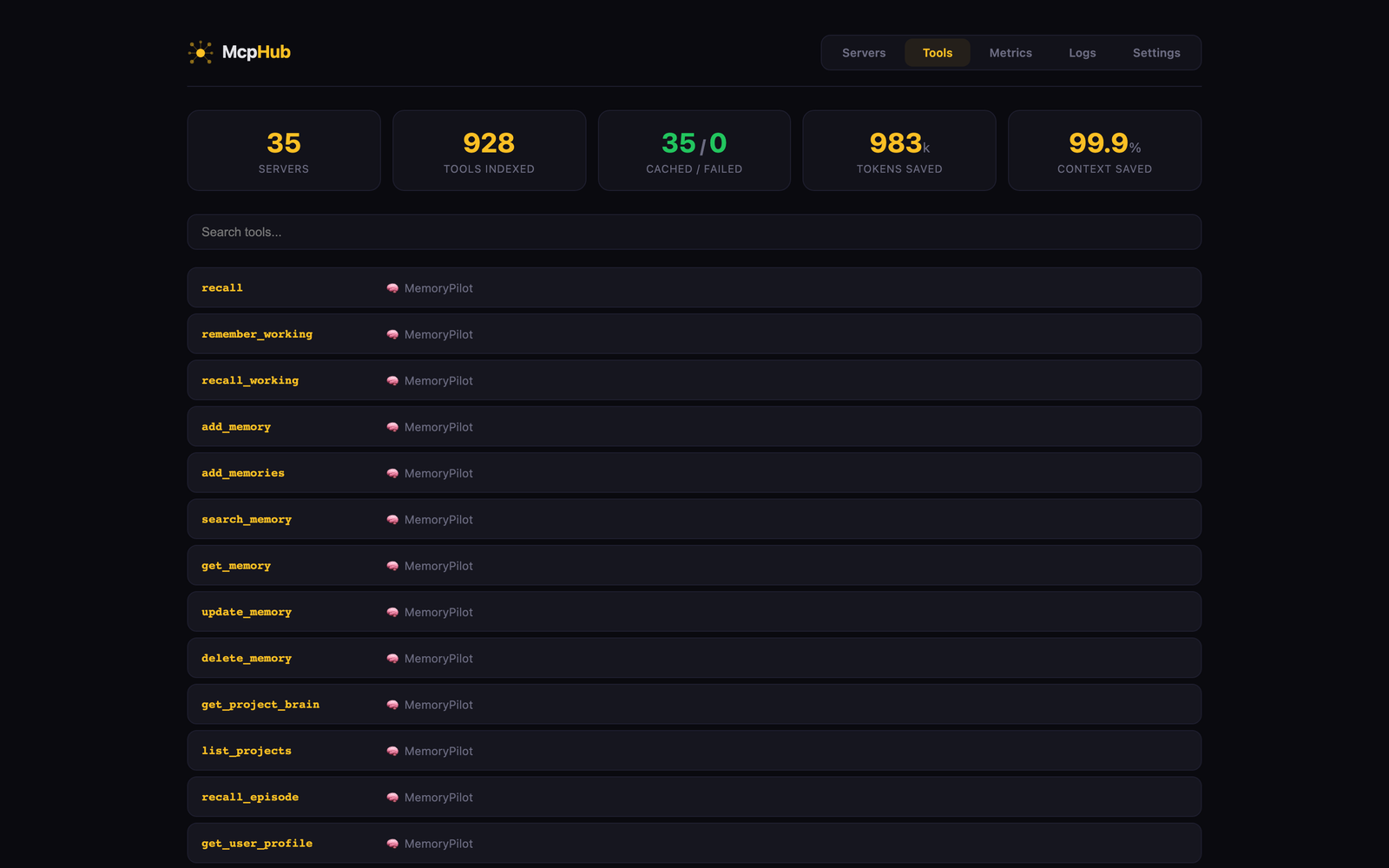 Every indexed tool, searchable |
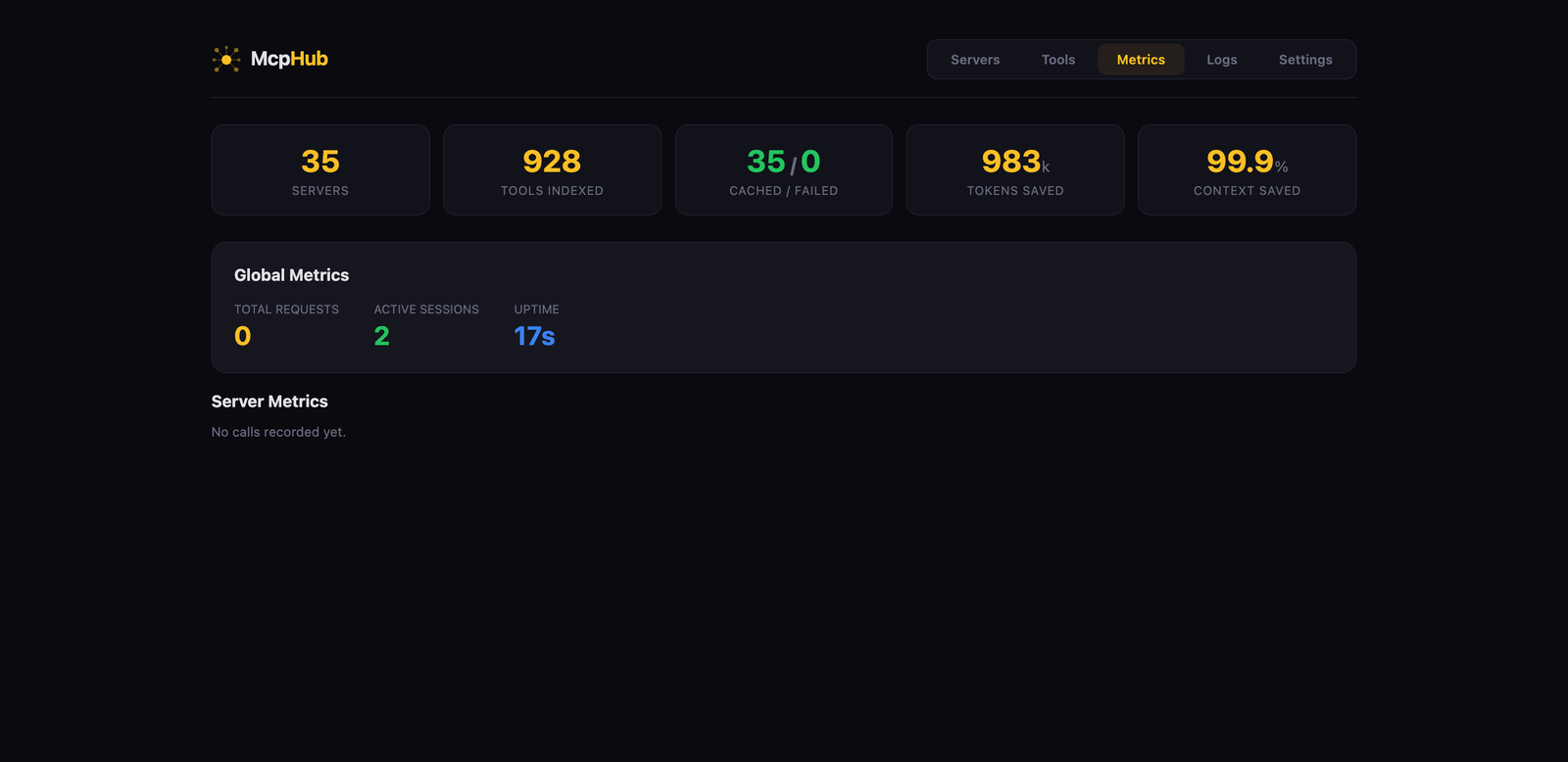 Calls, errors and latency per server |
|
📚 Library
The Library tab of the dashboard is the official MCP Registry inside McpHub: search thousands of servers, read a trust score, click Add.
- Search runs locally. The first time you open the Library, McpHub downloads the catalog once in the background (the popular servers from the GitHub MCP Registry come first, in a few seconds; the full official catalog follows) into
~/.McpHub/registry-cache/. After that, it only fetches what changed, at most once a day. Search is instant and works offline. - Zero weight for your agent. The catalog lives in the dashboard and on disk. It adds no tool definition to the agent's context and nothing stays in memory between searches.
- Trust score before you install (0 to 100), with the detail of every point:
- verified publisher: the registry checks the namespace (a GitHub account or a DNS domain), McpHub checks that it publishes its own code;
- popularity and activity: GitHub stars, last update, archived repositories;
- permission scan: secrets requested, plain HTTP endpoints, privileged Docker options, bundle integrity hash, unpinned versions, and what the server can do (run commands, touch files, a browser, payments...).
- One-click add for every kind of server: remote (Streamable HTTP), npm (
npx), Python (uvx), Docker, .NET (dnx) and.mcpbbundles (downloaded, SHA-256 checked, extracted outside~/.McpHub). - Secrets go to the Keychain, never to
config.json. A secret you already have (GITHUB_TOKEN...) is reused. - Remote servers sign in with McpHub's native OAuth (one click on Sign in), tokens in the Keychain.
- New servers inherit every guard: shield sandbox for local code (Docker keeps its container), tool pinning and description scan on first contact, quarantine on change, audit log, permissions and profiles.
From the terminal: McpHub registry search postgres, McpHub registry info NAME, McpHub registry install NAME, McpHub registry sync.
Your agent installs what it needs
No new tool is added for this (about 30 tokens in total). When mcphub_search finds nothing, the agent can call:
mcphub_call  server=mcphub  tool=registry_search   arguments={"query": "postgres"}
mcphub_call  server=mcphub  tool=registry_install  arguments={"name": "io.github.acme/postgres-mcp"}
The server is installed with the same guards, its tools are indexed right away, and the call is audited. An agent never handles secrets: when a server needs one, the agent asks you to finish in the dashboard. Control it in settings.registry:
"registry": { "agentInstall": "trusted", "minTrust": 60 }
agentInstall: "trusted" (default, only servers whose trust score reaches minTrust), "any" or "off".
Your agent manages your servers
The agent can also list, add, remove, enable and disable servers in ~/.McpHub/config.json, without you editing the file:
mcphub_call  server=mcphub  tool=servers_list
mcphub_call  server=mcphub  tool=server_disable  arguments={"name": "cloudflare", "revision": "<from servers_list>"}
mcphub_call  server=mcphub  tool=server_add      arguments={"name": "weather", "command": "npx", "args": ["-y", "weather-mcp"], "env": {"WEATHER_TOKEN": "${WEATHER_TOKEN}"}}
mcphub_call  server=mcphub  tool=server_add      arguments={"name": "linear", "url": "https://mcp.linear.app/mcp", "auth": "oauth"}
mcphub_call  server=mcphub  tool=server_remove   arguments={"name": "weather"}
- Confirmation:
server_add,server_removeandserver_enableask you first (native window, or token depending onconfirmVia).server_disableandservers_listdon't. A rule insettings.permissionswith"server": "mcphub"overrides this. - No secrets: a value that looks like a secret is refused, and a secret field (
*_TOKEN,*_KEY,Authorization,--password...) only accepts a${NAME}reference. You store the value withMcpHub vault set NAME. - Safe writes: each change saves the previous file in
~/.McpHub/backups/(last 20 kept). It is refused if the file changed sinceservers_list(revision) or during the write. - Local commands run in the
shieldsandbox by default, and an agent cannot turn the sandbox off. - Client accounts: always refused from a tenant folder. A server used by a client account can't be removed or disabled by an agent.
- Every call is written to the audit log (
admin/<tool>).
🐧 Linux servers and sync
McpHub runs the same way on a Linux server, for example next to an agent running on a VPS:
curl -fsSL https://raw.githubusercontent.com/Soflutionltd/McpHub/main/get.sh | bash
sudo apt install bubblewrap   # sandbox
McpHub install                # systemd --user service
- Sandbox with bubblewrap: same policy as on macOS. Every secret folder (
~/.ssh,~/.aws,~/.McpHub...) is replaced by an empty folder in memory, every secret file by an empty file;strictmode makes the whole system read-only except temporary folders, caches andallowWrite. - Secrets in
~/.McpHub/secrets.env, mode 600, hidden from sandboxed servers.McpHub vault set NAMEworks the same.
Move your setup from one machine to another without any plaintext secret:
McpHub sync export mcphub.sync.json --secrets   # on the Mac
McpHub sync import mcphub.sync.json --secrets   # on the server
The export is a portable config.json: every secret is a ${NAME} reference (plain values that look like tokens are taken out of the copy), and home paths become ${HOME}/.... With --secrets, the values travel too, encrypted with a passphrase (scrypt, then ChaCha20-Poly1305). Without the passphrase the file only reveals secret names. On import, servers whose program is missing on that machine are imported disabled, and decrypted secrets go to the Keychain (macOS) or secrets.env (Linux). For scripts, set MCPHUB_SYNC_PASSPHRASE.
⚙️ Configuration
Everything lives in ~/.McpHub/config.json and is hot-reloaded while the daemon runs.
{
  "servers": {
    "supabase": {
      "command": "npx",
      "args": ["-y", "@supabase/mcp-server-supabase"],
      "env": { "SUPABASE_ACCESS_TOKEN": "${SUPABASE_ACCESS_TOKEN}" },
      "tools": { "exclude": ["delete_*", "pause_project"] },
      "toolDescriptions": { "list_projects": "List my Supabase projects" }
    },
    "github": { "command": "npx", "args": ["-y", "@modelcontextprotocol/server-github"], "readOnly": true },
    "sentry": { "url": "https://mcp.sentry.dev/mcp" }
  },
  "settings": {
    "mode": "discover",
    "sandbox": "shield",
    "toolSecurity": { "pinning": "block", "scan": "block", "newTools": "block" },
    "permissions": { "default": "allow", "rules": [] },
    "profiles": {
      "cursor": { "servers": ["supabase", "git*"], "excludeTools": ["supabase/execute_sql"] },
      "review": { "readOnly": true }
    },
    "codeMode": { "timeoutSecs": 60, "maxCalls": 100 },
    "idleTimeout": 300
  }
}
Servers named in settings.preload ("auto", "all" or a list) are started with the daemon and are not stopped when idle, so their next call never waits for a cold start; set "keepPreloadedWarm": false to let idleTimeout stop them too. A start that fails for a reason time does not fix (refused or expired sign-in, program not found) is reported at once instead of being tried three times.
Per-server options
| Option | Effect |
|---|---|
tools.include / tools.exclude | glob lists of tools to expose or hide |
readOnly: true | only tools that read (readOnlyHint, or a read verb such as get, list, search) |
toolDescriptions | rewrite a tool description shown to agents |
sandbox | false, "shield", "strict" or an object (see Security) |
inheritEnv | daemon variables passed to this server by name |
pool | number of instances for parallel calls |
url, headers, auth | remote server over HTTP (auth: "oauth" or "none") |
Profiles per client
Profiles decide what each client may see and call: servers and excludeServers (globs), excludeTools ("server/tool" globs) and readOnly. Select one with http://127.0.0.1:24680/mcp/<profile>, /sse?profile=<profile>, or MCPHUB_PROFILE=<profile> in stdio mode.
Modes
discover(default): the agent seesmcphub_search,mcphub_callandmcphub_run.passthrough: every tool is exposed directly asserver__tool(full visibility, higher token cost).
🧰 CLI
McpHub serve              # HTTP daemon (Streamable HTTP /mcp, SSE /sse, dashboard)
McpHub stdio              # stdio mode for editors that spawn the process
McpHub install            # start at login · McpHub uninstall
McpHub generate           # start every server and index its tools
McpHub status | doctor    # configuration, cache and health diagnostics
McpHub search "send email"
McpHub dashboard          # open the dashboard (one-time link)
McpHub logs               # follow the daemon log
McpHub add                # interactive server wizard
McpHub vault ...          # Keychain secrets: status, list, set, get, rm, migrate (--tenant ID)
McpHub tenant ...         # client accounts: add ID --dir DIR, list, check ID, rm ID
McpHub registry ...       # Library: search, info, install, uninstall, sync
McpHub sync ...           # export / import to another machine, secrets encrypted
McpHub oauth ...          # remote servers: status, login, logout, migrate (--tenant ID)
McpHub pins ...           # tool pinning: status, approve, reset, scan
McpHub sandbox [show S]   # server isolation
McpHub policy test S T    # which permission applies
McpHub audit --tail 50    # recent calls (--tenant ID)
McpHub update [--check]   # install the latest signed release now (automatic otherwise)
McpHub version | help
Publishing a release (maintainers)
Bump version in Cargo.toml, merge, then push the tag vX.Y.Z (only admins can create v* tags). The Release workflow builds every binary, signs and notarizes the macOS ones, bundles the client, signs latest.json and publishes; the MCP Registry workflow then builds the Claude Desktop extension from .mcp/, attaches it and publishes to the MCP Registry. Its secrets live in the release environment, reachable only from v* tags; the signing key and the certificate are also kept in 1Password (scripts/ci-signing-secrets.sh refreshes the certificate when it is renewed).
Something wrong with a version already out?
gh workflow run release.yml --ref vX.Y.Z -f action=pause    # nobody else receives it
gh workflow run release.yml --ref vX.Y.Z -f action=resume   # back to the gradual rollout
gh workflow run release.yml --ref vX.Y.Z -f action=full     # everyone now (urgent fix)
Installations never go back to an older version: to undo a release, publish a fixed one with a higher number.
Files: ~/.McpHub/ (config, cache, pins, audit log, token; ~/.McpHub-<name>/ for a named instance) and ~/Library/Logs/McpHub/<server>.stderr.log (each server's error output).
❓ FAQ
Does it work with any MCP server?
Yes: any stdio server (command + args) and any Streamable HTTP server (url). Tool annotations, output schemas, paginated tool lists and protocol versions up to 2026-07-28 are relayed.
What happens when an editor restarts?
Nothing: the daemon keeps running, servers stay warm, and the editor reconnects to the same URL.
Will the sandbox break my servers?
shield only removes access to secrets and to a few programs that could escape it; regular servers keep working. Servers that need the whole machine (a shell tool like desktop-commander) are left outside by default, and any server can opt out with "sandbox": false.
Why does macOS ask for permissions after an update?
macOS remembers permissions per signing identity. make install signs with your Developer ID when available; the prebuilt binary is signed by SOFLUTION LTD. Ad-hoc builds get a new identity on every build, so macOS asks again.
How do I uninstall?
McpHub uninstall
rm ~/.local/bin/McpHub
rm -rf ~/.McpHub

MIT License · Made by SOFLUTION LTD