Listed from the MCP registry; nobody on Odel publishes it.

Basecoat UI
Basecoat UI 1.0 components (shadcn/ui look in plain HTML + Tailwind) with usage docs and setup.
Runs on your machine from its package; the steps are below.
What it does
- Reads
- Writes
- High impact
At most: only reads or looks up information.
What it costs
FreeOdel charges nothing per call. The publisher may charge for its own service.
Runs locally over stdio
This server isn't hosted — your MCP client launches it from a package registry. Use one of the commands below, or drop the config into your client (e.g. Claude Desktop).
Run
npx -y basecoat-ui-mcp
MCP client config
{
  "mcpServers": {
    "basecoat-ui": {
      "command": "npx",
      "args": [
        "-y",
        "basecoat-ui-mcp"
      ]
    }
  }
}Basecoat MCP Server





Give your AI assistant the full Basecoat UI component library (the shadcn/ui look in plain HTML + Tailwind, no React), so it writes correct Basecoat markup instead of guessing class names.
Kept in sync with Basecoat releases. Basecoat 1.0.2 shipped with breaking API changes; this MCP was updated to it the same day.


Story
While building my hobby project — turning old devices into a Digital Photo Frame — I struggled with UI components. I wanted to use Basecoat CSS, the HTML port of ShadCN UI, but there was no MCP server to easily pull components and docs into AI-assisted coding.
So I built one.
This is my first MCP server, and it’s here to make working with Basecoat (and ShadCN-style components) effortless for everyone. Feedback and contributions are welcome!
A Model Context Protocol (MCP) server that provides programmatic access to Basecoat CSS components and their usage documentation. This server allows AI assistants to help developers build HTML interfaces using the Basecoat CSS framework.
Features
- Basecoat 1.0.2: All markup follows the 1.0 API (
class="btn" data-variant="outline",.field, method-based JS). - 90+ Component Variants: Buttons, fields, input groups, cards, dialogs, command menus, drawers, charts and more.
- Usage Documentation: Implementation guides for 30 components, including JS requirements and 0.x migration notes.
- Setup Scripts: CDN links for any style pack (Vega, Nova, Maia, Lyra, Mira, Luma, Sera, Rhea) and the theme script.
- Search & Discovery: Find components by name or category.
- Accessibility Ready: All components include ARIA attributes and semantic HTML.
Quick Start
No install needed: every client runs the server with npx.
Claude Code
claude mcp add basecoat-ui -- npx -y basecoat-ui-mcp
Claude Desktop
Add to claude_desktop_config.json:
{
  "mcpServers": {
    "basecoat-ui": {
      "command": "npx",
      "args": ["-y", "basecoat-ui-mcp"]
    }
  }
}
Cursor
Click Install in Cursor above, or add to ~/.cursor/mcp.json:
{
  "mcpServers": {
    "basecoat-ui": {
      "command": "npx",
      "args": ["-y", "basecoat-ui-mcp"]
    }
  }
}
VS Code (GitHub Copilot)
Click Install in VS Code above, or add to .vscode/mcp.json:
{
  "servers": {
    "basecoat-ui": {
      "command": "npx",
      "args": ["-y", "basecoat-ui-mcp"]
    }
  }
}
Windsurf
Add to ~/.codeium/windsurf/mcp_config.json:
{
  "mcpServers": {
    "basecoat-ui": {
      "command": "npx",
      "args": ["-y", "basecoat-ui-mcp"]
    }
  }
}
Codex CLI
Add to ~/.codex/config.toml:
[mcp_servers.basecoat-ui]
command = "npx"
args = ["-y", "basecoat-ui-mcp"]
Other MCP clients
Run npx -y basecoat-ui-mcp as a stdio server.
Try it
Ask your assistant something like:
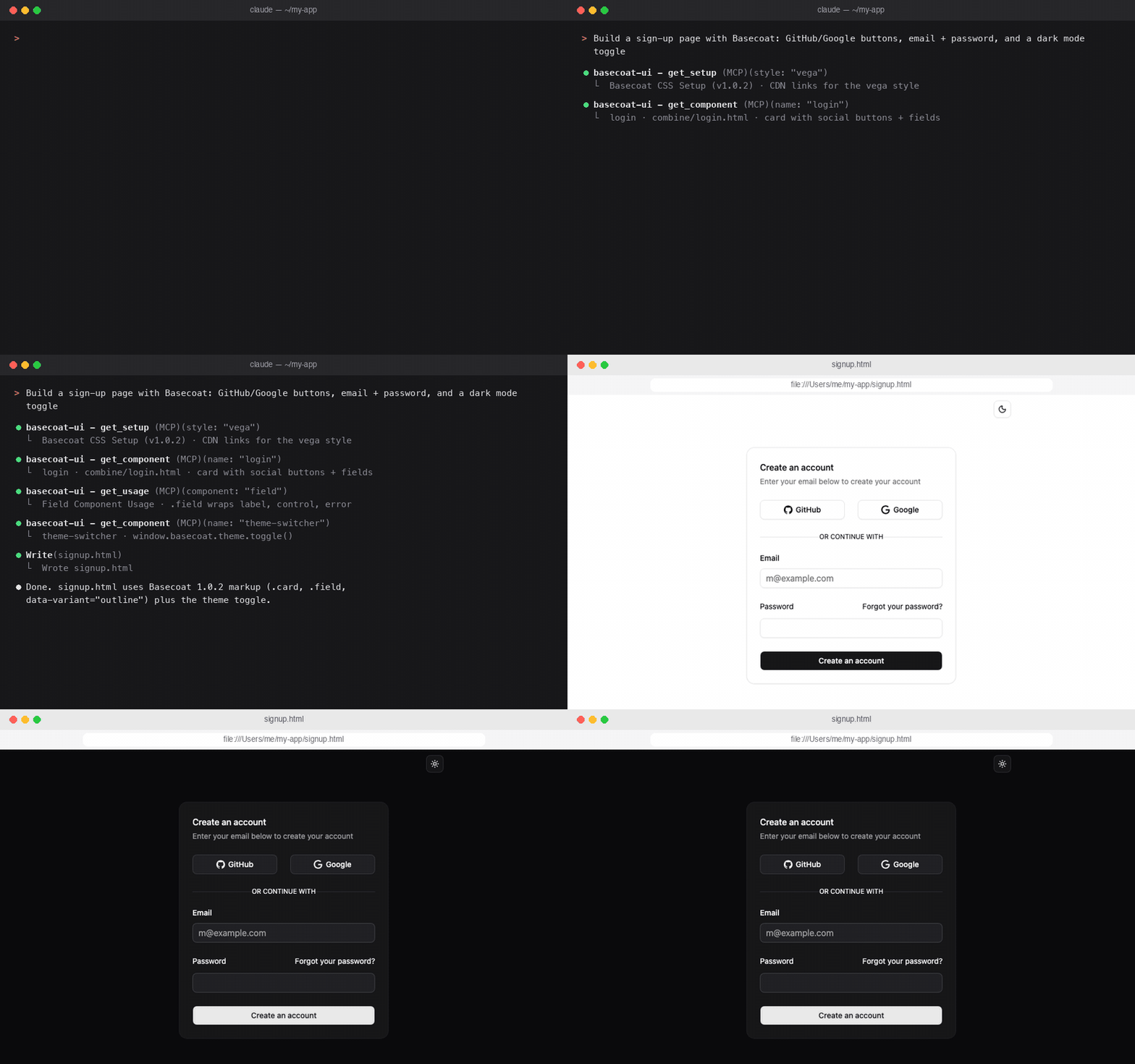
Build a sign-up page with Basecoat: a card with GitHub/Google buttons, email and password fields, and a dark mode toggle.
It will call get_setup, pull the matching components and usage docs, and return HTML that uses the real Basecoat 1.0 API.
Local Development
git clone https://github.com/Sorbh/basecoat-ui-mcp.git
cd basecoat-ui-mcp
npm install
Point your client at the local copy:
{
  "mcpServers": {
    "basecoat-ui": {
      "command": "node",
      "args": ["/path/to/basecoat-ui-mcp/server.js"]
    }
  }
}
Available Tools
| Tool | Description | Parameters |
|---|---|---|
get_component | Get HTML code for a specific component variant | name: Component name (e.g., "button-outline", "field", "command"). Prefix with a category to disambiguate (e.g., "layout/pagination") |
list_components | List all available components organized by category | None |
get_usage | Get usage documentation for a component | component: Component name (e.g., "button", "combobox"). Variant names fall back to their base doc ("button-primary" → "button") |
get_setup | Get Basecoat CSS setup code with CDN links | style (optional): vega (default), nova, maia, lyra, mira, luma, sera, rhea |
get_theme_script | Get theme switcher script for dark/light mode | None |
search_components | Search for components by name or category | query: Search term (e.g., "button", "form", "navigation") |
get_category | Get all components in a specific category | category: combine, feedback, forms, interactive, layout, navigation |
Component Categories
Forms
- Button: default, secondary, outline, ghost, link, destructive, sizes, icon, with-icon, loading
- Button Group: horizontal, vertical
- Field / Fieldset: label, description, invalid state, grouped fields
- Input / Input Group: basic, with-label, invalid, with icon, with button
- Select: native select, JS select
- Checkbox, Radio Group, Switch: with labels and descriptions
- Slider, Textarea, Label, Form container
Navigation
- Tabs, Accordion, Breadcrumb, Sidebar
Feedback
- Alert: default, success, error
- Alert Dialog, Dialog: confirmation and modal forms
- Badge: primary, secondary, destructive, outline
- Toast, Empty, Progress, Spinner
Interactive
- Command: inline and dialog palettes
- Combobox: input-first searchable select
- Dropdown Menu, Popover, Tooltip
- Drawer (beta): bottom and side
- Theme Switcher
Layout
- Card, Avatar, Item, Kbd, Scroll Area
- Skeleton, Table, Pagination
- Chart (beta)
Combine
Composed examples: chat, login, settings, interactive pagination.
Upgrading from 1.x of this MCP
Version 2.0.0 of this MCP targets Basecoat 1.0.2, which has breaking changes from Basecoat 0.3.x:
- Variant classes became data attributes:
btn-outline→class="btn" data-variant="outline",btn-sm-icon→data-size="icon-sm". - The
.formwrapper was removed; wrap each label and control in<div class="field">. - Document events (
basecoat:toast,basecoat:sidebar,basecoat:theme) were replaced by methods:toaster.toast(),sidebar.toggle(),window.basecoat.theme.toggle(). dialog-alertwas renamed toalert-dialog.
If your project still has 0.x markup, load Basecoat's compatibility stylesheet after Basecoat while you migrate (@import "basecoat-css/compat";). See style-guide.md for the full migration guide.
Directory Structure
basecoat-mcp/
├── components/           # HTML component files
│   ├── combine/         # Composed page examples
│   ├── feedback/        # Alerts, badges, dialogs, toasts
│   ├── forms/           # Buttons, fields, inputs, selects
│   ├── interactive/     # Command, combobox, dropdowns, tooltips
│   ├── layout/          # Cards, tables, avatars, items
│   └── navigation/      # Tabs, accordion, sidebar
├── usage/               # Usage documentation (same categories)
├── scripts/             # Setup and theme scripts
├── style-guide.md       # Full Basecoat 1.0 style and migration guide
├── server.js            # MCP server implementation
├── package.json
└── README.md
Categories are read from disk, so adding a folder under components/ or usage/ is enough to expose it.
About Basecoat CSS
Basecoat CSS is a comprehensive CSS framework that provides:
- Accessible, semantic components
- Dark/light theme support
- Tailwind CSS integration
- JavaScript-enhanced interactions
- Mobile-responsive design
Learn more at basecoatui.com
License
MIT License - see LICENSE file for details.
Contributing
- Fork the repository
- Create a feature branch:
git checkout -b feature/amazing-feature - Make your changes following our coding standards
- Test your changes thoroughly
- Commit with clear messages:
git commit -m 'Add amazing feature' - Push to your branch:
git push origin feature/amazing-feature - Open a Pull Request
Support
- Issues: GitHub Issues
Built with ❤️ by Claude Code - Monitored & Prompted by Saurabh K. Sharma







