
LLM Documentation Scraper (doc-scraper)




A configurable, concurrent, and resumable web crawler written in Go. Specifically designed to scrape technical documentation websites, extract core content, convert it cleanly to Markdown format suitable for ingestion by Large Language Models (LLMs), and save the results locally.
Overview
This project provides a powerful command-line tool to crawl documentation sites based on settings defined in a config.yaml file. It navigates the site structure, extracts content from specified HTML sections using CSS selectors, and converts it into clean Markdown files.
Why Use This Tool?
- Built for LLM Training & RAG Systems - Creates clean, consistent Markdown optimized for ingestion
- Preserves Documentation Structure - Maintains the original site hierarchy for context preservation
- Production-Ready Features - Offers resumable crawls, rate limiting, and graceful error handling
- High Performance - Uses Go's concurrency model for efficient parallel processing
Goal: Preparing Documentation for LLMs
The main objective of this tool is to automate the often tedious process of gathering and cleaning web-based documentation for use with Large Language Models. By converting structured web content into clean Markdown, it aims to provide a dataset that is:
- Text-Focused: Prioritizes the textual content extracted via CSS selectors
- Structured: Maintains the directory hierarchy of the original documentation site, preserving context
- Cleaned: Converts HTML to Markdown, removing web-specific markup and clutter
- Locally Accessible: Provides the content as local files for easier processing and pipeline integration
Key Features
| Feature | Description |
|---|---|
| Configurable Crawling | Uses YAML for global and site-specific settings |
| Scope Control | Limits crawling by domain, path prefix, and disallowed path patterns (regex) |
| Content Extraction | Extracts main content using CSS selectors |
| HTML-to-Markdown | Converts extracted HTML to clean GitHub-Flavored Markdown (tables, task lists, strikethrough) |
| Image Handling | Opt-in downloading and local rewriting of image links with domain and size filtering (disabled by default; doc-scraper is text-first) |
| Link Rewriting | Rewrites internal links to relative paths for local structure |
| JSONL Output | Optional one-record-per-page JSONL with a trailing crawl-summary record, for RAG ingestion |
| Concurrency | Configurable worker pools and semaphore-based request limits (global and per-host) |
| Rate Limiting | Configurable per-host delays with jitter |
| Robots.txt & Sitemaps | Respects robots.txt and processes discovered sitemaps |
| State Persistence | Uses BadgerDB for state; supports resuming crawls via crawl --resume |
| Graceful Shutdown | Handles SIGINT/SIGTERM with proper cleanup |
| HTTP Retries | Exponential backoff with jitter for transient errors |
| Observability | Structured logging (log/slog); optional pprof endpoint (build with -tags pprof) |
| Modular Code | Organized into packages for clarity and maintainability |
| CLI Utilities | Built-in config validate and config list commands for configuration management |
| MCP Server Mode | Expose as Model Context Protocol server for Claude Code/Cursor integration |
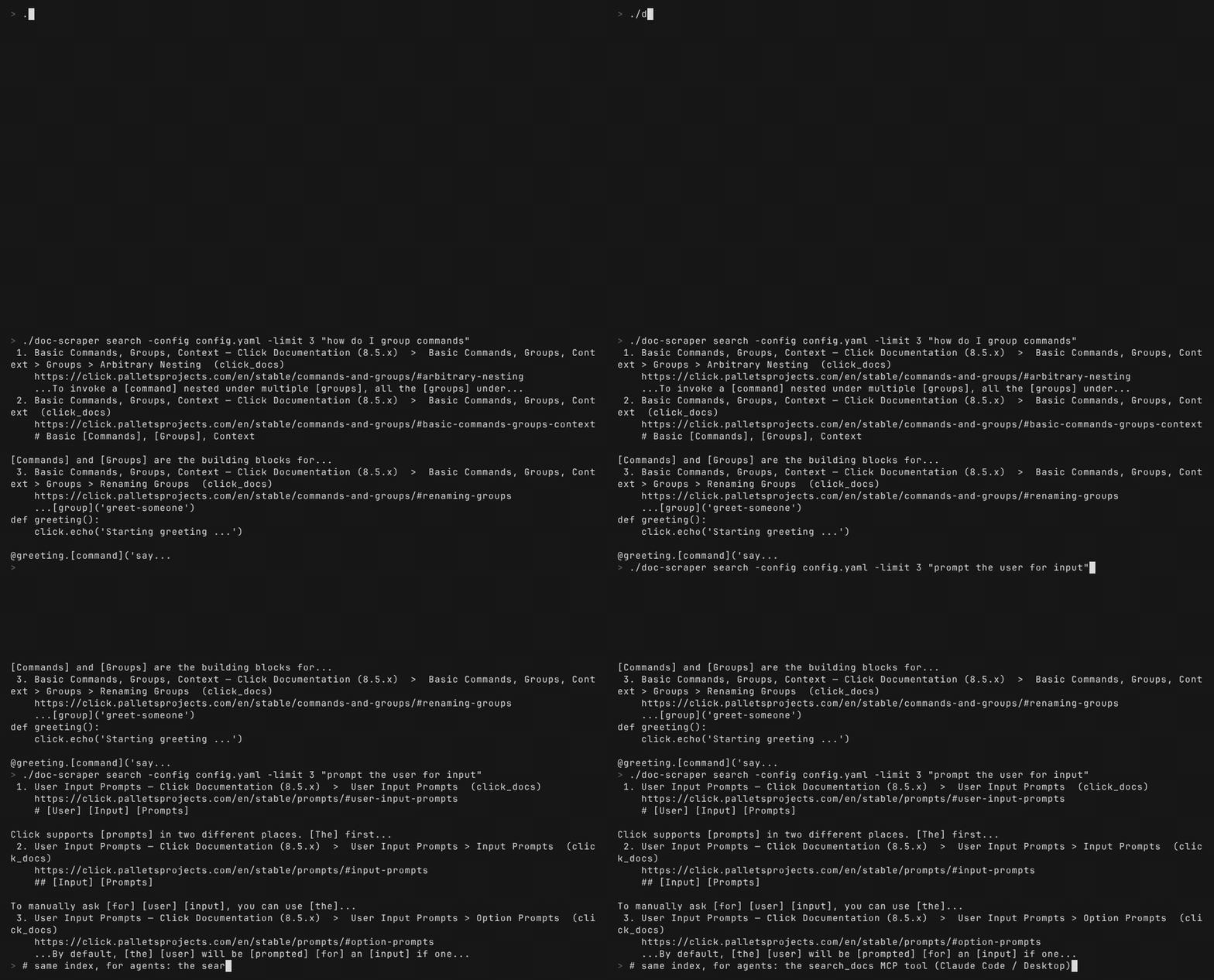
| Full-Text Search | Offline BM25 search over crawled docs (SQLite FTS5) via the search_docs MCP tool |
| Auto Content Detection | Automatic framework detection (Docusaurus, MkDocs, Sphinx, GitBook, ReadTheDocs) with readability fallback |
| Parallel Site Crawling | Crawl multiple sites concurrently with shared resource management |
| Watch Mode | Scheduled periodic re-crawling with state persistence |
Getting Started
Prerequisites
- Go: Version 1.26 or later
- Git: For cloning the repository
- Disk Space: Sufficient for storing crawled content and state database
Installation
Option 1: Direct Installation (Recommended)
Install the latest version directly from GitHub:
go install github.com/Sriram-PR/doc-scraper/v2/cmd/doc-scraper@latest
This installs the doc-scraper binary to your GOPATH/bin directory (usually ~/go/bin or %USERPROFILE%\go\bin). Make sure this directory is in your PATH.
Option 2: Clone and Build
-
Clone the repository:
git clone https://github.com/Sriram-PR/doc-scraper.git cd doc-scraper -
Install Dependencies:
go mod tidy -
Build the Binary:
make build
# or: go build -o doc-scraper ./cmd/doc-scraper
This creates an executable named
doc-scraperin the project root.
Quick Start
Create a minimal config.yaml in the project root:
output_base_dir: "./crawled_docs"
state_dir: "./crawler_state"
enable_jsonl_output: true
sites:
  rust_cli_book:
    start_urls:
      - "https://rust-cli.github.io/book/index.html"
    allowed_domain: "rust-cli.github.io"
    allowed_path_prefix: "/book/"
    content_selector: "#content, main"
    max_depth: 2          # seed plus one level; set 0 for the whole book
Run the crawl:
./doc-scraper crawl -site rust_cli_book -loglevel info
The Markdown, plus pages.jsonl, llms.txt, and llms-full.txt, lands under ./crawled_docs/rust_cli_book/ (output is organized by site key). A small book like this finishes in a few seconds; large sites can take minutes, so start with a low max_depth to gauge size before removing the bound.
Configuration (config.yaml)
A config.yaml file is required to run the crawler. Create this file in the project root or specify its path using the -config flag.
Key Settings for LLM Use
When configuring for LLM documentation processing, pay special attention to these settings:
sites.<your_site_key>.content_selector: Define precisely to capture only relevant textsites.<your_site_key>.allowed_domain/allowed_path_prefix: Define scope accuratelyskip_images: Images are not downloaded by default (text-first). Set tofalseglobally or per-site to download and localize images for offline consumption- Adjust concurrency/delay settings based on the target site and your resources
Example Configuration
# Global settings (applied if not overridden by site)
default_delay_per_host: 500ms
num_workers: 8
num_image_workers: 8
max_requests: 48
max_requests_per_host: 4
output_base_dir: "./crawled_docs"
state_dir: "./crawler_state"
max_retries: 4
initial_retry_delay: 1s
max_retry_delay: 30s
global_crawl_timeout: 0s
skip_images: true # Default. Set to false to download and localize images
max_image_size_bytes: 10485760 # 10 MiB (applies only when images are downloaded)
enable_jsonl_output: true
jsonl_output_filename: "pages.jsonl"

# HTTP Client Settings
http_client_settings:
  timeout: 45s
  max_idle_conns_per_host: 6

# Site-specific configurations
sites:
  # Key used with -site flag
  pytorch_docs:
    start_urls:
      - "https://pytorch.org/docs/stable/"
    allowed_domain: "pytorch.org"
    allowed_path_prefix: "/docs/stable/"
    content_selector: "article.pytorch-article .body"
    max_depth: 0 # 0 for unlimited depth
    skip_images: false # Opt in to downloading images for this site
    disallowed_path_patterns:
      - "/docs/stable/.*/_modules/.*"
      - "/docs/stable/.*\.html#.*"

  tensorflow_docs:
    start_urls:
      - "https://www.tensorflow.org/guide"
      - "https://www.tensorflow.org/tutorials"
    allowed_domain: "www.tensorflow.org"
    allowed_path_prefix: "/"
    content_selector: ".devsite-article-body"
    max_depth: 0
    delay_per_host: 1s  # Site-specific override
    # Disable JSONL output for this site, overriding global
    enable_jsonl_output: false
    disallowed_path_patterns:
      - "/install/.*"
      - "/js/.*"
Full Configuration Options
| Option | Type | Description | Default |
|---|---|---|---|
default_user_agent | String | Default User-Agent header for requests | "" (Go default) |
default_delay_per_host | Duration | Time to wait between requests to the same host | 0s (no delay) |
num_workers | Integer | Number of concurrent crawl workers | 4 |
num_image_workers | Integer | Number of concurrent image download workers | same as num_workers |
max_requests | Integer | Maximum concurrent requests (global) | 10 |
max_requests_per_host | Integer | Maximum concurrent requests per host | 2 |
output_base_dir | String | Base directory for crawled content | "./crawled_docs" |
state_dir | String | Directory for BadgerDB state data | "./crawler_state" |
max_retries | Integer | Maximum retry attempts for HTTP requests. To disable retries, set this to 0 together with a non-zero initial_retry_delay; max_retries: 0 on its own is treated as unset and falls back to the default | 3 |
initial_retry_delay | Duration | Initial delay for retry backoff | 1s |
max_retry_delay | Duration | Maximum delay for retry backoff | 30s |
global_crawl_timeout | Duration | Overall timeout for the entire crawl | 0s (no timeout) |
per_page_timeout | Duration | Timeout for processing a single page | 0s (no timeout) |
skip_images | Boolean | Whether to skip downloading images. Image downloading is opt-in | true (skip) |
max_image_size_bytes | Integer | Maximum allowed image size (applies only when images are downloaded) | 0 (unlimited) |
max_page_size_bytes | Integer | Maximum HTML page body size | 52428800 (50 MiB) |
enable_jsonl_output | Boolean | Enable JSONL page output (one record per page plus a trailing crawl_meta record) for RAG pipelines | false |
jsonl_output_filename | String | Filename for JSONL output | "pages.jsonl" |
enable_incremental | Boolean | Enable incremental crawling globally | false |
crawl_history_retention | Integer | Number of past crawls per site kept in the SQLite history index (powers get_freshness/diff_crawl) | 10 |
http_client_settings | Object | HTTP client configuration | (see below) |
sites | Map | Site-specific configurations | (required) |
HTTP Client Settings:
(Global; cannot be overridden per site. Pool, dialer, and TLS timings are baked into pkg/fetch with sane defaults and are not exposed as config knobs.)
timeout: Overall request timeout (default45s)max_idle_conns_per_host: Idle connections per host (default2)allow_private_networks: Disables the SSRF guard that blocks dials to loopback / private / link-local / CGNAT / multicast addresses. Defaultfalse. Set totrueonly if you intentionally crawl internal documentation servers reachable via private IPs.
Site-Specific Configuration Options:
start_urls: Array of starting URLs for crawling (Required)allowed_domain: Restrict crawling to this domain (Required)allowed_path_prefix: Restrict crawling to URLs under this path prefix (Optional; defaults to/, the whole domain). Setting it is strongly recommended to bound scopecontent_selector: CSS selector for main content extraction, or"auto"for automatic detection (Required)max_depth: Exclusive upper bound on crawl depth from start URLs. Start pages are depth 0, so1crawls only the start pages,2adds their directly-linked pages, and so on.0= unlimited. URLs discovered from asitemap.xmlare seeded at depth 1 (one hop from the site root), so they are still bounded bymax_depth:max_depth: 1stays start-only and skips sitemap expansiondelay_per_host: Override global delay setting for this sitedisallowed_path_patterns: Array of regex patterns for URLs to skiplink_extraction_selectors: Array of CSS selectors for additional link extraction areasrespect_nofollow: Boolean. Whether to respectrel="nofollow"linksuser_agent: String. Override global user agent for this siteskip_images: Override the global image setting for this site. Images are skipped unless this (or the globalskip_images) is set tofalsemax_image_size_bytes: Integer. Override global max image size for this siteallowed_image_domains: Array of domains from which to download imagesdisallowed_image_domains: Array of domains to block image downloads fromenable_jsonl_output:trueorfalse. Override global JSONL output enablement for this sitejsonl_output_filename: String. Override global JSONL output filename for this site
Usage
Execute the compiled binary from the project root directory:
./doc-scraper <command> [options]
Commands
| Command | Description |
|---|---|
crawl | Start a crawl (add --resume to continue an interrupted one) |
add | Probe a docs site and draft a config entry for it: detects the framework, proposes crawl scope from the sitemap, previews one extracted page, and writes only after confirmation |
config validate | Validate configuration file without crawling |
config list | List available site keys from config |
mcp-server | Start MCP server for AI tool integration |
search | Ranked full-text search over the crawled corpus (BM25, stemming, section anchors) |
watch | Watch sites and re-crawl on schedule |
version | Show version information |
run | Read a JSON task spec from stdin and dispatch a crawl or watch (for orchestration/automation) |
Command Options
crawl:
| Flag | Description | Default |
|---|---|---|
-config <path> | Path to config file | config.yaml |
-site <key> | Site key from config (single site) | - |
-sites <keys> | Comma-separated site keys for parallel crawling | - |
--all-sites | Crawl all configured sites in parallel | false |
--resume | Resume an interrupted crawl from existing state | false |
-loglevel <level> | Log level (debug, info, warn, error) | info |
-json | Emit logs as JSON (one record per line) instead of text | false |
-pprof <addr> | pprof server address. Only effective in builds with -tags pprof; default builds log a warning and ignore the flag | "" (disabled) |
-incremental | Enable incremental crawling (skip unchanged pages) | false |
-full | Force full crawl (ignore incremental settings) | false |
Note: One of -site, -sites, or --all-sites is required.
add:
doc-scraper add https://vitepress.dev/guide/what-is-vitepress
Probes the site with a handful of polite requests (the page, robots.txt, llms.txt, the sitemap), then shows what it found before anything is written: the detected framework and content selector (validated against the fetched page), a crawl scope clustered from the sitemap with page counts as evidence, sibling version/locale trees proposed as exclusions, and a markdown preview of the extracted page with code-block fidelity numbers. The entry is appended to your config only after you confirm; the rest of the file is preserved byte-for-byte, comments included.
| Flag | Description | Default |
|---|---|---|
-config <path> | Path to config file (created if missing) | config.yaml |
-site <key> | Site key to use instead of the derived one | - |
-selector <css> | Content CSS selector, skipping auto-detection | - |
-depth <n> | Override the proposed max_depth | - |
-yes | Write without prompting | false |
-dry-run | Draft only, never write (exit code 2) | false |
-json | Emit the draft as JSON on stdout (human text goes to stderr) | false |
Exit codes: 0 written, 1 error, 2 drafted but not written. For agents and scripts: add -dry-run -json <url> inspects, then add -yes <url> commits; with no terminal attached the command fails fast instead of waiting on stdin. Sites whose robots.txt disallows crawling the given path are refused, and robots rules that restrict AI crawlers are surfaced as a warning.
config validate:
| Flag | Description | Default |
|---|---|---|
-config <path> | Path to config file | config.yaml |
-site <key> | Site key to validate (optional, validates all if empty) | - |
-json | Emit a single JSON object instead of human-readable text | false |
config list:
| Flag | Description | Default |
|---|---|---|
-config <path> | Path to config file | config.yaml |
-json | Emit a single JSON object instead of human-readable text | false |
mcp-server: (stdio transport only; the SSE transport was removed in v2.x)
| Flag | Description | Default |
|---|---|---|
-config <path> | Path to config file | config.yaml |
-loglevel <level> | Log level (debug, info, warn, error) | info |
watch:
| Flag | Description | Default |
|---|---|---|
-config <path> | Path to config file | config.yaml |
-site <key> | Site key to watch (single site) | - |
-sites <keys> | Comma-separated site keys to watch | - |
--all-sites | Watch all configured sites | false |
-interval <duration> | Crawl interval (e.g., 1h, 24h, 7d) | 24h |
-loglevel <level> | Log level (debug, info, warn, error) | info |
-json | Emit logs as JSON (one record per line) instead of text | false |
Note: One of -site, -sites, or --all-sites is required.
Example Usage Scenarios
Basic Crawl:
./doc-scraper crawl -site tensorflow_docs -loglevel info
Resume a Large Crawl:
./doc-scraper crawl -site pytorch_docs --resume -loglevel info
Validate Configuration:
./doc-scraper config validate -config config.yaml
./doc-scraper config validate -site pytorch_docs  # Validate specific site
List Available Sites:
./doc-scraper config list
High Performance Crawl with Profiling:
./doc-scraper crawl -site small_docs -loglevel warn -pprof localhost:6060
Debug Mode for Troubleshooting:
./doc-scraper crawl -site test_site -loglevel debug
Parallel Crawl of Multiple Sites:
./doc-scraper crawl -sites pytorch_docs,tensorflow_docs,langchain_docs
Crawl All Configured Sites:
./doc-scraper crawl --all-sites
Start MCP Server for Claude Desktop:
./doc-scraper mcp-server -config config.yaml
Incremental Crawling
crawl -incremental (which implies --resume, and is also what watch mode uses) re-fetches every previously-crawled page and re-checks it for changes:
- Change detection is content-scoped: it hashes the extracted content-selector region, not the raw page. Churn in the page shell (navigation, analytics, build timestamps, CSRF tokens) outside the content selector does not count as a change.
- Pages whose content region is unchanged are skipped without re-converting, re-downloading images, or rewriting output.
- Pages whose content region changed are fully reprocessed and their output is rewritten.
- A page that now returns an error (e.g. 404) on re-crawl leaves its previously-crawled output as-is; nothing is pruned.
Because there is no conditional-request support yet, incremental mode still performs the HTTP fetch for each known page; the savings come from skipping the downstream processing of unchanged pages.
Output Structure
Crawled content is saved under the output_base_dir defined in the config, organized by site key and preserving the site structure. Keying by site key (rather than domain) keeps two site configs that target the same domain in separate trees:
<output_base_dir>/
└── <sanitized_site_key>/            # e.g., flask_docs
    ├── images/                       # Always created; only populated when skip_images: false
    │   ├── image1.png
    │   └── image2.jpg
    ├── index.md                      # Markdown for the root path
    ├── <jsonl_output_filename>       # If enable_jsonl_output: true
    ├── llms.txt                      # Manifest of pages (auto-generated, when JSONL is enabled)
    ├── llms-full.txt                 # Full content concatenated (auto-generated, when JSONL is enabled)
    ├── topic_one/
    │   ├── index.md
    │   └── subtopic_a.md
    └── topic_two.md
llms.txt and llms-full.txt
When JSONL output is enabled, the crawler also emits llms.txt and llms-full.txt following the llmstxt.org convention. llms.txt is a markdown manifest (H1 + summary blockquote + ## Pages list of every crawled page with title and URL). llms-full.txt concatenates the full markdown content of every page, with section separators. Both files are regenerated on every crawl from the JSONL source of truth, so resumed crawls produce a complete updated manifest.
Output Format
Each generated Markdown file begins with a YAML frontmatter block carrying page metadata, followed by the converted content:
- YAML frontmatter (delimited by
---) withtitle,url(source URL),crawled_at(RFC3339 timestamp),content_hash(SHA-256 of the content, matching the JSONL record), anddepth - Clean content converted from HTML to GitHub-Flavored Markdown, preserving tables
- Relative links to other pages (when within the allowed domain)
- Local image references (if images are enabled)
Example:
---
title: 'Authentication'
url: https://docs.example.com/api/auth
crawled_at: "2026-08-09T12:00:00Z"
content_hash: 9f2b...c1a4
depth: 2
---

# Authentication

...page content as Markdown...
JSONL Output
When enabled, the crawler writes one JSON object per line to a JSONL file. This format is designed for ingestion into RAG pipelines and downstream indexers.
Enable it:
enable_jsonl_output: true
jsonl_output_filename: "pages.jsonl"  # default
The file mixes two record kinds, distinguished by the record_type field:
pagerecords, one per crawled page.- A single
crawl_metarecord as the final line, holding the crawl-level summary. Resuming rewrites the file to drop any leftovercrawl_metarecord before appending a fresh one at close, so a closed file always contains exactly onecrawl_metarecord.
page record fields (from PageJSONL):
| Field | Description |
|---|---|
record_type | Always "page" |
url | Final absolute URL of the page |
title | Page title |
content | Full markdown content |
headings | Array of headings extracted from the page |
links | Array of links found in the content |
images | Array of image URLs found in the content |
content_hash | SHA-256 hash of the content (used for incremental crawling) |
crawled_at | Timestamp of when the page was crawled |
depth | Crawl depth from the start URL |
crawl_meta record fields (from CrawlMetaJSONL):
| Field | Description |
|---|---|
record_type | Always "crawl_meta" |
site_key | Site key from the config |
allowed_domain | The crawled domain |
crawl_started_at | Crawl start timestamp |
crawl_ended_at | Crawl end timestamp |
total_pages | Number of pages recorded in this crawl |
The output file is written to each site's output directory. Both the enable flag and filename can be overridden per site.
Auto Content Detection
When you set content_selector: "auto" for a site, the crawler automatically detects the documentation framework and applies the appropriate content selector.
Supported Frameworks
Detection recognizes 30+ documentation generators and hosted platforms, checked in three tiers of decreasing trust: the <meta name="generator"> tag, structural DOM signatures (attributes, ids, classes), and asset path patterns. Covered families include Docusaurus, VitePress, VuePress, Starlight/Astro, Nextra, Fumadocs, Mintlify, GitBook, MkDocs (Material, ReadTheDocs theme, and plain), Sphinx (furo, pydata, book, RTD, and classic themes), Antora, Docsy, hugo-book, Geekdoc, just-the-docs, mdBook, rustdoc, pkg.go.dev, Javadoc, Doxygen, TypeDoc, Writerside, ReadMe.com, Intercom, and Docus.
Every detected selector is validated against the live page before it is trusted: if it matches nothing or captures too little text, the crawler falls back instead of extracting empty content. Client-rendered shells (Docsify, Swagger UI, Redoc, Scalar, Document360, and generic empty-body SPAs) are recognized and reported as needing JavaScript rendering rather than silently producing an empty crawl.
Fallback Behavior
If no known framework is detected (or the detected selectors do not match the page), the crawler uses Mozilla's Readability algorithm to extract the main content. This works well on classic server-rendered docs, but can drop code blocks on some modern sites, so doc-scraper add's preview reports code-block fidelity before you commit a config.
Example Usage
sites:
  pytorch_docs:
    start_urls:
      - "https://pytorch.org/docs/stable/"
    allowed_domain: "pytorch.org"
    allowed_path_prefix: "/docs/stable/"
    content_selector: "auto"  # Auto-detect framework
    max_depth: 0
Parallel Site Crawling
Crawl multiple documentation sites concurrently with shared resource management. The orchestrator coordinates multiple crawlers while respecting global rate limits and semaphores.
Usage
# Crawl specific sites in parallel
./doc-scraper crawl -sites pytorch_docs,tensorflow_docs,langchain_docs

# Crawl all configured sites
./doc-scraper crawl --all-sites

# Resume parallel crawl
./doc-scraper crawl -sites pytorch_docs,tensorflow_docs --resume
Resource Sharing
When running parallel crawls, the following resources are shared across all site crawlers:
- Global semaphore: Limits total concurrent requests across all sites
- HTTP client: Shared connection pooling
- Rate limiter: Respects per-host delays
Each site still maintains its own:
- BadgerDB store for state persistence
- Output directory for crawled content
- Per-host semaphores for domain-specific limiting
Results Summary
After all sites complete, the orchestrator outputs a summary:
===========================================
Parallel crawl completed in 2m30s
Site Results:
  pytorch_docs: SUCCESS - 1500 pages in 1m20s
  tensorflow_docs: SUCCESS - 2000 pages in 2m15s
  langchain_docs: FAILED - 0 pages in 3s
    Error: initial fetch failed for start URL (see logs)
-------------------------------------------
Total: 3 sites (2 success, 1 failed), 3500 pages processed
===========================================
Unknown or misspelled site keys are rejected before the crawl starts, so they never appear as a FAILED row in this summary. For example, crawl -sites pytorch_docs,typo_key exits immediately (non-zero) with:
Invalid site keys: site 'typo_key' not found. Available sites: [pytorch_docs tensorflow_docs langchain_docs]
The FAILED rows in the summary are for sites that exist in the config but errored during the crawl itself.
Watch Mode
Watch mode enables scheduled periodic re-crawling of documentation sites. The scheduler tracks the last run time for each site and automatically triggers crawls when the configured interval has elapsed.
Usage
# Watch a single site with 24-hour interval
./doc-scraper watch -site pytorch_docs -interval 24h

# Watch multiple sites
./doc-scraper watch -sites pytorch_docs,tensorflow_docs -interval 12h

# Watch all configured sites weekly
./doc-scraper watch --all-sites -interval 7d
Interval Format
The interval supports standard Go duration format plus day units:
30m- 30 minutes1h- 1 hour24h- 24 hours7d- 7 days1d12h- 1 day and 12 hours
State Persistence
Watch mode persists state to <state_dir>/watch_state.json, tracking:
- Last run time for each site
- Success/failure status
- Pages processed
- Error messages (if any)
This allows the scheduler to resume correctly after restarts, only running sites when their interval has elapsed.
Example Output
INFO Starting watch mode for 2 sites with interval 24h0m0s
INFO Watch schedule:
INFO   pytorch_docs: last run 2024-01-15T10:30:00Z (success, 1500 pages), next run 2024-01-16T10:30:00Z
INFO   tensorflow_docs: never run, will run immediately
INFO Running crawl for 1 due sites: [tensorflow_docs]
...
INFO Next crawl: pytorch_docs in 23h45m (at 10:30:00)
Graceful Shutdown
Watch mode handles SIGINT/SIGTERM gracefully: it stops the scheduler and cancels any in-progress crawl, letting the crawler flush its BadgerDB state and partial output first, so the interrupted crawl resumes cleanly on the next run.
Run (JSON Task Spec)
The run command reads a single JSON object from stdin and dispatches the equivalent crawl or watch. It is meant for orchestration agents that would rather build a JSON payload than assemble shell flags. Unknown fields are rejected so typos surface immediately; logs go to stderr and the exit code matches the equivalent flag-driven subcommand.
{
  "command":     "crawl" | "watch",   // required
  "config":      "config.yaml",        // optional, defaults to config.yaml
  "site":        "site_key",           // exactly one of site | sites | all_sites
  "sites":       ["a", "b"],
  "all_sites":   true,
  "resume":      false,                // crawl only
  "incremental": false,                // crawl only (implies resume)
  "full":        false,                // crawl only (mutually exclusive with incremental)
  "interval":    "24h",                // watch only, defaults to 24h
  "loglevel":    "info",               // defaults to info
  "json_logs":   false,                // emit slog records as JSON on stderr
  "pprof":       ""                    // crawl only, e.g. localhost:6060
}
Examples:
echo '{"command":"crawl","site":"pytorch_docs"}' | doc-scraper run
echo '{"command":"crawl","all_sites":true,"incremental":true,"json_logs":true}' | doc-scraper run
echo '{"command":"watch","sites":["pytorch_docs","tensorflow_docs"],"interval":"6h"}' | doc-scraper run
MCP Server Mode
The crawler can run as a Model Context Protocol (MCP) server, enabling integration with AI assistants like Claude Code and Cursor.
Available MCP Tools
| Tool | Description |
|---|---|
describe_server | Orientation manifest: server identity + sites + recent jobs in one call (call this first) |
list_sites | List all configured sites from config file |
get_page | Fetch a single URL live over the network and return content as markdown |
crawl_site | Start a background crawl for a site (returns job ID) |
get_job_status | Check the status of a background crawl job |
cancel_crawl | Cancel a running or pending crawl job by job ID |
list_pages | Enumerate crawled pages for a site (paginated, metadata only) |
read_page | Return a crawled page's markdown from the stored output, without network access |
search_docs | Full-text search across crawled docs (BM25, stemming, snippets), without network access |
get_freshness | Report how stale a site's latest crawl is, from the crawl-history index |
diff_crawl | Report pages added, removed, or changed since a given timestamp |
Usage
The MCP server uses the stdio transport, compatible with Claude Desktop, Claude Code, and Cursor.
./doc-scraper mcp-server -config config.yaml
Claude Code Integration
Add to your Claude Code configuration (claude_code_config.json):
{
  "mcpServers": {
    "doc-scraper": {
      "command": "/path/to/doc-scraper",
      "args": ["mcp-server", "-config", "/path/to/config.yaml"]
    }
  }
}
Tool Examples
List available sites:
Tool: list_sites
Result: Returns all configured sites with their domains and crawl status
Fetch a single page:
Tool: get_page
Arguments: { "url": "https://docs.example.com/guide", "content_selector": "article" }
Result: Returns page content as markdown with metadata
Start a background crawl:
Tool: crawl_site
Arguments: { "site_key": "pytorch_docs", "incremental": true }
Result: Returns job ID for tracking progress
Check crawl progress:
Tool: get_job_status
Arguments: { "job_id": "abc-123-def" }
Result: Returns status, pages processed, and completion info
Enumerate crawled pages:
Tool: list_pages
Arguments: { "site_key": "pytorch_docs", "max_results": 50, "offset": 0 }
Result: Returns up to 50 page entries (URL, title, depth, crawled_at, content_length), sorted by URL. Use offset for pagination.
Cancel a running crawl:
Tool: cancel_crawl
Arguments: { "job_id": "abc-123-def" }
Result: Returns cancelled: true/false and the job's current status. Has no effect on jobs already in a terminal state.
Contributing
Contributions are welcome! Please feel free to open an issue to discuss bugs, suggest features, or propose changes.
Pull Request Process:
- Fork the repository
- Create a feature branch (
git checkout -b feature/amazing-feature) - Commit your changes (
git commit -m 'Add some amazing feature') - Push to the branch (
git push origin feature/amazing-feature) - Open a Pull Request
Please ensure code adheres to Go best practices and includes appropriate documentation.
Privacy Policy
doc-scraper collects nothing: no telemetry, no analytics, no accounts. All output and state stays on your machine, and the only network requests it makes are the crawls and fetches you explicitly ask for. Full policy: PRIVACY.md.
License
This project is licensed under the Apache-2.0 License.
Acknowledgements
- GoQuery for HTML parsing
- html-to-markdown for conversion
- BadgerDB for state persistence
- mcp-go for MCP server implementation
- go-readability for content extraction fallback
- modernc.org/sqlite for the pure-Go crawl-history index