
Inbox To Action
Agentic Gmail triage: classify, summarize, extract tasks, draft replies. Never sends.
Runs on your machine from its package; the steps are below.
What it does
- Reads
- Writes
- High impact
At most: creates or changes data: records, files, settings.
What it costs
FreeOdel charges nothing per call. The publisher may charge for its own service.
Runs locally over stdio
This server isn't hosted — your MCP client launches it from a package registry. Use one of the commands below, or drop the config into your client (e.g. Claude Desktop).
Run
uvx inbox-to-action
MCP client config
{
  "mcpServers": {
    "inbox-to-action": {
      "command": "uvx",
      "args": [
        "inbox-to-action"
      ]
    }
  }
}


Published on PyPI and listed on the
Official MCP Registry (io.github.tarunlnmiit/inbox-to-action),
Glama (deployable release, Quality A),
and Smithery (MCPB bundle).
Registry manifests (server.json, glama.json) ship in the repo.

One command. Your inbox triaged, summarized, drafted, and turned into tasks — in a single agentic pass.
Install
pip install inbox-to-action          # or: pipx install inbox-to-action
uvx inbox-to-action run --mock       # zero-install trial (uv)
pip install 'inbox-to-action[mcp]'   # + MCP server for Claude Code
docker run --rm ghcr.io/tarunlnmiit/inbox-to-action   # MCP server (stdio)
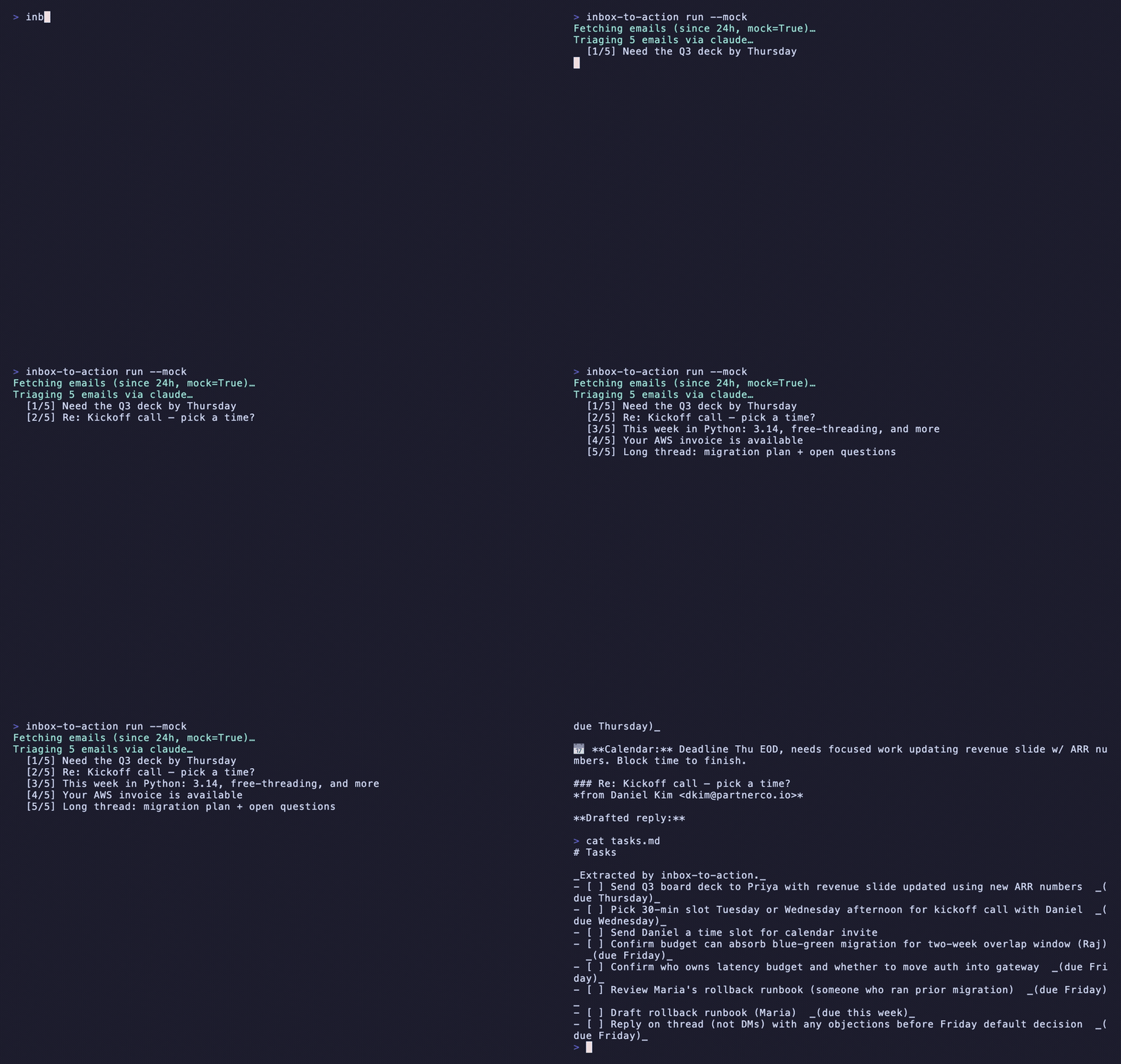
Try it with zero setup: inbox-to-action run --mock (bundled sample inbox).
📖 Full documentation → docs/ — install · providers · Gmail OAuth · multi-account · integrations · MCP & Skill · config · troubleshooting · testing checklist. Quick version: SETUP.md.
Why this exists
Most people process their inbox with four separate tools: an email client to read, a task manager to capture to-dos, a calendar to block time, and (increasingly) an AI summarizer to make sense of long threads. Every message gets handled four times.
inbox-to-action collapses all four into one agentic pass. Run one command and get
a unified triage report, drafted replies saved to Gmail, and extracted tasks — without
ever leaving the terminal, and without ever sending an email automatically.
🔒 Drafts only — never sends
This tool cannot send email. It requests only the Gmail readonly + compose
scopes; there is no send scope and no send API call anywhere in the codebase
(enforced by a test). Replies are saved as Gmail drafts for you to review and send.
Email bodies flow into the LLM prompt, so a hostile email could try to steer its own classification or a drafted reply (prompt injection). Because every draft is saved for human review and nothing is ever sent automatically, the worst case is a draft you choose not to send. See SECURITY.md.
🌐 What leaves your machine
inbox-to-action reads your email. Where your email content goes for classification
depends on the LLM provider you pick — and the default (openrouter) is a cloud
provider, so an out-of-the-box run sends your subjects + bodies to a third party.
PROVIDER= | Email content goes to | Key |
|---|---|---|
ollama | Nowhere — fully local 🔒 | none |
claude / host | Your existing Claude Code / Anthropic session (keyless) | none |
openrouter (default) · openai · nim · anthropic | Third-party cloud ☁️ | API key |
Want privacy? Use ollama (local) or claude (keyless) so nothing is transmitted
to a third party. --telegram / --todoist also push subjects/tasks off-box (opt-in).
Full breakdown → PRIVACY.md.
Note:
triage-report.mdandtasks.mdare written to your working directory and contain private email content. If you run inside a git repo, add them to.gitignore.
What it does
- Fetches unread email from Gmail (last 24h by default).
- Classifies each into
action_needed·fyi·newsletter·noise. - Summarizes long threads (>500 words) into two lines.
- Extracts tasks with deadlines → local
tasks.md(optional Todoist via--todoist). - Drafts replies for
action_neededmail → saved as Gmail drafts. - Flags emails that need a calendar block.
Final output: a single triage-report.md with a section per category, drafted-reply
previews, a tasks summary, and a calendar list.
Architecture — the agent loop
The model's own classification of each email drives which tools fire next — the pipeline is not hardcoded. The same tool functions back the CLI agent and the MCP server.
flowchart TD
  CLI[main.py · typer] --> AGENT[agent.py · agentic loop]
  AGENT -->|model picks tools per email| T1[classify_email]
  AGENT --> T2[summarize_thread]
  AGENT --> T3[extract_tasks]
  AGENT --> T4[draft_reply → Gmail draft]
  AGENT --> T5[flag_for_calendar]
  T1 & T2 & T3 & T4 & T5 --> LLM[llm_client.py · pluggable providers]
  LLM --> P1[OpenRouter / Ollama / NIM / OpenAI<br/>OpenAI-compatible HTTP]
  LLM --> P2[Anthropic · official SDK · keyless via ant auth login]
  AGENT --> REPORT[report.py → triage-report.md]
fetch → for each email:  classify ─┬─ action_needed → extract_tasks + draft_reply + flag_calendar
                                   ├─ fyi / newsletter / noise → record only
                                   └─ (long thread) → summarize
                          → render triage-report.md
Quick start (2 minutes)
git clone https://github.com/tarunlnmiit/inbox-to-action.git && cd inbox-to-action
python3 -m venv .venv && source .venv/bin/activate
pip install -e '.[mcp]'        # installs the `inbox-to-action` command
cp .env.example .env
This installs an inbox-to-action console command (and the python -m inbox_to_action.mcp_server entry point used by Claude Code / Glama).
Free-first: run end-to-end on zero spend
Pick whichever keyless/free path you like — all run the full pipeline at no cost:
Option A — claude CLI (keyless, fastest; uses your Claude Code login):
PROVIDER=claude inbox-to-action run --mock # no API key; needs `claude` on PATH
Option B — Ollama (truly keyless, fully local):
ollama serve            # in another terminal
ollama pull llama3.1
PROVIDER=ollama inbox-to-action run --mock     # uses bundled sample inbox
Option C — OpenRouter free model (free signup key):
# put OPENROUTER_API_KEY in .env (free models, $0 spend)
inbox-to-action run --mock                      # default PROVIDER=openrouter
Option D — inside Claude Code (keyless, Claude Code is the LLM): see below.
--mock uses the bundled sample inbox so you can see a full report with zero Gmail
setup. Drop --mock once you've authorized Gmail. Free OpenRouter models are often
rate-limited; the client auto-rotates a fallback list and retries with backoff.
Real inbox
# 1. Create OAuth credentials in Google Cloud Console (Desktop app),
#    download client_secret.json into the project, then:
inbox-to-action auth                 # one-time consent (read + compose only)
inbox-to-action run --since 24h --no-drafts   # safe first pass: report only, no writes
inbox-to-action run --since 24h      # triage the last day (creates Gmail drafts)
inbox-to-action run --since 3d --max 40 --todoist
--no-drafts— classify, summarize, extract tasks, write the report, but create no Gmail drafts. Recommended for a first run.--max N— cap emails per account (default 25) to bound cost/volume.- Automated no-reply senders (security alerts, notifications) never get a drafted reply — the report notes them instead.
Telegram summary (--telegram)
Push a concise summary to your phone after each run — counts, action-needed subjects (with draft-ready status), extracted tasks, and a link to your Gmail Drafts.
# 1. In Telegram, message @BotFather → /newbot → copy the bot token.
# 2. Message your new bot once (say "hi"), then open:
#    https://api.telegram.org/bot<token>/getUpdates  → copy "chat":{"id": ...}.
# 3. Put both in .env:
#    TELEGRAM_BOT_TOKEN=...   TELEGRAM_CHAT_ID=...
inbox-to-action run --since 24h --telegram
Off by default (opt-in flag). A send failure never breaks the run. Privacy: this sends email subjects + extracted tasks to Telegram's servers (into your own chat). It's notification only — it never sends email.
Multiple accounts (Gmail + Google Workspace)
Declare accounts in config.json — one merged report, each email tagged with its
account. Personal Gmail and Workspace both use the Gmail path (Workspace may need
your admin to allow the OAuth app).
{
  "accounts": [
    { "id": "personal", "kind": "gmail", "label": "Personal Gmail" },
    { "id": "work",     "kind": "gmail", "label": "Workspace" }
  ]
}
inbox-to-action auth --account personal   # authorize each account once
inbox-to-action auth --account work
inbox-to-action run --since 24h           # fetches + triages across all accounts
Multiple personal Gmail accounts can reuse one client_secret.json — each gets its
own cached token (~/.config/inbox-to-action/tokens/<id>.json). With no accounts
block, the tool uses a single default Gmail account (backwards compatible).
Use inside Claude Code (keyless)
When run inside Claude Code, Claude Code is the LLM — no provider key needed. Two integration paths ship in this repo:
MCP server
Exposes IO-only tools (fetch_emails, save_gmail_draft, append_tasks, write_report).
Claude Code does the classify/summarize/extract/draft reasoning itself and calls these.
# after `pip install -e '.[mcp]'`
claude mcp add inbox-to-action -- python -m inbox_to_action.mcp_server
This is the same stdio server that MCP registries (e.g. Glama) build from
the bundled Dockerfile (CMD python -m inbox_to_action.mcp_server).
Skill
Copy skills/inbox-to-action/ into your Claude Code skills directory, then type
/inbox-to-action. The skill instructs Claude Code to fetch, reason, draft, and write
the report — keyless.
Anthropic (keyless via ant auth login)
The Anthropic provider uses the official SDK with a zero-arg client, so it picks up your
ant auth login OAuth profile — no ANTHROPIC_API_KEY required:
ant auth login
PROVIDER=anthropic inbox-to-action run --mock   # default model: claude-opus-4-8
Configuration
All keys live in .env (.env.example is committed). Switch providers with PROVIDER:
openrouter (default) · ollama · nim · openai · anthropic · claude · host.
Configure triage (make it yours)
The default buckets are generic — newsletters and job alerts are treated as no-action.
Override that with config.json (copy config.example.json). Two layers:
rules— deterministicfield → categoryoverrides applied before the LLM (fast, free, exact). First match wins.field∈sender | subject | body | any.triage_instructions— freeform guidance injected into the classifier prompt for nuance the model interprets.
{
  "triage_instructions": "I'm job hunting in ML/AI — treat relevant job alerts as action_needed.",
  "rules": [
    { "field": "sender",  "contains": "hirist.tech", "category": "action_needed" },
    { "field": "subject", "contains": "invoice",     "category": "noise" }
  ]
}
cp config.example.json config.json   # edit to taste (config.json is gitignored)
inbox-to-action run --since 24h                 # auto-loads ./config.json
inbox-to-action run --config /path/to/other.json
Quick override without a file: TRIAGE_INSTRUCTIONS="treat job alerts as action_needed".
Tests
pytest --cov=. # 100+ tests, ~89% coverage, incl. the never-send security test
Docs
- docs/ — full guides with screenshots: install, every LLM provider, Gmail OAuth, multi-account, integrations, MCP & Skill, config, troubleshooting, testing checklist.
- SETUP.md — 5-minute quickstart.
- PRIVACY.md — what leaves your machine, per provider.
- SECURITY.md — never-send invariant + vulnerability disclosure.
- CHANGELOG.md — version history.
- CONTRIBUTING.md — dev setup + the never-send rule.
- CLAUDE.md — project map for Claude Code.
Built with
This project demonstrates the contract skills:
- Agentic orchestration — model-driven, per-email tool selection (no hardcoded pipeline).
- Function calling — typed tool schemas (
agent.TOOL_SCHEMAS) shared by the CLI agent and MCP server. - Multi-API integration — Gmail + LLM + Todoist in one flow.
- Pluggable LLM providers — one
llm_clientswaps OpenRouter / Ollama / NIM / OpenAI / Anthropic. - Claude Code integration — first-class MCP server and Skill, both keyless.
License
MIT — see LICENSE.