Listed from the MCP registry; nobody on Odel publishes it.

tableau graphQL
Ask any Tableau lineage question, in any MCP client, through the Tableau Metadata API.
Runs on your machine from its package; the steps are below.
What it does
- Reads
- Writes
- High impact
At most: only reads or looks up information.
What it costs
FreeOdel charges nothing per call. The publisher may charge for its own service.
Runs locally over stdio
This server isn't hosted — your MCP client launches it from a package registry. Use one of the commands below, or drop the config into your client (e.g. Claude Desktop).
Run
uvx tableau-graphql-mcp
MCP client config
{
  "mcpServers": {
    "tableau-graphql": {
      "command": "uvx",
      "args": [
        "tableau-graphql-mcp"
      ]
    }
  }
}☕ Think I deserve a coffee for all the hard work I put into this? Buy me one, you silly! 🙂
tableau-graphql-mcp
Ask any Tableau lineage question, in any MCP client, through the Tableau Metadata API.








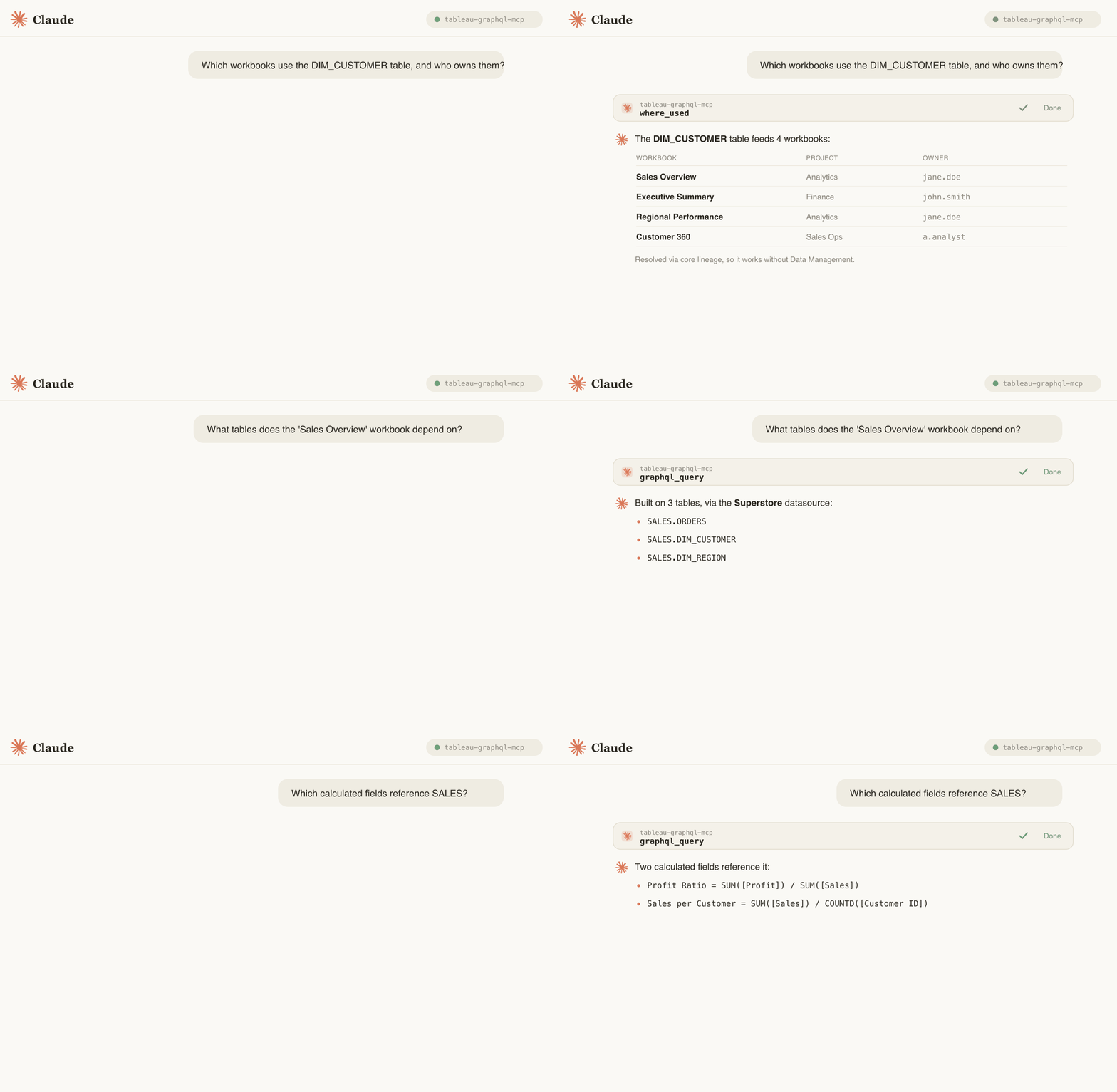
tableau-graphql-mcp turns your Tableau site's Metadata API into a set of MCP tools, so an AI assistant (Claude, Cursor, Cline, and others) can answer lineage questions in plain language:
- "If I drop the column
SALES, which workbooks break?" - "What tables does the Sales Overview workbook depend on?"
- "Which calculated fields reference
Profit, and on which dashboards?" - "Who should I notify before changing the
DIM_CUSTOMERtable?"
It ships seven curated tools: a universal GraphQL passthrough, live schema introspection, an embedded library of correct query templates, a robust where_used resolver, a multi-hop impact_analysis, a substring content search, and a connection probe. Together they let the model answer any lineage question, not just a fixed menu.
Why it's different
- Any question, done right.
graphql_queryruns any read-only GraphQL;introspect_schemaand a built-in cheat-sheet plus 28 worked examples keep the model's queries correct. - True impact analysis (multi-hop).
impact_analysisfollows the whole dependency chain (a calc built on a calc built on a column is included) and returns the full blast radius plus the de-duplicated owners to notify, not just direct references. - Works everywhere. Tableau Server and Cloud. The REST API version and the GraphQL endpoint (
/api/metadata/graphql, with a/relationship-service-war/graphqlfallback) are auto-detected. - Robust lineage without Catalog.
where_usedresolves workbooks via core lineage (referencedByFields -> sheets -> workbook), so it works even when the Data Management add-on'sdownstreamWorkbooksis empty. - No silent truncation.
graphql_queryflagspartial_resultswhen a query hits the node limit, andsearch_contentreportsscanned/totalcoverage, so a truncated answer is never mistaken for a complete one. - Tiny and safe. Read-only, stdio-only (no inbound port), secrets from env only, and no dependencies beyond the MCP SDK (stdlib
urllibfor HTTP).
Quickstart
You need uv (curl -LsSf https://astral.sh/uv/install.sh | sh) and a Tableau Personal Access Token.
Claude Code, one line:
claude mcp add tableau-graphql \
  -e TABLEAU_SERVER=https://10ax.online.tableau.com \
  -e TABLEAU_SITE_CONTENT_URL=YourSite \
  -e TABLEAU_PAT_NAME=my-token \
  -e TABLEAU_PAT_SECRET=the-full-secret \
  -- uvx tableau-graphql-mcp
That's all. uvx fetches the package from PyPI and runs it in an isolated environment; nothing to clone or install (and no git required). Then ask Claude a lineage question.
Configuration
All configuration is via environment variables (set them in your client's env block, never on the command line).
| Env var | Required | Default | Description |
|---|---|---|---|
TABLEAU_SERVER | yes | n/a | https://tableau.company.com (Server) or https://<pod>.online.tableau.com (Cloud). |
TABLEAU_SITE_CONTENT_URL | no | "" | Site slug (the part after /#/site/). Empty = Default site (Server only); Cloud always has one. |
TABLEAU_PAT_NAME | yes¹ | n/a | Personal Access Token name. |
TABLEAU_PAT_SECRET | yes¹ | n/a | PAT secret: the whole string, do not split on :. |
TABLEAU_TIMEOUT | no | 60 | Per-request timeout (seconds). |
TABLEAU_API_VERSION | no | auto | REST API version; else read from /api/serverinfo. |
TABLEAU_METADATA_PATH | no | auto | Override the GraphQL path; else auto-detected. |
TABLEAU_ALLOW_HTTP | no | off | Set to 1 to allow a plain http:// server on a trusted internal network. Otherwise only HTTPS (or loopback) is accepted, so credentials never travel unencrypted. |
TABLEAU_LOG_LEVEL | no | INFO | DEBUG logs each HTTP call (method + URL; never headers, bodies or secrets) to stderr. |
TABLEAU_AUTH_TOKEN | no | n/a | Advanced: a pre-obtained X-Tableau-Auth token (SSO tenants where PATs are disabled). |
TABLEAU_COOKIE | no | n/a | Advanced: a browser session cookie (SSO fallback). |
¹ Provide a PAT (TABLEAU_PAT_NAME + TABLEAU_PAT_SECRET) or an advanced TABLEAU_AUTH_TOKEN / TABLEAU_COOKIE.
Claude Desktop
Edit claude_desktop_config.json (macOS: ~/Library/Application Support/Claude/, Windows: %APPDATA%\Claude\):
{
  "mcpServers": {
    "tableau-graphql": {
      "command": "uvx",
      "args": ["tableau-graphql-mcp"],
      "env": {
        "TABLEAU_SERVER": "https://10ax.online.tableau.com",
        "TABLEAU_SITE_CONTENT_URL": "YourSite",
        "TABLEAU_PAT_NAME": "my-token",
        "TABLEAU_PAT_SECRET": "the-full-secret"
      }
    }
  }
}
Fully quit and reopen Claude Desktop, then check the tools menu.
Cursor · Cline · Windsurf
Every client uses the same mcpServers schema shown above. Add the same block to:
- Cursor:
~/.cursor/mcp.json(global) or.cursor/mcp.json(project). - Cline: the MCP Servers panel, then Configure, into
cline_mcp_settings.json. - Windsurf:
~/.codeium/windsurf/mcp_config.json.
On Windows, if uvx isn't found by the GUI app, use its absolute path (e.g. %USERPROFILE%\.local\bin\uvx.exe).
Tools
| Tool | What it does | Key args |
|---|---|---|
graphql_query | Run any read-only Metadata API GraphQL query. The general tool for any lineage question. | query, variables |
introspect_schema | Live schema introspection: list entry points, or a type's exact fields. | type_name |
lineage_examples | A schema cheat-sheet plus 28 curated question-to-GraphQL templates (8 categories). | category |
where_used | Which workbooks/datasources use given column / field / table names (robust one-hop core-lineage resolution). | names |
impact_analysis | Full transitive multi-hop blast radius of a column/field/table: every dependent field, plus affected sheets, dashboards, workbooks, and owners to notify. | name |
search_content | Find content whose name contains a term (case-insensitive substring), across workbooks, datasources, tables (and optionally fields/columns), with coverage numbers. | term, types |
server_info | Connected server, site, versions, endpoint, auth, and whether Catalog lineage is available. | none |
All tools are read-only. The Metadata API has no mutations.
Example prompts
Once connected, try:
- "Use server_info to confirm what you're connected to."
- "Search for anything with 'revenue' in the name."
- "Which workbooks use the columns SALES, PROFIT and DISCOUNT? Group by owner."
- "Show me the field-to-source-column map for the 'Sales Overview' workbook."
- "List every calculated field in that workbook with its formula."
- "Which published datasources feed workbooks in the Analytics project, and which are uncertified?"
- "Run impact_analysis on the 'Profit Ratio' field: every dependent sheet, dashboard, workbook, and owner to notify."
- "What is the blast radius of dropping the DIM_CUSTOMER table: workbooks, sheets, and owners to notify?"
Architecture
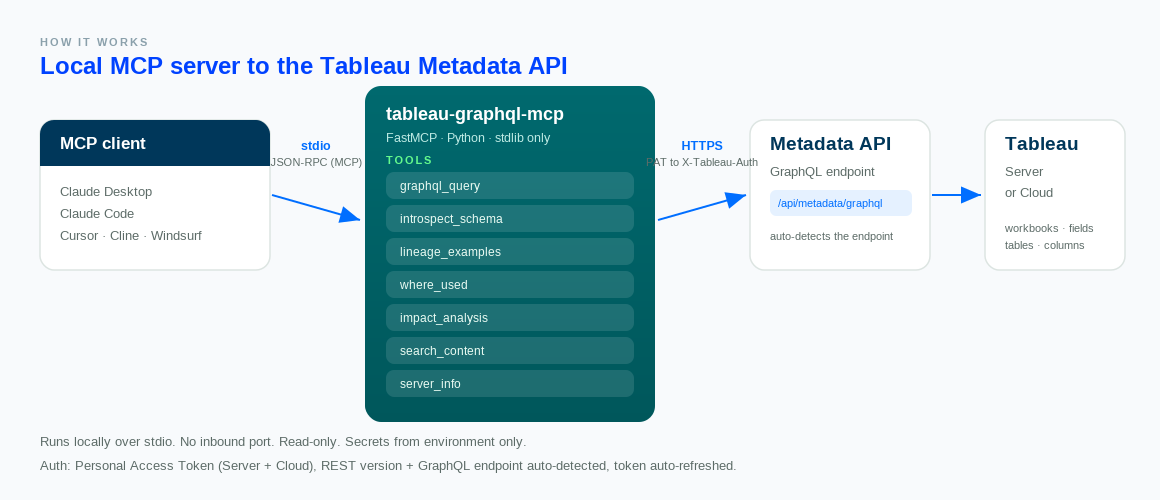
The server speaks MCP over stdio to the client and HTTPS to Tableau: it signs in with your PAT to get an X-Tableau-Auth token (auto-refreshed on expiry), auto-detects the REST API version and the GraphQL endpoint, then forwards queries to the Metadata API. Nothing is stored; every answer is live.
Security
- Read-only, enforced. Only GraphQL queries: no writes, no shell.
graphql_queryrejectsmutation/subscriptionoperations, and the Metadata API is query-only regardless. - Declared read-only. Every tool carries the MCP
readOnlyHintannotation, so clients can verify it without reading the code. - Local and stdio-only. No inbound network port is opened.
- Secrets from env only. Never passed as tool arguments, never logged, never returned in output.
- Credentials go only to your Tableau host. HTTPS is required, certificates are verified, and redirects are refused.
- Least privilege. The PAT inherits your Tableau permissions; the API only returns content you can see.
- Verifiable releases. Every GitHub release carries Sigstore signatures and a CycloneDX SBOM, and PyPI uploads use Trusted Publishing.
- Pin a version in production:
uvx tableau-graphql-mcp==0.2.0.
See SECURITY.md for the threat model, data handling, disclosure policy and how to verify a release.
Troubleshooting
| Symptom | Fix |
|---|---|
| Server doesn't appear | Fully quit and relaunch the client; check the config path and JSON validity. |
spawn uvx ENOENT | Install uv, or use the absolute path to uvx. |
| Sign-in fails (401) | Check the PAT name/secret and TABLEAU_SITE_CONTENT_URL. On SSO tenants PATs may be disabled; use TABLEAU_AUTH_TOKEN/TABLEAU_COOKIE. |
| "Could not reach the Metadata API" | On Tableau Server, an admin must enable it: tsm maintenance metadata-services enable. On Cloud it is always on. |
Empty downstreamWorkbooks | Expected without the Data Management add-on; use the where_used tool, which resolves via core lineage. |
Inspect the server directly with the MCP Inspector:
npx @modelcontextprotocol/inspector uvx tableau-graphql-mcp
Development
git clone https://github.com/tdries/tableau-graphQL-mcp && cd tableau-graphQL-mcp
uv sync --all-extras
uv run tableau-graphql-mcp                     # run from source
uv run pytest --cov=tableau_graphql_mcp        # tests + coverage (offline; no Tableau needed)
uv run ruff check .                            # lint
uv run ruff format --check .                   # format
The same gates run in CI (Linux/macOS/Windows, Python 3.10 to 3.13): ruff check,
ruff format --check, mypy --strict, and pytest with a coverage floor. The package
ships a PEP 561 py.typed marker, so importing it gives your type checker full types.
CodeQL scans every push, and a weekly fuzzing job (fuzz/) attacks the read-only guard.
Contributions welcome: see CONTRIBUTING.md and the Code of Conduct.
Roadmap
Shipped: published on PyPI and listed on the official MCP registry. Next:
- Optional Data Management path: richer
downstreamWorkbookswhen Catalog is present - More curated query templates in
lineage_examples - Optional response caching for repeated introspection within a session
Ideas and votes welcome in Discussions.
License
MIT © Tim Dries. Built at Biztory.
☕ Think I deserve a coffee for all the hard work I put into this? Buy me one, you silly! 🙂






