Listed from the MCP registry; nobody on Odel publishes it.
UpscaleX
Production 16K image upscaler and model gateway via RealESRGAN and Vulkan.
Runs on your machine from its package; the steps are below.
What it does
- Reads
- Writes
- High impact
At most: creates or changes data: records, files, settings.
What it costs
FreeOdel charges nothing per call. The publisher may charge for its own service.
Runs locally over stdio
This server isn't hosted — your MCP client launches it from a package registry. Use one of the commands below, or drop the config into your client (e.g. Claude Desktop).
Run
uvx upscalex
MCP client config
{
  "mcpServers": {
    "upscalex": {
      "command": "uvx",
      "args": [
        "upscalex"
      ]
    }
  }
}
UpscaleX MCP/CLI



UpscaleX is a production-grade 8K and 16K image upscaler CLI and Model Context Protocol (MCP) server powered by RealESRGAN, Vulkan GPU hardware acceleration, and Lanczos supersampling.
Engineered for digital print workflows, large-format poster production, fine art reproductions, and autonomous AI coding agents in Claude Desktop, Antigravity, and Cursor.
Looking for quick setup? Read the Installation Guide for a copy-paste AI Agent setup prompt and manual instructions, or provide your AI coding assistant with the UpscaleX Agent Skill.
Table of Contents
- Key Features
- Installation Guide
- AI Agent Skill
- Visual Quality Comparison
- Documentation Directory
- Quickstart with uv
- Command-Line Interface
- Model Context Protocol (MCP) Integration
- Model Matrix
- Testing and Verification
- Contributing
- License
Key Features
- Dual-Mode Operation: Interactive command-line interface (
upscalex) and standard Model Context Protocol server (upscalex-mcp). - 8K and 16K Presets:
- 16K: Native 4x RealESRGAN deep-learning model upscale producing master files up to 400+ Megapixels.
- 8K: 4x deep-learning inference followed by Lanczos-3 downsampling (Supersampling Anti-Aliasing / SSAA) for sharp edges and zero noise.
- Custom Dimensions: Proportional scaling to arbitrary resolutions or physical print aspect ratios.
- Cross-Platform Architecture: Tested and supported across Windows, Linux (Ubuntu, Debian, Fedora), and macOS (Apple Silicon arm64 & Intel x86_64).
- GPU Acceleration with Seamless CPU Fallback: Automatically discovers and utilizes discrete Vulkan GPUs (NVIDIA RTX/GeForce, AMD Radeon, Intel Arc/Iris, Apple Silicon via MoltenVK). In headless Docker containers or environments without GPU drivers, the engine falls back to multi-threaded CPU Lanczos super-resolution with zero crashes.
- Hardware Diagnostics: Integrated
upscalex doctorcommand inspects system compute devices, Vulkan support, and recommended tile dimensions. - Memory-Safe Tiling: Sliding-window spatial tile decomposition (
--tile-size 256) processes ultra-gigapixel images without Out-Of-Memory (OOM) failures on 4GB to 8GB GPUs. - Automated Engine Provisioning: Downloads and validates the precompiled platform binary automatically if not found locally.
- Print Fidelity Analysis: Automatically calculates physical print dimensions in inches and centimeters at 300 DPI, 150 DPI, and 72 DPI.
Visual Quality Comparison
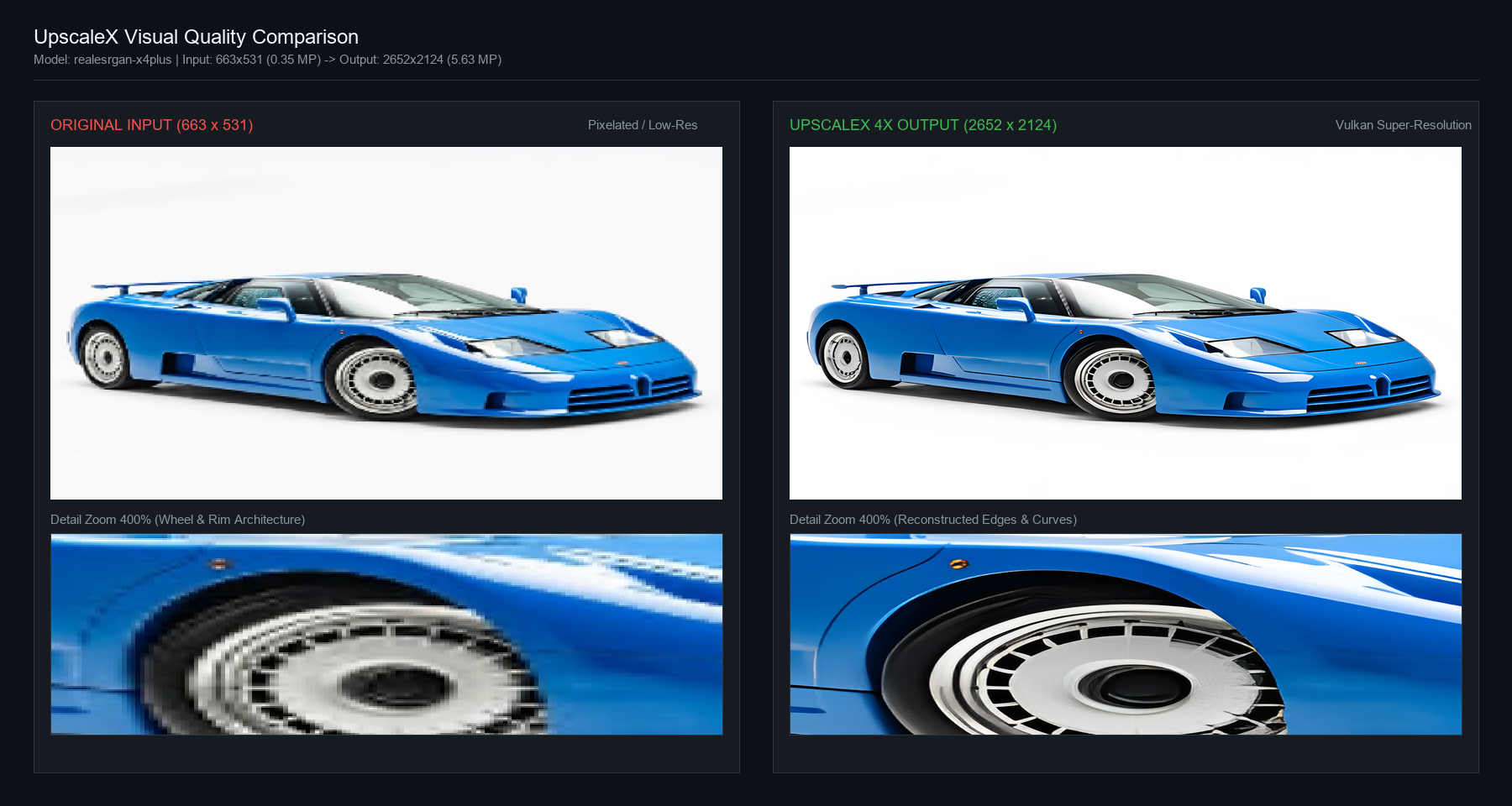
Below is an empirical comparison demonstrating UpscaleX 4x super-resolution reconstruction on a low-resolution pixelated source (663 × 531 px, 0.35 MP) upscaled to high-definition print fidelity (2,652 × 2,124 px, 5.63 MP) using the realesrgan-x4plus model.
| Metric | Original Source | UpscaleX 4x Output |
|---|---|---|
| Pixel Dimensions | 663 × 531 | 2,652 × 2,124 |
| Total Megapixels | 0.35 MP | 5.63 MP (16× Pixel Multiplication) |
| Edge Reconstruction | Heavy block pixelation, ringing | Reconstructed circular spokes, sharp contours |
| Max 300 DPI Print Size | 2.2 × 1.8 inches | 8.8 × 7.1 inches |
| Model | — | realesrgan-x4plus |
| Hardware | — | NVIDIA GeForce RTX 3050 Laptop GPU (10.8s) |
Documentation Directory
Comprehensive technical guides are available in the docs/ directory and repository root:
- Installation Guide: AI Agent autonomous copy-paste prompt and manual installation procedures.
- AI Agent Skill Specification: Standard agent skill definition for Claude, Cursor, and Antigravity.
- CLI Reference Guide: Complete flag documentation, tiling strategies, and execution examples.
- Model Context Protocol (MCP) Guide: JSON-RPC tool contracts, parameter schemas, and multi-client configuration.
- Architecture & Mathematics Specification: Deep-learning foundations, RRDB networks, Lanczos kernels, and memory bounds.
- Error Handling & Troubleshooting: Known failure modes, pre-flight sanitization, and recovery procedures.
- Contributing Guide: Code standards, test procedures, and pull request workflow.
Quickstart
Option 1: Install from PyPI (Simplest for CLI & MCP)
pip install upscalex
Option 2: Clone and Install from Source (with uv)
git clone https://github.com/The-Open-Source-Founder/upscalex.git
cd upscalex

# Create virtual environment and install package
uv venv
uv pip install -e .
Inspect Available Models
upscalex models
Command-Line Interface
16K Upscale (Default 4x Model)
upscalex upscale input.png --target 16k
8K Supersampled Upscale
upscalex upscale poster.png --target 8k -o poster_8k.png
2D Illustration / Anime Artwork
upscalex upscale graphic.png --model realesrgan-x4plus-anime --target 8k
Image and Print Sizing Inspection
upscalex info input.png
Hardware and Content-Aware Model Recommendation
upscalex recommend input.png
For complete options and arguments, see the CLI Guide.
Model Context Protocol (MCP) Integration
UpscaleX runs as a native MCP server over stdio, enabling AI agents (Claude Desktop, Cursor, Antigravity, Windsurf, Zed) to inspect image metadata, evaluate print viability, and execute upscaling autonomously.
Server Invocation
# Standalone entrypoint
upscalex-mcp

# Or via CLI
upscalex serve
Client Configuration
Method 1: Using Pip (pip install upscalex)
A. Claude Desktop
Configuration file paths:
- Windows:
%APPDATA%\Claude\claude_desktop_config.json - macOS:
~/Library/Application Support/Claude/claude_desktop_config.json - Linux:
~/.config/Claude/claude_desktop_config.json
{
  "mcpServers": {
    "upscalex": {
      "command": "upscalex-mcp"
    }
  }
}
Note: If your environment does not have global pip binaries in PATH, use explicit Python:
{
  "mcpServers": {
    "upscalex": {
      "command": "python",
      "args": ["-m", "upscalex.server"]
    }
  }
}
B. Default / Common MCP Clients (Cursor, Antigravity, Windsurf, Claude Code)
Configuration file: mcp_config.json or .cursor/mcp.json
{
  "mcpServers": {
    "upscalex": {
      "command": "upscalex-mcp"
    }
  }
}
Method 2: Using Git Clone & Source Checkout
A. Claude Desktop (with uv or virtualenv)
{
  "mcpServers": {
    "upscalex": {
      "command": "uv",
      "args": [
        "run",
        "--directory",
        "/absolute/path/to/upscalex",
        "upscalex-mcp"
      ]
    }
  }
}
Direct virtual environment alternative (Windows / Linux / macOS):
{
  "mcpServers": {
    "upscalex": {
      "command": "/absolute/path/to/upscalex/.venv/bin/python",
      "args": ["-m", "upscalex.server"]
    }
  }
}
(On Windows, use C:\\absolute\\path\\to\\upscalex\\.venv\\Scripts\\python.exe)
B. Default / Common MCP Clients (Cursor, Antigravity, Windsurf)
Configuration file: mcp_config.json or .cursor/mcp.json
{
  "mcpServers": {
    "upscalex": {
      "command": "uv",
      "args": [
        "run",
        "--directory",
        "/absolute/path/to/upscalex",
        "upscalex-mcp"
      ]
    }
  }
}
For complete tool schemas and JSON-RPC contracts, see the MCP Guide.
Model Matrix and Catalog
UpscaleX supports both pre-packaged core models and on-demand downloadable community models:
| Model ID | Scale | Target Media | VRAM Requirement | Status | Description |
|---|---|---|---|---|---|
realesrgan-x4plus | 4x | Photos / Fine Art | Medium (4GB VRAM) | Installed | Flagship model for high-fidelity photography, art, and exhibition posters. |
realesrgan-x4plus-anime | 4x | Anime / Illustration | Medium (4GB VRAM) | Installed | Preserves flat colors, sharp contours, and line definition in 2D illustrations. |
realesr-animevideov3-x4 | 4x | Video / Fast Previews | Low (1GB-2GB / CPU) | Installed | Lightweight 4x feed-forward model for fast turnaround and low-spec systems. |
realesr-animevideov3-x2 | 2x | Animation / Video | Low (1GB-2GB / CPU) | Installed | Fast 2x model for video frames, icons, and lightweight web assets. |
realesr-animevideov3-x3 | 3x | Animation / Video | Low (1GB-2GB / CPU) | Installed | Fast 3x model for intermediate scaling. |
realesr-general-x4v3 | 4x | General / Compact | Low (2GB VRAM) | Installed | Official compact general model with low memory consumption. |
4x-ultrasharp | 4x | Portraits / Ultra-Detail | Medium-High (4GB-6GB) | Downloadable | Community champion for micro-textures, portraits, fabrics, and skin. |
4x-nmkd-superscale | 4x | Clean Photorealistic | Medium-High (4GB-6GB) | Downloadable | Trained on clean photography; preserves hair, threads, and foliage. |
realesrgan-anime-6b | 4x | Anime / Fast | Low (1GB-2GB / CPU) | Downloadable | 6-block lightweight anime model for rapid processing. |
Download Additional Models
Download models through the CLI or via the download_model MCP tool:
# Download 4x UltraSharp for portraits
upscalex download-model 4x-ultrasharp

# Download NMKD clean photo model
upscalex download-model 4x-nmkd-superscale
Testing and Verification
Run the test suite to verify model resolution calculation, CLI exit codes, and live GPU inference:
uv pip install -e ".[dev]"
uv run pytest -v
All tests must pass prior to submitting changes.
Contributing
Contributions to UpscaleX are welcome. Please read CONTRIBUTING.md for coding standards, pull request processes, and development guidelines.
License
This project is licensed under the MIT License. See the LICENSE file for details.