
cdek-mcp
MCP server for CDEK — delivery, tariffs, tracking, order management (Russia)
Runs on your machine from its package; the steps are below.
What it does
- Reads
- Writes
- High impact
At most: only reads or looks up information.
What it costs
FreeOdel charges nothing per call. The publisher may charge for its own service.
Runs locally over stdio
This server isn't hosted — your MCP client launches it from a package registry. Use one of the commands below, or drop the config into your client (e.g. Claude Desktop).
Run
npx -y @theyahia/cdek-mcp
MCP client config
{
  "mcpServers": {
    "cdek-mcp": {
      "command": "npx",
      "args": [
        "-y",
        "@theyahia/cdek-mcp"
      ]
    }
  }
}MCP-сервер для СДЭК API — 16 инструментов для ИИ-агента: тарифы, заказы, трекинг
Если вы искали, как подключить доставку СДЭК к Claude или другому ИИ-агенту, — этот сервер закрывает весь цикл отправления через CDEK API v2: расчёт тарифов и сроков, создание и отмена заказов, трекинг по накладной, поиск городов и пунктов выдачи, вызов курьера, штрихкоды и квитанции, вебхуки. Спрашиваете «сколько стоит и как долго везти 2 кг из Москвы в Казань» — получаете сравнение тарифов таблицей, а не форму на сайте. Работает и на тестовом контуре СДЭК, и на боевом.


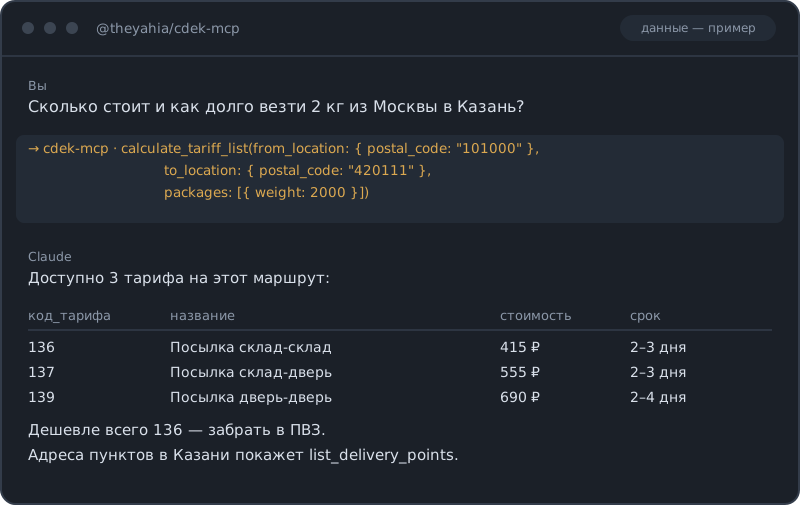
Инструменты (16)
Тарифы
| Инструмент | Описание |
|---|---|
calculate_tariff | Рассчитать стоимость и срок доставки по конкретному тарифу |
calculate_tariff_list | Все доступные тарифы с ценами по маршруту |
Заказы
| Инструмент | Описание |
|---|---|
create_order | Создать заказ на доставку с отправителем, получателем и местами |
get_order | Детали и статус заказа по UUID |
delete_order | Отменить или удалить заказ по UUID |
list_orders | Поиск и фильтрация заказов по периоду, номеру ИМ или накладной СДЭК |
Трекинг
| Инструмент | Описание |
|---|---|
track_shipment | Отследить отправление по номеру накладной СДЭК |
География
| Инструмент | Описание |
|---|---|
get_cities | Поиск по справочнику городов — по названию, индексу или стране |
get_regions | Поиск по справочнику регионов — по стране или названию |
list_delivery_points | Найти пункты выдачи и постаматы по городу или GPS-координатам |
Штрихкоды и печать
| Инструмент | Описание |
|---|---|
generate_barcode | Сформировать штрихкод или этикетку для заказа |
print_receipt | Сформировать PDF квитанции или накладной по заказу |
Вызов курьера
| Инструмент | Описание |
|---|---|
create_courier_pickup | Заказать забор груза курьером по заказу |
get_courier_pickup | Проверить статус заявки на вызов курьера |
Вебхуки
| Инструмент | Описание |
|---|---|
create_webhook | Зарегистрировать вебхук на смену статуса заказа или фото доставки |
delete_webhook | Удалить подписку на вебхук по UUID |
Быстрый старт
Claude Desktop
~/.config/claude/claude_desktop_config.json (macOS) или %APPDATA%\Claude\claude_desktop_config.json (Windows):
{
  "mcpServers": {
    "cdek": {
      "command": "npx",
      "args": ["-y", "@theyahia/cdek-mcp"],
      "env": {
        "CDEK_CLIENT_ID": "<YOUR_CLIENT_ID>",
        "CDEK_CLIENT_SECRET": "<YOUR_CLIENT_SECRET>",
        "CDEK_SANDBOX": "true"
      }
    }
  }
}
Cursor / Windsurf
.cursor/mcp.json или .windsurf/mcp.json:
{
  "mcpServers": {
    "cdek": {
      "command": "npx",
      "args": ["-y", "@theyahia/cdek-mcp"],
      "env": {
        "CDEK_CLIENT_ID": "<YOUR_CLIENT_ID>",
        "CDEK_CLIENT_SECRET": "<YOUR_CLIENT_SECRET>",
        "CDEK_SANDBOX": "true"
      }
    }
  }
}
VS Code (Copilot)
.vscode/mcp.json:
{
  "servers": {
    "cdek": {
      "command": "npx",
      "args": ["-y", "@theyahia/cdek-mcp"],
      "env": {
        "CDEK_CLIENT_ID": "<YOUR_CLIENT_ID>",
        "CDEK_CLIENT_SECRET": "<YOUR_CLIENT_SECRET>",
        "CDEK_SANDBOX": "true"
      }
    }
  }
}
Транспорт Streamable HTTP
Для веб-развёртываний используйте флаг --http или переменную HTTP_PORT:
HTTP_PORT=3000 npx @theyahia/cdek-mcp --http
Эндпоинты:
POST /mcp— MCP JSON-RPCGET /mcp— SSE-потокDELETE /mcp— завершение сессииGET /health— проверка состояния
Переменные окружения
| Переменная | Обяз. | Описание |
|---|---|---|
CDEK_CLIENT_ID | да | Client ID из личного кабинета СДЭК |
CDEK_CLIENT_SECRET | да | Client Secret из личного кабинета СДЭК |
CDEK_SANDBOX | нет | true — работать в песочнице (api.edu.cdek.ru) |
HTTP_PORT | нет | Порт HTTP-транспорта (включает HTTP-режим) |
Где взять ключи API: личный кабинет СДЭК → Интеграция → Ключи API.
Режим песочницы
Задайте CDEK_SANDBOX=true, чтобы работать с тестовым контуром СДЭК (api.edu.cdek.ru). Боевой контур — api.cdek.ru.
СДЭК публикует общий тестовый аккаунт для интеграционных проверок:
- Client ID:
EMscd6r9JnFiQ3bLoyjJY6eM78JrJceI - Client Secret:
PjLZkKBHEiLK3YsjtNrt3TGNG0ahs3kh
⚠️ СДЭК время от времени меняет этот общий тестовый аккаунт. Если вы получили
OAuth token error (HTTP 401) … invalid_client, публичная пара уже сменилась — запросите собственные ключи песочницы в кабинете интеграции (lk.cdek.ru → Интеграция → Ключи API).
Авторизация
OAuth 2.0, поток Client Credentials, реализован в OAuthStrategy из @theyahia/mcp-core:
- Токен запрашивается автоматически при первом обращении
- Кэширование токена с упреждающим обновлением незадолго до истечения
- Дедупликация параллельных запросов (одно обновление токена делится между всеми)
- Автоматический повтор на 401 со сбросом токена
E-commerce-стек
Соберите полный ИИ-стек для интернет-магазина вместе с другими серверами WWmcp:
| Сервер | Назначение |
|---|---|
| cdek-mcp | Доставка и логистика |
| dadata-mcp | Проверка адресов, поиск компаний |
Часть серии WWmcp.
Демо-промпты
-
«Сколько стоит отправить посылку 2 кг из Москвы в Санкт-Петербург?» Использует
get_citiesдля поиска кодов городов, затемcalculate_tariff_listдля сравнения всех доступных тарифов. -
«Найди ближайший пункт выдачи СДЭК к Красной площади» Использует
get_cities, чтобы получитьcity_codeМосквы, затемlist_delivery_pointsсlatitude: 55.7539,longitude: 37.6208,radius_km: 5— результаты фильтруются по радиусу и сортируются по расстоянию (у каждого есть полякоординатыирасстояние_км). -
«Создай заказ на отправку книги из Казани в Новосибирск, вызови курьера и распечатай квитанцию» Использует
create_order, затемcreate_courier_pickupдля забора груза иprint_receiptдля накладной.
Разработка
git clone https://github.com/theYahia/cdek-mcp.git
cd cdek-mcp
npm install

npm run lint        # ESLint (flat config)
npm run typecheck   # tsc --noEmit
npm run build       # сборка в dist/
npm test            # юнит-тесты (vitest)
npm run test:e2e    # e2e smoke-тест (перечисляет инструменты, без реальных ключей)
Запуск сервера локально против песочницы СДЭК (api.edu.cdek.ru) — с общей тестовой парой из раздела Режим песочницы или со своими ключами:
CDEK_SANDBOX=true \
CDEK_CLIENT_ID=<YOUR_SANDBOX_CLIENT_ID> \
CDEK_CLIENT_SECRET=<YOUR_SANDBOX_CLIENT_SECRET> \
npm run dev
Заметки о релизах — в CHANGELOG.md.
Лицензия
MIT