Listed from the MCP registry; nobody on Odel publishes it.

icloud-mcp
stdio MCP for iCloud Calendar (CalDAV), with optional Contacts and Mail.
Runs on your machine from its package; the steps are below.
What it does
- Reads
- Writes
- High impact
At most: moves money, runs code or commands, deletes data, or sends messages for you.
What it costs
FreeOdel charges nothing per call. The publisher may charge for its own service.
Runs locally over stdio
This server isn't hosted — your MCP client launches it from a package registry. Use one of the commands below, or drop the config into your client (e.g. Claude Desktop).
Distributed as an MCP bundle (`https://github.com/ThomasCrouzet/icloud-mcp/releases/download/v1.2.0/icloud-mcp-v1.2.0-linux-amd64.mcpb`) — download it and import the bundle in your MCP client.
Distributed as an MCP bundle (`https://github.com/ThomasCrouzet/icloud-mcp/releases/download/v1.2.0/icloud-mcp-v1.2.0-linux-arm64.mcpb`) — download it and import the bundle in your MCP client.
Distributed as an MCP bundle (`https://github.com/ThomasCrouzet/icloud-mcp/releases/download/v1.2.0/icloud-mcp-v1.2.0-darwin-arm64.mcpb`) — download it and import the bundle in your MCP client.
icloud-mcp
iCloud Calendar, Contacts, and Mail through one stdio MCP server.
Get started | MCP tools | Configuration | Documentation
Connect an MCP host to iCloud with one Go binary. Calendar uses CalDAV; optional Contacts and Mail use CardDAV, IMAP, and SMTP. The host starts the process and exchanges JSON-RPC through stdin and stdout.
Why icloud-mcp?
Use this server when an MCP host needs to search calendars, find free time, or work with iCloud contacts and messages on a headless machine. It uses app-specific passwords and remote protocols, without macOS frameworks, browser automation, or private Apple APIs.
Capability gates let you start with Calendar reads and enable other operations as needed. Each domain has its own protocol clients and network policy. All enabled domains share one process: a process compromise can expose all loaded credentials. Use separate processes and account configurations for stronger isolation.
Privacy and security
Accounts: An Apple Account with iCloud Calendar and an app-specific password is required. Contacts uses the same identity. Optional Mail needs a full iCloud Mail address and can use a separate app-specific password. The server has no separate product account; the MCP host has its own account requirements.
Telemetry: The server has no telemetry or crash-reporting service. It writes operational logs and mutation audit records to stderr. The host controls log retention and has its own telemetry policy.
Data: Credentials are loaded at startup. Discovery state and keyed update results stay in process memory; the server writes no local data files. It sends authenticated requests to iCloud and returns account content to the MCP host. That host controls any further storage or transmission to a model provider.
- Fixed destinations. Calendar and Contacts use their iCloud hosts and
validated shards on port 443. Mail uses
imap.mail.me.com:993andsmtp.mail.me.com:587, with mandatory STARTTLS for SMTP. TLS 1.2 or later is required. DAV ignores proxy environment variables. - Redaction and audit. The server redacts configured identities, passwords,
and Basic/SASL forms from errors, results, and logs. Mutation audits contain
domain,resourceType, and a process-local HMACresourceToken, without raw resource paths, UIDs, mailboxes, or recipients. - Host permissions. Remote text can contain prompt injection. A compromised host model can invoke every registered tool. Start with global read-only mode and enable only the capabilities you need.
See the threat model and reporting policy and security implementation.
Capability gates
| Capability | Operations | Enablement |
|---|---|---|
| Calendar | List calendars; search, get, and validate events; find free slots; create, update, and delete events | calendar.read in ICLOUD_MCP_PERMISSIONS registers the read tools; a profile without it receives no Calendar tool; calendar.write and calendar.delete are required for effects; group-scheduled mutations also need calendar.schedule and acknowledge_scheduling |
| Contacts | List books; search and get contacts; create, update, and delete vCard 3.0 contacts | Reads require ICLOUD_MCP_ENABLE_CONTACTS=true; writes require contacts.write or contacts.delete |
| Mail read | List mailboxes; search messages; get plain text and attachment metadata | ICLOUD_MCP_ENABLE_MAIL=true |
| Mail mutation | Change flags; move or trash a message | Mail plus mail.mutate or mail.trash |
| Mail send | Submit a plain-text message, or reply to one with preserved conversation headers, through SMTP | Mail plus mail.send and a recipient policy |
ICLOUD_MCP_READ_ONLY=true removes every mutation and send tool from
tools/list. It does not enable a disabled read domain. Contacts has no separate
write flag. Mail mutation and send have independent gates. A send policy is
required whenever the send flag is set, including under global read-only.
ICLOUD_MCP_RESOURCE_SCOPES optionally limits which calendars, address books,
and mailboxes an agent may use. It is a semicolon-separated list of
action=value[,value] entries. Actions are calendar.read, calendar.write,
calendar.delete, contacts.read, contacts.write, contacts.delete,
mail.read, mail.mutate, and mail.archive. A literal * keeps an action
unrestricted.
Calendar values are paths. Contacts values are opaque identifiers or exact display names. Mail values are exact mailbox names. Omitted action scopes fall back to the read or write scope for that domain. Direct identifier injection is checked before the domain operation. Ambiguous or stale Contacts names fail closed. The variable is invalid if an action is unknown, duplicated, empty, or a Calendar path is malformed.
ICLOUD_MCP_PERMISSIONS names every capability. It takes a comma-separated
list: calendar.read, calendar.write, calendar.delete, calendar.schedule,
contacts.read, contacts.write, contacts.delete, mail.read, mail.mutate,
mail.trash, mail.send, and mail.archive. calendar.schedule is a separate
operator grant for group-scheduled Calendar mutations and requires
calendar.write or calendar.delete. Domain switches still enable a domain. Global
read-only still removes every mutation and send. With no value, enabled
domains are read-only. No switch, flag, or omission implies an effect. For
example, calendar.read,mail.read,mail.send gives Calendar reads and Mail send
without Calendar, Contacts, or Mail mutation tools.
MCP tools
The server registers 7 tools with the default read-only profile, including the global capability tool, and 24 when explicit permissions and domain gates enable every capability. Disabled tools are absent from discovery. The MCP interface provides tools over stdio.
| Tool | Input | Result | Account changes |
|---|---|---|---|
icloud_capabilities | No arguments | Enabled domains, effective capabilities, version, tool names and count | None; the call uses local state |
list_calendars | No arguments | Calendar names and paths for subsequent calls | None |
search_events | start, end; optional calendar, filters, and cursor | Sorted event page with calendar, recurrence occurrences, truncation or failure warnings, and optional nextCursor | None |
update_event | calendar, uid, changed fields; optional etag, idempotency_key, occurrence scope | Updated event or a structured error | Conditional Calendar write |
get_message | mailbox, uid_validity, uid; optional body limit and HTML fallback | Message metadata and bounded plain text | None; EXAMINE and PEEK preserve read state |
send_message | body, optional subject, idempotency_key, and at least one recipient across to, cc, bcc | Submission status or a structured error | Sends mail to allowed recipients; identical keyed calls reuse one submission |
reply_message | source mailbox, uid_validity, uid; body; optional mode and idempotency_key | Submission status or a structured error | Replies to the resolved sender or reply-all recipients; never marks Answered or appends Sent |
The complete inventory lists all tools.
Run icloud-mcp -doctor for authenticated read-only network checks. Add
-doctor-format=json for machine-readable output. The command validates local
configuration, then probes enabled domains with a 10-second timeout each. It
never creates, updates, moves, trashes, or sends. Exit status is 0 when every
enabled domain is ready and 1 when a probe fails. Disabled domains stay
disabled; enabled domains are never reported ready before a successful probe.
-doctor is not an offline profile check. It discovers collections and mailboxes
outside MCP resource filtering, and it does not probe SMTP. See the
diagnostic authorization limits.
It is not available in v0.4.3. For credential-free TLS checks and hosted-network limitations,
see Mail network troubleshooting.
Representative read tools also publish output schemas and structuredContent.
Their text content remains for older hosts. Both forms come from the same
redacted values.
Discover their argument schemas with the host's tool list. Domain failures set
the MCP error flag and include a JSON code in text content. Follow the
error and recovery reference.
Get started
This first run gives an MCP host read-only Calendar access. You need an MCP host, network access to iCloud, and an Apple Account with two-factor authentication to create an app-specific password. Never use the main Apple Account password.
Read-only by default. With no ICLOUD_MCP_PERMISSIONS, the server exposes
reads only. Keep ICLOUD_MCP_READ_ONLY=true for the first run. No switch or
omission grants an effect.
Choose an install path
| Path | Use when | Installation evidence |
|---|---|---|
| MCPB bundle (recommended) | Your host installs MCPB files and you do not want Go | Bundle build, manifest validation, native startup, and signatures are verified. Real host installation is UNVERIFIED (#126). |
| Release archive | Linux amd64/arm64 or macOS arm64, with a manual host command | Native archive smoke is verified on the matching platform. Host configuration is manual. |
go install | You develop with Go 1.26.0 or newer | Build, tests, and protocol checks are verified locally and in CI. |
The MCPB path is first because it needs no compiler. The missing evidence is a recorded install in a named host version, not a bundle defect. Until that record exists, this page does not claim that an MCPB host install was performed.
Path A: MCPB bundle (host installation unverified)
-
Download the bundle for your platform from the
v1.2.0release:linux-amd64,linux-arm64, ordarwin-arm64. -
Download
icloud-mcp-v1.2.0-checksums.txtand the matching.sigand.pemfiles. Verify the bytes:shshasum -a 256 -c icloud-mcp-v1.2.0-checksums.txt cosign verify-blob \ --certificate icloud-mcp-v1.2.0-linux-amd64.mcpb.pem \ --signature icloud-mcp-v1.2.0-linux-amd64.mcpb.sig \ --certificate-identity "https://github.com/ThomasCrouzet/icloud-mcp/.github/workflows/ci.yml@refs/tags/v1.2.0" \ --certificate-oidc-issuer "https://token.actions.githubusercontent.com" \ icloud-mcp-v1.2.0-linux-amd64.mcpb -
Open the
.mcpbfile in your MCPB-capable host, or use that host's install command. The host readsmanifest.json, asks for the declared user settings, and starts${__dirname}/server/icloud-mcp. -
Set
emailand the app-specific password. Keepread_only=true,permissions=calendar.read,enable_contacts=false, andenable_mail=false. Set your IANAdefault_timezone. -
Start the connector and confirm exactly seven tools. Call
icloud_capabilitiesand confirmreadOnlyis true. -
Restart the host and confirm the settings survive. Uninstall by removing the bundle from the host, then revoke the app-specific password at Apple.
Unverified host part. The host name, host version, OS/arch, settings
persistence, secret storage, upgrade behavior, and disable/uninstall behavior
are not recorded yet. If the host rejects manifest version 0.4, the command,
or the bundle platform, use Path B and report the exact host name and version in
#126. Do not send
credentials or account data in that report.
The MCPB guide lists the manifest settings, entry set, and trust chain. The release verification procedure covers checksums and signatures in more detail.
Path B: release archive
Download the archive for Linux amd64/arm64 or macOS arm64 from the release page, verify the checksum and signature, then extract it:
tar -xzf icloud-mcp-v1.2.0-linux-amd64.tar.gz
./icloud-mcp -version
Use the extracted absolute path in the host configuration below. The archive contains the same native binary as the bundle. It does not include a host installer.
Path C: go install
With Go 1.26.0 or newer:
go install github.com/ThomasCrouzet/icloud-mcp/cmd/icloud-mcp@latest
go env GOPATH GOBIN
The executable is installed in GOBIN when set, otherwise in bin under
GOPATH (normally $HOME/go/bin). Use its absolute path in the host config.
Prepare credentials
Create one app-specific password for this server. Never use the main Apple
Account password. Store the Apple Account identity and the app-specific password
in separate files outside the repository. Each must be a regular file of at
most 4 KiB, with mode 0600 or stricter. The host user must be able to read
them. Use absolute file:// paths; the server reads these files only at
startup.
For an MCPB host, prefer the masked password settings. If the host cannot store
secrets, enter the documented file:// value in the string setting. See
MCPB user settings.
Configure the host
This manual example uses Claude Desktop on macOS. Open Settings >
Developer > Edit Config. Its user configuration file is
~/Library/Application Support/Claude/claude_desktop_config.json; see the
official local-server setup guide
and environment configuration.
Merge this entry into mcpServers, with your actual absolute paths:
{
  "mcpServers": {
    "icloud": {
      "command": "/Users/you/go/bin/icloud-mcp",
      "env": {
        "ICLOUD_EMAIL": "file:///Users/you/.config/icloud-mcp/email",
        "ICLOUD_PASSWORD": "file:///Users/you/.config/icloud-mcp/password",
        "ICLOUD_MCP_READ_ONLY": "true",
        "ICLOUD_MCP_PERMISSIONS": "calendar.read",
        "ICLOUD_MCP_ENABLE_CONTACTS": "false",
        "ICLOUD_MCP_ENABLE_MAIL": "false",
        "ICLOUD_MCP_ENABLE_MAIL_WRITE": "false",
        "ICLOUD_MCP_ENABLE_MAIL_SEND": "false",
        "ICLOUD_MCP_DEFAULT_TZ": "Europe/Paris"
      }
    }
  }
}
Keep optional domains off for this run. Fully quit and reopen the host. The host
launches the binary. Calendar discovery starts on the first Calendar call, so a
remote Calendar outage does not block an optional domain. Open the host's
connector tool list and confirm the icloud tools appear.
For an MCPB host, use the host's settings form instead of this JSON. The manifest maps the same values to the same environment variables. Do not paste a password into a public configuration file.
This entry is also available as calendar-read-only.json. Choose one of the five tested profiles for Calendar, Contacts, Mail, scoped Calendar writes, or exact-recipient send. Only the three read-only profiles are recommended for first use.
The local binary can return account data to the configured MCP host and model. Their policies govern onward transmission. Local stdio does not keep that data outside the host or model. Review those policies before the first account read. For synthetic-only startup checks, use the offline validation commands or the synthetic first-run transcript.
Run your first operation
Ask the host:
Call icloud_capabilities and confirm readOnly is true.
Compare its tools with the host's tools/list. No write, delete, mutate, or send tool may appear.
For this Calendar profile, the current toolCount is 7.
Then call list_calendars with no arguments and show the calendar names.
The first call confirms capability discovery. The second reads iCloud. It
returns count and a calendars array with name and path fields. An account
with no calendars returns an empty array. A synthetic protocol fixture returns:
{
  "count": 1,
  "calendars": [
    {"path": "/fixture/calendars/home/", "name": "Fixture Calendar"}
  ]
}
This output comes from the repository fixture, not a live account. Your names,
paths, and count depend on your account. Next, ask the host to use
search_events for the next seven days.
For another host, configure a custom stdio process with the same command and environment; its configuration format can differ. See host integration.
If the first start fails
| Symptom | Check |
|---|---|
| The host rejects the bundle | Host name and version are not yet verified. Use Path B. Report the host version in #126. |
configuration error | The identity, password, gate, or timezone value is invalid. Fix it before retrying. |
authentication | Use a new app-specific password. Never use the main password. |
| Calendar tools are absent | The host did not start the process or the tool list is stale. Restart the host. |
| Write or send tools appear | Set ICLOUD_MCP_READ_ONLY=true and use only calendar.read. Report the host configuration. |
Configuration
The binary reads exactly 15 product environment variables from its process
environment. It does not load .env files or host configuration files.
.env.example lists the supported keys. The host or launching
shell must supply them; restart the process after a change.
| Variable | Required | Default | Purpose |
|---|---|---|---|
ICLOUD_EMAIL | Calendar or Contacts requested | None | Calendar and Contacts identity; supports file:// |
ICLOUD_PASSWORD | Calendar/Contacts, or Mail password fallback | None | App-specific password; supports file:// |
ICLOUD_MCP_READ_ONLY | No | false | Remove every mutation and send tool |
ICLOUD_MCP_PERMISSIONS | No | Reads only | Explicit comma-separated capability list |
ICLOUD_MCP_RESOURCE_SCOPES | No | All resources | Per-action Calendar, Contacts, and Mail resource allowlists |
ICLOUD_MCP_LOG_LEVEL | No | info | Operational stderr log level |
ICLOUD_MCP_DEFAULT_TZ | No | UTC | IANA zone for Calendar times without an offset and recurring-write fallback |
ICLOUD_MCP_ENABLE_CONTACTS | No | false | Enable Contacts reads; writes require contacts.write or contacts.delete |
ICLOUD_MCP_ENABLE_MAIL | No | false | Enable Mail reads |
ICLOUD_MAIL_ADDRESS | When Mail is on | None | Full iCloud Mail address; supports file:// |
ICLOUD_MAIL_FROM | No | ICLOUD_MAIL_ADDRESS | Sender address for From and MAIL FROM, for example an iCloud+ custom-domain address; login stays on ICLOUD_MAIL_ADDRESS; ASCII only; supports file:// (an empty file is an error) |
ICLOUD_MAIL_PASSWORD | No | ICLOUD_PASSWORD | Separate Mail app-specific password; supports file:// |
ICLOUD_MCP_ENABLE_MAIL_WRITE | No | false | Compatibility gate only; Mail mutation requires mail.mutate or mail.trash |
ICLOUD_MCP_ENABLE_MAIL_SEND | No | false | Compatibility gate only; send requires mail.send and a recipient policy |
ICLOUD_MCP_SMTP_ALLOWED_RECIPIENTS | When send is requested | None | Comma-separated exact addresses, or literal * |
Boolean values accept unset, 0, false, 1, and true; the parser trims
whitespace and ignores case. Invalid values fail before network access. Pass
environment values as strings, including quoted booleans in YAML. Mail write
or send without Mail is a boot error. Prefer exact recipient addresses: literal
* permits any syntactically valid recipient and causes a boot warning.
For Calendar times, use an explicit RFC3339 offset or a local time without an
offset in ICLOUD_MCP_DEFAULT_TZ. Do not label a local hour with Z. Timed
results include an explicit numeric offset; all-day dates use YYYY-MM-DD. A
floating source value stays offset-free and sets isFloating. A recurrence
occurrence resolved from a spring gap sets dstAdjusted.
See the full configuration and date rules
for log-level forms and optional-domain examples.
Version 1.0.0 makes read-only the default. An unset
ICLOUD_MCP_PERMISSIONS grants reads only; a domain switch or
ICLOUD_MCP_READ_ONLY=false does not grant an effect. Existing v0.x
configurations that relied on implicit Calendar or Contacts writes must add the
exact tokens before upgrading. See the
v1.0.0 migration for the token
list and examples.
Operations
| Area | Behavior |
|---|---|
| Lifecycle | Configuration validates before network access. Calendar, Contacts, and Mail initialize independently. Calendar and Contacts discovery is lazy; Mail uses fresh sessions. A failing domain does not remove another domain. EOF and SIGTERM stop the stdio process. Use a separate process for each account. |
| Logs | stdout is reserved for JSON-RPC. Operational logs and mutation audits go to stderr. -audit-format=json is the default; text is also supported. |
| Health | Disabled by default. -health 127.0.0.1:8797 enables loopback-only /healthz and /status with domain status and rate limits. Enabled domains start as not_checked. Use -doctor for bounded read-only probes. These are monitoring endpoints; MCP remains stdio. |
| Read retries | Calendar and Contacts retry bounded HTTP status failures. A transient IMAP read can use one replacement session. |
| Mutations | Calendar/Contacts writes, IMAP mutations, and SMTP never replay automatically. An outcome_unknown result requires reconciliation before another mutation. An event with organizer or attendee metadata stays denied until an explicit operator permission grant, acknowledge_scheduling=true, and the current strong ETag are present. |
| Update keys | update_event and update_contact retain keyed results in memory. Known results last 15 minutes; uncertain results remain until process exit. Restart removes the cache without resolving outcomes. |
Use strong ETags for Calendar and Contacts updates and deletes. Creates use
If-None-Match: *; updates and deletes use a strong If-Match. For creates,
client_uid or its idempotency_key alias identifies the resource. For keyed
updates, follow the cache contract
and recovery procedure.
Limits
Tools have a 25 s deadline and DAV a 30 s HTTP timeout. Stdio frames are limited to 1 MiB and MCP results to 256 KiB. Calendar and Contacts each allow 60 reads and 20 writes per minute. Mail has separate limits of 60 reads, 20 mutations, and 20 sends per minute. See the public limits for search, parser, recurrence, and concurrency bounds.
Documentation
| Guide | Contents |
|---|---|
| Host integration | Secrets, all configuration keys, dates, health, multiple accounts, caller behavior |
| Architecture | Startup, boundaries, full tool inventory, limits, update idempotency |
| Error codes | Structured errors, retry rules, mutation reconciliation |
| CalDAV compatibility | Calendar discovery, conditional writes, recurrence |
| CardDAV compatibility | Contacts discovery, search, vCard formats and writes |
| Mail compatibility | IMAP identities, sessions, MIME bounds, mutations, SMTP |
| Mail network troubleshooting | Version-specific diagnostics, credential-free TLS checks, approved deployment networks |
| Security policy and implementation | Threat model, private reporting, technical controls |
| MCPB bundles | Bundle contents, user settings, verification, unverified host path |
| Case study | Architecture, mutation boundaries, evidence, limitations |
| Synthetic first run | Reproducible read-only transcript with no account |
| Testing | Local checks, protocol evidence, CI, live integration, release verification |
| Releases and Changelog | Published archives and version history |
Build and test
From the repository root, use Go 1.26.0 or newer and Make. Build and test need no iCloud account or running service. CI and release builds pin Go 1.26.11.
make build        # bin/icloud-mcp, host Go; version defaults to dev
make test         # go test ./... -race -cover
make lint         # go vet and pinned golangci-lint v2.15.0
make release-all VERSION=vX.Y.Z packages Linux amd64/arm64 and macOS arm64
with the host toolchain. make release VERSION=vX.Y.Z uses a pinned Docker
image for Linux arm64. Replace vX.Y.Z with a release version. Both require a
clean worktree, including untracked files, and refuse to overwrite output.
Tag releases build after CI and gitleaks pass. Live integration tests require
credentials and explicit gates; see Testing.
Contributing
Follow CONTRIBUTING.md. Run gofmt, make test, and
make lint before opening a pull request. Report bugs through
GitHub Issues, with the
version, enabled domains, reproduction steps, and redacted errors. Report
vulnerabilities privately through SECURITY.md.
Status
The implemented scope is iCloud Calendar with optional Contacts and Mail.
| Target | Published archive | Native release smoke | Status |
|---|---|---|---|
| Linux amd64 | Yes | Ubuntu GitHub-hosted runner | Supported |
| Linux arm64 | Yes | Ubuntu arm64 GitHub-hosted runner | Supported |
| macOS arm64 | Yes | macOS GitHub-hosted arm64 runner | Supported |
| Windows amd64 | No | None | Compile-only, explicit scope decision |
Windows has no signed archive and no runtime support claim. Compilation is not evidence of file-credential handling, service startup, or installation. See the platform support and evidence matrix for the compiled, published, archive-verified, and native-executed distinction.
Install without Go by downloading icloud-mcp-vX.Y.Z-<os>-<arch>.tar.gz and
icloud-mcp-vX.Y.Z-checksums.txt from the release. Verify the checksum and
cosign signature, extract icloud-mcp, and use its absolute path in the host
configuration. See the release verification procedure.
Current limits to account for:
- Calendar. Recurring operations support a full series or one occurrence.
this-and-futureand RDATE are unsupported. A search range is at most 366 days. - Contacts. Reads accept vCard 3.0 and 4.0. Writes support 3.0 only; vCard 4.0 and groups are read-only. Full-object updates preserve PHOTO and unknown fields.
- Mail. Message identity is
(mailbox, UIDVALIDITY, UID). Reads return plain text and attachment metadata, without HTML or attachment bodies.move_messagerejects SPECIAL-USE Trash and Junk destinations; usetrash_messagefor intentional deletion. When CONDSTORE is advertised,set_message_flagsrequiresexpected_modseq. The adapter sends one guarded UID STORE and proves the result from its tagged status and the returned FETCH. It reportsconcurrent_modificationfor a stale MODSEQ andoutcome_unknownwhen the result cannot be proved, and never retries the write. - Scope. Reminders, Notes, Photos, Drive, Find My, Keychain, Messages, and Home are outside the supported scope. Modern Reminders are not exposed by this CalDAV connector.
Architecture
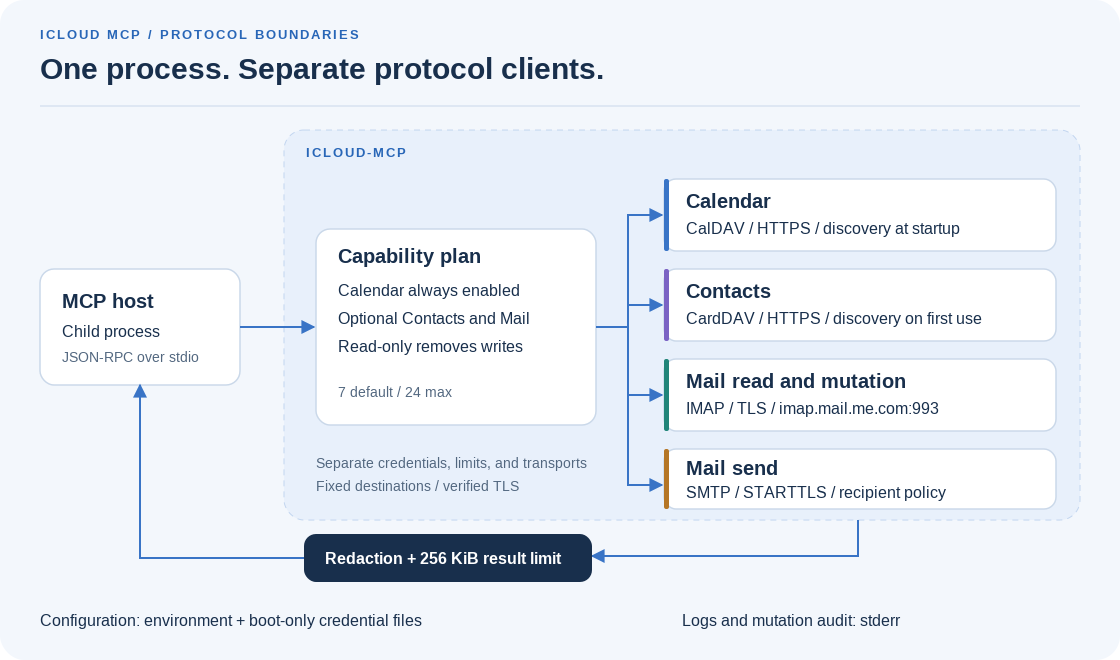
Each domain keeps separate credentials, transports or dialers, rate limiters, and semaphores. Shared code handles redaction, audit, result bounds, and the process lifecycle. See the package map.
Direct dependencies
The single Go module has 12 direct requirements: 11 runtime dependencies and one explicit test dependency. Exact versions are in go.mod; required notices are in THIRD_PARTY_NOTICES.md.
| Dependency | Purpose |
|---|---|
github.com/emersion/go-webdav | CalDAV primitives; custom discovery and conditional requests preserve iCloud behavior |
github.com/emersion/go-ical | iCalendar parsing and encoding |
github.com/mark3labs/mcp-go | MCP stdio transport, schemas, and JSON-RPC |
github.com/teambition/rrule-go | Bounded recurrence expansion with timezone preservation |
golang.org/x/time | Independent domain rate limiters |
golang.org/x/text | RFC 5051-compatible Unicode collation for local Contacts matching; already present transitively |
github.com/emersion/go-vcard | vCard 3.0/4.0 reads and 3.0 writes |
github.com/emersion/go-imap/v2 | IMAP through the narrow internal/mail/imapadapter boundary |
github.com/emersion/go-message | MIME parsing and bounded plain-text handling |
github.com/emersion/go-smtp | SMTP submission with STARTTLS |
github.com/emersion/go-sasl | SASL PLAIN authentication after STARTTLS |
github.com/santhosh-tekuri/jsonschema/v6 | Test-only explicit import for conformance checks of published schemas and actual outputs; the validator already exists transitively through the MCP SDK |
License and credits
MIT. Copyright (c) 2026 Thomas Crouzet. See LICENSE and third-party notices.
Attribution
Calendar tool shape and several patterns were inspired by
github.com/roygabriel/mcp-icloud-calendar
(MIT, copyright 2026 Gabe). Code was rewritten, not copied.







