Listed from the MCP registry; nobody on Odel publishes it.

TollWire Evidence
Tamper-evident log of agent changes, scans and approvals with draft ISO 27001/NIS2 control mapping.
Runs on your machine from its package; the steps are below.
What it does
- Reads
- Writes
- High impact
At most: creates or changes data: records, files, settings.
What it costs
FreeOdel charges nothing per call. The publisher may charge for its own service.
Runs locally over stdio
This server isn't hosted — your MCP client launches it from a package registry. Use one of the commands below, or drop the config into your client (e.g. Claude Desktop).
Run
npx -y @tollwire/evidence-mcp
MCP client config
{
  "mcpServers": {
    "tollwire-evidence": {
      "command": "npx",
      "args": [
        "-y",
        "@tollwire/evidence-mcp"
      ]
    }
  }
}TollWire




TollWire adds a policy enforcement layer to AI coding agents: it checks file writes, shell commands and new dependencies before they run, blocks detected violations, and keeps a tamper-evident log of reported changes, scans and approvals that you can use as evidence in audits. The code runs locally.
License & Commercial Evaluation (PoC):
TollWire is source-available under the PolyForm Noncommercial License 1.0.0 (free for personal, academic, and noncommercial use).
Looking for Pilot Teams: Organizations and engineering teams evaluating TollWire in a commercial environment can request a free, time-limited Proof-of-Concept (PoC) license before transitioning to a paid Enterprise agreement. To start a pilot or request the Enterprise Edition, please reach out via the contact details in LEGAL.md.
German version: README.de.md
Important
Release status: version 0.1.4. Interfaces can change incompatibly before 1.0.
License: source-available, not open source: PolyForm Noncommercial License 1.0.0. Noncommercial use only; commercial use requires prior permission in writing (text form, e.g. e-mail). See License and LEGAL.md.
Warning
Not a sandbox: TollWire is defense in depth, not a security boundary. See Limits. For untrusted code, run the agent in a container or sandbox; TollWire adds the policy guardrail and a tamper-evident audit trail over that boundary, not a replacement for it.
What is TollWire? · How it works · Architecture · Quick start · Security notes · Limits · Documentation
What is TollWire?
TollWire contains two local, source-available plugins (PolyForm Noncommercial License 1.0.0, noncommercial use only, see License):
| Plugin | Package | What it does |
|---|---|---|
tollwire-guardrail | guardrail-plugin/ | Blocks recognized writes to protected paths, dangerous shell commands and dependencies that are not on the allowlist, before the tool call runs (PreToolUse hook). The same checks are available as MCP tools. |
tollwire-evidence | evidence-mcp/ | MCP server that records agent changes, reviews, scans, approvals, deployments, incidents and permission changes in a hash-chained log. It verifies the chain, creates external anchors, maps event types to ISO/IEC 27001:2022 Annex A and NIS2 Article 21(2) controls (draft), and exports a Markdown report. |
Both plugins run as local processes on your machine. The project does not operate a hosted service. The plugin code makes no network requests. Apart from what your own tools do (for example Claude Code or npm when they install packages), no data leaves your machine through TollWire. The evidence log is a file in your project directory; see the evidence package for details.
How it works
What happens when Claude Code calls a checked tool. Details: Security notes.
flowchart TB
    agent["Claude Code calls<br/>Bash, Edit, Write,<br/>MultiEdit, NotebookEdit"]
    hook["PreToolUse hook<br/>checks the policy"]
    allowed["exit 0<br/>allowed"]
    blocked["exit 2: blocked<br/>reason on stderr"]
    dlog[("Decision log<br/>one event per evaluation<br/>can be turned off")]
    agent -- "call on stdin" --> hook
    hook -- "no violation" --> allowed
    hook -- "violation or error" --> blocked
    hook -- "writes" --> dlog
A blocked call
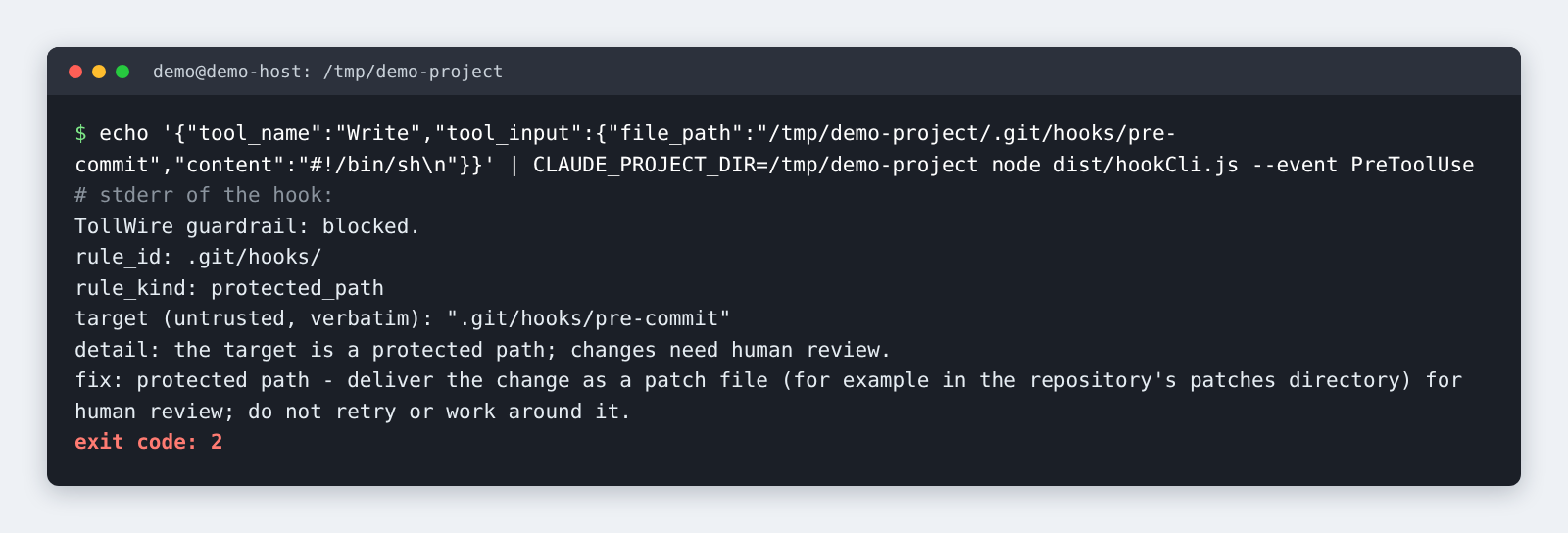
The call from screenshot 1 below: a Write to .git/hooks/pre-commit.
sequenceDiagram
    participant agent as Claude Code
    participant hook as PreToolUse hook
    participant policy as Policy and built-in<br/>protected paths
    participant dlog as Decision log
    agent->>hook: Write<br/>.git/hooks/pre-commit<br/>(stdin)
    hook->>policy: check the<br/>target path
    policy-->>hook: rule_kind<br/>protected_path
    hook->>dlog: one event (redacted)
    hook-->>agent: exit 2, "TollWire<br/>guardrail: blocked."
    Note over agent,hook: Exit code 2 blocks<br/>the call. stderr also<br/>names rule_id, rule_kind,<br/>target, detail, fix.
Note
Output of the built code (guardrail plugin and evidence server 0.1.4, monitor 0.1.0) in a temporary demo project with the
demo account demo@demo-host. Long parts are shortened with "…". Some technical identifiers still carry the former name
(see Naming). Select an image to see it in full size.
| Protected path | Dependency not on the allowlist | Outside the project directory |
|---|---|---|
| 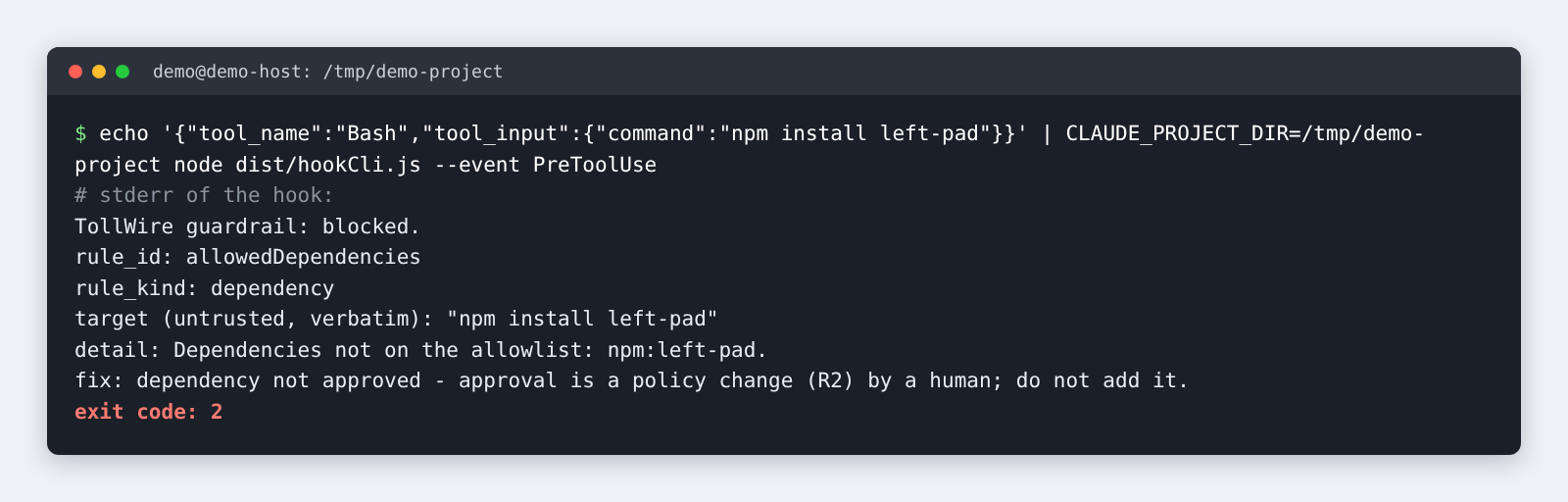 | 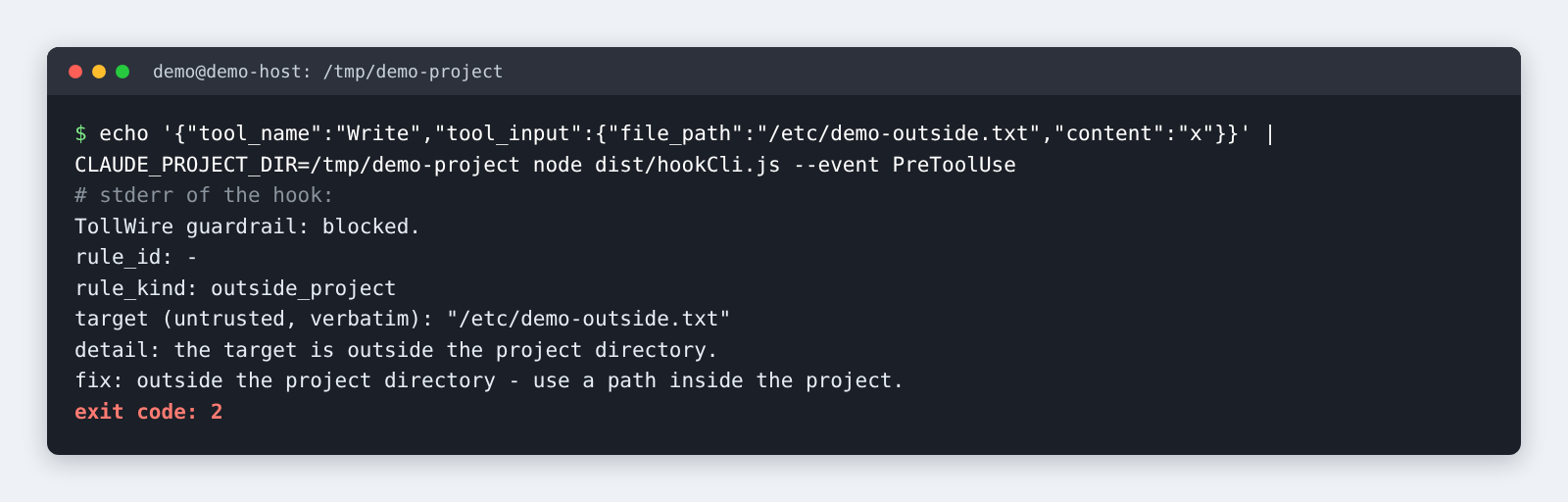 |
The guardrail hook blocks a Write to .git/hooks/pre-commit before it runs (rule kind protected_path, exit code 2). | The guardrail hook blocks npm install left-pad because the package is not on the dependency allowlist. | The guardrail hook blocks a Write to /etc/demo-outside.txt because the target is outside the project directory (rule kind outside_project, exit code 2). |
Architecture
The components of the two plugins and how they connect. Each plugin is installed on its own.
Guardrail plugin (tollwire-guardrail)
flowchart TB
    agent["Claude Code"]
    hook["Hook"]
    gmcp["MCP server"]
    policy["Policy"]
    dlog[("Decision log")]
    agent -- "tool call" --> hook
    agent -- "MCP, stdio" --> gmcp
    hook -- "checks against" --> policy
    gmcp -- "same checks" --> policy
    hook -- "events" --> dlog
Evidence plugin (tollwire-evidence)
flowchart TB
    agent["Claude Code"]
    emcp["MCP server"]
    elog[("Evidence log")]
    report["Markdown report"]
    anchor["External anchor"]
    agent -- "MCP, stdio" --> emcp
    emcp -- "append, verify" --> elog
    emcp -- "export" --> report
    elog -. "stored manually" .-> anchor
| Component | What it does | Tools |
|---|---|---|
| Hook | Command: node dist/hookCli.js. PreToolUse: checks, can block. PostToolUse and session events: log only. | – |
| Policy | Project policy, else the bundled policy/default.json. | – |
| MCP server (guardrail) | Command: node dist/mcp/server.js. Same checks as the hook. | check_command, check_path, check_dependencies, describe_policy |
| Decision log | Hash-chained, JSON Lines. | – |
| MCP server (evidence) | Command: node dist/server.js. | record_event, list_events, verify_log, create_anchor, map_controls, export_report |
| Evidence log | JSON Lines in the project directory, hash chain, anchor file. | – |
| Markdown report | Output of export_report. | – |
| External anchor | For example a signed Git tag: create_anchor, then stored by a person. | – |
- Hook: Claude Code runs the hook before
Bash,Edit,Write,MultiEditandNotebookEdit. Exit code 2 blocks the call; the reason is written to stderr. Observed tools (log only) and session events never block. Details: Security notes and the guardrail README. - Decision log: every evaluation of a tool call writes one event to a hash-chained log in your user directories (event schema); you can turn it off in your user configuration (plugin README, "Decision log").
- Evidence log: a JSON Lines log in the project directory. An anchor is effective only when it is stored outside the machine; the tools never sign anything (evidence README).
| Evidence log and report | Monitor user view |
|---|---|
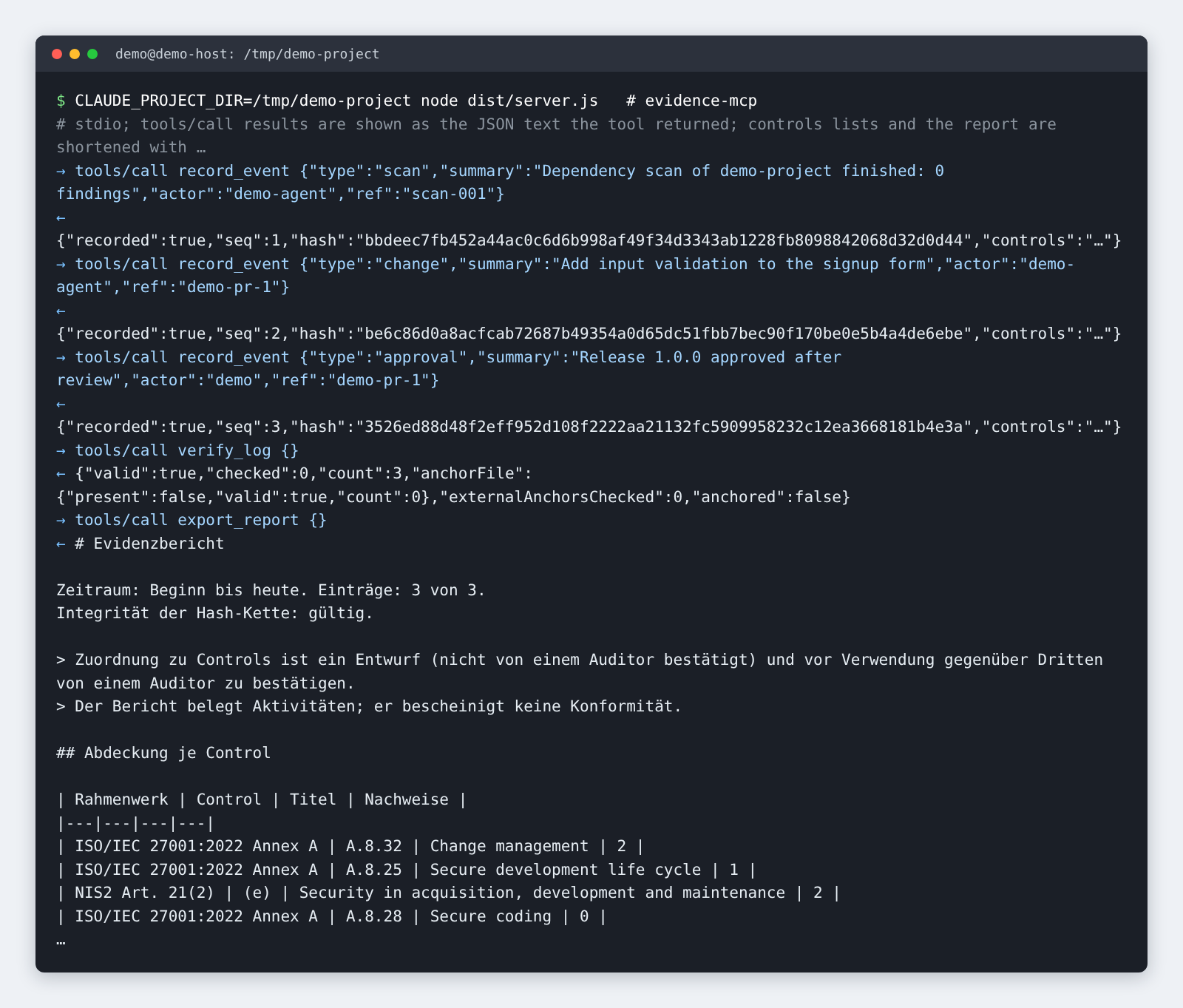 | 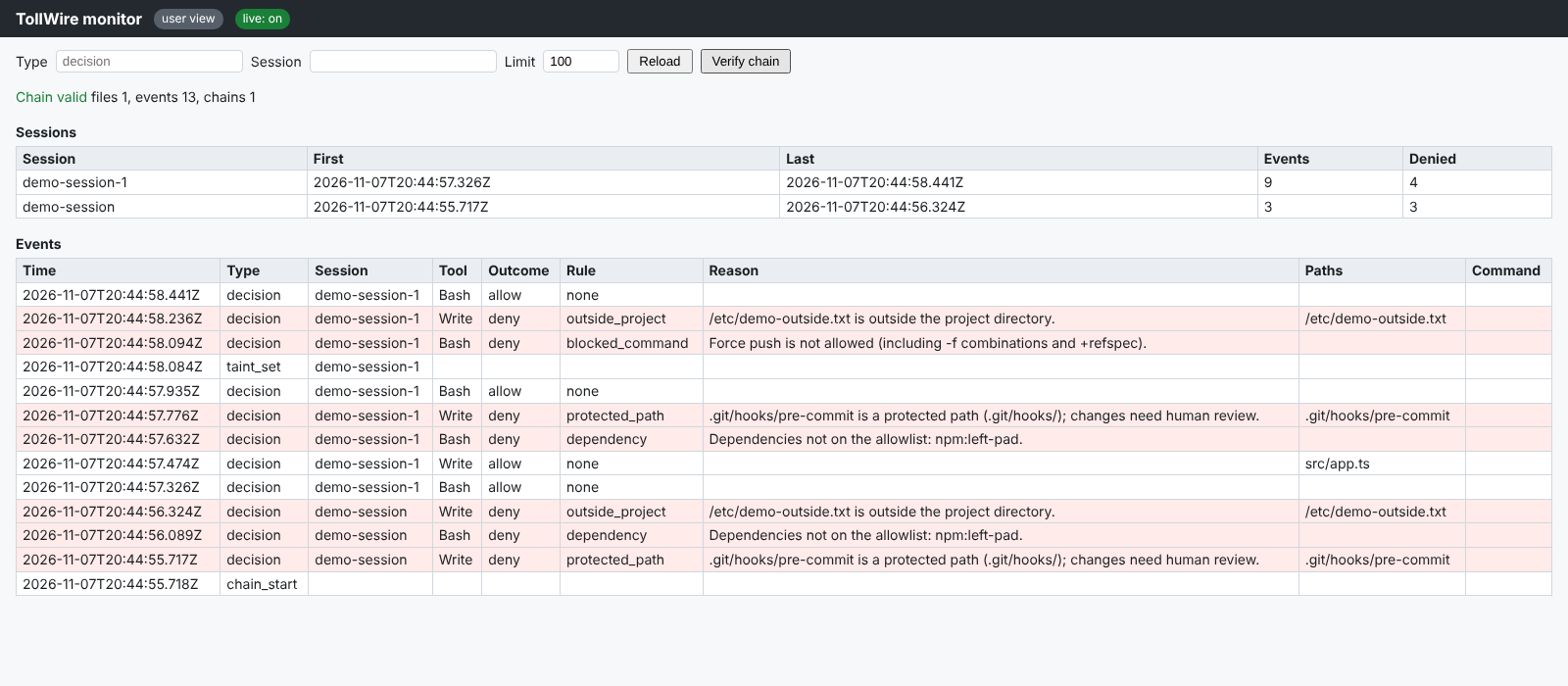 |
The evidence MCP server: three record_event calls (scan, change, approval), verify_log and export_report. The report text is German (current product output); its control table is shortened. | The user view of the local monitor after "Verify chain": the chain is valid (one file, 13 events), two demo sessions with their event and denial counts, and the event list with tool, outcome, rule and reason; denied events are highlighted. |
Quick start
Guardrail and evidence log as Claude Code plugins, three commands in Claude Code:
/plugin marketplace add TollWire/tollwire
/plugin install tollwire-guardrail@tollwire
/plugin install tollwire-evidence@tollwire
Each plugin is installed on its own; you can install only the guardrail. There is no single bundle install yet.
Only the evidence MCP server (instead of the tollwire-evidence plugin), one command in a shell:
claude mcp add tollwire-evidence -- npx -y @tollwire/evidence-mcp
You need Node.js 22.12 or later and npm on your PATH (Requirements). Read the
Security notes before you install, and see Uninstall to remove everything again.
For administrator-managed Linux machines there is a separate enterprise edition.
Install via the Claude Code plugin marketplace
Commands, pinning to a release tag, scopes, auto-update
In Claude Code:
/plugin marketplace add TollWire/tollwire
/plugin install tollwire-guardrail@tollwire
/plugin install tollwire-evidence@tollwire
To pin the marketplace to a release tag:
/plugin marketplace add TollWire/tollwire#<tag>
From the command line:
claude plugin marketplace add TollWire/tollwire
claude plugin install tollwire-guardrail@tollwire --scope user
claude plugin install tollwire-evidence@tollwire --scope user
--scope accepts user, project or local. See the install documentation for what each scope means.
Auto-update is off by default for marketplaces from third parties. The marketplace entries use exact package versions.
Install via npm
Choose one path: the marketplace install above or the npm install below. Running both can register the same MCP servers twice.
The npm path is for the evidence MCP server only. The guardrail needs its PreToolUse hook, which only the plugin install registers, so install the guardrail through the marketplace.
Commands, .mcp.json, pinning, MCP Registry, install scripts
Register the evidence server for your user account:
claude mcp add --scope user --transport stdio tollwire-evidence -- npx -y @tollwire/evidence-mcp
Or add it to the .mcp.json of your project:
{
  "mcpServers": {
    "tollwire-evidence": {
      "command": "npx",
      "args": ["-y", "@tollwire/evidence-mcp"]
    }
  }
}
To run a version you have reviewed, pin it: npx -y @tollwire/evidence-mcp@<exact-version>.
The evidence server is also listed in the official MCP Registry as io.github.TollWire/evidence-mcp (since version 0.1.2).
The packages declare no install scripts. If you install a package with npm yourself, --ignore-scripts prevents npm from running lifecycle scripts.
Requirements
- Node.js 22, version 22.12.0 or later (the
enginesfield of both packages). - Claude Code with plugin support; tested with Claude Code 2.1.302 (guardrail plugin, 2026-10-30).
- npm on your
PATH. After a marketplace install, Claude Code installs the package dependencies with npm. If the runtime dependencies are missing, the guardrail hook blocks Bash, Edit, Write, MultiEdit and NotebookEdit calls (see Security notes).
Security notes
Warning
A Claude Code plugin you install can execute arbitrary code on your machine with your user privileges. Hooks and MCP servers run outside Claude Code's sandbox. Source: Claude Code plugin security (wording checked against the source on 2026-10-24).
What tollwire-guardrail executes
Hook, fail closed, timeout, macOS, MCP server, logs
- Hook: PreToolUse for
Bash,Edit,Write,MultiEditandNotebookEdit. It runsnode dist/hookCli.jsand reads the tool call from stdin. Exit code 2 blocks the call; the reason is written to stderr. - Fail closed: for the checked tools (
Bash,Edit,Write,MultiEdit,NotebookEdit), ifnodeordist/hookCli.jsis missing or does not load, or the hook exits with any code other than 0 or 2, the wrapper exits with 2 and the call is blocked. Observed tools (log only) and session events never block. The message starts withTollWire guardrail: hook did not run or timed out. Check thatnodeis on yourPATHand that the plugin dependencies are installed, or disable the plugin. - Timeout:
hooks/hooks.jsonsets 30 seconds. When GNUtimeoutis installed, the wrapper stops the hook after 25 seconds. Withouttimeout(for example with the default macOS setup) the wrapper starts the hook with a built-in watchdog (dist/hookCliPosix.js) that ends the process after 25 seconds; for the checked tools that is a block (exit code 2). What Claude Code itself does when its own 30-second limit passes has not been verified. - macOS: path comparisons for protected paths ignore case and Unicode normalization form, because APFS does so by default (
.CLAUDE/settings.jsonis the same file as.claude/settings.json).Library/LaunchAgents/andLibrary/Application Support/Claude/in the home directory are protected paths. The enterprise mode for macOS (managed by an administrator, with a root-owned policy) belongs to a separate commercial package and is not active in this plugin build: where an administrator directory is present, the checked tools are blocked (enterprise_unsupported_platform) until the mode has been accepted on real hardware. Without the administrator directory the plugin behaves as described in this document. - MCP server: stdio, started with
node dist/mcp/server.js. Tools:check_command,check_path,check_dependencies,describe_policy. The server does not write files. - Logs: the plugin writes a local log of its decisions (redacted); you can turn it off in your user configuration. By default it contains no command text and nothing is sent anywhere. Location, retention and the switch are described in the plugin README ("Decision log"). Hook messages go to stderr.
What tollwire-evidence executes
MCP server, writes, content
- MCP server: stdio, started with
node dist/server.js. Tools:record_event,list_events,verify_log,create_anchor,map_controls,export_report. - Writes: a JSON Lines log. The path is
TOLLGATE_EVIDENCE_LOGif set; otherwise.tollgate/evidence/log.jsonlin the project directory (CLAUDE_PROJECT_DIR, or the current directory). Files are created with mode 0600. A lock file and an anchor file (log.jsonl.anchors.jsonl) are created next to the log. Symbolic links in the path are refused. - Content: the log contains what is recorded, including the
actoryou name. Do not record secrets. The server refuses only some known secret formats, not all of them.
Before you install
- Read
hooks/hooks.jsonand.mcp.jsonin the package. They show exactly what Claude Code will run. - Verify the release: download the
.tgzand theSHA256SUMSfile from the GitHub release of the version you install, then runsha256sum --check --strict SHA256SUMSin that directory. The marketplace entry has no integrity digest. This check covers the file you downloaded, not the copy that npm serves. - Compare with the copy npm serves:
npm view @tollwire/<package>@<version> dist.integritymust be equal tosha512-followed byopenssl dgst -sha512 -binary <file>.tgz | openssl base64 -Afor the file you checked. - Pin the version: use
#<tag>for the marketplace, and an exact version fornpx. - Auto-update of third-party marketplaces is off by default. Keep it off unless you have reviewed the release.
Uninstall
Disable a plugin in /plugin, or uninstall it:
claude plugin uninstall tollwire-guardrail@tollwire --scope user
claude plugin uninstall tollwire-evidence@tollwire --scope user
claude plugin marketplace remove tollwire
Use the scope you installed with. For the npm install, remove the server with claude mcp remove tollwire-evidence or delete its entry from .mcp.json.
Uninstalling does not delete your data: the evidence log stays in the project (.tollgate/evidence/), the guardrail's decision log and user configuration stay in your user directories (locations in the plugin README, "Decision log"). Delete them yourself if you no longer need them.
Limits
Warning
- TollWire is defense in depth, not a security boundary. The guardrail is not a sandbox.
- The guardrail checks shell commands heuristically. It does not analyze script files (
bash x.sh,./x.sh,source x.sh), modules (python -m),make,npm run, or other programs that write files themselves. Such calls are allowed. - The hook takes effect only if Claude Code loads the plugin or the project settings. The project directory is the directory from which Claude Code was started.
- The evidence log detects changes; it does not prevent them. Whoever rewrites the whole file can create a new, internally valid chain. External anchors detect this only up to the last anchor. Entries after the last anchor are not protected.
- The
actorvalue andanchorevents are self-declared. The tools do not verify who made an entry. - The control mapping (ISO/IEC 27001:2022 Annex A, NIS2 Article 21(2)) is a draft. It has not been audited and is not evidence of conformity with either standard.
- Before 1.0, interfaces may change incompatibly.
Enterprise edition (Linux)
For machines managed by an administrator there is a separate, commercial enterprise edition: a root-owned policy that users and agents cannot change, a fixed system Node, forwarding of the decision log to your SIEM and an admin view. It is not part of this repository; to ask for it, use the request route in LEGAL.md. Linux comes first; macOS and Windows are planned.
Install, dry run and checks
The enterprise package installs with one command, first as a dry run (run as a normal user; it asks for sudo
where root is needed):
sh install/linux/setup.sh --dry-run    # prints every step, changes nothing
sh install/linux/setup.sh              # Node check, build, root-owned copy, install, provisioning, system check
If you receive the package as an archive, check it before you unpack it: sha256sum --check --strict SHA256SUMS in
the download directory. The installer does not download anything and there is no curl | sh variant. Install it only
on a dedicated test or managed machine: once installed, the guardrail on that machine runs in enterprise mode (fail
closed).
Naming
Message names and technical identifiers
Messages shown to you use the name TollWire (TollWire guardrail: …, since version 0.1.4). Some technical
identifiers still carry the former name TollGate: environment variables (TOLLGATE_*), directories (.tollgate/,
/etc/tollgate/), the event schema tollgate.event.v1 and the MCP server names inside the plugins
(tollgate-guardrail, tollgate-evidence). They keep working as documented. A later release may rename them; the
release notes will say so.
Contributing and security
- CONTRIBUTING.md: issues and bug reports are welcome; pull requests from third parties are not accepted.
- SECURITY.md: report vulnerabilities privately, not as public issues.
License
Source-available, not open source: PolyForm Noncommercial License 1.0.0 (SPDX: PolyForm-Noncommercial-1.0.0). Noncommercial use only; commercial use requires prior permission in writing (text form, e.g. e-mail). Summary, request route and details: LEGAL.md. See also NOTICE.
Documentation
- Guardrail plugin: what it checks, hook and fail-closed behavior, decision log, session taint, policy, limits.
- Decision log event schema: fields, hash chain, verification.
- Evidence MCP server: tools, storage, external anchors, limits.
- Security notes and Limits in this README.
- SECURITY.md: report vulnerabilities privately.
- CONTRIBUTING.md: issues and bug reports.
- LEGAL.md, LICENSE and NOTICE: license summary, request route and license text.
- Releases: packages (
.tgz) andSHA256SUMSfor each version. - Claude Code plugin security: what an installed plugin can execute.
- German version







