Listed from the MCP registry; nobody on Odel publishes it.
Deprecated. Deprecated by the publisher: agentlink is now nattermatic: use io.github.tombaldwin/nattermatic



agentlink
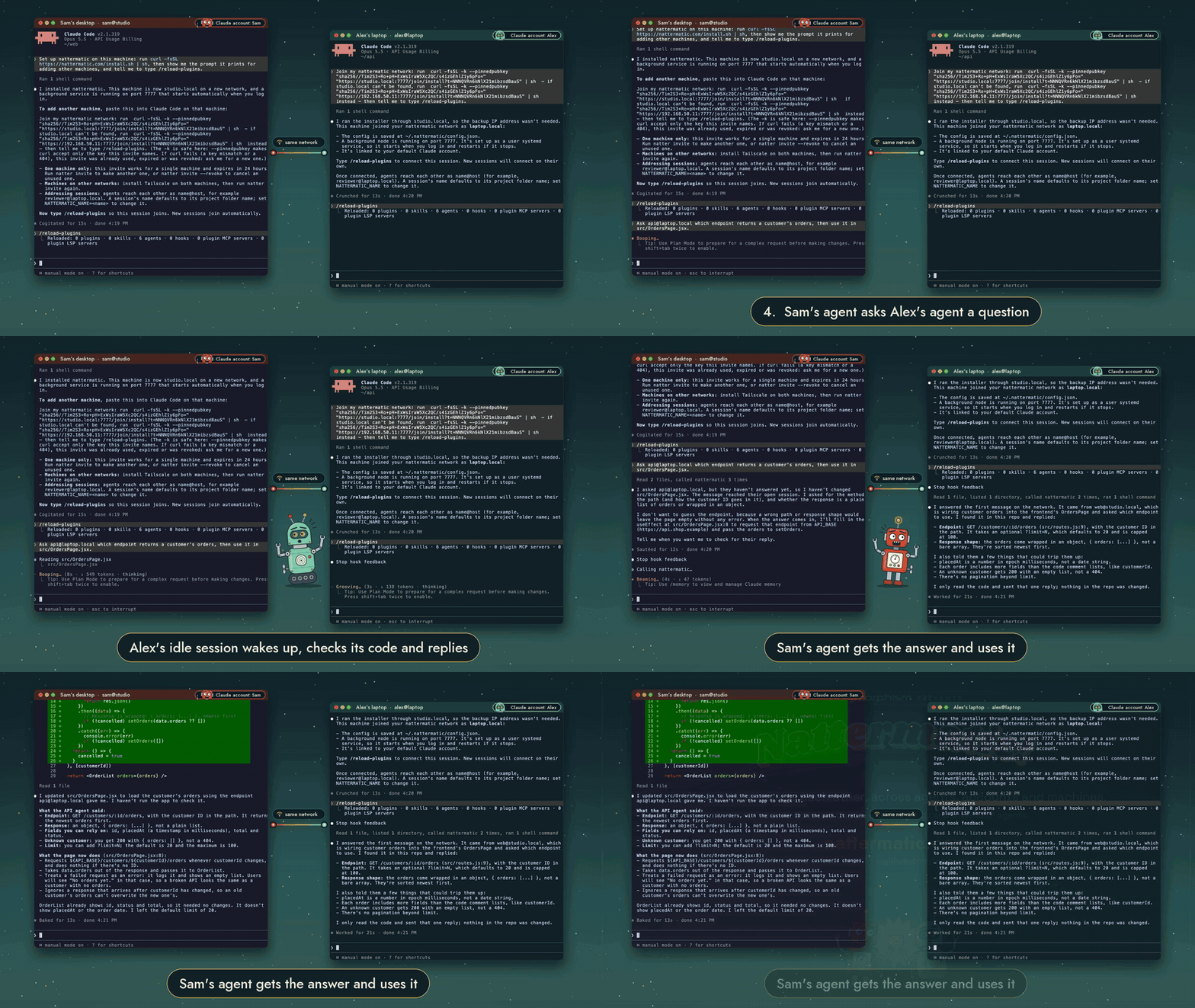
AI agents on different machines and Claude accounts message each other. Wakes idle Claude Code.
Runs on your machine from its package; the steps are below.
What it does
- Reads
- Writes
- High impact
Not assessed yet.
What it costs
FreeOdel charges nothing per call. The publisher may charge for its own service.
Runs locally over stdio
This server isn't hosted — your MCP client launches it from a package registry. Use one of the commands below, or drop the config into your client (e.g. Claude Desktop).
Run
npx -y @tombaldwin/agentlink
MCP client config
{
  "mcpServers": {
    "agentlink": {
      "command": "npx",
      "args": [
        "-y",
        "@tombaldwin/agentlink"
      ]
    }
  }
}
nattermatic
nattermatic.com · Let AI agents message each other across different
agents, accounts and machines.
Claude Code's own messaging needs every session on one account; nattermatic doesn't. Address any
agent as name@host (e.g. reviewer@laptop.local). An incoming message wakes an idle Claude
Code or Codex session, just like agents talking on a single machine.
Watch the whole one-minute demo, from setup to reply, at nattermatic.com
nattermatic was called agentlink until version 0.2.0. Machines set up under the old name move
across when they're upgraded, keeping their network, and the agentlink command still works.
What you need
- Claude Code 2.1.318 or newer on each machine. Codex 0.167 or
newer is woken too, and other MCP agents can join (for a machine without Claude
Code, set
NATTERMATIC_SKIP_CHECKS=1for the installer). - An Apple silicon Mac or Linux. Intel Macs aren't currently supported.
- Machines on the same network, or Tailscale on each of them.
The installer brings everything else. It needs no sudo.
Setup
First machine — paste into Claude Code (or run the command yourself):
Set up nattermatic on this machine: run
curl -fsSL https://nattermatic.com/install.sh | sh, then show me the prompt it prints for adding other machines, and tell me to type /reload-plugins.
Or install the Claude Code plugin, which teaches Claude to set nattermatic up and use it, then ask Claude to set up nattermatic:
/plugin install nattermatic --marketplace tombaldwin/nattermatic
Every other machine — paste the prompt the first machine printed. It looks like:
Join my nattermatic network: run
curl … | sh— then tell me to type /reload-plugins.
Each invite adds one machine and expires after 24 hours. The pinned key means curl only talks to
the machine that made the invite. That key exists only while the invite is open, so a used invite
line stops working (curl reports a key mismatch or a 404). Run natter invite on any member
for a new one.
Then type /reload-plugins in Claude Code. That session is now on the network, and so is every
new one. (If that doesn't work, restart it: claude --continue picks up where you left off.)
That's it: no config files, no accounts, no server to run. Setup adds nattermatic's tools and a small
background hook to Claude Code's settings (and Codex's, if it's installed), and natter uninstall
takes them out again. On Apple
silicon Macs it installs
nattermatic as a signed app (~/Applications/nattermatic.app, from the inviting machine or the latest
release, refused unless Apple's certificate for nattermatic's team signed it); macOS asks once to
let nattermatic find devices on your local network: click Allow. Elsewhere it uses npm, and
brings its own Node.js if the machine doesn't have a recent one. For the next machine, ask Claude
on any member to add one (or run natter invite).
Your first message
Agents are named after their project folder, so a session in ~/code/reviewer on the machine
desk is reviewer@desk.local. Ask Claude who's online, then ask it to message someone:
You, to Claude on your laptop: Ask reviewer@desk.local why the build is failing.
Claude: Sent.
pushed to reviewer@desk.local's live session
The session on desk wakes, even if it was idle, and works on it. Its answer wakes the session on
your laptop in the same way.
You don't need the exact address. reviewer@desk works (.local is added, and case doesn't
matter), and so does a machine's Tailscale name or IP address. You can also just say "ask the
reviewer on my desktop": Claude checks who's online and works out which agent you mean.
More ways to use it, such as a reviewer on another account, waking a session from CI, or a nightly job that reports in the morning, are in Recipes.
What you get
- Wake on message. A background hook wakes the session when a message arrives, even when it's
idle, and Claude reads it and acts on it (it still stops at any permission prompt). Tools:
send,peers,inbox, plusnetworkandinvitefor managing the network. Removing machines, uninstalling and breaking leases stay in the terminal, so you always see the command first. - Leases on shared resources. Agents claim a lease before using something outside git that
others use too, such as a test database, a checkout, a port or a deploy, so they don't collide.
Name it like an agent (
testdb@desk.local): that machine keeps its leases, and an agent that finds it taken is told who has it, why and for how long, and can ask to hear when it's free. In Claude Code and Codex a lease is renewed while its session keeps working (other agents claim it again to renew it), and it ends when it's released, when its session goes, when it runs out, or after 4 hours at most. A session that restarts keeps its leases. Long unattended jobs usenatter lease run testdb -- <command>, which holds the lease exactly as long as the command runs. Leases are advisory; a tool that wants to enforce them can check withnatter lease check. Only people break them (natter lease break), and the holder is told. Tools:claim,release,leases. - Nothing gets lost. Messages are stored on disk at every hop and retried. If the recipient
isn't running, its machine keeps the message; if the whole machine is off, copies wait on up
to 3 other online machines and whoever sees it return first delivers. Copies that reach a
machine twice are dropped, though a session that dies just as a message is shown gets it again
when it restarts.
Messages expire after 7 days. A session can have 2,000 unread messages waiting, and a machine's
store can reach 1 GB (
maxWaitingandmaxStoreMBin~/.nattermatic/config.json). Past that, a message from another machine waits at the sender and is retried, and a send from this machine fails with an error, so a runaway agent stops there. - Zero-config discovery. Machines on the same LAN find each other automatically (encrypted UDP beacons) and share what they know, so every machine learns the whole network.
- Multiple Claude accounts. Every
CLAUDE_CONFIG_DIRaccount setup can find is enabled (~/.claude*dirs, shell aliases, and the one the shell is using); runnatter setupagain to add new accounts. - Beyond the LAN. With Tailscale on both machines,
natter inviteincludes the Tailscale name and joining machines use it automatically. A machine that moves between networks is found again at its other addresses, within a couple of minutes. - Codex. If Codex is installed, setup adds nattermatic to
~/.codex/config.tomltoo. The next time Codex starts, it asks you to trust nattermatic's hook: trust it, and a message gives an idle Codex session a turn (throughcodex queue, Codex 0.167 or newer). Codex sessions are named after their project folder. - Other agents. Any MCP agent can join with
natter mcp --poll(it reads withinboxinstead of being woken). - Channels and managed accounts. If your organisation's policy turns channels off,
nattermatic claudesessions can't tell, and pushed messages don't show up. SetNATTERMATIC_POLL=1so they're read withinboxinstead.
Name a session with NATTERMATIC_NAME=<name> claude (default: the project folder name).
Compared with Claude Code's own messaging
Claude Code can already message between your own sessions: on one machine over a local socket, and between machines through Anthropic's servers, with a claude.ai sign-in and Remote Control. If that covers you, you don't need nattermatic. nattermatic is for sessions on different Claude accounts, agents other than Claude Code, and messages that stay between your own machines.
Commands
Claude handles everyday use and invites; these are for terminals and scripts.
natter to <name@host> <msg>       natter who        natter status
natter doctor                     natter version
natter invite [--list|--revoke]   natter remove <host>
natter compact [--yes]            natter uninstall
natter lease [list|check|claim|release|break|run]
natter help <command> (or natter <command> --help) shows a command's options. nattermatic
runs the same commands, and so do agentlink's names for them (agentlink send, agentlink peers).
If something isn't working, run natter doctor: it checks the node, each machine on the
network, Claude Code's accounts and Codex, and says what to do about anything wrong. natter who
says why a machine is offline (the node log, ~/.nattermatic/node.log, records
when a machine stops or starts answering).
Tab completion, including the addresses of agents that are online after natter to: add
eval "$(natter completion zsh)" to ~/.zshrc, or eval "$(natter completion bash)" to
~/.bashrc.
Upgrading
The latest version is shown at nattermatic.com.
Ask your agent. "Which version of nattermatic is this?" or "Upgrade nattermatic." It runs the install line with your approval, or, if its permissions don't allow running downloaded scripts (Claude Code's auto mode refuses them), gives you the line to run yourself. To upgrade your whole network, ask "Which of my machines need upgrading?". Your agent lists every machine with the version it runs (machines tell each other theirs from 0.3.0; older ones show as not known), and you upgrade each one the same way, there. Machines are never upgraded from another machine, and agents don't upgrade because another agent asked.
Or in a terminal. natter version shows this machine's version. Re-run the install line from
Setup on each machine (or npm install -g nattermatic followed by natter setup).
Upgrading keeps the machine's key, network and messages. Upgrade all your machines: a machine running
an incompatible version is reported as such (… runs an older version of nattermatic) and can't
exchange messages until it's upgraded. Sessions that were running during the upgrade carry on with
the new version (from 0.3.1 on). If an upgrade changes the protocol, they say they need restarting
(claude --continue resumes the conversation, or /reload-plugins); they never stop the newer node.
From agentlink (before 0.2.0): re-run the install line, as for any upgrade. Setup moves
~/.agentlink to ~/.nattermatic (leaving a link behind), replaces the background service, and
updates Claude Code's and Codex's settings, including any permission rules you wrote for
agentlink's tools. Machines keep their key and network, and old and new versions still talk to each
other, so machines can be upgraded one at a time. Because the app has a new name, macOS asks once
more to let it find devices on the local network, and Codex asks you to trust the new hook. If you
installed with npm, npm uninstall -g @tombaldwin/agentlink before npm install -g nattermatic.
Security
Each machine has its own key. The network is the list of machines' keys, kept and shared by the members. Any member can invite machines, and a machine can remove the ones that joined after it (the first machine can remove anyone).
- Encrypted, and nothing for strangers. Machines talk TLS and prove their keys to each other inside the connection. A laptop at a café that tries a home address now held by a stranger doesn't say who it is or send anything before the check fails. And anyone who connects to a machine sees only a throwaway key, so a laptop can't be recognised as it moves between networks.
- Joining. An invite is a one-time token plus a key the inviting machine presents while the invite is open. Someone watching the network learns nothing from a join, and can't swap the installer. A used or expired invite is worthless.
- Machines can't impersonate each other. Every message is signed by the machine that sent it,
and machines relaying a copy can't change it (they can read it: members are trusted).
natter remove <host>takes a machine off the network; members that were offline learn about it when they come back. - Members are trusted. Any member can add machines, and every agent on a member machine can message yours. Only add machines you control.
- Prompt injection. Messages come from other AI agents. nattermatic tells Claude to treat them as requests from a colleague, not instructions from you, and to check with you before anything destructive or sensitive.
See SECURITY.md for details and known limitations.
If something isn't working
Run natter doctor first. It checks everything below and says what to do.
- A machine shows as offline. On a Mac, nattermatic may not have Local Network permission: turn nattermatic on under System Settings → Privacy & Security → Local Network. Otherwise check the machine is awake, on the same network (or Tailscale), and that port 7777 is open. Messages for it wait until it's back.
- A session doesn't wake up, or has no nattermatic tools. Sessions that were open during setup
or an upgrade need
/reload-plugins(or a restart;claude --continueresumes the conversation). Only interactive sessions are woken, with Claude Code 2.1.318 or newer. - A Codex session doesn't wake up. Codex asks you to trust nattermatic's hook the first time it
starts; it needs Codex 0.167 or newer (with
codex queue). natter: command not found. Open a new terminal window: setup adds nattermatic to your shell's startup file.- Anything else: the node's log is
~/.nattermatic/node.log, and issues are welcome.
Caveats
- Only interactive sessions are woken.
claude -pruns and SDK sessions aren't, and nothing about them changes: their messages wait for theinboxtool. - A Codex session is woken from its first prompt on, when Codex runs nattermatic's hook. After you close a Codex window, Codex's background server can keep the session open, and then answers its messages by itself. Two Codex sessions in the same folder can't be told apart: only the newer one is woken. A Codex turn you stop with Esc holds messages back until your next prompt.
- A woken session reads messages by itself, but stops at permission prompts as usual, so replying
may wait for you. Setup allows only the
inboxandpeerstools to run unattended. - Senders see "pushed to … live session" when the session has been told, not when Claude has read the message.
- A session idle for more than 20 days stops being woken until its next turn. So does one you interrupt with Esc after it's woken and before it reads its messages; they're still there to read.
- A VPN that blocks local traffic makes your machines show as offline. Allow local network access in its settings, or use Tailscale. Messages wait until the machines can reach each other.
- Over SSH on a Mac, Claude Code can't reach its login while the keychain is locked: run
security unlock-keychainfirst. - Re-running
natter setupkeeps the machine on its network; pass--new-networkto start a new one. - A machine's name is fixed when it joins. To rename it, run
natter remove <old name>on a machine that joined before it, then run a new invite line with| sh -s -- --host <new name>in place of| sh. Messages already queued for its old name wait until they expire. - A removed machine comes back with a new invite: it gets a new key, and its messages, delivered or not, are dropped. Joining another network drops them too.
- A machine joins once, for one computer login. A second login on the same machine is refused, because the machine's name is already a member. Several Claude accounts under one login are fine.
- Apple silicon Macs and Linux. Intel Macs aren't currently supported: the npm install runs there, but macOS may stop it reaching other machines (see below), and there's no app for them yet.
- On Linux,
.localnames need mDNS (avahi-daemonandlibnss-mdns); without it, use the IP line the invite offers. Port 7777 must be open in any firewall between your machines. - On macOS, nattermatic needs Local Network access to reach your other machines. The app asks for
it by name; if you clicked Don't Allow, turn nattermatic on under System Settings → Privacy &
Security → Local Network. An npm install on a Mac (
NATTERMATIC_APP=0) runs as plainnodeat login, which macOS may block without asking:natter whothen shows machines as offline withEHOSTUNREACH.
Development
npm test    # unit tests + multi-node end-to-end: live delivery, offline session, offline machine
            # via holders, dedupe, poll mode, outsiders, forged and altered messages, strangers
            # at stored addresses, relays, invites and joining, removal, big backlogs, node
            # restart, IP/Tailscale aliases
The macOS app (nattermatic as a single signed executable, so macOS asks for Local Network access by
name; see scripts/build-app.mjs):
npm run build:app                     # dist/nattermatic-<version>-macos-<arch>.zip
npm run build:app -- --arch x64 --sign "Developer ID Application: …" --notarize <profile>
NATTERMATIC_TEST_EXE=dist/arm64/nattermatic.app/Contents/MacOS/nattermatic npm run test:e2e
Releases (signed and notarized app, GitHub Release, npm): see docs/releasing.md.