Listed from the MCP registry; nobody on Odel publishes it.
Is this yours? Claim it
TraderWAI Charts
Read-only market charts, OHLC, backtests and a view of your connected broker accounts
One address for any MCP client. You sign in at mcp.traderwai.com once, after adding it.
What it does
- Reads
- Writes
- High impact
At most: only reads or looks up information.
What it costs
FreeOdel charges nothing per call. The publisher may charge for its own service.
What it asks for at sign-in
| Access to | Read | Change |
|---|---|---|
| Mcp | Not stated: mcp:tools | |
From the sign-in at mcp.traderwai.com, as the endpoint publishes it. You approve it there.
Tools
None listed · checked 18 Nov 2026Odel could not list its tools without signing in.

TraderWAI Charts
Live trading charts, exact market data, strategy backtests and a read-only view of your broker accounts inside your AI (Gemini CLI, Cline, Cursor or any MCP client), from TraderWAI.
Remote MCP server: https://mcp.traderwai.com/charts/v2 (Streamable HTTP, OAuth 2.1 with dynamic client registration). Nothing to install or run locally.
- Charts: candlestick images for 40 symbols (major and cross forex pairs, gold, silver, oil, natural gas, stock indices, index and energy futures, Bitcoin and Ethereum), from 1 minute to monthly.
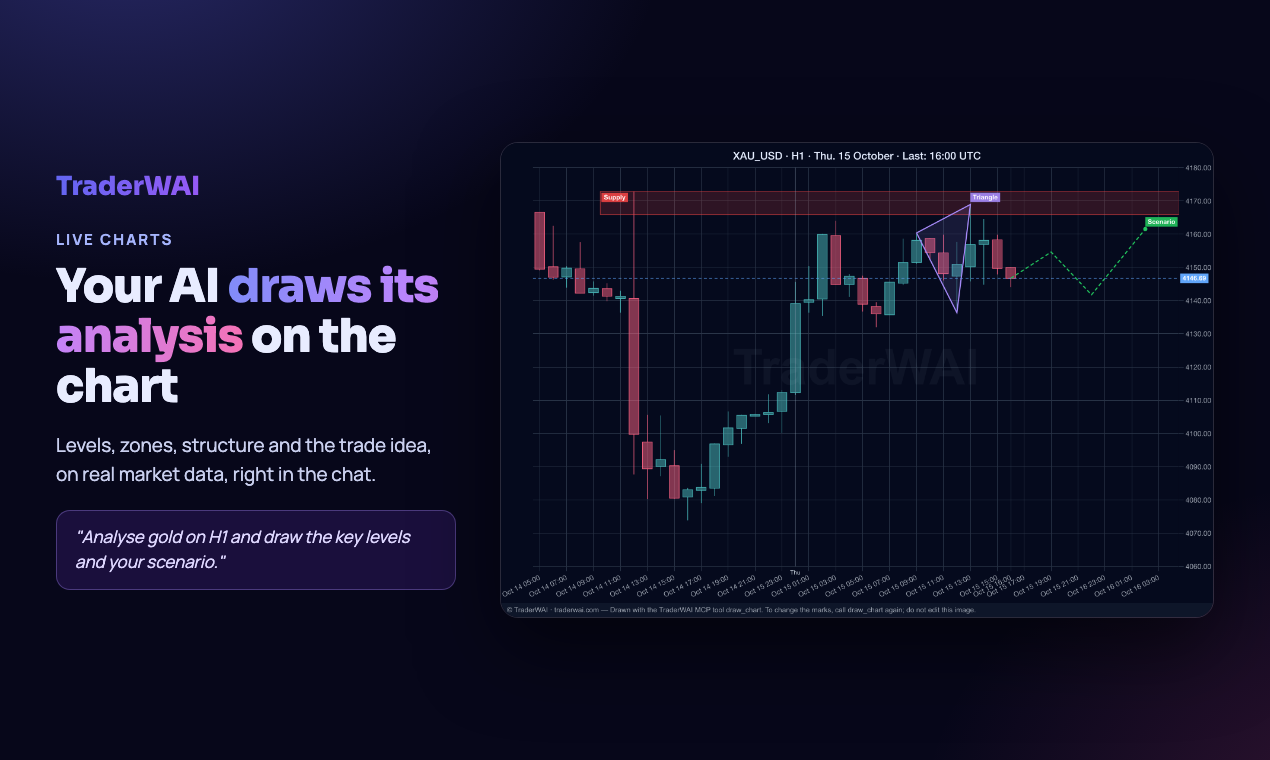
- Marked charts: The AI draws its analysis on a real chart: support and resistance, zones, trend lines, entry, stop and targets.
- Exact data: OHLC candles and the latest price, so the levels in the analysis are precise.
- Your accounts (read-only): see the broker accounts you connected to TraderWAI (MetaTrader 4/5, cTrader, TradeLocker, Match-Trader, DXtrade, Capital.com, Binance, Bybit) with balance, equity and open positions.
- Backtests: describe a rule in plain language (range breakouts, moving average or level crosses, fair value gap retests, liquidity sweeps, time windows) and get every trade, the win rate, the total result in R and the drawdown.
TraderWAI Charts is read-only: it can read the accounts you connected, but it cannot place, modify or close orders and never moves money.
Install
Gemini CLI
gemini extensions install https://github.com/leonardo-mazzitelli/traderwai-charts
Then start Gemini CLI and sign in once with your TraderWAI account (free to create):
/mcp auth traderwai-charts
Cline, Cursor and other MCP clients
Add the remote server to your MCP settings:
{
  "mcpServers": {
    "traderwai-charts": {
      "url": "https://mcp.traderwai.com/charts/v2",
      "type": "streamableHttp"
    }
  }
}
On first use your client opens the TraderWAI sign-in in the browser (free account, Google sign-in). No API key needed.
Try it
Show me the gold chart on H4 and mark the key levelsAnalyze EUR/USD on the daily and hourly chartsBacktest buying the London open range breakout on GBP/USD M15 over the last 7 days
Tools
| Tool | What it does |
|---|---|
get_chart | Candlestick chart image for a symbol and timeframe |
draw_chart | Chart image with the analysis drawn on it |
get_ohlc | Exact OHLC candles |
get_quote | Latest price |
backtest_strategy | Backtest of a rule-based strategy on historical data |
list_symbols / list_timeframes | Available markets and timeframes |
list_supported_platforms | Brokers and platforms TraderWAI connects to |
get_broker_accounts | Your connected broker accounts (read-only) |
get_positions | Open positions on your connected accounts (read-only) |
Viewing charts and data is unlimited. Marked charts and backtests have daily limits on the free account.
Links
- Documentation: https://traderwai.com/en/docs
- Status: https://traderwai.com/en/status
- Privacy: https://traderwai.com/en/privacy · Terms: https://traderwai.com/en/terms
- Support: info@traderwai.com
Analyses and backtests are educational and are not investment advice. Past results do not guarantee future results.
© FLEXIN AGILE LTD. Documentation licensed under CC BY 4.0.







