Listed from the MCP registry; nobody on Odel publishes it.

Hyper
📦️ A fast, secure MCP server that extends its capabilities through WebAssembly plugins
Runs on your machine from its package; the steps are below.
What it does
- Reads
- Writes
- High impact
At most: moves money, runs code or commands, deletes data, or sends messages for you.
What it costs
FreeOdel charges nothing per call. The publisher may charge for its own service.
Runs locally over stdio
This server isn't hosted — your MCP client launches it from a package registry. Use one of the commands below, or drop the config into your client (e.g. Claude Desktop).
Run
docker run -i --rm docker.io/tuananh/hyper-mcp:v0.1.6
MCP client config
{
  "mcpServers": {
    "hyper": {
      "command": "docker",
      "args": [
        "run",
        "-i",
        "--rm",
        "docker.io/tuananh/hyper-mcp:v0.1.6"
      ]
    }
  }
}



hyper-mcp
⚠️ NOTICE: PROJECT TRANSFERRED
This project has been transferred to https://github.com/joseph-wortmann/hyper-mcp
Please refer to the new repository for the latest updates and contributions.
A fast, secure MCP server that extends its capabilities through WebAssembly plugins.
What is it?
hyper-mcp makes it easy to add AI capabilities to your applications. It works with Claude Desktop, Cursor IDE, and other MCP-compatible apps. Write plugins in your favorite language, distribute them through container registries, and run them anywhere - from cloud to edge.
Features
- Write plugins in any language that compiles to WebAssembly
- Distribute plugins via standard OCI registries (like Docker Hub)
- Built on Extism for rock-solid plugin support
- Sanboxing with WASM: ability to limit network, filesystem, memory access
- Lightweight enough for resource-constrained environments
- Support all 3 protocols in the spec:
stdio,sseandstreamble-http. - Deploy anywhere: serverless, edge, mobile, IoT devices
- Cross-platform compatibility out of the box
- Support tool name prefix to prevent tool names collision
Security
Built with security-first mindset:
- Sandboxed plugins that can't access your system without permission
- Memory-safe execution with resource limits
- Secure plugin distribution through container registries
- Fine-grained access control for host functions
- OCI plugin images are signed at publish time and verified at load time with sigstore.
Getting Started
- Create your config file:
- Linux:
$HOME/.config/hyper-mcp/config.json - Windows:
{FOLDERID_RoamingAppData}. Eg:C:\Users\Alice\AppData\Roaming - macOS:
$HOME/Library/Application Support/hyper-mcp/config.json
- Linux:
{
  "plugins": {
    "time": {
      "url": "oci://ghcr.io/tuananh/time-plugin:latest"
    },
    "qr_code": {
      "url": "oci://ghcr.io/tuananh/qrcode-plugin:latest"
    },
    "hash": {
      "url": "oci://ghcr.io/tuananh/hash-plugin:latest"
    },
    "myip": {
      "url": "oci://ghcr.io/tuananh/myip-plugin:latest",
      "runtime_config": {
        "allowed_hosts": ["1.1.1.1"]
      }
    },
    "fetch": {
      "url": "oci://ghcr.io/tuananh/fetch-plugin:latest",
      "runtime_config": {
        "allowed_hosts": ["*"],
        "memory_limit": "100 MB",
      }
    }
  }
}
📖 For detailed configuration options including authentication setup, runtime configuration, and advanced features, see RUNTIME_CONFIG.md
Supported URL schemes:
oci://- for OCI-compliant registries (like Docker Hub, GitHub Container Registry, etc.)file://- for local fileshttp://orhttps://- for remote filess3://- for Amazon S3 objects (requires that you have your AWS credentials set up in the environment)
- Start the server:
$ hyper-mcp
- By default, it will use
stdiotransport. If you want to use SSE, use flag--transport sseor streamable HTTP with--transport streamable-http. - If you want to debug, use
RUST_LOG=info. - If you're loading unsigned OCI plugin, you need to set
insecure_skip_signatureflag or env varHYPER_MCP_INSECURE_SKIP_SIGNATUREtotrue
Using with Cursor IDE
You can configure hyper-mcp either globally for all projects or specifically for individual projects.
- For project-scope configuration, create
.cursor/mcp.jsonin your project root:
{
  "mcpServers": {
    "hyper-mcp": {
      "command": "/path/to/hyper-mcp"
    }
  }
}
-
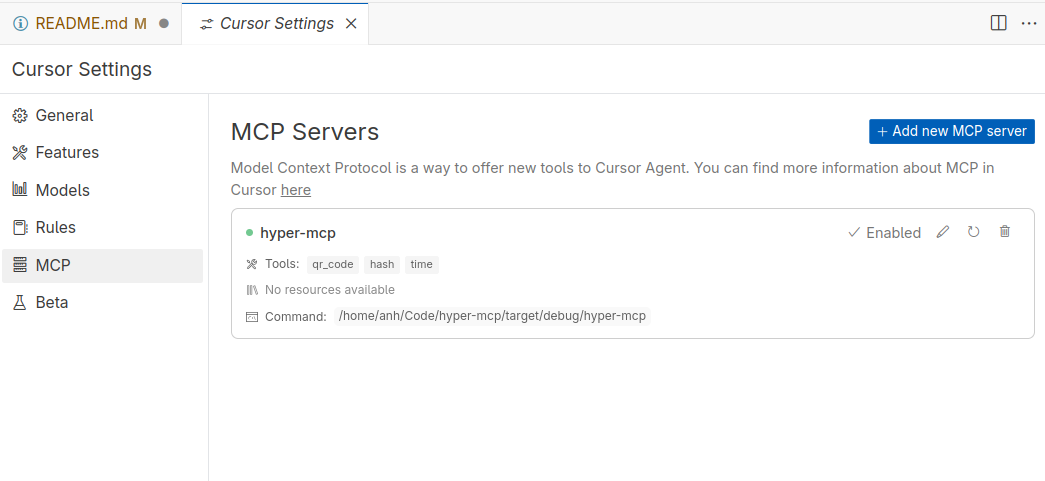
Set up hyper-mcp in Cursor's settings:
-
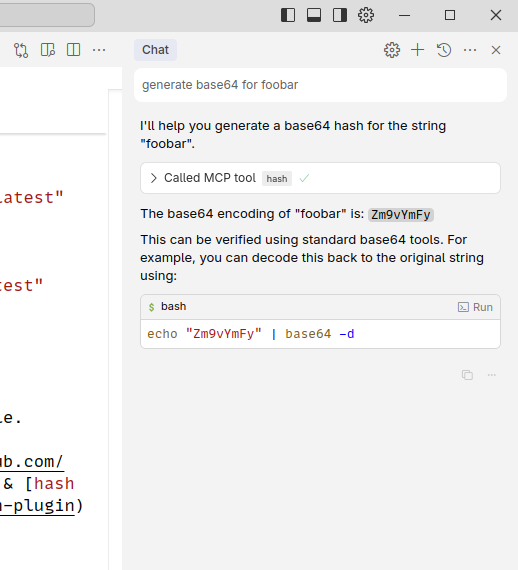
Start using tools through chat:
Available Plugins
We maintain several example plugins to get you started:
V1 Plugins
These plugins use the v1 plugin interface. While still supported, new plugins should use the v2 interface.
- time: Get current time and do time calculations (Rust)
- qr_code: Generate QR codes (Rust)
- hash: Generate various types of hashes (Rust)
- myip: Get your current IP (Rust)
- fetch: Basic webpage fetching (Rust)
- crypto_price: Get cryptocurrency prices (Go)
- fs: File system operations (Rust)
- github: GitHub plugin (Go)
- eval_py: Evaluate Python code with RustPython (Rust)
- arxiv: Search & download arXiv papers (Rust)
- memory: Let you store & retrieve memory, powered by SQLite (Rust)
- sqlite: Interact with SQLite (Rust)
- crates-io: Get crate general information, check crate latest version (Rust)
- gomodule: Get Go modules info, version (Rust)
- qdrant: keeping & retrieving memories to Qdrant vector search engine (Rust)
- gitlab: GitLab plugin (Rust)
- meme_generator: Meme generator (Rust)
- context7: Lookup library documentation (Rust)
- think: Think tool(Rust)
- maven: Maven plugin (Rust)
- serper: Serper web search plugin (Rust)
V2 Plugins
These plugins use the v2 plugin interface. New plugins should use this interface.
- rstime: Get current time and do time calculations (Rust)
Community-built plugins
- hackernews: This plugin connects to the Hacker News API to fetch the current top stories and display them with their titles, scores, authors, and URLs.
- release-monitor-id: This plugin retrieves project ID from release-monitoring.org, which helps track versions of released software.
- yahoo-finance: This plugin connects to the Yahoo Finance API to provide stock prices (OHLCV) based on a company name or ticker symbol.
- rand16: This plugen generates random 16 bytes buffer and provides it in base64uri format - very usable for symmetric cryptography online.
Documentation
- Runtime Configuration Guide - Comprehensive guide to configuration options including:
- Authentication setup (Basic, Token, and Keyring)
- Plugin runtime configuration
- Security considerations and best practices
- Platform-specific keyring setup for macOS, Linux, and Windows
- Troubleshooting authentication issues
- Skip Tools Pattern Guide - Comprehensive guide to filtering tools using regex patterns:
- Pattern syntax and examples
- Common use cases and best practices
- Environment-specific filtering strategies
- Advanced regex techniques
- Migration and troubleshooting
Creating Plugins
For comprehensive instructions on creating plugins, see CREATING_PLUGINS.md.