
Video Analyzer MCP Server
Analyze any video with AI — YouTube, TikTok & Instagram
Powered by Google Gemini 3.5 Flash · FastMCP · yt-dlp





Features · Architecture · Quick Start · Integration · Security · العربية
Features
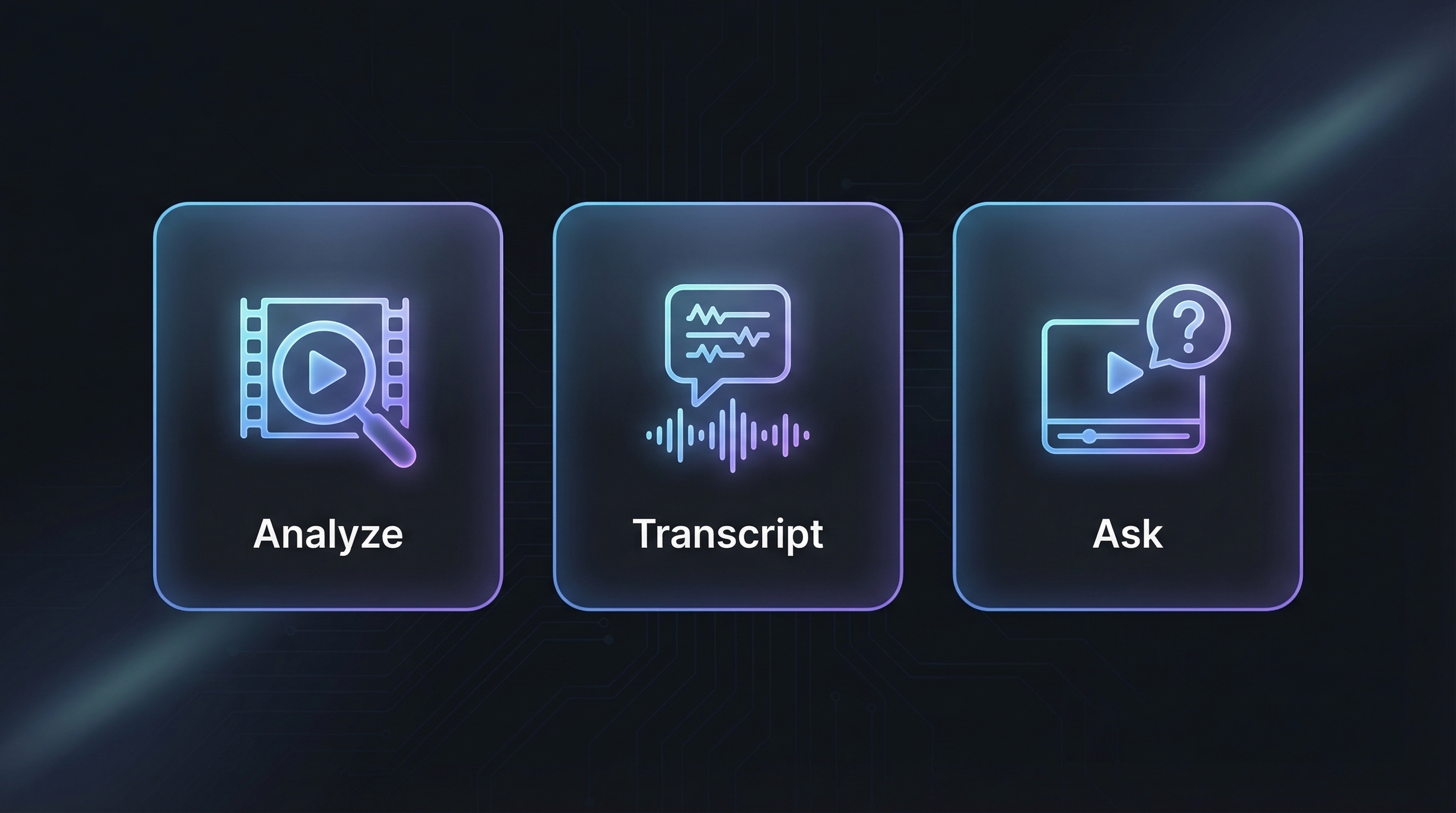
v1.5.4 exposes 18 MCP tools:
| Tool | What it does |
|---|---|
analyze_video | Full audio + visual analysis with custom prompts. Uses Gemini multimodal understanding. |
get_transcript | Extract timestamped transcript with speaker identification. Supports 100+ languages via auto-detection. |
ask_about_video | Ask any question about the video content. |
prepare_slideshow_assets | Return ordered slideshow images as MCP image blocks so Claude/the client AI can inspect them directly. |
find_video_moments | Find matching moments with compact/standard/full structured output. |
analyze_video_segment | Analyze only a selected time range. |
prepare_video_context | Analyze once and save a reusable local context for follow-up questions and evidence lookup. |
ask_video_context | Answer from saved context by default; Gemini reanalysis is explicit opt-in. |
list_video_contexts | List saved local contexts. |
delete_video_context | Delete one saved context. |
get_video_frame | Extract a local still frame, using the YouTube fast path when possible. |
get_video_clip | Extract a short local clip, with a 30s cap and YouTube fast path when possible. |
get_video_evidence_asset | Select saved evidence and return a frame or clip reference. |
list_video_sources | Inspect local source/context/asset cache metadata. |
cleanup_video_cache | Dry-run or clean managed cache files; dry-run is the default. |
watch_and_analyze | Extract tutorial steps, shell commands, code snippets, and file paths from technical videos. |
execute_tutorial_steps | Validate and review extracted steps safely; executes only with confirmation. |
check_analysis_job | Poll background job status for TikTok/Instagram async downloads. |
Supported Platforms
| Platform | Method | Speed |
|---|---|---|
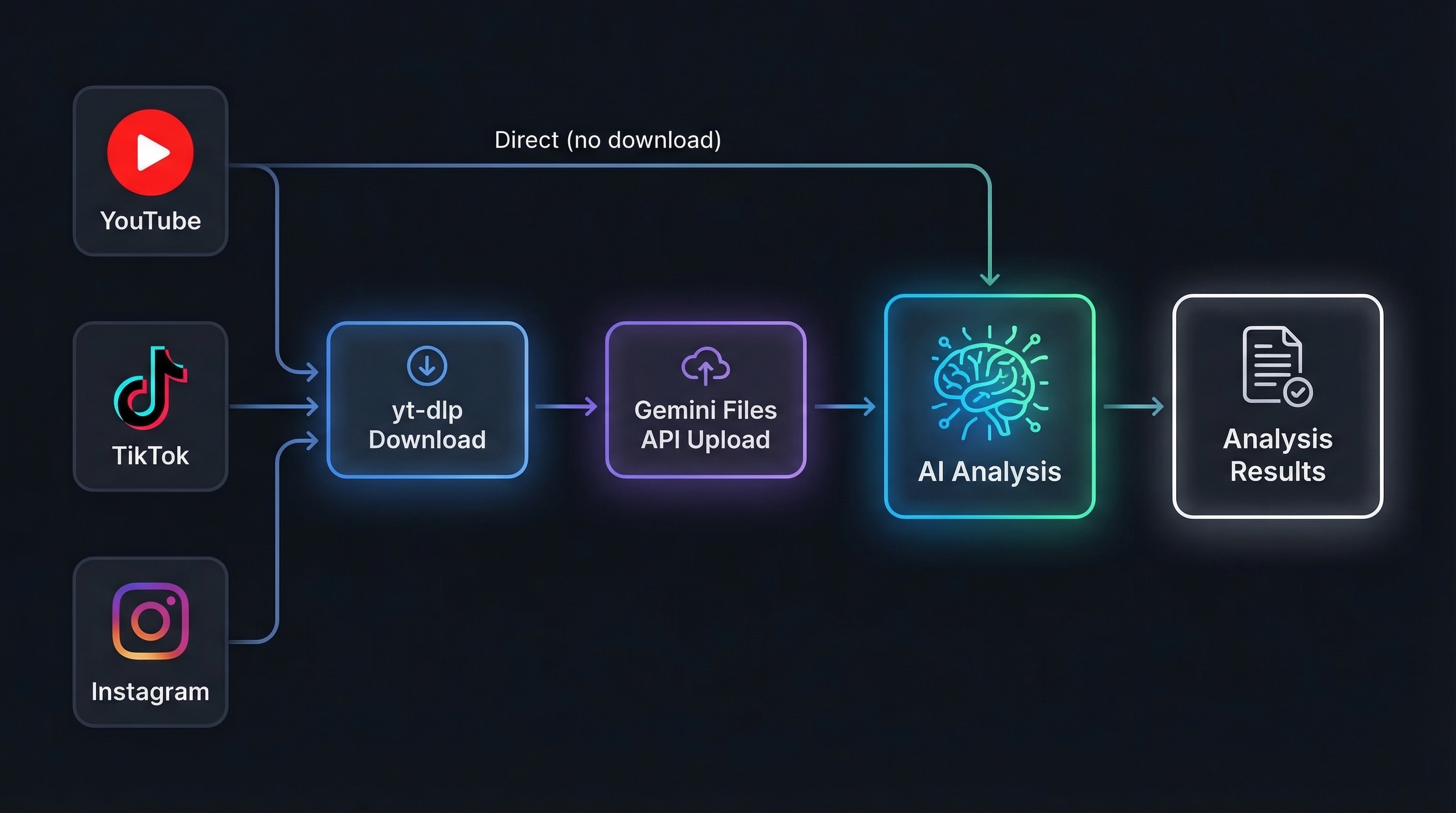
| YouTube | Direct Gemini analysis — no download needed for analysis. Frame/clip extraction uses yt-dlp -g stream URLs + ffmpeg when available, with a small section-download fallback. | Instant / fast local extraction |
| TikTok | tikwm.com API (fast) → yt-dlp fallback with a safe MP4 H.264/H.265 selector that avoids unsupported ByteDance bvc2/bytevc2 streams when possible | ~8s |
| Page scrape via curl_cffi (fast) → yt-dlp fallback | ~10s |
Photo / Slideshow Posts
| Platform | Post type | Handling |
|---|---|---|
| TikTok | Photo Mode slideshow | Downloads all images, extracts the music/audio track when available, and sends one multimodal Gemini request. |
| Carousel / single-photo posts | Downloads image slides in order and analyzes them as one post; mixed video slides are skipped with metadata. | |
| YouTube | Community /post/ image attachments | Scrapes ytInitialData, downloads image attachments, and analyzes them through Gemini Files API. |
YouTube videos are analyzed directly through Gemini's native video understanding — zero download, zero upload, maximum speed. For YouTube evidence assets,
source.mp4is not always required: saved contexts keep the original URL, so frame/clip tools can use the local stream fast path later.
Architecture
| Component | Role |
|---|---|
| Gemini 3.5 Flash | Latest Gemini Flash model — full audio + visual understanding in a single pass |
| FastMCP 3.x | MCP protocol framework over stdio transport |
| yt-dlp + curl_cffi | Video download with Chrome browser impersonation to bypass anti-bot. TikTok downloads prefer locally decodable MP4 H.264/H.265 formats and reject ByteDance bvc2/bytevc2 streams. |
| tikwm.com API | TikTok fast-path fallback when yt-dlp is WAF-blocked |
| ffmpeg | Local frame/clip extraction, including YouTube stream URL extraction without full-video downloads |
| Background Jobs | Async threading for TikTok/Instagram to prevent Claude Desktop timeouts. Failed inner results are reported as failed jobs, not completed jobs. |
Operating Modes
These are behavior modes, not tool names:
| Mode | Behavior |
|---|---|
auto | Default adaptive behavior: YouTube direct analysis; TikTok/Instagram fast API/scrape then yt-dlp fallback; saved contexts reused when available. |
api | Gemini-backed analysis or reanalysis. This is used by analysis tools and explicit Gemini opt-ins. |
client | MCP client workflow mode: long TikTok/Instagram analysis returns a background job_id for polling. |
local | Saved-context, cache, frame, and clip operations that avoid Gemini unless explicitly requested. |
Quick Start
The packaged runtime lives at src/video_url_analyzer_mcp/server.py; the
console entry point is video_url_analyzer_mcp:main. Pick whichever
install path matches your workflow.
Option A — one-line Windows installer (recommended for new users)
irm https://raw.githubusercontent.com/u2n4/video-url-analyzer-mcp/main/install.ps1 | iex
The installer follows the current MCP client pattern: it installs/runs from
PyPI with uvx, uses an existing GEMINI_API_KEY environment variable when
one is already set, otherwise asks for the key only through a hidden prompt,
and lets the user choose where to register the server:
- Claude Code
- Claude Desktop
- Codex CLI
- Cursor
- Windsurf
- VS Code / GitHub Copilot
- Google Antigravity
- Cline
Do not append your API key to the PowerShell command. If you skip the key,
the installer still registers the server and you can set GEMINI_API_KEY
later. If GEMINI_API_KEY is already set in your User environment, the
installer will use it directly and print only a masked form like
AIza...abcd.
Option B — uvx (no install)
uvx video-url-analyzer-mcp
Works on Windows / macOS / Linux as long as uv is on PATH.
Option C — Windows wizard from a checkout
git clone https://github.com/u2n4/video-url-analyzer-mcp.git
cd video-url-analyzer-mcp
powershell -ExecutionPolicy Bypass -File scripts\install_windows.ps1
The wizard:
- Verifies Python 3.10+ and (optionally)
uv. - Installs the package as an editable checkout or via
uv tool install. - Lets you save
GEMINI_API_KEYto a User environment variable or to a gitignored.env.keys.local. Keys are masked in logs (AIza...abcd), never printed in full. - Lets you pick a default model via
VIDEO_ANALYZER_MODEL. - Runs an offline import smoke test.
- Hands off to
scripts/configure_mcp_clients.ps1for client setup.
Option D — Manual install (any OS)
git clone https://github.com/u2n4/video-url-analyzer-mcp.git
cd video-url-analyzer-mcp
pip install -e .
python -m video_url_analyzer_mcp
Get a free key at Google AI Studio,
then set it once in your shell environment (setx GEMINI_API_KEY ... on
Windows, or your ~/.zshrc / ~/.bashrc on macOS/Linux). For local dev
only, you can also drop it in a gitignored .env.keys.local next to the
repo.
Windows launcher
start.bat loads .env.keys.local (if present), sets safe defaults
(VIDEO_ANALYZER_MODE=auto), and runs python -m video_url_analyzer_mcp.
Use it as a command value in any MCP client that prefers a single
executable.
Integration
Run scripts/configure_mcp_clients.ps1 for an interactive menu, or copy
the snippets below from docs/mcp-config-examples.md. The wizard backs up
existing client config, validates JSON/TOML, and never overwrites unrelated
MCP servers.
Client configs use video-analyzer as the local MCP server entry name. The
published package remains video-url-analyzer-mcp, and the registry name
remains io.github.u2n4/video-url-analyzer-mcp.
Claude Desktop (%APPDATA%\Claude\claude_desktop_config.json)
{
  "mcpServers": {
    "video-analyzer": {
      "command": "uvx",
      "args": ["video-url-analyzer-mcp"]
    }
  }
}
The wizard prefers leaving the API key in your OS environment. If you must
embed it, add "env": { "GEMINI_API_KEY": "YOUR_KEY_HERE" }.
Claude Code (CLI)
claude mcp add video-analyzer --transport stdio -- uvx video-url-analyzer-mcp
Or, after pip install -e . in the repo:
claude mcp add video-analyzer --transport stdio -- python -m video_url_analyzer_mcp
Codex CLI (~/.codex/config.toml)
[mcp_servers.video-analyzer]
command = "uvx"
args = ["video-url-analyzer-mcp"]
VS Code / GitHub Copilot MCP
Workspace registration writes .vscode/mcp.json:
{
  "inputs": [
    {
      "type": "promptString",
      "id": "video-url-analyzer-gemini-api-key",
      "description": "Gemini API key for video-url-analyzer-mcp",
      "password": true
    }
  ],
  "servers": {
    "video-analyzer": {
      "type": "stdio",
      "command": "uvx",
      "args": ["video-url-analyzer-mcp"],
      "env": {
        "GEMINI_API_KEY": "${input:video-url-analyzer-gemini-api-key}"
      }
    }
  }
}
For all clients, restart the application after editing config so the new
MCP server is picked up. Full snippets — including Cursor, Windsurf,
Antigravity (%USERPROFILE%\.gemini\antigravity\mcp_config.json), and
Cline — live in docs/mcp-config-examples.md.
Usage Examples
# Full video analysis with Gemini 3.5 Flash
analyze_video("https://www.youtube.com/watch?v=dQw4w9WgXcQ")

# Custom analysis prompt
analyze_video("https://www.tiktok.com/@user/video/123",
              prompt="List every product shown and estimate prices")

# Multilingual transcript extraction
get_transcript("https://www.instagram.com/reel/ABC123/", lang="ar")

# Ask specific questions about video content
ask_about_video("https://youtu.be/abc",
                question="What programming language is used in the tutorial?")

# Analyze once, then ask locally from the saved context
prepare_video_context("https://youtu.be/abc", detail="standard")
ask_video_context("https://youtu.be/abc",
                  question="What happens near the end?")

# Extract visual evidence without embedding binary data in the tool output
get_video_frame("https://youtu.be/abc", timestamp="00:30")
get_video_clip("https://youtu.be/abc", start="00:20", end="00:28")

# Watch & build — extract tutorial steps
watch_and_analyze("https://www.youtube.com/watch?v=tutorial123")
Security
This server has been hardened against a comprehensive threat model audit:
| Layer | Protection |
|---|---|
| SSRF | URL allowlist — only YouTube, TikTok, Instagram domains accepted. Private IPs, localhost, file:// blocked. |
| Command Injection | shell=False + shlex.split(). Dangerous command blocklist (rm -rf, reverse shells, eval, pipe-to-shell). |
| Path Traversal | 25+ sensitive path patterns blocked (.ssh, .aws, .env, system dirs, AppData). |
| TLS | Full certificate validation on all downloads. |
| Browser Cookies | Opt-in only via VIDEO_ANALYZER_COOKIES=true. Disabled by default. |
| Download Size | Hard limit of 100 MB per video. |
| DoS Protection | Max 10 concurrent background jobs. Auto-expiry after 1 hour. Storage cap of 200 analyses. |
| Schema Validation | Gemini JSON responses validated before execution. Response size capped at 500K chars. |
| Dependencies | Runtime dependency bounds are maintained in pyproject.toml. |
Environment Variables
| Variable | Description | Default |
|---|---|---|
GEMINI_API_KEY | Google Gemini API key | Required |
ANALYSES_DIR | Directory for saved analyses | ./analyses |
VIDEO_CONTEXT_DIR | Directory for saved reusable video contexts | video_contexts |
VIDEO_SOURCE_DIR | Directory for cached downloaded source media | video_sources |
VIDEO_ASSET_DIR | Directory for extracted frames/clips | video_assets |
VIDEO_ANALYZER_COOKIES | Enable browser cookie access (true/false) | false |
VIDEO_DOWNLOAD_TIMEOUT | Override download and yt-dlp timeout values, in seconds | Existing per-operation defaults |
VIDEO_FFMPEG_TIMEOUT | Override ffmpeg extraction timeout values, in seconds | Existing per-operation defaults |
VIDEO_GEMINI_TIMEOUT | Optional Gemini HTTP timeout, in seconds | SDK default |
VIDEO_IMAGE_DOWNLOAD_CONCURRENCY | Parallel image downloads for TikTok/Instagram/YouTube photo posts | 6 |
VIDEO_GEMINI_UPLOAD_CONCURRENCY | Parallel Gemini Files uploads for downloaded media and slideshow images | 4 |
VIDEO_ANALYZER_MODEL | Single-knob default model id used for both fast and deep model resolution. Per-call model= and GEMINI_FAST_MODEL / GEMINI_DEEP_MODEL still take precedence. | unset |
GEMINI_FAST_MODEL | Override for compact/standard detail mode | gemini-3.5-flash |
GEMINI_DEEP_MODEL | Override for full detail mode | gemini-3.1-pro-preview |
Default fast model:
gemini-3.5-flash. Default deep model (used whendetail="full"):gemini-3.1-pro-preview. SetVIDEO_ANALYZER_MODELto override both at once. Model availability can vary by Google account, region, and API tier — fall back togemini-flash-latestif the latest ids are not yet enabled for your key. |VIDEO_ANALYZER_MODE| Behavior preset (auto/api/client/local); read bystart.bat|auto|
Troubleshooting
| Issue | Solution |
|---|---|
GEMINI_API_KEY not set | Create .env file or pass via environment variable |
| TikTok download fails | tikwm.com fallback activates automatically. Ensure curl_cffi is installed. |
TikTok bvc2 / bytevc2 codec | v1.4 avoids these unsupported ByteDance streams when a compatible MP4 H.264/H.265 format exists. If no compatible stream is available, tools return a structured unsupported_codec or no_compatible_format error instead of uploading or pretending success. |
| Instagram download fails | pip install curl_cffi for browser impersonation support |
ENOENT on Windows | Use start.bat as command in Claude Desktop config |
| Impersonate target not available | Reinstall: pip install "yt-dlp[curl-cffi]" |
| Claude Desktop timeout | TikTok/Instagram run in background — use check_analysis_job(job_id) to poll |
| Background job says failed | Expected when the worker result is an error, Gemini file processing fails, or media validation rejects the source. check_analysis_job no longer reports these inner failures as completed. |
prepare_video_context repeats work | It reuses cached contexts unless force_refresh=true |
YouTube source.mp4 missing | Expected in some cases. Frame/clip tools can recover from the saved URL and use yt-dlp -g + ffmpeg fast extraction. |
| Transient Gemini 503/5xx | Gemini generate_content calls retry up to 3 times with exponential backoff. 4xx auth/schema/user errors are not retried. |
Tech Stack
| Technology | Version | Purpose |
|---|---|---|
| Google Gemini 3.5 Flash | Latest | Multimodal video analysis engine |
| FastMCP | 3.3.1+ | MCP protocol framework |
| yt-dlp | 2026.3.17+ | Video downloader |
| curl_cffi | >=0.7.4,<0.15.0 | Browser impersonation (TLS fingerprint), pinned for yt-dlp 2026.03.17 compatibility |
| google-genai | 2.5.0+ | Official Google GenAI SDK |
License
MIT
العربية
خادم تحليل الفيديو بالذكاء الاصطناعي
خادم MCP لتحليل الفيديو باستخدام Google Gemini 3.5 Flash — احدث نموذج Gemini Flash متعدد الوسائط من جوجل.
المميزات
| الاداة | الوصف |
|---|---|
analyze_video | تحليل شامل للصوت والصورة مع دعم الاوامر المخصصة |
get_transcript | استخراج النص المنطوق مع الطوابع الزمنية — يدعم +100 لغة |
ask_about_video | اسال اي سؤال عن محتوى الفيديو |
prepare_video_context | تحليل الفيديو مرة واحدة وحفظ سياق محلي قابل لاعادة الاستخدام |
ask_video_context | الاجابة من السياق المحفوظ بدون Gemini افتراضيا |
get_video_frame / get_video_clip | استخراج صورة او مقطع كدليل محلي، مع مسار سريع ليوتيوب عبر yt-dlp + ffmpeg |
watch_and_analyze | استخراج خطوات الشروحات التقنية والاوامر والاكواد |
execute_tutorial_steps | مراجعة وتنفيذ الخطوات المستخرجة بامان |
المنصات المدعومة
| المنصة | السرعة |
|---|---|
| يوتيوب | فوري — تحليل مباشر بدون تحميل |
| تيك توك | ~8 ثواني — واجهة tikwm.com السريعة |
| انستقرام | ~10 ثواني — استخراج مباشر من الصفحة |
التثبيت السريع (ويندوز)
استنسخ الريبو ثم شغل المعالج التفاعلي:
git clone https://github.com/u2n4/video-url-analyzer-mcp.git
cd video-url-analyzer-mcp
powershell -ExecutionPolicy Bypass -File scripts\install_windows.ps1
البديل بدون تثبيت: uvx video-url-analyzer-mcp.
الامان
الخادم محمي ضد:
- SSRF — قائمة بيضاء للنطاقات المسموحة فقط
- حقن الاوامر — حظر الاوامر الخطيرة + تنفيذ بدون shell
- اختراق المسارات — حظر 25+ مسار حساس
- حماية من الحمل الزائد — حد اقصى 10 مهام متزامنة
الحصول على مفتاح API
- اذهب الى Google AI Studio
- انشئ مفتاح API مجاني
- ضعه في ملف
.env:
GEMINI_API_KEY=مفتاحك_هنا