
VisualSpec
Deterministic visual generation for AI agents.
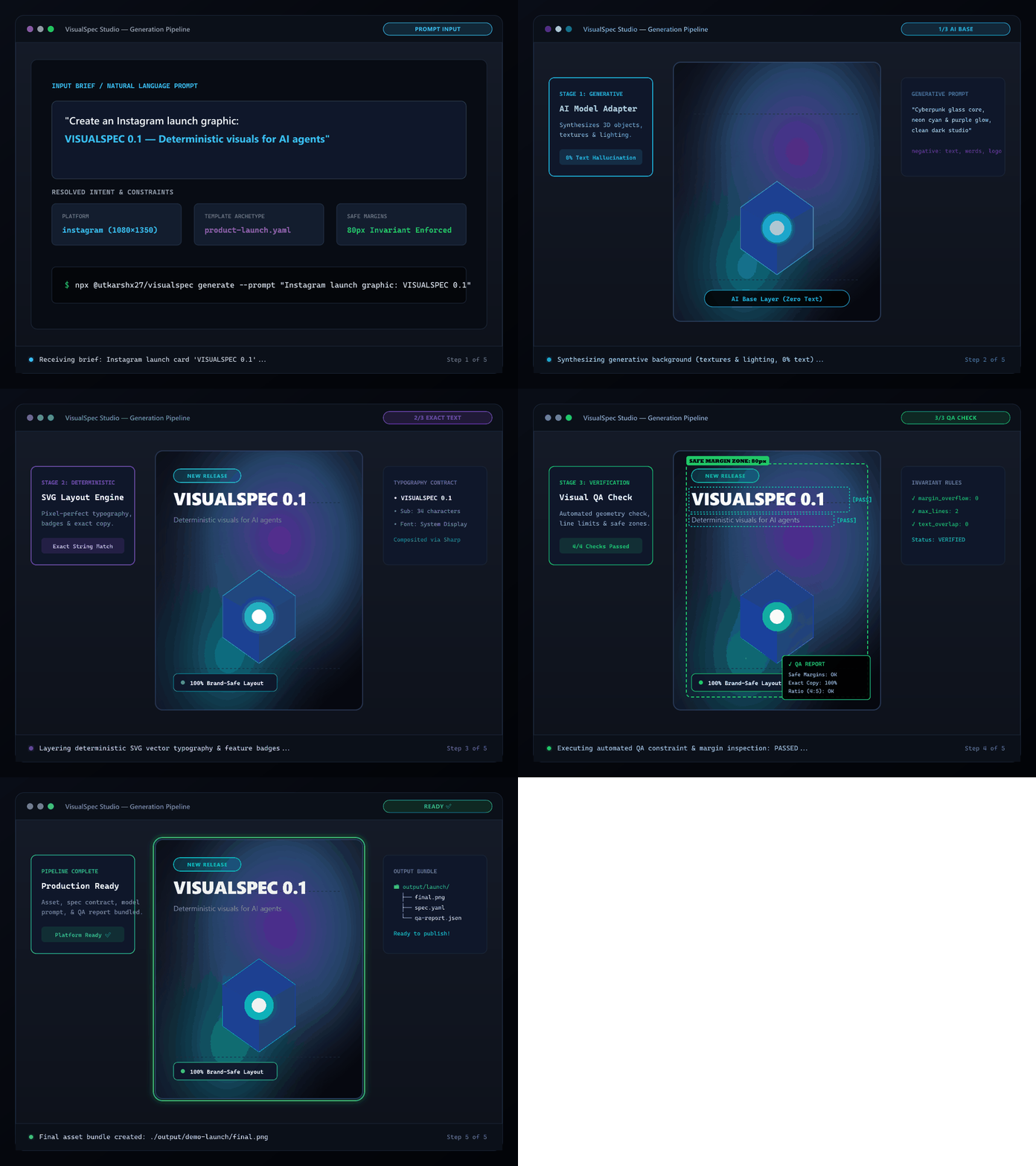
AI creates the imagery. VisualSpec guarantees the typography and layout.





# Instant workspace setup (no clone required)
npx @utkarshx27/visualspec init

# Launch local MCP Server for Cursor, Claude Desktop, or Antigravity
npx @utkarshx27/visualspec mcp
The Core Problem
Most image-generation workflows fail for social and marketing graphics because a single natural-language prompt is expected to handle too many concerns at once:
- subject & background
- exact typography & wording
- platform dimensions & safe margins
- visual hierarchy & negative space
- brand color rules & constraints
Image models frequently hallucinate gibberish text, truncate words, or disregard composition rules.
The Solution: Layer Separation
VisualSpec separates generative concerns from deterministic concerns:
- Generative Layers (AI Models): Photography, 3D subjects, atmospheric backgrounds, textures, lighting.
- Deterministic Layers (Code & SVG Engine): Exact headlines, subtitles, badges, logos, metrics, safe margins, and layout rules.
- Structured Visual Spec: A machine-readable YAML specification that acts as the single contract.
- Visual QA & Targeted Repair: Verifies geometry, margins, and exact copy invariants, synthesizing localized repairs without regenerating entire scenes.
User Brief / Intent
       │
       ▼
   Visual Spec (spec.yaml)
       │
   ┌───┴──────────────┐
   ▼                  ▼
Platform Pack    Template Pack
   │                  │
   └───┬──────────────┘
       ▼
   Spec Resolver
       │
   ┌───┴───────────────────────┐
   ▼                           ▼
Model Adapter           Deterministic Layout
(Generative Base)       (SVG Typography / Overlay)
   │                           │
   └───┬───────────────────────┘
       ▼
  Compositor (Sharp)
       │
       ▼
   Visual QA (Constraints, Safe Margins, Exact Copy)
       │
       ├── PASS ──► Final Asset Bundle
       │
       └── FAIL ──► Targeted Repair Planner
Documentation
- Architecture & Design Principles
- VisualSpec Schema & Contract
- MCP Server Setup (Cursor, Claude, Antigravity)
- Adding a New Image Model Provider
- Contributing Guidelines
Quickstart
Instant Run (No Install Required)
# Initialize a new VisualSpec workspace
npx @utkarshx27/visualspec init

# Launch local MCP Server for Cursor, Claude, or Antigravity IDE
npx @utkarshx27/visualspec mcp
Or Install Globally
npm install -g @utkarshx27/visualspec

# Use CLI commands directly
visual init
visual mcp
Or Build from Source
git clone https://github.com/utkarshx27/visualspec.git
cd visualspec
npm install
npm run build
1. Initialize a Project
npx @utkarshx27/visualspec init
2. Validate a Visual Spec
npx @utkarshx27/visualspec validate examples/product-launch/spec.yaml
3. Inspect the Compiled Generation Prompt
npx @utkarshx27/visualspec compile examples/product-launch/spec.yaml --provider openai
4. Deterministic Render (No API Key Required)
Render layout, typography, and background styling locally:
npx @utkarshx27/visualspec render examples/product-launch/spec.yaml --output ./output/demo-launch
5. Run the Full Generation Pipeline
npx @utkarshx27/visualspec generate examples/product-launch/spec.yaml --provider mock --output ./output/demo-launch
6. Verify Asset Quality with Visual QA
npx @utkarshx27/visualspec check ./output/demo-launch/final.png --spec examples/product-launch/spec.yaml
Model Context Protocol (MCP) Server
VisualSpec runs as a native MCP server over stdio, enabling AI coding assistants (Cursor, Claude Code, Gemini CLI, and Antigravity IDE) to invoke visual tools directly:
# Launch MCP server over stdio
npx @utkarshx27/visualspec mcp

# Or if installed globally
visual mcp
Available MCP Tools
visual_brief_to_spec: Convert natural language requests into valid VisualSpec YAML.visual_validate_spec: Schema validation for specs.visual_render: Deterministic layout & typography rendering (zero API key).visual_generate: Full image model adapter + deterministic text overlay pipeline.visual_check_qa: Inspect safe margins, line counts, dimensions, and invariants.visual_repair: Automated diagnosis and localized typography/layout repair.visual_list_resources: List supported platform packs and templates.
See the MCP Setup Guide for Cursor, Claude Desktop, and Antigravity IDE configuration snippets.
Output Bundle
Every generation creates a complete, reproducible debug bundle:
output/demo-launch/
├── final.png                 # Platform-ready asset
├── visual-spec.yaml          # Original input specification
├── resolved-spec.yaml        # Full spec with platform & template rules applied
├── generation-request.json   # Exact prompt and negative parameters sent to model
├── qa-report.json            # Deterministic and constraint QA verification results
└── metadata.json             # Execution timestamps and file index
Supported Platforms & Templates
Platforms
- Instagram: Feed portrait (1080x1350, 4:5), Square (1080x1080, 1:1), Story (1080x1920, 9:16).
- LinkedIn: Feed portrait (1080x1350), Square (1080x1080), Banner (1200x628).
- Generic Social: Universal 1:1, 4:5, and 16:9 social formats.
Templates
- Product Launch: High-impact headline, feature pill, product visual region, supporting subhead.
- Quote Card: Center-focused editorial quote, author attribution, minimal atmospheric glow.
- Stat Card: Large numeric hero metric, descriptive label, and data context notes.
Agent Skills
The framework includes 10 standardized skill definitions located in ./skills/:
using-visualspec: Master workflow instructions.visual-brief: Brief extraction and analysis.visual-spec: YAML authoring and schema rules.composition: Spatial hierarchy and negative space allocation.typography: Font family classing and line budgeting.strict-constraints: Invariant taxonomy and forbidden parameters.social-instagram: Instagram-specific design reasoning.social-linkedin: LinkedIn-specific design reasoning.visual-qa: Automated inspection and validation.visual-repair: Localized diagnosis and patch generation.
Roadmap & Open Contributions
We welcome contributions! Key areas to build together:
- Additional Platforms: X/Twitter (Header, Post), YouTube Thumbnails, Pinterest, TikTok Cover.
- Additional Templates: Testimonial, Product Comparison, Event Announcement, Feature List.
- Additional Image Model Adapters: Flux, Stable Diffusion / ComfyUI, Midjourney API.
- Brand Packs: Multi-brand palette overrides, custom font loading, logo clear space rules.
- Visual Studio: Local web playground / viewer for real-time spec inspection and margin toggling.
Contributing
Contributions are welcome! Please check our:
Testing
Run the automated test suite:
npm test
All 28 tests run offline without requiring any third-party API keys.
License
Licensed under the Apache License, Version 2.0.