Listed from the MCP registry; nobody on Odel publishes it.

UXLoom
Agent-native UI/UX design validation: journey completeness, state coverage, and WCAG checks.
Runs on your machine from its package; the steps are below.

What it does
- Reads
- Writes
- High impact
At most: only reads or looks up information.
What it costs
FreeOdel charges nothing per call. The publisher may charge for its own service.
Runs locally over stdio
This server isn't hosted — your MCP client launches it from a package registry. Use one of the commands below, or drop the config into your client (e.g. Claude Desktop).
Run
npx -y uxloom
MCP client config
{
  "mcpServers": {
    "uxloom": {
      "command": "npx",
      "args": [
        "-y",
        "uxloom"
      ]
    }
  }
}Your generator gave you 6 screens. UXLoom proves you're missing 9 states.
AI generators (v0, Lovable, Figma Make, Claude) produce happy-path screens. UXLoom is the critic layer: it models user journeys as state machines, treats screens as nodes with state contracts, and mechanically proves what's missing before a line of production code exists — unreachable screens, dead ends, missing error/empty/loading states, WCAG contrast failures, undersized touch targets, and labels that will overflow under localization.
Agent-native by design: the interface is an MCP server (works with Claude Code, Codex, and any MCP client), with Agent Skills included.
Deterministic by design: same input, byte-identical report — benchmarked
(packages/bench) at 1.000 precision/recall on a seeded
defect catalog, SHA-256-stable across processes, 1000 screens in under 5ms.
That's what lets design completeness gate CI, where an LLM opinion can't.
Website: uxloom.dev · npm: uxloom · MCP registry: io.github.uxloom-dev/uxloom · 
Packages
| Package | What it is |
|---|---|
@uxloom/journeygraph | The open design-as-data format: journeys as state machines, screens as nodes with required states |
@uxloom/critics | The validators: journey completeness, state coverage, WCAG contrast, touch targets, text expansion |
uxloom | The MCP server + Agent Skills — the interface agents use |
New here? Start with the Quickstart — prerequisites, the Claude Code walkthrough, what to say to your agent, and troubleshooting.

Quick start (agents)
# Claude Code
claude mcp add uxloom -- npx -y uxloom

# Codex CLI
codex mcp add uxloom -- npx -y uxloom
The project file (uxloom.project.json) lives in your workspace and belongs
in git — the design is data, versioned next to the code it specifies.
Quick start (humans & CI)
npx uxloom init      # one-command setup: MCP config + agent skill + starter file
npx uxloom preview   # live mocks (themed, commentable, EDITABLE in the browser)
npx uxloom export    # shareable HTML — plus --svg (Figma/Penpot import; add
                     #   --manifest for the round-trip key) and --png (playwright)
npx uxloom check     # design completeness — exit 1 on errors, CI-ready
npx uxloom audit     # implementation drift — web AND native (Swift/Kotlin/
                     #   Dart/Java markers); --live verifies the real DOM;
                     #   --design <file|dir> audits a Figma/Penpot export vs the contract
npx uxloom diff      # human-readable design diffs for PR review
Evidence-based design: every decision in the contract can carry its
rationale — reasoning, rejected alternatives with pros/cons, sources,
confidence — enforced by the critics once adopted, iterated through a
bounded design_review loop (max 3 rounds), and shown to stakeholders in
the preview's evidence panel (ⓘ) and exports. The design doesn't just
validate; it argues its case.
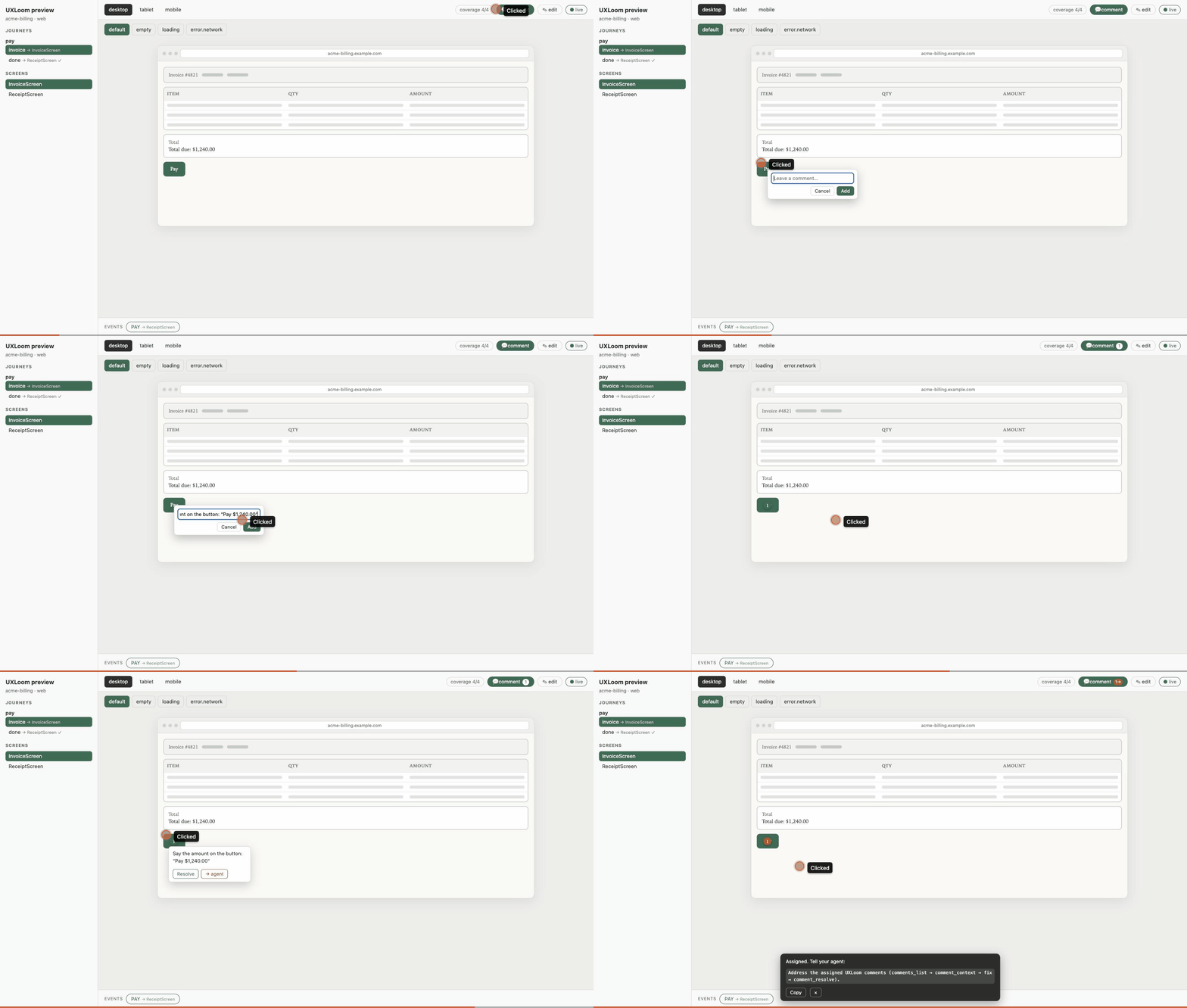
Agent-addressable comments: a reviewer drops a pinned comment in the
preview and clicks "→ agent". The comment becomes a work item any Gen-AI
model can read with full context — comment_context returns the pinned
layout block, the screen contract, the journey references, and the current
findings for that screen — act on, and resolve back into the preview with
a note. One click from feedback to addressed.
CI-native: check and audit take --json, --sarif (GitHub code
scanning), and --github (inline PR annotations). Brownfield-ready:
--update-baseline freezes existing findings so only new drift blocks;
uxloom.config.json tunes thresholds to your accessibility bar. Full
documentation: uxloom.dev/docs.html.
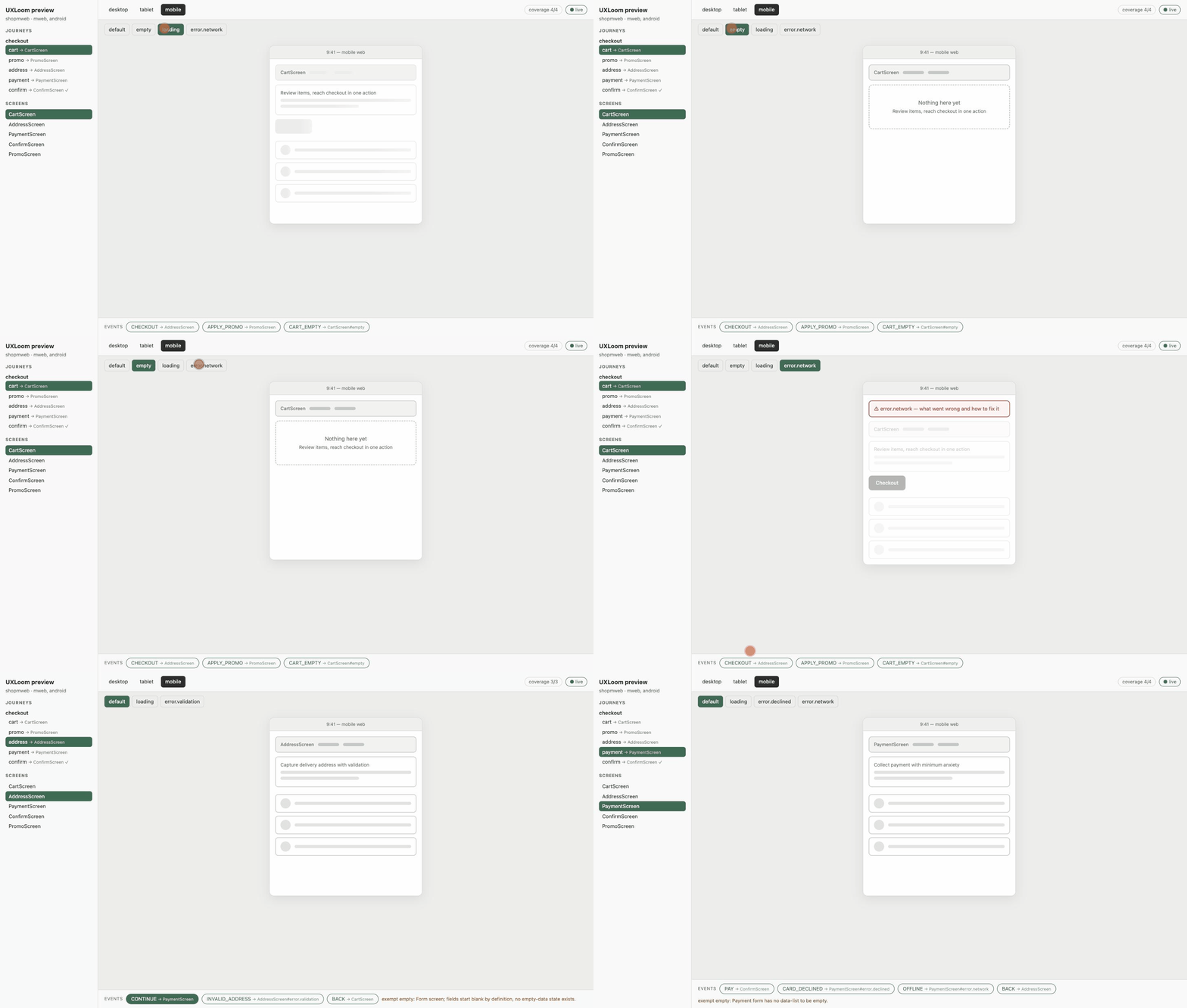
Add it to CI and a happy-path-only design can never merge:
- run: npx uxloom check design/uxloom.project.json
Workflow (also shipped as a skill in packages/mcp-server/skills/):
project_init → brief_start/brief_answer → journey_define →
screen_register → project_validate → fix → repeat until zero errors →
coverage_report.
Does it actually catch things?
tools/dogfood.mjs drives the real MCP server through three products, twice
each: screens as a happy-path generator hands them over, then repaired using
the validation report. Artifacts in examples/.
| Product | Generated (happy-path) | Repaired |
|---|---|---|
shopmweb — e-commerce checkout (mWeb + Android) | 9 errors, 6 warnings | 0 / 0 |
taskflow — SaaS signup/onboarding (web) | 1 error, 6 warnings | 0 / 0 |
ridenow — ride booking (iOS + Android, offline-heavy) | 3 errors, 7 warnings | 0 / 0 |
Caught: an unreachable promo screen, dead-end verification states, five
undesigned payment/error states, a 2.4:1 contrast button, a 40px touch target
on Android, a checkout label that breaks in German, and three products' worth
of missing offline states. Zero errors and zero warnings is reachable
honestly — screens declare documented exemptions where a baseline state
genuinely cannot apply, and contradictory exemptions are flagged.
Development
npm install
npm run typecheck
npm test
Status
Released and maintained: on npm and
the official MCP registry, with the benchmark scorecard published in every
GitHub release. The
JourneyGraph format (formatVersion: "0.1") may evolve until 1.0; releases
follow RELEASING.md — every surface is drift-checked in CI.
License
MIT






