Listed from the MCP registry; nobody on Odel publishes it.

Testa
Drive the iOS Simulator from an agent: read the screen, tap/type/swipe, replay flows in CI.
Runs on your machine from its package; the steps are below.
What it does
- Reads
- Writes
- High impact
At most: moves money, runs code or commands, deletes data, or sends messages for you.
What it costs
FreeOdel charges nothing per call. The publisher may charge for its own service.
Runs locally over stdio
This server isn't hosted — your MCP client launches it from a package registry. Use one of the commands below, or drop the config into your client (e.g. Claude Desktop).
Run
npx -y @valewnrt/testa-mcp
MCP client config
{
  "mcpServers": {
    "testa": {
      "command": "npx",
      "args": [
        "-y",
        "@valewnrt/testa-mcp"
      ]
    }
  }
}


Testa gives Claude Code, Codex, Cursor or any MCP client eyes and hands in the
iOS Simulator. It reads the screen as compact text, taps, types and swipes with
real touch events, and checks the result. It works with React Native, Expo and
SwiftUI apps, and you don't have to add a single testID. When the agent is
done, save the run as a flow file and replay it in CI without a model.
Install
Requires macOS with Xcode 26 (iOS 26 simulators).
brew tap valewnrt/testa
brew install testa
testa setup        # installs the Claude Code skill and registers the MCP server
Or build from source: git clone https://github.com/valewnrt/testa && cd testa && ./install.sh.
Connect your agent
testa setup already configures Claude Code. For other agents:
codex mcp add testa -- testa mcp # Codex
{ "mcpServers": { "testa": { "command": "testa", "args": ["mcp"] } } }
The JSON goes into Cursor's .cursor/mcp.json or any other MCP client config.
Then ask your agent something like "Launch the app in the simulator, sign up
with a test account and check that the welcome screen appears."
More in docs/agents.md.
Try it yourself
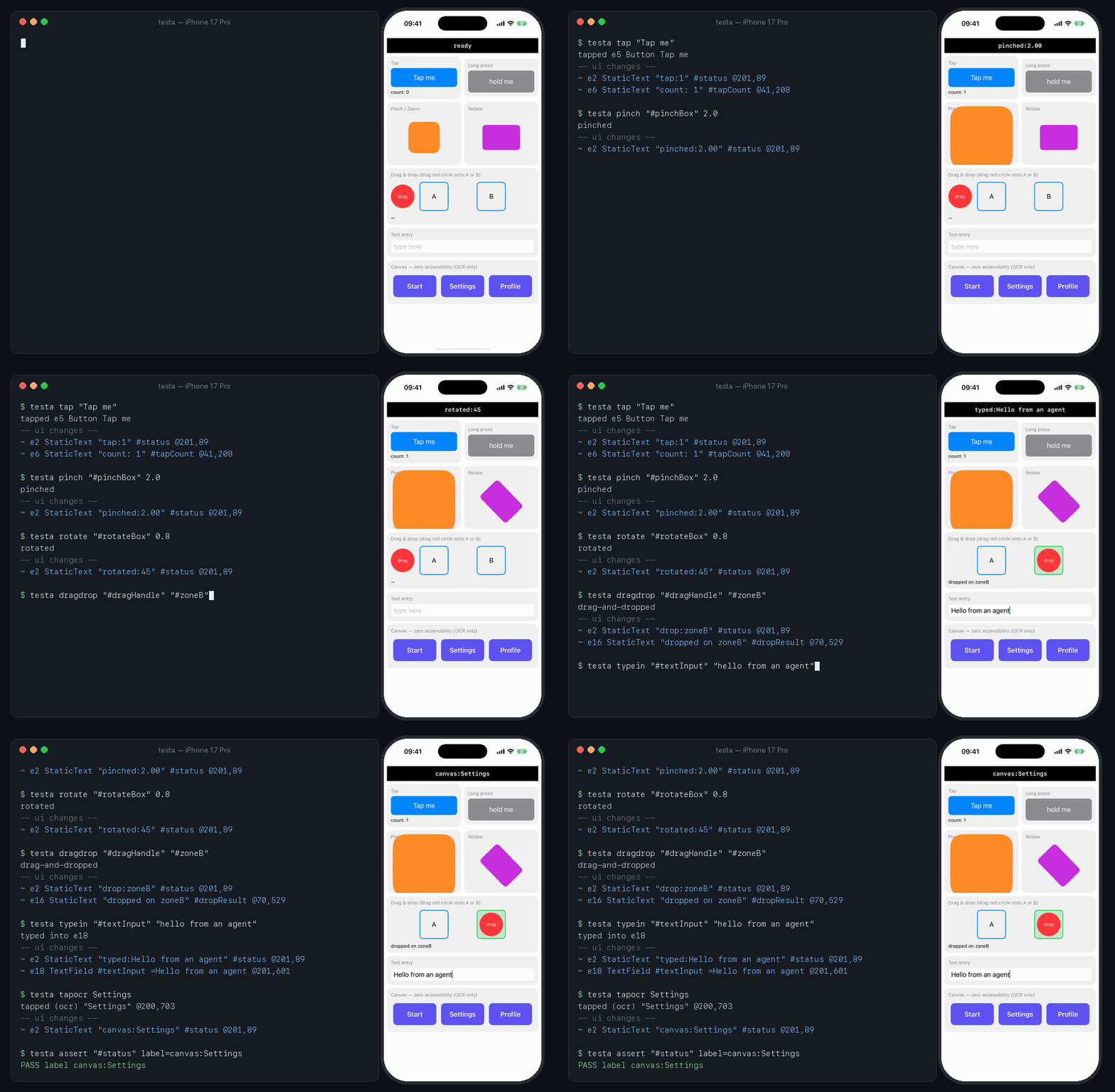
Testa is a plain CLI, so you can drive it by hand too:
$ testa boot "iPhone 17 Pro"
$ testa install ./MyApp.app && testa launch com.example.myapp

$ testa ui
19 elements (on screen)
e2 StaticText "ready" #status @201,89
e5 Button "Tap me" #tapButton @102,171
e18 TextField #textInput =type here @201,601
…

$ testa tap "Tap me"
tapped e5 Button Tap me
-- ui changes --
~ e2 StaticText "tap:1" #status @201,89
~ e6 StaticText "count: 1" #tapCount @41,208

$ testa assert "#status" label=tap:1
PASS label tap:1
The first command starts a background daemon (a few seconds, once). After that, each command takes about 60 ms.
What makes it different
- No app changes needed. Testa reads the accessibility tree and falls back to on-device OCR (Apple Vision) for anything that isn't in it: system sheets, canvas-drawn screens, games, WebViews. More →
- Built for token budgets. A screen is one line per element, about 200 tokens instead of about 1,500 for a screenshot, and every action replies with only what changed. Benchmark →
- Record once, replay in CI.
testa flow recordturns what the agent did into a plain-text flow file.testa flow runreplays it with JUnit output and failure artifacts, and there's a GitHub Action. More → - Real gestures and device control. Tap, long-press, swipe, drag-and-drop, pinch, rotate, multi-touch and hardware buttons, plus push notifications, location, Face ID, dark mode, Dynamic Type and more.
- One local binary, no dependencies. Testa talks to Apple's simulator frameworks directly: no Node, no Python, no WebDriver server. No network, no telemetry. How it works →
Status
Testa is pre-1.0 and is used against real production apps. It relies on private Apple frameworks, so a new Xcode can break it; a weekly job runs the suite against Xcode betas so breakage shows up early. Verified on Xcode 26.4 with iOS 26.4 simulators. iOS Simulator only: no real devices, no Android (why).
Documentation
- Commands: selectors, the observe → act → verify loop, full reference
- Using Testa from an AI agent: MCP setup, tools, token cost
- Testing apps without testIDs
- Flows & CI: flow files, recording, GitHub Action
- How it works · Security model
- How Testa compares to Maestro, Appium, idb and Argent
- Troubleshooting & limitations
Contributing
Bug reports, Xcode-compatibility reports and pull requests are welcome. Start with CONTRIBUTING.md; questions and ideas go to Discussions. Changes are listed in the CHANGELOG.
Acknowledgements
Testa's HID and accessibility work was informed by studying Meta's idb (MIT); no idb code is linked or bundled. Thanks to everyone who has contributed.







