Listed from the MCP registry; nobody on Odel publishes it.

PDF Accessibility Audit
Local-first PDF accessibility triage: cited findings, offline HTML report, not a validator.
Runs on your machine from its package; the steps are below.
What it does
- Reads
- Writes
- High impact
At most: creates or changes data: records, files, settings.
What it costs
FreeOdel charges nothing per call. The publisher may charge for its own service.
Runs locally over stdio
This server isn't hosted — your MCP client launches it from a package registry. Use one of the commands below, or drop the config into your client (e.g. Claude Desktop).
Run
npx -y pdf-a11y-audit
MCP client config
{
  "mcpServers": {
    "pdf-accessibility-audit": {
      "command": "npx",
      "args": [
        "-y",
        "pdf-a11y-audit"
      ]
    }
  }
}pdf-a11y-audit
A local-first PDF accessibility auditor for people and AI agents.
No upload. No account. No API key. No model call. It reads a local PDF, inspects the actual object model and text layer, and returns a compact summary, a JSON report, a Markdown audit, CSV or SARIF output, or a self-contained HTML report you can send to a colleague.
It is heuristic triage, not a PDF/UA validator. Use veraPDF or PAC plus a screen reader before making a conformance claim.

Why this exists
Most PDF accessibility checks are either a Windows GUI, a paid service, or a black-box score. This tool is the opposite:
- Local: the document never leaves the machine.
- Deterministic: the same PDF produces the same findings.
- Evidence-based: every finding names the rule, the page, the standards reference and the remediation step.
- Honest: checks that need a screen reader or a human are listed as manual, never reported as passed.
- Free: no server, no per-document fee, no inference cost.
It is built and maintained by Remediate for teams publishing public-sector documents.
Requirements
- Node.js 22.13 or newer.
pdfjs-distneeds 22.13 as its floor. - No account, network access or model provider. The CLI and the MCP server work offline.
Install
# Run without installing
npx -y pdf-a11y-audit ./document.pdf

# Or install the CLI
npm install -g pdf-a11y-audit
pdf-a11y-audit ./document.pdf --format html --out report.html
Published on npm as
pdf-a11y-audit and listed in
the official MCP Registry as io.github.Veduis/pdf-a11y-audit.
Prefer to work from a checkout? Clone the repository, run npm install, and
use node bin/cli.js instead.
CLI
# Markdown to the terminal
pdf-a11y-audit budget.pdf

# A compact summary instead of the full report
pdf-a11y-audit budget.pdf --format summary

# A self-contained HTML report (one document at a time)
pdf-a11y-audit budget.pdf --format html --out budget-a11y.html

# JSON for a pipeline
pdf-a11y-audit budget.pdf --format json --out budget-a11y.json

# SARIF for code scanning, or CSV for a spreadsheet
pdf-a11y-audit budget.pdf --format sarif --out budget-a11y.sarif
pdf-a11y-audit ./public-docs --format csv

# Only report serious and critical findings
pdf-a11y-audit budget.pdf --severity serious

# Fail a build on serious or critical findings
pdf-a11y-audit budget.pdf --fail-on serious

# Compare against a saved baseline, or write the current report as the baseline
pdf-a11y-audit budget.pdf --baseline budget-baseline.json
pdf-a11y-audit budget.pdf --update-baseline budget-baseline.json

# Only the summary line
pdf-a11y-audit budget.pdf --quiet

# Start the MCP server on stdio
pdf-a11y-audit --mcp
| Option | Default | Meaning |
|---|---|---|
--format json|markdown|summary|html|csv|sarif | markdown | Output format |
--out <path> | stdout, or <name>-a11y-report.html for HTML | Write to a file |
--severity <level> | all findings | Only include findings at or above this severity |
--fail-on <severity|none> | serious | Exit 1 at or above this severity |
--max-findings <n> | 500 | Cap findings shown per document. Display only: scores and status come from all findings. |
--baseline <file> | off | Compare the current report against a saved baseline |
--update-baseline <file> | off | Write the current findings as the new baseline |
--quiet | off | Print only the summary line |
--mcp | off | Start the stdio MCP server instead of the CLI |
--help, --version | Print help or the version |
--fail-on defaults to serious, which means a normal report run on most real
documents exits 1. That is deliberate for a CI gate; pass --fail-on none
when the report itself is the deliverable.
The HTML report is one document at a time. Use render_report or run the CLI
once per file when you need HTML for a folder.
MCP server
The package exposes a stdio MCP server. It never opens a network connection.
Every tool declares an outputSchema, so a client can validate the structured
result.
Claude Desktop / Cursor / any MCP client
{
  "mcpServers": {
    "pdf-a11y-audit": {
      "command": "npx",
      "args": ["-y", "pdf-a11y-audit", "--mcp"]
    }
  }
}
For a local checkout:
{
  "mcpServers": {
    "pdf-a11y-audit": {
      "command": "node",
      "args": ["/absolute/path/to/pdf-a11y-audit/bin/mcp.js"]
    }
  }
}
A minimal client is included. It starts the server, calls audit_pdf and prints
the result exactly as the server returned it:
node examples/mcp-client.mjs ./document.pdf
MCP_TRACE=1 node examples/mcp-client.mjs ./document.pdf | head -n 30
The same server can be started through the CLI entry point with --mcp; this is
the form used by the registry manifest and by the npx configuration above.
Tools
| Tool | What it does |
|---|---|
audit_pdf | Audit one local PDF. Formats: json, markdown, html, summary (default). minSeverity filters findings, maxFindings/offset paginate the returned list, and overwrite: true is required to replace an existing output file. |
audit_batch | Audit every PDF under one or more folders. Formats: json, markdown, csv. File count and folder depth are capped, symlinked PDFs are followed with loop protection, and one unreadable file fails soft instead of aborting the batch. |
explain_finding | Explain a rule, its standards mapping and its remediation. |
list_checks | List the automated and manual check catalog. |
compare_reports | Compare two reports for the same document and list new, fixed and persisting findings. Cross-document comparisons are refused. |
render_report | Re-render an existing JSON report as HTML and write the file. overwrite: true is required to replace an existing file. |
File-writing tools refuse to replace an existing file unless overwrite: true
is passed. Relative paths resolve against the server process working
directory, so absolute paths are safer.
Resources and prompt
remediate://rules: the full rule catalog.remediate://methodology: what the audit can and cannot decide.audit_and_plan: a prompt that turns findings into a prioritized remediation plan without claiming conformance.
What it checks
There are 62 automated checks and 10 manual checks. The automated engine covers, among other things:
- Document: tagging,
/MarkInfo, parent tree, suspects, role map, language, display title, document title, XMP title, PDF/UA claims. - Headings: presence, first level, skipped levels, empty headings, multiple H1s.
- Tables: header cells, empty headers,
Scope/Headers, rows, irregular rows. - Figures: missing alt, empty alt, filename-like alt.
- Forms: field names, tooltips, duplicate names, widget structure, tab order.
- Lists: empty list items.
- Links: structure parent and accessible names.
- Fonts: embedded fonts and
ToUnicodemaps. - Pages: scanned pages, blank pages, sparse text.
- Reading order: orphaned or missing MCIDs and order mismatches.
- Navigation: missing bookmarks in long documents, empty bookmark entries.
The report also lists 10 manual checks for colour contrast, alt-text quality, screen-reader order, complex tables, link purpose, OCR accuracy, form errors and a full assistive-technology pass. An automated pass is not a conformance certificate, and the tool is not a substitute for veraPDF, PAC or a screen reader.
The report
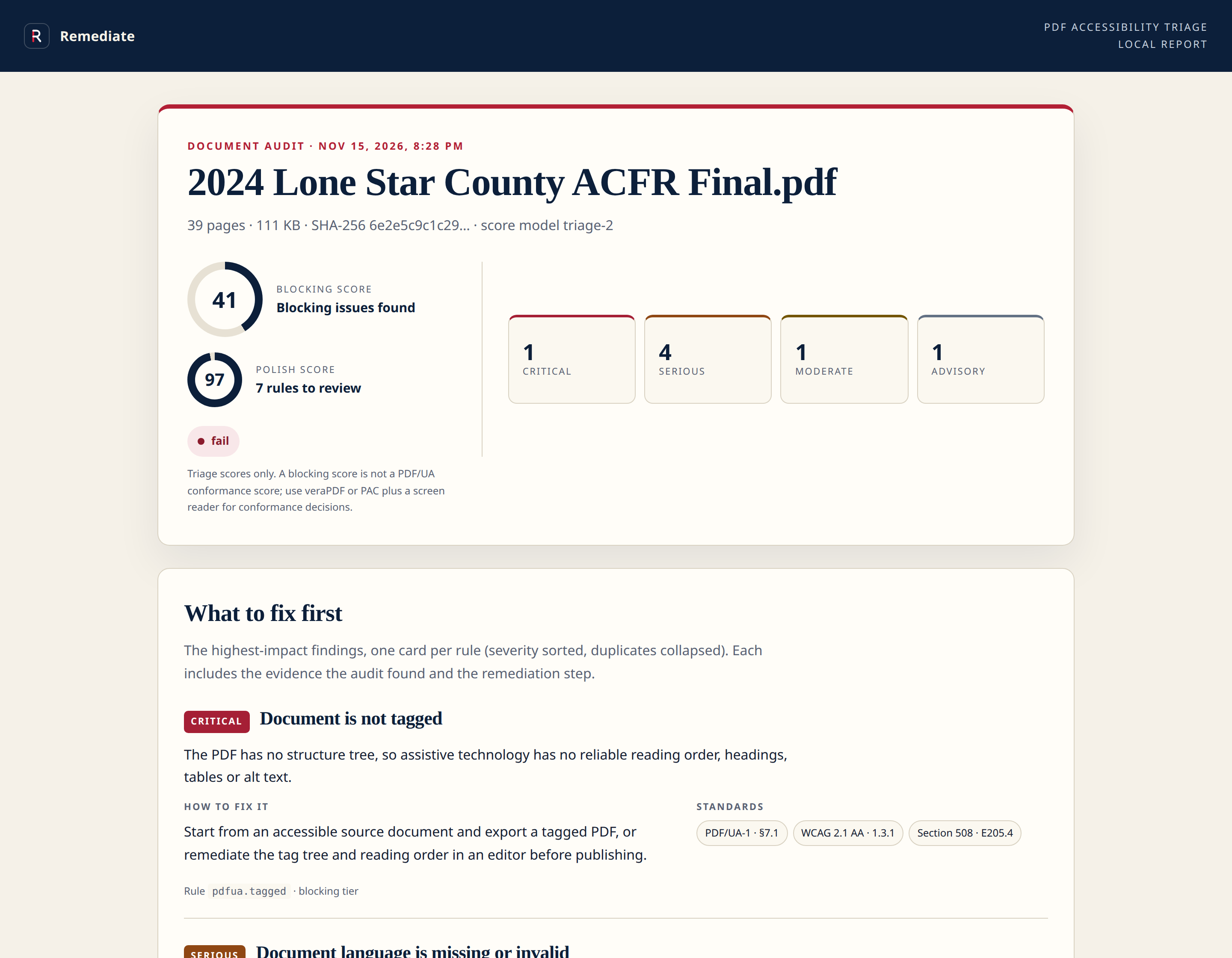
Every report carries two 0-100 scores and a status:
blockingScore: PDF/UA-critical and serious findings.polishScore: moderate and advisory findings.status:fail,revieworpass.
summary.score is the blocking score. The scores are computed from every
finding before any display cap, so asking for less output cannot improve them.
Findings are grouped per root cause, and page-level findings are counted so a
long document is not penalised just for having more pages. Advisory findings can
never round a report to 100.
The HTML report is a single file with no external fonts, images, scripts or tracking. It includes:
- the status, both scores and the scoring method;
- a "Findings by rule" rollup;
- "What to fix first", deduplicated by rule;
- evidence and remediation for every finding;
- the standards mapping;
- the full automated check register (all 62, including skipped checks);
- the manual review checklist and limitations;
- a machine-readable JSON copy of the report in a
<script type="application/json">block.
It is responsive, print-friendly and supports light and dark colour schemes.
Design principles
- No recurring cost. No hosted service, no inference, no storage, no account.
- No AI theatre. No purple gradients, glowing blobs or "AI-powered" copy. The report is an editorial document, not a dashboard toy.
- Evidence over scores. The scores are a summary with a stated method; the findings are the product.
- Fail visibly, not silently. Unsupported checks are reported as skipped or manual; they are never silently treated as passes.
Development
cd pdf-a11y-audit
npm install
npm test
The test suite generates its own tagged and untagged PDF fixtures, exercises the CLI and MCP server, and verifies the HTML report is self-contained.
Vulnerability reports: see SECURITY.md in the public repository for the
disclosure process.
Limitations
- The audit reads the PDF, not a customer's website or third-party embeds.
- This is heuristic triage, not a PDF/UA validator. Use veraPDF or PAC plus a screen reader before making a conformance claim.
- Colour contrast, alt-text quality and the meaning of the reading order require a human and a screen reader.
- Malformed or encrypted PDFs can hide structure from any parser.
- This is not legal advice and not a conformance certificate.
License
MIT © Veduis. Built by Remediate.