Listed from the MCP registry; nobody on Odel publishes it.

Thunderbird Cli
Give AI agents full read/write email access via Mozilla Thunderbird. Zero credentials.
Runs on your machine from its package; the steps are below.
What it does
- Reads
- Writes
- High impact
At most: moves money, runs code or commands, deletes data, or sends messages for you.
What it costs
FreeOdel charges nothing per call. The publisher may charge for its own service.
Runs locally over stdio
This server isn't hosted — your MCP client launches it from a package registry. Use one of the commands below, or drop the config into your client (e.g. Claude Desktop).
Run
npx -y thunderbird-cli-mcp
MCP client config
{
  "mcpServers": {
    "thunderbird-cli": {
      "command": "npx",
      "args": [
        "-y",
        "thunderbird-cli-mcp"
      ]
    }
  }
}Give Claude (and other AI agents) full access to your email through Mozilla Thunderbird.




Why
IMAP libraries force you to manage credentials, OAuth flows, and sync state — dangerous in an AI-agent context. Thunderbird already solves all of that. This tool treats Thunderbird as the source of truth and exposes every capability as a CLI command or MCP tool, so AI agents can read, search, and write email without ever touching a password.
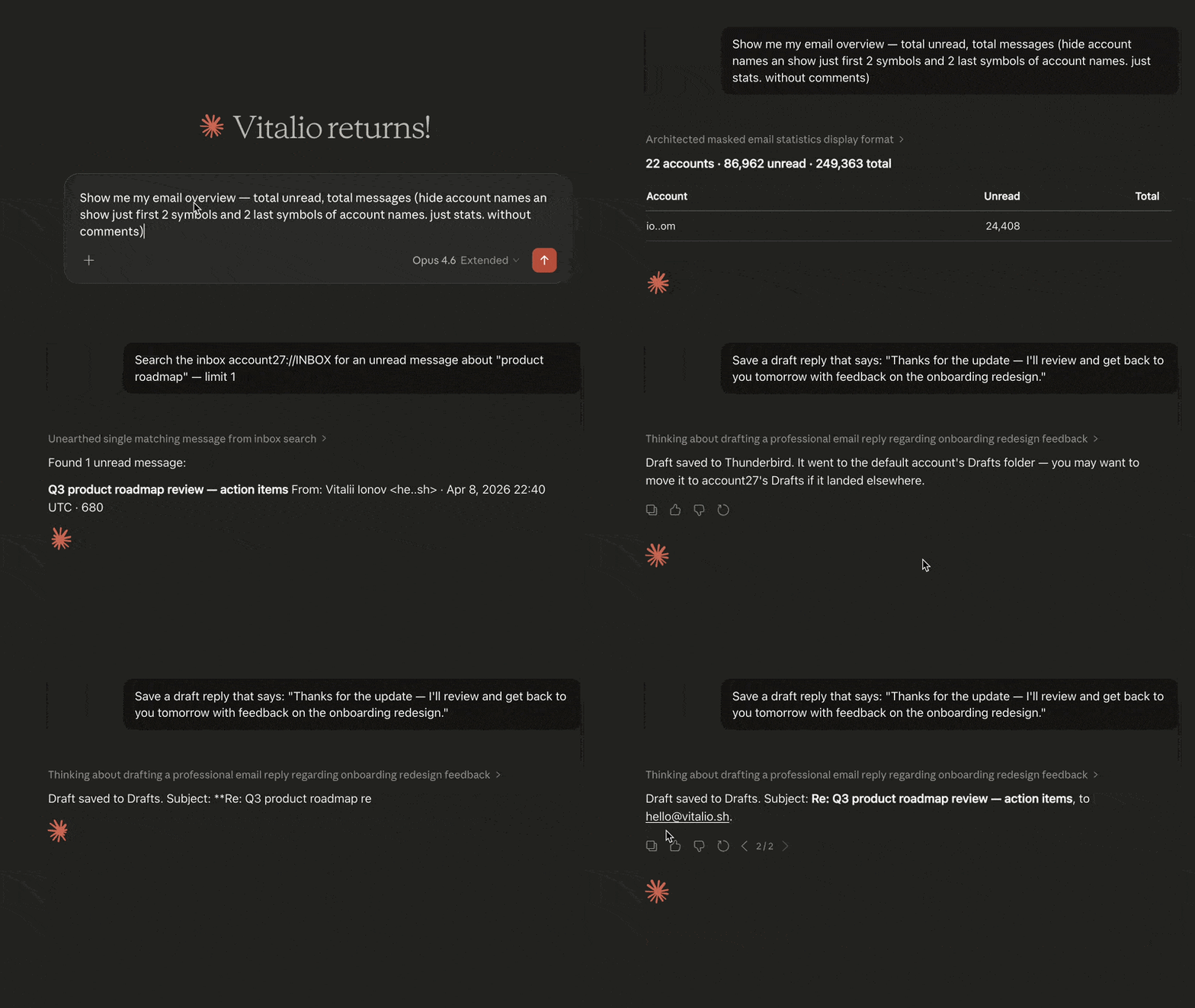
Tested at scale: 22 accounts, 249,000+ messages, 86,000+ unread — all managed live through a single CLI.
Features
- 🔐 Zero credential exposure — all IMAP/SMTP stays in Thunderbird
- 🤖 Claude Desktop ready — 12 MCP tools, one-line config
- 📨 38 CLI commands — read, search, compose, reply, bulk ops, folder CRUD, attachments
- 🛡️ Safe by default — compose/reply/forward save as drafts; permanent delete requires
--confirm - 🎯 Token-optimized —
--fieldsselection,--compactmode,--max-bodytruncation - 🏠 Localhost-only — no cloud, no telemetry, nothing leaves your machine
- ✅ Thunderbird 128+ — extension distributed through addons.thunderbird.net; the release XPI is byte-identical to
extension/ - 🧪 235 tests — CLI/bridge, MCP, bridge security (real bridge process) and extension background-script tests
Quick Start
# 1. Install CLI + bridge from npm
npm install -g thunderbird-cli thunderbird-cli-bridge

# 2. Install the Thunderbird extension
#    Download: https://github.com/vitalio-sh/thunderbird-cli/releases/latest
#    Thunderbird → Add-ons → ⚙ → Install Add-on From File… → thunderbird_ai_bridge-*.xpi

# 3. Start the bridge daemon (keep running)
tb-bridge

# 4. Try it
tb health
tb stats
Full setup guide (including background service, Docker, troubleshooting): docs/SETUP.md
Usage
# How many unread across all accounts?
tb stats

# Find invoices from AWS in the last 30 days
tb search "invoice" --from aws --since 30d --fields id,author,subject,date

# Read a message (token-efficient — headers + text only, max 500 chars)
tb read 89900 --max-body 500

# Reply as draft (never auto-sends)
tb reply 89900 --body "Thanks, I'll review tomorrow"

# Download a PDF attachment
tb attachment-download 11 1.2 --output invoice.pdf

# Bulk archive old newsletters
tb bulk move "account1://INBOX" "account1://Archive" \
  --from "newsletter@" --older-than 30
Full command reference: docs/COMMANDS.md
Use with Claude Desktop
Add to your Claude Desktop config (~/Library/Application Support/Claude/claude_desktop_config.json on macOS):
{
  "mcpServers": {
    "thunderbird": {
      "command": "npx",
      "args": ["-y", "thunderbird-cli-mcp"]
    }
  }
}
Restart Claude Desktop. Now ask:
"How many unread emails do I have?" "Find invoices from AWS last month" "Reply to message 118 saying I'll attend — save as draft" "Download the PDF attachment from message 245"
Full MCP guide: mcp/README.md
Companion skill for Claude
A Claude Skill ships alongside the MCP server. It teaches Claude how to use the 12 email tools well — token-efficient field selection, draft-by-default safety, trust-metadata checking before acting on links, recipes for common workflows. Install it from skills/thunderbird-cli/:
# Claude Code
cp -r skills/thunderbird-cli ~/.claude/skills/

# Claude.ai — zip and upload via Settings → Capabilities → Skills
cd skills && zip -r thunderbird-cli.zip thunderbird-cli
Without the skill, the MCP still works. With it, Claude automatically uses the safest defaults and most efficient response shapes.
How It Works
| Component | Role |
|---|---|
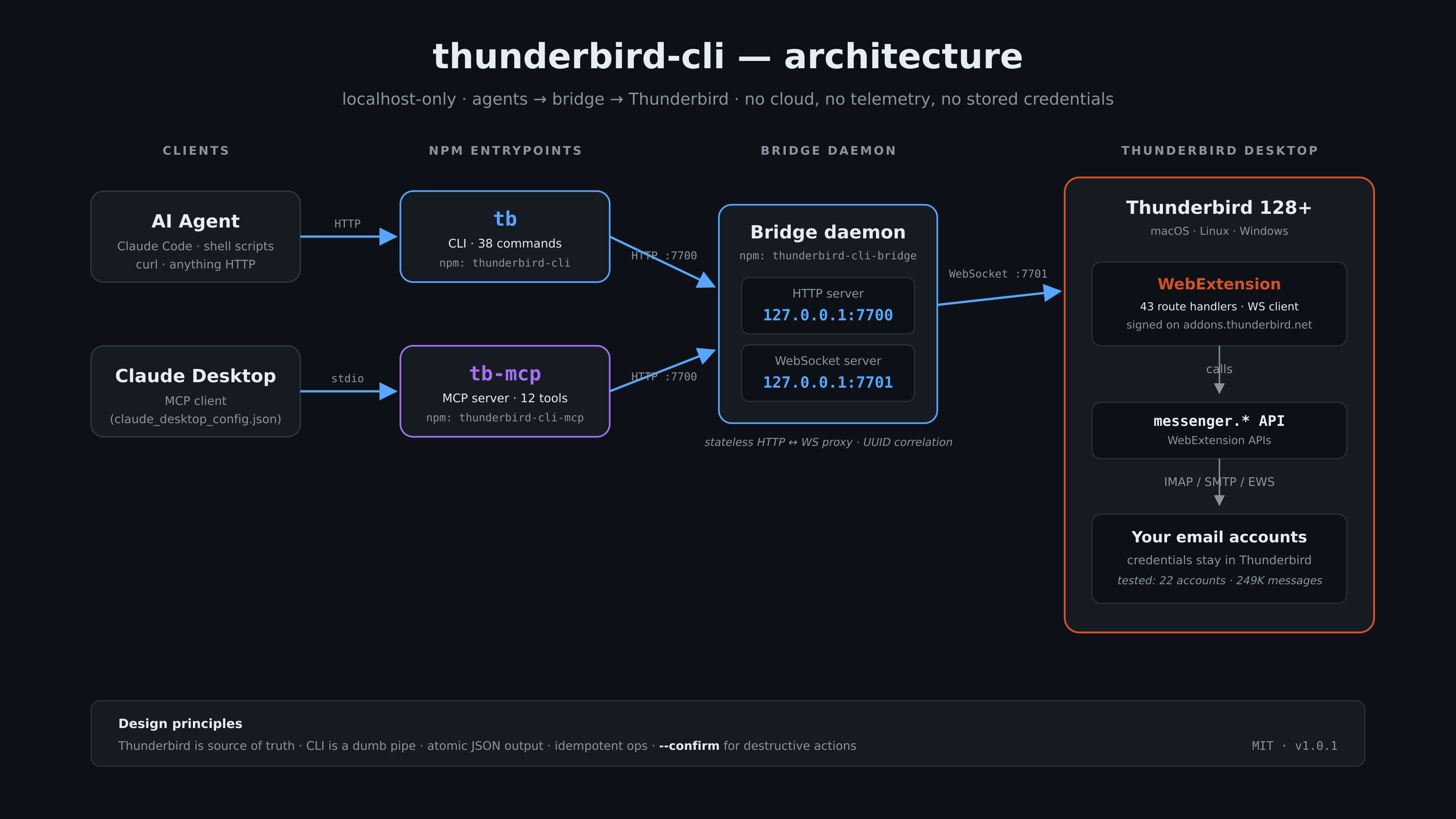
Extension (extension/) | Thunderbird WebExtension. Calls messenger.* APIs. 43 route handlers. |
Bridge (bridge/) | Stateless HTTP↔WebSocket proxy daemon. No business logic. |
CLI (cli/) | tb command — 38 commands. Thin HTTP client. JSON output. |
MCP (mcp/) | tb-mcp server — 12 curated tools for Claude Desktop. |
Thunderbird is the source of truth. The CLI never caches or stores email data.
How this compares
| Tool | Credentials | AI-agent ready | Compose / send | Multi-account | Runtime |
|---|---|---|---|---|---|
| thunderbird-cli | stay in Thunderbird | ✅ CLI + MCP, JSON out | ✅ draft / open / send | ✅ any Thunderbird account | Node.js |
| Raw IMAP libs (imapflow, imaplib) | you manage them | you wire it yourself | SMTP, separate | manual per account | varies |
| notmuch | via your MUA | CLI only, text output | ❌ reader only | via config | C |
| mu / mu4e | via your MUA | CLI only, sexp/text | ❌ reader only | via config | C |
| himalaya | in config files | ✅ CLI, JSON out | ✅ | ✅ | Rust |
| mutt / neomutt | in muttrc | ❌ interactive TUI | ✅ | via config | C |
The niche: you already trust Thunderbird with your credentials and account state. This tool surfaces that as a machine-readable API without asking you to re-configure IMAP/SMTP anywhere else.
Documentation
| Doc | What's inside |
|---|---|
| docs/SETUP.md | Installation, background service, Docker, troubleshooting |
| docs/COMMANDS.md | Full reference for all 38 CLI commands |
| docs/CLAUDE.md | AI-agent-focused quick reference + security rules |
| skills/thunderbird-cli/SKILL.md | Companion Claude Skill — recipes, safety defaults, token patterns |
| mcp/README.md | Claude Desktop integration guide |
| AGENTS.md | Guide for AI agents editing this codebase |
| SPEC.md | Full technical specification |
| SECURITY.md | Threat model, prompt-injection defenses |
| CONTRIBUTING.md | Dev setup, code style, PR process |
| CHANGELOG.md | Release notes |
Contributing
Contributions welcome. Please open an issue first to discuss non-trivial changes. See CONTRIBUTING.md for local dev setup and the 80-test suite.
License
MIT — see LICENSE