
Quarry
The database workbench built for the AI era — one kernel, many faces (CLI / GUI / MCP / agent skill).




Every database tool you know — DBeaver, TablePlus, pgAdmin — assumes a human at the keyboard. But increasingly, the entity running your queries is an AI agent, and agents need different guarantees:
- Results a machine can parse, not a screen a human can read
- Safety rails that live in the kernel, so no client can forget them
- Deterministic error contracts (stable exit codes), not stack traces to scrape
- Configuration as files, not clicks — so it can be versioned, diffed, and shared with agents
Quarry inverts the traditional design: it is a query kernel with an agent-safe contract first, and the human faces (CLI, GUI) are thin shells grown from the same kernel. Whether a query comes from a person in the browser, a script in CI, or Claude running a skill, it passes through the exact same safety rails and returns the exact same structured result.
Philosophy
-
One core, many faces. Connection management, query execution, schema introspection, and safety rails live in an importable kernel (
quarry.core). The CLI (qy), the GUI, the MCP server, and agent skills are thin shells. Fix a bug once, every face gets it. -
Read-only by default; escalation is explicit and graduated. Writes and DDL are blocked (exit code
8) unless you pass--write. Production connections require an additional confirmation on top of--write. Every query gets an automaticLIMIT 500unless you opt out. Because the rails are in the kernel, an agent cannot bypass them by picking a different entry point. -
A contract machines can trust. Every query returns
{columns, rows, rowCount, truncated, elapsedMs, engine, sql}. Exit codes are stable API:0ok,2connection error,3SQL error,8safety block. An agent can branch on outcomes without parsing prose. -
Workspace as code. A workspace is just a directory:
connections.toml+queries/**/*.sql(named queries with-- @metaheaders). It lives in your repo, versioned by git, shared between teammates and agents alike. The kernel itself carries zero business logic and zero secrets. -
Nearly zero dependencies. Pure stdlib. PostgreSQL goes through your system
psql, Redis throughredis-cli, SSH tunnels through systemssh. MySQL is one optionalpymysql. No Electron, no daemon, no cloud.
Install
pipx install quarry-db        # or: pip install quarry-db
qy --help
PostgreSQL uses the system psql binary; MySQL needs pip install "quarry-db[mysql]".
Quickstart
mkdir my-workspace && cd my-workspace
cat > connections.toml <<'EOF'
[shop]
url    = "postgresql://user:pass@localhost:5432/shop"
engine = "postgres"
env    = "dev"
EOF

qy connections                       # list connections
qy exec shop --sql "select * from customers"
qy schema shop customers             # table structure (\d+)
qy gui                               # browser data grid
Workspace
A workspace directory is the source of connections + queries:
my-workspace/
├── connections.toml      # [key] url / engine / env / group / notes
└── queries/<db>/*.sql    # named queries (with -- @meta headers)
Resolution order: --workspace PATH → ~/.config/quarry/config.toml → current directory.
CLI reference
| Command | Purpose |
|---|---|
qy connections [list|add|set|remove|test] | Manage connections |
qy exec <db> --sql "..." [--format json|ndjson|csv|table] | Run ad-hoc SQL |
qy schema <db> <table> | Live table structure |
qy run <name> [k=v ...] | Run a saved named query |
qy save <name> --db X --sql "..." | Save a named query |
qy list / describe / validate / fingerprint / audit | Manage named queries |
qy workspace list/add/remove | Manage aggregated workspaces |
qy local up/down/status/sync [--engine postgres|redis|all] | Local dev containers (see below) |
qy gui | Launch the local GUI |
qy mcp [--write] | Serve the MCP face over stdio (for AI agents) |
MCP (the agent-native face)
qy mcp speaks the Model Context Protocol over stdio — pure stdlib, no SDK dependency. Agents get six tools (list_connections, list_tables, describe_table, exec_sql, list_saved_queries, run_saved_query) with the exact same kernel rails: read-only unless the server was started with --write and the call passes write: true; a prod env additionally requires confirm_prod: true.
# Claude Code
claude mcp add quarry -- qy mcp --workspace ~/my-workspace
// or any MCP client (.mcp.json)
{ "mcpServers": { "quarry": { "command": "qy", "args": ["mcp", "--workspace", "/path/to/workspace"] } } }
Published in the MCP Registry as mcp-name: io.github.Wangggym/quarry.
Safety rails (the AI-native moat)
- Read-only by default: writes/DDL blocked with exit code
8;--writeto allow - Automatic row cap:
run_query()injectsLIMIT 500; raise with--max-rows N - Graduated prod protection: all envs default read-only → dev needs
--write→ prod needs--writeplus an interactive confirmation (--yesfor automation) - Stable exit-code contract:
0ok /2connection /3SQL /8safety block
As a library (what the GUI and agents use)
from quarry import configure_workspace, get_connection, run_query

configure_workspace("~/my-workspace")
res = run_query(get_connection("shop"), "select * from customers")
print(res.to_dict())   # {columns, rows, rowCount, truncated, elapsedMs, engine, sql}
SSH tunnels
For databases only reachable via a bastion, add ssh_* fields and qy opens the tunnel automatically (system ssh, zero dependencies):
[internal_db]
url      = "postgresql://user:pass@127.0.0.1:5432/appdb"
engine   = "postgres"
ssh_host = "bastion.example.com"
ssh_user = "ubuntu"
ssh_key  = "~/.ssh/id_ed25519"
Redis
engine = "redis" (uses system redis-cli). Queries are redis commands:
qy exec cache --sql "SCAN 0 COUNT 100"
qy exec cache --sql "HGETALL user:42"
Read-only rail applies here too: GET/SCAN/TYPE/TTL/HGETALL pass; SET/DEL/FLUSHALL are blocked without --write. In the GUI, redis keys are clickable with TYPE-aware value display.
Groups & env-sets
Connections can be organized into project folders (group) and env-sets (same db, different env, shared schema):
[shop_dev]
url = "postgresql://…dev…/shop";  group = "shop"; db = "shop"; env = "dev"
[shop_prod]
url = "postgresql://…prod…/shop"; group = "shop"; db = "shop"; env = "prod"
- Connections with the same
dbfold into one env-set — one saved query runs against any environment:qy exec shop --env prod - Unspecified env defaults to
dev(the safest) - The GUI shows an environment switcher (prod turns red)
Multiple workspaces
qy aggregates all workspaces listed in ~/.config/quarry/config.toml — one GUI/CLI over all your projects:
qy workspace add ~/projects/acme/db-workspace
qy workspace add ~/projects/side-project/db
qy connections    # both projects, grouped
qy gui            # sidebar shows both groups side by side
--workspace a:b (os.pathsep-separated) works as a temporary override; the first directory is primary for writes.
Local dev containers
When a locally-running service shares a remote (dev) database, every read/write
crosses the public network — and a test/e2e run that hammers the DB gets flaky
on the round trips. qy local runs Postgres/Redis in a docker container so the
service talks only to localhost:
qy local up shop            # start local Postgres + register a shop `local` connection
qy connections              # shop now shows a [local] env alongside [dev]
qy run active_customers --env local

qy local status             # running? which port / image?
qy local sync shop          # copy dev schema into local (staging db + rename swap)
qy local down               # stop, keep the data volume (data survives)
qy local down --purge       # stop + delete the volume (next up is an empty DB)
One shared Postgres container hosts a logical database per connection key (fixed
port 5433; redis 6380), and data lives on a named docker volume. Requires a
docker daemon; the image tag is overridable with --image.
GUI
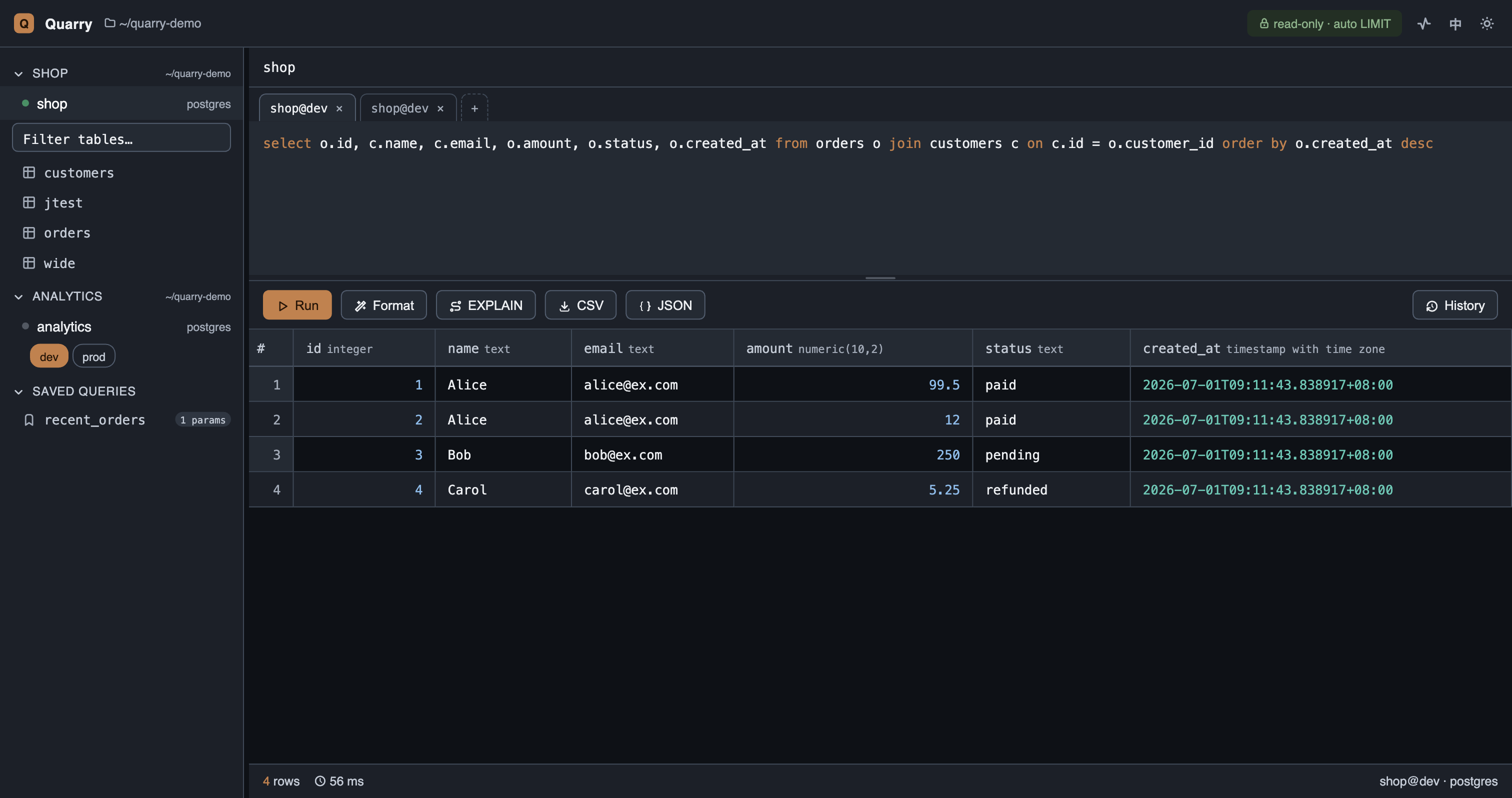
qy gui — a local, zero-build web GUI (Slate & Copper theme, light/dark):
- Grouped sidebar tree with env switcher (prod turns red), connection health dots
- Multi-tab editor — each tab remembers its SQL + connection, across restarts
- SQL highlighting + local autocomplete (keywords / tables / columns)
- EXPLAIN button — one click to the query plan
- Type-aware data grid: sorting, column resize, keyboard navigation (arrows + Enter), cell inspection with a collapsible JSON tree
- CSV/JSON export, searchable query history (with connection + time)
- TYPE-aware Redis key browsing
Roadmap
- Column types in the result contract for all engines
- SQLite & DuckDB engines (zero-setup local demo)
- Redis key-namespace folding tree
- Cross-environment schema/data diff
- Write audit log (who ran what, where, when)
- Single-binary distribution
Development & testing
pip install -e ".[dev]"
createdb quarry_test && psql quarry_test -f tests/seed.sql   # or: make seed
make test        # layered run with a per-layer PASS/FAIL summary
723 tests in four layers, each auto-classified so you can run any slice:
| Layer | Count | Covers | Needs |
|---|---|---|---|
unit | 568 | pure logic + mocked engines (safety rails, SQL skeleton, params, formatters, cache) | nothing |
integration | 110 | in-process against a real DB, incl. the GUI HTTP API and CLI/MCP dispatch | Postgres |
e2e | 45 | the real qy CLI and qy mcp stdio server as subprocesses | Postgres |
browser | 20 | the real GUI frontend driven in headless Chromium (Playwright) | Postgres + Playwright |
DB/engine-backed tests skip automatically when the engine is unreachable, so the suite stays green on a bare machine; CI provides the engines and runs everything.
Coverage is gated at ≥95% (unit + integration) and currently sits at 99.6%.
Seeing test status at a glance
- On GitHub: the CI badge above is live — it goes red if any layer or the coverage gate fails. Per-commit and per-PR results show under the Actions tab and as PR checks.
- Locally, pass/fail:
make testprints a colored per-layer summary; run one layer withmake test-unit/test-integration/test-e2e/test-browser. - Locally, coverage:
make covenforces the gate and writes an HTML report — openhtmlcov/index.htmlfor a line-by-line view of exactly what's covered.
See TESTING.md for the full architecture, fixtures, and CI layout, and CONTRIBUTING.md for contribution guidelines.
Quarry is developed and tested on macOS and Linux. Windows is currently untested (the psql/ssh integration and port takeover are Unix-flavored) — PRs welcome.