
Reado
Your code review comments from Reado, the read-first IDE, as context and tools for your agent.
Runs on your machine from its package; the steps are below.

What it does
- Reads
- Writes
- High impact
At most: creates or changes data: records, files, settings.
What it costs
FreeOdel charges nothing per call. The publisher may charge for its own service.
Runs locally over stdio
This server isn't hosted — your MCP client launches it from a package registry. Use one of the commands below, or drop the config into your client (e.g. Claude Desktop).
Distributed as an MCP bundle (`https://github.com/WatermelonBros/reado/releases/download/v1.33.2/reado.mcpb`) — download it and import the bundle in your MCP client.





Download · Website · Discord · Contribute
If Reado earns it, a star is how a small open-source project gets found. The first 50 testers who send feedback get Reado Pro free for 12 months.
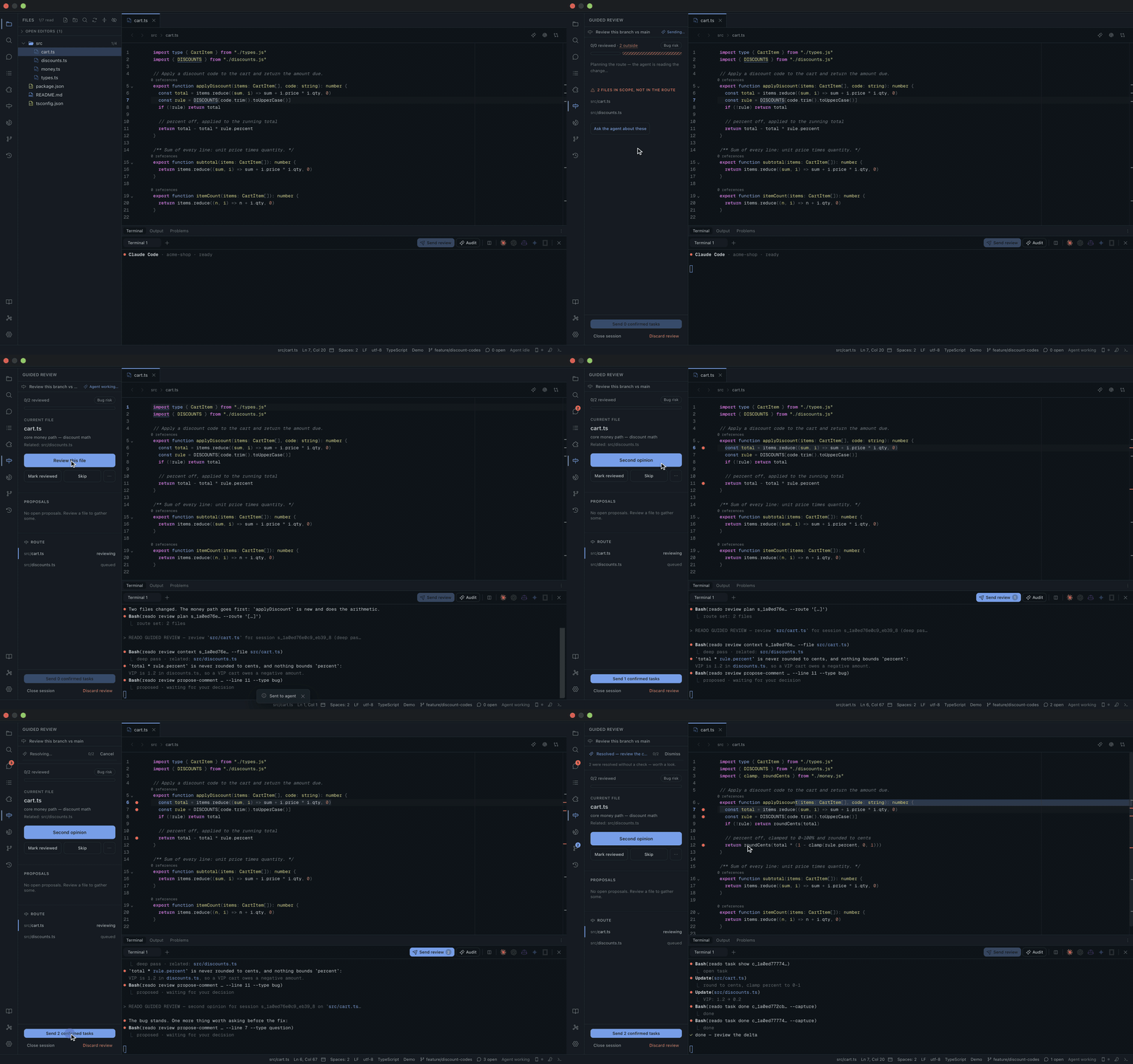
A full guided review on a real branch — unedited, in real time. The agent proposes, you decide, the agent fixes.
Most IDEs are built for writing code. Reado is built for reading it.
Your agent writes more code than you do now. The job that's left is reading it and deciding — and that deserves a tool of its own. In Reado you read, and you leave comments anchored to the exact lines that matter; your agent (Claude Code, Codex, Copilot, Gemini, OpenCode or Cursor) resolves them, and you review what changed.
Inverted code review: you are the reviewer, the AI is the committer.
A guided review, with an AI pair
Pick what to review — your working changes, a branch, a pull request — and a focus: bug risk, security, performance, test coverage. The agent plans a route through the change, reviews it file by file and proposes; nothing is final until you approve it.
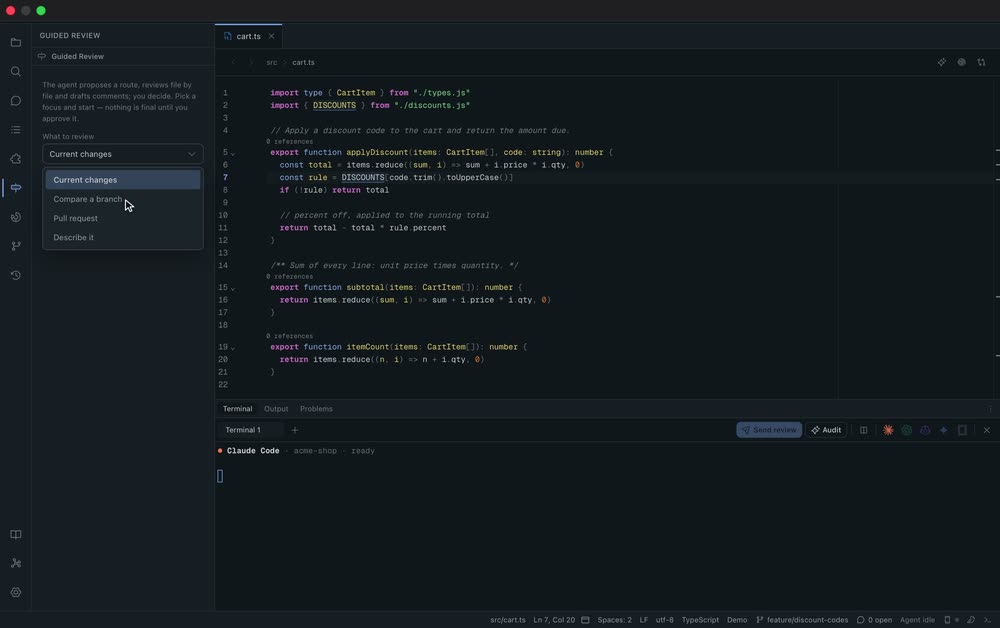 1 · Point it at your changes. Compare a branch, pick a focus — bug risk, security, performance. | 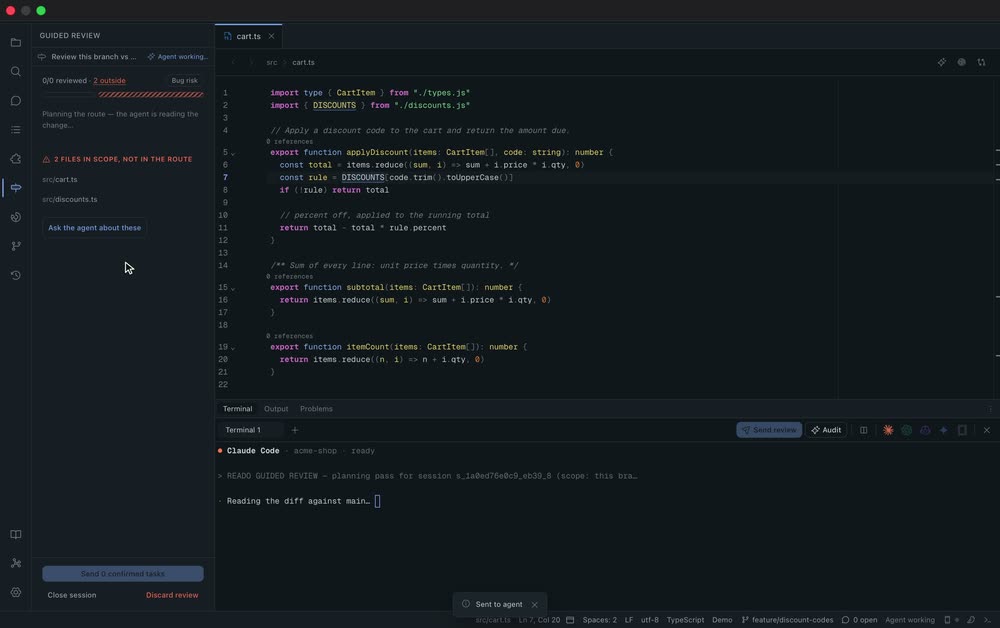 2 · The agent plans a route. It reads the diff in your terminal and orders the files, riskiest first. | 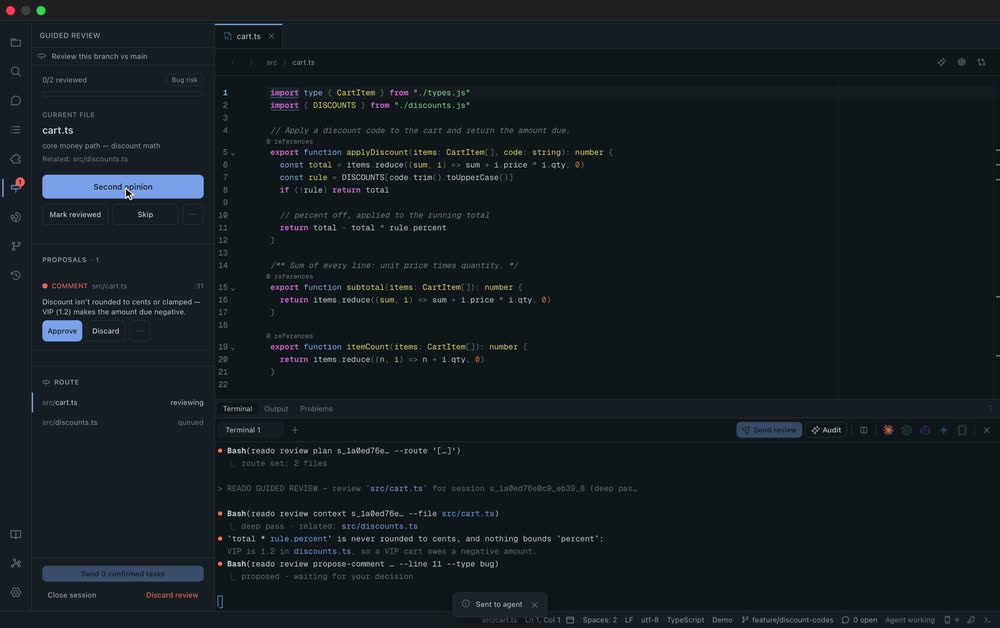 3 · It proposes — never final. Findings land on the line as proposals. Nothing touches your code yet. |
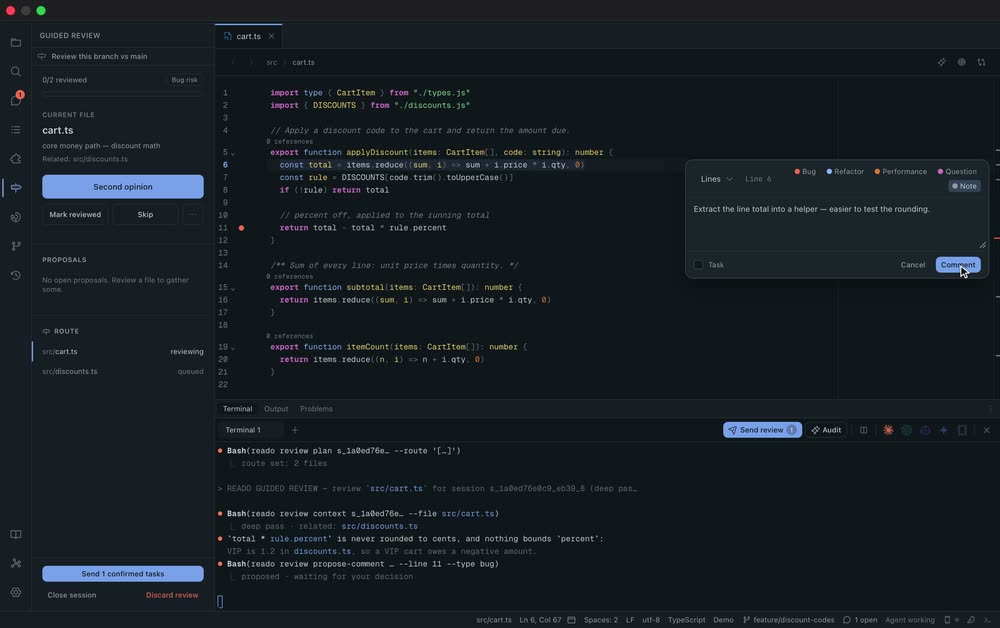 4 · You review too. Select any line and leave your own comment — Reado is a reading tool first. | 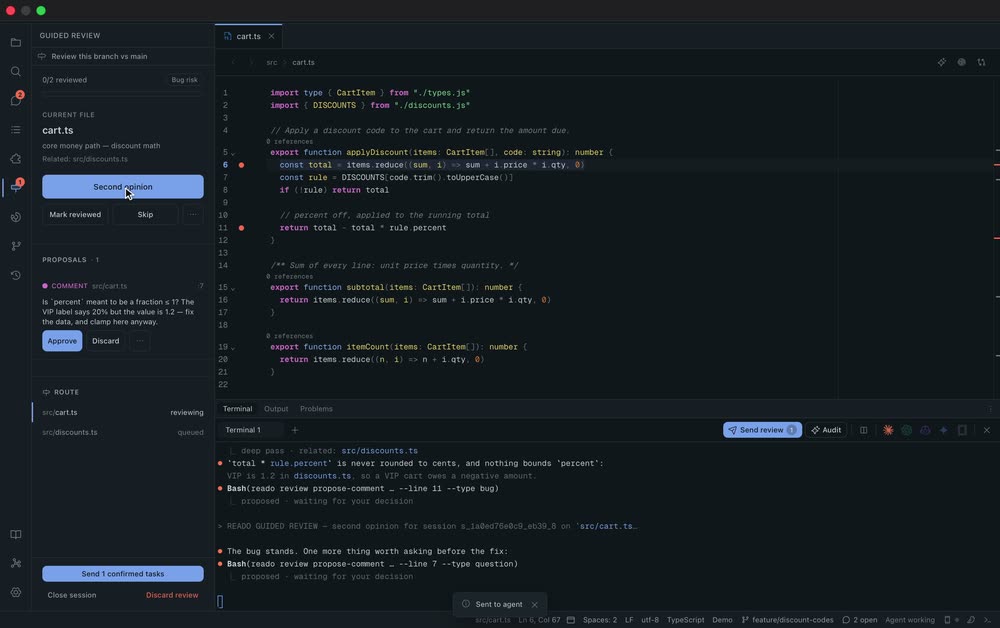 5 · Ask for a second opinion. The agent challenges its own pass; you approve what holds up. | 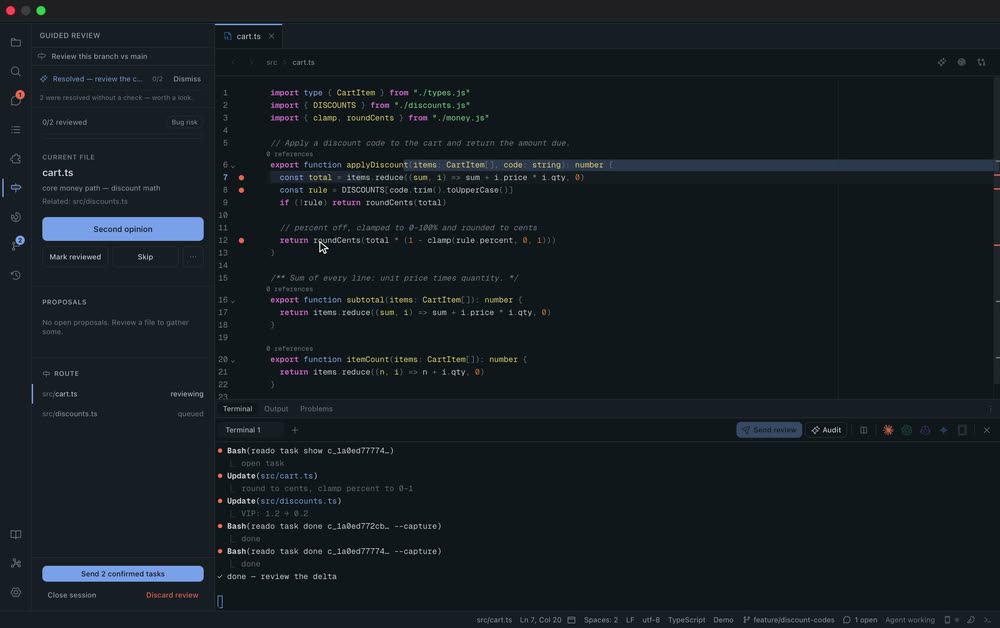 6 · Hand it back. Send the approved tasks; the fix lands and the comments resolve. |
Comments that stay where you left them
A Reado comment is not a sticky note. It is anchored to a line range, typed
(bug, refactor, performance, question, note), threaded, and either a task for
the agent or a note for the next reader. Comments live next to your code as
plain Markdown in .reado/, and they survive edits: when the code moves, they
re-anchor with it — and one whose code is gone becomes an orphan instead of
quietly pointing at the wrong line.
Your agent does the work — you watch it happen
Send review hands your open tasks to the agent running in Reado's terminal.
It works through the reado CLI and MCP server — reading your comments, consulting
the project's docs and specs, resolving each task — and Reado reflects every step
live: the reasoning, the files it touches, the task closing. When it's done, a
Δ on the file tree takes you straight to what changed since you last read it.
An IDE that reads like a book
- Built for reading: a calm CodeMirror 6 viewer with comfortable line length, sticky scope headers, an outline, go-to-definition and code intelligence.
- Reading coverage: Reado knows what you have actually read, and what changed underneath you since.
- Project tours: ship a
tour.jsonwith your repository and anyone who opens it in Reado can walk the code you'd explain to a newcomer, the exact lines lit up and explained step by step. The format is open — any tool can read and write it. - A knowledge base that grows as you read: the project's docs, specs (OpenSpec, Spec Kit) and your notes in one searchable place, plus a graph linking comments, files, specs and docs.
- A browser your agent can drive: preview your app inside Reado, comment on the page itself, and let the agent inspect the DOM, console and network.
- Reado Anywhere: pair your phone to follow a review, comment from it, and get pinged when the agent is done.
- Four research-grounded themes — dark, light, high contrast, sepia — and a UI in English, Italian, Spanish, French and German.
Local-first, open source
Reado is MIT and runs on macOS, Linux and Windows. Your code and your comments stay on your machine as plain files; an account is optional and never gates the app.
Download
Grab the latest signed build from
Releases — macOS
(.dmg, signed & notarized), Linux (.AppImage / .deb / .rpm) and Windows
(.exe / .msi). Reado updates itself from signed releases after that.
The AI loop
Reado's core loop is read → annotate → AI-resolve:
- You read code and leave comments. Comments flagged as tasks are the work list; notes stay out of the agent's way.
- Open the terminal (
Cmd/Ctrl+J), launch Claude, Codex or Copilot, then click Send review. Reado injects a prompt pointing the agent at your open tasks. - The agent reads your tasks and comments — from the
reado://tasksandreado://commentsMCP resources, orreado task list— makes the changes, and marks each done withreado task done <id>(orreado task fail <id> "<reason>"). Reado's watcher reflects the result live, and resolved comments move to history.
The reado binary is the stable contract — the on-disk format can evolve without
breaking the agents. It serves both the MCP server (reado mcp, auto-wired
into each agent's config on project open) and the CLI the agent calls, so it
must be on the agent's PATH for the AI loop to work. The packaged app bundles
it: install from Settings → Command-line tool (links reado into
~/.local/bin, VS Code style). The MCP server is also listed in the
official MCP Registry
as io.github.WatermelonBros/reado, as a bundle with the binary for macOS, Linux and
Windows. From a source checkout, build and link it
directly:
scripts/install-cli.sh           # builds release + links into ~/.local/bin
reado --help
Actions (CLI): reado task list|show|done|fail|link,
reado comment add|reply|search, and reado kb list|show|search (to consult
the docs and specs before resolving). Context (MCP): the reado://tasks,
reado://comments, reado://reading-progress and reado://bookmarks resources,
plus browser_* tools for the in-app preview. Agent identity comes from
$READO_AGENT (Reado sets it when launching an agent).
An agent plugin in plugin/ teaches Claude Code (and Codex, via
AGENTS.md) this contract so the agent resolves tasks correctly. See
plugin/README.md to install it. Other agents (e.g. Copilot)
still get the contract from the Send review prompt Reado injects, as long as
the reado CLI is installed.
Keyboard shortcuts
| Shortcut | Action |
|---|---|
Cmd/Ctrl + P | Go to file (fuzzy) |
Cmd/Ctrl + K | Command palette |
Cmd/Ctrl + Shift+F | Search & replace in project |
Cmd/Ctrl + , | Settings |
Contributing
Reado aims to be a friendly open-source project, and contributions are welcome. Everything you need to build, test and send a change — prerequisites, the dev loop, the checks CI runs, conventions — is in CONTRIBUTING.md. Please read our Code of Conduct; security issues go through SECURITY.md.
License
MIT © Reado contributors