Listed from the MCP registry; nobody on Odel publishes it.

Research Hub
Research workspace for Zotero + Obsidian + NotebookLM. Search, ingest, sync, verify briefs.
Runs on your machine from its package; the steps are below.
What it does
- Reads
- Writes
- High impact
At most: creates or changes data: records, files, settings.
What it costs
FreeOdel charges nothing per call. The publisher may charge for its own service.
Runs locally over stdio
This server isn't hosted — your MCP client launches it from a package registry. Use one of the commands below, or drop the config into your client (e.g. Claude Desktop).
Run
uvx research-hub-pipeline
MCP client config
{
  "mcpServers": {
    "research-hub": {
      "command": "uvx",
      "args": [
        "research-hub-pipeline"
      ]
    }
  }
}research-hub
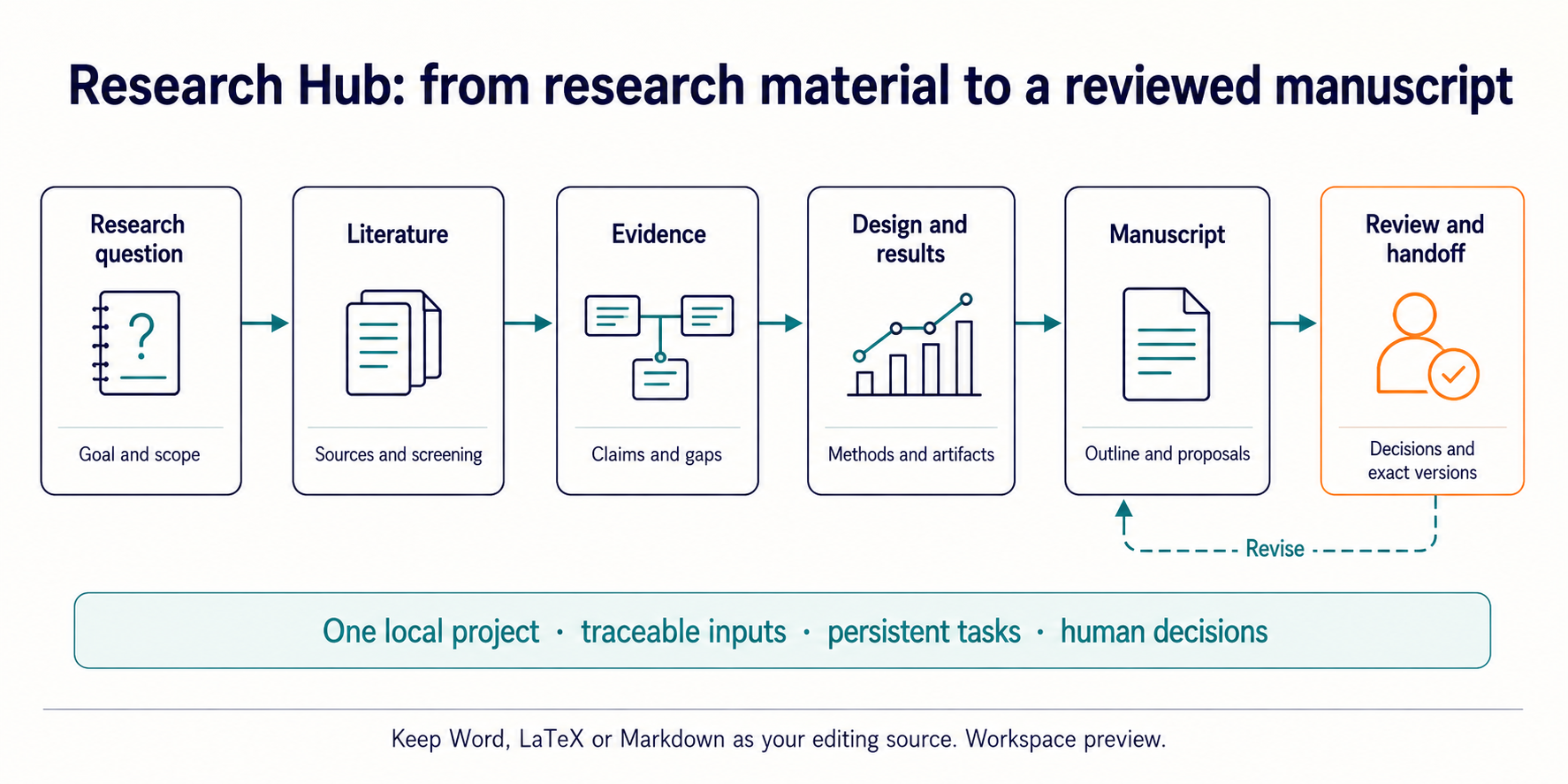
A workspace on your computer for researchers to organize papers, evidence, and drafts, with AI-assisted proposals you review.
繁體中文 · Workspace guide · Setup guide · Developer architecture


Why research-hub?
Research is spread across papers, notes, analysis, and manuscripts. A new paper can change a question; an updated file can make a conclusion or section worth revisiting. research-hub gives researchers and AI assistants a local workspace to record those connections, hand off tasks, and review proposals before accepting them.
- Keep context: bring questions, sources, evidence, results, and manuscripts into one project rather than leaving them only in a conversation.
- Track changes: register file paths and a file fingerprint (hash) to help detect changes, then inspect work that may need review when inputs change.
- Keep decisions human: AI proposals require review; a local delivery requires separate approval.
Choose your starting path
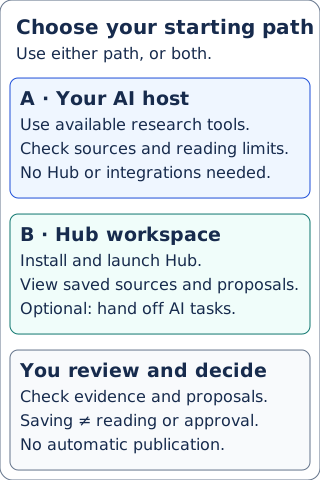
Use your existing AI host: You need working search/reading tools and the portable skill with its references. No Hub installation, Zotero, Obsidian, or NotebookLM is required. See skill loading and host support; Codex MCP is not release-verified.
First request: “Find papers on LLMs simulating human decisions. Include source links, relevance, versions, and actual reading limits.” Expect a source list in your host, with unknowns and unavailable tools/sources stated, not automatic full-text reading or a Hub save.
Use the Hub workspace: You need Python 3.10+, Git, and a local browser. Install and launch the tested demo below to inspect two seed references and their reading limits. Optional result saving and task handoff require a selected destination and authorization.
Install and get started
Try the local workspace
Choose this path for the Hub workspace. If you only want to try the older published literature dashboard, see the separate option below.
You need Python 3.10+ and Git. These commands install a specific source revision and create teaching fixtures in a new or empty workspace-demo directory. The source workspace is separate from the PyPI release: a package version does not establish that the installed wheel contains current source features.
git clone -c core.autocrlf=false https://github.com/WenyuChiou/research-hub.git
cd research-hub
git fetch origin 1f0726a7e92a1231e633963f17236a2f5c1eab8f
git checkout --detach 1f0726a7e92a1231e633963f17236a2f5c1eab8f
Choose the block for your system. They call the virtual environment's Python directly, without activation or changing PowerShell execution policy. Dependency installation needs network access.
macOS / Linux
python3 -m venv .venv
./.venv/bin/python -m pip install -e .
./.venv/bin/python -m research_hub project demo --root ./workspace-demo --json
./.venv/bin/python -m research_hub serve --workspace --root ./workspace-demo
Windows PowerShell
One Windows test environment using the earlier 14ddc070 source encountered WinError 5 during demo creation; its cause is not yet known. See verification and environment notes.
py -3 -m venv .venv
.\.venv\Scripts\python.exe -m pip install -e .
.\.venv\Scripts\python.exe -m research_hub project demo --root ./workspace-demo --json
.\.venv\Scripts\python.exe -m research_hub serve --workspace --root ./workspace-demo
First task: inspect a saved source and its reading limits.
- Open http://127.0.0.1:8765/app/ and, in Projects, choose
DEMO: floating-point reading and review outline(review-demo). - Open Literature, then select What Every Computer Scientist Should Know About Floating-Point Arithmetic.
- Expect two seed references in the list. The selected source shows DOI
10.1145/103162.103163, Unverified, Coverage unknown, and No summary saved. These are expected demo states: no source text was downloaded or summarized, and the supplied screening decisions are examples, not your review.
The other project, DEMO: three floating-point summation cases (summation-demo), contains numerical examples and a manuscript scaffold; its Literature list is empty. Both projects are account-free teaching inputs, not accepted research.
Keep the terminal running while using the workspace; stop it with Ctrl+C. To return later, run only the serve --workspace --root ./workspace-demo command above. Do not recreate the demo over saved work. If creation was interrupted, inspect the preserved partial directory and use another new or empty root for both creation and serving.
Demo creation, launch, and this bilingual first task were checked on Linux with Python 3.12.14 at source revision 1f0726a7; this does not verify Windows, macOS, or a fresh dependency installation. See the exact verification scope.
For your own files, go directly to bring your own project; the guide’s earlier installation pin is historical.
Optional: try the older published literature dashboard
The PyPI package provides the older literature dashboard, not the newer source workspace. For an account-free sample, this separate virtual environment and empty root were tested on Linux with Python 3.12:
python3 -m venv .dashboard-venv
./.dashboard-venv/bin/python -m pip install research-hub-pipeline==1.2.0
mkdir -p "$HOME/research-hub-preview"
RESEARCH_HUB_ROOT="$HOME/research-hub-preview" ./.dashboard-venv/bin/research-hub dashboard --sample
Use a new or empty research-hub-preview directory under HOME: the command creates .research_hub and logs there. It prints the generated temporary HTML path; open that path in your browser. The bare dashboard --sample failed in a fresh HOME without the root setting; see verification notes for platform and browser limits. For real services, see setup, the dashboard tour, and first 10 minutes.
Work in the workspace
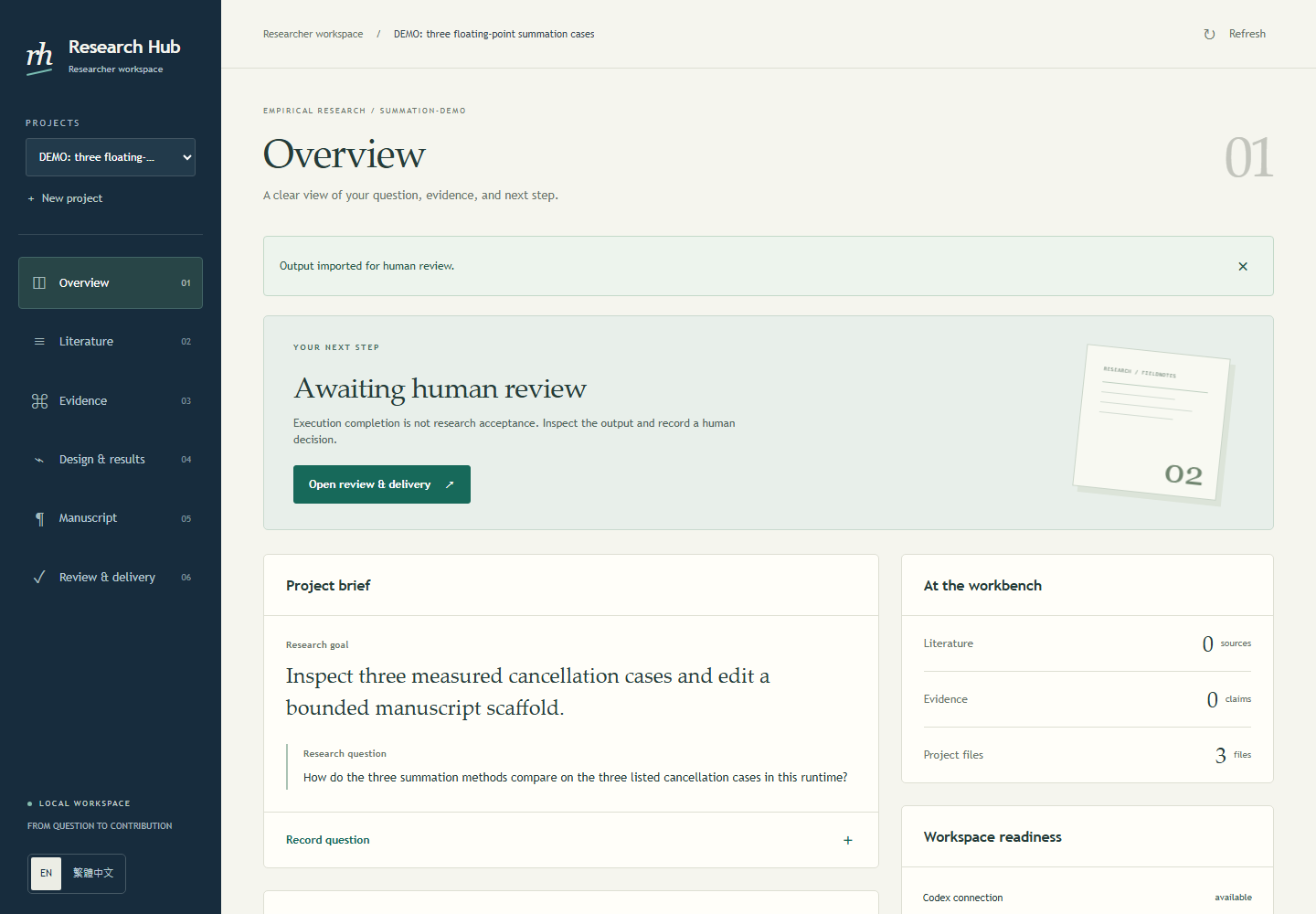
Historical demo capture, reviewed 2026-09-08; the current interface may differ.
| Page | Example work |
|---|---|
| Overview | Review the research question, goal, and project context. |
| Literature | Collect sources and record reasons to include or exclude them. |
| Evidence | Link claims to sources and inspect unresolved support. |
| Design & results | Record methods, results, limitations, and supporting files. |
| Manuscript | Register Word, LaTeX, or Markdown and prepare outlines and revisions. |
| Review & delivery | Inspect proposals, record decisions, and prepare a local handoff. |
Your editor remains responsible for changes to original files; the workspace registers their paths and hashes. A resolvable identifier does not prove a source supports a claim: check the evidence and scientific judgments yourself.
Discover literature
In a compatible AI tool (an AI host) that can load the research-hub skill and has search and reading tools, start with a concrete request, for example:
Find literature on LLMs simulating human decisions; include original links, relevance, versions, and limits on available full text.
Then ask to focus on economic decisions and compare human baselines and evaluation methods. Review the sources, reading coverage, and open questions before deciding what to do next. Search snippets are not full-text reading. This research approach can be used independently of Hub; Zotero, Obsidian, NotebookLM, and Hub storage are optional. The Hub visual workspace and saved-result view do require Hub.
The native reader can organize supplied research summaries, source indexes, and bibliographies, and attach a PDF explicitly supplied by the user. The PDF is copied unchanged for download; that does not mean it was parsed, translated, verified, or read in full. The reader can display caller-supplied translations alongside original observations, labeled unverified; it does not generate translations or verify their accuracy. See the native reader export guide for the supplied-translation format.
See AI Research Skills, the AI host support matrix, and MCP/REST integration. The optional saved-result contract describes what a Hub handoff stores and its platform boundaries.
Write, review, and deliver
| Mode | How it works |
|---|---|
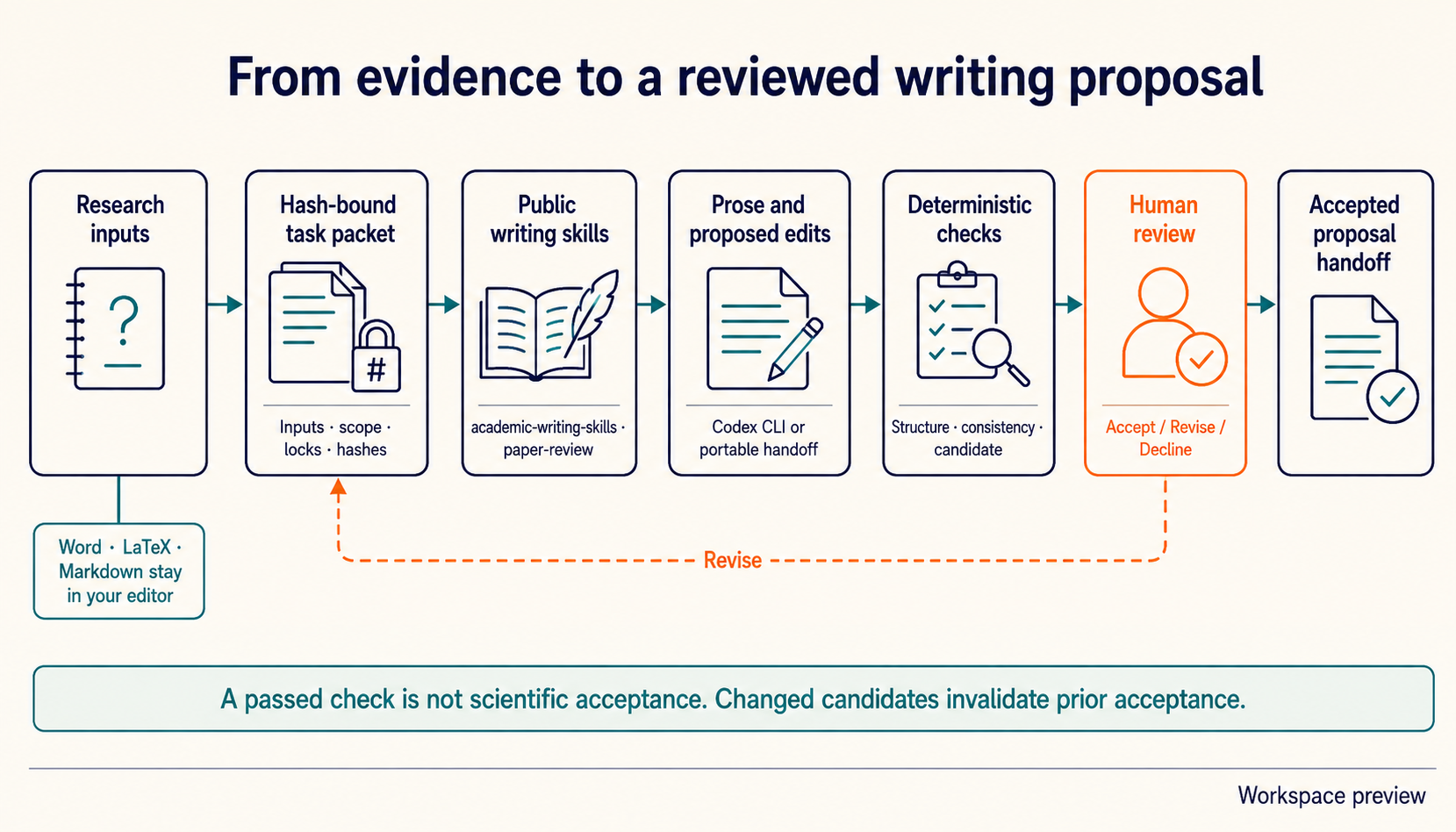
| Portable handoff | Export a task to your AI host, then import prose and candidate file hashes. Export leaves the task waiting for the agent. |
| Connected Codex | An authenticated, compatible Codex CLI uses an explicitly trusted public writing bundle to produce prose; the result waits for human review. |
The optional writing setup explains how to verify and configure the adapter. Connected Codex receives bounded text excerpts, not binary document contents. Use your editor for Word formatting, LaTeX compilation, and final document changes. Accepted proposals can be packaged into a local ZIP after separate approval; this does not authorize publication or cloud upload. Workspace approval does not automatically protect existing direct-write CLI, MCP, dashboard, or cloud tools. See boundaries and recovery.
Optional integrations
- Zotero: manage references; the connection requires an API key and library ID.
- Obsidian: organize notes in a local vault, or begin with local files.
- NotebookLM: create source-based briefings; it requires browser sign-in and a working session. See setup and troubleshooting.
- AI hosts: connect through MCP/REST or portable skills; MCP requires the optional
[mcp]extra.
Choose integrations as needed and run ./.venv/bin/python -m research_hub doctor (macOS/Linux) or .\.venv\Scripts\python.exe -m research_hub doctor (Windows PowerShell) to inspect them individually. Setup or installation does not itself verify a service. The setup guide covers extras and credentials; see also local file import, EZproxy, and the live smoke checklist.
Integration credentials and extras
The local workspace demo needs none of these credentials. Existing personas use optional extras: Researcher and Humanities [playwright,secrets]; Analyst and Internal KM [import,secrets].
| Name | Required | Purpose |
|---|---|---|
ZOTERO_API_KEY | Zotero only | Zotero API authentication |
ZOTERO_LIBRARY_ID | Zotero only | Zotero library identifier |
SEMANTIC_SCHOLAR_API_KEY | no | Optional search API key |
SEMANTIC_SCHOLAR_RPS | no | Optional search request-rate override |
TAVILY_API_KEY | no | Optional web search backend |
BRAVE_API_KEY | no | Optional web search backend |