Listed from the MCP registry; nobody on Odel publishes it.

Firefly III
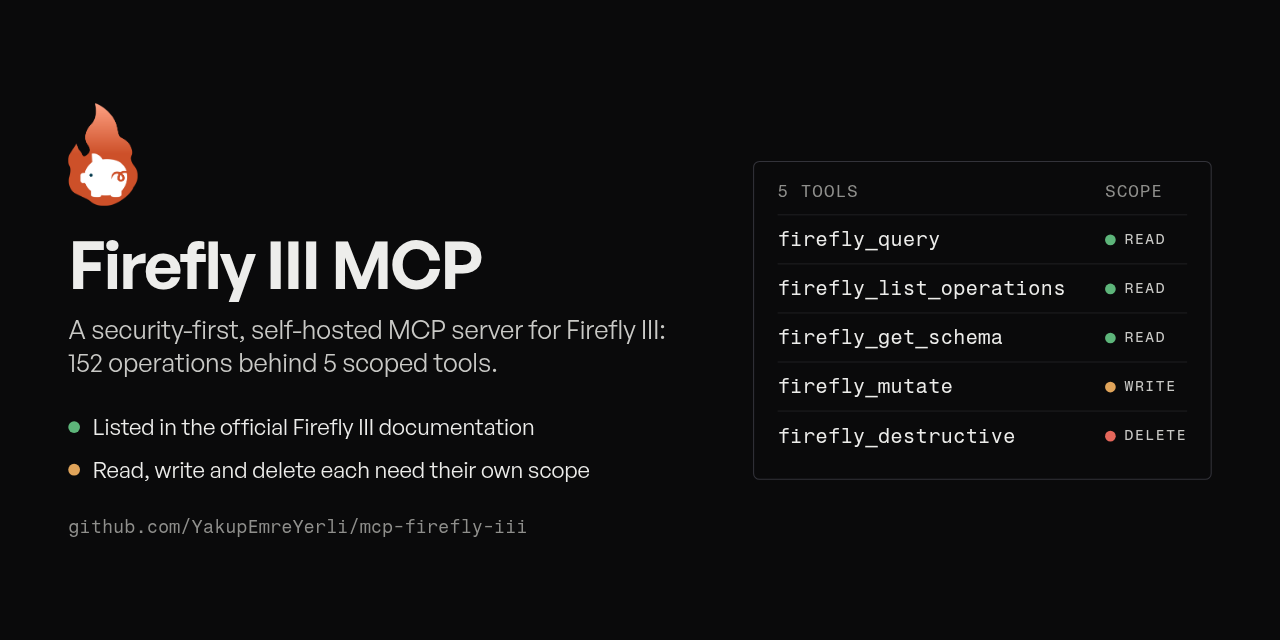
Security-first, self-hosted MCP server for Firefly III — 152 operations behind 5 scoped tools.
Runs on your machine from its package; the steps are below.
What it does
- Reads
- Writes
- High impact
At most: moves money, runs code or commands, deletes data, or sends messages for you.
What it costs
FreeOdel charges nothing per call. The publisher may charge for its own service.
Runs locally over stdio
This server isn't hosted — your MCP client launches it from a package registry. Use one of the commands below, or drop the config into your client (e.g. Claude Desktop).
Run
npx -y @yakupemreyerli/firefly-mcp
MCP client config
{
  "mcpServers": {
    "firefly-iii": {
      "command": "npx",
      "args": [
        "-y",
        "@yakupemreyerli/firefly-mcp"
      ]
    }
  }
}Firefly III MCP Server and CLI




An MCP server and a command-line tool that give an AI assistant access to your own Firefly III instance — 152 operations, as 5 scoped MCP tools or as firefly-cli commands, with reading, writing and deleting kept as three separate, explicitly-authorized surfaces instead of one tool that can do all three.
Türkçe: README.tr.md
- "What did I spend the most on last month?"
- "Find uncategorised transactions from August and suggest categories."
- "Show me subscriptions whose amount went up."
Everyone runs this against their own Firefly instance with their own token — there is no hosted backend or relay in between.
Listed in the official MCP Registry as io.github.YakupEmreYerli/mcp-firefly-iii, on Glama, and in Firefly III's own third-party apps documentation. Every release is built and published by CI from a tagged commit, with npm provenance attesting that the tarball came from this repository.
Demo
https://github.com/user-attachments/assets/d308b2b5-18ef-4275-a4ed-ccdb7f04386f
40-second demo: month-end in Claude Code. It reads October, finds 35 uncategorised payments, proposes a plan, dry-runs every write, and only writes after you approve, then checks Firefly III again: 0 left. All financial data shown is fabricated.
Features
- 5 meta-tools, not 152.
firefly_query,firefly_mutate,firefly_destructive, plusfirefly_list_operationsandfirefly_get_schemafor discovery — a typed registry maps every Firefly endpoint onto these instead of flooding the model's tool list. - A CLI from the same package.
firefly-cliruns the same operations from a terminal, for agents with a shell and for scripts: short text output instead of a tool catalogue in the context, and every write previews until you add--confirm. dry_runon every write, returning the exact request — resolved record IDs included — without sending it.- Bulk writes can't run blind. Filter-driven updates require
max_matchesand refuse an incomplete scan before the first write; multi-split transaction groups are rejected outright rather than risk folding their amounts together. - Read/write/destructive are separately scoped and enforced, not just annotated — over stdio by the Firefly token, over HTTP by OAuth scope or a static token.
- Embedded OAuth 2.1 authorization server for Claude web, Claude mobile, and ChatGPT — no separate Keycloak or Authentik install.
- Docker images for
linux/amd64/linux/arm64, and a self-checking documentation pipeline that keeps the tool catalogue in sync with the code. - It tells you when it is out of date. Once a day it checks whether a newer version exists and, if so, says so once — a line on stderr, a sentence beside the next answer.
MCP_UPDATE_CHECK=falseturns it off.
Prerequisites
- A running Firefly III instance and a Personal Access Token (Firefly III → Options → Profile → OAuth → Create New Personal Access Token)
- Node.js 20.6+, unless you're using Docker
Command line
The same package ships firefly-cli: the five tools as terminal commands, for agents and scripts that would rather run a command than hold an MCP connection. It reads the same FIREFLY_API_URL and FIREFLY_API_TOKEN, and goes through the same validation, previews and access split.
npm install -g @yakupemreyerli/firefly-mcp
firefly-cli ops                                    # every operation, by the command that runs it
firefly-cli schema transaction create              # its parameters (* = required)
firefly-cli query transaction list period=this_month limit=20
firefly-cli mutate bill create name=Rent amount_min=900 amount_max=900 date=2026-12-01 repeat_freq=monthly
firefly-cli destructive transaction delete id=42   # preview; add --confirm --destructive to delete
Output is short text, one line per record; --json prints the raw result the tools return. A write only previews until it is repeated with --confirm, and a delete or bulk rewrite needs --destructive too. Full reference: docs/cli.md.
Usage
| Method | Transport | Best for |
|---|---|---|
firefly-cli | terminal | Agents that can run commands (Claude Code, Codex), scripts — no MCP connection to hold |
npx — stdio | stdio | Claude Code, Claude Desktop, Cursor — simplest setup |
| Static token | HTTP | n8n, automation, headless callers |
| OAuth | HTTP + OAuth | Claude web, Claude mobile, ChatGPT — can't hold a static token |
| Docker | HTTP | Self-hosted, either auth mode above |
1. stdio (Claude Code, Claude Desktop, Cursor)


One click: Claude Desktop — download firefly-mcp-<version>.mcpb from the latest release and open it; Claude Desktop asks for your Firefly III URL and token and keeps the token in the system keychain. Cursor — the button installs the server with your-firefly.example and your-token as placeholders; replace them in Cursor's MCP settings. VS Code — the button asks for the URL and the token when the server first starts.
Let setup do it — it asks for your Firefly III address and token, checks that they actually work, then configures Claude Code and Claude Desktop if it finds them: npx -y @yakupemreyerli/firefly-mcp setup. For any other client it prints the configuration to paste.
By hand, Claude Code:
claude mcp add firefly --env FIREFLY_API_URL=your-firefly.example --env FIREFLY_API_TOKEN=your-token -- npx -y @yakupemreyerli/firefly-mcp
By hand, Claude Desktop / Cursor / other clients — add to the MCP config file:
{
  "mcpServers": {
    "firefly": {
      "command": "npx",
      "args": ["-y", "@yakupemreyerli/firefly-mcp"],
      "env": { "FIREFLY_API_URL": "your-firefly.example", "FIREFLY_API_TOKEN": "your-token" }
    }
  }
}
2. Remote HTTP with a static token
For n8n, automation, or any caller that can't drive a browser-based OAuth flow. Set MCP_HTTP_TOKEN in .env, then run npx -y -p @yakupemreyerli/firefly-mcp firefly-mcp-http. Every request to /mcp must carry Authorization: Bearer <token> — one token, full access, no per-connection scoping.
3. Remote HTTP with OAuth (Claude web, Claude mobile, ChatGPT)
None of these clients can hold a static token, and none of them can spawn a local process — they connect to a public HTTPS URL and expect OAuth. With MCP_AUTH_PASSWORD set, this server is the OAuth 2.1 authorization server: it handles client registration, PKCE and token exchange itself, so there is no Keycloak, no Google sign-in, and no token to copy anywhere.
Set it up next to Firefly III. If Firefly III runs with Docker Compose, the setup writes everything. Run it from the folder that holds Firefly III's compose file — only Docker is needed:
docker run --rm -it --user "$(id -u):$(id -g)" -v "$PWD":/work:z ghcr.io/yakupemreyerli/mcp-firefly-iii:1.4.0 setup
(:z lets the container write the folder on SELinux hosts such as Fedora; elsewhere Docker ignores it.) It asks for a Firefly III token, an address of the server's own (for example mcp.example.com; Firefly III keeps its address), and where your HTTPS reverse proxy runs. It then writes compose.firefly-mcp.yml and firefly-mcp.env (mode 600) beside your compose file without touching yours, generates the sign-in password, and prints the lines to add to your proxy — Caddy, Traefik, Nginx Proxy Manager or Cloudflare Tunnel. Start the server and check it:
docker compose -f docker-compose.yml -f compose.firefly-mcp.yml up -d
docker compose -f docker-compose.yml -f compose.firefly-mcp.yml run --rm firefly-mcp doctor
doctor checks the sign-in mode, the public address, that sign-ins survive a restart, that the server reaches Firefly III with your token, and that the public address answers as this server. Every line should say PASS. A WARN on "reachable from outside" from inside a home network usually means the address does not loop back there; open https://mcp.example.com/health on your phone, off Wi-Fi, to confirm.
Connect a client.
Claude (web, Desktop, iOS/Android). Settings → Connectors → Add custom connector, URL https://mcp.example.com/mcp. Leave the authentication choices as detected — Claude probes the server and picks the flow it supports. The connector then works on every Claude surface you're signed into, phone included.
ChatGPT. In the custom connector / MCP screen, enter the same https://mcp.example.com/mcp and choose OAuth as the authentication method.
Then enter the password. A Firefly login screen opens in the browser; type the sign-in password (MCP_AUTH_PASSWORD; the setup prints it). That one screen is the whole decision — the connection is granted all three scopes (firefly:read, firefly:write, firefly:destructive), whatever the client itself asked for. There is no second consent screen: whoever holds the password could have ticked every box on it. To hand out a connection that genuinely cannot write, give the server a read-only Firefly Personal Access Token instead.
Full TLS recipes and troubleshooting: docs/oauth.md.
Manual setup
Without Compose, or to wire it yourself:
Step 1 — give the server a public HTTPS address. Cloudflare Tunnel is the easiest route for a home server (no port forwarding, no certificate); Caddy or Traefik work on a VPS. compose.example.yml ships cloudflare and caddy profiles for exactly this. Say the result is https://mcp.example.com.
Step 2 — configure .env:
MCP_AUTH_PASSWORD=a-strong-password-of-at-least-12-characters
MCP_RESOURCE_URL=https://mcp.example.com
MCP_AUTH_STATE_DIR=/data/firefly-mcp-auth
MCP_RESOURCE_URL is the external origin, character for character, with no path — not the internal http://firefly-mcp:3000, and not the /mcp connection URL. A mismatch fails the token audience check and the client only reports "invalid token". MCP_AUTH_STATE_DIR must sit on a persistent volume (compose.example.yml mounts one) or every restart de-authorizes every client.
Step 3 — start it and verify:
docker compose -f compose.example.yml up -d
curl https://mcp.example.com/health     # {"ok":true,"auth":"oauth-builtin"}
If auth says bearer instead, the password never reached the process and the client will report that the server doesn't support OAuth. docker compose -f compose.example.yml run --rm firefly-mcp doctor names this and the other usual mistakes. Then connect a client as above.
4. Docker
Recommended for either HTTP mode above:
cp .env.example .env    # fill in the values for the mode you need
docker compose -f compose.example.yml up -d
Swap build: . in compose.example.yml for image: ghcr.io/yakupemreyerli/mcp-firefly-iii:1.4.0 to use the prebuilt image — the tag pins the version; change it to upgrade. Single container without Compose: docker run -d --env-file .env -p 3000:3000 ghcr.io/yakupemreyerli/mcp-firefly-iii:1.4.0. It refuses to start without one of the two auth modes above, and /mcp needs TLS in front — compose.example.yml has optional cloudflare and caddy profiles for that. /health is open, for container probes.
Configuration
| Variable | Default | Purpose |
|---|---|---|
FIREFLY_API_URL | — | Required. A bare domain, or a full base URL including /api/v1. |
FIREFLY_API_TOKEN | — | Required. Personal Access Token. |
FIREFLY_DISABLE_SSL_VERIFY | false | Only for a local instance with a self-signed certificate. |
MCP_UPDATE_CHECK | true | Daily check for a newer release. The only request this server makes to anywhere but your Firefly instance, and it carries no data. |
Every variable, including HTTP and OAuth mode: docs/configuration.md.
Tools
| Tool | Answers | Risk |
|---|---|---|
firefly_query | Read anything. Its description carries the catalogue, so choosing an operation costs no extra call. | read-only |
firefly_mutate | Create or change a record. | writes |
firefly_destructive | Delete a record, or rewrite one field across many records at once. | cannot be undone |
firefly_list_operations | What can I do with this entity? | read-only |
firefly_get_schema | What parameters does this operation take? | read-only |
The split is enforced, not just advertised — a delete reached through firefly_query is refused, and a connection granted only firefly:read never even sees the two writing tools. Responses are trimmed before they reach the model: empty and null attributes are always dropped, and every execution tool takes a fields list — roughly a 90% cut on a large transaction list. Full reference: docs/api/operations.md.
Prompts
Three ready-made workflows appear in your client's prompt menu. The two that write preview every change with dry_run, cap filter-driven writes with max_matches, and apply nothing until you confirm.
| Prompt | What it does |
|---|---|
month_end_review | Overview of a month, then categorise its uncategorised spending. |
categorise_uncategorised | Propose a category per payee for a month's uncategorised spending, preview, apply after you confirm. |
budget_summary | Compare a month with the one before: income, spending, categories, budgets. Read-only. |
Each takes an optional month (YYYY-MM, default last month). Details: docs/prompts.md.
Security
This server never sends your data to a third party, but it doesn't control what the AI client or model you connect it to does with a response once it has one. Full threat model: SECURITY.md. Found a vulnerability? Report it privately there.
Documentation
| Page | What it covers |
|---|---|
| Quickstart | Getting a token, wiring up your client, first things to try, troubleshooting |
| Configuration | Every environment variable, the permission policy, HTTP mode |
| Remote access with embedded OAuth | Deploying for Claude web, Claude mobile, and ChatGPT |
| MCP Integration | Claude Code, Claude Desktop, Cursor, VS Code, n8n and remote HTTP |
| Prompts | The month-end review, categorisation and budget summary workflows |
| Command line | firefly-cli: the tools as terminal commands, previews and confirmation |
| Operations | All 152 operations, response trimming, the Firefly quirks that bite |
| Analysis Operations | summary.overview, search, and the eight insight endpoints |
| MCP Inspector | Poking at the server interactively while developing |
Development
git clone https://github.com/YakupEmreYerli/mcp-firefly-iii.git && cd mcp-firefly-iii
npm install
cp .env.example .env    # fill in your instance
npm test                # mocked; never touches a live instance
npm run build
npm run check           # read-only connection check against .env
Tests are mocked and never reach the network. npm run smoke:live is a maintainer tool that walks every read operation against the instance in .env; it is read-only and not part of the published package. Bug reports and pull requests are welcome — see CONTRIBUTING.md.
License
MIT — see LICENSE.
The flame-and-piggy logo in the banner and in docs/assets/ is Firefly III's own logo, not covered by this licence. It is used, as its logo guidelines allow, to refer to Firefly III; this project is not made or endorsed by Firefly III.







