Listed from the MCP registry; nobody on Odel publishes it.

Time
Time MCP Server, giving LLMs time awareness capabilities.
Runs on your machine from its package; the steps are below.
What it does
- Reads
- Writes
- High impact
At most: only reads or looks up information.
What it costs
FreeOdel charges nothing per call. The publisher may charge for its own service.
Runs locally over stdio
This server isn't hosted — your MCP client launches it from a package registry. Use one of the commands below, or drop the config into your client (e.g. Claude Desktop).
Run
npx -y time-mcp
MCP client config
{
  "mcpServers": {
    "time": {
      "command": "npx",
      "args": [
        "-y",
        "time-mcp"
      ]
    }
  }
}🚀 Time MCP Server: Giving LLMs Time Awareness Capabilities



A Model Context Protocol (MCP) server implementation that allows LLMs to have time awareness capabilities.
Tools
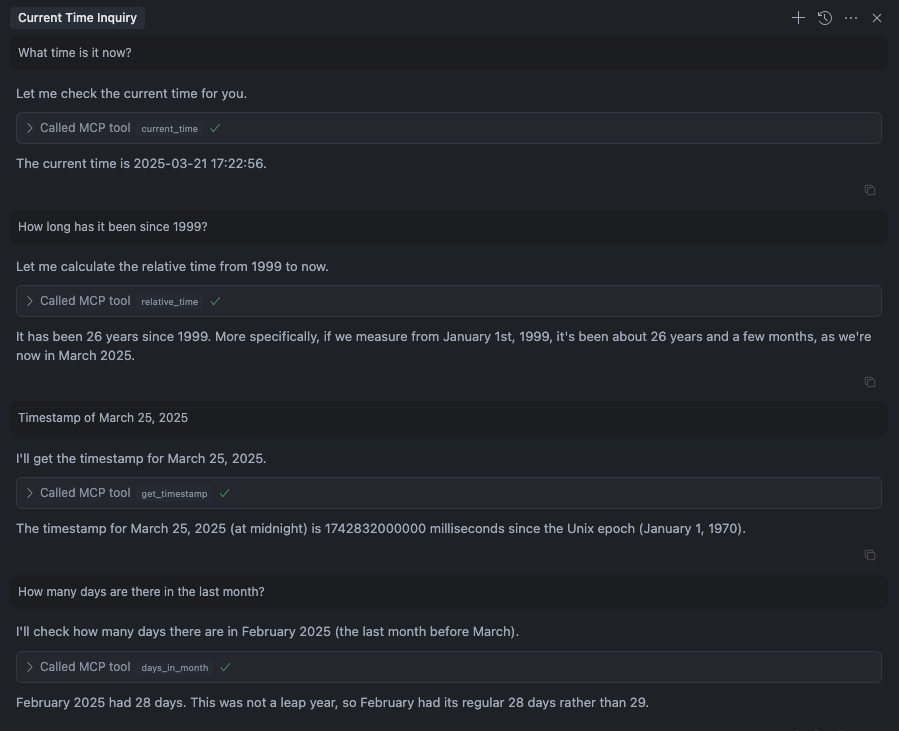
current_time: Get current time (UTC and local time)relative_time: Get relative timeget_timestamp: Get timestamp for the timedays_in_month: Get days in monthconvert_time: Convert time between timezonesget_week_year: Get week and isoWeek of the year
Installation
Installing via Smithery
To install time-mcp for Claude Desktop automatically via Smithery:
npx -y @smithery/cli install @yokingma/time-mcp --client claude
Manually install (Optional)
npm install -g time-mcp
using npx
npx -y time-mcp
Running on Claude Code
To add time-mcp to Claude Code, use the following command:
claude mcp add time-mcp -- npx -y time-mcp
To verify the installation:
claude mcp list
You should see time-mcp listed with a ✓ Connected status.
Usage in Claude Code
Once installed, you can use time-mcp tools in your conversations with Claude Code. For example:
- "What time is it now?"
- "Convert 2:00 PM from New York to Tokyo time"
- "How many days are in this month?"
- "What week of the year is it?"
The time-mcp server will automatically provide accurate time information to Claude.
Running on Cursor
Your mcp.json file will look like this:
{
  "mcpServers": {
    "time-mcp": {
      "command": "npx",
      "args": ["-y", "time-mcp"]
    }
  }
}
Running on Windsurf
Add this to your ./codeium/windsurf/model_config.json file:
{
  "mcpServers": {
    "time-mcp": {
      "command": "npx",
      "args": ["-y", "time-mcp"]
    }
  }
}
License
MIT License - see LICENSE file for details.