
Zenith
Author, validate, edit, and render deterministic .zen design docs to PNG/PDF.
Runs on your machine from its package; the steps are below.

What it does
- Reads
- Writes
- High impact
At most: creates or changes data: records, files, settings.
What it costs
FreeOdel charges nothing per call. The publisher may charge for its own service.
Runs locally over stdio
This server isn't hosted — your MCP client launches it from a package registry. Use one of the commands below, or drop the config into your client (e.g. Claude Desktop).
Run
npx -y @zenitheditor/zenith-mcp
MCP client config
{
  "mcpServers": {
    "zenith": {
      "command": "npx",
      "args": [
        "-y",
        "@zenitheditor/zenith-mcp"
      ]
    }
  }
}Zenith
A design-document format and engine built for the age of AI agents.
Plain-text .zen design files that you can read, diff, review, validate, and let an agent safely edit — compiled deterministically to pixel-exact PNG, self-contained SVG, and print-ready PDF.
Install Quick start Features Validation Commands Agents







Every banner and diagram in this README is itself created using Zenith — source in assets/showcase/.
Zenith is a plain-text format and engine for design files — posters, decks, books, social graphics, diagrams, and more. The idea is simple: design should work the way code does. You should be able to read it, diff it, review it, test it, and let an agent safely edit it.
A .zen file is human-readable KDL text. The engine parses it, validates it against a large diagnostic set, compiles it to a backend-neutral scene, and renders the same file to the same pixels every time — as a PNG, self-contained SVG, or print-ready PDF.
The sections below are collapsed to keep this page skimmable — click any heading's ▸ to expand it. Install and Quick start are open by default.
Install
The recommended way to install the zenith CLI is the install script, which detects your platform and downloads the matching prebuilt binary from GitHub Releases.
Linux / macOS
curl -fsSL https://raw.githubusercontent.com/zenitheditor/zenith/main/scripts/install.sh | sh
Windows (PowerShell)
irm https://raw.githubusercontent.com/zenitheditor/zenith/main/scripts/install.ps1 | iex
Set ZENITH_INSTALL_DIR to change the install location (default ~/.local/bin):
ZENITH_INSTALL_DIR=/usr/local/bin \
  curl -fsSL https://raw.githubusercontent.com/zenitheditor/zenith/main/scripts/install.sh | sh
With cargo
cargo install zenith-tool    # from crates.io (installs the `zenith` binary)
cargo install --git https://github.com/zenitheditor/zenith zenith-tool   # from source
Thirteen library crates are published under their own names for Rust projects that build on the engine directly: zenith-geometry, zenith-session, zenith-core, zenith-layout, zenith-raster, zenith-scene, zenith-perception, zenith-zpx, zenith-render, zenith-tx, zenith-producers, zenith-pipeline, and zenith-editor. zenith-editor-wasm and zenith-editor-bench are not published.
With npm
npm install -g @zenitheditor/zenith-mcp
npx -y @zenitheditor/zenith-mcp --help
The npm package installs the matching prebuilt zenith binary from GitHub Releases and is focused
on the MCP Registry launch path. The unscoped zenith binary remains the Rust CLI.
GitHub Releases
Download directly from GitHub Releases:
| Platform | Architecture | Asset |
|---|---|---|
| Linux | x86_64 | zenith-<version>-linux-x64.tar.gz |
| Linux | aarch64 | zenith-<version>-linux-arm64.tar.gz |
| macOS | x86_64 | zenith-<version>-macos-x64.tar.gz |
| macOS | Apple Silicon | zenith-<version>-macos-arm64.tar.gz |
| Windows | x86_64 | zenith-<version>-windows-x64.zip |
Update
zenith update                   # latest stable release
zenith update --pre             # latest prerelease
zenith update --version <tag>   # a specific release tag, e.g. the ones on the Releases page
Verify with zenith --version.
Build from source
For local development or source installs:
git clone --recurse-submodules https://github.com/zenitheditor/zenith
cd zenith
cargo build --release
cargo install --path zenith-cli   # installs `zenith` to ~/.cargo/bin
./scripts/install.sh --local      # installs the local build to ~/.local/bin
The release binary lands at target/release/zenith. No C toolchain or system libraries are required — the dependency graph is C-free and unsafe is forbidden workspace-wide.
Quick start
zenith validate examples/hello.zen          # report diagnostics (add --json for machine output)
zenith fmt examples/hello.zen               # canonical, idempotent formatting
zenith fix draft.zen --apply                # apply machine fixes (tokens, typos) in one step
zenith tokens examples/hello.zen            # list design tokens and their resolved values
zenith inspect examples/hello.zen           # print the node tree (read-only)
zenith render examples/hello.zen --png hello.png          # render to PNG

zenith render examples/multipage.zen --all-pages out/     # one PNG per page
zenith render examples/hello.zen --pdf hello.pdf          # print-ready PDF
zenith render examples/hello.zen --svg hello.svg          # self-contained SVG
zenith render examples/multipage.zen --svg page.svg --page 2
zenith render examples/multipage.zen --all-pages-svg svg-pages/
zenith render examples/hello.zen --scene scene.json       # dump the scene IR
| Export flag | Output |
|---|---|
--svg OUT | Page 1 by default, with outlined text. |
--pdf OUT | Every page in one PDF by default. |
--page N | Selects one page for single-output flags, including PDF. |
--all-pages-svg DIR | Writes page-N.svg in document order. |
--raster-scale F | SVG/PDF fallback resolution. Finite 0 < F <= 4, default 1. |
--scale F | PNG output scale. Finite 0 < F <= 4, default 1. |
--deny render.svg_rasterized | Blocks SVG exports requiring raster fallback. |
--deny render.pdf_rasterized | Blocks PDF exports requiring raster fallback. |
- SVG assets: RGB colors and embedded image assets keep the artifact self-contained.
- SVG text: Outlines preserve appearance and lose editing, selection, and search.
- SVG fallback: Effects capture their complete scope. Non-normal blends capture the page. Crossed scopes and bitmap glyphs require capture.
- PDF fallback: Unsupported features capture their required scope or page. Captured text loses selection and search. Captured links lose click targets.
- Resolution:
--raster-scalechanges fallback pixels without changing vector geometry or page dimensions. Existing bitmap assets retain source resolution. - Reports:
render.svg_rasterizedandrender.pdf_rasterizedreport pages, command ranges, and reasons. JSON includes structured rasterized regions. - PDF errors: CLI and MCP reject capture and resource errors. Legacy library APIs returning
Vec<u8>retain compatibility emission. Use report APIs for strict errors. - Policy: Blocking diagnostics prevent output writes. Read the export report after source validation.
- Writes: Each file uses a temporary sibling and rename. Write errors preserve existing destinations. Earlier committed outputs can remain after later I/O errors.
- Batch reports: Partial rows and variants retain committed paths with failed status. Manifest write errors retain batch error counts.
- Filesystem limits: Writes reject read-only destinations. Symlink outputs replace the resolved target and retain the link. Replacement preserves permissions and leaves other hard links unchanged. Crash durability is not guaranteed.
zenith render examples/multipage.zen --pdf book.pdf --raster-scale 2 --json
zenith render examples/hello.zen --svg hello.svg --raster-scale 2 --json
The smallest valid document:
zenith version=1 {
  project id="proj.hello" name="Hello Zenith"
  tokens format="zenith-token-v1" {
    token id="color.bg" type="color" value="#f8fafc"
    token id="color.ink" type="color" value="#111827"
    token id="font.body" type="fontFamily" value="Noto Sans"
    token id="size.heading" type="dimension" value=(px)42
  }
  styles {}
  document id="doc.hello" title="Hello Zenith" {
    page id="page.hello" w=(px)480 h=(px)160 {
      rect id="rect.bg" x=(px)0 y=(px)0 w=(px)480 h=(px)160 fill=(token)"color.bg"
      text id="text.hello" x=(px)24 y=(px)24 w=(px)432 h=(px)112 fill=(token)"color.ink" font-family=(token)"font.body" font-size=(token)"size.heading" { span "Hello Zenith" }
    }
  }
}
See examples/ for runnable .zen files covering shapes, rich text, inline markdown (loaded from an external file), code blocks, images, frames/groups, multi-page documents and styles, plus the richer features — gradient, shadow, blur, filter, mask, table, flowchart (shapes + connectors), charts (bar/line/area/pie/donut/sparkline, with legends, value labels, and data binding), and anchors.
Why
Code got source control, types, tests, and PRs. Design files got none of that — and that hurts people and blocks AI.
Code got source control, types, tests, and pull requests. Design files got none of that. They're opaque blobs — you can't diff them, you can't review a change, and the same file can render differently on different machines.
That's a problem for people, and it's a bigger problem for AI. Agents can already write code and open pull requests, because code is text they can read and reason about. Drop them into a design tool and they go blind. Ask an agent to "make the heading brand red and tighten the layout" and there's nothing safe to grab onto — no stable target, no validation, no preview, no way to check the result.
Zenith fixes that. The goal is to make design files as safe to automate as code:
- Plain text you own — readable, diffable, yours forever.
- Stable IDs so every change is a reviewable patch, not a mouse drag.
- Deterministic rendering — the same file always produces the same pixels.
- Real validation — text fits, colors come from the design system, nothing falls off the page.
- Safe edits — every change is a typed transaction, checked and previewable before it lands, with a source diff and an audit record.
It's not AI image generation
The opposite of an image model: Zenith generates the editable design, not a flat picture.
This is the most common mix-up, so it's worth being blunt: Zenith is the opposite of an image model like Nano Banana, ChatGPT image, or Grok Imagine.
An image generator gives you a flat picture. It's a bag of pixels — you can't open it up and move the logo, you can't force the headline to use your exact brand color, and asking for "the same thing but with a different date" gives you a different image. There's nothing to edit, review, or guarantee.
Zenith doesn't generate a picture. It generates the design itself — a structured, editable document where every element is real and addressable. An agent (or a person) can change one line, swap a color token, or regenerate a hundred on-brand variants, and every render is exact and repeatable. AI writes and edits the source; Zenith guarantees what it means and how it looks.
Agent-native first, not a tool with an API bolted on
The foundation is a programmatic, deterministic engine; the visual editor is a client on top — automation is the front door.
Most design tools are built for a human dragging boxes, and an automation API gets added later as an afterthought — a thin, limited layer over a model that was never meant to be driven by software.
Zenith is built the other way around. The foundation is a programmatic, text-based, deterministic engine. Agents, scripts, and the command line drive it directly. So automation isn't a side door; it's the front door.
The editor. The engine and the CLI are the surface an AI agent drives. The browser editor is a client on top of the same engine: a designer nudges a box, an agent restyles a hundred variants, and both operate on the identical deterministic core with the same validation, transactions, and version history. The GUI is not a separate product with automation bolted on.
How it works
One deterministic pipeline: parse + validate → AST → compile → scene IR → render (PNG/SVG/PDF).
A .zen document flows through a single deterministic pipeline. Each stage is a separate crate with a clean contract boundary, so a GPU backend or an editor can consume the same scene IR:
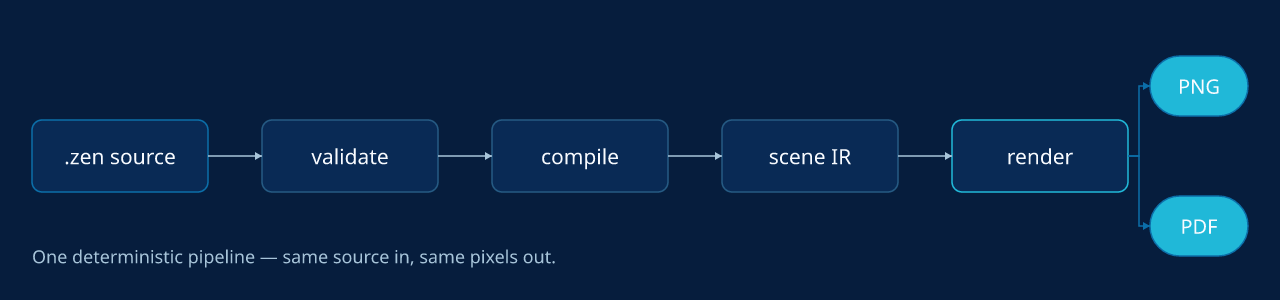
Rendered by Zenith — source: assets/showcase/pipeline.zen.
  design.zen  (KDL plain text)
       │  parse + validate           zenith-core   →  diagnostics (Error/Warning/Advisory)
       ▼
  Document AST  ──transaction ops──▶  Document AST'  zenith-tx  →  dry-run / apply + audit record
       │  compile                    zenith-scene + zenith-layout
       │    · resolve tokens, geometry, anchors
       │    · shape text (rustybuzz), wrap, hyphenate
       ▼
  Scene IR  (backend-neutral display list)
       │  render                     zenith-render
       ├─▶ PNG   (tiny-skia, byte-identical)
       ├─▶ SVG   (outlined text, embedded assets)
       └─▶ PDF   (vector, native CMYK, bleed / trim / crop)

  local history / undo / versions    zenith-session   (off the render path; never affects pixels)
Everything that touches the render path is deterministic and C-free: no time, no randomness, no HashMap, no unsafe, no C dependencies. The same bytes in always produce the same bytes out, on any machine.
What it does
Tokens, a full node set, real typography, visual effects, anchors, recipes, a transaction engine, deterministic PNG/SVG/PDF, history, libraries, and data-merge.
- Scaffold & identity —
zenith newcreates a ready-to-edit document (minimal valid template, or a finished themeable layout with--starter flyer|letterhead|handout|deck|poster|menu|card|report, default.zenextension, parent dirs created) with a stabledoc-idminted on first write; any.zengains its identity and workspace store transparently on the first edit — no manual setup step. - Plain-text
.zenformat — KDL v2 source withproject/tokens/styles/document/pagestructure; every node carries a stable id. - Design tokens —
color(sRGB and native CMYK),dimension,number,fontFamily,fontWeight,gradient(linear/radial),shadow,filter, andmask, with alias chains and cycle detection. - A full node set —
rect,ellipse,line,polygon,polyline,text,code,image,frame,group,pattern,shape,connector,chart,instance,field,footnote,toc, andtable, plus lossless pass-through of unknown nodes for forward compatibility. - Real typography —
rustybuzzshaping with bundled Noto Sans / Noto Sans Mono, font fallback, Knuth–Liang hyphenation, rich inline spans (bold/italic/underline/strikethrough/highlight/inline-code/link), threaded text flow (chains), drop-caps, tab-leaders, text runaround, and afont.glyph_missingdiagnostic when a glyph is unavailable. - Lean long-form text — keep the
.zensmall by sourcing body copy from an external.md/.txtfile (text src="copy/article.md") or a data field, and opt into markdown (format="markdown") for both inline marks (**bold**,*italic*,==highlight==,++underline++,~~strike~~,`code`,[label](https://github.com/zenitheditor/zenith/blob/main/url)) and full block structure —# headings(h1–h6), blank-line paragraphs, blockquotes, ordered/unordered lists, fenced code blocks, and---rules. Per-role typography (font, size, weight, fill, spacing) is controlled byblock role="h1" …declarations at document, page, or text scope (cascade: text > page > doc), so the.zenowns all layout and styling while the.mdfile stays pure prose. For long-form content that exceeds one box, link multipletextnodes withchainfor manual pagination; atext.overflowwarning fires when content doesn't fit. - Visual effects — linear & radial gradients, layered shadows, Gaussian blur, feathered masks, 12 Porter-Duff blend modes, opacity cascade, per-corner radius, and image fit / clip-shape / object-position.
- Anchors — 9-point placement relative to the page, a safe-zone, the parent container, or a sibling node (precedence: zone > sibling > parent > page), all materializing to explicit, deterministic geometry (absent anchor = byte-identical to hand-placed coordinates).
- Procedural recipes — a
recipesprovenance block records how a generated motif was made (kind, seed, generator, params, palette tokens, expanded node ids), inspectable and editable via typed recipe transactions, so procedural visuals stay reproducible and re-tunable. - Transaction engine — a typed op set (set fill/stroke/geometry, add/remove/reparent/group, align/distribute, page ops, token ops, find-replace, pattern detach, and more) applied as dry-run by default, with referential-integrity and id-uniqueness enforcement, a source diff, moved/resized node boxes, affected node ids, and an audit record.
- Deterministic rendering — pixel-exact PNG via tiny-skia and print-ready PDF (native DeviceRGB/CMYK, MediaBox/TrimBox/BleedBox, no embedded timestamps), single page, all pages, or facing-page spreads. The scene IR can be dumped to JSON.
- Real PDF text, not pictures — PDF output embeds genuine, selectable / searchable / indexable text (subsetted fonts + ToUnicode) and clickable hyperlinks by default; set
selectable=#falseon atext/codenode to render it as outlines instead.--embed-full-fontsembeds whole faces in place of subsets. Opaque linear and radial gradients retain native shading. Bitmap glyphs, translucent gradients, and gradients with outer or non-strict stop offsets rasterize their complete enclosing scopes. Effects and compositing layers requiring group opacity rasterize their complete enclosing scopes. Non-normal blends rasterize the whole page to preserve the backdrop. Text and links inside rasterized ranges lose selectability and clickability. Text outside those ranges retains native PDF behavior. Imported SVG paths with supported fills and solid strokes retain native vectors. Imported radial gradients, gradient strokes, patterns, clips, masks, filters, nested images, and unsupported paint transforms rasterize their complete enclosing scopes at page pixel resolution. SVG group opacity and placement opacity use the same fallback. - Local history — per-document identity (ULID doc-id stamped in the file, ignored by the renderer), an ephemeral session DAG for undo/redo, and a durable content-addressed version store (SHA-256 + DEFLATE) with named versions and restore — entirely off the render path.
- Workspace scratch candidates — content-addressed
.zensnapshots for design exploration, stored alongside history:scratch newrecords a candidate,scratch list/showreview them,candidatetransitions their lifecycle (draft → selected | rejected),promote --into <page>merges a selected candidate into the deliverable, andfinalizedrops the rejected ones.bundle/unbundlepack the whole per-doc store (history + scratch) into a portable, deterministic.zenithbundle. - Library subsystem — embedded preset packs (
@zenith/flowchart,@zenith/filters,@zenith/masks,@zenith/brand-kit);library addmaterializes an item into a self-contained document withlibraries+provenancetracking. Inspect any item withzenith library show <pkg>#<item>. - AI-asset provenance — when an image/illustration from an image model is composed in as an
asset, Zenith records how it was made:ai-prompt,ai-model,ai-provider,ai-seed,ai-license,ai-source-rights,ai-safety-status,ai-reuse-policy(alongside thesha256content lock). Runzenith schema assetfor the full field list. - Variable-data merge —
role="data.<column>"bindings drive CSV mail-merge across text and image columns and multi-page templates, with a per-row JSON report and a byte-reproducible manifest. - Self-describing CLI —
zenith schemaemits the authorable surface (every node kind + its attributes, the transaction op set, token types, and thepage/asset/document/variant/diagnostics/brandsurfaces) as human text or--json, so an agent discovers what it can author from the CLI itself rather than guessing — paired withzenith validate's actionable diagnostics for the fix loop.
Validation — the safety net
70+ checks (Error / Warning / Advisory) that catch what's wrong, risky, or off-brand before you render or print.
zenith validate file.zen is the step that makes design files safe to edit and trustworthy to ship. It's like a compiler's type-checker, but for a document: it reads the source and reports everything that is wrong, risky, or off-brand before you render or print — so an agent (or you) never has to "render it and eyeball it" to find out something broke.
It runs 70+ checks, each reported as a diagnostic with a stable code (e.g. text.overflow), a human message, the offending node id, and the source location. Every diagnostic has one of three severities:
| Severity | Meaning | Effect |
|---|---|---|
| Error | A definite problem that would produce wrong output | Blocks rendering — render refuses and validate exits non-zero until it's fixed |
| Warning | A likely problem or risky construct | Output still produced; worth a look |
| Advisory | Informational note | Never blocks; just FYI |
What it actually checks, in plain terms:
- Structure & references resolve — every node id is unique and every reference points at something real: token refs, image assets, connector targets, fields, masters/sections (
id.duplicate,token.unknown_reference,asset.unknown_reference,connector.missing_target). No dangling links, no typos that silently render nothing. - Design-system discipline — visual properties must come from tokens, not raw hex (
token.raw_visual_literal), so a brand change is one edit; it also flags cyclic, mistyped, or unused tokens (token.cyclic_reference,token.type_mismatch,token.unused). - Nothing falls off or overflows — geometry is present and on-canvas, text actually fits its box, children stay inside their frame, and content respects page margins and safe zones (
node.missing_geometry,text.overflow,text.fit_failed,frame.child_overflow,margin.violation,safe_zone.violation). Anchors must resolve to a real reference frame (anchor.unresolved_sibling,anchor.cycle). - Readable & print-ready — text/background contrast is checked against WCAG 3 (APCA) (
contrast.low); colorspace, bleed, and page parity are validated so a PDF is actually printable (document.invalid_colorspace,page.invalid_bleed). - Model integrity — the newer
variants,recipes, andprovenanceblocks are checked too, so generated/derived work stays consistent (variant.unknown_source,recipe.unknown_palette_token).
Why it matters:
- For people — you catch "the headline ran off the page", "this grey-on-grey is unreadable", "that color isn't a brand token", or "the print file has the wrong colorspace" before exporting, not after.
- For agents —
zenith validate --jsonis a precise, machine-readable contract. An agent edits the source, validates, and knows whether the change is sound — the safety net that makes hands-off editing trustworthy.
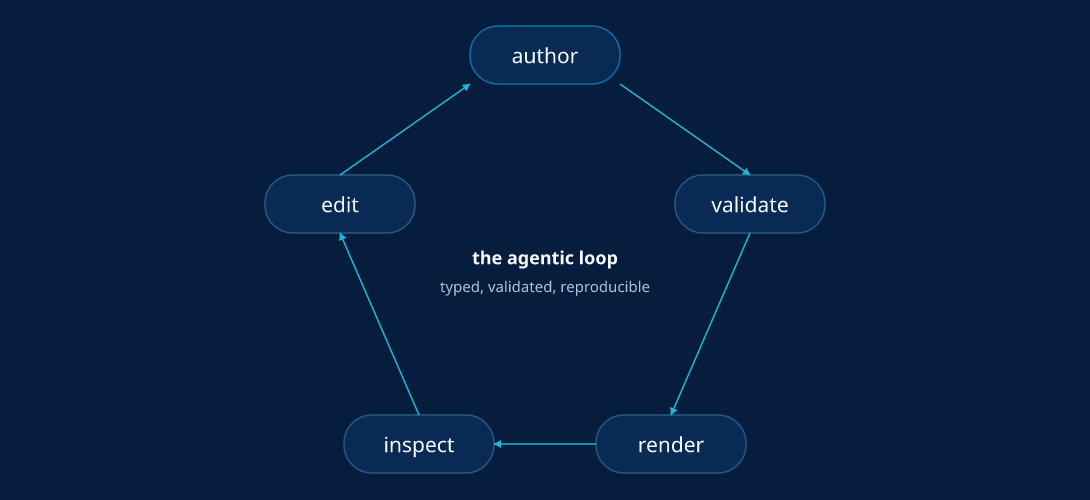
Rendered by Zenith — source: assets/showcase/loop.zen.
Perception
Deterministic signals measured from the render. Signals, not taste: no aesthetic score, no vision model.
zenith perceive page file.zen [--page N | --all-pages] [--json] renders each page as zenith render --png does at scale 1. It then measures the trim box (a bleed is cut off). zenith perceive vector measures path geometry from the source instead.
The output describes pixels and declared geometry. It is not a judgement of design quality. Read it as evidence, then decide.
| Metric | What it measures |
|---|---|
histogram | Ten-bin Rec.709 luminance histogram, with min, max, and mean. |
value_zones | Pixel count, mean, and spread per zone: shadow below 1/3, midtone below 2/3, highlight above. |
density_map | Luminance contrast energy in up to 4 × 4 cells, the strongest cell, and the 70/20/10 energy split. |
edge_map | Luminance steps between neighbour pixels. Hard at 0.25 and above, lost below 0.03. |
optical_balance | Offset of the ink centre from the page centre, in px and as a fraction of the page. |
clearspace | Distance from the ink to each page edge, against the smallest declared page margin. |
grid_conformance | Largest distance from a top-level node box corner (plus the union corners and centre) to the nearest construction guide. |
Ink is every pixel that differs from the most common pixel of the page.
How to read --json:
schemais1. A breaking change to the shape bumps it. The envelope has no tool version, so a release does not change its bytes.pages[].metrics.<name>.statusismeasuredornot_applicable. Anot_applicablemetric carries areason.clearspaceneeds all four margins:margin-top,margin-bottom,margin-inner, andmargin-outer(page or document).grid_conformanceneeds aconstructionblock withsegmentorcircleguides. No metric invents a threshold or an input.- Each measured metric has a
diagnosticsarray ofcode,severity(infoorwarning), andmessage. - Every non-integer number is rounded half away from zero to
decimals(4) places. - The exit code is 0 when the pages measure. A perception diagnostic is a signal and never fails the command. Hard validation errors block it, as they block
render.
Determinism: the same document gives the same bytes on every target. zenith-cli/tests/perceive_hashes.json pins the output of every example on Linux x64 and arm64, macOS arm64 and x64, and Windows x64. MCP exposes the same envelope as zenith_perceive (doc, page, all_pages).
Variants
Two ways to generate many outputs from one design: zenith variant (sizes) and zenith merge (data).
Two complementary ways to generate many outputs from one design — one varies size, the other varies content.
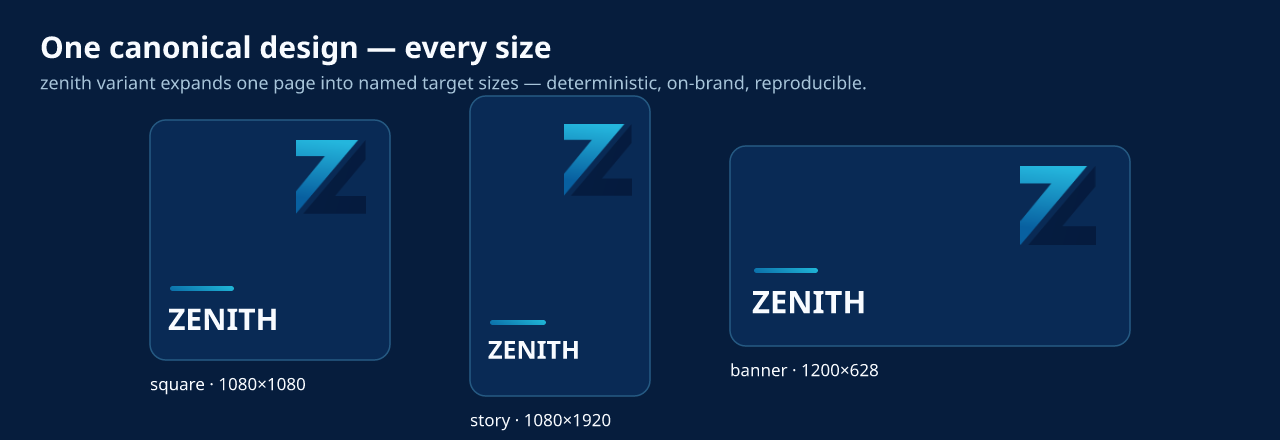
Rendered by Zenith — source: assets/showcase/variants.zen.
Size / format variants (zenith variant)
A variants block expands one canonical page into named target sizes. Each target produces a .zen companion and PNG or SVG image. Per-target overrides change visibility, text, and visual properties. Source token edits propagate to every variant. Anchored nodes reflow to each size.
variants {
  variant id="square" source="page.main" w=(px)1080 h=(px)1080 {
    override node="qr" visible=#false
  }
  variant id="story" source="page.main" w=(px)1080 h=(px)1920 { }
}
zenith variant poster.zen --out-dir out/ --manifest manifest.json
zenith variant poster.zen --out-dir svg/ --format svg --raster-scale 2
| Batch flag | Contract |
|---|---|
--format png|svg | Selects PNG or SVG. PNG is the default. SVG variants retain .zen companions. |
--raster-scale F | SVG only. Finite 0 < F <= 4, default 1. |
--manifest PATH | Records committed outputs, including partial entries with failed status. |
Batch commands have no --deny flags. Document, local, and global policy govern fallback diagnostics. Denied fallback prevents writes for that variant. I/O errors can leave earlier outputs. There is no batch rollback.
Generation is deterministic (same source → byte-identical outputs + manifest, schema: zenith-variant-manifest-v1).
Data mail-merge (zenith merge)
One template plus a CSV becomes one rendered design per row — for localized posts, personalized graphics, certificates, or campaign variants. Mark the variable text/image nodes with role="data.<column>" (the columns are the CSV header), then merge:
# in poster.zen — bind the headline to the CSV "name" column:
text id="hero.name" role="data.name" x=(px)60 y=(px)160 w=(px)680 h=(px)90 fill=(token)"color.ink" font-family=(token)"font.body" font-size=(token)"size.heading" { span "Name" }
zenith merge poster.zen people.csv --out-dir out/ --name-by name --manifest manifest.json
zenith merge poster.zen people.csv --out-dir svg/ --name-by name --format svg --raster-scale 2
PNG is the default merge format. Multi-page filenames include -page-N before .png or .svg. SVG fallback diagnostics respect document, local, and global policy. Denied fallback prevents writes for that row. I/O errors can leave earlier committed outputs. Reports retain those paths.
Every row renders independently and deterministically. --name-by names files by a column (Alice.png, Bob.png); --manifest writes a byte-reproducible batch record (template + data hashes and per-row provenance) for CI. Image columns work too — a role="data.logo" image node swaps its asset path per row.
Connectors
Semantic arrows whose endpoints are derived from their from/to nodes — auto-routing, arrowheads, self-loops, and line jumps.
A connector is a semantic arrow between two nodes. It has no authored geometry — you give it a from and a to node id, and the engine derives both endpoints from those targets' resolved boxes at compile time. Move either box and the connector reroutes automatically; the same source always produces the same path. It is a stroke-only leaf (no fill, no children); a stroke color is required for it to render.
- Endpoint anchoring —
from-anchor/to-anchorpick where each end attaches. Use named grid anchors (top-left,bottom,center-right) for simple flowcharts, or divided outline anchors like35/60for polished diagrams that need several distinct links around one shape. Divided anchors start at top center and proceed clockwise; ellipses use their perimeter and rectangles walk their outline by edge length. The default,auto, picks the edge facing the other box. - Ports — a page can declare semantic attachment points with
ports { port node="agent" id="memory.vector" anchor="38/60" }; connectors can then usefrom="agent#memory.vector"orto="store#in". Component ports project through instances, soconnector from="agent.instance#out"stays tied to the component's internal geometry without copying coordinates. - Route modes (
route=) —straight(default) draws a direct line;orthogonaldraws a right-angle elbow;avoidruns an obstacle-avoiding orthogonal router that bends the path around the other node boxes (falling back to a plain elbow when no clear path exists). - Self-loops — when
fromandtoname the same node, the connector becomes a small loop off one edge (the side taken from the anchor, defaulttop). - Arrowheads —
marker-start/marker-end=arrowadd a filled arrowhead in the stroke color (defaultnone); heads orient along the actual routed segment, so they land axis-aligned. - Line jumps — a page-level
line-jumps="arc"orline-jumps="gap"makes connectors hop where they cross: the crossing line gets a small semicircular bump (arc) or a broken gap (gap) so overlapping arrows read clearly. Deterministic — the horizontal line hops over the vertical one — and it applies to nested connectors too. Absent (none/ default) renders byte-identically. - Styling —
stroke(required),stroke-width,opacity,rotate, and astyleref, following the same property/style cascade as the other primitives.
page id="pg" w=(px)640 h=(px)360 line-jumps="arc" {
  ports {
    port node="n.start" id="out" anchor="1/4"
    port node="n.end" id="in" anchor="3/4"
  }
  shape id="n.start"  kind="process" x=(px)40  y=(px)150 w=(px)130 h=(px)60 fill=(token)"c.node" stroke=(token)"c.line" { span "Start" }
  shape id="n.end"    kind="process" x=(px)470 y=(px)150 w=(px)130 h=(px)60 fill=(token)"c.node" stroke=(token)"c.line" { span "Finish" }
  shape id="n.block"  kind="process" x=(px)290 y=(px)130 w=(px)70  h=(px)100 fill=(token)"c.block" stroke=(token)"c.blockline" { span "Block" }

  // Auto-routed flow bends around the Block instead of crossing it…
  connector id="e.flow"  from="n.start#out" to="n.end#in" route="avoid" marker-end="arrow" stroke=(token)"c.flow"  stroke-width=(token)"cw"
  // …and where a second connector crosses it, the page's line-jumps hops it.
  connector id="e.cross" from="n.top"   to="n.bottom" marker-end="arrow"               stroke=(token)"c.cross" stroke-width=(token)"cw"
}
See examples/connector-routing.zen for a complete runnable document.
Icons & libraries
Reusable packs in two formats: a .zen file, or a plain directory of *.svg. The full Lucide icon set (1745 icons) ships embedded.
A pack exports named items addressed <package>#<item>, materialized into a document with zenith library add. Items come in three kinds: component (a node group, placed as an instance), token (a filter/mask token), and action (a canned transaction).
A pack is stored in one of two formats:
- A
.zenfile — the feature-rich format: tokens, components, and actions, authored directly. It declares its own identity with alibraryself-entry. - A directory of
*.svg— the plug-and-install format, for icon sets. Each*.svgis one icon; its id is the file stem. There is nothing to author: drop a folder into<project>/libraries/and it is a pack, addressed@local/<dirname>#<stem>.
SVG icons are converted to native, editable path nodes at add-time — not embedded as an opaque raster or an <image> reference. Restyle them with instance overrides (override ref="icon.0" stroke=(token)"brand" …) like any other geometry. Conversion is deterministic and scoped: adding one icon converts one icon.
The embedded @zenith/icons-lucide pack carries the complete Lucide set (1745 icons, ISC AND MIT). Because that is far too many to enumerate, discovery is search-first:
zenith library search sync                       # → refresh-cw (matched on its alias)
zenith library search arrow --category navigation
zenith library search cloud --kind component --limit 5
zenith library show  @zenith/icons-lucide#house  # format, license, aliases, tags, geometry
zenith library add   @zenith/icons-lucide#house --into poster.zen --page pg --at 40,40
Search is ranked, not a substring scan: an item named for your query beats one aliased to it, which beats one merely tagged with it — so home returns house, not lamp. Every query term must match, and categories filter rather than rank.
An optional library.kdl beside the icons supplies identity and that search metadata; without one, icons are still findable by their filename:
library id="@acme/icons" version="1.0.0" {
  license "CC0-1.0"
  icon "rocket-launch" aliases="liftoff" tags="spaceship booster" categories="space"
}
A project pack shadows an embedded pack of the same id, in either format.
Command surface
Author · render · edit · variants · library · theme · history · agent — every command takes --json.
Run zenith <command> --help for flags (each prints a description and an example). Every command supports --json for machine-readable output.
| Group | Commands |
|---|---|
| Author | new · validate · fmt · tokens · inspect |
| Render | render (--png · --svg · --pdf · --scene · --all-pages · --all-pages-svg · --spread · --page) |
| Perceive | perceive page (measured page signals, see Perception) · perceive vector (path geometry signals) |
| Edit | tx (typed transactions, dry-run by default) · fix (machine fixes for diagnostics, dry-run by default) · edit (browser editor and agent HTTP API, see Browser editor) |
| Variants | variant (one design → many sizes/formats) · merge (CSV data mail-merge) |
| Library | library list · library search · library show · library add |
| Theme | theme new (synthesize a token pack from brand colours) |
| History | history · undo · redo · version · restore · sync |
| Workspace | scratch new/list/show · candidate <status> · promote --into <page> · finalize · bundle/unbundle |
| Agent | plugin install · plugin uninstall · plugin list · mcp |
Browser editor
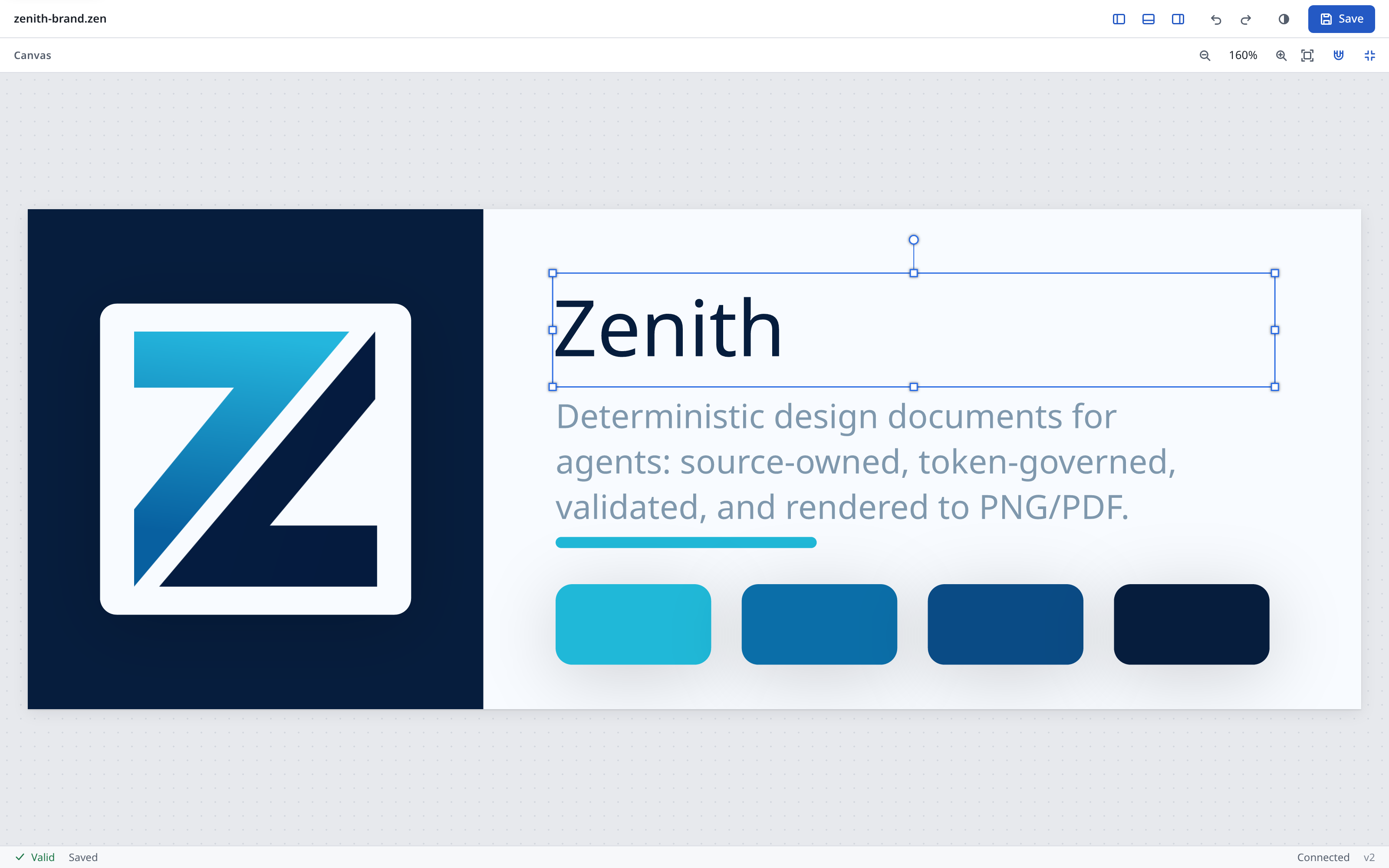
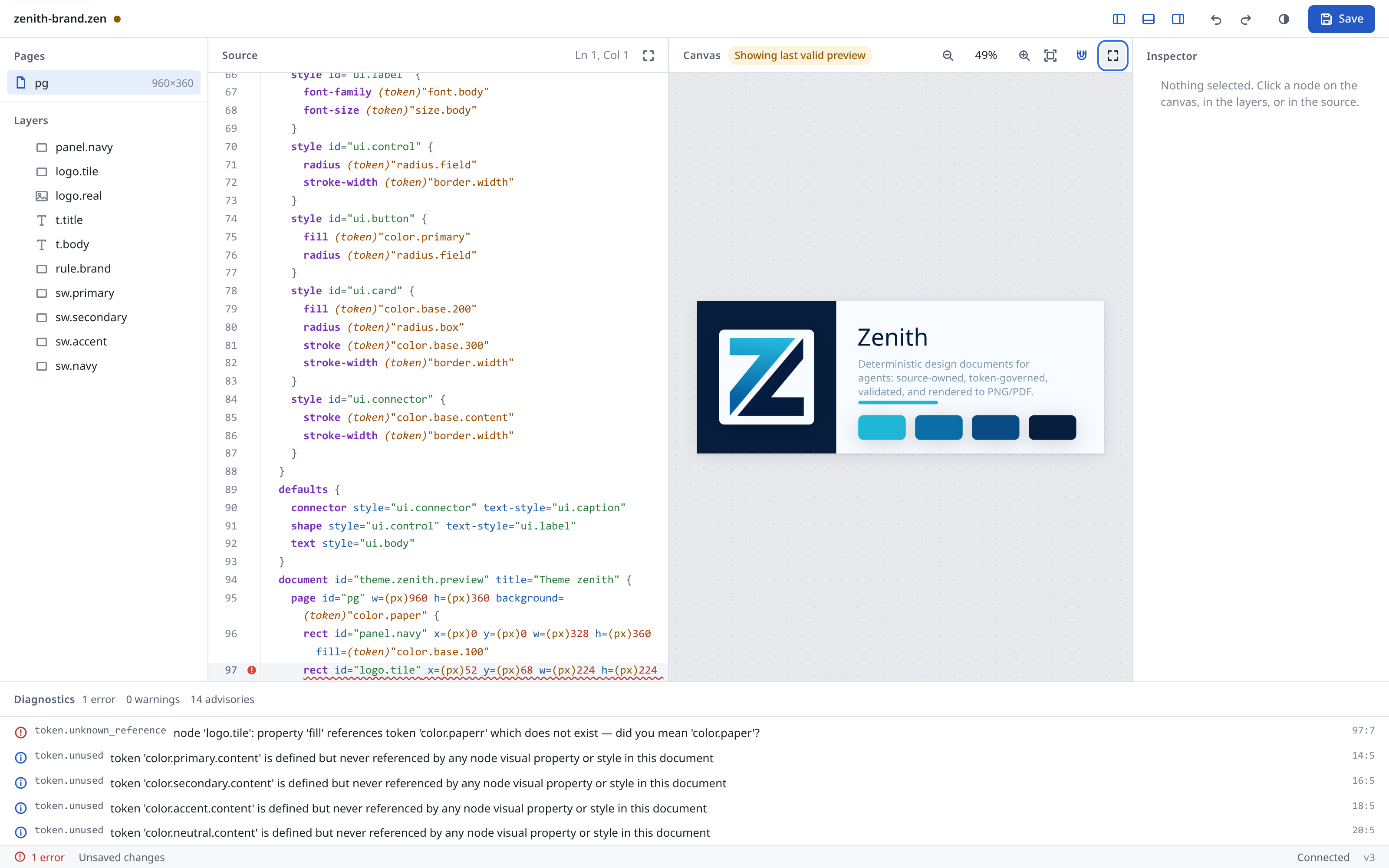
Edit a .zen file in the browser: source on one side, the rendered page on the other. Local server or static site.
The source pane is the source of truth. The canvas shows the engine render of that text. Canvas edits (move, resize, rotate, inspector fields) become transactions that modify the text.
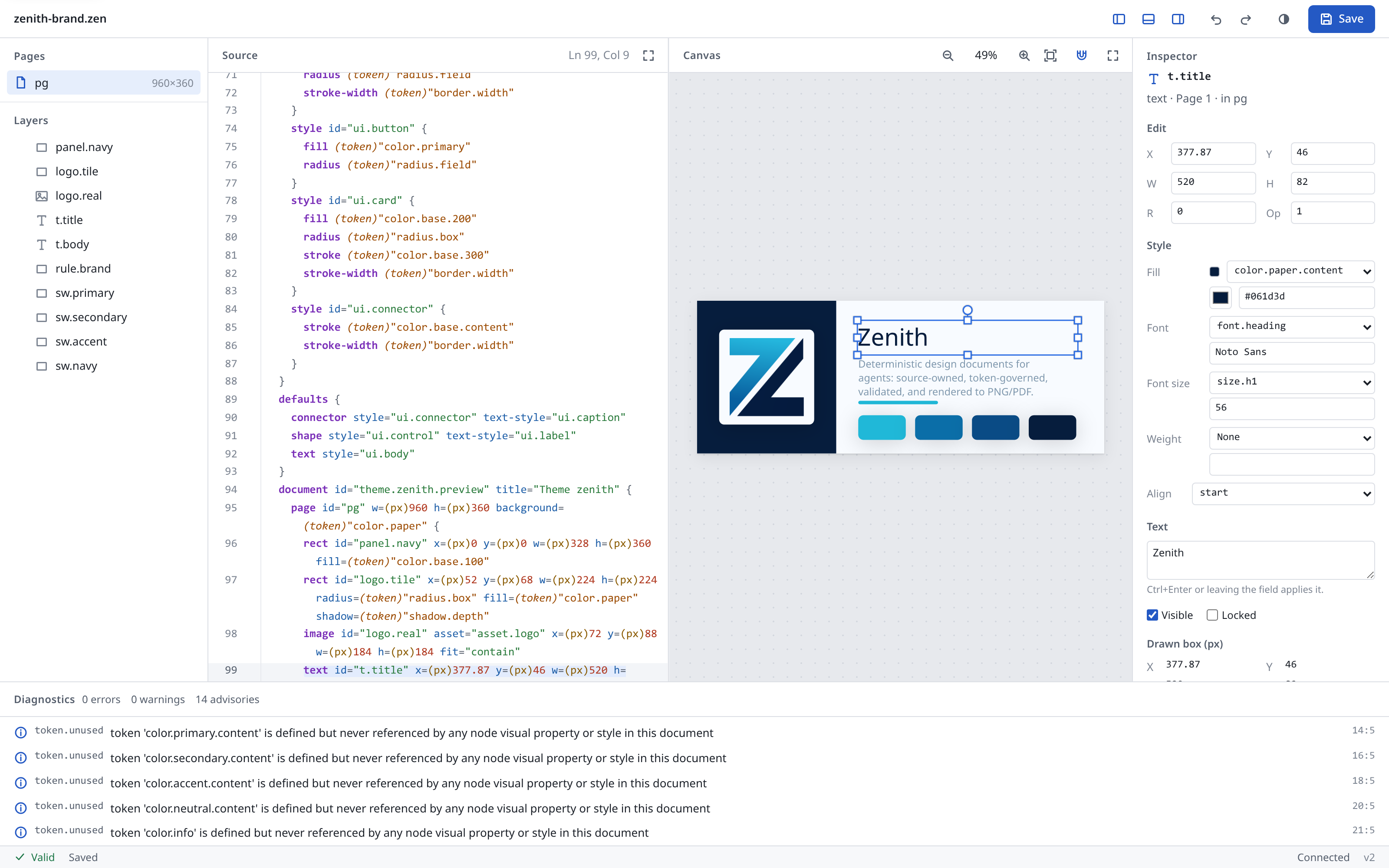
zenith edit
zenith edit poster.zen
The command serves one document on a local port, prints the URL with a per-run token, and opens the browser. Run zenith edit --help for the routes.
| Flag | Meaning |
|---|---|
--port <N> | Port. Default: a free port. |
--host <ADDR> | Bind address: an IP address or localhost. Default 127.0.0.1. |
--allow-remote | Allow a non-loopback --host. The traffic is plain HTTP, so the token crosses the network in clear. Prefer an SSH tunnel (ssh -L PORT:127.0.0.1:PORT host) or a TLS reverse proxy. |
--root <DIR> | Directory the editor may read project files from. Default: the document's directory. |
--no-open | Do not open the browser. |
--json | Print the start line as JSON: {schema, url, host, port, token, path}. |
Security model:
- Bind. Loopback by default. A non-loopback
--hostneeds--allow-remoteand prints a warning: the traffic is plain HTTP. - Token. 64 hex characters from the OS RNG, new on every run. Every
/apiroute needsAuthorization: Bearer <token>. The server accepts the token nowhere else. A cookie would reach every service on127.0.0.1, since cookies ignore the port. - Page URL.
http://127.0.0.1:PORT/#token=<token>. Browsers never send a fragment to a server or in aReferer. The page reads the token, removes it from the address bar and history, and keeps it in memory and in this tab'ssessionStorage(so a reload works). The page files themselves are public and need no token. - Browser launch. The token never goes on the opener command line, which other local users can read. The server writes a
0600redirect file with a random name to$XDG_RUNTIME_DIR(or the temporary directory), opens that file, and removes it after the first authenticated request. If a sandboxed browser cannot read the file, open the printed URL. - Host and Origin.
Hostmust belocalhost, an IP address, or the--hostname, with the bound port. Otherwise the server answers 403edit.bad_host. A DNS-rebinding page fails here. When a request has anOrigin, it must behttp://<Host>. A cross-site fetch gets 403edit.bad_origin. The server sends no CORS headers. POST bodies must beapplication/json. - Limits. The head and the token are checked before the body is read. A head must arrive within 5 s. One thread serves each connection, at most 64 at once (16 from one remote peer). Idle clients cannot stall a real request.
- Files. The server serves only the embedded page files. The engine reads the document, imports, assets, data, and text sources only under the document's directory (or
--root)...and symlinks that leave it are errors. Two reads are not confined. Config files (the nearest.zenith.kdland$HOME/.config/zenith/config.kdl) and system fonts are read as every other CLI command reads them. - Writes. A save keeps comments, records history, stamps the
doc-idastx --applydoes, syncs the bytes to disk, and replaces the file atomically. A read-only document opens with a warning. The page turns Save off and says how to make the file writable.
The server runs until Ctrl-C or POST /api/shutdown. Shutdown returns 409 while unsaved edits remain, unless {"force": true}. Ctrl-C, SIGTERM, and SIGHUP stop a clean session at once with exit code 0. With unsaved edits, the first signal stops nothing: the terminal names the file, and the page shows a banner with Save. A second signal discards the edits and exits with code 130.
Using the editor
- Layout. Source and canvas sit side by side (stacked on a narrow screen). Drag the divider, or focus it and use the arrow keys, to resize. The fullscreen buttons expand either pane. Escape restores. Toolbar buttons hide the pages and layers panel, the inspector, and the diagnostics panel. The layout and theme (system, light, dark) persist per browser.
- Canvas view.
+and-zoom,0shows 100%,1fits the page. Ctrl or Cmd with the wheel, or a pinch, zooms about the pointer. The wheel, two fingers, Space and drag, or the middle button pan. The canvas renders only the visible region at device resolution. - Selection. Click a node to select it. Shift-click adds to the selection. Drag on empty canvas to select with a band (Alt: only nodes wholly inside, Shift: add). Layers, the source cursor, and the canvas share one selection.
- Move, resize, rotate. Drag the node or its handles. Shift keeps one axis, keeps the aspect ratio, or rotates in 15 degree steps. Ctrl or Cmd resizes about the centre and skips snapping while moving. Alt detaches a token-bound value or an anchor. The edit lands on release. A ghost outline and a live preview follow the pointer.
- Snapping. The magnet button toggles snapping to other nodes and the page.
- Keyboard on a selection. These keys work while the canvas has focus: click the canvas first. Arrows move by 1 px (Shift: 10 px). Ctrl or Cmd with arrows resizes.
[and]rotate by 15 degrees. Delete or Backspace removes. Escape cancels a drag or clears the selection. Without a selection, arrows pan. - Inspector. Shows the selected node and edits its fields, including fill and stroke from the color tokens.
- Shortcuts. Ctrl or Cmd with:
Ssave,Zundo,Shift+ZorYredo,Dduplicate the selection,Oopen a file (static site). Undo and redo cover typing and canvas edits in one history. - Diagnostics. The bottom panel lists errors, warnings, and advisories. A row with a position jumps to it in the source.
- Save and conflicts. Save writes the text to disk. If the file changed on disk, a clean session reloads it. A session with unsaved edits shows a conflict notice: Reload takes the disk text (undo brings back yours), Overwrite writes the editor text. The browser asks before closing a tab with unsaved edits.
Source of truth
- Typing in the source pane is never overwritten. The engine merges other changes (canvas, agents, disk) into the pane without losing keystrokes.
- Canvas and inspector edits patch the text in place. Comments and layout survive. When a patch has no exact form, the engine rewrites the document in canonical form, shows a warning that comments are gone, and undo restores them. This happens when the layout at the edit point has no exact patch, for example a node on the same line as other text, an inline
{ ... }child block, or a new top-level node. Removing a node also removes the//comment lines directly above it, and the page says so. - While the source has errors, the canvas keeps the last valid render, marked "Showing last valid preview", and the diagnostics panel lists the errors.
Static site
The editor also runs as a static site. The engine runs in a Worker as a WebAssembly module. No server is involved. Documents open from the user's disk and save back to it.
Build the site:
cargo build --target wasm32-wasip1 -p zenith-editor-wasm --profile release-wasm
node zenith-cli/scripts/build-static-editor.mjs --out dist/editor
The script reads the module from target/wasm32-wasip1/release-wasm/ (or $CARGO_TARGET_DIR). Pass --wasm <file> to name another. It copies the page, the module, the bundled fonts, and samples/ (the examples) into --out. Every URL is relative, so the site can live in a subdirectory. Test it locally with any file server, for example python3 -m http.server -d dist/editor.
Host requirements:
- Serve over
https://, orhttp://localhost. The File System Access pickers andcrypto.subtleneed a secure context. - Serve
.wasmasapplication/wasm. A wrong type still loads, but without streaming compilation. - Allow
'wasm-unsafe-eval'inscript-src. The browser compiles the module under that source. - Allow a Worker from the same origin:
worker-src 'self'. The Worker script isjs/engine/wasm/worker.js. - Allow
blob:anddata:inimg-src. The page draws PNGs from blobs. - Keep
connect-src 'self'. The page fetches the module, fonts, and samples from the same origin. build-static-editor.mjswrites a_headersfile (Netlify and Cloudflare Pages) with this policy:default-src 'self'; script-src 'self' 'wasm-unsafe-eval'; worker-src 'self'; style-src 'self' 'unsafe-inline'; img-src 'self' blob: data:; connect-src 'self'; frame-ancestors 'none'; base-uri 'self'. Other hosts need the same headers set by hand.
How it behaves:
- The page picks its host at startup.
<meta name="zenith-host" content="wasm">(written by the build) selects the wasm engine. Without the meta, the page asks/api/stateonce.zenith editanswers and the page uses it. - Open a
.zenfile or a project folder with the toolbar buttons. A folder gives the document its imports and assets. Chromium writes saves back to the file. Other browsers read through<input type=file>and save by download. - Bundled fonts beyond Noto Sans Regular and Bold load on demand from
fonts/. ?doc=samples/<name>.zenopens a sample. The default issamples/stack.zen.- Each engine call sends the session and the project files to the module. Keep large images out of a project folder.
- A save on the static site does not stamp a
doc-idinto the file.
Agents and MCP
Agents drive the same session the page shows. Over HTTP, POST /api/cmd runs an editor command ({"command":"commands.list"} lists them). Edits from an agent appear live in the page. Over MCP, six tools expose the engine. They open and save only .zen files. The read root is the document's directory (or root). / is refused as a read root unless the server runs with zenith mcp --root /. A server holds at most 16 sessions: a new one evicts the least recently used session without unsaved edits.
| Tool | Purpose |
|---|---|
zenith_editor_open | Open a .zen file in an editor session. Returns the session id. A dirty session needs discard=true to reopen. |
zenith_editor_command | Run one editor command on a session (select.hit, gesture.commit, tx.apply, history.undo, file.save, and more). Text edits need the session version. |
zenith_editor_render | Render a session page to PNG. Renders the last valid text while the text has errors (stale: true). |
zenith_editor_sessions | List the sessions: id, kind (local or attached), path, version, dirty, valid, conflict. |
zenith_editor_close | Close a session. Unsaved edits need discard=true. Closing an attached session only forgets it. |
zenith_editor_attach | Attach to a running zenith edit on this machine, so the person watching the page sees the agent's edits. Pass the URL it printed. |
History & versions
Local, per-document edit history (snapshots, undo/redo, durable named versions) — entirely off the render path.
Zenith keeps a local edit history per document, entirely off the render path — it never
changes the pixels. On the first edit, a document is given a stable identity: a ULID doc-id
stamped into the file and ignored by the renderer. From then on, every engine edit (tx --apply,
library add, an undo/redo/restore) is recorded as a full snapshot (state, not an
op-log), so history survives even hand-edits.
zenith tx poster.zen recolor.json --apply   # an edit — recorded automatically
zenith undo poster.zen                       # step back, rewriting the file in place
zenith redo poster.zen                       # step forward again
zenith history poster.zen                    # list the timeline (--json for tooling)

zenith version poster.zen "launch-v1"        # save a NAMED version, kept indefinitely
zenith restore poster.zen launch-v1          # rewrite the doc to that version
zenith restore poster.zen @head~1            # …or to a revspec: v2, @head~1, @latest:named, a name

zenith sync poster.zen                        # capture an out-of-band change (GUI / hand-edit / git checkout)
There are two tiers. Undo/redo walk an ephemeral session timeline — fast, local, for
in-progress work. Named versions are durable, content-addressed checkpoints (SHA-256 +
DEFLATE) retained until you remove them; restore can jump to any of them. sync is how an edit
made outside the engine gets folded back in so the history stays complete. History recording is
best-effort: if it can't write, your file still saves — the edit is never blocked.
Use with your coding agent
Install a skill for Claude Code / Codex / OpenCode / Cursor / … with zenith plugin install, plus an MCP server for remote/CI.
Zenith ships a skill that teaches AI coding agents how to drive the CLI — the agentic
author → validate → render → edit loop, design recipes, and the token/brand discipline that
--help can't carry. Install it for whatever agents you use:
zenith plugin install                  # auto-detect installed agents, install for your user
zenith plugin install --claude --codex # choose specific agents
zenith plugin install --all            # every supported agent
zenith plugin install --claude --scope project   # into ./ for one repo
zenith plugin list                     # see what's installed where
Claude Code, Codex, and OpenCode get the full folder skill (reference packs, templates, and themes); other agents (Cursor, Windsurf, Aider, Zed, Gemini, Copilot, Continue, Kiro, Antigravity) get a single self-contained rule file that points back at the self-documenting CLI. Matching files remain unchanged. Upgrade installed assets with:
zenith plugin install --force
--force overwrites differing installed files, including user changes. Without it, differing files remain untouched. Remove installs with zenith plugin uninstall.
MCP server (remote / CI / hosted agents)
For agents that discover capabilities through the Model Context Protocol — or for CI and
hosted/SaaS pipelines — Zenith runs as a first-class MCP server. It is not a thin CLI
wrapper: tool results are trimmed structured JSON, schema detail is fetched on demand via a
single zenith_schema tool (so the model never carries every node/op schema), large or binary
artifacts (renders, big trees, diffs) come back as resource links into a content-addressed
store instead of being inlined, and documents are addressable by doc-id so agents stop
juggling paths. The full author loop is exposed — zenith_schema, zenith_validate,
zenith_inspect, zenith_tokens, zenith_tx, zenith_fix, zenith_render, zenith_perceive, zenith_fmt, zenith_merge,
zenith_theme_new, plus the scratch/candidate/promote/finalize workspace tools. Pointer-style editing (hit-test, drag, undo, live render) uses the zenith_editor_* tools described under Browser editor.
| MCP render parameter | Contract |
|---|---|
format | Required: png, svg, pdf, or scene. |
page | One-based. Defaults to every PDF page and page 1 for other formats. |
raster_scale | SVG/PDF fallback resolution. Finite 0 < F <= 4, default 1. |
scale / contact_sheet | PNG only. |
out | Optional protected file write alongside the artifact resource link. |
diagnostics | Includes soft diagnostics. Fallback reports remain visible when false. |
MCP zenith_merge supports format: png|svg, with PNG as the default. SVG accepts finite raster_scale values within 0 < F <= 4, default 1. Document, local, and global batch policy apply. Structured responses retain committed paths and partial rows. Manifest write errors retain row counts and mark the tool result as an error. There is no MCP variant tool.
Run it over stdio (the default transport):
zenith mcp
Point any MCP-aware client at it:
{
  "mcpServers": {
    "zenith": { "command": "zenith", "args": ["mcp"] }
  }
}
…or, for Claude Code: claude mcp add zenith -- zenith mcp.
Remote / hosted serving. Build with the optional http feature and serve native
Streamable-HTTP at a single /mcp endpoint. The transport runs on the same bounded std::net
HTTP layer as zenith edit and adds no dependency:
cargo install --path zenith-cli --features http --locked
zenith mcp --http 127.0.0.1:8080     # prints the token to stderr
# test it:
curl -s -XPOST http://127.0.0.1:8080/mcp \
  -H "Authorization: Bearer $TOKEN" \
  -H 'Content-Type: application/json' \
  -d '{"jsonrpc":"2.0","id":1,"method":"tools/list"}'
The tools read and write files, so the HTTP transport checks every request before it reads the body:
- Bind. Loopback only.
--allow-remoteallows another address. The traffic is plain HTTP: put a TLS reverse proxy in front. - Token.
Authorization: Bearer <token>. The token isZENITH_MCP_TOKEN(at least 32 characters), else a random one printed to stderr at start. - Host and Origin.
Hostmust belocalhost, an IP address, the--httphost, or an--allow-hostname. A browserOriginmust name the same host. - Body.
Content-Type: application/json, at most 8 MiB. - Root. Every tool path (documents, outputs, data, bundles) must lie under
--root, by default the working directory. Over stdio,--rootis optional. Under a root, every file a document reads (imports, assets, data, the local.zenith.kdl) is confined to the root. The user-level global config ($HOME/.config/zenith/config.kdl) and system fonts are not confined.
The workspace store (scratch candidates, version history, rendered resource artifacts) lives
under $XDG_DATA_HOME/zenith (~/.local/share/zenith by default); set ZENITH_DATA_DIR to
relocate it for isolated/hosted deployments.
Local agents should prefer the CLI + skill, not MCP. Running
zenithdirectly (taught byzenith plugin install) is the fastest path when the environment can run the binary. Reach for the MCP server when it can't — remote hosts, CI, sandboxes, or hosted/production services where you want the full read+write surface behind a protocol. The server is first-class there.
The repo ships a server.json (MCP registry manifest). The manual
Publish MCP workflow publishes the matching npm launcher and registry entry for a selected
stable tag (via GitHub OIDC — no registry token needed), so Zenith stays discoverable from MCP
directories and can be launched by clients through npx -y @zenitheditor/zenith-mcp.
- MCP Registry name:
mcp-name: io.github.zenitheditor/zenith
Workspace
A Rust workspace of one-concern crates; zenith-geometry depends on no other Zenith crate.
Each crate owns one concern and exposes a stable contract. zenith-geometry depends on no other Zenith crate. zenith-core depends only on zenith-geometry among them.
| Crate | Responsibility |
|---|---|
zenith-geometry | Pure geometry: paths, contours, booleans |
zenith-core | KDL parser adapter, semantic AST, canonical formatter, comment-preserving source patcher, tokens, validation, diagnostics |
zenith-layout | Text shaping & font metrics (rustybuzz + ttf-parser); third-party types confined here |
zenith-raster | Raster surface, blend modes, adjustments |
zenith-perception | Visual QA reports over geometry and raster |
zenith-scene | Backend-neutral scene IR + compilation (geometry, text wrap, anchors, opacity/clip, hit data) |
zenith-render | CPU PNG backend (tiny-skia), SVG export, and vector PDF backend; determinism enforcement |
zenith-tx | Transaction op set, apply/dry-run engine, diffs, and the audit-record contract |
zenith-session | Local-machine doc identity, session DAG, durable versions (content-addressed store) |
zenith-zpx | Packaged design export (manifest + bake) |
zenith-producers | Higher-level produce/export helpers (SVG native, ZPX bake) |
zenith-pipeline | Config policy, imports, fonts, assets, validate, compile, and render over host I/O traits; shared by the CLI and the wasm editor |
zenith-editor | Editor engine: a stateless command registry over a serializable session; shared by the browser, zenith edit, and MCP |
zenith-editor-wasm | The editor engine as a wasm32-wasip1 command module for the static site (not published) |
zenith-cli | zenith command-line tool (crate zenith-tool): dispatch, argument parsing, JSON/human output, MCP |
Works in your repo
A `.zen` file is just text — commit it, review it in PRs, render it in CI, roll it back.
Because a Zenith file is just text, it lives wherever your code lives. Commit it to git. Review design changes in a pull request, side by side with the diff. Render it in CI to catch a broken layout before it ships. Generate variants in a pipeline. Roll back like any other file. Design stops being a separate world you export to and from, and becomes part of the build.
Who it's for
AI/agent builders, engineering teams, high-volume producers, and tool builders.
- AI and agent builders who need to generate and edit visuals reliably, not by screenshot-and-pray.
- Engineering teams who want design assets in the repo, reviewed in PRs, and built in CI.
- High-volume producers — marketing, publishing, localization — who need lots of correct variants.
- Tool builders who'd rather build on an open format than a closed cloud API.
Showcase
Reusable Zenith examples live in the zenith-showcase submodule.
The public showcase lives at zenitheditor/zenith-showcase and is linked here as the zenith-showcase submodule.
It is the place for reusable Zenith examples: .zen source, rendered outputs, visual recipes, actions, filters, backgrounds, posters, flyers, books, magazines, ads, diagrams, presentations, and other generated design work.
Only put files in the showcase if you have the rights to share them and you allow others to reuse the submitted source, outputs, and assets under the declared license. Private, client, portfolio-only, or custom-licensed work should be linked from the showcase's external gallery instead; licensing for external work stays with the owner.
Status
Zenith is in its first public release series. The author → validate → edit → render pipeline works end-to-end: parsing, the diagnostic set, the transaction engine, PNG/SVG/PDF rendering, local history, the library subsystem, and variable-data merge are implemented and tested. The format, wire types, and command surface may still evolve while the project matures.
Contributing
See CONTRIBUTING.md for how to work on the engine, and AGENTS.md for the binding repository conventions (the source of truth for both human and agent contributors). CHANGELOG.md lists the changes in each release.
License
Apache-2.0. See LICENSE.