Listed from the MCP registry; nobody on Odel publishes it.

Personal Brain
Gives your AI agent memory of your professional network, from your LinkedIn data.
Runs on your machine from its package; the steps are below.
What it does
- Reads
- Writes
- High impact
Not assessed yet.
What it costs
FreeOdel charges nothing per call. The publisher may charge for its own service.
Runs locally over stdio
This server isn't hosted — your MCP client launches it from a package registry. Use one of the commands below, or drop the config into your client (e.g. Claude Desktop).
Run
uvx personal-brain
MCP client config
{
  "mcpServers": {
    "personal-brain": {
      "command": "uvx",
      "args": [
        "personal-brain"
      ]
    }
  }
}An MCP server that gives your AI agent memory of your professional network.




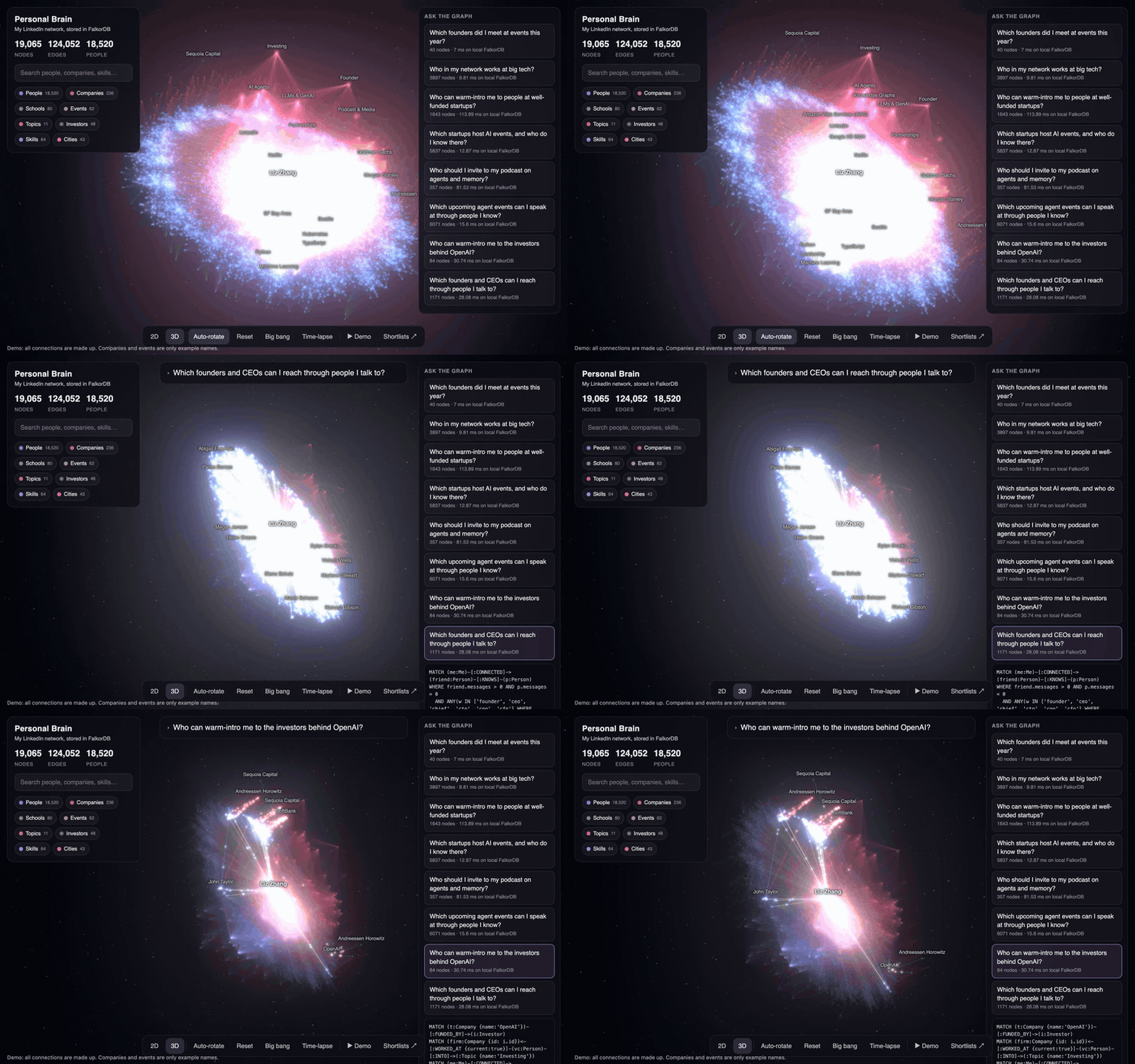
Personal Brain loads your LinkedIn connections into a graph in FalkorDB. Claude Code, or any MCP client, can then look up who you know, find who can introduce you to whom, and remember who you met. A 3D viewer shows the graph as a galaxy.
claude mcp add personal-brain -- uvx personal-brain mcp
This command needs a database with your network in it. See the quick start.
Try the live demo. All connections in it are made up, and its companies and events are only example names.
After every event you meet people. Two weeks later you forget who they were, what they work on, and who could introduce you to whom. Your agent can now remember that for you. Your agent cannot delete anything: only you can, with personal-brain forget.
Everything runs on your laptop.
Quick start: a sample network in 5 minutes
You need uv and FalkorDB. uvx downloads the right Python for you.
The made-up sample network has 241 invented people, startups and events, in the same file formats as a real LinkedIn export. You can try everything before you download your own data.
1. Start FalkorDB. Run it in Docker, or see FalkorDB Cloud:
docker run -p 6379:6379 -p 3000:3000 -v falkordb_data:/var/lib/falkordb/data -it --rm falkordb/falkordb:6.0.4
2. Load the sample, and add the server to Claude Code:
uvx personal-brain load --sample
claude mcp add personal-brain -- uvx personal-brain mcp
Try:
- "Who in my network works at Kestrel Graph?"
- "Who did I talk to about agent memory?"
- "Who could introduce me to someone at a well-funded startup?"
- "I met Oskar Mensah at the Graph & RAG Meetup. He's building agent memory." (There are two Oskar Mensahs, so it asks which one.)
Other MCP clients: the server runs over stdio. Most clients take this config:
{
  "mcpServers": {
    "personal-brain": { "command": "uvx", "args": ["personal-brain", "mcp"] }
  }
}
FalkorDB Cloud
A free FalkorDB Cloud instance works without Docker. Pass its URL to the server, and add --cloud to load and export:
export FALKORDB_URL='falkors://user:password@host:port'
uvx personal-brain load --sample --cloud
claude mcp add personal-brain -e FALKORDB_URL="$FALKORDB_URL" -- uvx personal-brain mcp
Or put FALKORDB_URL=... in ~/.personal-brain/.env.
The MCP tools
uvx personal-brain mcp gives your agent three tools on one graph:
| Tool | What it does |
|---|---|
remember | Saves who you met, where they work, where you met, and their title, city and email. To correct a fact, say so: it replaces the old value. If a company or event is one letter off a known one, it saves nothing and the agent asks you. It also keeps follow-ups: "remind me to send Jonas the deck by Friday" stays open until you say it is done. "Kestrel" and "Kestrel Inc." are one company, and a typo in an event name finds the same event. Matches the name to people already in the graph. When it is not sure which person you mean, it saves nothing and asks. A new company ends the old job and keeps it in the history. If the person has several current jobs, it asks which ended. It also records that someone left a job with no new one. The same call twice saves one meeting. Say when you met if it was not today. |
find | Finds people, companies and events by name, in any script, typos and missing accents included. With about, finds people by words in your notes, their topics, skills and headlines, such as "who did I talk to about agent memory?", and says why each one matches. |
ask | Runs a read-only Cypher query (FalkorDB refuses writes), with a 5 second limit, at most 50 rows and 40,000 characters. It refuses LOAD CSV, which could send your data to the internet. The tool description carries the schema. |
No tool deletes, so text hidden in a LinkedIn headline cannot make your agent delete anything. It could still lead an agent to save a fake note, so each tool tells the agent to treat that text as data, and personal-brain notes shows what was saved, newest first. No instruction can fully stop this. To delete, run the command yourself. It asks first, unless you add --yes, and it also updates the viewer's files if you have them:
uvx personal-brain forget note <id>         # one note and everything it added. remember's reply gives this command
uvx personal-brain forget person "Name"     # a person and every note about them. They stay out of future rebuilds
uvx personal-brain forget all-notes         # every note and everything they added, to clear a live demo
Every write hangs off a Note node, so you can trace each fact to the note that made it. Running personal-brain load again with a new LinkedIn export keeps your notes and what they added. If the new import has the same fact, the import wins, and someone you saved who is now in the import becomes one person. --force drops your notes. load --sample asks before it replaces a real network, and --yes skips the question. PB_GRAPH picks the graph (default network). If FalkorDB is not running, the server still starts, and each tool says how to start it. It runs on macOS and Linux. Windows is not supported.
Each new LinkedIn export also tells you what changed. personal-brain load prints who changed jobs since the last load, and your agent can ask for it later. If your export has message dates, your agent can answer "who did I lose touch with". It reads only the date, not the message. personal-brain followups lists what you still have to do.
The 3D viewer
Run personal-brain export, then personal-brain view, and open http://127.0.0.1:8765. It works offline, because three.js is included.
- Shows your whole network as a galaxy in WebGL (tested with 19k nodes and 117k edges), with a 2D / 3D toggle.
- Time-lapse: watch your network grow, connection by connection, with your events popping up.
- Ask the graph: a question types itself, then its Cypher query, then the answer lights up with light pulses along the paths. Example questions:
- Which founders did I meet at events in the last year?
- Who in my network works at big tech?
- Who can warm-intro me to people at well-funded startups?
- Which startups host AI events, and who do I know there?
- Who should I invite to my podcast on agents and memory?
- Which upcoming agent events can I speak at through people I know?
- Remember: type "Met Maya from Supabase at AI Engineer Summit, runs developer events" and it is written to FalkorDB live and appears in the galaxy.
- Live view: keep
personal-brain viewopen while your agent works. Each person it looks up or saves lights up in the galaxy. - Demo mode: the whole show hands-free (press
D).
How it works
LinkedIn data export ──┐
                       ├─> load_graph.py ──> FalkorDB ──┬─> mcp_server.py ──> your agent
data/enriched/ ────────┘   (graph "network")            ├─> export_graph.py ──> layout_graph.py ──> viewer
(optional)                                              ├─> export_stories.py ──> viewer
                                                        └─> server.py (live "Remember" API) ──> viewer
- Your LinkedIn export gives connections (with the date you connected), your messages (only counts are used, never text), your posts, jobs and schools.
- Optional files in
data/enriched/add each connection's full job history, schools and skills, company funding, and upcoming events. They use the JSON format ofsample_data/enriched/. This repo has no tool to collect them; everything works without them. - load_graph.py builds the graph and infers:
KNOWSbetween two connections who worked at the same company or studied at the same school for 3+ months at the same time (at big schools, same start year only), who work at the same company now (when there is no job history), or who are in the same group chat.Eventnodes: days when you added 5+ connections are probably events. Name them inmy_brain.json.Topicinterests (AI agents, agent memory, knowledge graphs, founders, investors, podcasts…) from headlines and skills.- With enriched files only:
- Years of experience per technology from job titles and descriptions.
well_fundedstartups: private, active, at most 5,000 people, and a Series round or 8+ investors.Cityfrom each profile's location, at metro level ("Berlin Metropolitan Area" and "Berlin" are one city; Palo Alto and San Jose are "SF Bay Area").- Who hosts each upcoming event: a host who is your connection (LinkedIn match), or a company where you know people (host is the company, a host works there, or the title names it, like "Notion x Clover").
- export_graph.py + layout_graph.py export the graph to JSON and compute a 2D layout (igraph DrL). In 3D, each node type sits on its own layer.
- export_stories.py runs the "Ask the graph" Cypher queries on FalkorDB and saves the answers and timings for the viewer.
Graph schema
| Nodes | Edges |
|---|---|
Me, Person, Company, School, Skill, Topic, Event, Investor, City, Note | (Me)-[:CONNECTED]->(Person), (Person)-[:WORKED_AT {title, start, end, current}]->(Company), (Person)-[:STUDIED_AT]->(School), (Person)-[:HAS_SKILL]->(Skill), (Person)-[:HAS_EXPERIENCE {years}]->(Skill), (Person)-[:INTO]->(Topic), (Person)-[:KNOWS {via, place}]-(Person), (Me)-[:ATTENDED]->(Event), (Person)-[:MET_AT]->(Event), (Company)-[:FUNDED_BY {lead, round}]->(Investor), (Person)-[:LIVES_IN]->(City), (Event {upcoming})-[:HOSTED_BY {via}]->(Person or Company), (Event)-[:ABOUT]->(Topic), (Event)-[:HELD_IN]->(City), (Me)-[:MET]->(Person) and (Me)-[:WROTE]->(Note)-[:ABOUT]->(Person) (from Remember) |
Build your own
1. Get your LinkedIn data. LinkedIn > Settings > Data privacy > Get a copy of your data. Two choices:
- Connections only: usually ready in about 10 minutes. You get people, their current company and title, and the day you connected. That is enough for the graph, events and the agent tools.
- Download larger data archive: ready in about a day. It adds your messages (only counts are used), posts, jobs and schools.
Unzip it into ~/.personal-brain (the folder name contains LinkedInDataExport). If there are several, load reads the newest. personal-brain --help shows your data folder. To use another folder, set PB_HOME.
Or start empty. Skip the import. The MCP server creates you in an empty graph, and the graph grows as you tell your agent who you met.
Optional: copy my_brain.example.json to ~/.personal-brain/my_brain.json to name your events and skip companies.
2. Build the graph and the viewer data. Add --cloud to both when you use FalkorDB Cloud:
uvx personal-brain load
uvx personal-brain export
3. Open it.
uvx personal-brain view
Open http://127.0.0.1:8765. Keys: 2 / 3 switch views, T time-lapse, B big bang, D demo, Esc reset.
To explore in the FalkorDB Browser instead, see docs/demo_queries.cypher.
Work on the code
You need Python 3.10 or newer, uv and Docker. In a clone, your data folder is the clone itself, and Claude Code reads .mcp.json from any folder inside it.
git clone https://github.com/zhang-liz/personal-brain && cd personal-brain
python3 -m venv .venv && .venv/bin/pip install -e ".[test]"
docker run -p 6379:6379 -p 3000:3000 -v falkordb_data:/var/lib/falkordb/data -it --rm falkordb/falkordb:6.0.4
Then, in another terminal, run the tests. They use throwaway graphs:
PATH="$PWD/.venv/bin:$PATH" .venv/bin/python -m pytest          # everything, on local FalkorDB
.venv/bin/python tests/test_memory.py --cloud                    # the memory tools on FALKORDB_URL
Your data stays yours
- Your data stays in
~/.personal-brain, outside the package. Only you can open that folder. In a clone, the export,data/,.envandmy_brain.jsonare in.gitignore. Never commit them. - Message text is never read into the graph, only how many messages you exchanged with each person and the date of the last one.
data/viewer/graph.jsonin your data folder holds real names. Share screenshots, not that file.- The local server listens on
127.0.0.1only and serves onlydata/viewer/.
Files
| Path | What it does |
|---|---|
src/personal_brain/cli.py | The personal-brain command |
src/personal_brain/paths.py | Where your data folder is |
src/personal_brain/load_graph.py | Builds the FalkorDB graph and all inferred links |
src/personal_brain/export_graph.py | Exports every node and edge to data/viewer/graph.json |
src/personal_brain/layout_graph.py | Precomputes the layout |
src/personal_brain/export_stories.py | The "Ask the graph" questions and their Cypher |
src/personal_brain/server.py | Serves the viewer and the live Remember API, to the viewer's own page only |
src/personal_brain/memory.py | The memory itself: remember, find, ask, forget (used by the MCP server, the viewer and the forget command) |
src/personal_brain/mcp_server.py | The MCP server for Claude Code and other agents |
src/personal_brain/forget.py | The personal-brain forget command |
src/personal_brain/notes.py | The personal-brain notes command |
src/personal_brain/notes_backup.py | Keeps your notes through a rebuild |
src/personal_brain/job_changes.py | Reports who changed jobs on each load |
src/personal_brain/followups.py | The personal-brain followups command |
src/personal_brain/activity.py | Tells the viewer what your agent just did |
src/personal_brain/companies.py | Decides if two company names are the same company |
.mcp.json | Tells Claude Code how to start the MCP server in a clone |
tests/ | End-to-end checks of the memory tools, the MCP server and the built package, on throwaway graphs |
src/personal_brain/sample_data/ | The made-up sample network |
scripts/make_sample_data.py | Writes sample_data/ |
src/personal_brain/viewer/index.html | The WebGL viewer (three.js r170, MIT, vendored) |
docs/demo_queries.cypher | Queries to paste into the FalkorDB Browser |
This is an early project. It has tests and CI, but commands and tools may still change before 1.0.
Contributing
See CONTRIBUTING.md. To report a security problem, see SECURITY.md.
License
MIT, see LICENSE. three.js in src/personal_brain/viewer/vendor/ is MIT too (its own LICENSE file).