Listed from the MCP registry; nobody on Odel publishes it.
Agent Bridge for Bitwig
Control Bitwig Studio 6: tracks, MIDI clips, devices, mixer and scenes, each change read back.
Runs on your machine from its package; the steps are below.
What it does
- Reads
- Writes
- High impact
Not assessed yet.
What it costs
FreeOdel charges nothing per call. The publisher may charge for its own service.
Runs locally over stdio
This server isn't hosted — your MCP client launches it from a package registry. Use one of the commands below, or drop the config into your client (e.g. Claude Desktop).
Run
npx -y agent-bridge-for-bitwig
MCP client config
{
  "mcpServers": {
    "agent-bridge-for-bitwig": {
      "command": "npx",
      "args": [
        "-y",
        "agent-bridge-for-bitwig"
      ]
    }
  }
}







Quick start · Examples · Tools · Docs
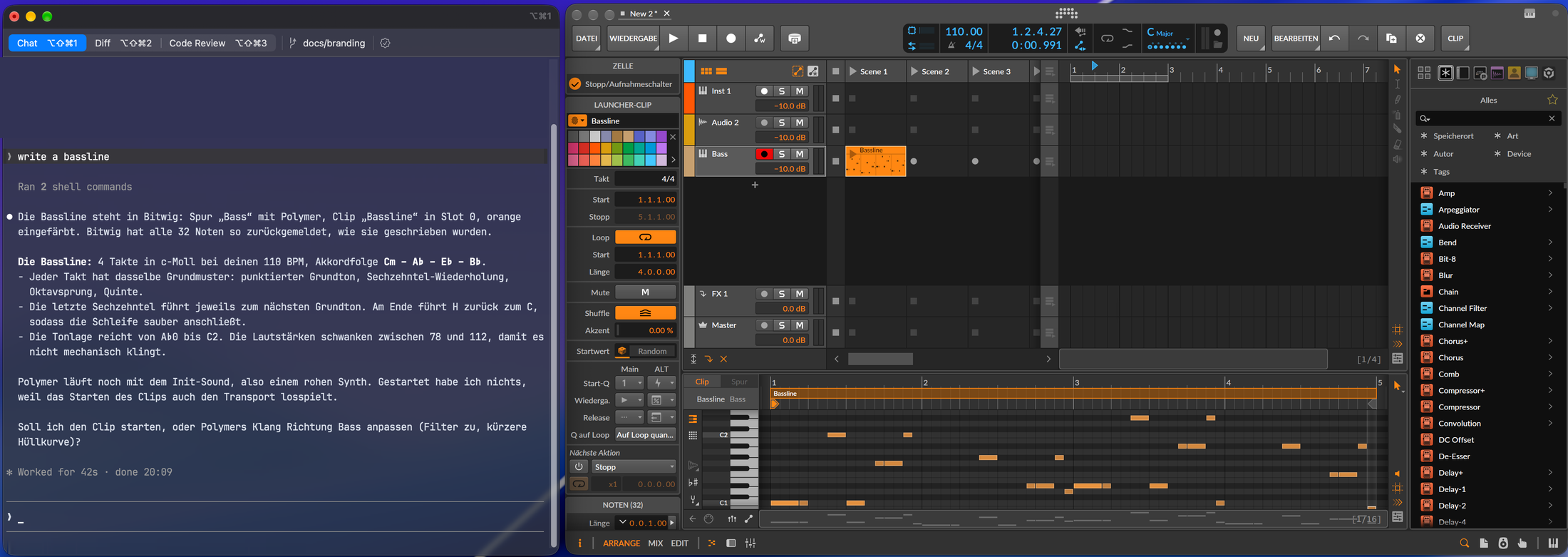
Tell an agent what to change in Bitwig Studio. Agent Bridge for Bitwig does it on your computer, then checks that Bitwig actually did it.
Agent Bridge for Bitwig is a local MCP server for Bitwig Studio 6 on macOS, Windows and Linux. It gives an agent such as Claude Code exact, read-back-verified control of tracks, the mixer, devices and plug-in parameters, launcher clips and notes, scenes, the transport and Bitwig's own actions, so it can compose, arrange and mix.
Why
- Exact targets. Tracks are addressed by Bitwig's track id, which survives renaming and moving. Devices, scenes and clips are addressed by index plus their exact current name, so a stale target is refused instead of changing the wrong thing.
- Read back. A change is reported as done only once Bitwig shows it. Otherwise the reply says what Bitwig holds now.
- Strict inputs. All 24 tools have strict JSON schemas; unknown fields are rejected.
- Local only. Agent, server and Bitwig talk on your computer. Requests need a per-install secret that never leaves it, and Bitwig answers only locally (Security).
Bitwig Studio is a product of Bitwig GmbH. This project is an independent community tool and is not affiliated with or endorsed by Bitwig.
Quick start
You need macOS 13 or newer, Windows or Linux, Bitwig Studio 6 (tested with 6.1.7) and Node.js 20 or newer. Start Bitwig once before setup, so it creates its user folder.
-
Install. Run
npx agent-bridge-for-bitwig@2.2.0 setup. It creates a private secret and installs the controller script into Bitwig's controller folder. -
Add the controller in Bitwig, once. Settings → Controllers → + Add Controller, vendor Agent Bridge for Bitwig, controller of the same name. Bitwig shows "Agent Bridge for Bitwig online".
-
Register the server with Claude Code (on Windows, put
cmd /cbeforenpx):shclaude mcp add --scope user bitwig -- npx -y agent-bridge-for-bitwig@2.2.0 -
Try it. With Bitwig open, ask Claude Code: "Call bitwig_status and list the tracks."
Other agents (Claude Desktop, Codex, Cursor, VS Code and more), installing from a checkout, updating, and every step in detail: Setup.
What you can ask
- "Make an instrument track called Keys, put Polymer on it and write a four-bar chord progression in A minor into slot 0."
- "Set the tempo to 124 BPM, turn the metronome on and start playback."
- "Duplicate scene 2, name the copy Chorus and color it orange."
- "Pull the bass down 3 dB, pan the hats 20 % right and send the snare to the reverb at −12 dB."
- "List the remote controls on the first device of the Lead track and open the filter a bit."
- "Delete the clip Sketch in slot 3 on the Drums track."
The agent picks the tools. Every change comes back with what Bitwig reports, so a refused or ignored change shows up in the reply.
Tools
24 tools, each with a strict input schema. Details for every tool: Tool reference.
| Area | Tool | What it does |
|---|---|---|
| Status & session | bitwig_status | Bridge, Bitwig, project, selection and audio engine at a glance |
bitwig_actions | Search Bitwig's ~780 menu and shortcut actions | |
bitwig_invoke_action | Run one action, undo or redo, or switch the panel layout | |
bitwig_transport | Read or change play, record, tempo, meter, position, loop, metronome and more | |
bitwig_track_meters | Peak levels per track, for playback checks | |
| Tracks | bitwig_tracks | List main, effect and master tracks with mixer state and sends |
bitwig_create_track | Create an instrument, audio or effect track | |
bitwig_set_track | Name, color, volume, pan, mute, solo, arm and sends | |
bitwig_delete | Delete a track, device, scene or launcher clip | |
| Clips & arrangement | bitwig_read_clip | Read a launcher clip with all its notes |
bitwig_write_clip | Write a complete MIDI clip, verified note by note | |
bitwig_edit_clip | Add, change or remove single notes; rename, recolor, set the loop | |
bitwig_arrange_launcher_clips | Print launcher clips into the Arranger at exact beats | |
bitwig_cue_markers | List and place Arranger cue markers | |
| Scenes & launcher | bitwig_launcher | Read scenes, clips and their play state |
bitwig_edit_scene | Create, duplicate, name and color scenes | |
bitwig_launch | Launch or stop scenes and clips, return to the arrangement | |
| Devices & parameters | bitwig_devices | List the devices on a track |
bitwig_browser_search | Search devices, presets and plug-ins in Bitwig's browser | |
bitwig_insert_device | Insert a device, preset or plug-in by exact name | |
bitwig_insert_sample | Load a sample file into a new Sampler | |
bitwig_set_device | Turn on or off, open the plug-in window, expand, pick the remote-controls page | |
bitwig_device_parameters | Read remote controls and all direct parameters | |
bitwig_set_device_parameters | Set up to 32 parameters at once, read back |
Documentation
- Setup: install, Bitwig, all supported agents, uninstall
- Tool reference: every tool, its fields and how it verifies
- Limitations: what the Controller API cannot do, and Bitwig behavior measured in 6.1.7
- Troubleshooting: timeouts, secrets, browser and track issues
- Development: how it works, security model, tests
- Changelog
Support
Agent Bridge for Bitwig is a hobby project, maintained on a best-effort basis. Found a bug or missing something? Open an issue with the form; it asks for the Bitwig version and display language, which matter for many reports.
Origin and license
Agent Bridge for Bitwig is based on Bitwig Control Deck by Remy Mazmanian, released under the MIT License. The original copyright notice is kept in LICENSE.