Listed from the MCP registry; nobody on Odel publishes it.
Is this yours? Claim itUnreachable. The endpoint has not answered since 23 Nov.

Antigravity Gemini MCP
Drive Google Antigravity from the Gemini app: remote MCP with OAuth 2.1 + PKCE.
One address for any MCP client. No sign-in needed on this server.
What it does
- Reads
- Writes
- High impact
Not assessed yet.
What it costs
FreeOdel charges nothing per call. The publisher may charge for its own service.
Tools
None listed · checked 23 Nov 2026Odel could not list its tools without signing in.
Drive your Antigravity IDE from the Gemini app you already have on your phone. No app to install, no browser tab to keep open.




The idea
Every mobile remote for a coding agent builds its own UI. That is a lot of work, and you end up with a second place to type.
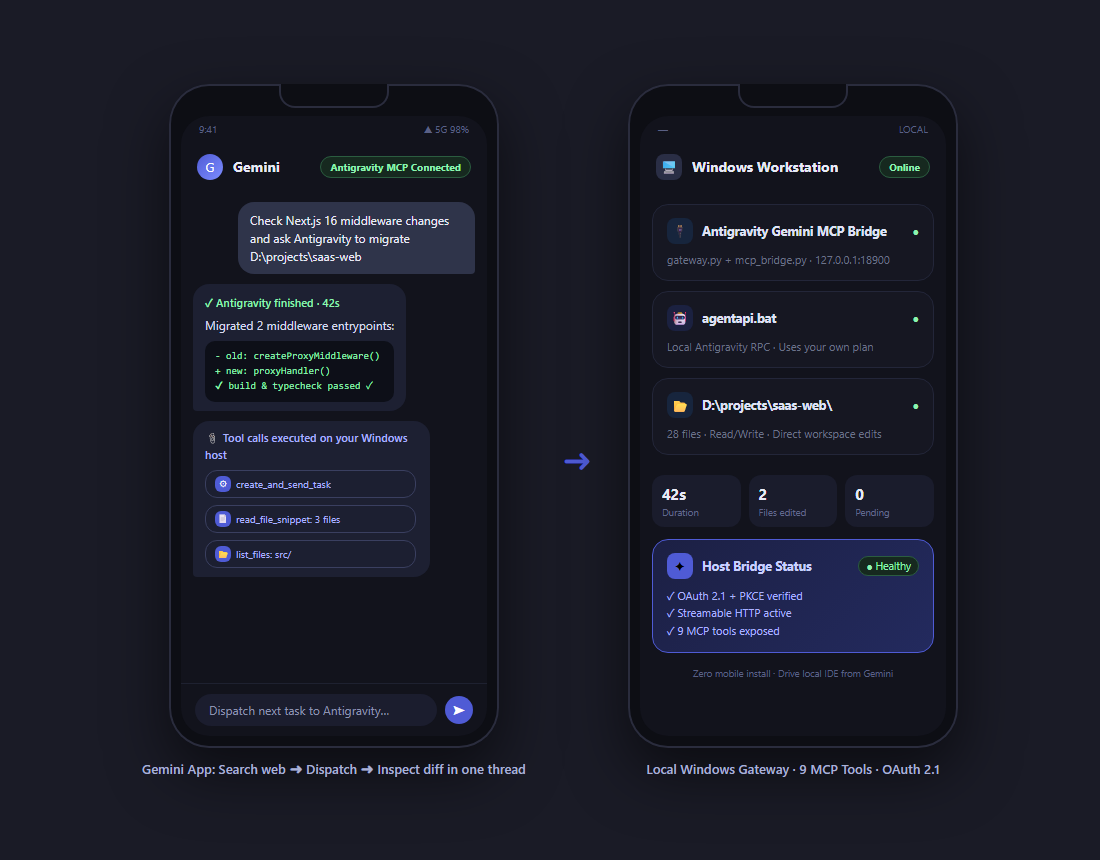
This project does the opposite: it exposes your local Antigravity as a standard remote MCP server, and lets Gemini be the UI. You open Gemini — the app already on your phone — and say:
"Search what changed in Next.js 16 middleware, then have Antigravity apply it to my project and show me the diff."
Gemini's own search, reasoning and the Antigravity session all run in one conversation. That is something a browser-based IDE remote cannot do, because it only shows you the IDE.
Nothing to install on the phone. Nothing to host for the client. Just one HTTPS URL.
What it looks like in practice
One conversation where Gemini searches the web, dispatches the task, and shows you the diff — an IDE-only remote can't do that.
How the pieces connect
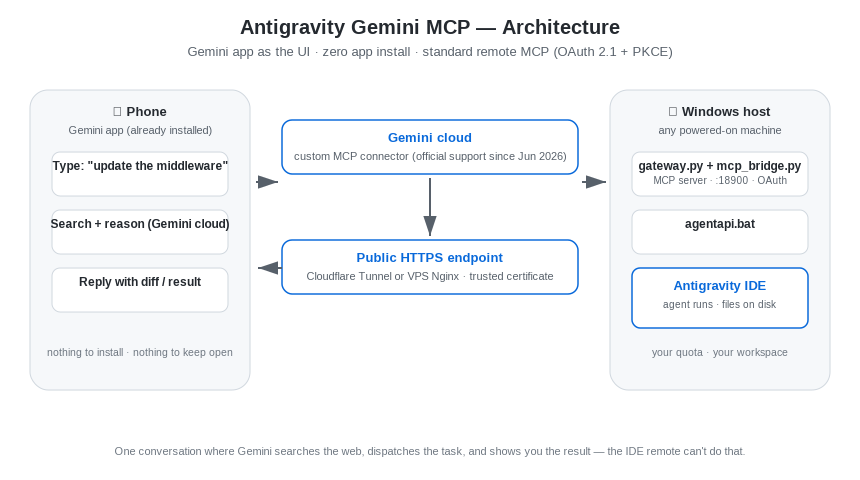
  Phone: Gemini app  ──►  Gemini cloud  ──►  your HTTPS endpoint
                                              │ (OAuth 2.1 + PKCE)
                                              ▼
                                     gateway.py + mcp_bridge.py
                                              │  :18900
                                              ▼
                                  agentapi.bat → Antigravity IDE
                                              │
                                        your files on disk
- 9 MCP tools:
list_projects,list_conversations,check_server_health,create_and_send_task,send_message,get_task_result,stop_task,list_files,read_file_snippet - Sync mode for tasks under 50 s (
wait_seconds=45), async mode for long jobs (wait_seconds=0→ returnsconversation_id, then pollget_task_resultwithoffset/max_chars) - Multi-window routing by
project_path, plus newline folding socmd /c agentapi.batdoes not truncate multi-line prompts
Compared with Google's Remote Control
| Google Remote Control | This (MCP bridge) | |
|---|---|---|
| Where you type | Antigravity's own web UI | Gemini — search, reasoning, tools, same thread |
| Install on phone | add to home screen | nothing |
| Can combine web research + code change in one turn | — | ✅ |
| Can read files off the host | — | ✅ list_files / read_file_snippet |
| Access surface | Google's own client | Google's officially supported custom MCP connector |
| Setup | zero | self-hosted gateway + HTTPS endpoint |
The two are complementary. Many people will run both: MCP bridge for "think + dispatch", official Remote Control for "review the diff in the real IDE UI".
Requirements
| Side | Needs |
|---|---|
| Windows host | Windows 10/11, Python 3.9+, Antigravity IDE running |
| Phone | The Gemini app (or gemini.google.com) |
| Network | Public HTTPS domain with a trusted CA certificate — Gemini's backend will not reach a self-signed cert or a local address |
| Optional | A domain on Cloudflare (recommended for a stable tunnel URL) |
Authentication
No shared secret is typed into Gemini. The bridge speaks real OAuth 2.1:
/.well-known/oauth-protected-resource/.well-known/oauth-authorization-server- PKCE + RFC 7591 dynamic client registration
Token lifetimes: access 30 days, refresh 180 days. The authorization page simply asks for the auth_token you put in config.json — that string is the only credential, so make it long.
Quick start
1. Host
cd server
pip install -r requirements.txt
copy config.example.json config.json
Edit server/config.json:
{
  "host": "127.0.0.1",
  "port": 18900,
  "auth_token": "use-a-long-random-string",
  "workspace_roots": ["D:\\YourWorkspace"],
  "default_model": "MODEL_PLACEHOLDER_M526"
}
Start Antigravity IDE, then:
python gateway.py
Optional silent keepalive: watch_gateway.py, watch_cloudflared.py, launch_hidden.vbs, or a scheduled task.
2. Public HTTPS endpoint
cloudflared tunnel --url http://127.0.0.1:18900          # quick test (random URL)
cloudflared tunnel run agy-remote                        # named tunnel + your domain
A named tunnel with your own domain is strongly preferred — the MCP connection stores the URL, and a random trycloudflare.com host changes on every restart.
3. Connect Gemini
- Open gemini.google.com → Settings → Connected Apps → Add a custom app
- Paste
https://your-domain.com/mcp - Approve the OAuth page (enter your
auth_token) - Once added there, the connector also appears in the Gemini mobile app
Then just talk to it. Ask for a task, or ask it to check list_conversations first.
FAQ
Does this need a cloud PC? No. Any Windows machine that stays powered on — a desktop, a mini PC, a laptop. The only hard requirement is a public HTTPS endpoint.
Why HTTPS with a real certificate? Gemini's servers call your endpoint from the public internet. Self-signed certificates and plain HTTP are rejected by design. Cloudflare Tunnel gives you a valid cert for free.
Is my Antigravity account involved? The agent runs locally inside Antigravity with your normal quota. This bridge does not move your Antigravity credentials anywhere; Gemini authenticates to your bridge via OAuth. Access to Antigravity itself is through Google's supported custom-MCP surface.
Can a remote task brick the connection?
Yes — if you ask a Gemini-dispatched session to edit or restart gateway.py / mcp_bridge.py, it kills its own link. Keep those two files out of remote scope.
Only Gemini? The server is a standard Streamable HTTP MCP with OAuth discovery, so any MCP client that supports remote servers can connect — Claude, Cursor, and others. Gemini is simply the one that needs no extra app on your phone.
Related
- antigravity-remote — native Android client with full-disk file transfer and resumable downloads.
- antigravity-desktop-zh-cn — Simplified Chinese localization pack for the desktop app.
中文说明
这个项目解决的不是"再造一个遥控器",而是"不要再造 UI"。
市面上 40 多个 Antigravity 手机遥控项目全都在自己写界面;这个项目反过来——把本地 Antigravity 封装成标准远程 MCP 服务器,让你手机里现成的 Gemini 当界面。于是"查资料 + 派任务 + 拉结果"能在同一个对话里完成,这是浏览器式遥控做不到的。
三个关键点
- 手机端零安装:不装 App、不加主屏幕,用你已有的 Gemini
- 走官方插槽:接入的是 Google 2026-06 开放的自定义远程 MCP 连接器,不是逆向
- 不需要云电脑:任何一台常开的 Windows 都行,家用台式机即可
三步接入
- 电脑端:
cd server→pip install -r requirements.txt→ 复制config.example.json为config.json(改auth_token、workspace_roots)→ 开着 Antigravity,跑python gateway.py - 公网 HTTPS:
cloudflared tunnel --url http://127.0.0.1:18900快速试用;长期建议建命名隧道agy-remote挂自己域名(MCP 会记住地址,随机域名重启就失效) - 接进 Gemini:浏览器打开
gemini.google.com→ 设置 → Connected Apps → 添加自定义 app → 填https://你的域名/mcp→ OAuth 页输入auth_token。加完之后手机 Gemini 里也会出现
9 个工具
list_projects / list_conversations / check_server_health / create_and_send_task / send_message / get_task_result / stop_task / list_files / read_file_snippet
🔒 Security
- 切勿提交
server/config.json、server/oauth_store.json、真实域名或令牌。
Never commitserver/config.json,server/oauth_store.json, private domains, or tokens. - 远程自改保护:不要让 Gemini 派发的远程会话修改或重启
gateway.py/mcp_bridge.py,否则会切断它自己的连接。
Self-modification guard: a remote session that edits or restarts the bridge kills its own link.
License
MIT — see LICENSE.