Listed from the MCP registry; nobody on Odel publishes it.

DSA coach
DSA coach for LeetCode, Codeforces and more: spaced-repetition revision and a mistake journal.
Runs on your machine from its package; the steps are below.
What it does
- Reads
- Writes
- High impact
At most: creates or changes data: records, files, settings.
What it costs
FreeOdel charges nothing per call. The publisher may charge for its own service.
Runs locally over stdio
This server isn't hosted — your MCP client launches it from a package registry. Use one of the commands below, or drop the config into your client (e.g. Claude Desktop).
Run
uvx dsa-coach-mcp
MCP client config
{
  "mcpServers": {
    "dsa-coach": {
      "command": "uvx",
      "args": [
        "dsa-coach-mcp"
      ]
    }
  }
}dsa-coach-mcp



An MCP server that turns your DSA practice on any judge into a coach inside Claude, Cursor or any MCP client: revise what you solved on a spaced-repetition schedule, with a mistake journal that remembers why you got things wrong and builds your next practice set around it. On LeetCode and Codeforces it also reads your history live, shows where you stand and finds problems to try next; problems from any other judge are recorded as you solve them.
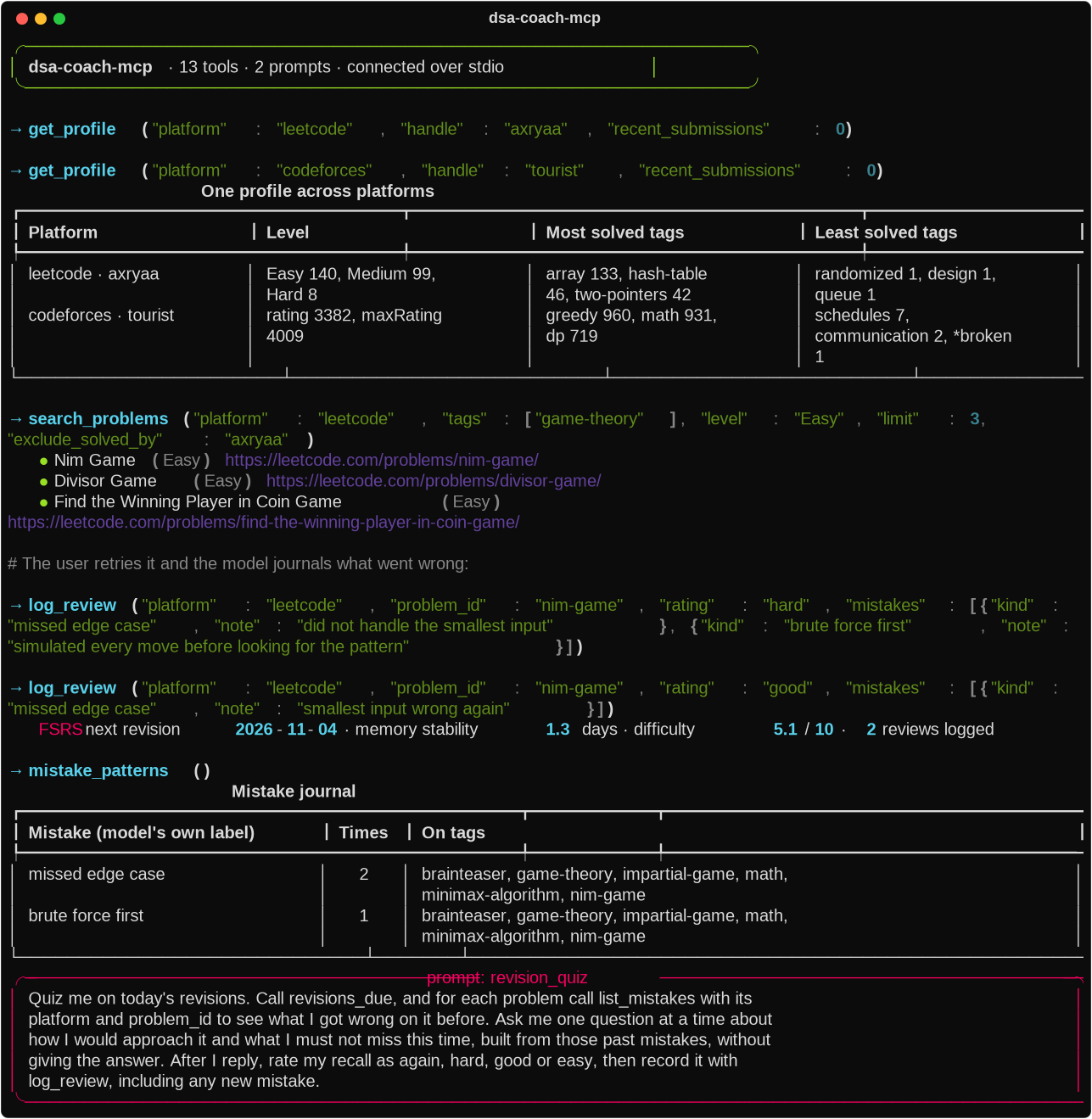
A real session, recorded by examples/demo.py: it starts the server over stdio and calls its tools on live data.
Why
Practice data is split across sites, and each grades difficulty its own way (LeetCode's Easy/Medium/Hard, Codeforces' 800-3500 ratings). Most trackers count problems; few tell you what you are forgetting. This server puts both platforms behind one interface and schedules revision with FSRS, so the model you already talk to can coach you.
FSRS predicts the chance you still remember each problem and brings it back just before
that chance drops below 90%. In the open
spaced-repetition benchmark
over ~10k Anki collections, FSRS predicted recall better than SM-2 for the large
majority of users. Once you have a review history, personalize_schedule fits its
parameters to how fast you forget.
Counting solved problems hides the real signal: the same few mistakes, repeated. Every review can carry the mistakes behind it, and the model turns those patterns into practice sets and revision quizzes aimed at exactly what you keep missing.
Design
The server returns data, not decisions. It never hardcodes what counts as a weak topic or the next level up; the model reads your profile and the platform's own vocabulary and decides.
flowchart LR
    Client["MCP client<br/>(Claude, Cursor)"] -->|tools| Server["server.py<br/>validates against<br/>platform vocabulary"]
    Server --> Registry["platforms/<br/>adapter registry"]
    Registry --> LC["LeetCodeAdapter<br/>GraphQL"]
    Registry --> CF["CodeforcesAdapter<br/>REST"]
    Server --> SRS["scheduling.py<br/>FSRS"] --> Store[("SQLite<br/>cards, reviews,<br/>mistakes")]
- Adapters translate one platform's API into shared models (
Problem,Profile,PlatformInfo). Nothing outside an adapter names a platform. - Data comes from the platforms. Tags and levels are read from each platform's
API, and a review takes the problem's title, link and tags from the platform rather
than from the model, so nothing in your history is invented. Platforms' own tag
lists are incomplete, so
search_problemsaccepts a tag outside them and only reports it when nothing matched. - Profiles say what they can't see. Each profile carries
limitations, e.g. LeetCode only exposes your 20 most recent accepted submissions publicly.
Tools
| Tool | What it does |
|---|---|
list_platforms | Connected platforms, with the tags and levels each accepts as filters |
get_profile | Your level, solved and unsolved counts per tag, and recent submissions |
link_account / unlink_account | Saves (or forgets) your username on a platform, so tools default to it and the dashboard shows that account |
search_problems | Problems with every given tag at a given level, optionally skipping ones you solved |
log_review | Records how you did (again / hard / good / easy), journals the mistakes behind it, and schedules the next revision with FSRS. Title, link and tags come from the platform |
review_evidence | Suggests a log_review rating from your actual submissions since the last review: again if none was accepted, good on a first-try accept, hard after rejected tries. Never easy, and nothing where a platform hides rejected submissions |
revisions_due | Problems due now, the one you are least likely to remember first, each with FSRS's recall estimate |
schedule_info | The FSRS parameters in use, whether they are personalised, and how many reviews are logged |
personalize_schedule | Fits FSRS to your own review history (needs dsa-coach-mcp[optimizer]) |
record_problem | Records a problem from any other platform (HackerRank, GeeksforGeeks, CodeChef, AtCoder, ...) as read from its page |
progress | Per platform: problems reviewed, reviews logged, and problems due now |
show_dashboard | Progress, revisions due by risk of forgetting, a mistake heatmap, a forgetting forecast, mistake recovery, overconfidence and calibration, as an interactive view in hosts that support MCP Apps |
mistake_kinds | Every mistake label used so far, so new mistakes reuse the same words |
list_mistakes | Journaled mistakes, filterable by label, tag, platform or recent days |
mistake_patterns | Mistake counts per label, broken down by tag, platform and month |
Prompts
| Prompt | What it does |
|---|---|
practice_plan | Builds the next practice set from your recurring mistakes and progress |
revision_quiz | Quizzes you on today's revisions using what you got wrong before |
weekly_report | Reports on your last week: what you did, what's slipping, mistakes that keep coming back, and three things to do next |
Dashboard
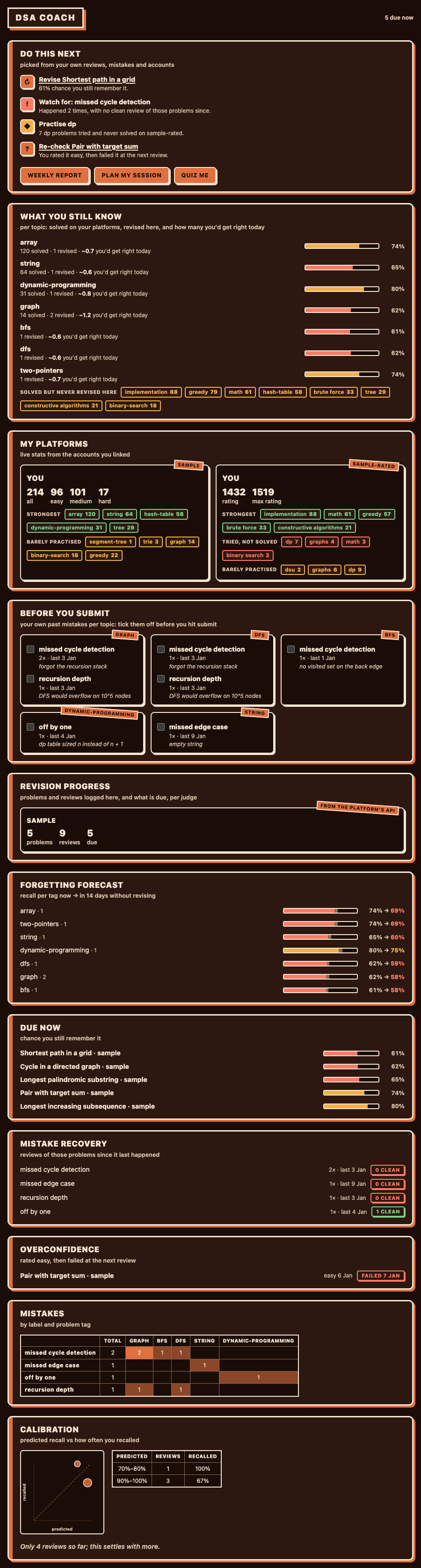
show_dashboard opens with Do this next: up to four steps picked from your own data
by fixed rules (the revision you're most likely to forget, a mistake that keeps coming
back, a weak topic, and a problem you were overconfident about), plus Weekly report,
Plan my session and Quiz me buttons that ask your assistant in the chat.
What you still know sets what you solved per topic against how many of the problems
you revised you'd still get right today (FSRS recall), and lists topics you solved but
never revised. Before you submit turns your mistake journal into a checklist per
topic, most frequent mistake first, with your own note on each. It then
shows live stats for each account you linked (solved per level or
your rating, your strongest tags, tags you tried and never solved, and tags you've barely
practised), progress per platform, the revisions due now, and what your own
history says about your memory: a forgetting forecast (recall per tag now and in two
weeks if you revise nothing), mistake recovery (reviews since each mistake last
happened), overconfidence (problems rated easy and failed at the next review) and
calibration (FSRS's predicted recall against how often you actually recalled).
It is an MCP App: hosts that support them (Claude, Claude Desktop, VS Code Copilot, Goose and others) render it inside the conversation; every other host gets the same data as the tool's result. In a client that can't render MCP Apps, such as Claude Code, open it in your browser instead, from the same local history:
uvx dsa-coach-mcp dashboard
It serves the page on localhost only and stops with Ctrl+C. The view is a React app built into one self-contained HTML file with no external scripts, follows the host's light or dark theme, and talks to the host over the MCP Apps postMessage protocol.
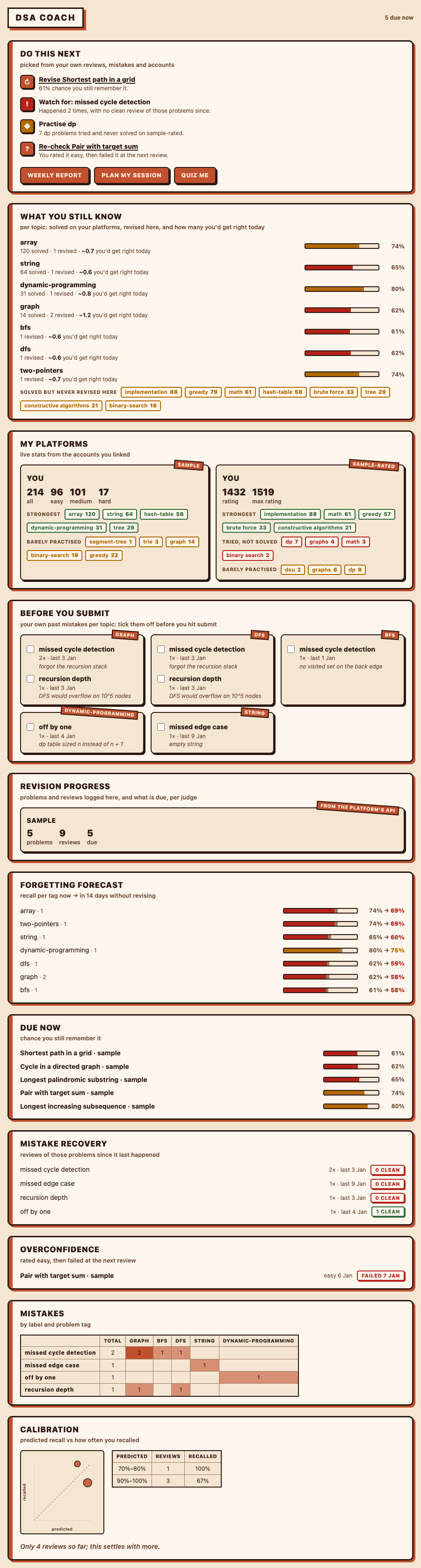
Rendered from sample data by examples/dashboard_host.py, which plays the host's side of the protocol. Try the live demo.
Any platform
LeetCode and Codeforces have adapters that read from their APIs. Every other platform
works through the page you are looking at: pair this server with a browser MCP server
such as Playwright MCP in extension mode,
which lets the model read the tab open in your own browser, logged in. The model reads
the problem page and calls record_problem with its URL, title, tags and difficulty;
from then on it is reviewed, scheduled and journaled like any other problem.
{
  "mcpServers": {
    "dsa-coach": { "command": "uvx", "args": ["dsa-coach-mcp"] },
    "playwright": { "command": "npx", "args": ["@playwright/mcp@latest", "--extension"] }
  }
}
No platform is listed in the code: the platform is the problem URL's host, and its
problem id is the URL's path. Problems recorded this way are marked
"source": "reported", because they come from a page the model read rather than from
the platform's API, and a host that has an adapter is always sent to its adapter.
Mistake journal
There is no fixed list of mistake types. The model labels each mistake in a few words and is shown every label used before, so it reuses yours instead of inventing new ones; your journal's vocabulary grows from your own reviews. The server only stores and counts them; spotting the pattern is the model's job.
You:    Redid Course Schedule. Forgot to detect the cycle again, and used DFS recursion
        that would overflow on 10^5 nodes.
Claude: (log_review rated "hard" with two mistakes, reusing your existing
        "missed cycle detection" label)
        That's the third time cycle detection has slipped on graph problems ...
Install
Requires uv.
Claude Desktop: add to claude_desktop_config.json:
{
  "mcpServers": {
    "dsa-coach": {
      "command": "uvx",
      "args": ["dsa-coach-mcp"]
    }
  }
}
Claude Code:
claude mcp add dsa-coach -- uvx dsa-coach-mcp
Cursor: same command and args as above in .cursor/mcp.json.
Agent skill
skills/dsa-coach/SKILL.md tells the agent when to reach
for these tools and how to use them well: how to rate a review, to reuse existing
mistake labels, and to record problems from other platforms only from a page it read.
For Claude Code, copy it into your skills:
mkdir -p ~/.claude/skills/dsa-coach
curl -fsSL https://raw.githubusercontent.com/aaryagodbole/dsa-coach-mcp/main/skills/dsa-coach/SKILL.md \
  -o ~/.claude/skills/dsa-coach/SKILL.md
Configuration
| Variable | Default | Purpose |
|---|---|---|
DSA_COACH_DB | ~/.dsa-coach/coach.db | Where cards, reviews and mistakes are stored |
To personalise the schedule, install the optimizer extra (it pulls in PyTorch):
uvx --from 'dsa-coach-mcp[optimizer]' dsa-coach-mcp.
Privacy
No login and no API keys. The server only calls the platforms' public APIs with the handles you give it, and revision cards stay in a local SQLite file.
Adding a platform
- Write
src/dsa_coach_mcp/platforms/<name>.pywith a class implementingPlatformAdapter:name,describe(),profile()andsearch(). - Add the class to
ADAPTERSinplatforms/__init__.py. - Add tests with a mocked API, like
tests/test_codeforces.py.
The server and tools need no changes.
Evals
Unit tests check the code; evals/ checks whether a model can actually
coach with these tools. A model drives the real server over the MCP protocol, against a
fixture world (one practice platform, a seeded history, a fixed clock), on tasks such
as planning from a profile, logging a review with its mistakes, reusing an existing
mistake label, recording a problem from another platform, and staying silent when no
tool is needed.
Grading is deterministic, with no LLM judge: each task lists the tool calls it expects with predicates on their arguments, the tools it must not touch, and a call budget. A run reports pass rate, tool-selection accuracy, argument accuracy, tool error rate, calls per task and token usage.
The model is configuration, not code. Any API that speaks the chat completions format works, whether a hosted free tier, a paid API or a model served on your own machine:
EVALS_BASE_URL=<api base url> EVALS_MODEL=<model> EVALS_API_KEY=<key, if needed> \
  uv run python -m evals.run
The loop talks to models through a small AgentBackend interface
(evals/backends/base.py); an API with a different wire
format is one more backend module. Runs never start on their own: run it locally, or
start the Agent evals workflow from the Actions tab after setting the
EVALS_BASE_URL and EVALS_MODEL repository variables (and an EVALS_API_KEY secret
if your API needs one). The graders, the fixture, the loop and the backend are
unit-tested in CI without calling any model.
Development
uv sync
uv run pre-commit install
uv run pytest
uv run ruff check . && uv run ruff format --check .
uv run mypy
The dashboard is a React + TypeScript app in ui/,
built with Vite into the single HTML file the package serves. After changing it, rebuild
and commit the output; CI checks they match:
cd ui && npm ci && npm run build
Re-record the demo at the top of this page against live data:
uv run python examples/demo.py --leetcode <username> --codeforces <handle>
Tests never hit the network: adapters are tested against mocked API responses. See CONTRIBUTING.md.