Listed from the MCP registry; nobody on Odel publishes it.

Secure Telegram
Telegram MCP server: each AI client gets its own key, scoped to chosen chats. Read-only by default.
Runs on your machine from its package; the steps are below.
What it does
- Reads
- Writes
- High impact
At most: moves money, runs code or commands, deletes data, or sends messages for you.
What it costs
FreeOdel charges nothing per call. The publisher may charge for its own service.
Runs locally over stdio
This server isn't hosted — your MCP client launches it from a package registry. Use one of the commands below, or drop the config into your client (e.g. Claude Desktop).
Run
npx -y secure-telegram-mcp
MCP client config
{
  "mcpServers": {
    "secure-telegram": {
      "command": "npx",
      "args": [
        "-y",
        "secure-telegram-mcp"
      ]
    }
  }
}
Connect Claude, Cursor, or any MCP client to Telegram — without handing any of them your whole account.



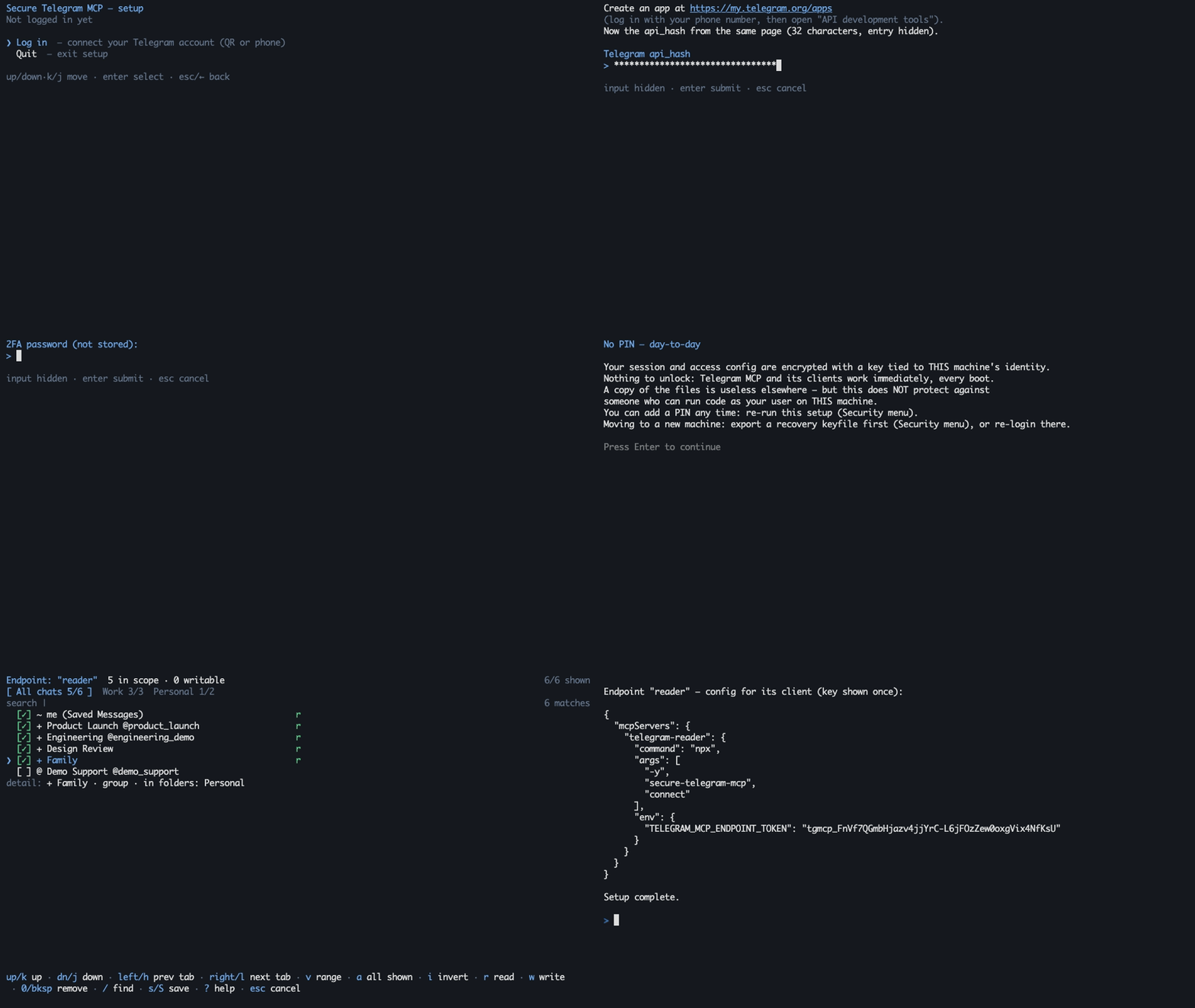
The demo runs against synthetic data — no real Telegram connection, no usable credential.
❌ The usual Telegram MCP setup
- The AI client holds your full account session — every chat, every contact, every write.
- Access is all-or-nothing: your work agent can read your family group.
- The session credential sits in plaintext in a config file or
.env.
✅ With secure-telegram-mcp
- Each AI client gets an endpoint: its own API key, scoped to the chats and folders you pick.
- Read/write verbs are re-checked on every call and fail closed — the tool menu is discovery, not authority.
- The Telegram session is encrypted at rest (AES-256-GCM, scrypt-wrapped keys), machine-bound by default or PIN-protected.
For example:
| AI client | Endpoint | Account | Telegram scope | Access |
|---|---|---|---|---|
| Personal agent | personal | main | private chats | read + write |
| Work agent | work | work-acc | the Work folder | read-only |
Every MCP connection authenticates with one endpoint key and receives a scope-bound Telegram adapter for that endpoint's account; without a key, a client can only list the tools. Endpoints can ride different logged-in accounts; endpoints on the same account share one background Telegram connection. Out-of-scope chats are not addressable at all.
Features
- 🔑 Per-endpoint API keys — each AI client gets its own key and scope, pinned to one of your logged-in accounts (one or many); only salted key hashes are stored.
- 📁 Folder-scoped access — bind an endpoint to Telegram folders, chats, or channels; write access is opt-in per endpoint.
- 🔒 Encrypted session at rest — AES-256-GCM envelopes for sessions and policy; PIN, recovery-keyfile, and machine-bound unlock slots.
- 🚦 Anti-ban pacing — per-account token buckets on messages, forwards, and search, plus a circuit breaker that backs the whole account off at the first sign of saturation. Pacing lowers the risk of flood limits; nothing can guarantee against a ban.
- 👤 Human-in-the-loop writes — optional per-endpoint confirmation; requires a client that supports MCP elicitation. On clients that don't, a confirm-writes endpoint fails closed: writes are blocked, never silent.
- ⛔ No raw MTProto surface — no
invokeescape hatch, no model-accessible scope mutation; a CI architecture guard keeps it that way.
Quickstart
Prerequisites: Node.js ≥ 20.10 and Telegram api_id/api_hash from my.telegram.org/apps.
1. Run setup
npx -y secure-telegram-mcp setup
Setup walks you through, in order:
- Telegram app credentials — the
api_id/api_hashfrom the prerequisite link. - Login method — QR code (scan from a phone that's already logged in) or phone number + code. If your account has two-step verification, setup also asks for that password.
- Session name — press Enter to accept the suggestion (your Telegram username, or
mainif you have none). - PIN or no PIN — default is no PIN (encryption keyed to this machine, nothing to unlock). With a PIN you re-enter it after each reboot; a forgotten PIN is unrecoverable.
- Endpoint — name it, then pick chats/folders in the picker:
ror Space grants read,wwrite,ssaves,?shows the full keymap.
At exit the endpoint's API key is printed once, inside a ready-to-paste client config — copy it before closing the terminal. Hit a snag? See Troubleshooting.
2. Add the endpoint to one MCP client
{
  "mcpServers": {
    "telegram": {
      "command": "npx",
      "args": ["-y", "secure-telegram-mcp", "connect"],
      "env": {
        "TELEGRAM_MCP_ENDPOINT_TOKEN": "tgmcp_..."
      }
    }
  }
}
The token alone selects and authorizes the endpoint — no api_id, api_hash, or PIN material ever goes into client config. Setup prints one block per endpoint; each goes only into its own client — combining entries in one client intentionally grants it the union of the scopes.
Claude Code
claude mcp add telegram --env TELEGRAM_MCP_ENDPOINT_TOKEN=tgmcp_... -- npx -y secure-telegram-mcp connect
Claude Desktop
Add the JSON block above to claude_desktop_config.json (Settings → Developer → Edit Config).
Cursor

Run setup first, then click and replace the placeholder token — or add the JSON block above to ~/.cursor/mcp.json yourself.
VS Code

VS Code prompts for the endpoint token as a masked secret — it never lands in a settings file in plain sight of other extensions' recommendations.
Docker
See Usage and operations → Docker for the setup and stdio-connect containers.
3. Unlock (PIN posture only)
If you kept the default machine-bound protection, skip this — the service starts automatically when a client connects. With a PIN:
npx -y secure-telegram-mcp start
Enter the PIN interactively; clients never need it. Multi-client examples, unattended unlock, environment variables, and manual policy editing live in Usage and operations.
Tools
18 tools, gated by 8 permission verbs that are checked at execution time.
| Category | Tools | Verb |
|---|---|---|
| Read | get_messages, search_messages, list_dialogs, list_topics, get_chat_info, get_media_info, get_pinned_messages, list_participants | read |
| Media download | download_media (strict size cap, server-chosen destination) | read_media |
| Send & edit | send_message, edit_message, prepare_media, send_media | send |
| Other writes | save_draft, delete_message, mark_read, send_reaction, forward_message | draft, delete, mark_read, react, forward |
Forwarding is two-sided: read on the source chat and forward on the destination. Sending local media is a deliberate two-phase flow — prepare_media returns an opaque, expiring handle for a file inside the confined media root; send_media consumes it. The full catalogue and verb semantics are in Usage and operations.
Security model
- One local service owns the encrypted Telegram session and the sealed policy; MCP shims never open a second Telegram session.
- Every call re-verifies the endpoint token against the current sealed policy, so rotating a key revokes live connections.
- There is no raw MTProto tool and no way for the model to widen its own scope.
- Writes pass ACL → optional human confirmation → quota → audit, in that order, and fail closed at each gate.
- Telegram prose is Unicode-sanitized (control/format characters stripped, length-capped) before it reaches the model; writes, denials, and media egress land in an append-only NDJSON audit log.
- Known limits: the enforcement boundary is your local OS user; endpoint ACLs cannot shrink what the underlying full-account session could do if the process itself were compromised; sanitization cannot neutralize semantic prompt injection.
A read-only endpoint attempting send_message is stopped at the ACL gate and audited — one NDJSON line, no message content:
{"v":1,"timestampIso":"2026-07-17T09:41:22.310Z","endpointName":"work","verb":"send","outcome":"deny","targetChatId":"-1001234567890","reason":"VERB_NOT_GRANTED"}
The client sees only an ACL_DENIED error. An out-of-scope peer denies the same way, with PEER_OUT_OF_SCOPE.
Read the complete threat model — including non-objectives and residual risks — before pointing this at a Telegram account you care about. Component boundaries are in Architecture.
Documentation
- Usage and operations — clients, endpoints, commands, environment variables, Docker, media, tool catalogue.
- Security — threat model, guarantees, residual risks, hardened deployment.
- Architecture — process ownership, trust boundaries, policy lifecycle.
- Example configuration — schema-valid, deliberately unusable placeholders.
Development
npm run ci     # typecheck + lint + architecture guard + knip + tests
npm run build
The architecture guard rejects forbidden MCP surfaces and unreviewed MTProto request constructors; ESLint enforces dependency boundaries and confines GramJS to the infrastructure layer. See CONTRIBUTING.md before opening a PR.
License
Unofficial project: not affiliated with, endorsed by, or sponsored by Telegram FZ-LLC. "Telegram" is a trademark of Telegram FZ-LLC. This software connects to the Telegram API; each user supplies their own API credentials.