Listed from the MCP registry; nobody on Odel publishes it.

Garmin Local
Local-first Garmin data warehouse: sync once to SQLite, analyze trends and correlations offline.
Runs on your machine from its package; the steps are below.
What it does
- Reads
- Writes
- High impact
At most: creates or changes data: records, files, settings.
What it costs
FreeOdel charges nothing per call. The publisher may charge for its own service.
Runs locally over stdio
This server isn't hosted — your MCP client launches it from a package registry. Use one of the commands below, or drop the config into your client (e.g. Claude Desktop).
Run
uvx garmin-local-mcp
MCP client config
{
  "mcpServers": {
    "garmin-local": {
      "command": "uvx",
      "args": [
        "garmin-local-mcp"
      ]
    }
  }
}garmin-local-mcp
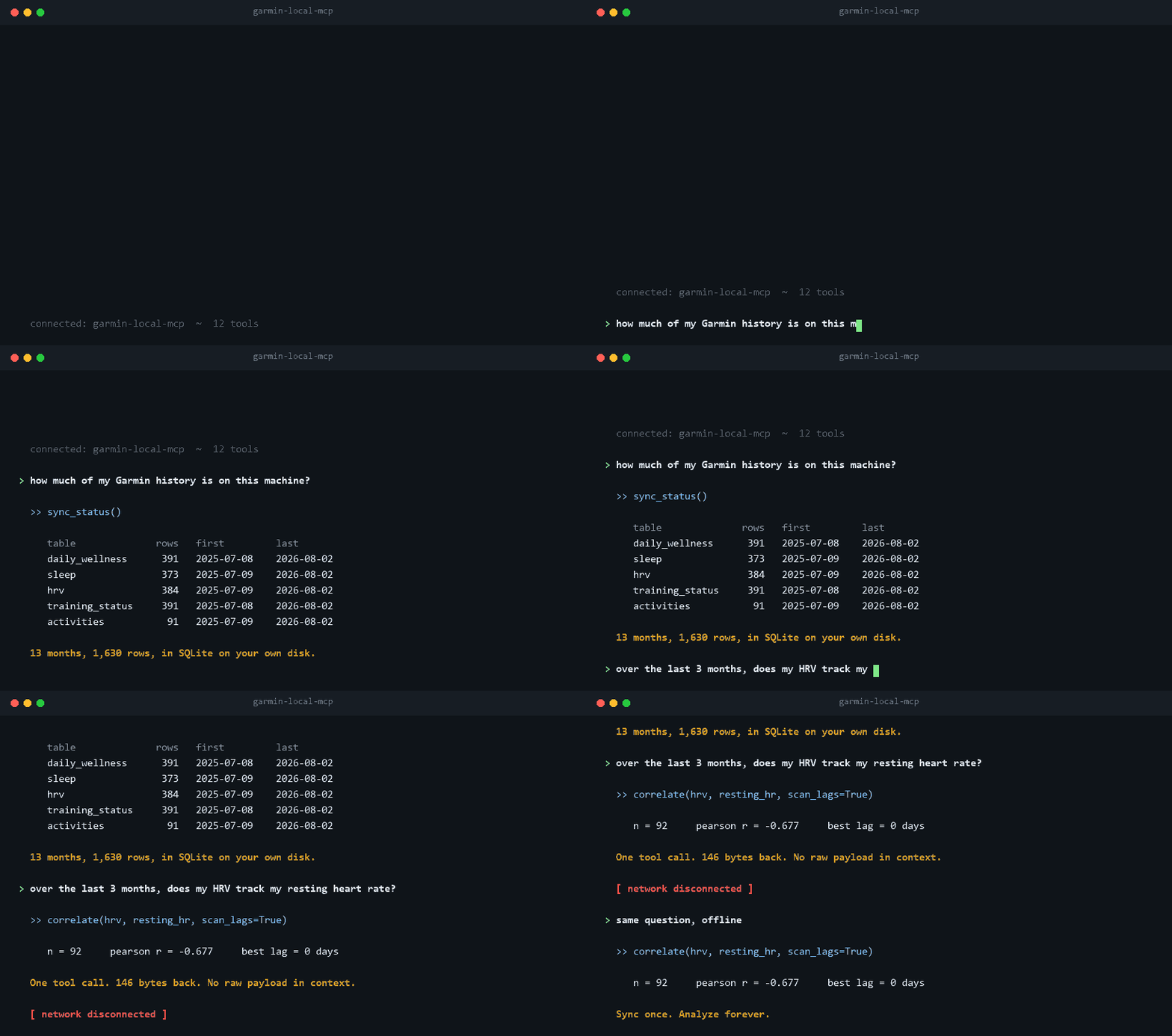
Local-first Garmin data warehouse with an analysis-grade MCP server. Sync once, analyze forever, even when the API is down.
Try it without a Garmin account
If you don't own a Garmin, or just want to see what the tools return before handing over credentials, seed a synthetic store:
pip install garmin-local-mcp
garmin-local-mcp --data-dir ~/.garmin-mcp-demo demo
garmin-local-mcp --data-dir ~/.garmin-mcp-demo serve
That generates 180 days across every table, then serves them over MCP. No login, no network, no account.
The data is generated rather than recorded, but it is not random. A latent recovery factor drives HRV up while resting heart rate goes down, training load raises the next day's resting heart rate, a six-day illness window sits in the middle of the range, and a few sleep nights are deliberately missing. Sleep timing carries a planted chronotype (MCTQ MSFsc 03:45, with alarm-pinned work mornings and later, longer free nights), and the sleep score drops with distance from that natural wake time. So the analysis tools have something real to find. Over the full 180 days (exact figures shift a little with the end date, because training days depend on the weekday):
| Ask | Returns |
|---|---|
correlate(hrv, resting_hr) | −0.4 to −0.6, a genuine inverse relationship |
correlate(training_load, resting_hr, scan_lags=True) | near 0 at lag 0, +0.4 to +0.65 at lag 1 (90 to 100 training days, significant after correcting for the 15 lags scanned): the effect is next-day |
anomalies() | the illness window, flagged across resting HR, HRV, skin temperature, sleep score and stress at once |
gaps() | the missing sleep nights |
circadian() | MSFsc within 10 minutes of the planted 03:45, a circadian wake around 07:45, and evidence supportive (the most that two holdout folds allow) |
The analysis tools default to the last 30 days, which misses the illness
window, so ask about the whole range (demo prints it). On a short window a
lag scan has little to work with; correlate says so in its note when the
strongest lag is not significant once all 15 lags are accounted for.
sync_status reports demo_store: true on these stores, so an assistant can
never present generated numbers as real measurements. The generator is
deterministic — --seed reproduces a store exactly, and --days changes the
range. demo refuses to overwrite a database it did not generate.
Why another Garmin MCP?
Most Garmin MCP servers are thin live wrappers around Garmin's unofficial API. Every question your AI assistant asks becomes one or more live API calls returning large raw JSON blobs (a single raw sleep response runs around 230 KB), which makes multi-month questions like "how does my sleep correlate with training load?" expensive to ask.
That design is no longer universal. Since Garmin's auth change in March 2026 broke the ecosystem for several weeks, a number of projects have added local storage, and the largest server computes training-load and HRV trends server-side. Data ownership and server-side analysis are both crowded ground now. Three things are not:
- Sleep-timing advice that is tested before it is given.
circadianestimates your chronotype from your watch's sleep times (the Munich Chronotype Questionnaire's sleep-debt-corrected mid-sleep) and the wake time that fits it, with an 80% interval on each and a check of how much the answer moves under other reasonable settings. Then it asks whether waking near that time actually went with higher Garmin scores on nights the model never saw, beyond what sleep duration and schedule regularity explain, and says plainly when it didn't. Chronotype on its own is not new: other tools, including at least one MCP server, report MCTQ-style chronotype from wearable sleep data. I have not found another that puts uncertainty on the answer or validates it out of sample. See Sleep timing and chronotype. - Ingest that needs no login. A standalone decoder for Garmin's undocumented wellness FIT messages (sleep score, HRV, skin temperature, sleep stages, naps) reads manually exported bundles with no credentials at all. Other servers parse FIT activity files; I have not found another that decodes the wellness export. It is the only ingest path here that keeps working when Garmin auth breaks.
- Correlation with lag. Pearson and Spearman between any two metrics with a scan over -7 to +7 day lags, so "training load raises my resting HR the next day" is a question with an answer.
The rest of the design follows from keeping your own copy:
- Sync once, analyze forever. Incremental sync into a local warehouse: immutable raw JSON snapshots plus a SQLite database, in a directory you own.
- Compact responses. Trends, correlations, baselines and anomaly detection
are computed locally and returned as small columnar tables. Typical responses
are under 2 KB (
circadian, the richest, stays under 3 KB), so nothing floods the model's context. - Offline resilience. An API breakage pauses new syncs only. Every query over already-synced history keeps working, and FIT import keeps filling gaps.
- Curated tools. 13 composable tools, not 110.
| garmin-local-mcp | Most other Garmin MCPs | |
|---|---|---|
| Zero-auth ingest path | Yes (wellness FIT bundle import) | No |
| Lag-aware correlation (-7 to +7 days) | Yes | No |
| Chronotype and wake-time advice, validated on unseen nights | Yes (intervals, stability check, rolling holdout) | A few report chronotype; none found that validate it |
| Response size discipline | Compact columnar tables, typically < 2 KB | Raw payloads; the largest server documents skipping its detail endpoint at 50-500 KB |
| Works offline after an API breakage | Yes, analysis plus FIT ingest | Varies; some keep a local cache |
| Local data store you own | Yes (raw JSON + SQLite) | Several now do this too |
| Tool count | 13 curated | 18 to 148 |
Quickstart
Requires Python 3.12+.
pip install garmin-local-mcp
Or run it without installing, via uv:
uvx garmin-local-mcp --help
1. Log in once (MFA supported; tokens persist locally, so future runs never ask for a password):
garmin-local-mcp login
2. Backfill your history. The sync is resumable, safe to interrupt, and throttled to be polite to Garmin's servers. A year of history is roughly 1,800 requests; for long backfills, start it and let it run (overnight works well). If it gets rate limited or interrupted, re-run the same command and it resumes where it left off.
garmin-local-mcp sync --from 2026-01-01
3. Register the MCP server with your client (see Client setup for Claude Desktop, Cursor, and other clients):
claude mcp add --scope user garmin -- garmin-local-mcp serve
4. Ask questions. Examples of what Claude can now answer from your local warehouse in one or two tool calls:
- "How does my sleep score correlate with next-day resting HR?"
- "What were my anomalous HRV days this quarter?"
- "Show weekly training load vs sleep for the last 3 months."
Client setup
The server speaks stdio, so any MCP client works. pip install garmin-local-mcp
first (or use the uvx variants below, which need nothing installed beyond
uv).
Claude Code
claude mcp add --scope user garmin -- garmin-local-mcp serve
Claude Desktop, one-click: download garmin-local-mcp-x.y.z.mcpb from the
latest release,
then in Claude Desktop open Settings > Extensions > Advanced settings, click
"Install Extension…", and select the file. Requires
uv on your PATH;
the extension installs and runs the server from PyPI via uvx, so no manual
Python setup is needed. If the install dialog warns about a missing
Python >=3.12, you can ignore it: uv provisions its own interpreter.
Claude Desktop, manual (Settings, then Developer, then Edit Config; add to
claude_desktop_config.json):
{
  "mcpServers": {
    "garmin": {
      "command": "garmin-local-mcp",
      "args": ["serve"]
    }
  }
}
Cursor (~/.cursor/mcp.json, or .cursor/mcp.json in a project):
{
  "mcpServers": {
    "garmin": {
      "command": "garmin-local-mcp",
      "args": ["serve"]
    }
  }
}
Any other stdio client / no local install (requires uv):
{
  "mcpServers": {
    "garmin": {
      "command": "uvx",
      "args": ["garmin-local-mcp", "serve"]
    }
  }
}
Note: login and the initial backfill sync are CLI steps (see
Quickstart); the MCP server itself never prompts for
credentials.
The 13 tools
| Tool | What it does |
|---|---|
auth_status | Check whether stored Garmin Connect tokens exist (use before sync, or after an auth error). |
sync | Fetch up to 60 days from Garmin Connect into the local store (default: last 30 days ending yesterday; big backfills belong in the CLI). |
sync_status | Local data coverage per table, last sync time, and pending sync errors. |
get_day | One merged view of a single day: wellness, sleep, HRV, training status, performance scores, activities, and data-quality flags. |
query_metrics | Columnar time series for one or more metrics between two dates, with daily/weekly/monthly aggregation and optional stats. |
correlate | Pearson/Spearman correlation between two metrics, with day-lag support and an optional scan over lags -7..+7. |
baselines | Personal mean +/- sd band per metric over a trailing window (default 28 days), to judge what is normal for this user. |
anomalies | Outlier days (z-score deviations) and sustained streaks (5+ consecutive days on one side of the mean). |
list_activities | Recent activities newest-first as a compact table, filterable by type, date range, and minimum distance. |
get_activity | Full stored summary row for one activity (summary fields only, no GPS or sample streams). |
gaps | Missing days per table plus unresolved sync errors, to find holes worth re-syncing before drawing conclusions. |
import_fit | Zero-auth offline ingest of a manually exported Garmin wellness FIT bundle. |
circadian | Chronotype (MCTQ), sleep need and an inferred wake window, each with an 80% interval, plus out-of-sample evidence on whether that window goes with higher Garmin scores. See Sleep timing and chronotype. |
Only sync and import_fit write anything, and only inside the data
directory. The server never prompts: auth problems come back as structured
errors with a hint pointing at the login CLI.
Available metric names include resting_hr, sleep_score, hrv, steps,
stress_avg, body_battery_high, skin_temp_dev_c, vo2max, fitness_age,
achievable_fitness_age, training_load, endurance_score, hill_score,
readiness_score, race_5k_s, the sleep-timing metrics sleep_onset_min,
wake_time_min and mid_sleep_min (minutes from midnight of the wake date, so
a 23:00 bedtime is −60), and about 35 more; any tool given an unknown name
returns the full list.
Performance scores
Garmin's periodic fitness scores land in their own performance table:
endurance score, hill score (with its endurance and strength sub-scores),
training readiness (score, level, recovery time) and race predictions for 5k,
10k, half and full marathon (all in seconds).
These update on Garmin's own cadence rather than daily, so performance is
deliberately excluded from gaps — a day without a new endurance score is
normal, not a hole. Race predictions and hill score only move after qualifying
running activity, so long stretches of nulls are expected for anyone whose
training is mostly hiking, cycling or strength work.
Sleep timing and chronotype
circadian answers "when does my body clock want me to wake up?" from the sleep
start and end times already in the store. It returns three separate quantities,
each with an 80% interval from a week-block bootstrap:
- Chronotype (
msf_sc). The Munich Chronotype Questionnaire measure: mid-sleep on free days, corrected for the extra sleep taken to repay workday debt. Labelledearly(before 03:30),intermediateorlate(after 04:30); the bands are approximate and the number is the main value. - Sleep need. Your mean free-night sleep window, unless you pass
sleep_need_min. The range where your Garmin scores level off is reported alongside as a cross-check. - Circadian-compatible wake window.
msf_sc + sleep_need / 2. This is an inference, not an MCTQ output. With no catch-up sleep it is simply your average free-day wake time; with catch-up sleep it is that time moved earlier by half the catch-up.
It then checks the inference against what actually happened:
- Stability. The estimate is recomputed over 90, 180 and 365 days, mean and
median mid-sleep, and three travel-filter widths.
stability: lowusually means your schedule changed; pass astartafter the change. - Evidence. On a rolling holdout (train 120 days, test the next 30), it
compares a sleep-duration-only model with one that adds distance from your
circadian wake, and controls for schedule regularity with a separate pair of
models. The level is
consistent,supportive,suggestiveorunsupported. These describe how consistently the pattern held on unseen nights. They are not statistical significance, and evidence needs at least 180 days of history. - What it can't show. Readiness and sleep score are Garmin's own composite scores, not physiological measurements. The strongest possible conclusion is that waking near your window was associated with higher Garmin scores on nights the model never saw, beyond what sleep duration and regularity predict. It does not show that wake timing changes physiology.
When the formula and your past scores disagree by more than 30 minutes, the
tool keeps both and suggests a 21-night experiment between them rather than
averaging them away. Free days default to Saturday and Sunday mornings
(free_days changes that), and if you set alarms on free days the chronotype
comes out earlier than your body clock. Daylight-saving changes in the range
are listed, using the configured timezone or the host's. Shift workers
(daytime main sleep) get the rhythm and chronotype but no wake window.
Data layout and ownership
Everything lives in one directory you own (default ~/.garmin-mcp, override
with the GARMIN_MCP_DATA_DIR environment variable or --data-dir):
~/.garmin-mcp/
├── config.toml                                  # optional settings
├── tokens/                                      # Garmin Connect session tokens
├── raw/daily/YYYY/YYYY-MM-DD/<endpoint>.json    # immutable raw API snapshots
├── raw/activities/<activity_id>.json            # one snapshot per activity
└── garmin.db                                    # SQLite warehouse
The raw JSON snapshots are the source of truth and are never overwritten. The
SQLite database is a derived, rebuildable index: garmin-local-mcp reparse
rebuilds it from the raw snapshots entirely offline, which is the universal
escape hatch for schema evolution and parser fixes. Your data never leaves
your machine.
Data quality note
Garmin watches report a provisional on-device resting heart rate that can diverge sharply from Garmin Connect's finalized value on nights with sparse sampling. A real observed case: the watch reported 69 bpm on-device while Garmin Connect later finalized the same night at 56 bpm.
This project handles that in two ways:
- The API sync stores Garmin Connect's finalized value.
- The FIT importer cross-checks the provisional on-device value against the
overnight heart-rate floor. A resting HR sitting more than 10 bpm above the
lowest overnight sample is a rate the watch never actually observed; it gets
flagged (
rhr_far_above_hr_floor) and withheld, leaving the field for the API to backfill rather than storing a misleading number.
Sparse sleep-stage logging is flagged the same way
(sparse_sleep_stage_logging), and flags surface in get_day so the analysis
layer knows which numbers to trust.
Offline / fallback runbook
If Garmin breaks the unofficial API again (it has before):
- Everything analytical keeps working. All query, correlation, baseline, anomaly, and gap tools run on your already-synced local history. Only new syncs pause.
- Keep ingesting without auth. Download a daily FIT bundle from the
Garmin Connect website and import it locally (exact steps below).
garmin-local-mcp import-fit <folder>decodes the bundle with zero authentication and fills the gap days. FIT-sourced rows never overwrite API-sourced rows (unless you pass--force). - Resume when the community catches up. Watch the
python-garminconnect
project for a fix, upgrade, and run
garmin-local-mcp syncagain. Thanks to resumable sync state, it picks up exactly where it stopped.
Downloading a wellness bundle, step by step
-
Sign in at connect.garmin.com in any browser.
-
Go directly to https://connect.garmin.com/app/settings/accountInformation (or click your avatar in the top-right corner, then Settings, then Account Information in the left sidebar).
-
Scroll to the bottom of the page, to the section titled Export Wellness Data ("Download your wellness FIT files from a specific day. This includes data such as steps, sleep, stress, HRV and more.").
-
Pick a date in the Date field and click Export. Your browser downloads a small zip for that one day, containing roughly 12 to 15 binary
.fitfiles (*_WELLNESS.fit,*_SLEEP_DATA.fit,*_HRV_STATUS.fit,*_SKIN_TEMP.fit,*_METRICS.fit, and similar). -
Unzip it into a folder and run:
garmin-local-mcp import-fit "path/to/unzipped/folder" -
Repeat for each missing day (one bundle per date). The
gapstool orgarmin-local-mcp statustells you which days need filling.
Two things worth knowing:
- Overnight sleep belongs to the wake date. To get last night's sleep, export yesterday's date if you slept into this morning, i.e. the date you woke up on.
- This per-day export is instant and separate from Garmin's full account
export (the "Data Management" link on the same page), which is a bulk
archive that can take days to arrive by email and is not what
import-fitexpects.
Configuration
Optional config.toml in the data directory:
| Key | Default | Meaning |
|---|---|---|
timezone | system timezone | IANA name (e.g. America/Denver) used to compute "yesterday" for sync ranges |
units | metric | metric or statute |
request_delay_seconds | 1.0 | Delay between API requests during sync |
baseline_window_days | 28 | Default trailing window for the baselines tool |
Environment variables:
| Variable | Meaning |
|---|---|
GARMIN_MCP_DATA_DIR | Override the data directory (default ~/.garmin-mcp) |
GARMINTOKENS | Override the token store location (default <data_dir>/tokens) |
GARMIN_EMAIL / GARMIN_PASSWORD | Optional, for non-interactive re-login; when set, garmin-local-mcp login skips the prompts (MFA may still prompt if your account requires it) |
Development
python -m venv .venv
.venv/bin/pip install -e .[dev]     # Windows: .venv\Scripts\pip install -e .[dev]
pytest
ruff check .
The test suite runs fully offline against sanitized JSON fixtures and small FIT samples; CI never touches the live API.
Disclaimer
This project is not affiliated with, endorsed by, or supported by Garmin Ltd. It uses the community python-garminconnect library with your own credentials to access your own data. Garmin's APIs are unofficial and can change or break at any time; when that happens, your synced history remains fully usable and the FIT import path keeps working.
All data stays on your machine. Nothing phones home: no telemetry, no third-party services, no cloud. Treat your data directory like the personal health record it is, and never commit it to a repository.
License
MIT